1
2
Executing COMPSs applications
2.1
Prerequisites
Prerequisites vary depending on the application’s code language: for Java applications
the users need to have a jar archive containing all the application classes, for Python
applications there are no requirements and for C/C++ applications the code must have
been previously compiled by using the buildapp command.
For further information about how to develop COMPSs applications please refer to the
COMPSs User Manual: Application development guide available at the http://compss.
bsc.es/ webpage.
2.2
Runcompss command
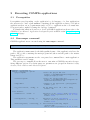
COMPSs applications are executed using the runcompss command:
compss@bsc :~ $ runcompss [ options ] a p pl i c a t i o n _ n a m e [ a p p l i c a t i o n _ a r g u m e n t s ]
The application name must be the fully qualified name of the application in Java, the
path to the .py file containing the main program in Python and the path to the master
binary in C/C++.
The application arguments are the ones passed as command line to main application.
This parameter can be empty.
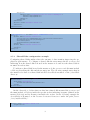
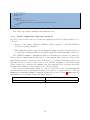
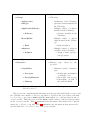
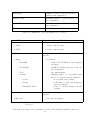
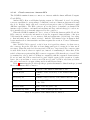
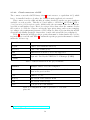
The runcompss command allows the users to customize a COMPSs execution by specifying different options. For clarity purposes, parameters are grouped in Runtime configuration, Tools enablers and Advanced options.
compss@bsc :~ $ runcompss -h
Runtime configuration options :
-- project = < path >
Path to the project XML file
Default : / opt / COMPSs / Runtime / configuration /
xml / projects / project . xml
-- resources = < path >
Path to the resources XML file
Default : / opt / COMPSs / Runtime / configuration /
xml / resources / resources . xml
-- lang = < name >
Language of the application ( java / c / python )
Default : java
-- log_level = < level > , -- debug , -d
Tools enablers :
-- graph = < bool > , -- graph , -g
Set the debug level : off | info | debug
Default : off
Generation of the complete graph ( true / false )
When no value is provided it is set to true
Default : false
-- tracing = < bool > , -- tracing , -t
Generation of traces ( true / false )
When no value is provided it is set to true
Default : false
-- monitoring = < int > , -- monitoring , -m
Period between monitoring samples
( milliseconds )
When no value is provided it is set to 2000
2