1
Troubleshooting
6-3
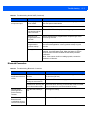
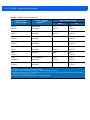
Table 6-1 Troubleshooting the MC919Z (Continued)
Problem
The MC919Z does not
accept scan input.
Cause
Solution
Scanning application
is not loaded.
Verify that the MC919Z is loaded with a scanning application.
See the System Administrator.
Unreadable bar code.
Ensure the symbol is not defaced.
Distance between
exit window and bar
code is incorrect.
Ensure MC919Z is within proper scanning range.
MC919Z is not
programmed for the
bar code.
Ensure the MC919Z is programmed to accept the type of bar
code being scanned.
MC919Z is not
programmed to
generate a beep.
If a beep on a good decode is expected and a beep is not heard,
check that the application is set to generate a beep on good
decode.
Battery is low.
If the scanner stops emitting a laser beam when the trigger is
pressed, check the battery level. When the battery is low, the
scanner shuts off before the MC919Z low battery condition
notification.
Note: If the scanner is still not reading symbols, contact the
distributor or Motorola.
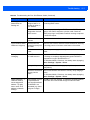
Bluetooth Connection
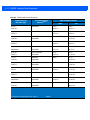
Table 6-2 Troubleshooting Bluetooth Connection
Problem
Cause
Solution
MC919Z cannot find
any Bluetooth devices
nearby.
Too far from other Bluetooth
devices.
Move closer to the other Bluetooth device(s), within a range
of 10 meters (30 feet).
The Bluetooth device(s)
nearby are not turned on.
Turn on the Bluetooth device(s) you wish to find.
The Bluetooth device(s) are
not in discoverable mode.
Set the Bluetooth device(s) to discoverable mode. If needed,
refer to the device’s user documentation for help.
The MC919Z’s battery is
low.
Recharge the battery.
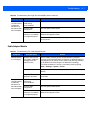
MC919Z keeps
powering down to
protect memory
contents.
There is a delay in the This is the normal behavior.
Bluetooth stack
re-initializing during a
resume from suspend.
No solution required.