1
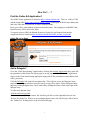
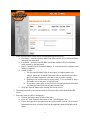
4. Enter the dates the delegation is to be effective by using the pop-up calendar provided or
entering the dates in an MM/DD/YYYY format.
a. Begin Date – the date the delegation is to start.
b. End Date – the date the delegation is to end. A ‘permanent’ delegate can be assigned
by assigning an end date far enough into the future it won’t expire. For example,
enter an end date such as 12/31/2099.
c. Click “Add Dates”
d. The selected delegate will be added to the “Current Delegates” list at the top of the
page.
Create a Transfer EA?
Transfer EAs are not used in the Online EA application. Instead, the hiring department will
create a “Hire” EA and the department the employee is leaving will process an “Update” EA
using the “End” option to end the employee’s assignment with the current department.
Use “Update,” “New,” and “End” on an Update EA?
For some people, thinking of “Update” of the “Update New End” options as “Replace” may
help them understand the process better.
The following questions can help you determine which option to use to create a new assignment.
1. Is the assignment in the “Assignments Selected for Updates:” to stay active after the new
assignment’s begin date?
If the answer is Yes, use “New”.
2. Is the assignment in the “Assignments Selected for Updates:” to stay as it is and it is only
being used as a template to create a new assignment?
If the answer is Yes, use “New”.
3. Is the assignment in the “Assignments Selected for Updates:” being replaced with another
assignment in the same position number?
If the answer is No and the assignment needs to be ended, use “End”.
4. Is the assignment in the “Assignments Selected for Updates:” being replaced by a new
assignment in the same position AND the position is still in the same department?
If the answer is Yes, use “Update”. Typical reasons for this type of transaction are pay
rate changes, FTE changes, title changes, employee status changes, etc.
5. Is the assignment in the “Assignments Selected for Updates:” being replaced by a new
assignment in the same position but the position has been transferred to another
department?
If the answer is Yes, use “End” to end the listed assignment and then click the “Add New
Position” link on Update Summary page to add the new assignment in the new position.
3