1
Introduction
Quick Tour of Basic Features
1
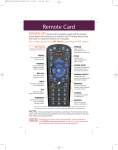
4. Press the Themes (Left arrow) button to open
the Themes and Search menu. This menu
allows you to search for programming by
themes (movies, sports, and more) or by key
words used in the programming information.
5. Select Sports to see a list of sporting events.
6. Press the VieW TV button to go back to watch
a program.
7. Press the Info button to see information about
the program.
Note: The first time you press the INFO
button, the information screen is transparent.
Press the INFO button again to make the
information screen solid. When you press the
Info button a third time, the information screen closes.
8. Press the Cancel button to go back to watch
the program.
9. Press the Browse (Right arrow) button to open
the Browse Banner. The Browse Banner
shows information on a program you’re
watching at the top, and information on two
other programs at the bottom.
10.Press the Up or Down Arrow button to change
the channel information you see at the bottom
of the TV screen.
11.Press the Right arrow button to highlight the
program coming on next at the bottom. Press
the Left Arrow button to go back to the
program on now.
12.Press the View TV button to clear the
Browse Banner from the TV screen and to
go back to watching a program. Press Select
to change to the highlighted channel.
Page 1-7