1
VIA REMOTE CONTROL
The batteries for the remote control handset for the CDT Two/II are
not included. Please purchase them (high quality AA bateries is
recommended) and fit into the handset before operating the remote
control. Please ensure that the batteries are inserted correctly.
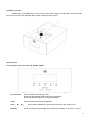
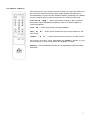
PLAY/PAUSE ( ►▐▐ ) - Press this button to play a disc. Pressing
this button again will pause playback. Press the button again to
resume playback.
STOP ( ■ ) - Press this button to stop playback.
SKIP ( ) - Press these buttons to go to the previous or the
next track.
SEARCH ( ) - Press these buttons to cue or review a track.
To reverse (review) a track, hold down the SEARCH - button. To cue
(fast forward) a track, hold down the SEARCH + button.
MEMORY - Use the Memory button for programming and reviewing
programs.
5