1
INTRODUCTION
Adjusting the Display
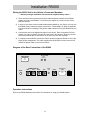
You can adjust the Screen from any Application.
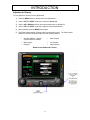
1) Press the MENU button to access the screen parameters.
2) Use the LEFT or RIGHT arrow key to select the Screen tab.
3) Use the UP or DOWN arrow key to select the parameter for adjustment.
4) Use the LEFT or RIGHT arrow key to adjust the selected parameter.
5) When finished, press the MENU button again.
6) The R5000 has the ability to output video to an external monitor. The Video Output
selection is used to select this output from the following options:
•
•
•
Auxiliary (default) – Garmin
output if option is installed
Main Display
Disabled
•
Rear Camera
•
Left Camera
Right Camera
•
R5000 Screen Buttons & Controls
9