1
Tire Pressure System
Removing Tire Pressure Sensors
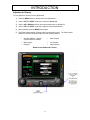
1) Press the INFO button repeatedly until Tires is highlighted.
2) Press SEL or wait until Tires is automatically selected.
3) Using the FOUR-WAY arrow keys, select the tire where the tire pressure sensor is to be
removed.
4) Hold SEL until the system prompts you to delete a sensor.
5) Use the FOUR-WAY arrow keys to toggle between Yes and No.
6) Press SEL to confirm or cancel the operation.
7) Remove the tire pressure sensor from the selected tire.
Replacing Tire Pressure Sensors
To replace a tire pressure sensor, the existing tire pressure sensor must be removed from the tire
then a new sensor must be added to the tire.
1) Follow the “Remove Tire Pressure Sensors” instructions to remove the current sensor
from the tire.
2) Add the new tire pressure sensor by following the “Installing Tire Pressure Sensors’
instructions.
Tire Pressure Alarms
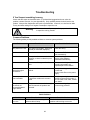
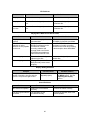
A red alarm notification will appear in the Background Window if there is a tire pressure alarm
condition. If there is an alarm, PULL OVER, INSPECT TIRE AND REPAIR.
To view alarm conditions:
1) Press the INFO button repeatedly until Tires is highlighted.
2) Press SEL or wait until Tires is automatically selected. The tires with the alarm condition
will be shown in RED.
3) To view the tire pressures use the FOUR-WAY arrow keys to select the tire. The
pressure will display will be displayed for the selected tire.
To disable and enable an alarm:
1) Press the INFO button until Alarm is highlighted.
2) When in the Alarm screen, use the UP and DOWN arrow keys to highlight the alarm of
interest.
3) Press the MINUS (-) key to disable the Alarm.
4) To enable an alarm, press the PLUS (+) key.
26