1
User manual
1. PRODUCT DESCRIPTION
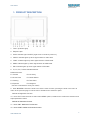
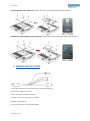
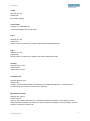
1.TALLY (indicator light).
2.Earphone jack.
3.Power indicator light: ON/OFF (Light turns to red when power on).
4.VIDEO: Indicator lights up when signal switch to video state.
5.YPbPr: Indicator lights up when signal switch to YPbPr state.
6.HDMI: Indicator lights up when signal switch to HDMI state.
7.SDI: Indicator lights up when signal switch to SDI state
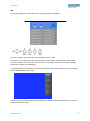
8.F1, F2, F3, F4:User-definable buttons.
Default functions:
F1 Camera
F2 H/V Delay
F3 Check Field
F4 Center Marker
F1 Peaking
F2 False Color
F3 Exposure
F4 Histogram
(function customized to meet your needs)
9.Knob BRI/MENU: Press the knob to access the menu function, pressing the knob in the menu to
return to the previous page or exit the menu. Rotate knob to select an option.
Default as Brightness function.
10.Knob SAT: Press the knob to select main MENU options; rotate knob to confirm the selection and
adjust parameter values.
Default as Saturation function.
11.Knob TINT: Default as Tint function.
12.Knob CONT: Default as Contrast function.
3
www.newhank.com