1
Operating the GUNNAR 3001
Starting the SPT32 Software
Follow the steps below to start the SPT32 Software
1. Start the PC.
2. After starting Windows 95 or Windows 98.
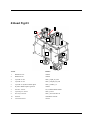
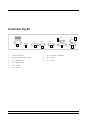
3. Switch on the GUNNAR 3001 by turning the Main-switch/Emergency stop
(Fig.02 Nr.02) right to get loose.
4. Click the Start button.
5. Then open Programs
6. SPT32 (Programgroup)
7. SPT32 (Icon)
Operating instructions and register information for the SPT32 Software may be
found in the SPT32 Help program. This can be started from inside SPT32 by
pressing the "F1" key, or "?" for direct help. Without SPT32, the help program
can be started from within the SPT32 program group.
Switching off the system
To switch off the system, proceed as follows:
1. To instantly exit SPT32 press the "Alt" + "F4" keys or via the menu, with
End. <"SPT32 Help, Chapter Switching off".
2.
Switch off your GUNNAR 3001 by pressing the Main switch / Emergency
stop (Fig.02 Nr.02)
3.
Now close down WIN95 or WIN98.
4.
Switch off the PC. Newer PCs may switch off automatically or be left on.
5.
If the RAPIDO is not to be used for a considerable period of time, then the
compressed air should similarly be switched off and machine covered.
Insert cardboard
To cut a cardboard you have to use underlay sheets. The most suitable underlay
sheets you can order at your GUNNAR dealer.
GUNNAR 3001 User Manual
Operating the GUNNAR 3001 • 17