1
CONTENTS
BEFORE YOU BEGIN....................... 2
Glossary............................................... 3
Features List......................................... 4
Audible Signals .................................... 5
INSTALLATION ............................... 6
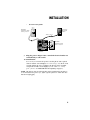
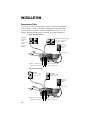
Table/Desk Installation........................ 6
Wall Installation................................... 8
Convenience Ports ............................ 12
FEATURE SET UP .......................... 13
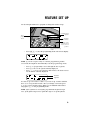
Set the Time/Date .............................. 14
Assign an Extension Number
to Your Phone ................................ 14
Turn the Ringer On or Off
for Each Line.................................. 14
Select the Ringer Type....................... 15
Set Delay Ring ................................... 15
Turn Line Usage On or Off
for Each Line.................................. 15
Assign the Prime Line
(Line Preference) .......................... 16
Assign the Line Group
for this Phone ................................ 16
Turn Auto-Mute On or Off................. 16
Set Audio Mode.................................. 17
Set the Dial Mode .............................. 17
Set the Flash Time ............................. 17
Turn Hold Reminder On or Off ........ 17
Set Your Phone to be the Centrex
Console Phone .............................. 18
Program the Centrex Console
Delayed Ring Time......................... 18
Erase All Settings and Return
the Phone to Default Settings........ 18
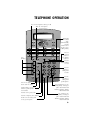
TELEPHONE OPERATION ............... 19
Making or Answering a Call ............... 20
Timer .................................................. 21
Pause................................................... 21
Call Privacy......................................... 22
Do Not Disturb................................... 22
Line-in-Use Lights ............................... 23
Volume................................................ 23
Redial................................................. 23
Auto Redial ........................................ 24
Hold .................................................... 24
Switch Between Lines ........................ 24
Mute..................................................... 25
Flash..................................................... 25
Temporary Tone Dialing...................... 25
Conference Calls ................................. 25
Transfer a Call..................................... 26
Low Battery Indicator ........................ 26
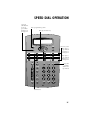
SPEED DIAL OPERATION............... 27
Storing a Number in
a Speed Dial Location ..................... 28
Reviewing a Speed Dial Entry ............ 28
Making a Speed Dial Call.................... 28
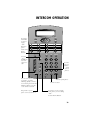
INTERCOM OPERATION ................. 29
Basic Intercom Operations................. 30
Making an Intercom Call with
the Handset ................................... 30
Making an Intercom Call with the
Speakerphone or Headset ............. 31
Answering an Intercom Call ............ 31
Making a Single-phone Page.............. 31
Answering a Single-phone Page ......... 31
Switching Between an Intercom
Call and a Single-phone Page......... 31
Ending an Intercom or Page Call ........ 31
Paging All Phones ............................... 32
Answering a System-wide Page .......... 32
Making an Intercom
Conference Call ............................. 32
Room Monitor .................................... 32
ADDING A FAX MACHINE............... 33
Using a Fax Switch ............................. 33
IN CASE OF DIFFICULTY ................ 34
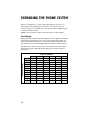
EXPANDING THE PHONE SYSTEM .. 36
Line Groups........................................ 36
Private Lines ....................................... 37
CENTREX OPERATION ................... 38
Setup Checklist................................... 38
Enabling the Console Phone.............. 38
Console Operation ............................. 38
Setting Ring Delay Duration................. 39
Answering a Delayed Ring .................. 39
Picking Up Another Station’s Line..... 39
INDEX ........................................... 40
1