1
UV512C-FINAL-092608:Layout 1
9/26/08
OPERATIONS OF INSTRUMENT
POWER ON
Press
button and hold for 2 seconds. Release the
symbols of LCD will appear for 1 second.
4:28 PM
Page 4
button after power on. All
POWER OFF
Press
button and hold for 2 seconds. All symbols of LCD will appear and shut down after
releasing
button.
MEASUREMENT VALUE
The primary reading always displays the value of measuring. The secondary reading displays the
outcomes of the advanced functions or data recording.
MAIN FUNCTION
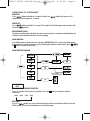
Press Mode button to choose the main functions (MIN/MAX/AVG) has several extended programs
as indicated in the diagram, please read the following descriptions to know how to press S ,
or M buttons to move to next level!)
MAIN FUNCTION DIAGRAM
MAX MIN
AVG
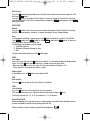
MAX/MIN/AVG MEASURING FUNCTION
There are 4 modes of the measuring function. Press the S button to change the mode of
measuring:
None → Max → Min → Avg.
DATA HOLD
Press the
button, the value at Secondary Display will be held and the LCD will show the
HOLD symbol. To cancel the hold mode, press the button again.