1
OWNER’S
MANUAL
C O L O R
T 1V
Safety Information
WARNING
RISK OF ELECTRIC SHOCK
DO NOT OPEN
TO REDUCE THE RISK OF ELECTRIC SHOCK, DO
NOT REMOVE COVER (OR BACK). NO USER
SERVICEABLE PARTS INSIDE. REFER SERVICING
TO QUALIFIED SERVICE PERSONNEL.
This symbol indicates
"dangerous voltage" inside
the product that presents a
risk of electric shock or
personal injury.
This symbol indicates
important instructions
accompanying the
product.
WARNING
To reduce the risk of fire
or shock hazard, do not
expose this TV to rain
or moisture.
Caution: To reduce the risk of electric shock,
match wide blade of plug to wide slot, fully insert.
Attention: Pour éviter les chocs électriques,
introduire la lame la plus large de la fiche dans la
borne correspondante de la prise et pousser jusqú
au fond.
•
Refer to the identification/rating label located on the back
panel of your product for its proper operating voltage.
•
FCC Regulations state that unauthorized changes or
modifications to this equipment may void the user’s authority
to operate it.
If fixed (non-moving) images are left on the screen for long periods, they may be permanently imprinted on the screen. Such
images include network logos, phone numbers, and video games.
This damage is not covered by your warranty. Extended viewing
of channels displaying these images should be avoided.
This reminder is provided to call your attention to Article 820-40
of the National Electrical Code (Section 54 of the Canadian
Electrical Code, Part 1) which provides guidelines for proper
grounding and, in particular, specifies that the cable ground
shall be connected to the grounding system of the building as
close to the point of cable entry as practical.
Note to Cable
TV Installer
2
Table of Contents
First Things First ....................................................... 3
Using the Menu System ........................................... 7
The Menu Rule: Point and Select ........................................................ 8
What is Point and Select? ..................................................................... 8
Menus and Control Panels ................................................................. 10
Interactive Setup .................................................... 15
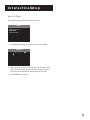
Entering Setup ..................................................................................... 16
Auto Channel Search .......................................................................... 16
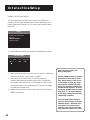
Set the Time ......................................................................................... 17
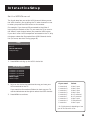
Label the Channels .............................................................................. 18
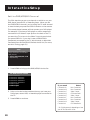
Set the VCR1 Channel ......................................................................... 19
Set the DVD/VCR2/LD .......................................................................... 20
Set the DSS/CABLE Channel ............................................................... 21
Programming the Remote ..................................... 23
About Programming the Remote .................................................... 24
Programming the Remote to Control a VCR ................................... 24
Programming the Remote to Control a Laserdisc Player ............... 26
Programming the Remote to Control an Audio Device: ................ 26
Programming the Remote to Control a ProScan, RCA,
or GE Brand DSS® Receiver .......................................................... 27
Programming the Remote to Control a Satellite
or Cable Box ................................................................................. 27
Using the Remote to Control a Device ............................................. 28
Tour of the TV .......................................................... 29
Remote Buttons ................................................................................... 30
Back Panel ............................................................................................ 32
Front Panel ........................................................................................... 34
Channel Marker ................................................................................... 35
Quick Reference ...................................................... 37
Audio Menu ......................................................................................... 38
Picture Quality Menu .......................................................................... 39
Screen Menu ........................................................................................ 40
Time Menu ............................................................................................ 41
Channel Menu ...................................................................................... 42
Setup ..................................................................................................... 45
Advanced Features ................................................. 47
PIP (Picture-in-Picture) Operation ..................................................... 48
Closed Captioning ............................................................................... 50
On-screen Program Details ................................................................ 52
Choosing an Audio Processor ............................................................ 53
1
Table of Contents
Appendix A: TV Connections ................................. 55
Things to Do Before Connecting Components ................................ 55
TV and MONO VCR (Connection A) .................................................. 56
TV and STEREO VCR (Connection B) ................................................. 57
TV, VCR and Laserdisc Player (Connection C) .................................. 58
TV and (2) VCRs (Connection D) ........................................................ 59
TV and Laserdisc Player(Connection E)............................................. 61
TV and DSS® Receiver (Connection F) ............................................... 62
TV, VCR, and DSS ® Receiver (Connection G) .................................... 63
TV, VCR, DSS® Receiver, and Laserdisc Player (Connection H) ....... 64
TV, (2) VCRs, and DSS® Receiver (Connection I) ............................... 66
Appendix B: Connecting Other Components ...... 68
Connecting External Speakers ........................................................... 68
Connecting Audio Components ........................................................ 69
Connecting a Camcorder .................................................................... 70
Appendix C: Troubleshooting Tips ...................... 72
Appendix D: Limited Warranty ............................ 74
Appendix E: Care and Cleaning ........................... 75
Accessories .............................................................. 76
Index......................................................................... 79
DSS® is a registered trademark of DirecTV, Inc., a unit of Hughes Electronics Corporation
2
First Things First
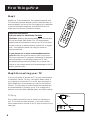
Hi, my name is Scott...
2
Using the Menu System
3
Interactive Setup
4
Programming the Remote
➣
Back in the old days, you bought a TV, stuck some
rabbit ears on it, and sat back and enjoyed test
patterns and bad sitcoms. Now, TVs are more like
computers than radios, and you have to jump
through a few hoops to get the TV up and running.
Don't worry, it sounds more complicated than it is.
First Things First
➣
Are you kidding? An 80-page
instruction book?
1
➣
...and I wrote this user manual. You're probably
saying to yourself, "so you're the guy." Well, laugh if
you must, but it's my job to see that you have a
rewarding user manual experience. No, really.
Read the first four chapters
These chapters cover the four big hoops: get the TV
out of the box and hooked up, learn to move
through the menu system, run the interactive setup
routine, and program the remote to control your
VCR and other stuff. That's about thirty pages' worth
of user manual stuff.
The rest of the manual should be used as reference
material. You can thumb through these sections
whenever you get some time. If you have a specific
question, refer to the table of contents or the index.
Check out the notes in the text
I've spent a lot of time pestering the people who
made your TV: engineers, designers, product
managers—you name it, I cornered them. In the
process, I've gotten some great advice about how to
tweak the TV. I’ve passed on as many of these tips as
I could, so keep an eye out for notes in the text.
The road map on the first page of
each of the four main chapters is
to let you know where you are in
the setup process.
3
First Things First
Step 1
POWER
VCR1
DSS
CAB
LE
•
Unpack the TV and accessories. The accessories packed with
TV include the Universal Remote, the four AAA batteries, an
antenna adapter, and an AV jack for plugging your camcorder
or other audio/video component into the front of the TV.
Make sure to locate the Connections Foldout.
VCR
TV
2 LD
•
AUD
IO
REW
PLA
Y
REC
FF
STO
DISP
P
LAY
PAU
SE
VOL
CHAN
SKIP
VOL
MUT
E
CH
1
AN
2
PREV
4
CH
3
5
7
6
Important Information:
Optional Stand for Table Model TVs ONLY
8
INPU
T
9
CLEA
0
R
ANT
U
•
ENN
A
G
PRO
MEN
PIP
RES
ET
MOV
CAUTION: Matching stands were designed to be used with
25-inch and larger table model TVs. All recommended
stands come with hardware to secure your TV to the stand
so that it cannot be easily pulled off, pushed off, or tipped
over. Your television dealer can help you choose an
appropriate stand.
E PIP
SWA
MOV
P
E
CH C
TRL
•
FREE
ZE
( )
SR
S
SCA
N
If you choose not to use a recommended stand for
your TV: Make sure that the stand or other furniture on
which you place the TV is properly located and of adequate
size and strength. This will help prevent the TV from
accidentally being pulled off, pushed off, or tipped over.
Failure to use a proper stand could cause damage to the TV
and/or personal injury.
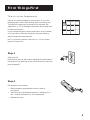
Step 2: Connecting your TV
If you’re only going to connect the TV to your home antenna
or cable box, use the “TV Only” connection shown below. If
you’re going to connect the TV to a VCR, laser disc player or
other component, we recommend you use the Connections
Foldout. The Connections Foldout details ten diagrams that
are recommended for hooking up the TV to a cable box or
antenna, one or two VCRs, a laserdisc player, and a DSS® receiver.
CABLE BOX
TV Only
IN
OUT
This is a basic connection from an antenna or cable box to
your TV. Connect the cable as shown. If you have a VCR or
other components to connect to the TV, skip to the top of the
next page.
OR
ANTENNA
TV
L
VIDEO 1
R VIDEO
S-VIDEO
S-VIDEO
L
4
R VIDEO
VIDEO 2
ANT A ANT B
First Things First
TV with other Components
Use the Connections Foldout to connect your TV to a VCR,
laserdisc player, and/or DSS® receiver. After connecting your
TV and other components, proceed to the next step. See
Appendix A, p. 55, for detailed information about using each
of these connections.
OWNER’S
MANUAL
C O L O R
T V
If your components don’t match those shown on the foldout,
or if you prefer a different connection, see your dealer or
specific component user manuals.
DSS® is a registered trademark of DirecTV, Inc., a unit of Hughes
Electronics Corporation
Step 3
Plug in the TV.
Plug the end into the wall outlet, matching the wide blade of
the plug with the wide slot in the outlet. Be sure to insert the
plug completely.
Step 4
Put batteries in the remote.
•
Slide the battery compartment cover off back of
the remote.
•
Insert the four AAA batteries as shown, matching the +
and – ends of each battery in the compartment.
•
Replace the cover.
5
First Things First
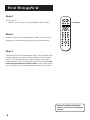
Step 5
POWER
Turn on the TV.
•
•
REW
PLAY
FF
REC
STOP
PAUSE
DISPLAY
CHAN
TV Button
Press TV on the remote, or press POWER on the TV itself.
SKIP
VOL
VOL
•
VCR1 DSS CABLE TV
VCR2 LD AUDIO
CH A N
MUTE
Step 6
2
3
4
5
6
7
8
9
INPUT
ANTENNA
•
RESET
OG
ME
CLEAR
NU
0
PR
Read the next section, Using the Menu System, which is a brief
overview of the basic rules for getting around in the menus.
PREV CH
1
PIP
SWAP
MOVE
MOVE PIP
CH CTRL
FREEZE
•
( ) SRS
SCAN
Step 7
Proceed to section three, Interactive Setup. The interactive setup
routine walks you through the steps needed to fully configure
the TV. The first step is the auto channel search, which puts
available cable TV or antenna signals into the TV’s memory. You
must complete the auto channel search. After this first step,
you can skip any of the remaining steps and return to them later.
Interactive Setup is designed
to be used with the Connections
Foldout.
6
Using the Menu System
One Rule to Remember
1
First things first
2
Using the Menu System
3
Interactive Setup
➣
You control and customize the TV by making
changes to various control panels in the menu
system. The great thing is, you only need to know
one rule: point and select.
➣
➣
4 Programming the Remote
If you want a lot of cool features,
you have to use some kind of
menuing system. Look at it this
way: you only need to know
one rule.
7
Using the Menu System
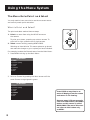
The Menu Rule: Point and Select
You only need to know one rule to use the on-screen menus
and control panels: point and select.
What is Point and Select?
The point and select method has two steps.
To point up or down, press the up or down arrows. To
point left or right, press the left or right arrows.
G
1. Point to a menu item using the MOVE arrows on
the remote.
O
PR
ME
NU
•
–
P
+
MOVE
2. Select a menu item by pressing MENU•PROG.
Selecting an item tells the TV’s menu system to go ahead
and make the change or go to a place you have indicated.
A
For example, to select the Channel menu from the Main Menu:
1. Press MENU to bring up the Main Menu.
TV Main Menu
1
2
3
4
5
6
0
Audio
Picture Quality
Screen
Time
Channel
Setup
Exit
2. Point to Channel by pressing the down arrow until the
word Channel is highlighted in green.
TV Main Menu
1
2
3
4
5
6
0
Audio
Picture Quality
Screen
Time
Channel
Setup
Exit
Press CLEAR at any time to remove all displays from the screen
and return to TV viewing.
Because many VCR user manuals
refer to a PROG button, the MENU
button on this remote is called
MENU•PROG. The rest of this manual refers to this button only
as MENU.
8
Using the Menu System
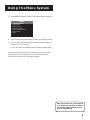
3. Press MENU to select Channel. The Channel menu comes up.
Channel
1
2
3
4
5
6
0
Parental Control
Signal Type
Signal Source
Lists and Labels
Auto Channel Search
Auto Tuning
Exit
4. Point to Exit and press MENU to return to the Main Menu.
5. Point to Exit and press MENU to leave the menu system
and return to TV viewing.
If you ever want to leave the menu system, press CLEAR.
Once you know how to point and select your way through
the menus, you can apply this rule in the control panels,
which do the real work in the menu system.
One way to exit out of the menus
is to press zero (0) until you back
out of the menu system and return to TV viewing.
9
Using the Menu System
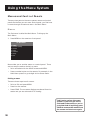
Menus and Control Panels
There are two parts to the menu system: menus and control
panels. But before you can use a control panel, you first have
to move through at least one menu—the Main Menu.
Menus
The first menu is called the Main Menu. To bring up the
Main Menu:
1. Press MENU on the remote or front panel:
TV Main Menu
1
2
3
4
5
6
0
Audio
Picture Quality
Screen
Time
Channel
Setup
Exit
Menus take you to another menu or a control panel. There
are two ways to make a choice in a menu:
•
Point and select with the MOVE arrows and MENU.
•
Press a number button on the remote. For example, in the
Main Menu press 3 to go straight to the Screen menu.
Exiting a menu
There are three ways to exit a menu:
•
Point to Exit and press MENU.
•
Press 0 on the remote.
•
Press CLEAR. The on-screen displays are cleared from the
screen and you are returned to TV viewing.
Feel free to explore the menu
system. If you ever get lost or
confused in the menus, or you’re
just plain tired of exploring, press
CLEAR to remove the menus from
the screen and start over again.
10
Using the Menu System
Control Panels
Control Panels do the work in the menu system: it’s where
you choose a setting, enter a number, or adjust a level such as
tint or brightness. There are three kinds of control panels:
sliders, choice lists, and numeric entry.
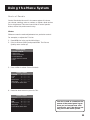
Sliders
Sliders are used to make adjustments to a particular control.
For example, to adjust the TV’s tint:
1. Press MENU to bring up the Main Menu.
2. Point to Picture Quality and press MENU. The Picture
Quality menu comes up.
Picture Quality
1
2
3
4
5
0
Picture Controls
Auto Color
Video Noise Filter
Color Warmth
Reset Picture Controls
Exit
3. Press MENU to select Picture Controls.
Picture Controls
Contrast
< .....| .....>
Color
< .....| .....>
Tint
< .....| .....>
Black Level
< .....| .....>
Sharpness
< .....| .....>
Press MENU when done.
4. Press the down arrow to point to Tint.
Picture Controls
Contrast
< .....| .....>
Color
< .....| .....>
Tint
< .....| .....>
Black Level
< .....| .....>
Sharpness
< .....| .....>
Press MENU when done.
You don’t need to remember the
names of the control panel types.
Once you’ve learned how each
type works, you’ll be able to use
any part of the menu system.
11
Using the Menu System
5. Press the right or left arrow to adjust the indicator line.
Notice that the picture changes as you adjust the tint.
Now that you know how the Tint slider works, you know how
all sliders work.
Choice Lists
Choice lists are used to choose a particular setting from a list
of settings. The current setting in a choice list is always
highlighted in green.
For example, to indicate whether you’re currently using a
home antenna or a cable TV signals:
1. Press MENU to bring up the Main Menu.
2. Point to Channel and press MENU. The Channel menu
comes up.
Channel
1
2
3
4
5
6
0
Parental Control
Signal Type
Signal Source
Lists and Labels
Auto Channel Search
Auto Tuning
Exit
3. Point to Signal Type and press MENU. The Signal Type
choice list comes up with the current setting highlighted
in green. For example:
Signal Type
1 UHF / VHF Antenna
2 Cable TV
4. Point to the correct setting for your connection and press
MENU. As soon as you select a choice, the TV saves your
change, and you are returned to the previous menu.
5. Point to Exit and press MENU to return to the Main Menu.
6. Point to Exit and press MENU to return to TV viewing.
12
You can enter numbers directly
by using the number buttons.
Using the Menu System
Numeric Entry
A numeric entry control panel is used to enter numbers
or letters.
For example, to set the current time:
1. Press MENU to bring up the Main Menu.
2. Point to Time and press MENU.
Time
1
2
3
0
Sleep Timer
Schedule
Set Time
Exit
3. Point to Set Time and press MENU. The Set Time numeric
entry control panel comes up. Notice the pointer
underneath the first dash.
Set Time
— — : — —
AM
4. Press the up arrow to enter a number in that column.
5. Press the right arrow to move to the next column, then
press the up or down arrow to enter a number.
6. Repeat Step 5 until you have entered the hour and
minute for the current time. Notice that when you reach
the last column, pressing the up or down arrow changes
whether the time reads AM or PM.
Trivia: This type of control panel
is referred to as a “one-armed
bandit.” I don’t know why.
If the control panel is not set at
the current time, use the left
arrow to go back over the
columns and the up arrow to
make changes.
13
14
Interactive Setup
There’s an on-screen setup routine
Search for available channels
•
Set the time
•
Make channel lists and labels
•
Set the VCR1 channel
•
Set the DVD/VCR2/LD channel
•
Set the DSS/CABLE channel
First things first
2
Using the Menu System
3
Interactive Setup
4
Programming the Remote
➣
•
1
➣
Your TV has software that tells it what to do, just like
a computer. The interactive setup routine takes you
through the steps needed to configure the TV:
➣
Complete the first step, auto
channel search, to receive antenna or cable TV signals. After that,
you can skip other steps and return to them at your convenience.
15
Interactive Setup
Entering Setup
Setup is accessed through the Main Menu:
1. Press MENU to bring up the Main Menu.
2. Point to Setup and press MENU. The first Setup screen
comes up, asking you to confirm that you want to begin.
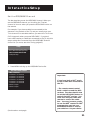
Setup
The Setup function will help
you configure your television.
Would you like to begin now?
1 Begin setup now
2 Cancel setup
3. Press MENU to begin the Setup routine.
Auto Channel Search
The first part of the setup routine asks you if you want the TV
to search automatically for all channels available through
your antenna or cable TV system. This is sometimes called
“autoprogramming.”
Setup
Would you like the TV to search
for all available channels?
1 Search for channels
2 Skip this step
1. Press MENU to tell the TV to begin searching for channels.
The display gives you a progress report and tells you when
it has finished.
2. Press MENU to continue.
You must complete the Auto
Channel Search to receive TV signals and put channels in memory.
Auto Channel Search can also
be accessed through the Channel menu.
16
Interactive Setup
Set the Time
The second step lets you set the time of day.
Setup
Would you like to set the time
of day on the TV?
1 Set time
2 Skip this step
1. Press MENU to bring up the Set Time control panel.
Set Time
— — : — —
AM
2. Use the left and right arrows to point to the hour and
minutes spaces. Use the up and down arrows to scroll
through the numbers and change from AM to PM.
3. Press MENU to continue.
17
Interactive Setup
Label the Channels
The third step lets you make your channel list, label your
channels, and choose whether each channel belongs in the
parent-approved channel list. (For more, see Lists and Labels,
page 42.)
Setup
Would you like to name each
channel and set parental
controls?
1 Name channels
2 Skip this step
1. Press MENU to bring up the Lists and Labels control panel.
Lists and Labels
Chan Chan Normal Parent
# Label
List Approved
15 – – – –
Yes
No
Two Tips from Keith, the
Design Engineer:
2. Use the left and right arrows to point to the four different
areas of the control panel (called “fields”).
3. Use the up and down arrows to scroll through the
numbers and letters and select Yes or No in the Normal
and Parent approved fields. You may wish to refer to the
call letters listed in your newspaper’s TV section for ideas
on labelling the channels.
4. Repeat this process for each of your channels. Then press
MENU to continue.
Use the CHAN buttons to change
channels in the Chan # field.
This works even if you’re not
in the Chan # field. Or, enter
the channel number directly
using the number buttons on
the universal remote. To enter
a number greater than 99, press
and hold “1” to enter the hundreds digit, then press the two
remaining numbers.
The lists and labels feature
can also be accessed from the
Channel menu. Because this
procedure can be time consuming, feel free to skip this
step and come back to it later.
18
Interactive Setup
Set the VCR1 Channel
The fourth step lets you set the VCR1 channel. When you set
the VCR1 channel, you’re telling the TV what channel to tune
to when you press the VCR1 button on the remote.
For example, if you have a VCR connected to the Video 1
input jacks on the back of the TV, you want the TV to tune to
the Video 1 input channel when you press the VCR1 button.
If you don’t have a VCR1 component connected to the TV, skip
this step or select Not Connected from VCR1 Channel choice
list. (For more, see Auto Tuning, page 43.)
Setup
Would you like to use a VCR with
your TV?
1 Use TV with a VCR
2 Skip this step
1. Press MENU to bring up the VCR 1 choice list.
Set VCR1 Channel
1
2
3
4
5
6
7
Not connected
Channel 3 - Antenna A
Channel 4 - Antenna A
Channel 3 - Antenna B
Channel 4 - Antenna B
Video 1 Input
Video 2 Input
2. Point to the choice that matches the way you have your
VCR connected to the TV.
If you used the Connections Foldout to hook up your TV,
use the table shown at the right to select the VCR1 channel.
3. Press MENU to continue.
If you used
Select
Connection A
Connection B
Connection C
Connection D
Connection E
Connection F
Connection G
Connection H
Connection I
Video 1 Input
Video 1 Input
Video 1 Input
Video 1 Input
Not Connected
Not Connected
Video 2 Input
Ch3 Antenna A*
Video 2 Input
* Or Ch4 Antenna A, depending on how
your VCR’s 3/4 switch is set.
19
Interactive Setup
Set the DVD/VCR2/LD Channel
The fifth step lets you set up a channel on which to run your
DVD player, second VCR, or laserdisc player. When you set
the DVD/VCR2/LD channel, you’re telling the TV what channel
to tune to when you press the VCR2•LD button on the remote.
This remote player, however, will not operate your DVD player.
For example, if you have a DVD player or other component
connected to the Video 2 input jacks on the back of the TV,
you want the TV to tune to the Video 2 input channel when
you press VCR2•LD. If you don’t have a DVD/VCR2/LD
component connected to the TV, skip this step or select Not
Connected from DVD/VCR2/LD Channel choice list. (For more,
see Auto Tuning, page 43.)
Setup
Would you like to use a DVD
player, second VCR, or Laser Disc
with your TV?
1 Use TV with a DVD,VCR, or LD
2 Skip this step
1. Press MENU to bring up the DVD/VCR2/LD choice list.
Set DVD/VCR2/LD Channel
1
2
3
4
5
6
7
Not connected
Channel 3 - Antenna A
Channel 4 - Antenna A
Channel 3 - Antenna B
Channel 4 - Antenna B
Video 1 Input
Video 2 Input
2. Point to the choice that matches the way you have your
DVD player, second VCR, or laserdisc player connected to
the TV.
3. Press MENU to continue.
If you used
Connection A
Connection B
Connection C
Connection D
Connection E
Connection F
Connection G
Connection H
Connection I
Select
Not Connected
Not Connected
Video 2 Input
Ch3 Antenna A*
Video 1 Input
Not Connected
Not Connected
Video 2 Input
CH3 Antenna A*
* Or Ch4 Antenna A, depending on how
your VCR’s 3/4 switch is set.
20
Interactive Setup
Set the DSS/CABLE Channel
The last step lets you set the DSS/CABLE channel. When you
set the DSS/CABLE channel, you’re telling the TV what
channel to tune to when you press the DSS•CABLE button on
the remote.
For example, if you have a cable box connected to the
Antenna A on the back of the TV, and you usually tune your
TV to channel 3 to see cable stations, you want the TV to tune
CH 3 Antenna A when you press DSS•CABLE. If you don’t
have a DSS receiver or cable box connected to the TV, skip this
step or select Not Connected from the DSS/CABLE Channel
choice list. (For more, see Auto Tuning, page 43.)
Setup
Would you like to use a cable
box or DSS unit with your TV?
1 Use TV with cable or DSS
2 Skip this step
1. Press MENU to bring up the DSS/CABLE choice list.
Set DSS/CABLE Channel
1
2
3
4
5
6
7
8
9
Not connected
Channel 2 - Antenna A
Channel 3 - Antenna A
Channel 4 - Antenna A
Channel 2 - Antenna B
Channel 3 - Antenna B
Channel 4 - Antenna B
Video 1 Input
Video 2 Input
(Continued on next page)
Important:
If you have both a DSS® receiver and a cable box connected to
the TV...
...The remote cannot control
both a cable box and the DSS®
receiver. The chart details how
to set the DSS•CABLE button to
control the DSS® receiver. You
must then use your cable box
remote to control the cable
box. You may, however, prefer
to use the DSS® remote for DSS ®
programming, and set your
DSS•CABLE button to control
your cable box. It’s your choice.
21
Interactive Setup
2. Point to the choice that matches the way you have your
DSS® receiver or cable box connected to the TV.
If you used the Connections Foldout to hook up your TV,
use the table at the right to select the DSS/CABLE channel.
3. Press MENU to complete the Setup routine and return to
TV viewing.
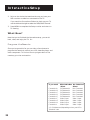
What Now?
Now that you’ve finished the interactive setup, you can sit
back, relax, and enjoy the TV. Or...
Program the Remote
Since you’ve gone this far, you can take a few minutes to
program the remote to control your VCR, laserdisc player, and
other component. To find out how to program both of the
remotes, go to the next section.
If you used
Connection A
Connection B
Connection C
Connection D
Connection E
Connection F
Connection G
Connection H
Connection I
With Cable Box
Select
Ch3 Antenna A*
Ch3 Antenna A*
Ch3 Antenna A*
Ch3 Antenna A*
Ch3 Antenna A*
Video 1 Input
Video 1 Input
Video 1 Input
Video 1 Input
No Cable Box
Select
Not Connected
Not Connected
Not Connected
Not Connected
Not Connected
Video 1 Input
Video 1 Input
Video 1 Input
Video 1 Input
* Or Ch4 Antenna A, depending on how your VCR’s
3/4 switch is set.
22
Programming the Remote
If you have a VCR or other
component...
First things first
2
Using the Menu System
3
Interactive Setup
4
Programming the Remote
➣
The universal remote can be programmed to control
most brands of remote controllable TVs, VCRs, and
cable boxes. If you own an RCA, GE, or ProScan VCR,,,
you probably don’t need to program it at all. Other
manufacturer’s brands need to be programmed.
1
➣
Now watch some TV!
➣
Once you’ve programmed the remote, you will have
completed all four setup sections. Now you can sit
back and enjoy the TV. If you want to know more
about the different parts of the TV, see the next
section, Tour of the TV. Refer to the other sections
and appendices as needed.
23
Programming the Remote
About Programming the Remote
POWER
VCR1
DSS
CAB
LE
•
The universal remote can be programmed to control most brands
of remote controllable TVs, VCRs, and cable boxes. Most RCA,
GE and ProScan TVs and VCRs are already programmed. Other
manufacturer’s brands need to be programmed.
VCR
2 L
D
•
TV
AUD
IO
REW
PLA
Y
REC
FF
STO
P
DISP
LAY
PAU
SE
VOL
CHAN
SKIP
VOL
MUT
E
CH
1
Programming the Remote to
Control a VCR
PRE
V CH
3
5
7
6
8
INPU
T
9
CLEA
0
R
ANT
U
MEN
PIP
•
ENN
A
G
PRO
To determine whether the universal remote needs to be
programmed, turn the VCR on, point the remote at the VCR,
and press the VCR1 button. Then press POWER or CHAN UP or
DOWN to see if the VCR responds to the remote commands. If
not, the remote needs to be programmed.
AN
2
4
RESE
T
MOV
E PIP
SWA
P
MOV
E
CH C
TRL
•
FREE
ZE
( )
SR
S
SCA
N
Follow these steps to program your universal remote to
control your VCR:
1. Turn on the VCR to be programmed.
2. Look up your VCR brand and code number(s) on the code
list on the next page.
3. Press and hold the VCR1 button on the remote.
4. Enter the two-digit code from the code list.
5. Release VCR1 then press POWER to see if the VCR
responds to the remote commands. If it doesn’t, try
pressing VCR1 and POWER to see if the VCR responds.
This remote may not operate all
models of the brands that are
shown below. Use the codes on
the next page or on the sheet
packed with your remote.
To program the VCR2•LD button
to control a second VCR, follow
these steps but use the VCR2•LD
button instead of the VCR1 button.
24
Programming the Remote
Universal Remote VCR Codes
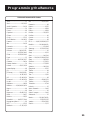
Aiwa .............................................. 15
Akai .................................... 03,22,23
Audio Dynamics .................... 14,16
Broksonic..................................... 10
Canon ........................................... 08
Capehart ...................................... 01
Citizen .......................................... 09
Craig ........................................ 07,12
Curtis Mathes .................. 00,08,15
Daewoo ....................................... 13
dbx ........................................... 14,16
Dimensia ...................................... 00
Dynatech ..................................... 15
Emerson ..................... 09,10,13,15,
................................. 20,23,24,34,41
Fisher ...................... 02,12,18,19,43
Funai ............................................. 15
GE ........................... 00,07,08,32,37
Goldstar .................................. 09,14
Harman Kardon ......................... 14
Hitachi ......................... 05,15,35,36
Instant Replay ............................. 08
JCL ................................................ 08
JCPenney .................... 02,05,07,08,
...................................... 14,16,30,35
JVC ............................... 02,14,16,30
Kenwood .................... 02,14,16,30
Lloyd’s ........................................... 15
Magnavox ................................ 08,29
Marantz ............ 02,08,14,16,29,30
Marta ............................................ 09
MEI ................................................ 08
Memorex .................... 08,09,12,15
MGA ........................................ 04,27
Minolta .................................... 05,35
Mitsubishi ............... 04,05,27,35,40
Montgomery Ward .................... 06
MTC ........................................ 07,15
Multitech ..................... 07,15,31,32
NEC ............................. 02,14,16,30
Panasonic ..................................... 08
Pentax ...................................... 05,35
Philco ....................................... 08,29
Philips ...................................... 08,29
Pioneer .............................. 05,16,33
ProScan ........................................ 00
Quartz .......................................... 02
Quasar .......................................... 08
RCA ............. 00,05,07,08,28,35,37
Realistic ................. 02,06,08,09,12,
............................................ 15,19,43
Samsung ................. 07,13,22,32,42
Sansui ............................................ 16
Sanyo ....................................... 02,12
Scott .................................. 04,13,41
Sears ...... 02,05,09,12,18,19,35,43
Sharp .................................. 06,24,39
Shintom ............................. 17,26,31
Sony ................................... 17,26,38
Sylvania .............................. 08,15,29
Symphonic .............................. 02,15
Tashiko ......................................... 09
Tatung ........................................... 30
Teac .......................................... 15,30
Technics ....................................... 08
Teknika ........................ 08,09,15,21
Toshiba .............................. 05,13,19
Totevision ............................... 07,09
Unitech......................................... 07
Vector Research .................... 14,16
Victor ........................................... 16
Video Concepts .................... 14,16
Videosonic ................................... 07
Wards .................... 05,06,07,08,12,
................................. 13,15,25,31,35
Yamaha ........................ 02,14,16,30
Zenith ...................................... 11,17
25
Programming the Remote
Programming the Remote to Control
a Laserdisc Player
The remote may need to be programmed for your equipment.
This remote may not operate all models of the brands that
are shown below. Use the codes at right or on the sheet
packed with your remote.
Laserdisc Player Codes
ProScan ........................................ 33
RCA .............................................. 33
1. Turn on the laserdisc player.
2. Look up your brand and its code number(s) on code list
at right.
3. Press and hold the VCR2•LD button on the remote.
4. Enter the two-digit code from the code list.
5. Release the VCR2•LD button and press POWER or another
button to see if the laserdisc player responds to the
remote commands.
6. Repeat these steps using the next code listed for your brand,
until the laserdisc player responds to the remote commands.
Programming the Remote to Control
an RCA Audio Device:
Your remote controls only RCA audio equipment such as an
audio receiver or amplifier. It does not control other brands
of audio equipment. The remote may need to be programmed
for your RCA equipment. This remote may not operate all
models of the brands that are shown at right. Use the codes
at right or on the sheet packed in with your remote.
1. Turn on the component to be programmed.
2. Look up your brand and its code number(s) on the code
list at right.
3. Press and hold the AUDIO button.
4. Enter the two-digit code from the code list.
5. Release the AUDIO button and press POWER or CHAN UP
or DOWN to see if the audio device responds to the
remote commands.
6. Repeat these steps using the next code listed for your brand
until the audio device responds to the remote commands.
26
Audio Codes
RCA/ Dimensia
AM/FM Receiver ........................ 03
CD ................................................ 07
Tape .............................................. 06
Phono ........................................... 05
Aux ............................................... 04
Programming the Remote
Programming the Remote to Control
a ProScan, RCA, or GE DSS® brand Receiver
The universal remote is preprogrammed to control a ProScan,
RCA, or GE DSS® brand receiver. Follow the instructions below
for basic operation of the receiver. You may also want to
experiment with other buttons on the remote to see if they
work with your receiver.
TV Remote
(works like ) DSS® Remote
DISPLAY
SELECT/DISPLAY
PREV CH
ANTENNA
CLEAR
MENU
MOVE
PREV CH
TV/DSS
CLEAR
MENU
ARROWS
Programming the Remote to Control a
Satellite or Cable Box
Refer to the Connection Foldout or contact your cable
company to hook up your cable box. If you have a cable box
with its own remote, then you may also be able to use the TV’s
remote with your cable box. This remote may not operate all
models of the brands that are shown below. Use the codes
below or on the sheet packed with your remote.
1. Turn on the cable box.
2. Look up your brand and its code number(s) on code list
at right.
3. Press and hold the DSS•CABLE button on the remote.
4. Enter the two-digit code from the code list.
5. Release the DSS•CABLE button and press POWER or CHAN
UP or DOWN to see if the cable box responds to the
remote commands.
6. Repeat these steps using the next code listed for your
brand until the cable box responds to the remote commands.
Satellite / Cable
Box Codes
ABC ......................................... 22,46
Anvision .................................. 07,08
Cablestar ................................ 07,08
Eagle .............................................. 08
Eastern International ................. 02
General Instrument ........... 04,05,
...................... 15,23,24,25,30,36,46
Hamlin ......................... 12,13,34,48
Hitachi ............................... 37,43,46
Jerrold......................... 04,05,15,23,
...................... 24,25,30,36,45,46,47
Macom .................................... 37,43
Magnavox ................... 07,08,19,21,
...................... 26,28,29,32,33,40,41
NSC .............................................. 09
Oak .................................... 01,16,38
Oak Sigma ................................... 16
Panasonic .......................... 03,27,39
Philips .............. 07,08,19,21,26,28,
................................. 29,32,33,40,41
Pioneer .............................. 18,20,44
Randtek ................................... 07,08
RCA ......................................... 00,27
Regal ........................................ 12,13
Regency ................................... 02,33
Samsung ....................................... 44
Scientific Atlanta .............. 03,22,35
Signature ...................................... 46
Sprucer ......................................... 27
Starcom ........................................ 46
Sylvania ......................................... 11
Teknika ......................................... 06
Texscan .................................... 10,11
Tocom ......................... 17,21,49,50
Unika ................................. 31,32,41
Viewstar ................ 07,08,19,21,26,
........................... 28,29,32,33,40,41
Warner Amex ............................. 44
Zenith ...................................... 14,42
27
Programming the Remote
Using the Remote to Control a Device
Once the remote has been programmed with the correct
codes, you are ready to use it to control your devices.
To operate the device:
1. Press the device button (TV, VCR1, VCR2•LD, DSS•CABLE,
or AUDIO) to set the remote to control the device.
2. Press OFF/ON to turn the device off or on.
3. Use the remote buttons that apply to that device.
28
Tour of the TV
A picture book tour
This section talks about the TV's main parts (at least the
parts you'll actually use):
•
The Remote Control
•
The Channel Marker
•
The Back Panel
•
The Front Panel
29
Tour of the TV
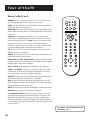
Remote Buttons
POWER When in TV mode, turns off the TV. In VCR mode,
and if programmed, turns on and off most VCRs.
POWER
•
REW
PLAY
FF
REC
STOP
PAUSE
DISPLAY
CHAN
VOL
CH A N
MUTE
PREV CH
1
2
3
4
5
6
8
9
TV Turns on the TV and puts the remote in TV mode. Also
displays channel information.
7
AUDIO If programmed, turns on RCA audio component and
puts the remote in audio mode.
CLEAR
INPUT
ANTENNA
ME
•
RESET
OG
NU
0
PR
REW, PLAY, FF, REC, STOP, PAUSE If programmed, provide
transport control for some remote-controllable VCRs, laserdisc
players, tape decks, and CD players.
SKIP
VOL
VCR2•LD If programmed may turn on your DVD player,
second VCR, or laserdisc player. Puts the remote in VCR2•LD
mode. Also turns on the TV. (Note: When you connect a DVD
player to your TV, you can use your TV remote to select a
channel on which to run your player. You may, however, need
to use your DVD remote to control DVD functions.)
•
VCR2 LD AUDIO
VCR1 If programmed, turns on VCR and puts the remote in
VCR mode. Also turns on the TV.
DSS•CABLE Turns on DSS® receiver or, if programmed, most
cable boxes. Puts the remote in DSS•CABLE mode. Also turns
on the TV.
VCR1 DSS CABLE TV
SWAP
PIP
MOVE
FREEZE
MOVE PIP
CH CTRL
•
( ) SRS
SCAN
VOL < or VOL > Decreases or increases the TV’s volume.
CHAN ^ or CHAN v Scans up or down through the current
channel list. Press once to change the channel up or down;
press and hold to continue changing channels.
DISPLAY Brings up channel information. Press repeatedly to
see detailed program information, if available.
SKIP Press once before changing channels and the TV will
wait 30 seconds before returning you to the original channel.
Press repeatedly to add more time.
MUTE Turns off the TV’s sound. Press again to restore the sound.
PREV CH Returns you to the previous channel.
(0-9) Number Buttons Enters channel numbers and time
settings directly though the remote control. To enter a twodigit channel, press the two digits. To enter a three-digit
channel, press and hold the first digit, then add the second
two. Example: to tune to channel 123, press and hold 1, press
2, then press 3.
For more, see Programming the
Remote, p. 23.
30
Tour of the TV
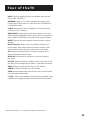
INPUT Press to toggle through the available input sources
(VID1, VID2, FRNT, etc.).
ANTENNA When in TV mode, changes the antenna input.
Functions as TV/VCR button in VCR mode and TV/DSS button
in DSS•Cable Mode.
CLEAR Removes any menu or display from the screen and
returns you to TV viewing.
MENU•PROG Brings up the Main Menu. When in the menu
system, selects highlighted items or returns you to the previous
menu. When in VCR mode, it functions as a Program button.
RESET Returns all picture quality controls to their original
settings.
MOVE (Arrows) Used to point to different items in the
menu system. Also used to adjust the menu controls. Also
move the PIP window when no menus are on the screen.
PIP Brings up the small picture-in-picture window. Press
again to remove the PIP window.
MOVE PIP Moves the PIP window to the four corners of
the screen.
CH CTRL Selects the picture window, (that is, the main or PIP
window) that is changed by the CHAN ^ and CHAN v buttons.
SWAP Swaps the main picture with the PIP window.
FREEZE Freezes the video in the PIP window.
SCAN Briefly displays each channel from the current channel
list. Press again to stop scan.
(•) SRS* Press once to display the current audio processor. Press
repeatedly to toggle through the available audio processors.
*SRS and the SRS symbol (•) are registered trademarks of SRS Labs, Inc.
31
Tour of the TV
Back Panel
REAR SPEAKERS
HIGH
LOW
OFF
S-VIDEO
L/MONO
RIGHT
VIDEO
VIDEO
L/MONO
RIGHT
FIXED
OUTPUT
INPUT 1
STRENGTH
PICTURE TILT
LEFT
RIGHT
EXT
L/MONO
RIGHT
VIDEO
S-VIDEO
L/MONO
RIGHT
POLARITY
HI-FI OUTPUT
INPUT 2
(VOLUME CONTROLLED)
INT
SPEAKERS
CAUTION — TO AVOID DAMAGE:
ANT A
SIGNAL
SOURCE
ANT B
FRONT SPEAKERS
1. DO NOT CONNECT SPEAKER OUTPUT TO
A SEPARATE AMPLIFIER OR TO SPEAKERS
CONNECTED TO ANOTHER PRODUCT.
2. DO NOT CONNECT LEFT AND RIGHT
SPEAKER OUTPUTS TOGETHER.
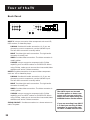
INPUT 1 Lets you connect a video component such as a VCR,
DSS® receiver, or laserdisc player.
L/MONO Provides left audio connection. Or, if you are
connecting a mono component, use the L/MONO input.
The left audio connector is usually white.
RIGHT Provides right audio connection. The right audio
connector is usually red.
VIDEO Provides video connection. The video connector is
usually yellow.
S-VIDEO Lets you connect a component with S-Video
capability, such as a DSS® receiver or S-VIDEO VCR. When
using S-Video, make sure to connect the three audio/video
cables as well as the S-Video connector.
INPUT2 Provides connection to a second video component
such as a VCR or laserdisc player.
L/MONO Provides left audio connection. Or, if you are
connecting a mono component, use the L/MONO input.
The left audio connector is usually white.
RIGHT Provides right audio connection. The right audio
connector is usually red.
VIDEO Provides video connection. The video connector is
usually yellow.
S-VIDEO Lets you connect a component with S-Video
capability, such as a DSS® receiver or S-VIDEO VCR. When
using S-Video, make sure to connect the three audio/video
cables as well as the S-Video connector.
SIGNAL SOURCE Provides connection to a home antenna or
cable TV system.
32
The ANT B input can be used
for video games or home computers, and you can switch between the two inputs using the
ANTENNA button on the remote.
If you are recording from INPUT
1 or 2and you are using S-Video,
remember to connect the regular INPUT 1 VIDEO cable as well.
Tour of the TV
FIXED OUTPUT Provides fixed-level audio and video output
from the TV. These output signals are ideal for connecting to
an A/V receiver or amplifier that has its own remote control.
The FIXED OUTPUT jacks are also suitable or for recording
from the TV with a VCR, camcorder, or tape deck.
HI-FI OUTPUT Provides volume-controlled stereo audio
output, meaning the volume changes as you change volume
on the TV. The HI-FI OUTPUT jacks are ideal for connecting the
TV to an amplifier that does not have its own volume control
or remote.
SPEAKER SWITCH Lets you turn off the TV’s internal (builtin) speakers and play the audio through external speakers connected to the TV. Set SPEAKER SWITCH to EXTERNAL to play
audio through external speakers. Set the switch to INTERNAL
to play audio through the TV’s internal (built-in) speakers.
REAR SPEAKERS The REAR SPEAKERS terminals let you
connect rear speakers to the TV.
FRONT SPEAKERS The FRONT SPEAKERS terminals let you
connect front external speakers to the TV.
POLARITY SWITCH This TV has an extra-large color picture
tube, which makes it vulnerable to the effects of the Earth’s
magnetic field. You may need to reset the POLARITY switch
and STRENGTH switches if you reposition the TV or move it to
a different room.
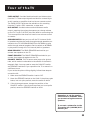
If you notice the picture tilting slightly, follow these steps to
correct the tilt:
1. Make sure the STRENGTH switch is set to OFF.
2. Move the STRENGTH switch to the LOW. If the picture gets
better, but not quite perfect, move the switch to HIGH.
3. If the picture gets worse, change the position of the
POLARITY switch. If the picture improves, but is not quite
perfect, move the STRENGTH switch to HIGH.
Remember to set the speaker
switch back to INTERNAL when
you are not using the external
speakers.
To connect a subwoofer to the
TV, use the left (L/MONO) HI-FIOUTPUT jack.
33
Tour of the TV
Front Panel
VOL < Decreases the volume. When in the menu system, VOL
< is used to point left to items and adjust menu controls.
MENU
CHAN
VOL
P OWER
VOL > Increases the volume. When in the menu system, VOL >
is used to point right to items and adjust menu controls.
CHAN ^ Scans up through the channel list. In the menu
system, it points up to items and adjusts menu controls.
CHAN v Scans down through the current channel list. In the
menu system, it points down to items and adjusts menu controls.
MENU Brings up the Main Menu. When in the menu system, it
selects highlighted items. Also returns you to the previous menu.
POWER Turns the TV on and off.
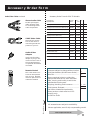
A•V (AV Jack) Use the AV adapter included with your TV
accessories to connect a camcorder or other device to the front
of the TV. The yellow connector is for video; the white for audio.
A•V
The front panel above shows a
typical button layout. The
exact look of the buttons may
be different from those on the
front of your TV. (In other
words, your mileage may vary.)
Because there are no MOVE
buttons on the front panel, the
CHAN and VOL buttons are used
to navigate up, down, left, and
right through the menu system.
This is different from the way
the CHAN and VOL buttons
work on the remote.
If you turn Parental Control on,
the front panel no longer provides access to the menus. For
more information, see Parental
Control, page 42.
34
Tour of the TV
Channel Marker
There are several indicators that come up when you change
channels, press the DISPLAY button, or press the TV button.
This display is called the Channel Marker.
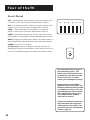
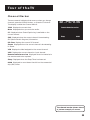
12:01 Displays the current time.
12:01
Mute
Stereo VCR VID1
CC SAP PIP Chan
Remote batteries are low
Mute Displayed when you mute the audio.
CC Displayed when Closed Captioning is available on the
current channel.
SAP Displayed when the current channel is broadcasting
SAP (Second Audio Program) information.
Sleep
00:00
PIP Chan Displays the current PIP channel.
Stereo Displayed when the current channel is broadcasting
in Stereo.
VCR Displays the label assigned to the current channel.
VID1 Displays the current channel or input channel.
Remote batteries are low Displayed when the batteries in
the remote need to be replaced.
Sleep Displayed when the Sleep Timer has been set.
00:00 Displayed to count down time left on the commercial
skip (SKIP) timer.
The channel marker shown above
is just an example, of course.
35
36
Quick Reference
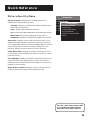
A SHORT GUIDE TO THE MENU SYSTEM
This section provides a brief explanation of all the
menu commands. These commands are organized in
the chapter by their location in the Main Menu.
•
Audio Contains the controls that let you adjust
the way the TV sounds.
•
Picture Quality Contains the controls that let
you adjust the picture.
•
Screen Contains the controls that let you adjust
the Closed-Caption mode and display.
•
Time Contains the controls that let you set the
time and schedule the TV to turn off and on at
specific times.
•
Channel Contains all the commands used to
control your channels, including custom-building
your channel list, setting parental controls, and
setting up your TV to control the components
connected to the TV.
37
Quick Reference
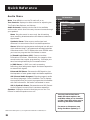
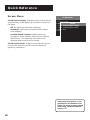
Audio Menu
Mute Press MENU to turn the TV audio off or on.
Tone Controls Displays the slider controls for adjusting the
TV’s Treble, Bass, Balance, and Volume.
Audio Processor Displays a choice list of the available
audio modes, which control the way the sound comes through
your speakers.
Mono Plays the sound in mono only. Use this setting
when receiving broadcasts where the distance makes the
signal weak.
TV Main Menu
1
2
3
4
5
6
0
Audio
Picture Quality
Screen
Audio
Time 1 Mute
Channel
2 Tone Controls
Setup3 Audio Processor
Exit
4 Speakers
0 Exit
Synthetic Stereo Takes a mono audio signal and
enhances it to sound more like it has stereo separation.
Stereo Splits the incoming stereo audio signal into left and
right channels. Most TV programs and recorded materials
have stereo audio. The TV displays the word STEREO when
you tune to a program that is broadcast in stereo.
( •) Sound Logic Stereo (SLS) Evens out sudden
fluctuations in volume. Commercials, for example, often
sound louder than regular programming. SLS keeps your
ears from being blasted by the increased volume.
( •) SRS Stereo (• ) SRS* is an audio processing
technology that adds greater depth and stereo separation
to stereo audio signals.
Enhanced SRS Stereo Enhances the SRS signal to give
the impression of even greater depth and stereo separation.
SAP (Second Audio Program) Plays the program’s audio
in a second language, if one is available. The TV displays
the word SAP when you tune to a program that is broadcast
with SAP information. SAP audio is broadcast in mono.
SAP in Synthetic Stereo Enhances the mono SAP (Second
Audio Program) to sound like it has stereo separation.
Speakers Displays a choice list that lets you turn the TV’s
internal or external speakers on or off.
You may notice that fewer
Audio Processor options are
available when you’re tuned to
a video input than when you’re
watching broadcast channels.
For more on the menus, see
Using the Menu System, p. 7.
*SRS and the SRS symbol (•) are registered trademarks of SRS Labs, Inc.
38
Quick Reference
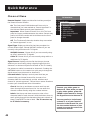
Picture Quality Menu
Picture Controls Displays the five slider controls for
adjusting the way the picture looks.
Contrast Adjusts the difference between the light and
dark areas of the picture.
Color Adjusts the richness of the color.
Tint Adjusts the balance between the red and green levels.
Black Level Adjusts the brightness of the picture.
TV Main Menu
1
2
3
4
5
6
0
Audio
Picture Quality
Screen
Picture Quality
Time
1 Picture Controls
Channel
2 Auto Color
Setup
3 Video Noise Filter
Exit
4 Color Warmth
5 Reset Picture Controls
0 Exit
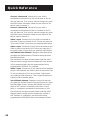
Sharpness Adjusts the crispness of edges in the picture.
Auto Color Displays a choice list that lets you turn on the
feature that automatically corrects the color of the picture.
(This is especially useful for tracking realistic flesh tone colors
as you switch from channel to channel.) Select Off if you
prefer to adjust the picture with the Picture Controls.
Video Noise Filter Displays a choice list that lets you turn
on the feature that automatically filters out noise, or “snow,”
from the picture.
Color Warmth Displays a choice list that lets you set one of
three automatic color adjustments: Cool for a more blue
palette of picture colors; Normal; and Warm for a more red
palette of picture colors.
Reset Picture Controls Displays a choice list that lets you
reset the picture controls to their original settings.
Turn the Auto Color feature OFF
if you prefer to adjust the picture with the picture controls.
39
Quick Reference
Screen Menu
Closed Caption Display Displays a choice list that lets you
choose the way closed captioning information is shown on
the screen.
Off No captioning information displayed.
On Always Captioning information shown always,
when available.
TV Main Menu
1
2
3
4
5
6
0
Audio
Picture Quality
Screen
Screen
Time1 Closed-Caption Display
Channel
2 Closed-Caption Mode
Setup0 Exit
Exit
On When Sound is Muted Displays captioning
information, when available, whenever you press the
MUTE button. The captioning information is not
displayed when the sound is not muted.
Closed Caption Mode Displays a choice list that lets you
choose which captioning mode is used for displaying
captioning information.
Adjust Projection TV (projection sets only): Displays a choice
list that lets you adjust the projection TV’s color alignment.
Select Blue Convergence and use the arrows to line up the
cross hair that appears over a black background, then press
MENU. Repeat for Red Convergence. Point to Exit and press
MENU to return to the Screen Menu.
Captioning information is not
available on all channels at all
times. For more on using closed
captioning, see Advanced Features, p. 51
40
Quick Reference
Time Menu
Sleep Timer Displays a control panel that lets you select
the amount of time you want to give the TV before it shuts
itself off.
Schedule Displays a control panel that lets you set up a
schedule for turning the TV on and off automatically. Make
sure to turn the schedule On. The on-screen directions
guide you through the steps needed to set the schedule.
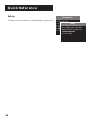
TV Main Menu
1
2
3
4
5
6
0
Audio
Picture Quality
Screen
Time
Time 1 Sleep Timer
Channel
2 Schedule
Setup3 Set Time
Exit 0 Exit
Set Time Displays a control panel that lets you enter the
current time. The on-screen directions guide you through the
steps needed to set the schedule.
You have to set the current time
before using the Schedule function.
Tip for Using Schedule:
To turn the TV into an alarm
clock, press RESET to blank both
the Start and Stop Time fields.
Then set the Start Time. The TV
will come on in the morning,
and stay on until you turn it off.
(I try to stay away from early
morning news programs, because
the newscasters’ voices seem to
lull me back to sleep.)
41
Quick Reference
Channel Menu
Parental Control Displays a choice list that lets you adjust
the Parental Control feature.
On The front panel CHAN buttons will tune only to
channels that you have marked as “Parent Approved” in
the Lists and Labels control panel (see below).
Important: When Parental Control is on, the TV’s front
panel no longer provides access to the menus. Parents may
prefer to hide the remote and let children use the front
panel to change channels.
TV Main Menu
1
2
3
4
5
6
0
Audio
Picture Quality
Channel
Screen
Time1 Parental Control
Channel
2 Signal Type
Setup
3 Signal Source
Exit
4 Lists and Labels
5 Auto Channel Search
6 Auto Tuning
0 Exit
Off The TV shows all channels, whether they are marked
as “Parent Approved” or not.
Signal Type Displays a choice list that lets you select the
current antenna type. Choose UHF/VHF Antenna if you are
currently using an antenna for TV signals.
UHF/VHF Antenna Choose this if you are currently using
an off-air antenna for TV signals.
Cable TV Choose this if you are currently using cable or a
cable box for TV signals.
Signal Source Displays a choice list that lets you choose
whether you are currently using a signal plugged into the
Antenna A or Antenna B jacks on the back of the TV. Usually,
the antenna or cable is connected to Antenna A. Pressing the
ANTENNA button on the remote is a quick way to change the
signal source from Antenna A to Antenna B.
Lists and Labels Displays a control panel that lets you
custom-build your Normal channel list, choose a fourcharacter label for each channel, and set whether each
channel is “parent-approved.” Follow the on-screen directions
to enter your channels and other information.
Chan # Use the up and down arrows to scroll up and
down through the channel scan list. You can enter the
channel number directly using the number buttons.
Labels Use the up and down arrows to enter a fourcharacter label for each channel. Hold the button down to
scroll quickly through the characters (there are a bunch of
them). Press RESET to clear a label. The TV can store up
to 67 labels in memory.
42
Connect your video game to
Antenna B. Then, when you want
to play video games, press ANTENNA on the remote to change
the Signal Source to Antenna B.
You may prefer to include only
a dozen or so of your favorite
channels in the Normal list, and
use the number buttons on the
remote to access the rest of the
channels as desired.
Quick Reference
Normal List Only the channels included in the Normal
list are available when you scan up and down using the
CHAN buttons. Use the up and down arrows to indicate
whether the channel number indicated is included (YES)
or is not included (NO) in the Normal channel list.
Parent Approved Use the up and down arrows to
choose whether the channel indicated should be shown
when the Parental Control feature is turned on. Select YES
to indicate that the channel can be shown at any time,
regardless of whether Parental Control is turned on. Select
NO to indicate that the front panel cannot tune to that
channel when Parental Control is turned on. Important:
You must turn on the Parental Control feature ON in the
Parental Control control panel (see above).
Auto Channel Search Displays a control panel that lets you
tell the TV to search automatically for all the channels
available through the antenna input(s). When the TV finds an
active channel, it places it in the channel list; inactive
channels (weak stations or channels with no signal at all) will
be removed from the channel list.
Auto Tuning Displays a choice list that lets you set up TV to
automatically tune to the correct input channel when you
press VCR1, VCR2•LD, or DSS•CABLE.
Set VCR 1 Channel Displays a choice list that lets you
select the channel that the TV tunes to when you press
the VCR1 button. The choices are:
Not Connected Choose this if you do not have a VCR
connected to an antenna or Video input on the back of
the TV, or if you don’t want the TV to tune to a channel
when the VCR1 button is pressed.
Channel 3 Antenna A Choose this if your VCR is
connected to the Antenna A jack on the back of the TV,
and you want the TV to tune to channel 3 when you press
the VCR1 button. Reminder: Make sure the VCR’s Ch 3/4
switch is set to channel 3.
Channel 4 Antenna A Choose this if your VCR is
connected to the Antenna A jack on the back of the TV,
and you want the TV to tune to channel 4 when you press
the VCR1 button. Reminder: Make sure the VCR’s Ch 3/4
switch is set to channel 4.
Auto Tuning is part of the interactive setup routine. For more,
see Interactive Setup, p. 15.
43
Quick Reference
Channel 3 Antenna B Choose this if your VCR is
connected to the Antenna B jack on the back of the TV,
and you want the TV to tune to channel 3 when you press
the VCR1 button. Reminder: Make sure the VCR’s Ch 3/4
switch is set to channel 3.
Channel 4 Antenna B Choose this if your VCR is
connected to the Antenna B jack on the back of the TV,
and you want the TV to tune to channel 4 when you press
the VCR1 button. Reminder: Make sure the VCR’s Ch 3/4
switch is set to channel 4.
Video 1 Input Choose this if your VCR is connected to
the Video 1 jacks on the back of the TV and you want the
TV to tune to Video I input when you press the VCR1 button.
Video 2 Input Choose this if your VCR is connected to the
Video 2 jacks on the back of the TV and you want the TV
to tune to Video 2 input when you press the VCR1 button.
Set DVD/VCR 2/LD Channel Displays a choice list that lets
you select the channel that the TV tunes to when you press
the VCR2•LD button.
The choices are the same as those listed under Set VCR 1
Channel, above, except that the component is the second
VCR or laserdisc player, and the remote button being
programmed is VCR2•LD. For example:
Video 2 Input Choose this if your second VCR or laserdisc
player is connected to the Video 2 jacks on the back of the
TV and you want the TV to tune to Video 2 input when
you press the VCR2•LD button. This is a typical setting for
a second VCR or laserdisc player.
Set DSS/Cable Channel Displays a choice list that lets
you select the channel that the TV tunes to when you press
the DSS•CABLE button. Usually, DSS•CABLE can control
either a DSS ® receiver connected to the Video 1 input
jacks, or a cable box connected to the Antenna A jack.
The choices are the same as those listed under Set VCR 1
Channel, above, except that the component is either a
DSS® Receiver or a cable box, and the button being
programmed is DSS•CABLE. Here is an example for each:
44
Quick Reference
Video 1 Input Choose this if your DSS® Receiver is
connected to the Video 1 jacks on the back of the TV and
you want the TV to tune to Video 1 input when you press
the DSS•CABLE button. (This is the typical setting for a
DSS® Receiver.)
Ch 3 Antenna A Choose this if your cable box is
connected to the Antenna A jack on the back of the TV
and you want the TV to tune to channel 3 when you press
the DSS•CABLE button. (This is a typical setting for a
cable box.)
45
Quick Reference
Setup
The Setup routine is detailed in Interactive Setup, pages 15-22.
TV Main Menu
1
2
3
4
5
6
0
Audio
Picture Quality
Setup
Screen
Time The Setup function will help
Channel
you configure your television.
SetupWould you like to begin now?
Exit 1 Begin setup now
2 Cancel setup
46
Advanced Features
This section details how to use four of
the TV’s important features:
•
PIP (Picture-in-Picture) Operation
•
Displaying On-Screen Program Details
•
Using Closed Captioning
•
Choosing an Audio Processor
For more about the different
menus and control panels in the
menu system, see Quick Reference, p. 37.
47
Advanced Features
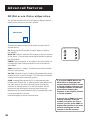
PIP (Picture-in-Picture) Operation
The PIP feature (picture-in-picture) lets you display a second,
smaller picture on top of the main picture.
Main Picture
PIP
There are six remote buttons that control the way the PIP
window works:
SWAP
–
+
MOVE PIP
MOVE
FREEZE
CH CTRL
XPAN
SCAN
D
MOVE PIP Lets you move the PIP window to the four corners
of the screen. (You can also use the MOVE arrows to position
the PIP window.)
PIP
E
PIP Brings up the PIP window. Press PIP again to remove
the window.
FREEZE Takes a snapshot of the video in the PIP window. To
unfreeze the video, change channels in the PIP window or
press SWAP.
SWAP Switches, or “swaps,” the video from the PIP window
with the main picture.
CH CTRL (Channel Control) Pressing PIP automatically places
channel control in the PIP window. CH CTRL lets you transfer
channel control back to the main picture.
SCAN Pressing SCAN causes the TV to automatically scan
through your channel list. If channel control (see above) is on
the main picture, the main picture will scan through the
channels. If channel control is on the PIP window, the PIP
picture will scan through the channels. Each channel is
displayed for four seconds before the TV automatically tunes
to the next channel in the list.
If you press FREEZE before the
PIP window is displayed, the
current channel’s video is frozen
in the PIP window, allowing you
to change channels on the main
picture while keeping the
snapshot of the original channel
in the PIP window.
Press SCAN again to stop the channel scan.
A typical use of SWAP is to scan
through channels in the PIP
window, and when you find a
channel you like, press SWAP to
display that channel in the main
picture, sending the current
channel to the PIP window.
48
Advanced Features
Two Tips for Using PIP Buttons
Automatic Channel Surfing in the Main Picture
You can auto-surf through the channels between commercials
using the SKIP and SCAN buttons.
1. Press SKIP to set the commercial skip timer and send the
current channel to the PIP window.
2. Press SCAN. The main picture auto-surfs through the channel
list. When the SKIP feature times out, the original channel
will return automatically to the main picture.
Automatic Channel Surfing in the PIP Window
You can use the PIP window to auto-surf through channels
as well.
1. Press PIP to bring up the PIP window.
2. Press SCAN. The TV begins displaying each channel in the PIP
window. If you see a channel that interests you, press SWAP.
49
Advanced Features
Closed Captioning
Many programs are encoded with closed captioning
information, which lets you display the audio portion of a
program as text on the TV screen. You can tell the TV to
display closed captioning: a) never, b) whenever it is available,
or c) whenever the MUTE button is pressed.
To display Closed Captioning
1. Press MENU to bring up the Main Menu.
2. Point to Screen and press MENU. The Screen Menu comes
up with Closed Caption Display highlighted.
3. Press MENU to select Closed Caption Display.
Closed-Caption Display
1 Off
2 On Always
3 On when sound is muted
Off No closed captioning information will be displayed.
On always Closed captioning will be displayed whenever
it is available.
On when muted Closed captioning will be displayed
only when you mute the sound by pressing MUTE.
4. Point to your choice and press MENU to select it and
return to the Screen menu.
Closed captioning is not available on all channels at all
times. Only specific programs
encoded with closed captioning
information are applicable.
When a program is closed captioned, the letters CC are displayed in the channel marker.
50
Advanced Features
Closed Captioning Modes
The TV offers eight closed-captioned modes, including four
text modes.
To Set the Closed Captioning Mode:
1. Select Screen from the Main Menu
2. Point to Closed-captioned mode and press MENU. This
choice list comes up:
Closed-Caption Mode
1
2
3
4
5
6
7
8
CC1
CC2
CC3
CC4
Text 1
Text 2
Text 3
Text 4
3. Point to your choice and press MENU to select it and
return to the Screen menu.
Turning off Closed Captioning
1. Select Screen from the Main Menu.
2. Press MENU to select Closed Captioned Display
3. Point to Off and press MENU. The closed captioning is
turned off and you are returned to the Screen menu.
If you are unsure of the differences among the modes, you may
prefer to leave the closed captioned mode set to CC1, which
displays complete text of the program in the primary language in
your area.
51
Advanced Features
On-screen Program Details
Program providers have the option of sending information
through the airwaves along with their programs. If this
information is available, the TV can display it when you press
DISPLAY. To display the on-screen program details:
1. Press DISPLAY once to bring up the channel marker.
2. Press DISPLAY again to bring up the program title and the
program's length and elapsed time.
3. Press DISPLAY again for other program details such as the
story line and whether Closed-Captioning is available.
4. Press DISPLAY again to clear the screen.
Whether all (or any) of the program details are displayed depends on whether the program
provider has sent the information along with the program.
52
Advanced Features
Choosing an Audio Processor
Changing the audio processor changes the way your TV
sounds. There are two ways to change the audio processor: a)
from the Audio menu, and b) by pressing (•)SRS on the
remote. For more, see Audio, page 40.
Choosing an audio processor from the Audio Menu
1. Press MENU to bring up the Main Menu.
2. Press MENU again to select the Audio menu.
3. Point to Audio Processor and press MENU. The Audio Processor
choice list comes up, with the current mode highlighted.
4. Point to an audio processor mode and press MENU to
select it and return to the Audio menu. The options are:
Mono Plays the sound in mono only.
Synthetic Stereo Takes a mono audio signal and
enhances it to sound more like it has stereo separation.
Stereo Splits the incoming stereo audio signal into left
and right channels.
( •) Sound Logic Stereo (SLS) Evens out sudden
fluctuations in volume. Commercials, for example, often
sound louder than regular programming. SLS keeps your
ears from being blasted by the increased volume.
( •) SRS Stereo (•) SRS* is an audio processing
technology that adds greater depth and stereo separation
to stereo audio signals.
Enhanced (•)SRS Stereo Enhances the SRS signal to give
the impression of even greater depth and stereo separation.
SAP (Second Audio Program) Plays the program’s
audio in a second language, if one is available. Setting the
audio processor to SAP tells the TV to play the program's
audio in this second language, if one is available.
SAP in Synthetic Stereo Enhances the mono SAP (Second
Audio Program) to sound like it has stereo separation.
Choosing an audio processor from the remote
1. Press (•)SRS to display the current audio processor mode
on the screen.
2. Press (•)SRS repeatedly to toggle through the different
audio modes. The TV displays the name of the current
audio processor mode each time you press (•)SRS.
•
( ) SRS
The number of audio processor
choices available depends on the
type of signal you are currently
using. For example, depending
on the way you have your VCR
connected to the TV, the number
of choices is greater when you
are watching TV than when you
are watching a video tape.
*SRS and the SRS symbol (•) are registered trademarks of SRS Labs, Inc.
53
54
Appendix A: Using the TV Connections
Things to DO Before Connecting
Components
Protect your components from power surges
•
Connect all components before plugging any power
cords into the wall outlet.
•
Always turn off the TV and/or component before you
connect or disconnect any cables.
Position cables correctly to avoid audio hum or
interference
•
Insert all cable plugs firmly into their jacks.
•
Place the audio/video cables to the sides of the TV’s
back panel instead of straight down the middle after
you connect your components.
•
Try not to coil any twin-lead cables and keep them
away from the audio/video cables as much as possible.
•
Make sure all antennas and cables are properly
grounded. Refer to the Safety Tips sheet packed with
your TV.
Protect your components from overheating
•
Do not block ventilation holes in any of the
components. Arrange the components so that air can
circulate freely.
•
Do not stack components.
•
Allow adequate ventilation when placing your
components in a stand.
•
Place an amplifier on the top shelf of the stand so heated
air rising from it will not flow around other components.
Connect audio/video cables for best results
•
Required for picture-in-picture feature.
Important: This section assumes
that you have already used the
Interactive Setup and programmed the remote.
55
Appendix A: Using Connection A
TV and MONO VCR (Connection A)
This information applies to Connection A in the
Connections Foldout.
Connection A provides:
•
Stereo sound from broadcast programs
•
Mono sound from VCR
•
Picture in Picture (PIP)
•
Watch one channel on TV while recording another channel
To use this connection you must have:
•
(2) audio/video cables
•
(2) coaxial cable
To connect:
1. Connect cables as shown in Connection A.
2. Return to First Things First, then follow the steps in the
Interactive Setup.
Using Connection A
To watch TV programs:
1. Turn VCR off.
2. Press TV and tune to a channel.
To record one program and watch another:
1. Press VCR1 and tune to a channel.
CABLE BOX
IN
OUT
OR
ANTENNA
2. Begin recording.
3. Make sure the TV/VCR switch on the VCR is set to TV.
VCR 1
IN FROM ANT
CH3
CH4
4. Press TV and tune to a channel.
AUDIO
OUT TO TV
VIDEO
To play a tape on the VCR:
TV
1. Press VCR1.
L
2. Press PLAY.
L
VIDEO 1
R VIDEO S-VIDEO
S-VIDEO
R VIDEO
VIDEO 2
ANT A ANT B
See Connections Foldout,
Connection A
56
Appendix A: Using Connection B
TV and STEREO VCR (Connection B)
This information applies to Connection B in the
Connections Foldout.
Connection B provides:
•
Stereo sound from broadcast programs
•
Stereo sound from VCR
•
Picture in Picture (PIP)
•
Watch one channel on TV while recording another channel
To use this connection you must have:
•
(2) coaxial cables
•
(3) audio/video cables
•
(1) S-Video cable (optional)
To connect:
1. Connect cables as shown in Connection B.
2. Return to First Things First, then follow the steps in the
Interactive Setup.
Using Connection B
To watch TV programs:
1. Turn VCR off.
2. Press TV and tune to a channel.
To record one program and watch another:
CABLE BOX
IN
OUT
OR
ANTENNA
1. Press VCR1 and tune to a channel.
2. Begin recording.
VCR 1
IN FROM ANT
OUT
3. Make sure the TV/VCR switch on the VCR is set to TV.
L
CH3
CH4
S-VIDEO
R
OUT TO TV
VIDEO
4. Press TV and tune to a channel.
To play a tape on the VCR:
TV
L
1. Press VCR1.
VIDEO 1
R VIDEO
S-VIDEO
S-VIDEO
L
R VIDEO
VIDEO 2
ANT A ANT B
2. Press PLAY.
See Connections Foldout,
Connection B
57
Connection
Appendix
A:CUsing Connection C
TV, VCR and Laserdisc Player
(Connection C)
This information applies to Connection C in the
Connections Foldout.
Connection C provides:
•
Stereo sound from broadcast programs
•
Stereo sound from VCR
•
Picture in Picture (PIP)
•
Watch one channel on TV while recording another channel
To use this connection you must have:
•
(2) coaxial cables
•
(6) audio/video cables
•
(2) S-Video cables (optional)
To connect:
1. Connect cables as shown in Connection C.
2. Return to First Things First, then follow the steps in the
Interactive Setup.
Using Connection C
To watch TV programs:
1. Turn VCR off.
2. Press TV and tune to a channel.
To record one program and watch another:
1. Press VCR1 and tune to a channel.
CABLE BOX
IN
2. Begin recording.
3. Make sure the TV/VCR switch on the VCR is set to TV.
OUT
ANTENNA
VCR 1
IN FROM ANT
L
CH3
CH4
S-VIDEO
OUT
4. Press TV and tune to a channel.
To play a tape on the VCR:
OR
R
OUT TO TV
VIDEO
LASERDISC
PLAYER
S-VIDEO
VIDEO
1. Press VCR1.
2. Press PLAY.
TV
L
VIDEO 1
R VIDEO
L
R
AUDIO
S-VIDEO
S-VIDEO
L
R VIDEO
VIDEO 2
ANT A
ANT B
To play a laserdisc:
1. Press VCR2.
2. Press PLAY.
58
See Connections Foldout,
Connection C
Appendix A: Using Connection D
TV and (2) VCRs (Connection D)
This information applies to Connection D in the
Connections Foldout.
Connection D provides:
•
Stereo sound from broadcast programs
•
Stereo sound from VCR
•
Picture in Picture (PIP)
•
Watch one channel on TV while recording another channel
•
Record from one VCR to the other
To use this connection you must have:
•
(3) coaxial cables
•
(6) audio/video cables
•
(1) S-Video cables (optional)
To connect:
1. Connect cables as shown in Connection D.
2. Return to First Things First, then follow the steps in the
Interactive Setup.
Using Connection D
To watch TV programs:
1. Turn VCR off.
2. Press TV and tune to a channel.
To record one program and watch another:
CABLE BOX
IN
1. Turn VCR2 off.
OUT
OR
ANTENNA
2. Press VCR1 and tune to a channel.
3. Begin recording.
VCR 1
IN FROM ANT
4. Make sure the TV/VCR switch on the VCR1 is set to TV.
CH3
CH4
S-VIDEO
OUT
L
R
VIDEO
L
R
IN
OUT TO TV
VIDEO
5. Press TV and tune to a channel.
VCR 2
IN FROM ANT
CH3
CH4
L
To play a tape on the VCR:
1. Press VCR1.
2. Press PLAY.
TV
L
VIDEO 1
R VIDEO
OUT TO TV
R VIDEO
OUT
S-VIDEO
S-VIDEO
L
R VIDEO
VIDEO 2
ANT A ANT B
See Connections Foldout,
Connection D
59
Appendix A: Using Connection D
To record from one tape to another (tape dubbing):
1. Insert original tape into VCR2.
2. Insert blank tape into VCR1.
3. Press VCR1.
3. Set VCR to line input (for more, see your VCR User Manual).
4. Press RECORD to begin recording.
5. Press VCR2•LD, then press PLAY.
6. If you want to watch a different channel, set both the
TV/VCR switch on both VCRs to TV; press TV; then tune to
a channel.
Caution: The unauthorized recording of copyrighted material may
infringe upon the rights of others.
60
Appendix A: Using Connection E
TV and Laserdisc Player
(Connection E)
This information applies to Connection E in the
Connections Foldout.
Connection E provides:
•
Stereo sound from broadcast programs
•
Picture in Picture (PIP)
To use this connection you must have:
•
(1) coaxial cable
•
(3) audio/video cables
•
(1) S-Video cable (optional)
To connect:
1. Connect cables as shown in Connection E.
2. Return to First Things First, then follow the steps in the
Interactive Setup.
Using Connection E
To watch TV programs:
1. Press TV and tune to a channel.
To play a laserdisc:
1. Press VCR2•LD.
2. Press PLAY.
CABLE BOX
IN
OUT
LASERDISC
PLAYER
OUT
L
TV
L
OR
ANTENNA
S-VIDEO
R
VIDEO
VIDEO 1
R VIDEO
S-VIDEO
S-VIDEO
L
R VIDEO
VIDEO 2
ANT A ANT B
See Connections Foldout,
Connection E
61
Appendix A: Using Connection F
TV and DSS® Receiver (Connection F)
This information applies to Connection F in the
Connections Foldout.
Connection F provides:
•
Stereo sound from broadcast programs
•
Stereo sound from the DSS® receiver
•
Picture in Picture (PIP)
To use this connection you must have:
•
(3) coaxial cables
•
(3) audio/video cables
•
(1) S-Video cable (optional)
•
Stereo sound from DSS® programming
To connect:
1. Connect cables as shown in Connection F.
2. Return to First Things First, then follow the steps in the
Interactive Setup.
Using Connection F
To watch TV programs:
1. Turn DSS® receiver off.
2. Press TV and tune to a channel.
To watch DSS® programming:
1. Press DSS•CABLE and tune to a channel.
CABLE BOX
SATELLITE DISH
IN
OUT
DSS
RECEIVER
OR
ANTENNA
IN FROM ANT
CH3
CH4
S-VIDEO
OUT
OUT TO TV
L
R VIDEO
L
VIDEO 1
R VIDEO
TV
SATELLITE
IN
S-VIDEO
S-VIDEO
L
R VIDEO
VIDEO 2
ANT A ANT B
See Connections Foldout,
Connection F
62
Appendix A: Using Connection G
TV, VCR, and DSS® Receiver
(Connection G)
This information applies to Connection G in the
Connections Foldout.
Connection G provides:
•
Stereo sound from broadcast programs
•
Stereo sound from VCR
•
Picture in Picture (PIP)
•
Watch one channel on TV while recording another channel
To use this connection you must have:
•
(4) coaxial cables
•
(6) audio/video cables
•
(2) S-Video cables (optional)
To connect:
1. Connect cables as shown in Connection G.
2. Return to First Things First, then follow the steps in the
Interactive Setup.
Using Connection G
To watch TV programs:
1. Turn VCR and DSS® receiver off.
2. Press TV and tune to a channel.
CABLE BOX
SATELLITE DISH
IN
OUT
OR
ANTENNA
To watch DSS® programming:
1. Press DSS•CABLE and tune to a channel.
DSS
RECEIVER
IN FROM ANT
CH3
CH4
S-VIDEO
OUT TO TV
L
R VIDEO
AUDIO
SATELLITE
IN
To record off-air broadcasts and watch a different channel:
1. Turn DSS® receiver off.
VCR 1
IN FROM ANT
OUT
VIDEO R
CH3
CH4
S-VIDEO
OUT TO TV
L
2. Press VCR1 and tune to a channel.
3. Begin recording.
TV
L
4. To watch another channel, make sure the TV/VCR switch
on the VCR is set to TV; then press TV and tune to a channel.
VIDEO 1
R VIDEO
S-VIDEO
S-VIDEO
L
R VIDEO
VIDEO 2
ANT A ANT B
To play a tape on the VCR:
1. Press VCR1 and then press PLAY.
See Connections Foldout,
Connection G
63
Appendix A: Using Connection H
TV, VCR, DSS® Receiver, and Laserdisc
Player (Connection H)
This information applies to Connection H in the
Connections Foldout.
Connection H provides:
•
Stereo sound from broadcast programs
•
Stereo sound from VCR
•
Picture in Picture (PIP)
•
Watch one channel on TV while recording another channel
To use this connection you must have:
•
(4) coaxial cables
•
(6) audio/video cables
•
(2) S-Video cables (optional)
To connect:
1. Connect cables as shown in Connection H.
2. Return to First Things First, then follow the steps in the
Interactive Setup.
Using Connection H
To watch TV programs:
1. Turn VCR and DSS® receiver off.
2. Press TV and tune to a channel.
To watch DSS® programming:
CABLE BOX
OUT
1. Press DSS•CABLE and tune to a channel.
To record off-air (cable or antenna) broadcasts and
watch a different channel:
1. Turn DSS® receiver off.
SATELLITE DISH
IN
DSS
RECEIVER
OR ANTENNA
IN FROM ANT
CH3
CH4
S-VIDEO
OUT TO TV
L
R VIDEO
AUDIO
VCR 1
SATELLITE
IN
IN FROM ANT
CH3
CH4
OUT TO TV
S-VIDEO
VIDEO R
L
AUDIO
2. Press VCR1 and tune to a channel.
3. Press RECORD to begin recording.
TV
L
VIDEO 1
R
VIDEO
S-VIDEO
S-VIDEO
4. To watch another channel, make sure the TV/VCR switch
on the VCR is set to TV; then press TV and tune to a channel.
L
R
VIDEO
VIDEO 2
ANT A ANT B
See Connections Foldout,
Connection H
64
LASERDISC
PLAYER
Appendix A: Using Connection H
To play a tape on the VCR:
1. Press VCR1 and then press PLAY.
To play a laserdisc:
1. Press VCR2•LD and then press PLAY.
65
Appendix A: Using Connection I
TV, (2) VCRs, and DSS® Receiver
(Connection I)
This information applies to Connection I in the
Connections Foldout.
Connection I provides:
•
Stereo sound from broadcast programs
•
Stereo sound from VCR
•
Picture in Picture (PIP)
•
Watch one channel on TV while recording another channel
To use this connection you must have:
•
(5) coaxial cables
•
(9) audio/video cables
•
(2) S-Video cables (optional)
To connect:
1. Connect cables as shown in Connection I.
2. Return to First Things First, then follow the steps in the
Interactive Setup.
Using Connection I
To watch TV programs:
1. Turn VCR and DSS® receiver and laserdisc player off.
2. Press TV and tune to a channel.
CABLE BOX
SATELLITE DISH
IN
OUT
OR
ANTENNA
To watch DSS® programming:
1. Press DSS•CABLE and tune to a channel.
To record from one VCR to the other (tape dubbing):
DSS
RECEIVER
IN FROM ANT
CH3
CH4
S-VIDEO
OUT TO TV
L
R VIDEO
AUDIO
SATELLITE
IN
VCR 1
IN FROM ANT
CH3
CH4
S-VIDEO
L
R VIDEO
OUT
L
R
IN
VIDEO
OUT TO TV
1. Turn DSS® receiver off.
VCR 2
IN FROM ANT
CH3
CH4
2. Insert original tape into VCR2.
L
R VIDEO
OUT
OUT TO TV
3. Insert blank tape into VCR1.
TV
4. Press VCR1.
L
S-VIDEO
S-VIDEO
L
5. Set VCR to line input (for more, see your VCR User Manual).
VIDEO 1
R VIDEO
R VIDEO
VIDEO 2
ANT A ANT B
6. Press RECORD to begin recording.
7. Press VCR2•LD, then press PLAY.
8. If you want to watch a different channel, set the TV/VCR
switch on both VCRs to TV; press TV; then tune to a channel.
66
See Connections Foldout,
Connection I
Appendix A: Using Connection I
To record off-air (cable or antenna) broadcasts and
watch a different channel:
1. Turn off VCR2.
2. Insert blank tape into VCR1.
3
Press VCR1.
4. Make sure to set VCR1 to line input.
5. Press RECORD to begin recording
6. To watch another channel, make sure the TV/VCR switch
on the VCR is set to TV; then press TV and tune to a channel.
To play a tape on VCR1:
1. Press VCR1 and then press PLAY.
Caution: The unauthorized recording of copyrighted material may
infringe upon the rights of others.
67
Appendix B: Connecting Other COmponents
Connecting External Speakers
You can connect up to four additional speakers to the TV: two
to the FRONT SPEAKERS terminals and two to the REAR
SPEAKERS terminals.
Front Speakers
REAR SPEAKERS
LEFT
RIGHT
To connect external speakers:
FRONT SPEAKERS
1. Connect speakers to the FRONT SPEAKERS terminals.
2. Set the SPEAKER SWITCH to EXTERNAL.
Speaker Connections
Rear Speakers
To connect rear speakers for surround sound effects.
1. Connect two speakers to the REAR SPEAKERS terminals.
2. Position them behind you in your TV room. To improve the
surround sound effect, you may prefer to set or mount the
several feet off the ground.
Connecting Speakers to the TV
1. If necessary, remove the vinyl covering from the ends of
the speaker wire and twist the wire core.
2. Press down and hold the lever on the speaker terminal.
L/MONO
HI-FI OUTPUT
(VOLUME CONTROLLED)
Subwoofer Connection
3. Insert the wire core into the hole. Be sure to connect the
(+) to (+) and (–) to (–).
4. Release the lever. Pull gently on the wire to see that it’s
connected securely.
Important: When connecting the speaker wire, make sure
you connect the positive (+) terminal on the TV to the
positive (+) terminal on the speaker. One side of the
speaker wire is usually marked with a white stripe to help
you match up the terminals correctly. If the (+) and (–)
terminals are not matched properly, the speakers will not
be “in phase,” causing reduction in bass frequencies.
Connecting a Subwoofer
To connect a subwoofer to the TV:
1. Connect the subwoofer’s audio input to the left (L/MONO)
HI-FI OUT jack.
68
IMPORTANT
Do not allow the wire core to
touch other wires or terminals.
Damage to components could
result if the cores of two wires
touch each other.
The TV’s internal speakers are
turned off when you set the
switch to EXTERNAL, so be sure
to reset the switch back to
INTERNAL if you ever disconnect
the speakers from the TV.
Appendix B: Connecting Other COmponents
Connecting Audio Components
Connecting a stereo amplifier
1. Connect the amplifier’s TV audio inputs to the left (L/
MONO) and right (R) HI-FI OUTPUT jacks.
2. You may prefer to turn off the TV's internal speakers by
selecting Speakers from the Audio menu, then turning the
speakers off.
If your audio amplifier is part of a system that uses its own
remote control, you may prefer to connect it to the TV
using the Fixed Output jacks.
Important: Do not use the amplifier’s PHONO inputs. If
the amplifier is not stereo, use the L/MONO HI-FI OUT
jack. Consult the amplifier's owner’s manual for the
manufacturer’s recommended hookup.
Connecting a tape deck
To use a tape deck to record audio from TV:
1. Connect the tape deck’s audio inputs to the FIXED
OUTPUT jacks on the back of the TV.
The FIXED OUTPUT jacks provide
a fixed level audio signal, making
them ideal for audio recording,
or for use with an audio amplifier
that has its own remote control.
No matter how the volume changes on the TV, the output volume
stays the same.
69
Appendix B: Connecting Other COmponents
Connecting a Camcorder
foR Playback
There are two connections recommended for playing back
from the camcorder to the TV:
Front Connection Playback
1. Locate the AV adapter included with your TV accessories.
2. Connect the camcorder’s video output to the adapter’s
video input (yellow).
A•V
3. Connect the camcorder’s audio output to the adapter’s
audio input (white).
4. Connect the adapter to the A•V jack on the front of the TV.
5. Press INPUT on the remote until the channel marker
displays FRNT.
6. Start playback on the camcorder.
Back Connection Playback
1. Connect the camcorder’s audio/video outputs to the
INPUT1 audio and video jacks on the TV.
2. Press INPUT on the remote until the channel marker
displays VID1.
3. Start playback on the camcorder.
Playback from an S-VHS camcorder
To connect a camcorder with S-Video capability:
1. Connect an S-Video cable from the camcorder to the
S-VIDEO jack on the TV.
2. Connect the camcorder’s audio/video outputs to the
INPUT1 audio and video jacks on the TV.
3. Press INPUT on the remote until the channel marker
displays VID1.
4. Start playback on the camcorder.
70
The AV adapter and the A•V
jack on the front of the TV can
be used to connect many types
of audio-video components,
not just camcorders. For example, if you need to connect
a VCR temporarily, use the A•V
jack and adaptor and connect
it to the front of the set. It’s
easy and quicker than connecting to the regular AV jacks on
the back of the TV.
Appendix
Connecting a
a Camcorder
Camcorder
Appendix B:
B: Connecting
Connecting a Camcorder to Record
from the TV
To record from the TV to the camcorder:
1. Connect the camcorder’s audio/video input cables to the TV’s
FIXED OUTPUT jacks.
2. Consult your camcorder’s owner’s manual for instructions on
camcorder recording.
Recording from an S-VHS Camcorder
The TV does not supply video ouput in S-Video form. Use the
connection described above.
The TV must remain on during
recording. If you change channels on the TV, the channel
change will be recorded.
Signals from the S-Video connector do not come through the
FIXED OUTPUT video jack. To
record to an S-Video component, remember to connect its
regular video cable as well as
the S-Video cable.
71
Appendix C: Troubleshooting Tips
Troubleshooting
Troubles sometimes are caused by simple “faults” that you
can correct without the help of a service technician. If you
experience any difficulty with your TV, check a few basic
remedies before calling your service technician.
TV will not turn on
• Check to make sure it is plugged in.
• Check the wall receptacle (or extension cord) to make sure it
is “live” by plugging in something else.
• Maybe batteries in remote control are “dead.”
• Maybe remote control was not aimed at remote sensor.
Controls don’t work
• If using remote control, make sure remote is in TV mode by
first pressing TV button.
• Try unplugging set for two minutes and then plug it back in
and turn it on again.
Problems with Remote
• Maybe something was between the remote and the remote
sensor.
• Maybe the remote was not aimed directly at the component
(TV or VCR) you were trying to control.
• Maybe remote is not in TV Mode. Press the TV button so
remote will control TV.
• Maybe batteries in remote are weak or dead. Try replacing
batteries.
• Maybe batteries were installed incorrectly. Try replacing
batteries correctly.
Turns off while playing
• Schedule function may have been activated.
• Electronic protection circuit may have been activated
because of a power surge. Wait 30 seconds and then turn on
again. If this happens frequently, the voltage in your house
may be abnormally high.
TV Turns on unexpectedly
• Schedule On function may have been activated.
Schedule does not turn off the TV at the set time
• Check schedule on/off function (it must be set to On).
• Check to make sure clock is set to the correct time.
72
Appendix C: Troubleshooting Tips
Blank screen
• Maybe the device connected to the input jacks is not turned on.
• Try another channel.
• Press RESET, in case the picture controls are set too low.
No sound, picture okay
• Maybe sound is muted. Try pressing volume up button to
restore sound.
• Maybe TV’s speakers are turned off. Check Speakers
On/Off function.
• If using an S-VHS component, remember to also connect the
component’s L and R AUDIO OUT jacks to the TV’s L and R
INPUT 1 jacks.
• Maybe SPEAKER switch on the back of the TV is not in the
INTERNAL position.
Can’t select certain channel
• If using a VCR, check to make sure the TV/VCR switch on the
VCR is in the correct position.
Noisy stereo reception
• May be a weak station. Use SRS button to change to mono
mode instead of stereo.
No picture, no sound but power light is on
• Maybe someone changed cable/air function to wrong position.
• Maybe a vacant channel is tuned.
• If watching VCR (connected only through antenna input),
make sure TV is tuned to channel 3 or 4 – same as CH3/4
switch on VCR. Also check to make sure TV/VCR switch on
VCR is in correct position.
Sound okay, picture poor
• Check antenna connections.
• Try adjusting sharpness function to improve weak signals.
Black Box appears on the screen:
• Captioning may be turned on. Check the Closed-Caption
Display control panel in the Channel Menu.
73
Appendix D: Limited Warranty
Limited Warranty
What your warranty covers:
•
Any defect in material or workmanship.
For how long after your purchase:
•
90 days for labor charges.
•
One year for parts.
•
Two years for picture tube.
(The warranty period for rental units begins with the first rental or 45 days from the date of
shipment to the rental firm, whichever comes first.)
What we will do:
•
Pay any Authorized RCA Television Servicenter the labor charges to repair your television.
•
Pay any Authorized RCA Television Servicenter for the new or, at our option, refurbished
replacement parts and picture tube required to repair your television.
How you get service:
•
For screen sizes 20” and smaller: Take your RCA television to any Authorized RCA
Television Servicenter, and pick up when repairs are complete.
•
For screen sizes larger than 20”: Request home service from any Authorized RCA
Television Servicenter.
•
To identify your nearest Authorized RCA Television Servicenter, ask your dealer, look in the
Yellow Pages, or call 1-800-336-1900.
•
Show the service technician your evidence of purchase date or first rental.
What your warranty does not cover:
•
Acts of God, such as but not limited to lightning damage.
•
Customer instruction. (Your Owner’s Manual clearly describes how to install, adjust, and
operate your television. Any additional information should be obtained from your dealer.)
•
Installation and related adjustments.
•
Signal reception problems not caused by your television.
•
Damage from misuse or neglect.
•
Batteries.
•
Customer replacable fuses.
•
Images burnt onto the screen.
•
A television that has been modified or incorporated into other products or is used for
institutional or other commercial purposes.
•
A television purchased or serviced outside the U.S.A.
Product Registration:
•
Please complete and mail the Product Registration Card packed with your set. It will make
it easier to contact you should it ever be necessary. The return of the card is not required
for warranty coverage.
How state law relates to this warranty:
•
This warranty gives you specific legal rights, and you also may have other rights that vary
from state to state.
What if you purchased your television outside the U.S.A.:
•
74
This warranty does not apply. See your dealer for details.
Appendix E: Care and Cleaning
Care and Cleaning
You can clean the TV as required, using a soft cloth or the
dusting attachment for your vacuum cleaner. Be sure to
occasionally vacuum the ventilation slots in the cabinet to
help assure adequate ventilation.
To clean the TV screen, use a diluted soap and water mixture
and a soft cloth. Do not use furniture polish on the TV cabinet
or screen.
While cleaning do not allow liquid to run down the
screen and inside the TV. Also, avoid placing drinks or
vases with water on top of the TV. This could cause
damage to the TV.
75
Accessory Cables
General Cable Information
Antenna (or cable-TV) connections are made with
either coaxial antenna cable or twin-lead cable.
Coaxial cables are shielded so they are less susceptible
to hum or interference from adjacent cables.
The following accessories are available from most RCA
dealers and electronics supply stores in case you want to
position your components farther apart or need
additional cables.
Antenna Cables
Screw-on Cable
Slip-on Connector
Screw-on Connector
Round 75-ohm coaxial cable
Flat 300-ohm twin-lead cable
Most audio/video connections between components
can be made with shielded audio and video cables
that have RCA-type phono connectors.
Attaches to the round antenna
connectors (called 75-ohm F-type) on
the back of your VCR or TV. The ends
screw onto the connectors for a
secure connection.
Push-on Cable
Attaches to the round antenna
connectors (called 75-ohm F-type) on
the back of your VCR or TV. Ends
push on for a quick connection.
Audio/Video Cables
Audio/Video Cable
Shielded cable for connecting AUDIO
and VIDEO jacks. Has an RCA-type
phono plug on each end.
Standard Audio/Video Cable with
RCA-type phono plugs
Color-Coded Jacks
The jacks on the TV’s monitor panel are color-coded for
ease of use. The VIDEO jacks are yellow, the right AUDIO
jacks are red, and the left AUDIO JACKS are white. When
connecting components to each other, be sure that you
always connect left outputs to left inputs and right
outputs to right inputs. If a component has only one
output (mono), connect it to the R/MONO INPUT jack.
To connect S-VHS (Super-VHS) components, an S-VHS
video cable is required.
Gold-Plated Jacks and Gold-Tipped Cables
Your RCA monitor panel is equipped with gold-plated
jacks. The gold plating helps prevent oxidation of
contacts which provides much less loss than conventional
contacts. A complete line of gold-tipped cables is
available to help you obtain optimum performance from
your equipment.
76
Monaural VCR Dubbing Cable
Double cable that lets you connect
the VIDEO and AUDIO JACKS of two VHS
VCRs to duplicate tapes. Can also be
used to connect a VCR to your TV.
Cable is color-coded and shielded.
Has RCA-type phono plugs on each end.
Stereo VCR Dubbing Cable
Triple cable that lets you connect
the VIDEO and AUDIO jacks of stereo
components.
Accessory Order Form
Accessory Order Form for RCA TV Models
Audio/Video Cables continued
Stereo Audio Cable
Double gold-tipped
cable generally used
for connecting stereo
audio components.
POWER
•
FF
REC
STOP
PAUSE
DISPLAY
CHAN
VOL
VOL
SKIP
CH A N
MUTE
1
4
7
PREV CH
2
3
5
6
8
9
INPUT
ANTENNA
•
RESET
OG
PR
MEN
U
0
CLEAR
PIP
CH CTRL
Gold-Tip Push-on Antenna Cable (10-ft) AH066G
$
4.95
Gold-Tip Audio/Video Cable (3-ft)
AH069G
$
3.95
Gold-Tip Audio/Video Cable (5-ft)
AH070G
$
7.99
Gold-Tip Stereo Cable (3-ft)
AH072G
$ 11.95
AH077G
$
9.95
Screw-on Antenna Cable (3-ft)
AH037
$
4.95
Wireless Headphone System
PSWH100 $149.95
S-Video Cable (3-ft)
VAA014
$ 27.55
S-Video Cable (8-ft)
VAA020
$ 29.95
Remote Control (CRK70A1)
221115
$ 41.00
Audio•Video Adapter
228449
$
4.35
Prices are subject to change without notice.
Remote Control
This is the remote control that came packed
with your TV. Replacements or spares can be
ordered as needed.
Total Merchandise ($10 Minimum Order) .....
$
Sales Tax .............................................................
$
We are required by law to collect the
appropriate sales tax for each individual
state, country, and locality to which the
merchandise is being sent.
SWAP
•
5.95
Gold-Tip Stereo Dubbing Cable (6-ft)
FREEZE
( ) SRS
$
Has multi-pin connectors on each end for
connecting S-VHS components to your TV.
MOVE
MOVE PIP
AH065G
5.95
•
PLAY
Gold-Tip Push-on Antenna Cable (6-ft)
$
Use the Audio•Video
adapter to plug a camcorder into the front of
the TV. Replacements
or spares can be ordered
as needed.
VCR1 DSS CABLE TV
Qty
Price
$ 3.95
Gold-Tip Monaural Dubbing Cable (6-ft) AH075G
VCR2 LD AUDIO
REW
Part No.
AH047
S-VHS Video Cable
Audio•Video
Adapter
228449
Description
Signal Splitter
SCAN
CRK70A1
Shipping, Handling, and Insurance ................
$
Total Amount Enclosed ....................................
$
5.00
Detach Here
✂
Use VISA or MasterCard preferably.
Money order or check must be in U.S.
currency only.
No COD or CASH.
All accessories are subject to availability.
Where applicable, we will ship a superseding model.
Please complete other side also
77
Accessories
To order accessories, contact your local RCA
Dealer.
Charge your order on your VISA
or MasterCard by
filling in below
If a dealer is not nearby, you can also follow the
instructions below to order by telephone.
USE YOUR CREDIT CARD
®
IMPORTANT: Copy complete account number
from your VISA card
United States and Canadian Orders
My card expires:
IMPORTANT: Copy complete account number
from your MasterCard
s r
r
TM
To place your order by phone, have your Visa or
MasterCard ready and call the toll-free number
listed below between 8AM and 8PM Eastern
Standard Time. Use this number only to place an
order for accessory items listed on this order
form.
1 – 800 – 338 – 0376
Copy Number
above your
name on
MasterCard
My card
expires:
AUTHORIZED SIGNATURE
Prices are subject to change without notice.
PLEASE
Print or type your name and
address clearly. This will be your
mailing label.
A complete and correct order will
save you days of waiting.
Name:
Street:
Apt:
City:
State:
78
Zip:
Index
CH CTRL 31, 48
CHAN 30
(•) SRS 38, 53
Chan # 42
(0-9) 30
Change the channel 30
Channel Control 48
A
Channel indicator 35
A•V 34
Channel information 30
A•V jack 70
Channel list 18, 30
AAA batteries 5
Channel Marker 35
Active channel 43
Channel menu 9, 42
Additional speakers 68
Channel numbers 30
Advanced Features 47
Choice Lists 12
ANT B input, note 32
Choosing an Audio Processor
ANTENNA 30, 42
53
Antenna A 42
CLEAR 9, 10, 30
Antenna B jack 42
Closed Caption Mode 40
Antenna input 43
Closed Captioning 50
Arrows 31
Closed Captioning indicator 35
AUDIO button 26, 30
Closed captioning information
Audio Codes 26
50
Audio component 30
Closed Captioning Modes 51
Audio modes 38
Closed-Caption Display 40, 50
Audio Processor 38, 53
Closed-Caption Mode 40
Audio processor 31, 53
Color 39
Auto Channel Search 15, 16, 43 Color Warmth 39
Auto channel search 6
Commercial skip timer 35
Auto Color 39
Connect a camcorder 34
Auto Tuning 19, 43
Connecting 2 VCRs 59
Automatic color adjustments 39 Connecting a camcorder 70
Autoprogramming 16
Connecting a stereo amplifier
AV adaptor 34, 70
69
AV jack 4, 34
Connecting a subwoofer 68
Connecting a tape deck 69
B
Connecting audio components
Back Panel 32
69
Back Panel Jacks 32
Connecting Speakers 68
Basic connection 4
Connecting to an A/V receiver
Batteries 4, 5
32
Black level 39
Connecting your TV 4
Connecting your TV and other
C
components 5
Connections
Foldout 4, 19
Cable box 27
Contrast
39
Cable Box Codes 27
Control panels 8, 10, 11
Cable TV 42
Choice Lists 12
Captioning information 40
Numeric Entry 13
Captioning mode 40
Sliders 11
Care and Cleaning 75
Current channel list 30
Symbols
D
Device button 28
DISPLAY 30, 52
Display Closed Captioning 50
DSS receiver 21, 30
DSS remote 21
DSS•CABLE 30
DSS•CABLE button 21, 27
DSS/CABLE Channel 21, 44
DSS/CABLE choice list 21
DVD/VCR2/LD Channel 20
DVD/VCR2/LD choice list 20
E
EDS 52
Enhanced SRS Stereo 38, 53
Enhanced Stereo 38, 53
Entering channel numbers 30
Entering Setup 16
Exit 9
Extended Data Services 52
F
FIXED OUTPUT 32
FIXED OUTPUT jacks 32
FREEZE 31, 48
Front external speakers 33
Front panel 34
Front speakers 68
H
HI-FI OUTPUT 32
HI-FI OUTPUT jacks 32
Highlight 8, 12
Home antenna 12
Home computers, note 32
I
INPUT 30
INPUT 1 32
Input channel indicator 35
Input sources 30
INPUT2 32
Interactive Setup 6, 15, 45
79
Index
L
L/MONO audio jacks 32
Labelling channels 18, 42
Labels 35, 42
Laserdisc player codes 26
Left arrow 12
Limited Warranty 74
Lists and Labels 18, 42
M
Main Menu 31
MENU 10, 12, 31
Menu commands 37
Menu system 10
Menus 10
Mono 38, 53
MOVE 31
MOVE arrows 8, 10, 31
MOVE PIP 31, 48
MUTE 30
Mute 38
N
PIP channel indicator 35
PIP operation 48
PIP window 31, 38, 48
Point and Select 8
Polarity switch 33
POWER button 6
PREV CH button 30
Previous channel 30
Program information 30
Program synopsis 52
Program title 52
Programming the remote
to control an audio
device 26
Programming the Remote
23
Programming the remote
22
Programming the remote to
control a laserdisc play
26
Programming the remote to
control a satellite or c
27
Programming the remotes
24
Normal channel ist 42
Normal channel list 18
Number buttons 10, 30
Q
Numeric entry 13
Numeric entry control panel 13 Quick Reference 37
O
On-screen menus 8
On-screen program details 52
On-screen setup routine 15
Optional stand 4
Original picture settings 39
R
Rear speakers 33, 68
Recommended stand 4
Recording from the TV 32
Remote batteries, low 35
Remote buttons 6, 30
Remote control 10
P
RESET 31
Parent-approved list 18, 42, 43 Reset Picture Controls 39
Parental control 42, 43
Return to TV 12
Picture control 11
REW, PLAY, FF, REC, STOP,
Picture controls 39
PAUSE 30
RIGHT audio jacks 32
Picture Quality Menu 39
Picture Quality menu 11
Right arrow 12
Picture-in-Picture 48
Picture-in-picture 31
PIP 31, 48
80
S
S-VHS camcorder 70
S-Video 32
S-Video Input 70
SAP 38, 53
Satellite Box Codes 27
SCAN 31, 48
Schedule 41
Screen Menu 40
Second Audio Program 38, 53
Select 8
Set DSS•CABLE Channel 44
Set the DSS•CABLE Channel 21
Set the Time 17
Set the VCR1 Channel 19
Set the VCR2•LD Channel 20
Set Time 13, 17, 41
Set Time control panel 13
Set VCR 1 Channel 43
Set VCR 2 Channel 44
Setting DSS•CABLE Channel 21
Setup 16, 45
Setup routine 45
Sharpness 39
Signal Source 32, 42
Signal Type 12, 42
Signal Type Choice list 12
SKIP 30
Sleep Goatee 52
Sleep Timer 41
Sleep Timer display 35
Sliders 11
Snow 39
Speaker Switch 68
Speaker switch 33
Speakers 38
SRS Stereo 38, 53
Stereo 38, 53
Stereo audio signal 38, 53
Stereo headphones 34
Stereo Indicator 35
STRENGTH switches 33
SWAP 31, 48
Index
T
Tape dubbing 60
Things to Know Before
Connecting Components 55
Three-digit channel 30
Time display 35
Time menu 13, 41
Tint 11, 39
Tone controls 38
Tour of the TV 29
Transport control 30
Troubleshooting Tips 72
Turn speakers on or off 38
TV accessories 34
TV and MONO VCR 56
TV button 6, 30
VCR1 Channel 19
VCR2•LD 30
VCR2•LD button 20, 26
VCR2•LD mode 30
VID1 30
VID2 30
Video 1 Input 44
Video 1 Input jacks 19
Video 1 Input Source 44, 70
Video 2 Input 44
Video 2 Input jacks 20
Video cable 44
Video games, note 32
VIDEO jacks 32
Video Noise Filter 39
VOL 30
U
UHF/VHF Antenna 42
Universal remote
4, 23, 24
Universal Remote VCR
Codes 25
Using Connection A 56
Using Connection B 57
Using Connection C 58
Using Connection D 59
Using Connection E 61
Using Connection F 62
Using Connection G 63
Using Connection H 64
Using Connection I 66
Using PIP buttons 49
Using the remote 28
V
VCR 1 Channel 43
VCR 1 choice list 19
VCR 2 Channel 44
VCR Codes 25
VCR mode 30
VCR1 30
VCR1 button 19, 24
81
CREATING A GREENER FUTURE
At Thomson Consumer Electronics we are dedicated to the preservation of our
natural heritage and to a healthy and safe way of life for current and future
generations. This is a global effort which encompasses every THOMSON facility
throughout the world.
We believe that clean air, clean water, a protected earth, and healthy people are not
only practical and desirable goals, but achievable ones as well. Our Corporate
Environmental, Health and Safety Charter acknowledges our commitment to protect
these precious assets and provides a challenging vision and guideline for conducting
our business.
Below are a few examples of Thomson’s achievements in our efforts to preserve our natural resources.
the earth
the air
the water
Thomson reclaims millions of pounds of
hazardous waste annually, diverting it
from landfills.
Thomson has replaced solvent-based
paints at many locations resulting in an
80% reduction in toxic air emissions for
equivelant material used.
Thomson recovers over 2 million
pounds of fine glass particles from
process water each year and recycles
them back into its glass furnaces.
Thomson has eliminated the use of
ozone-depleting substances at television
manufacturing facilities around the
world.
Thomson’s state-of-the-art waste water
treatment plants filter out over 26
million pounds of solids from process
water each year.
Thomson collects and returns over 1.5
million pounds of glass and furnace dust
to the glass making process annually.
Thomson’s U.S. glass factory recycles
2,500 gallons of water per minute and
cleans 2.6 million gallons of water
per day.
Thomson treats millions of pounds of
waste water sludge annually and
renders it non-hazardous.
Thomson recycles over 50 million
pounds of non-hazardous material
annually that otherwise would have
been treated as trash, an overall
recovery rate of 50%.
Thomson globally recycles millions of
pounds of broken television picture
tube glass annually through both
internal and external reclaim processes.
Thomson has launched worldwide
energy savings programs which contribute to efforts to reduce air emissions
from electrical generating facilities.
Thomson is researching new processes
and is developing new manufacturing
equipment and technologies to further
reduce large volume water use.
Thomson has also increased its usage of recycled materials for packaging of our products. For example, in the U.S. and Mexico
our television plants use recycled content in our television cartons and instruction booklets. The inks used for the print on
cartons and instruction booklets are soy based. For a free brochure regarding Thomson’s Environmental Health and Safety
Programs, write to Thomson Consumer Electronics’ address below, attention Environmental Programs: INH340.
Please do not send any products to the Indianapolis address listed in this manual or on the carton. This will only add delays in
service for your product.
The following materials were used in
printing this publication:
10330 North Meridian Street
Indianapolis, IN 46290
©1996 Thomson Consumer Electronics, Inc.
Trademark(s)® Registered
Marca(s) Registrada(s)
Printed in USA
TOCOM 1507982B
82
100%
RECYCLED PAPER
MINIMUM 50% POST CONSUMER