1
日0,operation
8.Configurat∶ on
10ˉ
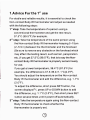
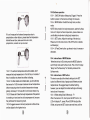
1,Insta"battery
Push the battery cover bythe arrow,open the battery cover,
inserttwopieCesAAAsizebatteHesacoordingtothe“ +"
",and oIose the battery cover
and“ ˉ
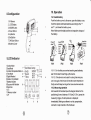
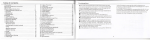
1 1R sensor
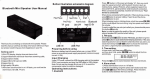
2LCD Display
雩 ㈣
3M0DE Bu⒒ on
4DoWn Bu⒒ on
Note∶
5 up Button
6 set Button
the battery
70N/sCan Button
8 Battery Coˇ er
9.LCD Indicator
Make sure the right positive and negative chaΓ ges of
(Fig2)
(Fig0)
(Fig4)
1surface Mode
9⑽
2Body Mode
"ρ
3Ambient Temperature Mode
4T me Mode
5Dig"aI Readout
:
6sm"e or Cry lndica1or
10ˉ
1¨
1 Forthe first use or when inserting new batte"es,
wait10minutes for warming up the device
10ˉ
1ˉ
2 1fthe deVice|s no1used for a Iong time once you
turn"on again,the devioeˇ ˇi"testthe room temperature
first丨 y andˇ ˇ
i"delayturning on for more one two seoonds
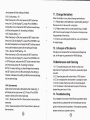
1o.2 m° asufi"g oρ oratio"
Aim towards the forehead(see the diagram beIow forthe
pos"ioning),from a distance of5ˉ 15Cm(2-59in〉 ,press the
7Ba钍 ery IndIcator
8Buzzer on`o仟 lndiCator
9Memo"es
彳0° C
彳1Memory number
12° F
measuring trigge1the teIη perature is dispIayed
immediately,Making sure there is no hair,perspⅡ
cosmetic orcap covered on the forehead
⑥
⑦
ation,