1
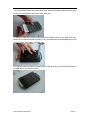
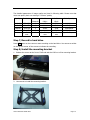
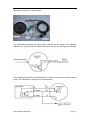
4. Put the hard drive back to the hard drive case. Please note, the hard drive should be put
to the mounting bracket inside of the hard drive case.
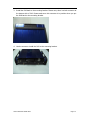
5. Install the hard drive with mounting bracket though the holes on the hard drive case.
Please note, install the hard drive tightly. If not, the hard drive will be damaged due to the
vibration which might lead to the data loss.
6. Install the connector back to the back side of hard drive case. Then the SATA hard drive
is installed into the hard drive case.
User’s Manual of Mobile DVR
Page 9