1
VXI Technology, Inc.
Number of Charts Displayed
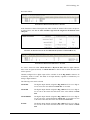
As soon as the channels are listed, the “Number of Charts Displayed” selection field offers 1, 4, 8,
and 16.
Now, select the number of charts that will be displayed on the screen. A maximum of 16 diagrams
per screen page can be selected.
When the “Number of Charts Displayed” is modified, the Update! button appears next to the test
name. Click this button to modifications made to the database.
Table/Diagram Selection
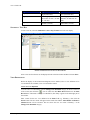
If Diagram is selected, the desired online values are displayed in diagrams.
If Table is selected, the desired online values are displayed in tables. Select one chart (1 – 16) and
one of the positions (1 – 8). The assignment of the channels to charts is not changed, the channels
of one chart are displayed in a table.
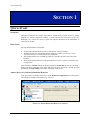
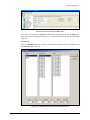
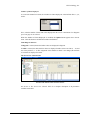
The Screen View Channel Table
FIGURE 1-18: SCREEN VIEW CHANNEL TABLE
See Section 4: The Screen View Channel Table for a complete description of all parameters
available in this table.
16
VTIcoda Quick Start Guide