1
..
..
.
5
Achieve Planner
Weekly Schedule
This section describes the Weekly Schedule and provides instructions for
using it. The Weekly Schedule is a powerful tool to help you organize your
schedule and manage your time effectively. You can use the tool in several
ways:
•
Use Time Charts to set aside blocks of times for certain activities and
show these times in the Weekly Schedule background (see section 5.2
Working with Time Charts).
•
Enter appointments and all-day events directly into the Weekly
Schedule (see section 5.3 Working with Appointments and Events).
•
Add blocks of time which are allocated for working on a specific project
or task (see section 5.4 Working with Project and Task Blocks).
5.1
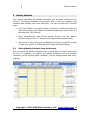
Setting Weekly Schedule View Preferences
You can set up the Weekly Schedule view in many ways, so that it works best
for you. For example, by default, the Weekly Schedule uses a 15-minute
resolution, and a five-day week. However, you can change these, and other,
settings.
Copyright © 2005-2008 Effexis Software, LLC - www.effexis.com 89