1
MIMOlite Wireless Interface/Bridge Module,
Technical Appendix
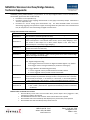
Self-Test
Caution: Self-test will overwrite all settings and take the MIMOlite out of the network!
Self-Test Entry: Hold the Program button while powering up the MIMOlite.
Indication: The Status LED will remain lit while the button is held.
Test 1: EEPROM test – The software will write bytes to the application EEPROM area, delay a second, and then attempt to
read them back.
Indication: If the EEPROM test is successful, the SIG1 LED will light (faintly). If the EEPROM test is not successful,
the Status LED will light and stay lit; no more tests will be performed. Note that this test erases EEPROM memory;
thus, all Configuration Command Class setups will be erased.
Test 2: Software verification test – The software will run a checksum on its program memory area.
Indication: If the Software verification test is successful, the SIG1 LED will turn off. If the Software verification test
is not successful, the Status LED will light and stay lit; no more tests will be performed.
Test3: Relay test – The software will attempt to turn on Relay1 twice.
Indication: Relay clicks should be heard.
Test 4: RF output should start and continue for 2 seconds.
Indication: The SIG1 LED will turn on during this test; check RF output with spectrum analyzer
Notes:
1) The tests go in sequence quickly.
2) After Test 4 is complete, the MIMO will reset and start normal operation.
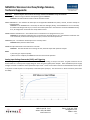
Analog Input Voltage Conversion (SIG1) and Triggering
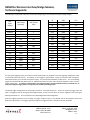
The input signal voltage conversion to Multilevel Sensor value (ADC reading or count) is non-linear. A typical conversion curve is
shown below for a nominal power supply voltage of 13.5V using the supplied power adapter. Note that different power supply
voltages will result in a different value reported for open circuit. These are the values returned via the Multilevel Sensor report
in response to a Get request or in the periodic, associated reports (Group 2). The conversion is a 12-bit conversion (values from
0 to 4095).
1080 Centre Rd. Ste C
Auburn Hills, MI 48326
www.fortrezz.com
Phone: (248) 481-7092
[email protected]
Made in USA
070713