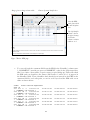
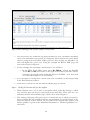
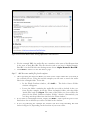
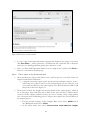
1
The Essential Tool for Audio Post Production User Manual For Titan version 4 Manual version 4.0.0 Contact Information Synchro Arts Limited 13 Links Road Epsom, Surrey KT17 3PP, UK Tel: +44 1372 811934 UK Tel: 01372 811934 Fax: +44 1372 817976 UK Fax: 01372 817976 Email: [email protected] Online Support at: Web: http://www.SynchroArts.com Email: [email protected] © Synchro Arts Limited 1997–2010 Limited End User License Agreement PLEASE READ THE FOLLOWING LEGAL AGREEMENT CAREFULLY PRIOR TO USING THE Titan SOFTWARE PROVIDED WITH THIS AGREEMENT. USE OF THE SOFTWARE CONSTITUTES YOUR ACCEPTANCE OF THE TERMS OF THIS LICENSE. IF YOU DO NOT AGREE TO THE TERMS OF THIS LICENSE, PROMPTLY RETURN THE UNUSED SOFTWARE, MANUALS, AND ACCOMPANYING MATERIALS TO THE LOCATION FROM WHICH THEY WERE OBTAINED FOR A REFUND. 1. License. The application, demonstration and other software and audio accompanying this License, whether on disk, in memory or on any other media (the ‘Software’) and the related documentation are licensed to you by Synchro Arts Limited. You may use the Software on a single computer, make one copy of the Software for backup purposes only and physically transfer the Software from one computer to another provided that all copies of the Software are removed from the machine from which it is being transferred and the Software is only used on one computer at a time. You may also transfer all your license rights in the Software, the backup copy of the Software, the related documentation and a copy of this License to another party, provided the other party reads and agrees to accept the terms and conditions of this License. 2. Copy and use restrictions. You are not allowed to distribute copies of the Software or the documentation. This Software is protected by the copyright laws that pertain to computer software. It is illegal to make copies of the Software, except for backups. It is illegal to give copies to another person, or to duplicate the Software by any other means, including electronic transmission. The Software contains trade secrets and in order to protect them you may not decompile, reverse engineer, disassemble or otherwise reduce the software to human-perceivable form. You may not modify, adapt, translate, rent, lease or create derivative works based upon the Software or any part thereof. You may not provide use of the Software in a network, timesharing, multiple CPU or multiple user arrangement. You may not electronically transmit the Software from one computer to another. You acknowledge that no title to the intellectual property in the Software is transferred to you and that title and full ownership rights to the Software will remain the exclusive property of Synchro Arts Limited or its suppliers and licensors. 3. Termination. This License is effective until terminated. You may terminate this License at any time by destroying the Software, related documentation and all copies thereof. This License will terminate immediately without notice from Synchro Arts Limited if you fail to comply with any provision of this License. Upon termination you must destroy the Software, related documentation and copies thereof. 4. Limited Warranty. Synchro Arts Limited warrants that the original disk or disks on which the Software is recorded are free from defects in materials and workmanship, assuming normal use, for a period of ninety (90) days from date of purchase. If a defect occurs during this period, you may return your faulty disk to Synchro Arts Limited along with a dated proof of purchase and Synchro Arts Limited will replace it free of charge. This limited warranty is void if failure of the Software has resulted from accident, abuse or misapplication. Any replacement Software will be warranted for the remainder of the original warranty period. This warranty gives you specific legal rights and you may also have other rights which vary by jurisdiction. 5. No Other Warranties. EXCEPT FOR THE EXPRESS WARRANTY OF THE ORIGINAL DISKS SET FORTH ABOVE, SYNCHRO ARTS LIMITED GRANTS NO OTHER WARRANTIES, EXPRESS OR IMPLIED, BY STATUTE OR OTHERWISE, REGARDING THE DISKS AND RELATED MATERIALS, THEIR FITNESS FOR ANY PURPOSE, THEIR QUALITY, THEIR MERCHANTABILITY OR OTHERWISE. THE LIABILITY OF SYNCHRO ARTS LIMITED UNDER THE WARRANTY SET FORTH ABOVE SHALL BE LIMITED TO THE AMOUNT PAID BY THE CUSTOMER FOR THE PRODUCT. IN NO EVENT SHALL SYNCHRO ARTS LIMITED, DIGIDESIGN OR AVID TECHNOLOGY BE LIABLE FOR ANY SPECIAL, CONSEQUENTIAL OR OTHER DAMAGES FOR BREACH OF WARRANTY. 6. Severability. In the event any provision of this Agreement is determined to be invalid or unenforceable, it shall be adjusted so as to best reflect the intent of the parties to the maximum extent possible, and the remainder of this agreement shall be valid and enforceable to the maximum extent possible. 7. Entire Agreement. This Agreement is the entire understanding between the parties with respect to the subject matter hereof and replaces any previous discussion and/or agreement regarding such subject matter. 8. Governing Law. This Agreement shall be interpreted and enforced in accordance with English law and the English courts shall have jurisdiction to determine any dispute. ii iii Important notes Thank you for using Synchro Arts Titan™. This user manual accompanies the Titan software. Tutorials are provided in this user manual that will guide you step-by-step through the operation of Titan. The tutorials refer to audio examples and Pro Tools session files that can be downloaded from the Synchro Arts website. To get the quickest start with Titan, it is highly recommended you follow the tutorials. Resources to help you use Titan come in four forms: • • • • This user manual Help screens provided in the application itself, containing detailed tips An online tutorial for Flash Conform and Flash Cutter (see the relevant sections of this manual for a link) Additional downloadable Selection Rules for Flash Conform at: http://www.synchroarts.com/Titan4/FlashConform Technical specifications • Titan 4 requires a Mac computer with an Intel processor running OS 10.5 or higher • Compatible with ProTools 7.4 and 8 session files (both versions use the same session file format). Flash Conform can also generate AES31 EDLs. • For compatibility with earlier Pro Tools session files use Titan 3 (see next section) Whatʼs new in Titan 4? Flash Conform • • • • • • Creates Pro Tool 8 sessions Better handling of badly formatted audio files, will create file error report Improved conform reports Creates a simplified text report file that can be used in other applications Warning if Source and Destination frame rates do not match the EDL Can read Light Works EDLs Fix Sync • • • • Compatible with Pro Tools 8 Improved alignment in fast mode Sample accurate alignment mode Can now operate on sessions that contain AUX, MIDI, and other non audio tracks Flash Cutter • Now works with Pro Tools 8 iv General • • Copy protected with iLok to allow the program to be easily moved Backwards compatibility – also comes with a copy of Titan 3.1.4 for compatibility with Pro Tools 6 session format (used by versions of Pro Tools 6 < 7.4) and earlier (Pro Tools versions 4 and 5) Acknowledgements Special thanks are offered to Digidesign staff for their continued support. Thanks also to Steve Cooke for providing all voices in the demonstration audio. Also thanks to the many beta testers for their helpful suggestions, bug reports and test data during development and beta testing. v Table of Contents A INTRODUCTION TO TITAN...................................................................................................................1 FLASH CONFORM ................................................................................................................................................................1 FIX SYNC ...............................................................................................................................................................................1 FLASH CUTTER ....................................................................................................................................................................2 Cutonly mode (Conform) ...........................................................................................................................................2 Cutandmove mode (Reconform)...........................................................................................................................2 TITAN AND PRO TOOLS .....................................................................................................................................................2 INTEGRAL HELP SCREENS .................................................................................................................................................2 B SOFTWARE AND TUTORIAL EXAMPLES INSTALLATION ...........................................................4 DOWNLOAD AND INSTALL TITAN 4.................................................................................................................................4 DEMONSTRATION MODE ....................................................................................................................................................4 SOFTWARE AUTHORIZATION ............................................................................................................................................4 What is iLok.com? ..........................................................................................................................................................4 First time using iLok?....................................................................................................................................................5 Obtaining your license..................................................................................................................................................5 How to install your Titan 4 License from iLok.com onto your iLok Key.................................................5 How to authorize your Titan 4 software with your iLok Key......................................................................6 Reauthorising Titan if iLok is removed.................................................................................................................6 ILok Support .....................................................................................................................................................................6 TUTORIAL EXAMPLES INSTALLATION..............................................................................................................................7 C FLASH CONFORM .....................................................................................................................................8 ABOUT FLASH CONFORM ..................................................................................................................................................8 Overview.............................................................................................................................................................................8 The Flash Conform process ........................................................................................................................................8 EDL formats ......................................................................................................................................................................9 Audio file formats and naming.................................................................................................................................9 QUICK START .......................................................................................................................................................................9 TUTORIAL .......................................................................................................................................................................... 10 Step 1 Start Titan and open a new Flash Conform Window ................................................................ 10 Step 2 Open the EDL file ....................................................................................................................................... 10 Step 3 Review the loaded EDL ........................................................................................................................... 11 Step 4 Set the file selection rules for the conform..................................................................................... 13 Step 5 Add the source audio files for the conform .................................................................................... 14 Step 6 Choose output session format and name ........................................................................................ 15 Step 7 Set the destination folders.................................................................................................................... 16 Step 8 Select region naming options .............................................................................................................. 17 Step 9 Load output session into Pro Tools and check results .............................................................. 18 ADDITIONAL INFORMATION ........................................................................................................................................... 19 Additional tutorial ...................................................................................................................................................... 19 Selection rules ............................................................................................................................................................... 19 Conforming Guidelines .............................................................................................................................................. 19 Pullup/down ................................................................................................................................................................ 20 Output format options............................................................................................................................................... 21 D FIX SYNC.................................................................................................................................................. 22 ABOUT FIX SYNC .............................................................................................................................................................. 22 Overview.......................................................................................................................................................................... 22 vi Applications of Fix Sync ............................................................................................................................................ 22 Sync errors in autoconforming ............................................................................................................................ 23 The Fix Sync process................................................................................................................................................... 23 QUICK START .................................................................................................................................................................... 24 TUTORIAL .......................................................................................................................................................................... 25 Step 1 Prepare a Pro Tools session for Fix Sync......................................................................................... 25 Step 2 Start Titan and open a new Fix Sync window .............................................................................. 26 Step 3 Open the prepared Pro Tools session................................................................................................ 26 Step 4 Create a new alignment group............................................................................................................ 27 Step 5 Assign a work track to each group.................................................................................................... 28 Step 6 Assign tracks to be aligned to each group ..................................................................................... 29 Step 7 Select the required search length....................................................................................................... 30 Step 8 Enter output session name.................................................................................................................... 31 Step 9 Choose region autonaming options................................................................................................. 31 Step 10 Start Fix Sync Processing .................................................................................................................... 31 Step 11 Check the report...................................................................................................................................... 31 Step 12 Checking the results .............................................................................................................................. 31 ADDITIONAL INFORMATION ........................................................................................................................................... 33 Preparing a Pro Tools session for use with Fix Sync .................................................................................... 33 Creating suitable handles ........................................................................................................................................ 33 Minimum region duration ....................................................................................................................................... 33 Using Fix Sync with multichannel audio ........................................................................................................... 33 Choosing the best track for alignment ............................................................................................................... 33 Alignment settings ...................................................................................................................................................... 34 E FLASH CUTTER ...................................................................................................................................... 35 ABOUT FLASH CUTTER ................................................................................................................................................... 35 Overview.......................................................................................................................................................................... 35 Applications of Cutonly mode (Conform) ........................................................................................................ 35 Applications of Cutandmove move mode (Reconform) ........................................................................... 36 QUICK START .................................................................................................................................................................... 37 Cut only mode................................................................................................................................................................ 37 Cutandmove mode (basic operation) .............................................................................................................. 37 TUTORIAL .......................................................................................................................................................................... 38 Step 1 Prepare a Pro Tools session and EDL ............................................................................................... 38 Step 2 Start Titan, select the EDL, sessions and mode ............................................................................ 38 Step 3 Select Region Auto Naming Options ................................................................................................. 40 Step 4 Review the Loaded EDL .......................................................................................................................... 41 Step 5 Assign EDL Tracks to Session Tracks................................................................................................ 42 Step 6 Start Flash Cutter processing .............................................................................................................. 43 Step 7 Check the Flash Cutter Report............................................................................................................. 44 Step 8 Open the cut session in Pro Tools ....................................................................................................... 44 ADDITIONAL INFORMATION ........................................................................................................................................... 46 Additional tutorial ...................................................................................................................................................... 46 What if there is no audio in the source session at a time specified in the EDL?............................... 46 Dealing with changes between EDLs .................................................................................................................. 46 F TROUBLE SHOOTING GUIDE ............................................................................................................. 47 FIX SYNC PROBLEMS ........................................................................................................................................................ 47 FLASH CUTTER PROBLEMS ............................................................................................................................................. 47 FLASH CONFORM PROBLEMS ......................................................................................................................................... 47 vii A Introduction to Titan is a stand-alone program that can save hours or even days of editing Pro Tools session files by providing four automatic editing functions. These are operated from within three separate processing windows: Flash Conform, Fix Sync and Flash Cutter. Integral help is provided on each of the pages of the processing windows, which offers additional guidance on the controls and functions, as well as keyboard shortcuts. Flash Conform Flash Conform enables post-production editors to auto-conform in minutes rather than hours. It works with Pro Tools- and AES31-compatible editing systems. In video and film post-production, auto-conforming is often used to create automatically a session file or project on a digital audio workstation (DAW) that manages recordings of selected takes made at the time of the picture shoot. The recordings or audio segments will be placed in destination tracks at time codes specified by an edit decision list (EDL). (The EDL is normally generated by a video editing system during the picture edit.) In this new approach using Flash Conform, the auto-conform process is typically performed in two steps. Firstly the selected source audio takes, perhaps taken from a diskbased field recorder or other workstation, are loaded as audio files on a hard disk, having been given timestamps and appropriate names. Secondly, Flash Conform is run, taking editing instructions from a CMX3600-format EDL. Flash Conform automatically locates the specified audio files and places them as correctly positioned audio regions into a new Pro Tools or AES31 session. Errors in the sync of the conformed audio can then be automatically corrected, if required, using Titan’s Fix Sync function. Using Flash Conform provides a number of benefits. Besides conforming hundreds of edits in seconds, it does not require any user intervention to select or link files; also, the resulting session contains audio regions which the editor can extend as required up to the limits of the recorded ‘handles’. Other features of Flash Conform are that automatically it can do the following: • Determine the correct layout for mapping EDL channels to session tracks, even with mono and multi-channel files • Name the new regions • Generate reports identifying any problem events Fix Sync Titan’s Fix Sync function automatically adjusts the position of manually or auto-conformed audio regions to sync precisely to a work track. Similarly the Fix Sync function can correct the sync of audio that has passed through signal processing devices and has been delayed by unknown amounts. Fix Sync virtually eliminates the need to adjust sync manually while listening for phasing or visually comparing waveforms with a work track. These are some of its features: • Automatically corrects the position of audio that is out of sync by up to ±2 seconds, to sample level accuracy if required • Hundreds of regions are corrected in minutes 1 • Multi-channel regions can be adjusted together to maintain phase relationship • Optional report indicates magnitude of errors, detection of signal inversion (180º phase shifts) and amount of shifting done Flash Cutter Cut-only mode (Conform) Flash Cutter’s Cut-only mode avoids having manually to re-cut and rename edits in situations when audio material from another editing or recording system is moved to a Pro Tools system as unbroken regions. It can be used when an OMF (Open Media Framework) or AAF (Advanced Authoring Format) transfer is not a practical option and one only has access to the uncut audio material from the original session. In such a situation the audio is available only as one or more continuous recordings that contain the edited regions. This is transferred into continuous tracks in a Pro Tools session and correctly positioned, then Flash Cutter uses a standard EDL from the first editing system to re-cut the tracks and rename the audio regions automatically. These are some of its features: • Automatically cuts and names several hundred edits in seconds • Simple assignment of EDL channels to session tracks • Multiple audio tracks can be cut from a single EDL track • Regions, tracks and sessions are automatically named from EDL and user-supplied information Cut-and-move mode (Reconform) This addition to Flash Cutter allows user-selected tracks in a Pro Tools session to be cut into sections defined by EDL events source In/Out times, which can be moved to new positions with starting points defined by each EDL events’ record (or destination) In time. This allows blocks of audio to be repositioned instantly and automatically, as might be required when the edit of a programme is changed later in a post-production process. Each Cut (and move) event in the EDL can operate on multiple regions, fades and tracks at the same time. Titan and Pro Tools Titan works quite extensively with Pro Tools session files. Although the Pro Tools application is not required for Titan to perform its processing, it is helpful to have Pro Tools software available in order to examine and compare the sessions before and after processing. In this manual, it will be assumed that the user is familiar with the operation of Pro Tools software. Integral Help screens Each window in Titan has a help panel at the bottom of the screen as shown in Figure 1. This panel contains detailed information about the controls and options in the current window. This manual does not contain a description of all of Titan’s controls and shortcuts; look at the Help panel for more detailed descriptions of the controls. 2 Drag here to resize Help panel Help panel Drag here to resize entire window Figure 1 Titan's integral Help window shown below the window containing the main controls Diana to choose 3 B Software and tutorial examples installation Download and install Titan 4 If you have not already done so, you can download Titan 4 from www.synchroarts.com and install it. The disk image (.dmg) file that you download should open and the installer run automatically after downloading. If it does not, for any reason, open the disk image that is mounted on the desktop and double click the Titan 4.n.n package icon contained therein. You will be guided through the various steps to install the software. This will install a folder called ‘Titan4’ in your Applications folder. Notice that a copy of Titan 3 has also been installed in a sub-folder. This is included for backward compatibility, for use with Pro Tools session files created prior to Pro Tools 7.4. Titan 4 works with Pro Tools 7.4 and 8 session files (which use an identical session file format). Demonstration mode When you first download and install Titan 4, it will run in a fully functional demonstration mode for the number of days shown in the start up screen that appears when you open an unauthorised copy of Titan. If you have not already purchased a license, clicking the Buy button will take you to the Synchro Arts online store where you can purchase a license to authorise the software using iLok (see below). Clicking the Try button will allow the application to operate in the time-limited demo mode. Software authorization Titan uses the iLok system for authorization and, once installed, your license will reside on a USB ‘smart Key’ (shown in Figure 2). If you already have a license installed on your iLok, you can skip this section on authorization. Once your iLok Key contains a Titan license, plug the Key into a USB port on the computer that runs your audio editing software to run your Titan in an authorized mode. Ilok Keys can hold licenses for a number of protected software products. You can have licenses from Synchro Arts and other software vendors on the same iLok. Licenses for Titan are downloaded from an iLok.com account. What is iLok.com? The www.iLok.com website (provided by PACE) lets you create a personal account which is used to manage your software licenses. If you don’t have a user account you will need to create one before you can authorise Titan. Figure 2 iLok Key 4 On www.iLok.com, you can receive new licenses from software publishers such as Synchro Arts, see what licenses are on your iLok Keys, register your licenses and move your licenses between iLok Keys. Using software available from iLok.com, you can transfer licenses from iLok.com to your computer and also identify the iLoks you currently have connected to the USB port on your computer. Synchro Arts may also use your iLok.com account to provide your license and give you technical support. First time using iLok? If this is the first time you have used iLok you will need to download and install the InterLok Mac OS X extensions from iLok.com (currently at http://www.ilok.com/downloadilok-software.html). You will also need to download the Interlok iLok Client Installer for Mac OSX. This will require you to logout and login again to your Mac before proceeding. Obtaining your license 1. If you haven't done so, you need to inform Synchro Arts (or your software dealer) of your iLok.com User ID (This is normally done when you purchase your software.) 2. Synchro Arts will deposit a license into your iLok.com account and notify you. Failure to keep your iLok.com account up to date may result in delays in providing you with services or other support. System requirements: To use iLok with Titan 4, you will need a Mac with a USB port, an Internet connection, Mac OS 10.5 or later and an Intel processor. How to install your Titan 4 License from iLok.com onto your iLok Key 1. Insert the iLok Key into an available USB port on your computer and ensure its indicator light is lit. 2. Log in to your account at www.iLok.com. 3. On iLok.com, if you have received notification from Synchro Arts that your electronic license has been deposited, then your authorization is available for transfer. Your iLok.com account will display a notice saying ‘You have licenses’. Select that link to start the transfer. 4. The next page on iLok.com will display the pending licenses available for download, along with the name of the application, the manufacturer, the type of authorization (Demo, Not For Resale, or License), the date the authorization was deposited, and the date when the authorization will no longer be available for download from the server. 5. Before an authorization transfer can take place, synchronize your iLok Smart Key with iLok.com. 6. Once you have synchronized your iLok, select the authorization(s) you wish to transfer to your iLok. If you have multiple iLoks connected to your computer, it is important to select the correct iLok as the destination to which you want an authorization to be transferred. 7. On iLok.com, click Download Licenses to begin the process. When the transfer finishes you will be asked to confirm completion, indicating that the transfer was successful. 5 Figure 3 Reauthorise Titan if iLok Key is removed by pressing 'Buy' on the screen shown here, and inserting iLok key How to authorize your Titan 4 software with your iLok Key If you followed the above procedure correctly, and the iLok Key with the application authorization is inserted in the computer running the application, the application should run in an authorized mode by simply launching Titan 4. Reauthorising Titan if iLok is removed If you subsequently try to run the Titan application without the iLok inserted into your computer the following window will appear. Press ‘Buy’ as shown in Figure 3 and reinsert the iLok containing the relevant license. The software will be reauthorised. ILok Support For further information on iLok, go to www.iLok.com. 6 Tutorial examples installation To install the example files referred to in the tutorials later in this manual, download the ‘Titan 4 examples’ disk image from the Synchro Arts downloads page (www.synchroarts.com/downloads) and copy the contents to an appropriate folder on your hard disk. The contents of the disk image are as shown in Figure 4. Figure 4 Contents of the Titan 4 examples folder 7 C Flash Conform About Flash Conform Overview Flash Conform provides fast auto conforming from pre-loaded and appropriately named audio files, and an EDL. Once the user has flash-conformed the session, region sync can be fine-tuned rapidly using Titan’s Fix Sync function. The inputs to and outputs from Flash Conform are shown graphically in Figure 5. The Flash Conform process During processing, Flash Conform will step through each EDL event and do the following: 1. Flash Conform reads the next event reel name, and Source timecode from the supplied EDL. 2. It then looks through the specified folders for audio files that match the reel name. 3. It then looks within the audio files for audio at the event Source timecode. 4. If audio is found at the Source timecode, a region containing this audio is created in the output session on the appropriate track and at the timecode specified by the EDL event’s Destination timecode. 5. Flash Conform moves on to the next matching audio file in the folder until there are no more matches. 6. The above steps are repeated until there are no more EDL events to process. Input to Titan Flash Conform Output from Titan Pro Tools session Sound files (Copied/demux sound files) CMX EDL Report Figure 5 Graphical representation of the Flash Conform process 8 EDL formats Flash Conform supports CMX 3600 format EDLs, with up to 16 channels, and comment fields. Flash Conform will recognise all standard CMX 3600 EDL channel identifiers (e.g. ‘AA’, ‘B’, ‘A2/V’, ‘AA/V’, ‘V’, ‘A2’, etc). Flash Conform will also recognise ‘A3’ to ‘A16’ and, if the identifier = ‘NONE’, it will recognize AUD 5 to AUD 16 in the comment field. If overlaps of audio occur in the EDL, when the session is created later events will cause audio regions to overwrite parts of other previously inserted audio regions. Audio file formats and naming Flash Conform supports Wave, and Broadcast Wave file formats. Audio files should be labelled in a consistent manner. The reel name can be placed in many locations, such as the file name, folder name or file metadata. The way you identify your audio files is called a file-selection schema. It is important that files are identified consistently for a production, otherwise multiple rules will be required, which makes conforming harder. Support for a number of standard file-selection schemas are included with Flash Conform. The selection schema can be selected from within the Flash Conform window, under File Selection Settings. New rules that govern the processing of file names, known as Selection Rules, may be downloaded from the Synchro Arts website. See the ‘Additional information’ section after the tutorial if you need further help with choosing or adding Selection Rules. Quick start We strongly recommend that you follow the tutorial in the next section, but if you want to get started quickly the following is a short introduction to using Flash Conform. You can refer to the Help information in the application window, which explains the controls on each page. 1 Obtain an EDL for the conform and load all the audio relating to it onto your workstation, with the audio files identified logically and systematically so that they can be identified by Flash Conform. 2 Start Titan and open a new Flash Conform window. (This is the default window opened when launching Titan.) 3 Open the EDL by clicking Add..., or drag and drop it into the list in the Titan window, then select the frame rates you are using and the sample rate pull up/pull down option as required. Advance to the next page of controls by clicking Next. 4 Review the loaded EDL. If the EDL contains region name information, enter the name identifier exactly as it is contained in the EDL in the box Clip Name Identifier. Advance to next page. If you have selected multiple EDLs, a review page for each EDL will be displayed. 5 Now select the file-selection schema you are using with the File Selection Settings 9 menu. Advance to the next page. 6 Specify the folders containing the audio files for the conform by clicking Add… Alternatively you can drag and drop these into the list. 7 Select the output session name, session format to output (Pro Tools or AES 31), whether to de-interleave any multichannel audio files during the process (this has to be done for Pro Tools) and the resolution/rate of any new audio files to be created. You can also arrange to copy all the audio files for the session to a new folder if you wish (otherwise Titan will simply refer back to the original files in most cases). Click Next, to present the last page of controls. 8 Select the destination folders for any files that have to be de-multiplexed or converted/copied. Multiple destination folders can be selected. Each folder should be on a separate disk volume. As a disk becomes full Titan will switch to the next available volume. Advance to the next page. 9 Now choose region auto-naming options for the output session and start the conform by clicking Conform. 10 When the conform is complete, review and save the Report. Tutorial This tutorial will guide you through using Flash Conform to conform the example session. You may also wish to follow this tutorial and substitute your own session and files in place of the example ones. The example files needed for this tutorial are included on the ‘Titan 4 examples’ disk image mentioned in the software installation section of this manual. If you have not installed the Titan 4 examples, you should download them now and copy them to a suitable location on your hard disk. Step 1 Start Titan and open a new Flash Conform Window • If it isn’t already running, in the dock or in the Applications folder, double click on the ‘Titan4’ icon. • If Titan is running, on the File menu select New Flash Conform to open a new Flash Conform processing window (shown in Figure 6). Step 2 Open the EDL file • In the Flash Conform window, click Add. The EDL selection window will appear. • Locate the EDL to use for the conform. For the example, locate the ‘Titan 4 examples’ folder downloaded as mentioned above, click ‘FlashConformEDL’, and then click Open. The name of the EDL file you have chosen will now be displayed in the Flash Conform window. If you wish to process more than one EDL file, simply click Add, and select another EDL. (Alternatively you can drag and drop EDLs into the list in the Titan window.) • If you have selected the wrong EDL file, simply click on the filename, and click Remove. • Select the EDL Source and Destination frame rates and whether to employ sample 10 Figure 6 New Flash Conform window rate pull-up or pull-down during the conform. If you are using the example EDL you must set the source and destination frame rate to 24 fps, with no pull up / pull down. o In the Flash Conform window, click on the EDL Source Frame Rate menu and select 24 fps. Now click on the EDL Destination Frame Rate control, and select 24 fps. Click on Source Sample Rate and select None. Click on the Destination Sample Rate and select None. • Click Next to advance to the next page of controls. Step 3 Review the loaded EDL • This page of the Flash Conform window will display the contents of the loaded EDL. You should review the EDL data to ensure that Flash Conform has loaded it correctly. • If you are using the example EDL, the Review EDL page will look as shown in Figure 7. You can click and drag the column boundaries in the EDL display to show more or less of the width of each column. Some of the information may be hidden to the right, so you may need to widen the window or narrow the columns to see it. In Figure 8 the column widths have been adjusted slightly to reveal the full identifier field. • In the example shown here, Flash Conform has not correctly loaded the comment field that was used in the EDL to identify the audio regions. You can see that no clip names are displayed in the Identifier column. 11 Drag e.g. here to change column width Enter a clip name identifier here Select the EDL tracks from which to take edit points here The clip identifier column is here on the right. You may need to alter column or window widths to see it Figure 7 Review EDL page • To correctly load the comment field from the EDL in the ‘Identifier’ column enter ‘* COMMENT:’ (asterisk, two spaces, COMMENT, colon) in the ‘Clip name identifier’ box. After a short while (or press return to speed things up) Titan will reload the EDL and you should see the names ‘Off Course n’ (where n is 1–6) appear in the Identifier fields. These identifiers had already been entered in the EDL in the comment field for each edit point, as can be seen if you load the EDL with a text editor as shown below: TITLE Flash Conform Experiment FCM: 24 001 017 A C 17:03:11:14 17:03:15:05 * COMMENT: Off Course 1 002 017 A2 C 17:03:15:05 17:03:17:03 * COMMENT: Off Course 2 003 017 A C 17:03:17:03 17:03:19:05 * COMMENT: Off Course 3 004 017 A2 C 17:03:19:05 17:03:21:04 * COMMENT: Off Course 4 005 017 A C 17:03:21:04 17:03:24:08 * COMMENT: Off Course 5 006 017 A2 C 17:03:24:08 17:03:36:08 * COMMENT: Off Course 6 12 01:00:00:01 01:00:03:16 01:00:03:16 01:00:05:14 01:00:05:14 01:00:07:16 01:00:07:16 01:00:09:15 01:00:09:15 01:00:12:19 01:00:12:19 01:00:24:19 Figure 8 Review EDL page with clip name identifier correctly loaded • You may need to use a different clip name identifier for your own EDLs, depending on how the information was stored. It is important that it matches the exact alphanumeric string used in the EDL. When you have done it right, the Identifier column will display the correct text. Using the example the Review EDL page will now look as shown in Figure 8. • For the example, the remaining controls must be set as follows: o In the EDL Track Offset menu select No Offset. Check the Enabled Tracks A1 and A2 check boxes on the right of the window (this takes edit information about both audio tracks described in the EDL – note that track A1 is described simply as ‘A’ in the EDL). • For a description of using these controls with your own EDLs, see the integral help in the Flash Conform window. • Click Next, to advance to the File Selection Rules page of controls. Step 4 Set the file selection rules for the conform • Flash Conform uses a set of rules to determine which audio files belong to which reel, and how timecode data is represented in the audio files. These rules are controlled by the File Selection Rule page, which can be seen in Figure 9. • The setting on this page will need to be set to match the way in which your particular set of audio files are identified and how any metadata are stored in them. A detailed description of these options can be found in the integral help window, and further guidance is given in the ‘Additional information > Conform guidelines’ section below. 13 Figure 9 File Selection Rule window showing Alphanumeric Reel ID chosen • For the example EDL, the audio files use a number at the start of the filename that is the same as their Reel ID. The file selection rule to use here is ‘Alpha-Numeric Reel ID’ so in the File Selection Settings menu choose ‘Alpha Numeric Reel ID’ • Click Next to advance to the File Source page. Step 5 Add the source audio files for the conform • After specifying the Selection Rules you must choose which audio files to include in the conform process. Using the tutorial example you will want to search the audio files in the example folder. To do this: o In the Flash Conform window, click Add…. The Select Source Folder window will appear. o Locate the folder containing the audio files you wish to include in the conform. For the example, locate the ‘Titan 4 examples’ folder, select the folder ‘Audio Files’ and click Open. The name of the folder you chose will be displayed in the Flash Conform window ‘Folder’ column. (Alternatively you can drag and drop folders into the list in the Titan window.) • If you wish to add multiple folders, simply click Add…, and repeat the process outlined above for each folder you wish to include in the conform. • If you are following the example the window will now look something like that shown in Figure 10, depending on the location of your source files. 14 Figure 10 File Source selection window • To save a list of the audio files Flash Conform has found in the folders concerned, click List Files…, which generates a ‘FileList.xml’ file. Send this file to Synchro Arts if you are having problems getting the conform to work. • Once you have added all audio folders you are using in the conform click Next to advance to the Session Format page. Step 6 Choose output session format and name • After specifying the input audio files for the conform process, you must choose an output session format and name: o Using the ‘Session Format’ menu, for the tutorial example click Pro Tools 7 (which also serves Pro Tools 8), or the session format you are using for your own conform (AES 31 is the other option). The Flash Conform window will then look as shown in Figure 11. • Titan needs to know the sample rate and resolution of the output project, which is set on this page. Any audio files that it finds in the selected source folders will be converted to the output resolution if they are not so already, using a high quality rate conversion and re-dithering process. Choose the sample rate and resolution of the output project: o For the tutorial example, in the ‘Sample Rate’ menu select 44100 and in the ‘Bit Depth’ menu select 16 bit. o In the menu below this, select ‘Convert files with different sample 15 Figure 11 Session format window rates or bit depths’. This instructs Titan to re-render any audio files that are not at the selected resolution (although there are none in the tutorial example.) The alternative option is to have Titan ignore such files, in which case they are excluded from the output project. • Leave the ‘De-interleave/Copy’ options set to All multichannel files for the tutorial example, even though there are no such files to deal with here. For further details about these options se the ‘Additional information > Output format options’ section below. • Choose an output session name: o Select the output session name by clicking Save Session As…. Choose an appropriate location to save the resulting project, type the output session name in the ‘Save As…’ box (for the example, the title will default to ‘FC Flash Conform Example’) and click Save. The output session name will now be displayed in the Flash Conform window. • Click Next to advance to the Destination Folders page. Step 7 Set the destination folders • If Titan has to de-interleave, copy or convert any audio files it needs to know where to put them. • Select Add… to select a destination folder for any audio files. This defaults to an ‘Audio Files’ folder within the project folder created at the end of Step 6, but you can change it if you wish. For the tutorial you will see that it defaults to a folder 16 called ‘Audio Files’ within a ‘FC Flash Conform EDL’ project folder. • You can add multiple folders here, which will be used in sequence if the first one fills up. For this reason such folders should be on separate disks, so that large projects can be spread across multiple disks. • If the De-interleave option is set in the previous page Titan always asks for a destination folder, even if no files will require de-multiplexing. This is because Titan does not check for the presence of interleaved files until it actually conform the files. Step 8 Select region naming options • The region naming page is the last page of controls you must set before starting the conform process. The options affect the names of the regions in the output session. • If you are following the example, use the default region naming options. Click Set Defaults to do this. The region-naming page will look as shown in Figure 12. Notice that the Conform button is now active. • You may wish to select alternative region naming settings for your own conforms. The integral help window explains the available options in more detail. • When you have selected region naming options, click Conform to start the conform process. • Wait for the conform to complete, then review the report. • While the conform process takes place a progress bar is displayed. When completed, the Report Page will always be displayed. The report will say if the conform Figure 12 Region naming window 17 was a success, or if an error was encountered. If an error was found, the detailed information contained in the report can be used to determine the cause of the problem. • The report can be saved by clicking Save Report. Step 9 Load output session into Pro Tools and check results • The output session can be loaded into Pro Tools and reviewed. • The tutorial example will should look something similar to that shown in Figure 13 if it has worked correctly. Note how the relevant regions from the source audio file ‘017’ have been conformed to the correct timecode locations in Pro Tools. Figure 13 Resulting Pro Tools session from Flash Conform tutorial example, showing conformed regions 18 Additional information Additional tutorial A further tutorial on using Flash Cutter and Flash Conform (based on Titan 3, but concentrating on production workflow) can be found on the Synchro Arts website at the following address: http://www.synchroarts.com/products/Flash%20Conform%20And%20Cutter%20Tutorial/html/default.html Selection rules Support for a number of standard and widely used file-identification schemas are included with Flash Conform. The naming schema can be selected from within the Flash Conform window, under File Selection Settings. New rules that govern the processing of file names, known as Selection Rules, may be downloaded from the Synchro Arts website. http://www.synchroarts.com/titan4/FlashConform/ These should be stored in the Scan Control folder, which is located in the same folder as the Titan application. Sometimes file-identification rules can be specific to the recorder used to capture the audio in the first place, and a number of widely used recorders have already been catered for. These only work if the correct workflow has been used and you may find that another general rule works better. In a production that uses multiple location recorders and naming conventions it is best to conform the audio from each recorder type separately and then merge the resulting Pro Tools sessions. If you have a file-identification schema that is not handled by any of the available Selection Rules please contact Synchro Arts for advice. The Selection Rules have been designed so that new settings can be easily created. If you need help selecting the correct rule or need a custom rule please send the following information to [email protected]: • The EDL • Try a conform and send the report generated by Flash Conform. (This contains information about your source files, settings and the result of the conform) • FileList.xml – to create this file, load your EDL into Titan and then select Next until you are at the ‘File Source’ page. Select your source audio folders and then select List Files... This file contains information which allow Synchro Arts technical support to replicate your audio files (without needing the actual audio) and test the conform Conforming Guidelines Titan uses three pieces of information to conform the audio: 1 Timecode – the timecode in the CMX3600 EDL must match the location time code written in the metadata of the location audio files. Timecode itself is not usually stored within audio files. However the starting time of files is often stored as metadata representing the number of samples from 00:00:00:00. If the film or video goes though a telecine step that changes the time code supplied to the video editor, the telecine facility must produce a Flex file, which can be used by the video editor to produce the correct location timecode when generating the EDL. 2 Reel ID – the reel ID is used with the time code to identify the correct location files. 19 The reel ID can be placed either in the file name, or within the audio file’s meta-data or as part of the name of the disk or directory that contains the audio files. There are many ways of using the reel ID: for example, it could be a scene number or a film reel ID. However the simplest way is for the production to have a shooting session number. The shooting session number is incremented at the start of each session. The session number should match the number applied to the video transfer created by telecine. The reason for using a shooting session number rather than a shooting day is that some productions may have a separate night-time shoot. Where the shooting session number is stored depends on the location recorder being used. Typical locations include the start of the audio file name, the folder which contains the audio files or the ‘TAPE’ metadata field within the audio file. 3 Track ID – the track ID is used when the location audio does not contain all the audio channels in a single multichannel file. (Titan will automatically deal with multichannel files.) The best place for the track ID is at the end of the audio file name and before the file extension. Example: ZAX000_xxx_1.wav - Channel 1 ZAX000_xxx_2.wav - Channel 2 Titan will work with the Fostex DP 6 and Cantar default track naming conventions. For example, using the Default File Rules: • The Reel ID is the first 3 digits in the file name. • The track identifier is at the end of the file name. Tracks can be identified by L, R, Ls, Rs, C or a number prefixed by A, a, +, -, /, or space Examples: 001006L.wav - Reel 001 Track 1 AX345006A6.wav - Reel 345 Track 6 For example, using the Alphanumeric scene ID: • The Reel ID is the SCENE ID stored in the metadata of the audio file. This is conformed to the alphanumeric scene ID in the EDL clip name. • The track identifier is at the end of the file name. Tracks can be identified by L, R, Ls, Rs, C or a number prefixed by A, a, +, -, /, or space Example: ABC123_A2.wav - Reel ABC123 Track 2 Pull-up/down The pull-up/pull-down options for sample rate, encountered on the first page, set the relationship between frame rate and sample rate, in order to enable the correct calculation of the destination timecode locations of regions in the output Pro Tools session and the start times of the source audio files. These settings can be used to accommodate sessions or source material where pulled-up or -down sample rates have been employed, or where it is desired to adjust the sample rate of the output session and content metadata so that the 20 timecode locations are based on pulled-up or -down rates. The ‘local’ mode is used when the pull-up/down calculation starts from the beginning of the reel only (e.g. if the reel starts at a timecode of 01:00:00:00 then the modified calculation of the sample count only begins from that time). The ‘global’ mode is used when the pull-up/down calculation is started from time zero. Here are some tips for using this function in certain tricky situations: • Where a production has been shot at 24 fps and passes though telecine at 25 fps before being edited on an Avid editor at 24 fps, you will probably need to use the ‘Source Sample Rate Pull Up/Down Local’ settings. • If the audio is conformed to the correct destination timecodes but is it out of sync by a number of seconds, try the ‘Source Sample Rate Pull Up/Down Local’ settings. • If the audio is conformed to the wrong destination timecodes, try adjusting the ‘Destination Sample Rate Pull Up/Down’. A useful article on timecode and sample rate pull-up/down can be found at: http://protools.dudesnetwork.com/2009/05/18/audio-pull-updown/. There is also a useful section on the topic in Chapter 3 of the book ‘The Filmmaker's Guide to Final Cut Pro Workflow’ by Dale Angell (Focal Press). Output format options The ‘De-interleave/Copy’ options allow interleaved multichannel audio files (e.g. multichannel WAVE files) to be deinterleaved into separate tracks for each channel. (This is obligatory if the output format is Pro Tools, because it requires every channel to be on a separate track.). If the output format is AES 31 an option to deinterleave files of more than 2 channels is available (this leaves stereo interleaved files intact). If you choose ‘All multichannel files’ this also de-interleaves stereo files. You can opt for Titan to copy or re-render all the audio files in the project if you wish (as opposed to only the ones that have to be converted) using the ‘De-interleave/Copy’ menu. This can be useful if you want to generate an output project that contains all the material for the project in one place. Otherwise the output EDL will simply refer back to the original locations of unchanged files. ‘Compact Audio File Length’ minimizes the length of de-interleaved or copied files to the length of the edited region, plus a handle length specified in the box. Length of Pro Tools sessions If the conformed session is longer than the maximum time-line length that can be handled by Pro Tools, Titan will split the conformed data over more than one Pro Tools session. 21 D Fix Sync About Fix Sync Overview The Fix Sync function provides a fast, efficient and automatic means of tightening up the timing accuracy of conformed audio in a Pro Tools session file. It does this by examining content in one or more conform tracks and comparing it with that in a guide or work track, moving the conform tracks by up to two seconds in order to correct any timing errors encountered. Operation is straightforward and quick. The user selects the conformed Pro Tools session and indicates to Titan which tracks are the work tracks and which are the conformed or new tracks. Titan can only work with Pro Tools sessions in which both the guide track(s) and the conformed audio are present. Audio must be contained in WAV or AIFF files. Applications of Fix Sync In video and film post-production, auto-conforming is often used to create a ‘session file’ automatically on a Digital Audio Workstation (DAW), containing recordings of selected takes from ‘source tapes’ generally recorded at the time of the picture shoot. These recordings or audio segments will be placed in destination tracks at time codes specified by an EDL (edit decision list). This may have been done using an automatic process such as Titan’s Flash Conform. The conformed audio will usually be similar to, but not necessarily exactly the same as, the guide track which will be referred to as the Work Track for the remainder of this manual. For a number of reasons the resulting conformed audio segments may not be in absolute sync with the Work Track audio and can often be one or two frames out. In some cases, where there has been broken time code or other problems, the sync can be over a second out. Therefore, many editors use the DAW environment to check each new segment for sync and either use the waveforms to align a segment visually with the Work Track waveform (if recorded) or play the two signals together until they are in sync to their satisfaction. If the Work Track was not recorded in the DAW, it can be monitored off the tape containing it and the picture while the DAW session playback is run in chase lock with the tape transport. Such sync checking is a time consuming process and, depending on the number of regions, may take up to a day or more per 10 or 20-minute sound reel. While it may not be difficult to sync them by ear if the two waveforms are nearly identical, it can be more difficult if the work track has become noisy or a different mike position is used for perspective changes. In any case, the process takes a considerable amount of time. In other situations, manual placement of original audio in rough alignment to a Work Track is also performed. We will refer to the results of both the automatic and manual placement of these regions as conformed audio. Sync errors in auto-conforming After auto-conform is performed the start and end timecode locations of a region are likely to be correct, but the audio within this timecode ‘window’ can become shifted out of place. The type of timing correction performed by Titan requires that there is sufficient audio 22 Figure 14 Sync error between conformed audio in the lower track and guide audio in the upper track available outside of the original region, known as ‘handles’, to make this correction. This is illustrated in Figure 14. The region in Track 2 named ‘Pilot1-01’ has the correct start and stop timecode, but the audio content is slightly out of sync in relation to the track above it (the Work Track). The light coloured audio shown before and after this region is part of the same file, so it is available, but not visible in the Pro Tools display. To correct this error, the audio needs to be shifted, moving a little of the ‘handle’ audio into the region window at one end, pushing some of the original region’s audio out of the other, while keeping the start and stop timecodes the same. The Fix Sync process Once started, Titan compares each conformed audio region on the so-called ‘Align Tracks’ with the Work Track, and determines if the region’s audio needs to be shifted in time to improve sync. In general, no new audio will be created (so no further audio disk space is taken). Only a modified copy of the original session will be produced (which tells Pro Tools where to place the existing audio content). A report will be generated which contains Titan's settings and the action taken on each region. The inputs to and outputs from the Fix Sync function are illustrated in Figure 15. For Titan to work the conformed audio content must be nearly identical to a section of audio in the Work Track, apart from minor variations in level and noise. (The Work Track and audio regions do not have to start and end at the same time codes.) In cases where this similarity does not exist, it might be necessary use VocALign, an automatic audio alignment process, also from Synchro Arts, which is designed to cope with more major differences in the audio content and determine a timing adjustment to within a quarter frame. 23 Input to Titan Fix Sync Output from Titan Modified Pro Tools session Pro Tools session blah blah blah blah Report Figure 15 Graphical representation of the Fix Sync function Quick start We strongly recommend that you follow the tutorial in the next section, but if you want to get started quickly the following is a short introduction to using Fix Sync. You can refer to the Help information in the application window, which explains the controls on each page. 1 Prepare a Pro Tools Session so that it contains conformed tracks (called Align Tracks in Fix Sync) and Work Tracks to which the conformed tracks can be synchronised (this stage does not use Titan). Guidelines can be found in the section ‘Additional information’ below. 2 Start Titan and open a new Fix Sync processing window. 3 Open the prepared session, by clicking Open Session. 4 Create an alignment group and assign a Work Track from the open session that will be used as the reference for the Fix Sync operation. 5 Add the tracks to be aligned to the alignment group. Once started, Fix Sync will attempt to align these tracks to the Work Track chosen for that group. 24 6 Select the Search Length of the Fix Sync process (the time window over which it will attempt to find a match between the tracks and perform any correction). Click Next. 7 Choose the output session name with Save Session As…, and select any region autonaming options you require. 8 Start the Fix Sync processing by pressing Fix Sync. The output session will be created with the Align Tracks aligned to the Work Track. 9 Review and save the report generated by the Fix Sync operation. 10 Check the results by loading the output session into Pro Tools. Tutorial This tutorial will guide you through using Fix Sync to process the example session. You may also wish to follow this tutorial and substitute your own session file in place of the example one. The example files needed for this tutorial are included on the ‘Titan 4 examples’ disk image mentioned in the software installation section of this manual. If you have not installed the Titan 4 examples, you should download them now and copy them to a suitable location on your hard disk. Step 1 Prepare a Pro Tools session for Fix Sync • If you are using the example session for this tutorial, you will not have to prepare a session to try out Fix Sync. We recommend you use the example session first, though. • The contents of the example session ‘Fix Sync Example 1 (T4)’ is shown in Figure 16. The session contains three tracks of audio, two of which will be the Align (conform) Tracks, and one will be the Work Track. • When preparing your own sessions, there can be any number of Work Tracks and any number of Align Tracks up to the maximum total allowable in a Pro Tools session. Figure 16 ProTools display of the tutorial session before Fix Sync operation, showing the Work Track (top) and Align Tracks (below) 25 Click here to open a new ProTools session Help tips for the current window are displayed here Figure 17 New Fix Sync window Step 2 Start Titan and open a new Fix Sync window • If it isn’t already running, in the dock or in the Applications folder, double click on the ‘Titan4’ icon. • Titan opens a Flash Conform window by default, when first launched, so close this and on the File menu, click New Fix Sync, to open a new Fix Sync processing window. • If Titan is already running, on the File menu click New Fix Sync, to open a new Fix Sync processing window. Step 3 Open the prepared Pro Tools session • Once a new Fix Sync window is opened, you must open the prepared session that you are going to process. The Fix Sync window will initially look as shown in Figure 17. • To open the session: 26 Figure 18 Fix Sync window with example session opened, showing session tracks o In the Fix Sync window, click Open Session. o Locate the session file you wish to open. For the example, locate the ‘Titan 4 examples’ folder, click ‘Fix Sync Example 1 (T4).ptf’, and then click Open. • The name of the session you chose will now be displayed in the Fix Sync window, next to the Open Session button, as shown in Figure 18. All of the session’s track names will now be displayed in the list headed Session Tracks. • In this example ‘Work Track’ is the name of the track to which the other selected audio tracks are to be synchronised. Audio 1 and Audio 2 are mono tracks that are nearly in sync with Work Track but are not tight enough to be used without some timing adjustment. • Fix Sync is now used to perform this adjustment automatically. • Before going any further, save this Fix Sync project in an appropriate location on your disk, using Save on the file menu. Step 4 Create a new alignment group Before Fix Sync can do its work, a new alignment group must be created. An alignment group consists of all the tracks that are to be aligned using one common timing adjustment. For the tutorial two alignment groups will be used, since the sync of Audio 1 and Audio 2 is to be adjusted independently (they are differently out of sync with the Work Track). 27 Two new alignment groups have been created using New Group Name of the Work Track assigned to Group 1 (using Add Work Track) Figure 19 Creating groups and assigning work tracks to them • Press New Group twice to create two alignment groups. For your own sessions you may need a different number of alignment groups. The integral Help window in Titan explains the use of groups in detail. Step 5 Assign a work track to each group • Next, a Work Track must be assigned to each alignment group being used. A Work Track contains the audio to which each conformed region in the Align Tracks will be compared and synchronised. • In this example the same Work Track is assigned as the guide for both alignment groups. To do this for the first alignment group: o In the Alignment Groups list, click Group: 1. In the Session Tracks list click Work Track. Click Add Work Track to assign this track as the ‘guide’ track for this alignment group. The name of the assigned work track appears in the middle-right of the Fix Sync window as shown in Figure 19. • You will notice that Work Track remains in the list of session tracks available. This is because the same work track can be used for more than one alignment group. • Now select the same Work Track as the guide for the second group: o In the Alignment Groups list, click Group: 2. In the Session Tracks list click Work Track. In the middle column of buttons click Add Work Track. 28 • For your own sessions you may wish to assign different work tracks to different alignment groups, to create more complex Fix Sync operations. The integral help window in the Fix Sync window also explains Work Tracks and Align Tracks. Step 6 Assign tracks to be aligned to each group • Each alignment group must contain one or more tracks called Align Tracks. All Align Tracks in the alignment group will be aligned to the same Work Track, using a common timing adjustment. (This means, essentially, that all the tracks in a single group should have the same synchronisation error to begin with.) • For the example session only one Align track is used per group. Following the example, assign Audio 1 as the Align Track for Alignment Group 1: o In the Alignment Groups list click Group: 1. In the Session Tracks list click Audio 1. In the middle column of buttons click Add Track. o Notice that Audio 1 has now disappeared from the Session Tracks list, as it can’t be in more than one Group at a time. • Now Audio 1 will be aligned to Work Track during the Fix Sync process. When using your own sessions, you may need to add multiple Align Tracks to the same Alignment Group, for example when operating on stereo or multi-channel material where two or more channels are supposed to remain in sync with each other. This would instruct Titan to perform identical timing adjustment across all Align Tracks in the group, ensuring that these tracks remain in-sync. Audio 2 assigned as Align Track to Group 2 Add Track is used to add align tracks to the selected Group Figure 20 Audio 2 track assigned to Group 2 29 • For the example, complete the track assignment by adding Audio 2 to be an Align Track of Group 2 as follows: o In the Alignment Groups list click Group: 2. In the Session Tracks list click Audio 2. In the middle column of buttons click Add Track. • If you are following the example, the Fix Sync window should now look as shown in Figure 20. Step 7 Select the required search length • Setting the search length will instruct Fix Sync to look over a specific time window in the Align Tracks to find content that can be synchronized with the Work Track. This is the maximum timing error that can be corrected in a Fix Sync operation. The integral help window provides more information on setting the search length for your own Fix Sync tasks. (In essence, select the shortest search length possible to deal with the sync errors in your conform material. The longer the window, the longer and the less reliable the process will probably be.) o If you are following the example, drag the Search Length slider to 0.70 seconds. • Once the tracks have been assigned and the search length chosen you have completed the first page of the Fix Sync window. Now advance to the Save Session page of controls by clicking Next. Figure 21 Save Session page showing file name chosen 30 Step 8 Enter output session name • The Fix Sync window now displays the Save Session page (see Figure 21). This page allows you to set the output session name, and choose region auto-naming options for the output session. To set the output session name: o In the Fix Sync window, click Save Session As. o Choose a suitable destination folder for the output ProTools session. In the Save As text box, type the name of the output session file. For the example, use the default name ‘FX Fix Sync Example 1 (T4)’. Click Save. The output session name is now displayed in the Fix Sync window. Step 9 Choose region auto-naming options • The remaining settings of the Save Session page allow regions in the output session file to be named automatically. In this example we do not wish to auto-rename regions, and Fix Sync defaults to Region Auto Naming being off in Titan 4. For your own session you may wish to use the Region Auto-Naming feature, in which case you should check the button and add a prefix and/or a suffix that will help to identify regions that have been modified by Fix Sync. The integral Help window describes the use of these controls. Step 10 Start Fix Sync Processing • When an output session name has been chosen and region auto-naming controls set, the Fix Sync button will no longer be greyed out. To start the process click Fix Sync. • The Fix Sync process will begin. A progress window, as shown below will appear, which will indicate the percentage completed. • The process can be stopped at any time with the Cancel button. (If Fix Sync cannot find an audio file a dialog box may be displayed asking you to select the folder that contains the file concerned.) Step 11 Check the report • After the Fix Sync process is complete the Report page will appear. Which will look similar to that shown in Figure 22. • The report contains detailed information about the Fix Sync operation. If the Fix Sync operation was successful the report will say ‘Completed without error’ in the last line. If an error occurred, the report can be examined to determine the cause of the problem. The time offsets introduced and the quality of the sync operation are displayed for each Group and Region. Step 12 Checking the results • After completing the Fix Sync process, the output session can be opened in Pro Tools. • If you are following the example, start Pro Tools and open the output session ‘FX Fix Sync Example 1 (T4)’. The output session from the example, should look as shown in Figure 23. 31 Figure 22 Report window • The regions in Audio 1 and Audio 2 are in sync with the audio in the Work Track. Zooming in it can be seen that ‘Pilot 1’ on Audio 1, for example, is now in sync with the Work Track. Figure 23 ProTools session display after Fix Sync operation 32 • Playing the track Work Track with tracks Audio 1 and Audio 2 in Pro Tools will confirm that there is now excellent sync between the Align Tracks and the Work Track. Additional information Preparing a Pro Tools session for use with Fix Sync Although Fix Sync can operate with standard Pro Tools session files, you must prepare the sessions for use with Fix Sync before processing can begin. The session you wish to use with Fix Sync should have at least two tracks of audio. If possible you should use Fix Sync before doing any editing on a session (except for adding the work tracks). • There must be one or more guide audio tracks that will be used as Work Tracks. • Work Tracks generally contain long and continuous regions in which audio is exactly at the correct timecode position. These tracks are typically recorded from the editor’s final output and are in exact sync with a picture (or other audio). There can be more than one region in a work track. • There must be one or more other conformed audio tracks, termed here as Align Tracks. These tracks contain the results of manual or auto-conforming and thus contain many regions which are meant to be, but are not necessarily, in sync with corresponding (nearly identical) audio in the Work Tracks. • The material on the tracks to be aligned must be no more than 2 seconds out of sync with the Work Track to which they relate. • The work flow should ideally be as follows: o Conform audio to session o Add work tracks and video (e.g. using OMF or other means) o Fix Sync the session o Start editing the session Creating suitable handles During the auto-conforming process you must ensure that start and end handles longer than the maximum expected sync error are recorded with each conformed region. This ensures that the Fix Sync function can make the correction required without running out of audio. Minimum region duration Conformed regions with a duration of less than 0.2 seconds will not be processed. Titan will generate a special message in the Report file indicating where such instances have occurred. Using Fix Sync with multichannel audio When working with stereo or multi-channel audio both/all channels of the audio should be processed identically to ensure that their timing relationship is preserved. This is achieved by adding all the tracks corresponding to the channels of the multi-channel audio to the same alignment group. 33 All tracks in the same alignment group will be processed identically. The integral Help window in the Fix Sync window contains more detailed information on using Alignment Groups. Choosing the best track for alignment Titan 4 synchronises all the tracks in a particular Alignment Group using one common timing adjustment. Before aligning the tracks Titan searches through all the tracks in the Group to find the best match with the Work Track. It then uses this track to guide the alignment of the whole Group. (Titan 3 differed slightly in that it used the first acceptable track in the Group that it discovered to guide the alignment.) Alignment settings The maximum sync error that can be corrected with Titan 4 is two seconds, however only use this setting of the Search Length in extreme circumstances. Long windows can result in the identification of false matches with the Work Track and take a lot longer to process, so only use as long a window as absolutely needed to deal with the errors of the tracks in question. On the first page of Fix Sync, the alignment mode can be switched from ‘Fast Align’ to ‘Sample Accurate’ as shown in Figure 24. In general use Fast Align unless it is absolutely crucial that sample accurate alignment is achieved between Work Track and Align Tracks. Sample accurate alignment can be very slow and is not usually needed to achieve lip sync for conformed audio. Selection of Fast Sync or Sample Accurate sync is made here Figure 24 Selection of sync accuracy 34 E Flash Cutter About Flash Cutter Overview Flash Cutter automatically cuts (edits) Pro Tools sessions using timecode and name information from a CMX 3600 format EDL. The inputs to and outputs from Flash Cutter are shown graphically in Figure 25. Flash Cutter consists of two modes of operation: • Cut-only mode • Cut-and-move mode Applications of Cut-only mode (Conform) Cut-only mode takes a CMX-format EDL and uses it to cut one or more audio tracks in a Pro Tools session at edit points indicated in the EDL. The Flash Cutter function only takes a few seconds to process hundreds of events in an entire EDL in this way. During post-production, audio edits may be made while editing sound to picture, generating a CMX-format EDL. In the past a tape audio transfer of the resulting edited audio, using a format such as DAT, analogue or digital multi-track tape or Betacam, might have Flash Cutter Output from Titan Input to Titan Pro Tools session Pro Tools session Report CMX EDL (CMX EDL) Figure 25 Graphical representation of Flash Cutter operation 35 been made in order to proceed to the next stage of audio editing on another system. Sometimes this was done in order to avoid a digital sampling frequency conversion from 44.1 kHz on one system to 48 kHz on another. Today, the audio editor may receive continuous audio files in the form of a project session containing one or more tracks that need to be cut according to a CMX EDL. Often when such a transfer occurs the audio is simply available as continuous recordings and all of the edit location and name information is missing. The sound editor who must edit the transferred audio in Pro Tools may wish to (or have to) re-cut and rename the audio. In some cases he may have an EDL provided by the first system’s editors that provides the timecodes and the clip names, but without Flash Cutter this information must be manually entered. Such manual editing and renaming can take several hours. Flash Cutter avoids having to manually re-cut and rename edits in such situations. The audio to be cut is transferred into continuous tracks in a Pro Tools session and correctly positioned, then Flash Cutter uses a standard EDL from the first editing system to re-cut the tracks and rename the audio regions automatically. Applications of Cut-and-move move mode (Reconform) The cut-and-move mode allows Flash Cutter to use a CMX 3600 EDL as a re-conform or change list on Pro Tools sessions. A change list looks like an EDL in which for each changed event there is a source In and Out timecode followed by a destination (‘record’) In and Out timecode. Here is an example of a simple change list: TITLE: SPOOL2 001 DAT001 002 VERS.D.D 003 VERS.D.D 004 VERS.D.D 005 VERS.D.D VERS F SFX A C A C A C A C A C 00:00:19:15 02:04:29:23 02:04:37:18 02:04:53:05 02:04:55:18 00:00:19:16 02:04:34:24 02:04:51:22 02:04:54:17 02:04:59:20 02:00:06:00 02:00:08:00 02:00:13:01 02:00:27:05 02:00:28:17 02:00:06:01 02:00:13:01 02:00:27:05 02:00:28:17 02:00:32:19 Cut-and-move mode is similar to the cut-only mode, except that during processing blocks of audio are not only cut but also moved to a new timecode location. User-selected tracks in a Pro Tools session can be cut into sections defined by EDL events source In/Out times, which can be moved to new positions with starting points defined by each EDL events’ record (or destination) In time. This allows blocks of audio to be repositioned instantly and automatically, as might be required when the edit of a programme is changed later in a post-production process. Each Cut (and move) event in the EDL can operate on multiple regions, fades and tracks at the same time. This function is useful for certain types of change list generated during video and film editing. Cut-and-move mode can generate a new CMX 3600 EDL that can subsequently be used again by Flash Conform to re-conform any new material found in the comparison between one EDL and another. By generating a simple EDL it can also be used to automate editing of sections of music programs many tracks wide. 36 Quick start We strongly recommend that you follow the tutorial in the next section, but if you want to get started quickly the following is a short introduction to using Flash Cutter. You can refer to the Help information in the application window, which explains the controls on each page. Cut only mode 1 Prepare a Pro Tools Session (this does not use Titan) in which transferred and uncut source audio is located at the correct timecode location in the session. Obtain an EDL detailing the original edits in the source audio before the transfer. 2 Start Titan and then open a new Flash Cutter window. Open the EDL by clicking Original EDL… and the associated prepared Pro Tools session by clicking Source Session…. 3 Choose an output session name and a place to store it by clicking Output Session… and select Cut-only mode. Select Empty target before cutting to strip the session of automation and audio information before generating the cut output session. Click Next. 4 Choose Region Auto Naming settings for the output session. Click Next. 5 Review the loaded EDL and enter a Clip name identifier and Source timecode offset if necessary. Click Next. 6 Assign which EDL tracks will cut which Pro Tools tracks by selecting the EDL track and Session track concerned and clicking Allocate EDL Track. 7 Press Flash Cut to start Flash Cutter’s processing. This will automatically generate a new Pro Tools session with the audio regions cut and named. 8 Review the Flash Cutter report. Cut-and-move mode (basic operation) 1 In the Flash Cutter window, open the original EDL and the source session to be cut, as above. 2 Enter an output session name, as above. 3 Select Cut and Move and other options as required. Click Next to advance to the second page of controls. 4 Select region auto-naming options for the output session as required, then click Next. 5 Review the loaded EDL and confirm that it has loaded correctly. Click Next. 6 Assign which EDL tracks will cut which Pro Tools tracks by selecting the EDL Track and Session track concerned and clicking Allocate EDL Track. 7 Click Flash Cut to start the process. For each EDL event, Titan will cut the source session audio on the allocated tracks at the timecodes contained in the EDL, and move it to the output session at the destination timecodes contained in the EDL. 8 After processing has completed, review and save the Flash Cutter report. (Further guidance on the advanced use of this mode can be found in the online tutorial mentioned in ‘Further information’ below.) 37 Tutorial This tutorial will guide you through using Flash Cutter to cut the example session ‘Flash Cut Example 1 (T4).ptf’. You may also wish to follow this tutorial and substitute your own session and files in place of the example ones. The example files needed for this tutorial are included on the ‘Titan 4 examples’ disk image mentioned in the software installation section of this manual. If you have not installed the Titan 4 examples, you should download them now and copy them to a suitable location on your hard disk. Step 1 Prepare a Pro Tools session and EDL • The ‘Flash Cut Example 1 (T4)’ session, when opened in Pro Tools, looks as shown in Figure 26. It contains two continuous audio tracks named Audio 1 and Audio 2. The audio on the two tracks is the same, to reduce the file size of the examples. When preparing your own sessions for us with Flash Cutter, you may use any number of audio tracks up to the maximum total allowable in a Pro Tools session. • The example EDL file is also in the Titan examples folder, and is called ‘FlashCutDEMO.EDL’. Its contents can be inspected in a text editor and it contains four events as shown below: TITLE: Titan FLASH CUTTER DEMO 001 94 A C 21:10:28:12 21:10:30:02 FROM CLIP NAME: 002C-1/Pilot1 002 95 A2 C 21:10:37:09 21:10:40:09 FROM CLIP NAME: 002C-3/Navigator1 003 94 A C 21:17:54:16 21:10:39:04 FROM CLIP NAME: 002C-1/Pilot2 004 95 A2 C 21:17:58:14 21:18:01:07 FROM CLIP NAME: 002C-3/Navigator2 • 01:00:03:13 01:00:05:03 01:00:05:11 01:00:07:06 01:00:07:14 01:00:09:03 01:00:09:14 01:00:12:07 Once the Session and EDL are available, Flash Cutter can be used. Step 2 Start Titan, select the EDL, sessions and mode • If it isn’t already running, in the dock or in the Applications folder, double click on the ‘Titan4’ icon. • Once Titan is running, on the File menu click New Flash Cutter, to open a new Figure 26 Pro Tools session display of Flash Cutter tutorial example 38 Figure 27 New Flash Cutter window Flash Cutter processing window. The new Flash Cutter window will look as shown in Figure 27. • Open the EDL containing the cutting information by clicking Original EDL… • Locate the prepared EDL file. For the example locate the ‘Titan 4 examples’ folder. Select the EDL file you have prepared – for the example click ‘FlashCutDEMO.EDL’. Click Open. The Flash Cutter window will now display the name of the EDL. • Open the prepared session file by clicking Source Session… in the Flash Cutter window. Locate and select the prepared session file, then click Open. For the example, choose ‘Flash Cut Example 1 (T4)’ in the ‘Titan 4 examples’ folder. The Flash Cutter window will now display the name of the source session. • Choose an output session name and appropriate location by clicking Output Session…. In the window that appears, choose an appropriate location to store the output Pro Tools session and type the name of the output session. For the example, use the default file filename of ‘FC Flash Cut Example 1’. Click Save. The Flash Cutter window will now display the name of the output session to the right of the Output Session button. 39 Figure 28 Load EDL window after EDLs and session loaded, showing names of files concerned • This tutorial concentrates on using Flash Cutter in Cut-only mode. (The difference between the modes is explained at the start of this chapter and in Titan’s integral Help window.) To select Cut Only Mode click Cut Only. The Flash Cutter window should now look as shown in Figure 28. • The Help window explains the use of the remaining controls. For your own sessions, set these, as you require. If you are following the example then set them as follows: • It’s necessary to edit the automation data in the example session. The help window explains how this will affect the cutting operation. Check the Edit Session Automation check box. • It’s also necessary to erase the contents of the output session before we perform a Flash Cut. Check the Empty Target Before Cutting check box. • In the Flash Cutter window, click Next, to advance to the Region Auto Name Options page of controls. (If at any time you need to return to the previous page of controls, simply click Back.) Step 3 Select Region Auto Naming Options • This page allows you to choose how to name regions in the output session. 40 Figure 29 Region naming window • If Rename regions using EDL is checked, regions in the output session can be named using the Clip name and Roll ID from the EDL as Prefix and Suffix for the region name, with or without a separator that you can enter here. • For the example, it is not required to automatically rename regions using the EDL, so uncheck the Rename regions using EDL check box. The remaining controls will now be greyed out as shown in Figure 29. • Advance to the Review EDL page of controls by clicking Next. Step 4 Review the Loaded EDL • The third page of Flash Cutter allows you to check that the EDL has been loaded correctly. • The EDL file that you chose is loaded by Flash Cutter, interpreted, and the loaded information re-displayed in this window. This is more than a display of the text contained in the file and allows you to check that Flash Cutter has correctly interpreted your EDL. • Using the example, the Flash Cutter window should look as shown in Figure 30. This display using the example EDL shows four EDL lines and has correctly interpreted the Reel ID, Track, In and Out times contained in the EDL. You can click 41 Figure 30 Review EDL window and drag the column boundaries to change the width of the columns, and widen the window if needed to reveal information that is to the right of the displayed area. • If you wish, you can enter a Clip name identifier in the box concerned, which should be entered to match exactly the text in the Comment field in the original EDL. For the example it is ‘FROM CLIP NAME:’. When you have it right, the name should appear in the ‘Identifier’ column. • Consult the integral help window for more information on reviewing the loaded EDL. Once you have confirmed that the EDL has been loaded correctly advance to the next page of controls by clicking Next. Step 5 Assign EDL Tracks to Session Tracks • The tracks identified in the EDL (EDL Tracks) must be assigned to each Session Track that requires cutting. The EDL track contains the In and Out timecodes for each assigned track to be cut as well as name information for the cut regions. • For the example Session Track Audio 1 will be cut with EDL Track A1 (shown here as simply ‘A’), and Audio 2 will be cut with EDL Track A2. o In the EDL Tracks list, click A1. In the Session Tracks list, click Audio 1. 42 Figure 31 Selecting the session tracks that will be cut by particular EDL tracks o Click Allocate EDL Track. In the Session Tracks list A1 will appear to the right of Audio 1. This means that Audio 1 will be cut by EDL Track A1. o In the EDL Tracks list, click A2. In the Session Tracks list click Audio 2. o Click Allocate EDL Track. In the Session Tracks list A2 will appear to the right of A2. This means that Audio 2 will be cut by EDL Track A2. • The Flash Cutter window should now look as shown in Figure 31. • For your own sessions a single EDL Track may be assigned to multiple Session Tracks if necessary. For example, when working with stereo or multi-track transfers, A1 could be assigned to two or more Session Tracks. o To select multiple Session Tracks click on the top track, then with the shift key pressed click on the bottom track. The highlighted tracks can then all be assigned to the same EDL Track by clicking Allocate EDL Track. Step 6 Start Flash Cutter processing • Once all the session tracks that you wish to cut have an EDL track assigned to them, you may start the Flash Cut process by clicking Flash Cut. • The Flash Cut process will now start. A progress window will be displayed during the process. • The process can be stopped with the Cancel button. 43 Figure 32 Flash Cutter report window Step 7 Check the Flash Cutter Report • After Flash Cut completes its work the report page will be displayed, similar to that shown in Figure 32. The report will say whether the Flash Cut process worked correctly or if an error was encountered. It also contains detailed information about the Flash Cut process. If an error occurred, then the report can be examined to work out the cause of the error. Step 8 Open the cut session in Pro Tools • If the Flash Cut operation was a success then the output session can be opened in Pro Tools. • If you have completed this tutorial with the example session, the output session ‘FC Flash Cut Example 1 (T4)’ will look something like Figure 33 when loaded into Pro Tools. • In the example the four cut and named regions are OffCourseLong2-01 to OffCourseLong2-04. When playing the new cut tracks the user should hear only dialog in this example. • Closer inspection of the audio regions, as shown in Figure 34, shows that they have been made at the correct timecode and have been given the proper names using 44 Pro Tools naming conventions. The first EDL event is repeated here for comparison. In this case the clip name comes from the original audio file and has not been renamed using the EDL (see Step 3). TITLE: Titan FLASH CUTTER DEMO 001 94 A C 21:10:28:12 21:10:30:02 FROM CLIP NAME: 002C-1/Pilot1 01:00:03:13 01:00:05:03 You can see that the first region is located in Pro Tools so its start and stop times (01:00:03:13 and 01:00:05:03) are correctly located against the Pro Tools timecode line. It clearly corresponds with the Record In and Out times in the EDL. Figure 33 Resulting Pro Tools session of tutorial file after cutting Figure 34 Detailed view showing correct timecode locations 45 Additional information Additional tutorial A further tutorial on using Flash Cutter and Flash Conform (based on Titan 3, but concentrating more on production workflow) can be found on the Synchro Arts website at the following address: http://www.synchroarts.com/products/Flash%20Conform%20And%20Cutter%20Tutorial/html/default.html Further guidance on the advanced use of Cut-and-move mode can be found there. What if there is no audio in the source session at a time specified in the EDL? If audio is not available in the Source Pro Tools session at the Source In timecode of an EDL event, an error message will be written to the Report file. Dealing with changes between EDLs Flash Cutter can find changes between an original EDL and a changed one, and generate an EDL that cuts the session accordingly. On the first page of Flash Cutter, Find Changes between EDL's, if checked will have Titan find the differences between the original EDL used to create the source session and a new EDL from the video editor. In this case: • New EDL... selects the new EDL from the video editor. • Remove EDL events with the same source and destination timecodes removes any events in the change EDL that have the same source and destination timecodes. If this option is selected you should probably disable Empty target before cutting in order only to modify an existing session rather than starting from scratch. • Consolidate cuts with adjacent timecode regions means that if possible cuts are combined to reduce the number of edits that are applied to the session. Duplicate or problem entries in the loaded EDL can be removed from the list before recutting. If any new audio is indicated in the changed EDL, Flash Cutter enables you to save a new CMX EDL after reviewing the changed EDL using Save EDL as… This can then be imported into Flash Conform and a Pro Tools re-conform session generated that contains the new audio. This can then be merged with the re-cut Pro Tools session generated by the Flash Cutter cut-and-move operation just undertaken. In this way the changes and the new material are combined into a single Pro Tools session. This operation is described in detail in the online Flash Cutter and Flash Conform tutorial described above, from Step 15. 46 F Trouble Shooting Guide Fix Sync problems Problem Possible reasons Solution All regions do not appear to be synchronised correctly to the Work Track The Search Length setting has not been set high enough Increase the Search Length value to one that is slightly greater than the maximum sync error expected The sync errors are beyond the maximum range of Fix Sync Contact Synchro Arts with details The audio contains too much noise, is very low level, is too high in pitch content or contains a steady level throughout the region The Fix Sync process is, by nature, very material dependant and future releases should increase the rate of success on difficult audio material The audio region is too short to analyse with the Search Length time set Try reducing the Search Length. A future release may adjust this dynamically The current version leaves automation data in place on existing tracks Do not create automation data until after using Fix Sync Problem Possible reasons Solution Audio appears at the wrong timecode in the processed session The frame rate in the EDL does not match the frame rate of the Pro Tools session. Change the frame rate in Pro Tools to match the EDL frame rate. Automation data is not moved with the audio when sync is altered by Fix Sync Flash Cutter problems Flash Conform problems Problem Possible reasons Solution No audio is conformed or audio is missing Audio files no not contain the correct time code. Check the report – it shows what information was found in the audio files. You may need to obtain new audio files with the correct start times stored in their metadata Reel names are not being identified Check the report – it shows how Titan read the EDL. You may need to use a different selection rule, or have a custom one created for your naming schema Check that you are using CMX3600 EDL’s If the EDL cannot be read by Titan you may have to use another program to convert the EDL to CMX3600 format EDL is not displayed correctly in the EDL Review window 47