1
CHAPTER 9 TROUBLESHOOTING
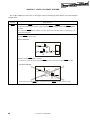
Cause:
The power supply capacity of the USB port of the personal computer may be low (when the MODE switch
is set to 3 V).
Action:
Try using another personal computer or supply power from the target system by setting the MODE switch
to Target.
Cause:
Security may be set.
Action:
Check that security is not set.
(2) The Status LED does not blink during erase operation.
In accordance with the specifications of the FPL2, the Status LED may not blink during erase operation.
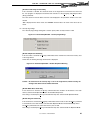
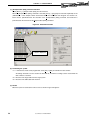
To confirm the erasure status, check the following message in the action log window of the GUI software:
Message during erase operation:
"Flash Erasing..."
Message for completion of erasure: "chip erase finish." or "all block erase finish."
Cause:
The power supply capacity of the USB port of the personal computer may be low (when the MODE switch
is set to 3 V).
Action:
Try using another personal computer or supply power from the target system by setting the MODE switch
to Target.
User’s Manual U17307EJ2V0UM
67