1
(c) SPECTRUM SYSTEMENTWICKLUNG MICROELECTRONIC GMBH
AHRENSFELDER WEG 13-17, 22927 GROSSHANSDORF, GERMANY
SBench and digitizerNETBOX are registered trademarks of Spectrum Systementwicklung Microelectronic GmbH.
Microsoft, Visual C++, Visual Basic, Windows, Windows 98, Windows NT, Window 2000, Windows XP, Windows Vista, Windows 7,
Windows 8 and Windows 10 are trademarks/registered trademarks of Microsoft Corporation.
LabVIEW, DASYLab, Diadem and LabWindows/CVI are trademarks/registered trademarks of National Instruments Corporation.
MATLAB is a trademark/registered trademark of The Mathworks, Inc.
Keysight VEE, VEE Pro and VEE OneLab are trademarks/registered trademarks of Keysight Technologies, Inc.
FlexPro is a registered trademark of Weisang GmbH & Co. KG.
PCIe, PCI Express and PCI-X are trademarks of PCI-SIG.
LXI is a registered trademark of the LXI Consortium.
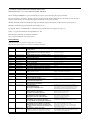
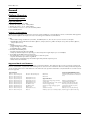
Revision History
Detailed information is found in the support area of our website:
http://spectrum-instrumentation.com/en/sbench-6-software-changelog
Version
Date
Changes
6.2.12
31th July 2015
Support of new hardware average version, Easy Generator improvements
More than 20 bug fixes
6.2.11
4th June 2015
Support of M4i.66xx AWG, Support of M4i Multiple
Recording SW trigger, function generator improvements-
Import + display imrpovements,
more than 60 bug fixes
6.2.10
27th February 2015
M4i.44xx digital input feature, small improvements
More than 30 bug fixes
6.2.09
28th January 2015
Shortcuts for cursor movement
More than 10 bug fixes
6.2.08
17th December 2014
ASCII Import improvements
Harmonics Cursor Improvements
6.2.07
9th December 2014
Improvements of display and export
More than 40 bug fixes
6.2.06
8th October 2014
Support of M4i.22xx series, Moveable comments
Small improvements, more than 40 bug fixes
6.2.05
29th July 2014
Autostore Round Robin
More than 70 bug fixes
6.2.04
7th May 2014
digitizerNETBOX name shown in selection screen
Bug fixes
6.2.03
17th April 2014
Zero Padding for FFT, Acces of write protected files
Bug fixes
6.2.02
21th March 2014
Base License now supports synchronization
Dim display channels feature, bug fixes
6.2.01
4th February 2014
Support of PXI synchrnoization via PXI trigger bus
6.2.00
28th November 2013
Support of M4i series
Hardware Calibration as button
6.1.11
21th August 2013
Bug fixes for digitizerNETBOX remote access
6.1.10
12th August 2013
User definable font size for displays
Bug fixes
6.1.09
3rd June 2013
Support of remote products: digitizerNETBOX
New function Moving Average
Display comment formats changable
6.1.08
18th April 2013
Support of MX.49xx and MC.49xx series
ASCII export: precision can be defined
Flush for timestamp implemented
XY display: Exchange x and y by drag and drop
Store path and last setup file
6.1.07
4th December 2012
Automatic card selection when starting with setup
Paper orientation in print dialog
6.1.06
31th October 2012
X/Y Display added
Improved Mode Dialogue
Improved Split File Settings
Added support for M2i.49xx series
Automatic start of channel conversion on drag and drop
SB6 can handle channels from multiple files at the same time
Source channels for calc can be changed from context menu
Digital displays can handle analog signals and vice versa
Import Wave/ASCII asks for missing header information
6.1.05
24th January 2012
Jump to position from calculation results
Printouts show Cursor Information
New X-Axis setup dialogue (right click)
Output mode implemented for MC/MX/MI series
New Zoom Function „Zoom to Range“
SBench 5 export format improved
6.1.04
4th October 2011
New calculation: Powerful Formula Interpreter
Easy Generator for simple output signals
Display: History mode for segmented signals
New export: VCD (standard for digital data)
New calculation: signal concatenation
Autostore for calculations implemented
Highlighting of signals with cursor
6.1.03
7th July 2011
Displays can be set up as tabbed windows
Source display can be selected for calculations
New setup dialogue for spread display offset/range
Scroll up/down in display with mouse wheel
Automatic FIFO online display limit added (user settings)
6.1.02
11th April 2011
New display: enhanced spread waveform display
New calculation functions: FIR filters, acceleration
UNICODE support for names, units, comments: Japanese, Chinese, Greek, Cyrillic and other character sets
supported.
ASCII export: signal header information added
Span of x-axis user definable in FIFO mode
Split files import: import chunk only or complete signal
Digital Display: highlighting of high levels by command
Print area between cursors
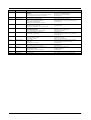
6.1.01
3rd February 2011
Add comments to displays and signals.
Support of PXI synchronization and MX.9010.
Drag and Drop of signals and configuration files to SBench 6.
License improvement: license is shared even for single cards.
Support of new hardware features: D/A output signal conversion,
M2i new trigger mode.
Better handling of loaded signals, placed under own node.
Output modes improved and bug fixed.
2
SBench 6 Software Manual
Window names can be changed
Display line data width can be changed