1
Warning: THE DEVICE IS NOT WATER PROOF OR WATER RESISTANT
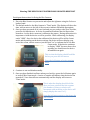
Participant Instructions for Using the Bite Counter:
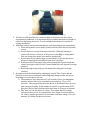
1. Place the Bite Counter on your wrist and adjust the tightness using the Velcro or
leather band.
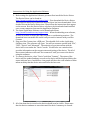
2. The default mode for the Bite Counter is “Time” mode. The display will show the
time, with an arrow to the left of the screen to indicate PM when appropriate.
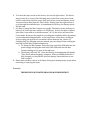
3. Once you have prepared all of your food and you are ready to take your first bite,
press the left button once. A series of sounds will indicate that the device has
turned on. As the device turns on it calibrates the sensor. During calibration it is
important to hold the device as still as possible. While calibrating, the display
reads “1888”. Once the device has calibrated, the device will be in Bite Count
mode and depending on the device settings, the device will now display your
active bite count, calorie count or just the word “on” to indicate that it is in Bite
Count mode. If the device continues
to display “1888” for more than a few
seconds, you should turn the device
off and back on again.
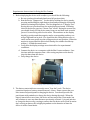
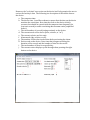
This is what the display should look like
before you press the left button.
Press the left button to begin counting
bites.
4. Continue to eat and drink normally.
5. Once you have finished and have taken your last bite, press the left button again
to turn off Bite Count mode. A series of sounds will indicate that the device has
turned off. Your data will save automatically and the display will return to
‘Time’ mode.
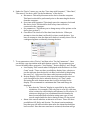
This is what the display should look like
after you have activated the bite counter
(the number of bites or calories will
increment with each bite or the device will
simply display the word “on”).
Press the left button again to deactivate the
bite counter.