1
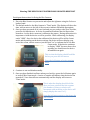
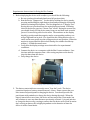
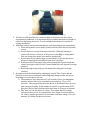
The battery status display with maximum charge
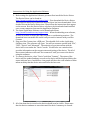
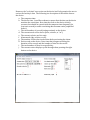
3. The device software allows for custom setting of the display for the various
experimental conditions. It is important that you understand how the display is
set before deploying the device. See the software instructions for details on
setting the display.
4. Additional subject instructions that may be used depending on the experiment:
a. When eating multi-course meals, please turn on/off the device with each
course.
b. Use the device to record all meals and snacks. (This will attempt to
capture all calories. However, if the person is snacking or eating when
they are doing other tasks, error may be introduced).
c. Use the device only when eating an actual meal. Do not use the device
when you simply grab a handful of some food “on the go”.
d. Drink non-caloric beverages only with your non Bite Counter hand and
caloric beverages with your Bite Counter hand (this will capture beverage
calories).
e. Drink beverages only with your left hand (this will ignore beverage
calories).
5. Procedures must be developed for identifying “outlier” Bite Counts that are
likely do to some error associated with eating while doing another activity or
forgetting to turn the device off, etc.
a. The minimum “inter-bite-interval” is 8 seconds. Hence, the maximum
number of bites that can be recorded in one minute is 7.5 or 0.125
bites/sec. Hence a good check on the data is to divide total bites by total
time eating in seconds. If this number is equal to or greater than 0.125
bites/sec this is a likely indicator that there may be an error in the data.
b. The “time out” for the device is 1 hour. This means that if an eating
session reaches 1 hour, it is assumed the user forgot to turn the device
off. Hence, another good check is to examine total time eating. If it is 60
minutes, it is likely the data are in error.