1
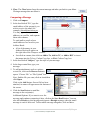
The Games page also features three Brain Fitness
Games, which entertain while improving memory and
brain health through stimulating in language, attention,
visual-spatial, and other skills.
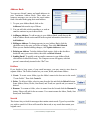
Start playing today! Use the menu options at the top of the
page to locate and click on the Games option in a dropdown menu. Click on a game name to play it.
Is your favorite game missing?
If one of your favorite games is not listed on our games
page, send us a request by clicking on the let us know!
link at the bottom of the Games page.
Activities
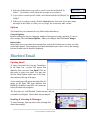
The Activities page presents important
information about upcoming activities right on
your Home page, with details just a
click away. You can browse, search,
and select interesting activities, then
sign up online.
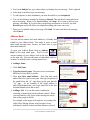
To view Activities happening at your
community, select the View All Activities
link located under the “Today at [Your Community Name]” slide show on the Home page.
You can also use the menu options at the top of the page to locate and click on the Activities
option in a drop-down menu.
Viewing & Signing up for an Activity
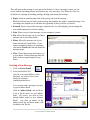
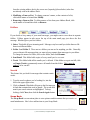
To see additional details for a specific activity, click on the
name of that activity.
If an event requires pre-registration, you will see an option to Sign Up
for the activity. Simply click on the Sign Up link to sign up for the event.
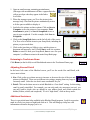
A Sign Up page will appear for that particular activity. If you would like
to include a message to the sponsor (organizer) of the event, enter
text in the Comments box. Then choose Confirm Sign Up.
The event sponsor will be notified of your request to sign up. You will
also receive an email confirming that you are signed up for the event.
19 | P a g e
© 2010 Touchtown, all rights reserved.