1
US 8,251,300 B2
5
6
secured to the base unit 1 04 and/ or the removable portion 1 08.
Those skilled in the art Will appreciate that other methods or
systems of connecting/securing the cap 112 to the base unit
104 and/or the removable portion 108 may also be used.
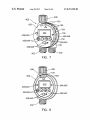
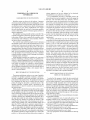
FIG. 2 shoWs a perspective vieW of a removable portion
108 docked With the base unit 104. For purposes of clarity, the
cap 112 has been removed. As can be seen from FIG. 2, the
display screen 132 displays information that may be vieWed
by a user. In the case of FIG. 2, this information is 12:00 PM,
Which may indicate the time When a particular sprinkler sta
herein, the sWitch 144 may be rotated or moved in an arcuate
path, or otherWise adjusted around the perimeter of the central
portion to alter the mode 150 of the removable portion 108.
As illustrated in FIG. 4, various modes 150 may be used. Of
course, those skilled in the art Will appreciate that other
modes and settings may also be used. The modes illustrated in
FIG. 4 include:
OFF: If this mode is selected, the controller 100 Will be
turned off such that the controller Will not cause the sprinkler
stations to turn on and off. This selection is useful during the
Winter months or other periods of inactivity;
RUN: If this mode is selected, the controller 100 Will “run”
tion Will turn on or the current time. Of course, other infor
mation may also be displayed such as the duration of time that
the sprinkler station Will run (e. g., it Will run for 45 minutes,
the speci?ed Watering schedule;
etc.), the frequency of Watering (e.g., Watering every day,
SET TIME: In this mode, the user may set and adjust the
time of day to be used by the controller 100 (e. g., set the clock
in the controller 100 to re?ect the current time);
tWice a day, 3 times a Week, etc.), the date, the time, the
beginning and/or ending time of the Watering period, as Well
SET DATE: In this mode, the user can select the date and/or
as other information. The user may use the controls 136 to
change the various settings of the controller 100.
the day of the Week used by the controller 100;
In one embodiment, the peripheral sWitch or dial 144/148
is positioned around the periphery 163, or a portion of the
periphery 163, of the sprinkler controller 100 to alloW the user
unimpeded access and to permit easy grasping and manipu
lation of the peripheral sWitch or dial 144/148, as illustrated in
FIG. 2.
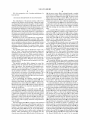
FIG. 3 is a rear, perspective vieW of the base unit 104. As
20
START TIME: This mode alloWs the user to program the
starting time for the various stations to turn on, as desired
(e.g., turn station 1 on at 9:00 a.m., turn station 2 on at 10:00
am);
HOW OFTEN: This mode alloWs the user to set hoW often
the Watering Will occur (e.g., every 3 days, every day, once a
25
Week, tWice a day, on speci?ed days of the Week);
can be seen in FIG. 3, the rear surface 164 ofthe base unit 104
HOW LONG: This mode alloWs the user to specify hoW
may include one or more sensor ports 168. TWo sensor por‘ts
long each particular station Will be turned on (e.g., station 1
168 are shoWn, although a greater or lesser number of ports
168 may also be used. The ports 168 are shoWn covered by a
plug 172. HoWever, in use, the plug 172 may be removed so
Will be on for 20 minutes, station 2 Will be on for 1 hour);
WATER BUDGET: This mode enables a user to specify the
30
that the port 168 may be placed in electronic communication
at each station. For example, by specifying 50%, a user could
reduce the Watering times for each station Without individu
With one or more sensors (not shown). The sensors may be,
for example, a moisture sensor that senses precipitation or
other types of moisture. If such a sensor is used, the sensor
may notify the controller 100 of the precipitation so that the
controller 100 may adjust, if desired, the amount of Water
ally adjusting the station Watering times; and
MOISTURE SENSOR: This mode enables a user to
35
It should be noted that the above-recited modes are exem
precipitation sensed.
plary. (LikeWise, different names for the mode may be
devised or placed on the face 157 of the sWitch or dial 144/
40
Another potential setting is that of “MANUAL WATERING,”
45
136. In some embodiments, these controls 136 may be an
increment control 136a and a decrement control 1361). The
increment control 136a alloWs a user to increase an indenti
50
the Watering schedule by pressing the increment control 13 6a
55
Those skilled in the art Will appreciate hoW the various set
tings may be adjusted in this manner.
In other embodiments, the controls 136 may further
setting. As shoWn in this ?gure, the indicator 184 may be a
60
tioned at the “12:00” o’clock position of the removable por
tion 108. Other locations of the indicator 184 may also be
position, the “6:00” o’clock position, or the “9:00” o’clock
As noted above, the user may select the particular modes of
the controller 100 by rotating the sWitch 144. As described
include an “arroW over” control 1360. This control 1360
alloWs a user to move or change the focus to different settings
Within the designated mode. For example, in one embodi
ment, different start times may be speci?ed Within the
“START TIME” mode. The “arroW over” control 1360 could
used, as desired, including, for example, the “3:00” o’clock
position.
and a decrement control 136b, as desired. LikeWise, if the
“SET TIME” mode Were selected, the user could adjust the
time, hours, or minutes by pressing these controls 136a, 1361).
include an indicator 184 that identi?es a selected mode 150 or
pointer 188. The indicator 184 shoWn in this Figure is posi
?ed value, Whereas the decrement control 1361) alloWs a user
to decrease the value. For example, if the “HOW OFTEN”
setting Were selected, the user could adjust the frequency of
are turned off.
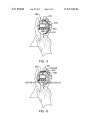
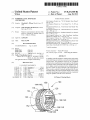
FIG. 4 shoWs an embodiment of the removable portion 108
positioned Within a person’s hand 180. The removable por
tion 108 may, in one embodiment, be siZed to ?t into a single
hand of the user, thereby alloWing the user to use his/her other
hand to rotate the sWitch 144. The central portion 128 may
Which alloWs the system to Water once and then stop.
Once the user has selected a particular mode 150, the user
may modify the settings in this mode 150 using the controls
station that Will cause the pertinent valve to open and close at
the designated time(s). When the valve is open, Water Will
?oW into the pertinent line and the area serviced by the station
Will be Watered via the coupled sprinklers. When the valve is
closed, the Water stops ?oWing and the sprinklers in that area
148, as Well). Other modes or settings may also be used
including, for example, a setting such as “RAIN DELA ,”
Which alloWs the user to skip one or more Watering cycles.
of communication conduit) to place the sprinkler controller
100 in electronic communication With sprinkler valves that
control the sprinkler stations. Speci?cally, the controller 100
may send electrical signals via the ports 170 to each particular
specify Whether a moisture sensor Will be employed to reduce
or augment Watering times.
provided by the sprinkler system based upon the amount of
In addition to sensor ports 168, the base unit 104 may also
include valve ports 170. Four valve ports 170 are shoWn, but
again a greater or lesser number may be used, as desired. The
valve ports 170 are designed to receive Wires (or another type
particular percentage of the speci?ed Watering time to be used
65
alloW a user to change the focus from one start time to another.
Once the focus is changed to another start time, the user may
employ the increment/decrement controls 136a, 1361) to