1
SILENT
HUNTER
21
COMMANDING THE SUBMARINE: Radar
SILENT
HUNTER
22
COMMANDING THE SUBMARINE: Torpedo Data Computer
SJ Radar
SJ surface search radar was installed on all submarines built after the war
started, and six of the older S-class submarines were refitted in 1943. Radar
made night surface-actions practical for submarines by generating accurate
range information.
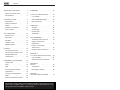
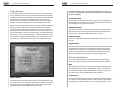
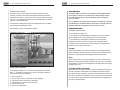
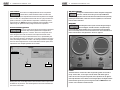
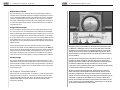
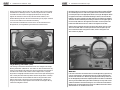
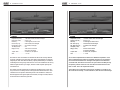
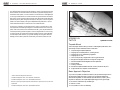
The SJ radar represented in SILENT HUNTER can operate in two modes:
Plan-Position Indicator (PPI) and A-scope.
The PPI screen shows the direction the radar’s antenna is pointing with a
line that sweeps through 360 degrees. When a contact is made, the radar
produces a blip on the screen. Distance to the contact is indicated on the
digital readout below the central knob, and by the blip’s relative position on
the radar screen.
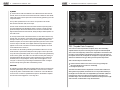
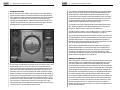
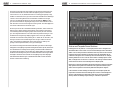
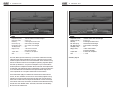
An A-scope contact doesn’t show the direction on the radar screen the way
the PPI does. The direction can be derived by the digital bearing readout on
the right side of the SJ console. A contact is represented as a spike in the
baseline reception, the size of the spike representing the size of the contact.
Contact range is indicated on the digital readout and by where the spike
appears on the screen. The farther to the left the spike appears, the closer
to the submarine the contact is.
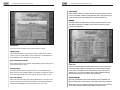
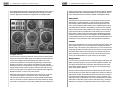
The antenna can be aimed by switching from Rotate mode to Focus. This
allows the PPI scope to be aimed by left-clicking right on the scope screen
or by left-clicking the bearing knob. The A-scope is aimed using the bearing
knob on the SJ panel. The radar’s aim can be fine tuned by left-clicking on
the digital display above the knob to adjust the bearing of the antenna by
hundreds, tens, or single degrees. The SJ radar can be toggled on or off
using Alt-S. Left-clicking on the Range knob allows the radar coverage to
be fine tuned by aiming the radar at the bearing chosen.
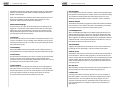
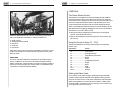
SD Radar
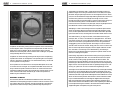
All submarines used in WWII were equipped with SD radar to prevent them
from being attacked by aircraft. The SD radar in SILENT HUNTER is of the Ascope variety, which reveals distance but not direction of aircraft detected
on the screen. A contact is represented as a spike in the baseline reception.
The SD radar can be toggled on or off using Alt-A.
TDC (Torpedo Data Computer)
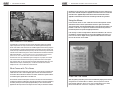
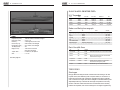
The controls on the Torpedo Data Computer (TDC) were remarkably
sophisticated for the period. The firing officer input the estimated speed
and course of the target ship, and the TDC compared this information with
the sub’s course and bearing and fed this information to the gyroscope in
the torpedo. Once fired, the torpedo ran straight for roughly 20 yards, then
altered course based on the gyro setting to intercept the target vessel.
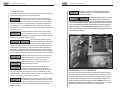
There are three ways to access the TDC:
♦ At the main TDC station in the control room (or by pressing F6).
♦ Using the TBT binocular mount on the Bridge.
♦ Through the periscope.
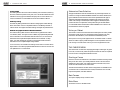
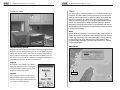
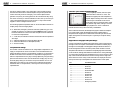
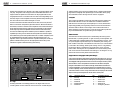
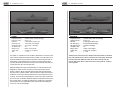
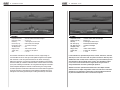
The main TDC station has the complete set of controls and indicators for
setting and firing torpedoes, however there is no way to take a bearing on
the target from the TDC itself. The Target Bearing Transmitter (TBT) and
periscope TDC controls are split into three partial screens which are
accessed using a control knob. The launch buttons are arrayed on the right
side of the TDC, forward tubes on top, aft tubes below.