1
YOU
( S W I T C H E S ,
GOT
A
G A U G E S ,
MINUTE?
B E L L S
&
W H I S T L E S )
T
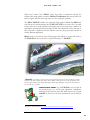
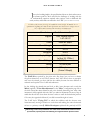
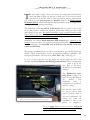
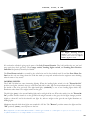
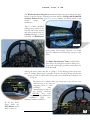
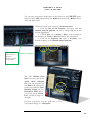
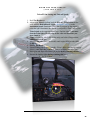
Figure 2: Radio & Compass controls
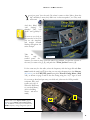
he cockpit layout of the F-86F-30 is pretty basic and easy to memorize. On
your right you have your Center Console, (Figure 2), which pertains to your
Radio Compass & Frequency
Selection options.
Center
Control Console
UHF & IFF
Control Panels
Radio Compass
Control Panel
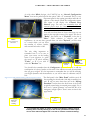
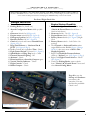
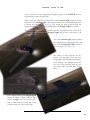
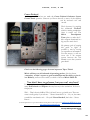
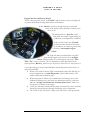
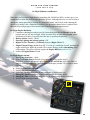
These two switches play a key
role when it comes to starting
the aircraft: the top one is the
Engine Master Switch, and
the one directly underneath it is
the Battery/Starter Switch.
Those two and a little bit of
external power and the "fire is
lit".** (… More or less)
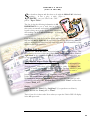
See page 5 for a more direct
reference to quickly starting
the Milviz F-86F if you’re
in a hurry!
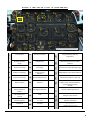
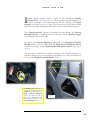
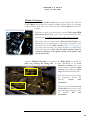
And on your Forward Right
Console is your Power System
panel, and just above that is your
Standby Compass, (not shown).
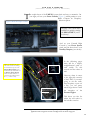
Engine Master
Switch:
Flip
On 1st
Battery/Starter Switch:
Right-Click will flip the
toggle down
momentarily.
In the following pages
there will be a simple,
straightforward guide to
each switch on this
console and the others as
well.
However, when it comes
to the right-side consoles
of the F-86F, if you aren't
going to use the radio,
start the plane, or put out
a fire, you can pretty
much forget about it with
the exception of the
External Lights.
This leaves you free for
where the real action is;
the left-side consoles.
**Though the F-86F-30 does have an on-board power system, (a starter/generator combo), it’s
application is for emergencies such as an in-flight restart as shown on page 24.
3