1
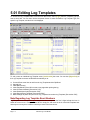
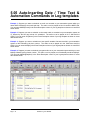
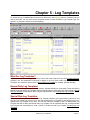
5.01 Editing Log Templates To access the Log Template Editor, from the main NL8 menu, select [Logs] then the Template Type you want to work with. You can then use the drop-down boxes to select the Station, Log Template Type, the specific Log Template, and the hour to be displayed. To edit or enter an individual Log Template event, [double-click] the event. You can also [Right-click] on the Log Template to access an Edit Menu that allows you to: Cut-and-Paste event lines to and from the Log Template and the ClipBoard Append Line Insert Blank Line(s) Insert PageBreak to force NL8 to start a new page when printing the log. Insert Commercial Break [See section 5.02] Insert Stand-Alone Avail [See section 5.02] Insert Special Event Template [ See section 5.04] Mass-Changer to paste all or part of one Log Template into another Log Template. [See section 5.03] Note Regarding Log Template Event Numbers Log Template event numbers do not correspond to time, except that the first 2 digits indicate the hour in which the event occurs. Example: Event 0810 is simply the 10th event in the 8 o'clock AM Template hour and may occur at any time in that hour which you enter in the time column. Page 5-4 Natural Log User Manual