1
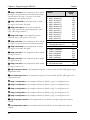
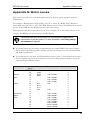
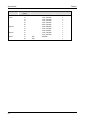
SEC-HD user manual Appendix G: Motor curves Appendix G: Motor curves Motor curves provide a way to proportionally increase or decrease speed, regardless of motor manufacturer. For example, a Multifan motor might require 130 VAC to run at 50% RPM, while a Marathon motor might need 100 VAC to run at 50% RPM. Without a motor curve, the Multifan motor would run at a slower RPM than the Marathon motor at the same settings. Selecting the correct motor curve allows you to set, for example, 50 on the control, and get much closer to 50% RPM on the motor then you would otherwise. Use manual override or test mode to test and evaluate the operation and performance of your fan motors. For more information, read Testing settings and equipment on page 43. If your fan motors are not running at approximately the correct RPM for the control settings, find your fan in the following table, and then select the motor curve for your fan manufacturer and model/specification. If your fan motor is not listed, use the default motor curve (curve 1). If the default motor curve does not operate your fan motor correctly, test the motor using manual override or test mode while selecting the different curves. Manufacturer Aerotech Airstream Baldor Canarm Choretime (GE) Emerson Exafan Diameter (inches) 09 36 12 36 14 18 24 09 12 14 16 18 12 12 10 14 16 18 20 24 Model Specifications AT09Z2 AT36Z1 APP12F APP36 3350 RPM PLF9 PLF12 PLF14 PLF16 1/4 HP, 1765 RPM 1/4 HP, 1700 RPM 1/3 HP, 1700 RPM 1/3 HP, 1140 RPM 1/5 HP 1/4 HP 1/3 HP, 1140 RPM 1/6 HP, 3400 RPM 1/4 HP, 1700 RPM 1/4 HP, 1700 RPM 1/3 HP, 1700 RPM 1/3 HP, 1700 RPM 0.53 HP, 1700 RPM 0.63 HP, 1700 RPM Recommended curve 2 4 3 4 4 4 4 4 2 2 2 2 1 2 2 2 2 2 2 2 63