1
Operation Test
Turn Off the UPS
Press the “Off” Switch for at least 3 seconds to turn off the UPS. If you press the “Off” Switch less than 3 seconds, the UPS will not execute shutdown
command due to insufficient pressing time.
In some occasions, the UPS will shut itself down in case of overload, output short-circuited or battery cutoff point reached in the Backup mode.
The UPS will automatically shut off the output and beep for 5 seconds then completely shut itself down.
Plug-in Charge
If the Input Power Cord is connected to the wall receptacle properly and the utility is normal, the UPS will start charging automatically without
processing “Turn On” procedure. You have to charge for at least 8 hours every 3 months to avoid from battery self over-discharge naturally, if the UPS
is in an idle condition.
Auto-Restart
If the Input Power Cord is connected to the wall receptacle properly and Utility is back to normal, the UPS will automatically restart to provide energy to
the output after battery cut.
Alarm Silence
The Alarm might be turned off by pressing the “On” Switch for approximately 1 second in the “Backup” mode. Unless any other warning or fault
condition occurs, the alarm remains at Silence condition once the “Alarm Silence” is turned off.
Test
Under Utility Normal condition, press the “On” Switch for 3 seconds to execute the Battery Self-test function. In case the battery is normal, it will enter
into the Battery Backup Mode for 10 seconds then return to Utility Mode. If the battery voltage is detected lower than set limit, the Battery Replacement
mark will blink for 5 times then extinguish to stop self-test procedure. And if battery is detected weak or dead, the Battery Replacement mark will
steadily illuminate.
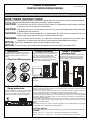
FRONT PANEL EXPLANATIONS
1. Utility
( Green LED)
2. Fault
(Red LED)
3. On Switch
4. Off Switch
5. Battery Replacement
6. Battery Backup
(Amber LED)
7. Battery Low
8. Bypass
9. Utility Low, UPS Boost
10. Utility High, UPS Buck
11. UPS Output Indicator
12. Polarity Error or Ground Fault
13. Over load
14. Load/Battery Level (%)
15. Load/Battery Level Indication Control Button
REAR PANEL EXPLANATIONS
1.
2.
3.
4.
5.
6.
RJ45 Port
DIP Switch
USB Communication Port
RS232 Communication Port
Output Breaker
Outlet
7.
8.
9.
10.
11.
Rating Label
Input Breaker
Input Power Socket(Inlet)
SNMP Slot
External Battery Terminal
REPLACING THE BATTERY
Note: Once the battery is disconnected, the loads are not protected from power outages.
When the Battery Replacement mark lights up, you may leave the UPS to be re-charged for at least 8~10 hours to see whether the mark will be
extinguished after the Self-test Function is executed again. In case the mark remains unchanged, you may unscrew the Hot Swappable Battery cover
to replace a new battery pack, and then press the “On” Switch to disable the mark. Please follow the steps 1-3 to draw out the old batteries. Then slide
in the new batteries into the UPS. Close the front panel and fasten two screws. Dispose of the old batteries properly at an appropriate recycling facility.
STEP 1
STEP 3
STEP 2
DIP SWITCH SETTING
The nominal voltage of the UPS might be re-set by the DIP Switch
on the rear panel of the UPS. The following charts may bring you
clear pictures about how the settings are done by the DIP Switch.
FUNCTION
2
1
VOLTAGE=110V
↑
↓
VOLTAGE=115V
↓
↓
VOLTAGE=120V
↓
↑
FUNCTION
2
1
VOLTAGE=220V
↑
↓
VOLTAGE=230V
↓
↓
VOLTAGE=240V
↓
↑
INDICATORS & ALARMS
Indicator
Color
Description
Alarm
Utility Mode
Green
None
Backup
Mode
Amber
Fault
Red
Steady:
Output Load is supplied by Utility.
Blinking:
Polarity error or Ground Fault
Steady (with alarm):
Output Load is supplied by Battery
Blinking every 5 seconds (no
alarm):Stand by for Utility
recovery to re-start up
When Overload, short circuit, or
Output Voltage Abnormal occurs
Blinking: Battery is weak and
needs to be recharged.
Steady: Battery is dead.
Battery
N.A.
Replacement
Every 2 seconds
before battery Low
and every 1 second
before battery Cutoff.
Buzzer beeps
continuously.
None