1
B) Hardware Switch:
3.
1) Jumper Setting
a)
Turn on Turbo Mode
10MHZ Turbo board can run Lotus 1-2-3
CP/M 86, DBASE III and many othe;
famous I BM package programs. Please
use Normal mode (4.77 MHZ) when
running Copy Wrhe.
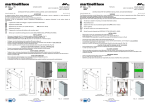
Push the Turbo switch mto "ON" position to
turn on Turbo mode at 10 MHZ and the Turbo
LED is on to indicate system being in Turbo
Mode now.
b)
Return to Normal Mode:
Push the Turbo switch into "OFF" position
to come back to Normal mode at 4.77 MHZ and
the Turbo LED is off.
Note: 1. The Push button lE!'ads to JP6 on mainboard. When the botton is pushed in,
JP6 i shorted.
2.
If you use software switch and hardware
switch at the same time, which means you
use ttlese two change methods exchangeable, the cursor on the screen display
does not indicate the exact execution
mode any more.
Because cursor does not change by hardware switch, you mix these two changes
methods, then the cursor is confused.
At this tillie, the. Turbo LED is the only
way that you can distinguish normal and
Turbo mode.
14
15