1
Settings Summary
Touch
in the Home Screen and select Settings. The
Settings app contains most of the tools for customising and
configuring your device.
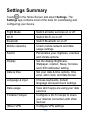
Flight Mode
Switch all radio services on or off
Wi-Fi
Switch Wi-Fi on or off
Bluetooth
Switch Bluetooth on or off
Mobile networks
Check mobile network and data
usage settings
Sound
Personalise your ringtones, volumes
and vibrate options
Display
Set the display Brightness,
Wallpaper, rotation, Sleep, font size
and LED notification setting.
Date & time
Set your date & time options, time
zone, 24hr clock, and date format.
Language & input
Choose keyboards, default
language and spell check settings.
Data usage
View which apps are using your data
services
Portable Hotspot
Configure a Wi-Fi hotspot to share
your internet connection with other
devices
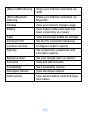
(More) VPN
Configure VPN settings
102