1
Chapter 3
Software Overview
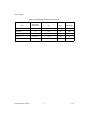
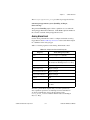
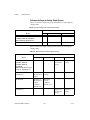
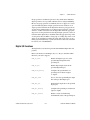
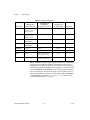
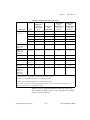
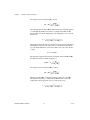
The digital I/O functions can write to and read from both an entire port
and single digital lines within the port. To write to an entire port,
Traditional NI-DAQ writes a byte of data to the port in a specified digital
output pattern. To read from a port, Traditional NI-DAQ returns a byte of
data in a specified digital output pattern. The byte mapping to the digital I/O
lines is as follows.
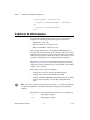
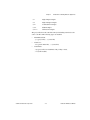
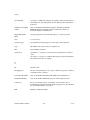
Table 3-6. Byte Mapping to Digital I/O Lines
Bit Number
Digital I/O Line Number
7
7 Most significant bit (MSB)
6
6
5
5
4
4
3
3
2
2
1
1
0
0 Least significant bit (LSB)
In the cases where a digital I/O port has fewer than eight lines, the most
significant bits in the byte format are ignored.
You can configure most of the digital I/O ports as either input ports
or output ports. On the 653X, DSA, 671X, 673X, and E Series devices
(except for ports 2, 3, and 4 on the AT-MIO-16DE-10), you can program
lines on the same port independently as input or output lines. Some digital
I/O ports are permanently fixed as either input ports or output ports. If you
configure a port as an input port, reading that port returns the value of the
digital lines. In this case, external devices connected to and driving those
lines determine the state of the digital lines.
If no external device is driving the lines, the lines float to some
indeterminate state, and you can read them in either state 0 (digital logic
low) or state 1 (digital logic high). If you configure a port as an output port,
writing to the port sets each digital line in the port to a digital logic high or
low, depending on the data written. In this case, these digital lines can drive
an external device. Many of the digital I/O ports have read-back capability;
if you configure the port as an output port, reading the port returns the
output state of that port.
Traditional NI-DAQ User Manual
3-54
ni.com