1
Table of Contents
Introduction.................................................................................................................. 1
Unpacking ................................................................................................................... 2
Finding Your Way Around
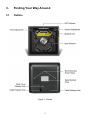
Outline ............................................................................................................... 3
Caution Label..................................................................................................... 5
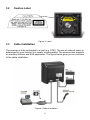
Cable Installation ............................................................................................... 5
Connection
Power................................................................................................................. 6
Connecting to the Host ...................................................................................... 6
Connecting Auxiliary Scanner ............................................................................ 7
Connect EAS ..................................................................................................... 7
Verifying Scanner Operation .............................................................................. 7
Interface Cable Replacement ............................................................................ 9
Mounting
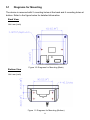
Diagrams for Mounting....................................................................................... 11
Mounting Plate Installation ................................................................................. 12
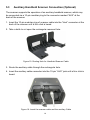
Auxiliary Handheld Scanner Connection (Optional) ........................................... 14
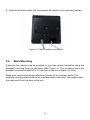
Back Mounting ................................................................................................... 15
Site Preparation
Configuring the Scanner .................................................................................... 16
Scan Test ........................................................................................................... 16
Set Up................................................................................................................ 17
Controlling the Scanner from POS System........................................................ 18
Setting EAS System........................................................................................... 18
Operation
LED Indications.................................................................................................. 20
Sound Indications .............................................................................................. 20
Tone and Volume Adjustment ............................................................................ 21
Sleep Mode........................................................................................................ 22
How to Scan
Scan Volume...................................................................................................... 23
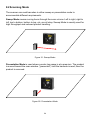
Scanning Mode .................................................................................................. 24
Maintaining the Scanner.............................................................................................. 25
Trouble Shooting ......................................................................................................... 36
Specification ................................................................................................................ 37
Dimension ................................................................................................................... 38
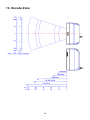
Decode Zone............................................................................................................... 39
Pin Assignment
Device................................................................................................................ 30
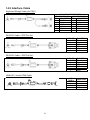
Interface Cable................................................................................................... 31