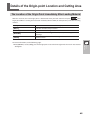
1
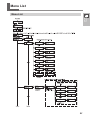
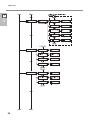
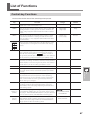
List of Functions
Menu
OTHERS
Function
Range
Default
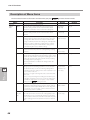
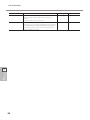
SMOOTING If you want the curves of circles and arcs to be cut smoothly, ON / OFF
set this to [ENABLE]. When on, however, small text or intricate
designs may also be cut with rounded corners. If this happens, change the setting to [DISABLE] and perform cutting
again.
ON
UNIT
Select the unit of measurement for numerical values shown
on the display.
However, values are shown in metrics for the following
menus even when inch is selected.
mm / inch
mm
FACTORY
DEFAULT
This returns the settings values of the menu items to their
factory-default values.
PRESET
−
SELF TEST
This adjusts the respective distances of the X axis. Compare
the actual measurements of the cutting results with the data
sent from the computer to calculate and set the distance
adjustment value.
−
−
CONTRAST
This changes the contrast of the display.
5 to 1
5
TEST PATTERN
This changes the cutting-test pattern carried out when you
press
.
This performs an ordinary cutting test with [TYPE 1]. For thin
materials or cases where graphics are too small to obtain
good cutting results with [TYPE 1], make the setting for
[TYPE 2].
TYPE 1 / TYPE 2
TYPE 1
TYPE 1
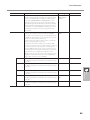
OVER CUT
TYPE 2
This cuts an excess margin of 1 mm (0.04 in.) from the first
DISABLE / ENABLE
and last line segments.
This selection is normally set to [DISABLE], and is set to [ENABLE] when cutting especially attractive corners is desired.
When cutting small text or intricate graphics, however, this
should be set to [DISABLE] to avoid cutting the text or graphics portion of material.
DISABLE
CALIB
This adjusts the respective distances of the X axis and Y axis.
Compare the actual measurements of the cutting results
with the data sent from the computer to calculate and set
the distance adjustment value.
0.00 %
AUTO PREFEED (only
GX-640)
With this feature set at [ON], the cutting is performed after
OFF ?ON
the material is automatically fed out by 1 m when the cutting
data is transmitted from the computer. (If the next transfer
point is over 1 m back, the material may be fed out by over 1
m, depending on the data.) When feeding of the material is
performed with the [AREA] feature in advance, the automatic
feeding is not performed up to the length where the material is fed out then even if [PREFEED] is set at [ON].
FAN
POWER
(only GX640)
This is a useful feature when the media is hard and floating
above the platen, or when the media is thin and sticking to
the platen. Set a greater value when the material is prone to
float, while set a smaller value when it is prone to stick.
Main
Specifications
-2.00 to 2.00 %
(0.01 % step)
5
OFF
-5 to -1 / NORMAL / NORMAL
+1 to +5
91