1
Contents
Be sure to read “Read this first!”. (
Important
Information
Important Information
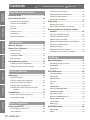
Read this first!............................................ 2
Precautions for Use................................. 12
Cautions when transporting..................................12
Cautions when installing.......................................12
pages 2 to 8)
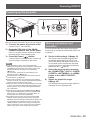
Powering up the projector.....................................29
Making adjustment and selection.........................29
Powering off the projector.....................................30
Direct power off function.......................................30
Projecting.................................................. 31
Selecting the image..............................................31
Preparation
Security.................................................................13
How to adjust the state of the image....................31
Disposal................................................................13
Cautions on use....................................................14
Basic operations using the remote
control................................................... 32
Accessories...........................................................15
Using the AV MUTE function.................................32
Optional accessories............................................15
Using the FREEZE function..................................32
Switching the input signal.....................................32
Getting Started
Preparation
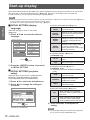
Start-up display........................................ 16
About Your Projector............................... 17
Remote control......................................................17
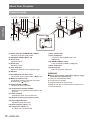
Projector body.......................................................18
Basic Operation
CONTROL PANEL................................................19
Rear terminals.......................................................19
Adjusting the display position automatically.........33
Using the function buttons....................................33
Using ECO button.................................................33
Resetting to the factory default.............................33
Controlling the volume of the speaker..................34
Settings
Using Remote control.............................. 20
Menu Navigation....................................... 35
Installing and removing batteries..........................20
Navigating through the menu................................35
Setting Remote control ID numbers......................20
MAIN MENU.........................................................36
SUB MENU...........................................................36
Getting Started
Settings
Setting up.................................................. 21
Projection method.................................................21
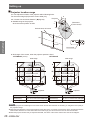
Parts for ceiling mount (Optional).........................21
Screen size and throw distance............................22
Adjusting front adjustable feet..............................24
Maintenance
Adjusting the position using the lens shift
function...........................................................24
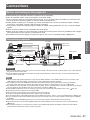
Connections.............................................. 27
Before connecting to the projector........................27
Connecting example.............................................27
Appendix
Basic Operation
PICTURE menu......................................... 38
PICTURE MODE..................................................38
CONTRAST..........................................................38
BRIGHTNESS.......................................................38
COLOR.................................................................39
TINT......................................................................39
SHARPNESS........................................................39
COLOR TEMPERATURE.....................................39
ADVANCED MENU...............................................40
DAYLIGHT VIEW..................................................40
DIGITAL CINEMA REALITY..................................40
NOISE REDUCTION............................................41
TV-SYSTEM..........................................................41
RGB/YPBPR. .........................................................41
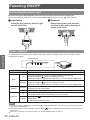
Powering ON/OFF..................................... 28
POSITION menu........................................ 42
Connecting the power cord...................................28
KEYSTONE..........................................................42
Power indicator.....................................................28
SHIFT....................................................................42
10 - ENGLISH