1
Total station manual
3.2 Set up using known points
-Relocate the total station to its new location , center the bubble (Like in point 2.1: Installation)
-Select PROG (Page key)
-Select SETUP, (Function key)
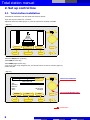
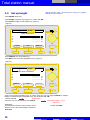
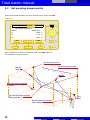
-Select Coordinates (Navigation keys), (Figure 10) confirm with OK
-Select Anywhere... (Navigation keys), and confirm with OK
(Figure 10)
CONFIG
THEO
PROG
DATA
Control line ...
Coordinates ...
Height ...
OK
ESC
-Do not edit hi (Instrument height).
-hr (=reflector height) see Point 2.4, press ok to continue.
-Select the 1st reference point (Navigation keys) and confirm with OK.
-Measure the 1st point! V0001, while shooting the point on the reference surface.
-Select the second reference point (Navigationkeys) and confirm with OK
-Measure the 2nd point the same way: V0002
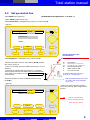
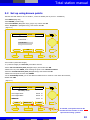
-On the Plausibility Check, you see the difference between the 2 measures. If its within the tolerance,
validate with YES.
(Figure 11)
CONFIG
THEO
PROG
DATA
Vérifier les Check
Plausibility
résultats
Line length Given:
6.506
m
Line length Meas.:
6.506
m
Difference
0.000
m
NO
NEXT PT
YES
ESC
If needed, a 3rd point can also be
measured. The location is then
reprocessed using 3 points
13