1
DI–710 Series and DI-715B Series Hardware Manual
3. Installation
Unpacking
The following items are included with each instrument. Verify that you have the following:
•
DI-710 Series or DI-715B Series Instrument.
•
Communications cable (USB ONLY - Ethernet models do not come with an Ethernet cable).
•
Power cable (except DI-710-UL and DI-710-UH).
•
The WINDAQ Resource CD-ROM.
•
DATAQ screwdriver for connecting signal leads to the screw terminal(s).
•
Installation Guide pamphlet (included in CD case).
If an item is missing or damaged, call DATAQ Instruments at 330-668-1444. We will guide you through the appropriate steps for replacing missing or damaged items. Save the original packing material in the unlikely event that your
unit must, for any reason, be sent back to DATAQ Instruments.
USB Device Installation
1.
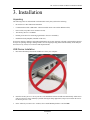
Disconnect all DATAQ Instruments USB devices from your Computer.
2.
Insert the WINDAQ Resource CD in your drive. The installation software should start automatically within 20 seconds. If it does not, start it manually by double-clicking the Setup application (setup.exe) located on the root of
the WINDAQ Resource CD.
3.
In the “What do you want to do?” window, select “Install WinDaq Software” and click OK.
Installation
9