1
TruVision Navigator 6.0
User Manual
P/N 1064107 • REV I • ISS 07OCT15
Copyright
© 2015 United Technologies Corporation
Interlogix is part of UTC Building & Industrial Systems, a unit of
United Technologies Corporation. All rights reserved.
Trademarks and
patents
The TruVision Navigator 6.0 name and logo are trademarks of
United Technologies.
Other trade names used in this document may be trademarks or
registered trademarks of the manufacturers or vendors of the
respective products.
Manufacturer
Interlogix
3211 Progress Drive, Lincolnton,
NC 28092 USA
Authorized EU manufacturing representative:
UTC Climate Controls & Security B.V.,
Kelvinstraat 7, 6003 DH Weert, Netherlands
Contact Information
Version
For contact information, see www.interlogix.com or
www.utcfssecurityproducts.eu.
This document applies to TruVision Navigator 6.0.
Certification
Software license
agreement
N0000
Important: This end-user license agreement (“Agreement”) is a legal
agreement between UTC and You. By downloading, installing,
copying, or otherwise using this software, you agree to be bound by
the terms of this Agreement. If you do not agree to the terms of this
Agreement, you may not download, install, copy or use the software,
and you may return the software within thirty days (30) days and
request a refund of the license fee.
1. Definitions. The following definitions apply to this document:
“UTC,” means UTC Fire & Security Inc., a Delaware corporation.
“You” means the natural person or the entity that is agreeing to be
bound by this Agreement, their employees and third party
contractors that provide services to you.
“Software” means the software products that are licensed to You
under this Agreement and any upgrades, modified versions, updates,
additions, and copies of the Software furnished to You during the
term of the license granted herein.
“Customer” means the person or organization, or parent or
subsidiary thereof, who uses the Software for its intended purposes,
and excludes distributors, authorized resellers, value added resellers
and original equipment manufacturers. Customer may be referred to
as You or Your, whether an individual or a business entity of any
kind.
“Machine” means the computer, workstation, terminal, or other
hardware product on which the Software is installed.
2. License. The Software is licensed, not sold. UTC shall retain all
rights to and in the Licensed Product, including, but not limited to, all
copyrights, patents, trademarks, and trade secrets incorporated in
the Licensed Products.
UTC hereby grants You a non-exclusive, non-transferable license,
without right to sublicense, to install and use the object code version
of the Software to the extent permitted by your payment of the
license fee (if applicable) and only in the country in which the
Software was acquired. Unless multiple copies are licensed, you
may not install more than one copy of the Software onto more than
one Machine.
UTC hereby grants You a non-exclusive, non-transferable license, to
make a single machine-readable copy of the Software solely for
backup or archival purposes.
You agree not to:
a. transfer or distribute the Software, in electronic format or
otherwise;
b. store the Software on a server for use by more than one terminal;
c. sell, rent, lease, or sublicense the Software;
d. copy or modify the Software for any purpose.
3. Term. This Agreement is effective until terminated. You may
terminate this Agreement by uninstalling all components of the
Software from all Machines and returning the Software to UTC. UTC
may terminate this Agreement if You breach any of these terms and
conditions. Upon termination of this Agreement for any reason, You
agree to immediately uninstall all components of the Software and
return the Software to UTC. All provisions of this Agreement relating
to (i) disclaimer of warranties; (ii) limitations on liability, remedies,
and damages; and (iii) UTC’s proprietary rights, shall survive
termination of this Agreement.
4. Reverse Engineer. The Software is delivered in object code only.
You may not alter, merge, modify, adapt, translate, decompile,
disassemble, reverse-engineer, or otherwise reduce the Software to
a human-perceivable form.
5. Limited warranty. UTC warrants that for one (1) year from the
date of delivery of the Licensed Product (Software Warranty Period),
the functions contained in the Software will be fit for their intended
purpose as described in the accompanying documentation, and will
conform in all material respects to the specifications stated in such
documentation. UTC does not warrant that the operation of the
Software will be uninterrupted or error-free. Your exclusive remedy
under this limited warranty for nonconforming Software shall be
repair or replacement of the Software, at the sole discretion of UTC.
To obtain a repair or replacement of nonconforming Software,
contact your Interlogix reseller directly or contact us online at
www.interlogix.com/customer-support during the Software Warranty.
EXCEPT FOR THE PRECEDING EXPRESS LIMITED WARRANTY,
TO THE MAXIMUM EXTENT PERMITTED BY APPLICABLE LAW,
UTC PROVIDES THE SOFTWARE WITHOUT ANY WARRANTIES
OF ANY KIN, EXPRESS, IMPLIED, OR STATUTORY. UTC
SPECIFICALLY DISCLAIMS ANY IMPLIED WARRANTIES OF
MERCHANTABILITY, FITNESS FOR A PARTICULAR PURPOSE,
AND NON-INFRINGEMENT.
6. Limitation of liability. UTC’s sole obligation or liability under this
agreement is the repair or replacement of nonconforming software
and/or defective media according to the limited warranty above. TO
THE MAXIMUM EXTENT PERMITTED BY APPLICABLE LAW, IN
NO EVENT WILL UTC BE LIABLE FOR ANY LOST PROFITS OR
BUSINESS OPPORTUNITIES, LOSS OF USE, BUSINESS
INTERRUPTION, LOSS OF DATA, OR ANY OTHER INDIRECT,
SPECIAL, INCIDENTAL, OR CONSEQUENTIAL DAMAGES
UNDER ANY THEORY OF LIABILITY, WHETHER BASED IN
CONTRACT, TORT, NEGLIGENCE, PRODUCT LIABILITY, OR
OTHERWISE. BECAUSE SOME JURISDICTIONS DO NOT ALLOW
THE EXCLUSION OR LIMITATION OF LIABILITY FOR
CONSEQUENTIAL OR INCIDENTAL DAMAGES THE PRECEDING
LIMITAITON MAY NOT APPLY TO YOU. IN ANY EVENT, UTC’S
LIABILITY WILL NOT EXCEED THE LICENSE FEE, IF ANY, PAID
BY YOU FOR THE SOFTWARE LICENSED HEREUNDER. THE
FORGOING LIMITATION WILL APPLY TO THE MAXIMUM
EXTENT PERMITTED BY APPLICABLE LAW, REGARDLESS OF
WHETHER UTC HAS BEEN ADVISED OF THE POSSIBILITY OF
SUCH DAMAGES AND REGARDLESS OF WHETHER ANY
REMEDY FAILS OF ITS ESSENTIAL PURPOSE.
7. General. The material provided to You, including the Software,
shall not be exported or reexported in violation of any export
provisions of the USA or any other applicable jurisdiction. Any
attempt to sublicense, assign, or transfer any of the rights, duties, or
obligations hereunder shall be void. This Agreement shall be
governed by and interpreted under the laws of the State of California,
United States of America, without regard to conflicts of law
provisions. You hereby consent to the exclusive jurisdiction of the
state and federal courts covering Costa Mesa, California to resolve
any disputes arising under or in connection with this Agreement.
8. Restricted rights legend. The Licensed Product is provided with
RESTRICTED RIGHTS. In the event the United States Government
or an agency thereof is granted a license, the following additional
terms apply: Restricted Computer Software, as defined in the
Commercial Computer Software– Restricted Rights clause at
Federal Acquisition Regulations 52.227-19, and the restrictions as
provided in subparagraphs (c)(1) and (c)(2) thereof; and as
applicable, the Government’s rights to use, modify, reproduce,
release, perform, display, or disclose the Software also are restricted
as provided by paragraphs (b)(2) and (b)(3) of the Rights in
Noncommercial Technical Data and Computer Software– Small
Business Innovative Research (SBIR) Program clause at DFARS
252.227-7018.
9. Acknowledgment. You acknowledge that You have read and
understand this agreement and agree to be bound by its terms. You
further agree that this agreement is the complete and exclusive
statement of the agreement between You and UTC, and supersedes
any proposal or prior agreement, oral or written, and any other
communication relating to the subject matter of this agreement.
Intended use Use this product only for the purpose it was designed
for; refer to the data sheet and user documentation. For the latest
product information, contact your local supplier or visit us online at
www.interlogix.com/customer-support .
Content
Chapter 1 Overview
Client Software Requirements
Client Hardware Guidelines
Server Software Requirements
Server Hardware Guidelines
Plug-in Requirements Internet Explorer
1
6
6
8
9
11
Chapter 2 Installation
Architecture
Installation Options
Languages
Installation – Standalone Model
Installation – Multi-Client Model
Initial Login
Uninstall
Network Time Protocol (NTP) Service
Windows 7 and Vista – Local Scheduling Service
Installing Navigator on Windows 8 platforms
14
14
14
15
15
17
21
23
27
28
30
Chapter 3 Operation
Adding Devices
Adding Cameras via Discovery Tool
Adding a TruVision 360 degree Camera
Organize the Navigator
Find and export video
Display Analytic Rules
The Collector Panel
TruVision Navigator Player
Camera Level Disk Analysis
The Viewing Panel
PTZ control
Digital Zoom
Tampering Monitor
Configuring discovered device(s)
Configure a device with TruVision Navigator
Configure a camera
Device properties
Device disk analysis
Upgrade Firmware
33
33
36
38
40
42
44
45
47
49
50
52
54
54
55
56
57
58
59
60
TruVision Navigator 6.0 User Manual
i
Camera search
TruVision Recorder Browser Configuration
Chapter 4 TruVision Navigator Settings
Client Settings
Server Settings
Notification Settings
Health Diagnostic Settings
Groups and User Settings
Help
Appendix A Device Details
Summary
Content
TruVision TVR10 (DVR)
TruVision TVR11 / TVR12 (DVR)
TruVision TVR41 / TVR42 (DVR)
TruVision Generic TVR / TVN
TruVision TVR60 (Hybrid DVR)
TruVision TVN10/20/21/50 (NVR)
ii
61
62
67
68
69
85
87
90
93
94
94
94
94
98
102
106
109
114
TruVision Navigator 6.0 User Manual
Chapter 1
Overview
TruVision Navigator is video management software that enables security-related
personnel to easily and remotely gather video evidence, monitor live situations, and
configure and maintain a video surveillance system that consists of UTC digital video
recorders (devices), analog video cameras, network video recorders, and IP cameras.
TruVision Navigator provides a more intuitive way to find and provide relevant video
content. Version 6 features a redesigned interface and functionality enhancements for a
more intuitive user experience. Figure 1 shows the TruVision Navigator main screen.
TruVision Navigator 6.0 User Manual
1
Chapter 1: Overview
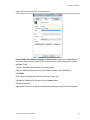
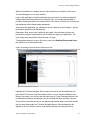
Figure 1: TruVision Navigator Main Window
1
Navigator Panel
2
Search Dialog
3
Add Devices and Add Folders Icons
4
Settings, Show Selected Tasks, Help, and Logout Icons
5
Viewer Panel, multiple tabbed viewing panels (up to 10) can be added by clicking on the + icon
6
Event Monitor Panel
7
8
9
10
11
Custom View, Toggle (maximized and normal view), Select All, and Close All icons
Notifier Panel
Details icon: Launches the Event Center
Collector Panel and
Export, Select all, and Close All icons
Controller Panel and Playback controls
12
Live and Sub stream toggle controls
13
Zoom In/Out, Center TimeLine, and Go To Date icons
14
Save Video, Snapshot , PTZ Controls, and Push to Talk icons
TruVision Navigator consists of 5 panels, several major dialogs, and numerous program
icons as listed above. Panels are resizable by dragging the vertical left or right splitter
bars. Arrow icons next to panel names signify the ability to hide/unhide the panel. This
2
TruVision Navigator 6.0 User Manual
Chapter 1: Overview
provides custom application layout styles depending on the activities that you want to
perform. TruVision Navigator will remember your custom panel layout upon logout and
restore you to that same point when you log back in.
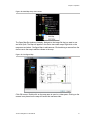
The Navigator panel (1) is the central administration area in the software and allows you
to quickly search and access any device or camera in your system.
The Navigator features double-click or drag n’ drop capability to view cameras or
devices as a whole. By right-clicking on any object in the Navigator, you will be exposed
to a number of operations that can be performed on the object. These include health
diagnostics, device configuration, disk analysis, properties, search, firmware uploads,
and more. Maps or floor plans can be added using .jpg or .png files. Live camera icons
can be placed on the maps to represent their physical locations. Clicking on these
camera icons loads video into the Viewer panel.
This panel is permission-based, so if you do not have rights to perform certain actions,
you will not see the options.
The Viewer panel (5) allows you to view both live and recorded video from any video
source in the system to verify and act on the content. It contains live or previous
recorded videos that can be launched from the Notifier, Navigator, or Collector. Multiple
tabbed viewing panels can be added (up to 10). These additional viewing panels can
also be detached and become free floating windows. An embedded viewer, the Event
Monitor is now available in the Viewer panel.
Users have several tile layouts to choose from when arranging the video sources.
Standard tile layouts include 1×1, 2×2, 3×3, 4×4, and 5×5. We also support a Custom
Tile Layout with 1 large tile and 7 smaller surrounding tiles for additional flexibility.
Double-clicking in any single tile will bring that video to full screen. Double-clicking the
video again will restore the video to the previous tile layout. As well, Instant Replay is
available from the video tile itself by clicking on the Instant Replay icon.
If your system contains PTZ (pan/tilt/zoom) cameras, the Viewer panel has mouse
support for PTZ features from within the video tile. Left-click and move the mouse
left\right\up and down to adjust the pan and tilt of the camera. Right-click and move the
mouse up and down to allow the camera lens to zoom in and out.
The Controller panel (11) allows you to manage video once it is loaded in the Viewer.
The Controller features a toolbar, a timeline, playback controls, and stream switching
capabilities. When a specific video tile is selected (blue outline around the video tile), the
Controller features will affect that video tile.
The Controller toolbar allows you to select all video tiles in the viewer, zoom in and out
on the timeline, center the timeline, open the PTZ control palette, perform a Go To
search, and put video in live or playback. The Snapshot button allows you to take a
snapshot of the current play time of a selected video tile and send it to the Collector for
TruVision Navigator 6.0 User Manual
3
Chapter 1: Overview
export. The Video button allows you to send a desired video segment (of the time range
you specified with the green and red indicators) to the Collector for export.
The Controller timeline allows users to seek for video at specific points in time. Doubleclicking anywhere on the timeline will automatically playback the selected video at that
specific date and time. Use the current live/playback cursor (appears as a blue seek
triangle icon) to seek and play the video anywhere along the timeline. Use the green and
red triangle icons to mark the beginning and end of a desired video segment. Use the
playback controls beneath the timeline to further manipulate playback video.
The Collector panel (10) contains all relevant video segments, snapshots, and local
recordings ready for export. From here, you can select the desired content to export to
your hard drive on demand or via a schedule.
To re-open a video clip for further analysis, double-click the thumbnail and the video will
launch in the Viewer. You can then manipulate the timeline to refine the clip and send it
back to the Collector. To delete video clips from the Collector, click the delete icon next
to the thumbnail. Rename, print, or E-mail snapshots with a right-click of the mouse on
the thumbnail.
The Tasks (4) panel affords the user one central place to monitor the tasks that have
been created and scheduled in the system. These tasks include video exports, firmware
upgrades, bulk configurations, database backups, and database restores. The Tasks
panel provides a real-time status of the tasks in the queue, and the reason if a task was
unsuccessful. The Tasks panel is launched using the Show Scheduled Tasks icon in the
Navigator panel.
The Settings dialog (4) allows the user to configure several options within the
application. These include settings for client, server, notifications, audit histroy, and
health diagnostics.
Client settings apply to each client station. These settings include CPU threshold control,
POS activation, aspect ratio and bandwidth controls for video monitoring, and audio
activation. Enable the maximum CPU threshold here to prevent your CPU from reaching
100% during video rendering. As with all applications, you will experience a system slow
down as you reach 100% CPU.
Enable your alert sound when new device notifications are received in TruVision
Navigator's Notifier.
Enable the aspect ratio for live and playback video in the Viewer.
Server settings include the SMTP server settings, permission settings, custom help link
settings, and server/client URL information.
Notifications settings include the network settings necessary to receive events from each
device. Also, this menu includes the e-mail notification settings as well as a filter of
specific notification types.
4
TruVision Navigator 6.0 User Manual
Chapter 1: Overview
Health diagnostics settings include a filter of diagnostics to be received, as well as e-mail
settings to receive notifications of diagnostics information. Also, automatic diagnostic
polling can be scheduled from this menu.
The Help dialog (4) offers an easy to use Help function for more detailed system
instructions. You can also obtain TruVision Navigator version information, copyright, and
end user license agreement information here. Organizations have the ability to add their
own custom Help or training link here to facilitate the adoption of the product.
The Event Center dialog allows you to collect and manage any notifications sent to you
from the devices. The Event Center dialog window is launched with the Details icon (9)
in the Notifier (8) panel. You must configure your devices to send these notifications
over the network via TCP or SMTP to the IP address of the TruVision Navigator Server
machine. In addition, the firewall must be configured on the TruVision Navigator Server
machine to accept these network notifications. Video associated with these events can
also be directly sent to the Event Monitor (6) embedded in the Viewer panel.
These notifications may include Alarm, Video Loss, Motion, Fan Failed, Disk Failed,
User Locked at Device, Video Erased, Disk Full, Device Powered Up, and more
depending on the device model.
TruVision Navigator 6.0 User Manual
5
Chapter 1: Overview
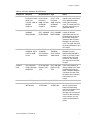
Client Software Requirements
TruVision Navigator supports all of the following Operating Systems and other software
components.
Table 1: Client Software Requirements
Component
Version
Notes
Operating
System
Microsoft Windows XP Pro SP3
Prerequisite to loading
TruVision Navigator
Microsoft Windows Vista SP1 32-bit / 64-bit
Prerequisite to loading
TruVision Navigator
Microsoft Windows 7 SP1 32-bit / 64-bit
Prerequisite to loading
TruVision Navigator
Microsoft Windows 8.1 32-bit/ 64-bit
Prerequisite to loading
TruVision Navigator
(WinPCAP needs to be
installed separately and ran
in compatibility mode for
operation on Windows 8
systems)
Microsoft Windows Server® 2003 R2 32-bit
Prerequisite to loading
TruVision Navigator
Microsoft Windows Server® 2008 R2 32-bit /
64-bit
Prerequisite to loading
TruVision Navigator
Microsoft .NET Framework 4.0
Packaged with the
installation
Other
Client Hardware Guidelines
The PC industry is constantly improving on product performance / configurations while
reducing cost to the customer.
As a result, we have listed some Client PC specifications for TruVision Navigator as to
what is commercially available in August 2013.
These specifications are meant to serve as a GUIDELINE for the customer. TruVision
Navigator will perform to varying degrees on lesser or more robust machines.
Please review the Expected Performance metrics at the bottom of the table to determine
what will meet your needs. You can make your PC decision based upon that need.
6
TruVision Navigator 6.0 User Manual
Chapter 1: Overview
Table 2: Client PC Hardware Specifications
Component
Minimum
Recommended High
Notes
Processor
3rd Gen Intel Core
i3-3220 Processor
(Dual Core,
3.30GHz, 3MB, w/
HD2500
Graphics)
3rd Gen Intel
Core i5-3470
Processor
(6MB, 3.2GHz)
w/HD2500
Graphics
3rd Gen Intel
Core i7-3770
Processor
(8MB, 3.4GHz)
w/HD4000
Graphics
CPU power is directly
related to the performance
of the application when
running and rendering
video. The better the CPU,
the more responsive your
application will be.
Memory
4GB, NON-ECC,
1600MHZ
DDR3,2DIMM
6GB, NONECC, 1600MHZ
DDR3,2DIMM
8GB, NONECC, 1600MHZ
DDR3,2DIMM
RAM is related to the
number of different
applications that can run
simultaneously as well as
the number of different
operations that TruVision
Navigator can perform at
once. The higher the RAM,
the better performance you
can expect.
Hard Drive
500GB 7200RPM, SATA
3.0Gb/s, 16MB
Cache
500GB5 7200RPM,
SATA 3.0Gb/s,
16MB Cache
500GB5 7200RPM,
SATA 3.0Gb/s,
16MB Cache
Optional - TruVision
Navigator requires
approximately 880 MB to
install. If you wish to store
exported video from the
devices on the machine,
you may want to increase
storage.
Graphics
Card
Intel Integrated
Graphic w/Single
HDMI/VGA
Dual 1GB AMD
Radeon™HD
7470
Dual 1GB AMD
Radeon™HD
7470
Video Card capability is
directly related to the video
rendering performance
within TruVision Navigator.
The better the video card,
the better video rendering
performance you can
expect.
Resolution
1024 x 768
1024 x 768
1024 x 768
Network
Integrated PCIE
10/100/1000
Integrated PCIE Integrated PCIE The network interface card
10/100/1000
10/100/1000
can be a performance
bottle neck depending
upon the throughput of the
card. If the card’s
throughput is less than the
amount of data streaming
to the machine, you will
experience performance
issues.
TruVision Navigator 6.0 User Manual
7
Chapter 1: Overview
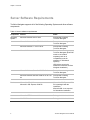
Server Software Requirements
TruVision Navigator supports all of the following Operating Systems and other software
components.
Table 3: Server software requirements
Component
Version
Notes
Operating
System
Microsoft Windows XP Pro SP3
Prerequisite to loading
TruVision Navigator
Microsoft Windows Vista SP1 32-bit / 64-bit
Prerequisite to loading
TruVision Navigator
Microsoft Windows 7 32-bit / 64-bit
Prerequisite to loading
TruVision Navigator
Microsoft Windows 8 32-bit/ 64-bit
Prerequisite to loading
TruVision Navigator (WinPCAP
needs to be installed
separately and ran in
compatibility mode for
operation on Windows 8
systems)
(SQL drivers need to be
installed for Windows 8 before
Navigator installation)
Database
Microsoft Windows Server® 2003 R2 32-bit
Prerequisite to loading
TruVision Navigator
Microsoft Windows Server® 2008 R2 32-bit / 64bit
Prerequisite to loading
TruVision Navigator
Microsoft’s SQL 2008
Microsoft’s SQL Express 2008
R2 is packaged with the
installation.
Microsoft’s SQL Express 2008 R2
Microsoft SQL is not required
for Standalone installation
Other
Microsoft .NET Framework 4.0
Packaged with the installation
Other
WinPCAP 4.1.2
Packaged with the installation
8
TruVision Navigator 6.0 User Manual
Chapter 1: Overview
Server Hardware Guidelines
This specification is meant to serve as a GUIDELINE for the customer. TruVision
Navigator will perform to varying degree on a lesser or more robust machine. Table 5
lists the recommended server hardware specification.
Table 4: Server Hardware Specifications
Component
Recommended
Notes
Processor
3rd Gen Intel Core i5-3470
Processor (6MB, 3.2GHz)
w/HD2500 Graphics
Memory
6GB, NON-ECC, 1600MHZ
DDR3,2DIMM
Hard Drive
500GB5 - 7200RPM, SATA
3.0Gb/s, 16MB Cache
Optional - this storage requirement will
vary widely depending on many factors
including whether or not the database is
being hosted on the server, the size of the
actual database, and whether or not you
want to store video on the server.
Graphics Card
Dual 1GB AMD Radeon™HD
7470
Optional - depending on whether or not
you want to view video from a Client on
this machine.
Network
1024 x 768
Integrated PCIE 10/100/1000
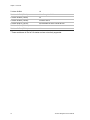
Supported Video Units
Table 6 shows the supported devices and related firmware versions.
Table 5: Supported Recording Devices
UTC Devices
Supported Firmware
TruVision NVR20*
2.0h
TruVision NVR50*
1.0m
TruVision TVN10
1.1
TruVision TVR20*
1.0.36
TruVision TVN21(P)
2.0
TruVision DVR12
1.0
TruVision DVR41*
1.0
TruVision Navigator 6.0 User Manual
9
Chapter 1: Overview
TruVision DVR42
1.0
TruVision NVR40 (TVN40)*
4.2.1 Changelist 53820
TruVision DVR60 (TVR60)
4.0
TruVision DVR40 (TVR40)*
V3.0 build 100416
TruVision DVR10 (TVR10)*
2.0 Build 090722 and 2.2 Build 091210
TruVision DVR11 (TVR11c)*
1.0m
TruVision DVR11 (TVR11)*
1.0k
* These models are in End of Life status and are not actively supported.
10
TruVision Navigator 6.0 User Manual
Chapter 1: Overview
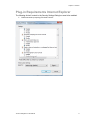
Plug-in Requirements Internet Explorer
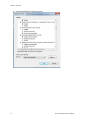
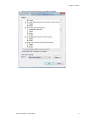
The following ActiveX controls in the Security Settings Dialog box need to be enabled.
1. Enable automatic prompting of ActiveX Controls.
TruVision Navigator 6.0 User Manual
11
Chapter 1: Overview
2. Prompt downloading of ActiveX Controls
12
TruVision Navigator 6.0 User Manual
Chapter 1: Overview
3.
Run ActiveX controls and plug-ins should be enabled.
TruVision Navigator 6.0 User Manual
13
Chapter 2
Installation
Architecture
TruVision Navigator is made up of 3 components:
•
Client
•
Services
•
Database
The TruVision Navigator architecture is flexible enough to allow all 3 of these
components to co-exist on the same PC (i.e. a single Windows 7 machine) in smallscale environments.
As well, TruVision Navigator allows each of these 3 components to operate on separate
machines (i.e. a virtual server for Services, a dedicated database machine for Database,
and multiple PCs distributed on the network hosting Clients) for large- scale, distributed
environments.
Installation Options
There are 2 installation options for TruVision Navigator:
Standalone Model (or Direct Database Connection) - this installation option allows
the Client, the Database, and the Services to be located on the same machine. The one
limitation is that no other Clients on the network can connect to the database on this
machine. This installation option is ideal for small, standalone systems.
Multi-Client Model (or Traditional Client/Server) - This installation option allows the
Client, the Database, and the Services to be located on the same or separate machines.
This installation option is ideal for larger systems with many geographically dispersed
users, PCs, and recording devices.
TruVision Navigator 6.0 User Manual
14
Chapter 2: Installation
Whatever installation option you choose, the core features, and functions of TruVision
Navigator remain the same.
You will need Administrator’s rights on the machine to install the application, but the
software will be available to all users who successfully log on to a Windows account on
that machine.
Languages
The following languages are supported in TruVision Navigator: Arabic, Chinese
(Simplified and Traditional), Czech, Danish, Dutch, English, Finnish, French, German,
Hungarian, Lithuanian, Italian, Polish, Portuguese, Russian, Slovak, Spanish, Swedish,
and Turkish.
After launching the TruVision Navigator Installation Setup.exe, the InstallShield Wizard
will auto-detect the language setting on the PC, and if it is supported, will translate to
that language. If the language detected is not supported, the InstallShield Wizard will
default to English.
Upon launching the Client, TruVision Navigator will always auto-detect the language
setting on the PC, and if it is supported, will translate to that language. If the language
detected is not supported, the Client will default to English.
Installation – Standalone Model
To install a new standalone instance of TruVision Navigator on your computer do the
following:
Place the TruVision Navigator setup.exe program on the desktop of the PC.
Launch the InstallShield Wizard from the auto-run page or double-click the TruVision
Navigator setup.exe to begin the installation.
The Open File – Security Warning window displays. Click on the Run button. The End
User License Agreement window displays. Click the Accept checkbox and the Next
button to continue. The Welcome window displays. Select Typical for a standalone
installation.
TruVision Navigator 6.0 User Manual
15
Chapter 2: Installation
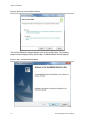
Figure 2: Welcome to the Installer window
The Confirm Selections window displays, click on the Install button. The Installing
product window displays briefly, then the Ntp – InstallationShield Wizard displays.
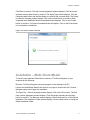
Figure 3: Ntp - InstallationShield Wizard
16
TruVision Navigator 6.0 User Manual
Chapter 2: Installation
Click Next to continue. The Ntp License Agreement window displays. Click the Accept
checkbox and the Next button to continue. The Setup Type window displays. Click the
Complete radial button and the Next button to continue with a normal setup. The Ready
to Install the Program window displays. Click on the Install button to continue. When
completed the InstallSheild Wizard Completed window displays. Click on the Finnish
button to continue. The Product Installed window will display. Click on the Close button
to to complete the installation.
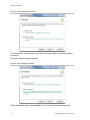
Figure 4: Product Installed window
Installation – Multi-Client Model
To install a new traditional Client/Server instance of TruVision Navigator on your
computer do the following:
Place the TruVision Navigator setup.exe program on the desktop of the PC.
Launch the InstallShield Wizard from the auto-run page or double-click the TruVision
Navigator setup.exe to begin the installation.
The Open File – Security Warning window displays. Click on the Run button. The End
User License Agreement window displays. Click the Accept checkbox and the Next
button to continue. The Welcome window displays. Select Advanced for a Client/Server
installation. The Installation Folder window displays. Click the Next button to accept the
default installation folder.
TruVision Navigator 6.0 User Manual
17
Chapter 2: Installation
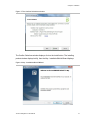
Figure 5: The Configuration window
The Configuration window displays click the Client /Server Mode radio button and Next
to continue.
The Select Database window displays.
Figure 6: Select Database window
Select the database option and click Next. The Confirm Selections window displays.
18
TruVision Navigator 6.0 User Manual
Chapter 2: Installation
Figure 7: The Confirm Selections window
The Confirm Selections window displays, click on the Install button. The Installing
product window displays briefly, then the Ntp – InstallationShield Wizard displays.
Figure 8: Ntp - InstallationShield Wizard
TruVision Navigator 6.0 User Manual
19
Chapter 2: Installation
The Ntp License Agreement window displays. Click the Accept checkbox and the Next
button to continue. The Setup Type window displays. Click the Complete radial button
and the Next button to continue with a normal setup. The Ready to Install the Program
window displays. Click on the Install button to continue. When completed the
InstallSheild Wizard Completed window displays. Click on the Finnish button to continue.
The Product Installed window will display. Click on the Close button to to complete the
installation.
Figure 9: Product Installed window
20
TruVision Navigator 6.0 User Manual
Chapter 2: Installation
Initial Login
After successful installation, launch TruVision Navigator using one of the following
methods:
•
Double-clicking on the TruVision Navigator icon on your desktop.
•
Access the Start menu, All Programs, and TruVision Navigator.
When TruVision Navigator launches, a login window displays. Log in as the default
Administrator using the following default credentials:
Username - admin
Password - 123456
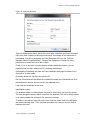
Figure 10: Login window
After initial login, a window displays prompting you to change the default admin
password which protects its security.
TruVision Navigator 6.0 User Manual
21
Chapter 2: Installation
Figure 11: Change Password Dialog
To change the password, do the following:
Enter the new password in the Password field.
Re-enter the password in the Confirm Password field.
Select one of the following challenge questions from the drop-down list.
Enter the answer to your challenge question in the Challenge Answer field.
Press OK.
If you ever forget your password, simply click on the Forgot? button on the Login dialog.
This will allow you to answer your challenge question, and if successful, change your
password and re-enter the application without calling for any assistance. In case you
don’t remember the Challenge Answer to recover your password, click on Forgot? button
once again, and call UTC technical support team with the “tech support key”
automatically provided in the related field. Technical support team will recover your
password with this information.
22
TruVision Navigator 6.0 User Manual
Chapter 2: Installation
Figure 12: User Account Challenge Dialog
Uninstall
To uninstall TruVision Navigator do the following:
Launch the Add/Remove Programs application from Windows Control Panel.
Navigate to TruVision Navigator Server and click on the Remove or Uninstall button.
TruVision Navigator 6.0 User Manual
23
Chapter 2: Installation
Figure 13: Add or Remove Programs window
The InstallShield window appears and the application will prepare to remove your
selection.
Figure 14: InstallShield Wizard window
Click the Yes button when this window appears.
24
TruVision Navigator 6.0 User Manual
Chapter 2: Installation
Figure 15: Confirmation window
The uninstall will begin and the status window will appear.
Figure 16: Setup Status window
When complete, click on the Finish button and restart your computer.
TruVision Navigator 6.0 User Manual
25
Chapter 2: Installation
Figure 17: Uninstall Complete window
Repeat these same uninstall steps for the TruVision Navigator Client application in the
Add or Remove Programs window.
Note: This process will remove all TruVision Navigator files and logs from your system.
No Registry edits are necessary to remove TruVision Navigator from the machine.
26
TruVision Navigator 6.0 User Manual
Chapter 2: Installation
Network Time Protocol (NTP) Service
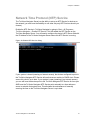
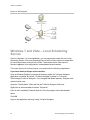
The TruVision Navigator Server has the ability to act as an NTP Service for devices on
the network (you also have the flexibility to use other 3rd party NTP Services should you
choose).
Enable the NTP Service in TruVision Navigator by going to Start – All Programs –
TruVision Navigator – Enable NTP Service. This will enable the NTP Service on the
TruVision Navigator Server. You will need to configure the device’s NTP Server field with
the IP Address of the TruVision Navigator Server where this NTP Service is running.
Figure 18: Enable NTP Service dialog
If your system is closed (meaning no Internet access), the devices configured to point to
the TruVision Navigator NTP Service will use that server machine’s CMOS clock. Please
ensure this clock is up to date. If your system is open (meaning it has Internet access),
you can still have the devices point to the TruVision Navigator NTP Service for time sync
AND have the TruVision Navigator NTP Service point externally to a time reference
server to maintain that system time. This alleviates the maintenance of manually
ensuring the time on the TruVision Navigator Server is up to date.
TruVision Navigator 6.0 User Manual
27
Chapter 2: Installation
Figure 19: NTP Diagram
Windows 7 and Vista – Local Scheduling
Service
If this is a Windows 7 or Vista installation, you may experience issues with your Local
Scheduling Service. The Local Scheduling Service on the Client machine is responsible
for executing all tasks on behalf of the Client. These tasks include video exports,
firmware upgrades, bulk configurations, and database backup/restores.
To be sure that you do not have issues, you can perform the following steps below:
If you have Admin privileges on the machine:
Open up Windows Explorer and locate the directory where the TruVision Navigator
application is installed. By default, TruVision Navigator is placed in C:\Program
Files\Interlogix\TruVision Navigator. If you changed that default pathway, navigate to the
revised location now.
Open the "ClientInstaller" folder and find the TruVision Navigator Client.exe.
Right-click on the executable and select "Properties.”
Click on the Compatibility Tab and check the "Run the program as an administrator"
option.
Click OK.
Login to the application and begin using TruVision Navigator.
28
TruVision Navigator 6.0 User Manual
Chapter 2: Installation
Figure 20: TruVision Navigator Client Properties
If you do NOT have Admin privileges on the machine, contact your Administrator to
turn off the User Account Control (UAC) for the user who will be running the TruVision
Navigator Client.
To do so, have the Admin perform the following steps:
Click the Start button and under the "Start Search" section, enter MSCONFIG.
Click Enter.
On the System Configuration Window, select the Tools Tab.
Highlight the Disable UAC row and click the Launch button.
Restart the machine.
Upon restart, the user can login to the application and begin using TruVision Navigator.
TruVision Navigator 6.0 User Manual
29
Chapter 2: Installation
Figure 21: Disable UAC
Installing Navigator on Windows 8 platforms
TruVision Navigator can be installed on Windows 8 platforms with the following
prerequisites met before installation. Microsoft Windows 8 OS needs to support
Microsoft SQL database drivers fully before the TruVision Navigator installation starts.
Therefore, these prerequisites are needed to make your system ready for TruVision
Navigator installation.
Please follow below instructions before installing Navigator on Windows 8 platforms.
1. Client/Server type installations: There are two scenarios:
a. Windows 8 (without SQL installed)
i.
Must install all the important updates from Microsoft.
ii. Install WinPcap 4.1.2 manually prior to, or, after installing Navigator.
iii. Navigator will install SQL 2008 express when detecting no SQL installed in
the machine.
b. Windows 8 (with SQL2008 Express R2 – SP1 or SP2 installed)
i.
Must install all the important updates from Microsoft.
ii. Install WinPcap 4.1.2 manually prior to, or after installing Navigator.
iii. Navigator will allow user to use existing SQL 2008 Express.
2. To make the WinPCAP compatible with Windows 8:
a. Right click on WinPcap.exe file
b. Select Properties
30
TruVision Navigator 6.0 User Manual
Chapter 2: Installation
c. Compatibility
d. Check Run this program in compatibility mode for: Select Windows 7 and
click Apply.
e. Right click on WinPcap.exe and select Run as Administrator.
TruVision Navigator 6.0 User Manual
31
Chapter 3
Operation
Adding Devices
To add a single or multiple Devices to Navigator by doing the following:
Click the Add Devices button in the Navigator. A drop down menu displays with the
following options:
-
Add Manually
-
Add Via Discovery Tool
Adding Devices Manually
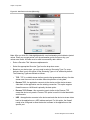
Once Add Manually option is selected, below screen will display for required input.
TruVision Navigator 6.0 User Manual
33
Chapter 3: Operation
Figure 22: Add Device window (Manually)
Note: After you click OK, fields highlighted with a red exclamation point indicate rejected
values. Place your mouse pointer over the exclamation points for tips on why your
values were invalid. All fields must be valid to successfully add a device.
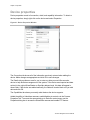
•
Enter a Recorder Title. Values are alphanumeric.
•
Select the appropriate Recorder Type from the drop-down menu.
•
Based on your device type, you may need to select a Streaming Type. For some
devices, there is only one option for the Streaming Type so it is selected by default.
The Streaming Types are defined as follows:
34
•
TCP - TCP is a reliable stream delivery service that guarantees delivery of a data
stream sent from one host to another without duplication or losing data.
•
Reverse TCP - the application connects to the device and the device streams
video back to the application over the existing connection. This option negates
firewall issues on a WAN and is primarily the best option.
•
Reverse TCP I-Frame - this connection type is similar to the Reverse TCP
except the device only sends I-Frames. This option is useful in limited bandwidth
environments.
•
UDP - the application connects to the device and asks the device to stream video
back to the application on a UDP address and port. For this option, the firewall
needs to be configured to allow the device to stream to the application on that
specific port.
TruVision Navigator 6.0 User Manual
Chapter 3: Operation
•
•
Wavelet/Wavejet - This type is based upon Wavelet/Wavejet compression
methodologies. This streaming type cannot be changed and is the default
streaming type for the DVMRe and StoreSafe DVR lines.
Enter the Recorders IP Address, or, the DynDNS or EzDDNS URL.
Note: You can add a recorder using a Domain Name System (DNS) name as well as a
static IP Address. Simply place the DNS name in the IP Address field on the form
. • Enter the device's listen Port. This field is pre-populated with a default value based
upon the type of device you selected. If you changed this port on the device, add that
specific port in this field.
Note: The port number must be added to the device address when using DynDns
with a HTTP port other than port 80 (i.e. mydvr.dyndns.org:2222 if the HTTP port
being used is 2222). When using No-IP instead of DYNDNS, you also need to add
the HTTP port number.
•
Enter the Username and Password. This field is only required if the device being
added has been configured to require a username and password.
•
Check the Add Recorder Offline checkbox if you wish to add the device to the
Navigator but you know the device is currently offline.
•
Click OK.
Note: You may see an error message stating that your device was added but it has
unsupported firmware. However, you should still be able to view video. See the
supported devices and firmware versions section of this document.
Adding Devices via Discovery Tool
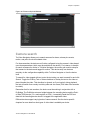
Click the Add Devices button and select Add via Discovery Tool. Once the Add via
Discovery Tool option is selected, the device discovery window will display. The device
discovery window provides a list of available devices in the network. To add devices to
the Navigator, select one or multiple devices from the list and click Add. Your device
should appear under the Device node in the Navigator panel.
Note: You can select the TruVision Recorder Driver from the drop-down list for any
TruVision device. Using this driver will enable the browser based configuration page of
the device.
Note: The Discovery Tool will attempt to add devices (recorders or TruVision cameras)
by using their default credentials. If the credentials of a device are previously changed
from default values, device is still going to be added to the device tree, but will be shown
as offline. In this case, updated credentials need to be applied manually by user from the
device properties or configuration menu with a right-click on the device.
TruVision Navigator 6.0 User Manual
35
Chapter 3: Operation
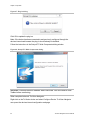
Once the recorder or TruVision camera shows online, expand the device icon to view
your cameras. If you chose to add the device offline via the Add Device Offline
checkbox, your device will appear in the Navigator with a red X on it. You can bring the
device online by right-clicking on the device and selecting Connect. Upon successful
connection, the Navigator will populate the respective cameras under the device.
Figure 23: Connect to off-line device
If you have channels on a RECORDER that will not be used, you can mark them as
"unused" so they do not appear in the Navigator under the RECORDER. To do this, go
to the Camera Title section under the RECORDER Configuration menus, mark the
"Camera Not in Use" check box, and click Save. This will hide the cameras in the
Navigator. To show them again, simply un-check the same box in the configuration and
click Save.
Adding Cameras via Discovery Tool
TruVision Navigator is equipped with an embedded device discovery tool that discovers
the devices in the network, and lets the user to add one or more of those devices to the
Navigator.
36
TruVision Navigator 6.0 User Manual
Chapter 3: Operation
Figure 24: Discovery Tool Window
Device discovery tool provides an easy way to discover the devices and make them
ready for recording in the system. Device discovery tool is available via various paths in
TruVision Navigator, and is used for discovering recorders, cameras, and encoders in
the network.
Following are the paths and functions device discovery tool can be located and used for:
•
•
•
•
•
Click the Add Recorder button in the Navigator Panel or right click on a recorder
in the device tree.
Click [Add Recorder], and select [Add via Discovery Tool].
Click on the Show drop down menu and select Show Cameras.
A list of discovered cameras in the network will be given. Select desired cameras
and click [Add].
Selected cameras should be automatically added under the selected device in
Navigator.
Note: Discovery Tool will attempt to add cameras by using their default
credentials. If the credentials of a camera are previously changed from default
values, camera is still going to be added to the device tree, but will be shown as
offline. In this case, updated credentials need to be applied manually by user
from the camera configuration menu with a right click on the device/camera.
TruVision Navigator 6.0 User Manual
37
Chapter 3: Operation
Adding a TruVision 360 degree Camera
TruVision Navigator 6.0 supports the Interlogix 360 degree panoramic cameras. These
cameras can be added to TruVision NVRs as a regular IP camera, manually, or, via
discovery tool.
Each Panoramic camera provides five streams to the user.
-
1x Raw 360 degree image
-
1x Two 180 degree bands in one video stream
-
3x 120 degree streams with digital PTZ capability
When a panoramic camera is added to a device, the camera will show up in the device
tree, and have its own node with up to five channels listed under it. By default, the
panoramic camera will be added with only 360 degree mode enabled. To add the rest of
the views:
-
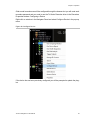
Right click on the camera and select properties.
-
In the properties menu, select the views desired, and click Ok.
Figure 25: Panoramic Cameras Properties tab
38
TruVision Navigator 6.0 User Manual
Chapter 3: Operation
Dewarping Feature
Dewarping commands are available on 360 degree cameras. Dewarping provides an
alternate view other than the fisheye type image normally associated with 360 degree
cameras. This feature only requires 1 fisheye view (live or playback) from the device.
Navigator will dewarp from this 1 view multiple dewarped views
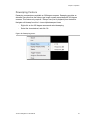
-
Right click on the 360 degree camera and select dewarping.
-
Select the views desired, and click Ok.
Figure 26: Dewarping menu
TruVision Navigator 6.0 User Manual
39
Chapter 3: Operation
Organize the Navigator
The Navigator allows you to organize your devices in a logical manner. As systems get a
larger, this will enable you to find your devices and cameras easily.
To organize your Navigator, do the following:
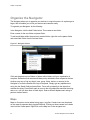
In the Navigator, click the Add Folder button. This creates a new folder.
Enter a name for the new folder and press Enter.
To add a sub-folder within the previously created folder, right-click on the parent folder
and select Add Folder from the context menu.
Figure 27: Navigator folders
Click and drag devices into folders or folders within folders until your organization is
complete. Remember that cameras will always stay attached to their respective devices.
Another easy way to find any object (user, group, folder, device, or camera) in the
Navigator is to use the Search at the top of the panel. Simply type any alphanumeric
string into the Search field and press Enter. Focus will go instantly to the object that
matches the string. Press Enter again to move to the next object that matches the string,
and so on, until you have been to each object. Enter a different alphanumeric string to
perform another search.
Maps
Maps or floor plans can be added using .jpg or .png files. Camera icons can be placed
on the maps to represent their physical locations. Clicking on these camera icons loads
video into the Viewer panel. Right-Click on the Map icon in the navigator tree.
40
TruVision Navigator 6.0 User Manual
Chapter 3: Operation
Figure 28: Add Map drop down menu
The Open Map file window will display. Navigate to the image file that you want to use
and click Open. The Map will appear in the device tree under maps. Right-click on the
map name and select Configure Map to add cameras. Click and drag a camera from the
device tree to the map to add the camera to the map.
Figure 29: Configure Map
Click OK to save. Double-click on the map name to open in a video pane. Clicking on the
camera icons placed on the map will launch that cameras video.
TruVision Navigator 6.0 User Manual
41
Chapter 3: Operation
Find and export video
There are three ways to load video from the Navigator into the Viewer:
Drag n’ drop a specific camera to the Viewer
Drag n’ drop a specific device to the Viewer which will load all of the cameras applicable
to the device
Double-click on a specific camera
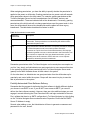
Figure 30: Viewer and Controller
By default, video will be loaded in the Viewer in Live mode. Video status (Live or
Playback), camera type, and device name can be found in the video tile status bar (thick
bar at the bottom of the video tile) along with the Instant Replay and Close Video Tile
buttons.
To go from Live to Playback video, you must first select camera(s) in the Viewer by
clicking on that video tile - a blue frame should surround the selected video tile. If you
want to select multiple video tiles, use the Select All check box in the Controller.
Once video tiles are selected, perform one of the following operations to retrieve
Playback video (assuming there is video on the device for the specified time):
42
TruVision Navigator 6.0 User Manual
Chapter 3: Operation
•
Go To Search – click on the Go To button in the Controller, enter a date and time,
and click OK. Playback will start at the desired date and time.
•
Playback Button – click on the Playback button in the Controller to go back a userdefined period of time (the same time you set for Instant Replay - i.e. 5 minutes).
•
Instant Replay Button - click on the Instant Replay button in the video tile status bar
to go back a user-defined period of time (i.e. 5 minutes).
•
Controller timeline - double-click on the Controller timeline for a point-in-time in the
past. Playback will start at the desired date and time.
•
Playback Controls - use the playback controls (as devices permit) for Frame
Advance, Fast Forward, Frame Reverse, Rewind, Pause, and Play to pinpoint the
exact incident you want.
Once the video is in Playback, a blue seek triangle displays in the Controller timeline
indicating where the selected video is playing in time. Drag and drop the blue seek
triangle backwards or forwards along the timeline to locate video.
Place your cursor over the blue seek triangle and green / red markers will display
underneath. The green marker represents the beginning time and the red marker
represents the ending time of the video segment you want to export. Slide both markers
as appropriate to mark the video segment.
To move the video segment to the Collector for export, click the Video button in the
Controller. To move a snapshot to the Collector for export, click the Snapshot button in
the Controller.
Thumbnails for snapshots and video segments will be added to the Collector and
readied for export. Snapshots display a start time as it is a single point in time. Video
segments display a time range that corresponds to the time range you marked on the
timeline. Double-click a snapshot or video segment thumbnail to replay it in the Viewer
and refine your time/date ranges.
TruVision Navigator 6.0 User Manual
43
Chapter 3: Operation
Display Analytic Rules
Show & Hide Video Analytic Rules in Video through the Context Menu. Right-Click on a
live video window to reveal the context menu.
Figure 31: Show & Hide Video Analytic Rules
Select Motion or VCA to show or hide. Right-Click on a recorder name to reveal the
context menu. Select Manage IP Cameras to display the cameras configuration window.
Select VCA, this will launch the VCA Configuration Window. Select the VCA rules that
you want and click OK to enable.
Note: VCA configuration only works with cameras that have this feature. To view the
alarms generated, click on the Actions tab and select Send to Alarm Host.
Figure 32: VCA Configuration window
44
TruVision Navigator 6.0 User Manual
Chapter 3: Operation
The Collector Panel
Figure 33: Collector panel
Export all collected video and snapshots to a specific location using the Collector.
To export video or snapshots, do the following:
Access the Collector and select each thumbnail that you wish to export (you can use the
select all/unselect all button in the Collector header bar for quick selections).You can
also right- click on snapshots to print, email, or rename them.
Check the Include Standalone Player checkbox. This ensures that the TruVision
Navigator standalone player is included in your destination folder.
Click Browse and specify a destination location for your export.
Note: Make sure you have an appropriate amount of disk space at the destination
location for the export. Use the Total Size estimation in the Collector as a guideline.
To start the export process immediately, click the Export Now button. Your export task is
automatically added to the Tasks panel. You can mouse over the status column in Tasks
to get detailed progress of the export.
TruVision Navigator 6.0 User Manual
45
Chapter 3: Operation
To schedule the export process, click the Schedule button and specify a date/time when
you want the export process to start. An export task is automatically added to Tasks.
Refer to it for status.
Note: Your Local Scheduling Service must be running to execute these export tasks.
Refer to the Services dialog for status and actions on all services.
When export tasks are complete, you can find exported video and snapshots at the
location you specified. These files can now be reviewed, burned to media, or stored for
later use.
In addition, you can use the Local Record button to record live video to your machine. To
create a local record video clip, do the following:
Display and select a camera in the Viewer.
In the Controller, click on the red Local Record button (to the right of the playback
controls) to begin recording. A thumbnail will display with a start time along with a red
dot in the Collector.
The red Local Record button will blink when any camera is being recorded locally
Click on the red Local Record button again to stop the recording to the machine. An end
time for the thumbnail will automatically display in the Collector.
Follow export operations as necessary to retrieve the local recording from the machine.
46
TruVision Navigator 6.0 User Manual
Chapter 3: Operation
TruVision Navigator Player
The TruVision Navigator Player is a standalone player that can be used to replay any
video clip that has been exported using TruVision Navigator (proprietary file formats
include .wvf, .mpc, .asf, .mp4, and .drv). This player should be copied to media along
with the video clips for authorities. It has a zero footprint – meaning it will launch from the
media itself and does not require installation to a machine.
After exporting video clip(s) from the Collector to the user-defined location, you can
launch the TruVision Navigator player by double-clicking the TruVision Navigator Player
icon in the file folder where the video clips are located. The player.bin file must be in
the same directory as the TruVision Navigator Player.exe or the TruVision
Navigator Player will not work.
Figure 34: Video Export window
Once launched, the TruVision Navigator Player will automatically sweep the directory
and load the associated video clips in the Play List from that directory. By clicking the
checkbox next to the clip in the Play List, the video will load in a tile (9-up maximum).
Highlight the video tile and click the Play button to play the video.
TruVision Navigator 6.0 User Manual
47
Chapter 3: Operation
Figure 35: TruVision Navigator Player window
The features of the TruVision Navigator Player are:
•
Browse – allows the user to browse for a specific video clip in another directory and
load it into the Play List.
•
Snapshot – allows the user to take a snapshot of the highlighted video tile.
•
Print - allows the user to print a snapshot of the highlighted video tile.
•
Maximize Screen – takes the TruVision Navigator Player full screen and hides the
Play List and Tool Bar at the top of the application.
•
Playback Controls – allows for FFWD, RWD, Play, Pause, Frame Reverse, and
Frame Advance.
•
Timeline – allows the user to jump ahead or back in time for a single selected video
tile.
•
Audio – allows the user to hear audio (if present) for only the selected video tile. If all
video tiles are selected, no audio will play.
•
Select All Videos – allows the user to select all video tiles. Once all video tiles are
selected (white outline around the video tiles), the Playback Controls will affect all
video tiles and not just a single one. However, each clip will begin at its own start
time and end at its own end time. This holds true for the snapshot and print capability
as well. The timeline will not appear when multiple video clips are selected.
•
Sync Playback Start – allows the user to start all video clips at the same time.
48
TruVision Navigator 6.0 User Manual
Chapter 3: Operation
Note: As the video clips are played, there may be time gaps due to the different
video settings on each clip source (i.e. different fps). This function will ensure that
the initiation of the playback for all tiles happen at the same time to keep the time
gaps between the clips at a minimum.
•
Time/Date Stamp – on playback, each video will have a time/date stamp on it for
evidentiary purposes.
Double-click on any video tile to go full screen or use the maximize button in the Tool
Bar.
Double-click to go back again to the normal state.
When in Full Screen, right-click to hide/show the Playback Controls to expose only the
video tiles and nothing else.
Camera Level Disk Analysis
Camera level disk analysis in the Timeline. This feature is only supported for TruVision
based devices (TVR10,11,12,12HD,41,42,44HD,60 and TVN10,20,21,50,70)
Camera analysis on the time line is tied to the Disk Analysis Permissions.
Trigger Output
This feature is only supported for TruVision based devices
TruVision Navigator 6.0 User Manual
49
Chapter 3: Operation
There are two types of Alarms (A->) (D->). Alarm type (A->) are alarms from the trigger
through the back of the recorder. Alarm (D->) are the alarms trigger out of the IP
Camera. Only NVR/Hybrid devices will have the (D->) type alarms.
Note: TVR60 & TVN20 do not support (D->) types alarm. This is a hardware limitation.
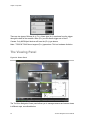
The Viewing Panel
Figure 36: Viewer Panel
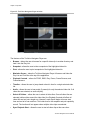
The TruVision Navigator Viewer panel allows you to manage cameras and camera views
in different ways, as outlined below:
50
TruVision Navigator 6.0 User Manual
Chapter 3: Operation
Tab views – Up to 10 separate detachable tabbed viewing panels can running.
Multi-site - The multi-site feature allows you to view video from multiple cameras from
different devices simultaneously in the Viewer. TruVision Navigator can render Wavelet,
Wavejet, MJPEG, MPEG4, and H.264 compression streams simultaneously, which
allows you to mix and match the cameras from your many devices seamlessly. Standard
video tile layouts include 1x1, 2x2, 3x3, 4x4, and 5x5. You can also use the 8-up custom
tile layout that features 1 large video tile surrounded by 7 smaller ones. When in a multiup view (i.e. 4x4), you can double-click in a video tile to bring the video to full screen.
Double-click in the video tile again to return to multi-up viewing.
Maximize Viewer - If you would like to close all panels instantly except for the Viewer,
use this option. Click it again to return to the previous layout.
Close All Video - Select this option to close all video.
Instant Replay - Click on the Instant Replay button on the video tile to go from Live to
Playback by a user-defined and pre-configured period of time (i.e. 5 minutes) for quick
viewing of an incident.
Custom View - Custom views allow you to define and save multi-site view templates for
future use. You can create as many custom views as you want. Custom views are
available by selecting the Custom View option in the Viewer header bar dropdown menu.
To define a custom view, do the following:
Load all the cameras you want to include in the custom view in the Viewer.
Organize your cameras by dragging and dropping the video tile’s status bar to other
video tiles.
Click Custom View from the Viewer panel header bar dropdown menu.
Select Save Custom View.
Enter a title in the Title field.
Click OK.
TruVision Navigator 6.0 User Manual
51
Chapter 3: Operation
Close all videos.
From the Viewer panel header bar dropdown menu, highlight the Custom View title in
the menu and select.
PTZ control
TruVision Navigator has the ability to control PTZ camera and motorized zoom cameras
with auto focus feature. Supported features include pan, tilt, and zoom moves, as well
as set and go to presets, and record and go to tours. The tours functionality is only
available for certain device types. See the device-specific chapters for the support for
this feature.
First, the camera must be marked as a PTZ camera in its configuration as the camera
does not identify itself as such to the device. To mark a camera as a PTZ, simply rightclick on the camera and select, Configure Camera. From the camera configuration
dialog, check the PTZ Enabled checkbox, select a PTZ protocol, assign an address, and
click Ok. Ensure the camera also has the appropriate address and protocol settings.
Upon completion, you’ll notice that the camera’s icon in the Navigator changes from a
fixed camera icon to a PTZ camera icon.
Once you have marked a camera as PTZ, you can now control it using the PTZ Controls
or with mouse commands in the video tile.
To control a PTZ camera using the PTZ Controls:
Load the PTZ Camera into the Viewer and select it.
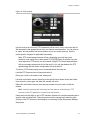
Click the PTZ icon on the Controller toolbar and the PTZ dialog will open. Adjust the
dialog to optimize video viewing.
52
TruVision Navigator 6.0 User Manual
Chapter 3: Operation
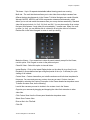
Figure 37: PTZ controls
Use the controls to move the PTZ Cameras as well as zoom, focus, auto focus and iris.
Set the speed to the appropriate level for your network and operations. You can also go
to, name, and set presets and return cameras to tour (on certain devices). See the
device-specific chapters for applicable functionality.
Note: PTZ control responsiveness will vary depending upon the frame rate,
resolution, and quality of the video stream. D1/ 30FPS/Quality 9 will afford you the
most responsive PTZ control over the network. Weigh PTZ control responsiveness
with your storage requirements to find the best fit. You can also balance the PTZ
speed setting with the stream configuration to find the best fit.
To control a PTZ camera using mouse commands within the video tile:
Load the PTZ Camera into the Viewer and select it.
Place your cursor in the center of the Viewing tile.
Left-click and hold the mouse, then drag to the right-left-up-or down. Notice the further
from center the cursor gets, the faster the camera will move.
Right-click and hold the mouse, then drag up or down to zoom in and out with the
camera.
Note: Interlogix cameras with motorized lens can also be controlled as a PTZ
camera via the PTZ palette for iris and focus adjustments.
Users also have the ability to link a PTZ camera’s presets into a sequence based upon a
specific order and dwell time. These sequences can be managed and tested by rightclicking on the PTZ camera in the Navigator and selecting Preset Sequences, Manage
Sequences.
TruVision Navigator 6.0 User Manual
53
Chapter 3: Operation
Figure 38: PTZ preset window
These sequences can be activated by right-clicking on the PTZ camera in the Navigator
and selecting Preset Sequences, and then the name of the sequence that was created.
Digital Zoom
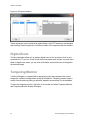
TruVision Navigator allows you to perform digital zoom in/out functions to the live and
recorded view. To zoom in, scroll up with the mouse wheel, and to zoom out scroll down.
When in digital zoom mode, you can click and hold the mouse left button to Navigate in
the zoomed image.
Tampering Monitor
TruVision Navigator is equipped with a tampering monitor that compares the current
image with a reference image taken during the installation. Tampering monitor keeps a
record of each camera by taking a reference snapshot and restoring it in the database.
To open the tampering monitor, right click on a recorder and select Tampering Monitor,
and Tampering Monitor window will display.
54
TruVision Navigator 6.0 User Manual
Chapter 3: Operation
Figure 39: Tampering Monitor
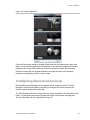
On the left hand side, reference images will be listed with the date and time they were
taken. For the first time applications of this feature, the reference images will be empty;
therefore, user should click Update All to save the reference images. By comparing
reference images with live images located on the right hand side, user can easily
measure any tampering activity on each camera.
Configuring discovered device(s)
Discovered devices (Recorders and Cameras) can be configured within TruVision
Navigator. New with this release is the ability to configure the devices through the
devices internal configuration web page.
TruVision Recorder Browser Configuration is currently available for the Recorders listed
below. To configure these devices through their native configuration web page see
TruVision Recorder Drive Configuration on page 72.
TruVision Navigator 6.0 User Manual
55
Chapter 3: Operation
Table 6: Browser Configuration Compatibility
Recorder Model
Firmware version
TVN 10
2.0 and above
TVN 21
3.0 and above
TVR 44HD
All versions
TVR 12 HD
All versions
TVR 70
All versions
Older model recorders can still be configured through the browser but you will need each
recorders password and you need to use the TruVision Recorder driver in the Recorders
Properties window.
Configure a device with TruVision Navigator
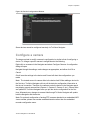
To configure a single device, right-click on the device in Navigator and select Configure
Device. A configuration dialog will open. Navigate through the settings, make changes
as appropriate, and either click Ok or Cancel. Ok will save the settings to the device and
Cancel will abort the configurations you made.
56
TruVision Navigator 6.0 User Manual
Chapter 3: Operation
Figure 40: Device Configuration Window
Some devices cannot be configured remotely via TruVision Navigator.
Configure a camera
The steps required to modify a camera’s configuration is similar to that of configuring a
device. To change a specific camera’s configuration do the following:
Right-click on a camera in the Navigator and select Configure Camera. A configuration
dialog will open.
Navigate through the settings, make changes as appropriate, and either click Ok or
Cancel.
Ok will save the settings to the device and Cancel will abort the configurations you
made.
Note: The trusted source for camera titles is the device itself. When adding a device for
the first time, TruVision Navigator will not pull the device’s configuration information at
the time of connection. Therefore, the cameras under the device in the Navigator panel
may display generic camera titles (Camera 1, Camera 2, Camera 3, etc.). Camera titles
are updated in TruVision Navigator after you pull the device configuration for the first
time. Afterwards, any changes to camera titles through TruVision Navigator will update
both the Navigator and the device.
Note: For protocol configuration of analog PTZ cameras attached to an embedded NVR
via an encoder, please use encoder web administration rather than the embedded
recorder configuration menu.
TruVision Navigator 6.0 User Manual
57
Chapter 3: Operation
Device properties
Device properties consist of connection, detail, and capability information. To obtain a
device properties, simply right-click on the device and select Properties.
Figure 41: Device Properties Window
The Connection tab shows all of the information previously entered when adding the
device. Make changes as appropriate and click OK to save changes.
The Details tab provides an area for you to enter any data you would like around a
device to help facilitate management of the system. If the device was imported and data
existed in the original WaveReader or SymNav address book, this data will appear in
these fields. If the device was added manually, the fields will remain blank until you add
data and click OK.
The Capabilities tab shows you exactly what features the device supports.
Added the ability to hide/show cameras, enable/disable ptz controls via the Camera
Properties Tab. To access the cameras tab go to Device's context menu use the
Properties dialog box to access the Show/Hide cameras and enable PTZ feature..
58
TruVision Navigator 6.0 User Manual
Chapter 3: Operation
Figure 42: Camera Properties tab
Device disk analysis
TruVision Navigator features the ability to run a disk analysis on a device in order to get
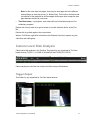
a broader sense of the different types of video data recorded to disk. This video data can
include alarms, events, video loss, motion, and more.
To run a disk analysis for a device, right-click on the device in the Navigator and select
Run Disk Analysis. The disk analysis dialog will appear.
Figure 43: Disk Analysis dialog
TruVision Navigator 6.0 User Manual
59
Chapter 3: Operation
From this dialog, you can zoom in and out on the timeline to view different levels of time
granularity for the video. The legend outlines the types of video by color (i.e. alarm is
red).
For periods marked as “Unknown,” the device may/may not have recorded video
available. It was just not tagged with a specific type per its device configuration
parameters.
Double-click on colored areas in disk analysis, and the video will begin to play in the
Viewer. By multi-selecting the checkboxes to the left of each camera name, you can
achieve synchronous playback across those selected cameras.
Once video is playing in the Viewer, you can manage and export it as normal. See the
device-specific chapters for more detail on what types of video tagging is available per
device.
Upgrade Firmware
TruVision Navigator offers the ability to upgrade firmware to devices remotely.
To upgrade firmware to device(s), either right-click on the device in the Navigator and
select Configure Recorder then Device Management/Upgrade Firmware or right-click on
the Recorders node and select Tasks/Bulk Configuration. The Firmware Upload dialog
will appear.
Select your source device type, browse for the applicable firmware, and select the
destination device(s) for the firmware upload.
Remember, TruVision Navigator does not do a file format check on the firmware file, so
ensure it is the proper file for that device type. In addition, the firmware file must reside
on the local machine. It cannot be accessed across network paths.
Click on the Upgrade button or schedule the firmware upload for a future date/time via
the Schedule button.
For any scheduled task that will take place in the future, you must ensure that the
machine where the task was created is powered up and the Local Scheduling Service is
running on that machine. The TruVision Navigator application itself can be closed but the
machine and Local Scheduling Service must be running for the task to be initiated and
completed.
60
TruVision Navigator 6.0 User Manual
Chapter 3: Operation
Figure 44: Firmware Upload Window
Camera search
TruVision Navigator allows you to search cameras for alarms, alarms plus events,
motion, and point-of-sale text-related video.
For those searches, the device must first be configured to tag the camera’s video based
upon those parameters (which must be available in the device). For instance, to be able
to search a camera for motion in TruVision Navigator, the motion grid must be setup for
that camera in the device and tagged for motion. This device setup can be done
remotely via the configuration capability within TruVision Navigator or from the device
itself.
To search for video tagged with text, enter the text string you want to search for and click
Search. Toggle the Overlay Text on Video checkbox to overlay the text on the video or
place it beside the video. This checkbox is dynamic so if you toggle it during playback,
the text will switch from overlay to side-by-side and vice-versa (it will take a few seconds
to switch).
Remember that for text searches, the device must be working in conjunction with a
ProBridge. The ProBridge acts as a bridge between the recording device and the Pointof-Sale (POS) device (i.e. a cash register or ATM). It essentially feeds the POS text
data into the recording device where it is tagged to the applicable video.
Different devices support varying levels of camera search. See the device-specific
chapters for more detail on what types of video data is available per device.
TruVision Navigator 6.0 User Manual
61
Chapter 3: Operation
To perform a camera search, right-click on the camera in the Navigator and select
Search. The search dialog will appear. From the search dialog, you can specify the
video type and time/date range, and upon clicking Search, the results will appear in the
table. Click the hyperlinked start times to review the video in the Viewer.
Figure 45: Search dialog
TruVision Recorder Browser Configuration
TruVision Recorder Browser Configuration is currently available for the Recorders listed
below. To configure these devices through their native configuration web page see
TruVision Recorder Drive Configuration on page 72.
Table 7: Browser Configuration Compatibility
Recorder Model
Firmware version
TVN 10
2.0 and above
TVN 21
3.0 and above
TVR 44HD
All versions
TVR 12 HD
All versions
TVR 70
All versions
62
TruVision Navigator 6.0 User Manual
Chapter 3: Operation
Older model recorders can still be configured through the browser but you will need each
recorders password and you need to use the TruVision Recorder driver in the Recorders
Properties window. Configuring a Device
Right-click on a device in the Navigator Panel and select Configure Device in the pop-up
menu.
Figure 46: Configure Device
If the device has not been previously configured you will be prompted to update the plugins.
TruVision Navigator 6.0 User Manual
63
Chapter 3: Operation
Figure 47: Plug-in dialog
Click OK to update the plug-ins.
Note: If the device has been connected to and previously configured through the
devices internal web browser the plug-in should already be installed.
Follow the instructions in the Setup-UTC Web Components dialog window.
Figure 48: Setup-UTC Web Components dialog
WARNING: Close all Browser windows when instructed. You also need to close
TruNav before continuing.
When completed relaunch TruVision Navigator.
Right-click on the TruVision device and select Configure Device. TruVision Navigator
now opens the devices internal configuration web page.
64
TruVision Navigator 6.0 User Manual
Chapter 3: Operation
Figure 49: Device Configuration dialog
Configure the device with your required preferences. (See the device’s User Manual for
all configuration options.
Note: For cameras not connected to a recorder you will be required to enter the
camera’s log-in credentials to proceed.
When completed click the Close button to save any configuration changes and return to
TruVision Navigator.
TruVision Navigator 6.0 User Manual
65
Chapter 4
TruVision Navigator
Settings
For both the standalone and multi-client installation models, you have the ability to
configure the TruVision Navigator Client and Server for specific features. To configure
the TruVision Navigator Client and Server, Click on the Settings icon in the Navigator
title bar. The Settings dialog will appear.
The following configuration tabs are available:
•
Client Settings
•
Server Settings
•
Notifications Settings
•
Health Diagnostics Settings
•
Groups and Users Settings
•
Audit History Settings
TruVision Navigator 6.0 User Manual
67
Chapter 4: TruVision Navigator Settings
Client Settings
Figure 50: Client Window
The Client tab of Settings Window provides following settings:
•
•
•
•
•
•
•
•
•
•
68
Notifier Sound: Select from None, Beep, Hand, Exclamation, Asterik, Bus Horn,
Drive Horn , and Buzzer
Point of Sale Text: Select from None, In Band, or Out of Band
Camera Order: Select By Title or By Number
Maximum Number of Live Streams
Limit Maximum CPU usage to a percentile
Preserve Aspect Ratio checkbox
Enable Audio from Recorders checkbox
Show Grid Line in Viewer checkbox
Show Caption Information checkbox
Language Selection: Select your language
TruVision Navigator 6.0 User Manual
Chapter 4: TruVision Navigator Settings
•
Units of Measure: Select English or Metric
Server Settings
Figure 51: Server window
The Server tab of Settings Window provides following server settings:
•
SMTP Setup
•
Permissions Model
•
Authentication Complexity
•
Instant Replay
•
Custom Help Link
•
Database Backup and Restore
•
Server URL: Multi-client installations (client/server) only
•
Client Download URL: Multi-client installations (client/server) only
TruVision Navigator 6.0 User Manual
69
Chapter 4: TruVision Navigator Settings
SMTP Setup
Simple Mail Transfer Protocol (SMTP) is a de facto standard for email transmissions
across the Internet. TruVision Navigator Server can be configured to use an SMTP
server to send automated email messages (with Client Download URL, Username,
Password) to users when they are created in TruVision Navigator and when their login
credentials (Username, Password) need to be reset in the system by an Administrator. If
SMTP is not setup, this information will need to be delivered via an alternative method
(i.e. phone or personal email).
Enter the SMTP Server IP Address, the port, any username/password credentials that
may be mandated by the SMTP server you are using, and SSL, if necessary. Test this
setup by clicking Test and entering the email address of where you want the test
message sent. Check the application status bar for feedback on the test. As well, check
your email to ensure there is a test message from the TruVision Navigator Server
confirming proper setup of the SMTP server.
You should see an email like the one below. After several minutes, if you still have not
received the message, check your Junk Mail folder to see if the email was classified and
stored there.
Figure 52: Test Email Window
70
TruVision Navigator 6.0 User Manual
Chapter 4: TruVision Navigator Settings
Permission Model
TruVision Navigator has two permission models – Simple or Advanced. The default for a
new installation is the Simple model.
Simple model - Administrators only have the ability to create, edit, and delete users and
their corresponding permissions.
Advanced model - Administrators have the ability to create, edit, and delete both users
AND groups. Groups allow you to scale user permissions in your system across many
users. For instance, many users can be placed into a single group, and that single group
can be assigned permissions against the folders/ devices in the system. Without groups,
the Administrator would have to permission each user against those same devices.
To change your permission model from Simple to Advanced, select it from the
Permission Model drop-down and click OK. Groups should now appear as a node in the
Navigator panel. The table below outlines the actual permissions that can be granted to
users or groups within TruVision Navigator, the user interface impact of that permission,
and the dependencies of specific permissions.
Table 8: Permission Matrix
Permission
User Interface Impact
Configure Server
Enable/disable right-click options on
TruVision Navigator Server node (i.e.
Properties and Database Backup and
Restore)
Manage User
Permissions
Show/Hide Users and/or Groups nodes in
Navigator
Dependent Permissions
Manage Device Folders Show/Hide Add Folder button and context
menus in Navigator
Show/Hide Folder (folder may also be
visible due to other permissions or
parent/child permissions)
Show/Hide Address Book Import context
menu for Devices node.
Manage Devices
Show/Hide Add Device button and context
menus (rename and delete) in Navigator
Show/Hide Folder (folder may also be
visible due to other permissions or
parent/child permissions)
Show/Hide Device (device may also be
visible due to other permissions or
parent/child permissions)
Show/Hide Camera (camera may also be
visible due to other permissions)
TruVision Navigator 6.0 User Manual
71
Chapter 4: TruVision Navigator Settings
Show/Hide Bulk Tasks (Firmware Upload
and Configuration) context menus for
Devices node.
Enable/Disable Device Properties
(Connection, Details, Capabilities) dialog
on device
Show/Hide Camera Search and
Configuration context menus
Show/Hide Firmware Upload context menu
for device
Show/Hide Tasks Panel (panel may also
be visible due to other permissions)
View Device Diagnostics Show/Hide Run Health Diagnostics in
Device node and specific device context
menus in Navigator.
Show/Hide Folder (folder may also be
visible due to other permissions or child
permissions)
Show/Hide Device (device may also be
visible due to other permissions or child
permissions)
View Notifications
Show/Hide Folder (folder may also be
visible due to other permissions or child
permissions)
Show/Hide Device (device may also be
visible due to other permissions or child
permissions)
Enable/Disable Notifier icon in application
status bar.
Show/Hide Device Notification in Notifier
dialog
Show/Hide Camera Notification in Notifier
dialog for permissioned device
Acknowledge
Notifications
Show/Hide Acknowledge All button in
Notifier dialog
Watch Live Video
Show/Hide Folder (folder may also be
visible due to other permissions or child
permissions).
Show/Hide Device (device may also be
visible due to other permissions or child
permissions).
Show/Hide Camera (camera may also be
visible due to other permissions).
72
TruVision Navigator 6.0 User Manual
Chapter 4: TruVision Navigator Settings
Allow/Disallow Open Video from Camera
(all methods: double-click and drag-n-drop
in Navigator).
Show/Hide PTZ and in-tile mouse controls.
Watch Playback Video
Show/Hide Folder (folder may also be
visible due to other permissions or child
permissions).
If you have Watch Playback
Video, you will automatically
receive Watch Live Video.
Show/Hide Device (device may also be
visible due to other permissions or child
permissions).
Show/Hide Camera (camera may also be
visible due to other permissions).
Enable/Disable Controller Playback
controls including Go To, Playback, Live,
double-click on timeline)
Enable/Disable notifications in Notifier
dialog.
Watch Video HBW
Enable/Disable Stream and Bandwidth
menus in the Controller.
Requires at least one of the
Watch Video permissions
(Live or Playback).
Export Video
Enable/Disable Local record button in
Controller.
Requires both of the Watch
Video permissions (Live and
Playback).
Enable/Disable Snapshot and Video
buttons in the Controller.
Show/Hide Collector Panel.
Show/Hide Tasks Panel (panel may also
be visible due to other permissions).
View Disk Analysis
Show/Hide Disk Analysis context menu for
device.
Show/Hide camera row in Disk Analysis
dialog.
TruVision Navigator 6.0 User Manual
Requires both of the Watch
Video permissions (Live and
Playback).
73
Chapter 4: TruVision Navigator Settings
Authentication Complexity
TruVision Navigator has three Authentication Complexity standards - Low, Medium, and
High. The default for a new installation is Low. To change the Authentication Complexity,
select a choice from the drop-down and click OK.
All new users to the application will be required to meet the new Authentication
Complexity standard. However, existing users of the application will not be prompted to
change their credentials to meet the new standard once it is changed. Therefore, the
Administrator must reset each of the existing user accounts for the standard to take
effect. This reset will only affect the password for that user – not the username. It is
recommended to set the Authentication Complexity early before any users are created in
the system to avoid having to do resets.
The table below outlines the components of each of these standards.
Table 9: Authentication complexity
Authentication Maximum
complexity
login failure
attempts
Username
complexity
Password
complexity
Password
reuse
Password
expiration
Low
n/a
At least 6
characters
At least 6
characters
n/a
n/a
Medium
3
At least 6
characters
At least 8
alphanumeric
characters
n/a
n/a
High
3
At least 12
characters
At least 8
Cannot use the User must
characters with last password change
at least:
password every
60 days
1 Upper- case
letter
1 lower-case
letter
1 numeric
1 special
character (~, !,
@, #, $, %, ^,
&, +, =)
Instant Replay
TruVision Navigator supports Instant Replay from the video tile itself via the Instant
Replay icon. This affords an operator the ability, with one mouse click, to rewind
selected video by a user-defined, pre-configured amount of time (99 minutes and 59
seconds maximum).To set your Instant Replay time, enter the minutes and seconds, and
74
TruVision Navigator 6.0 User Manual
Chapter 4: TruVision Navigator Settings
click OK. This setting can be found at the Server Settings screen in the Settings menu
located in the bottom toolbar
Load video into the Viewer and mouse over the Instant Replay icon (white back-arrow to
the left of the close video icon) on the far right of the video tile status bar. Notice your
pre-configured amount of time in the Tool Tip. Click on the icon to go back that amount
of time with the selected video. See the specific device chapters for limitations on instant
replay per device.
Custom Help
TruVision Navigator has Custom Help access that allows individual organizations to
provide their own additional content to facilitate adoption of the software. This content is
completely user-defined. TruVision Navigator simply provides a pathway for users to
access it.
To add a Custom Help link, enter the Custom Help title of the content that you want to
expose to users. Next, enter the Custom Help link, which is the actual path to the
content (users will not see what you enter in this field). Click OK.
Open the Help dialog (Question Mark icon) from the application status bar and notice the
Custom Help title there. Click on the link to access the content.
Database backup and restore
TruVision Navigator offers users the ability to backup the TruVision Navigator database.
This backup should be moved off-machine by an Administrator for safekeeping. Should
something happen to the machine where the TruVision Navigator database resides, the
Administrator can install that same version of TruVision Navigator and restore the
database with the backup file. This will bring the system back into operation quickly
without manual re-entry of device, user, group, permission, or other system configuration
data.
To backup the TruVision Navigator database, right-click on the TruVision Navigator
Server node and select Database Backup. The Backup Database dialog will appear.
Provide a database backup name (no file extension is necessary) and take note of the
path where the database backup file will reside. The Administrator should copy or move
this file to a safe location. Upon initiation of the backup, refer to the Tasks panel for
status. After successful completion, your database backup file will reside at the
designated location.
TruVision Navigator 6.0 User Manual
75
Chapter 4: TruVision Navigator Settings
Figure 53: Settings Server Database Backup Dialog Window
To restore the TruVision Navigator database, right-click on the TruVision Navigator
Server node and select Database Restore. The Restore Database dialog will appear.
Ensure that a copy of the backup database file has been placed in the directory listed on
the form. Enter the exact name of the file in the text field provided. If you are restoring
the database to a SQL instance that requires SQL authentication credentials, enter
them. Otherwise, use the default setting. Upon initiation of the restore, refer to the Tasks
panel for status. Once you see the Restore Task in the Task panel, logout of the
application. Log back in and your database should be restored.
Figure 54: Restore Database Window
76
TruVision Navigator 6.0 User Manual
Chapter 4: TruVision Navigator Settings
Multi-client (client/server) Installations
The Server and Client Download URL fields only appear on Client/Server installations.
Server URL
For Multi-client installations (client/server), the Server URL is the network location of the
TruVision Navigator Server. This is the URL that TruVision Navigator Clients use to
communicate with the TruVision Navigator Server.
For Standalone installations (Direct Database Connection), this field will be disabled, as
no other networked TruVision Navigator clients can connect to this instance of the
TruVision Navigator Server.
Client Download URL
For Multi-client installations (client/server), the Client Download URL is the network
location of the TruVision Navigator Client software package. Administrators can deliver
this URL to new users in order to download the Client software remotely from the
TruVision Navigator Server. If SMTP (see below) is in use, this is done automatically for
the Administrator during user setup.
For Standalone installations (Direct Database Connection), this field will be disabled, as
no other networked TruVision Navigator clients can connect to this instance of the
TruVision Navigator Server.
User Management & Client Software Delivery Overview
With Multi-client (client/server) installations of TruVision Navigator, PCs on the same
network with the TruVision Navigator Server have the ability to download the TruVision
Navigator Client. This alleviates the need for an Administrator to physically ship media or
visit the PC’s site to install the client software.
Remember:
Remote distribution of client software is NOT available for the Standalone (Direct
Database Connection) installation option.
The person installing the client software must have administrative rights on the machine
to perform the client installation.
The mechanism for delivering the client software is slightly different if you use the SMTP
capability within TruVision Navigator. If you use the SMTP capability, the entire process
of adding a user and distributing the client software is automated. If you do not use the
SMTP capability, there are several manual steps required to deliver the client software
as described below.
TruVision Navigator 6.0 User Manual
77
Chapter 4: TruVision Navigator Settings
Fully Automated Client Software Delivery
TruVision Navigator can be configured to use an SMTP server to send automated email
messages (with Client Download URL, username, and password) to new users or when
an existing user’s login credentials (username and password) need to be reset in the
system by an Administrator.
To distribute the client software remotely to a new user, you must first configure
TruVision Navigator with an SMTP Server; add the new user, and permission the new
user.
To add a user, right-click on the Users node in the Navigator and select Add User. The
Add User dialog will appear. Enter the user’s First Name, Last Name, and Email Address
(these fields are required while the Username, Password, and Confirm Password fields
are disabled due to SMTP configuration) and click OK. The new user will be added
under the Users node in the Navigator.
Add User
At this time, TruVision Navigator generates the new user with a temporary username
and password in the system and delivers an automated email to the SMTP server for the
user.
The user can now click the download URL or cut/paste the string into a web browser.
From the Client Installation page, follow the instructions to install the client software.
Client Installation
Figure 55: Client Installation Window
78
TruVision Navigator 6.0 User Manual
Chapter 4: TruVision Navigator Settings
When the installation is complete and you have rebooted your machine, click on the
TruVision Navigator icon on your desktop.
Login to the application using the credentials from the email. You will be prompted to
change those credentials upon initial successful login. You will also be prompted to
provide a challenge question and response that, in the future, will allow you to reset your
own password without Administrator assistance.
Once inside the application, you should see all of the devices in the Navigator – per the
permissions granted by the Administrator.
Remember, when a new user is added to the system, that user does not have any
permissions assigned, and therefore, will not be able to login to the application. You
must assign user permissions before the user can login.
To assign permissions to a user, click on the user in the Settings/Groups and Users
tab and click on the Permissions tab.
Figure 56: Settings Group and User Permissions tab
Highlight the TruVision Navigator Server node in the device tree and allow/deny the
permissions for this user in the Permission section. If your Permission Model is set to
Simple (only users), you will only see the Allow column. If your Permission Model is set
to Advanced (both users and groups), you will see both the Allow and Deny columns.
As you do this, the permissions you are granting will cascade down to all of the devices
that you have listed under the TruVision Navigator Server. A blue breadcrumb will
appear on all of the folders, devices, and cameras that the user has permissions.
TruVision Navigator 6.0 User Manual
79
Chapter 4: TruVision Navigator Settings
When assigning permissions, you have the ability to specify whether the permission is
applied at the parent or child node. Granting permissions at a parent node will cascade
those permissions down to the child nodes. For example, granting permissions at the
TruVision Navigator Server level will cascade down over all folders, devices, and
cameras beneath it. These are indicated with a blue breadcrumb. Conversely, granting
permissions at the child node will not change permissions up at the parent node. In this
case, the child node will show a blue breadcrumb and the parent will show a grey
breadcrumb. The table below describes this feature in detail.
Table 10: Permission breadcrumbs
Permission
Breadcrumb
Description
Blue
A blue breadcrumb indicates that there are express permissions granted
on that node. These permissions are inherited by the children nodes
underneath the parent node.
Grey
A grey breadcrumb indicates that there are express permissions assigned
to a child of the parent node, but not at the parent node itself.
This serves as a quick visual cue for the Administrator to find express
permissions granted to a user on devices buried in the Permission Tree.
If you continue to expand all of the grey breadcrumb nodes, you will
eventually arrive at the camera or device with one or more express
permissions, denoted by the blue breadcrumb.
Remember, permissions within TruVision Navigator can be as simple or as complex as
you like. Very simply, an Administrator can grant permission to users across all devices
in the system by applying those permissions at the TruVision Navigator Server node
(parent) and let them cascade across all child nodes in the system.
On the other hand, an Administrator can grant permission from the child nodes up for
granularity and control within the system. Groups will also come into play to ease the
task of permissions in the system.
Partially Automated Client Software Delivery
Remember that the process for delivering the client software is slightly different whether
you choose to use SMTP or not. If you do NOT have access to SMTP, you can still
deliver the client software remotely. However, there are a few additional steps you must
engage in around delivering the Client Download URL and login credentials to the user.
First, validate that there is no SMTP configuration in TruVision Navigator by right-clicking
on the TruVision Navigator Server node and select Properties. Ensure that the SMTP
Server IP Address is empty.
Second, when adding a user, the Administrator will have to generate a username and
password for the user, himself.
80
TruVision Navigator 6.0 User Manual
Chapter 4: TruVision Navigator Settings
Figure 57: Add User Window
Third, the Administrator has to deliver the user’s login credentials and Client Download
URL to the user via phone or through private email. An example of this information is
listed below. You can cut and paste the Client Download URL from the TruVision
Navigator Server Properties dialog - General Tab. Remember to assign the user’s
permissions or he/she will not be able to login.
Finally, if you do not want to use the remote software distribution feature, you can
physically load the client software on PCs by doing the following:
Download the ClientInstall.exe from the Client Installation web page and place it on a
thumb drive or other media.
Physically deliver the .exe file to the specific PC.
Run the ClientInstall.exe and follow the installation prompts (the ClientInstall.exe file is
preconfigured to point to the server that it was obtained from).
Login with the credentials for that user.
Inactivate a user
For whatever reason, an Administrator may want to inactivate a user from the system.
TruVision Navigator does not delete users from the database. The user is simply placed
in an Inactive status and all rights to the system are revoked.
To make a user inactive, right-click on the user under the Users node in the Navigator
and select Inactivate User. Click Yes when prompted with “Are you sure you want to
inactivate this user?”
TruVision Navigator 6.0 User Manual
81
Chapter 4: TruVision Navigator Settings
Inactive users will be removed from the Users node in the Navigator unless you rightclick on the Users node and select Include Inactive Users. The Inactive User icon is
shaded grey while the Active User icon is shaded blue.
To view all users in the database (active or inactive) in a list, right-click on the Users
node and select Show User List. The Users dialog will appear. All of the columns in this
dialog are sortable so you can find users quickly. Double-click on any user row to view
that user’s details dialog.
Figure 58: Users Window
Restore an inactive user
When an Administrator needs to restore an inactive user in the system, right-click on the
inactive user under the Users node in the Navigator and select Activate User. You can
also right-click on the inactive user under the Users node in the Navigator and select
Properties and use the Reset Account button on the Details Tab. Finally, you can launch
the user list and double-click on the user for the Details dialog to appear, and again use
the Reset Account button.
82
TruVision Navigator 6.0 User Manual
Chapter 4: TruVision Navigator Settings
Figure 59: Groups and Users Details tab
If SMTP is in use, the user will get an email automatically sent to him with his temporary
password for login. The user will be prompted to change this password upon initial login.
Figure 60: User Account Reset Window
TruVision Navigator 6.0 User Manual
83
Chapter 4: TruVision Navigator Settings
If SMTP is not in use, the Administrator will have to provide the user a new temporary
password at the Change Password dialog. These temporary credentials will need to be
delivered to the user via phone or the Administrator’s personally generated email.
Figure 61: Change Password Window
Reset a user after lockout
If a user forgets his or her username or password and challenge question, that user can
be locked out of the system. If a user has been locked out for login failures, they can
unlock themselves by answering their challenge question via the Login form’s Challenge
Dialog window
Figure 62: User Account Challenge Dialog Window
If a user cannot remember his/her challenge question, a call to the Administrator is
necessary to reset the account. Follow the instructions in Initial Login section.
84
TruVision Navigator 6.0 User Manual
Chapter 4: TruVision Navigator Settings
Notification Settings
Figure 63: Notification tab
The Notifications tab of Settings Window provides following server settings:
•
Select events for notification
•
Notifications Ports
•
Primary and Alternate Email Addresses
•
Length of notification preservation
Notifications and Notifier
Devices have the ability to push notifications out to an IP Address and port for proactive
issue resolution. These notifications typically include alarm, video loss, motion, etc... See
the device-specific chapters for what notifications are supported per device.
In order to receive notifications from devices in TruVision Navigator, there are
configurations that need to be made at both the device and TruVision Navigator servicelevel.
TruVision Navigator 6.0 User Manual
85
Chapter 4: TruVision Navigator Settings
Device configuration - each device must be set up to push its available notifications to
the IP Address and port of where the Notification Services are located. See the devicespecific chapters for detailed instructions per device.
TruVision Navigator Service configuration - the Notification Service settings must be
configured to listen on that same port for those notifications.
Note: Routers and firewalls may have to be configured accordingly to allow for this
traffic. Ensure that either the TCP Listener Port or the Email Listener Port (SMTP) on
the Notifications Tab of the TruVision Navigator Server Properties dialog matches
the port setup on the device itself.
TruVision Navigator offers you the ability to prune the notification data out of your
database to keep the size down. Set the retention period for this data as such.
If any of these values are changed, please restart the Notification Writer and Notification
Processor services via the Services dialog for the changes to take effect.
The central repository for notifications is the Notifier dialog. You can launch this dialog
from the notification icon in the application status bar.
From the Notifier, you can view video for live notifications as they are received by
double-clicking on the camera name link in the dialog. This will launch the video in the
Viewer. New, unacknowledged notifications are signified with a red alert icon over the
Notifier icon in the application status bar. You can also tie these live notifications to an
audible sound. See the Settings section for more information on this feature.
Once a live notification is acknowledged, it is considered a stored or historic notification
that can be searched. You can use the filters and time/date ranges to further define your
notification search. While in search mode (View Stored), a red alert icon will appear over
the Notifier icon in the application status bar if new live notifications are received. To
view the new notifications, select View Live in the Notifier and then sort and filter on the
columns as needed to find the latest notification. Double-click to access the video.
86
TruVision Navigator 6.0 User Manual
Chapter 4: TruVision Navigator Settings
Health Diagnostic Settings
Figure 64: Health Diagnostic window
The Health Diagnostics tab of Settings Window provides following server
settings:
•
Select Health events for notification
•
Primary and Alternate Email Addresses
•
Automated Diagnostic Polling
Health Diagnostics
TruVision Navigator offers the ability to run a health diagnostic snapshot on a single
device or aggregate health diagnostic reporting across all of the devices in the system.
To run a manual health diagnostic snapshot on a single device, right-click on the device
in the Navigator and select Run Health Diagnostics.
TruVision Navigator 6.0 User Manual
87
Chapter 4: TruVision Navigator Settings
The Diagnostics dialog will appear and show the full set of health diagnostic data for that
particular device. See the device-specific chapters for more details on the different
health diagnostics that are available per device.
Figure 65: Recorder Diagnostics Window
To run automated health diagnostic polling on an interval across all of the devices in the
system, the Diagnostic Polling service must first be configured. To configure the
Diagnostic Polling service, right-click on the TruVision Navigator Server node and select
Properties. The Settings dialog will appear with the Server tab selected.
From the Health Diagnostics Tab, enter the Diagnostic Polling Start Time and Interval.
Enter the retention period for the length of time to keep the health diagnostic polling data
in the database and click OK. Finally, restart the Diagnostic Polling service from the
Services dialog for the automated polling to begin. Remember, if any of these values are
changed, please restart the Diagnostic Polling service via the Services dialog for the
changes to take effect. (restarting the service in services dialog is only required on
client/server type installations.)
Once manual snapshots or automated health diagnostic data has been captured, that
data is stored in the TruVision Navigator database. That data is now searchable by
users to aid in maintaining up-time of the system.
Remember if you are searching in the Navigator for health diagnostic information and no
results can be found, you most likely have not setup your automated polling or run a
manual diagnostic against a single device.
88
TruVision Navigator 6.0 User Manual
Chapter 4: TruVision Navigator Settings
To review health diagnostic data for all devices, right-click on the Devices node in the
Navigator and select Run Health Diagnostics. The Diagnostics dialog will appear. Use
the filters and date parameter to pinpoint your search. You can export the contents of the
dialog to .csv via the Export to CSV button for case management, work orders, or issue
resolution documentation.
Figure 66: Diagnostics Window
Device Report
TruVision Navigator lets the health diagnostics information to be exported by generating
a device report. To generate the device report;
•
Right click on a recorder
•
Select Device Report
After selecting device report option, a new window will display.
Note: It may take up to a minute to complete the device report, based on the number of
cameras recording to the device, and the network connection.
As a part of the report, tampering monitor images are also provided at the end. For more
information on tampering monitor, please see "Tampering Monitor" section.
Device report can be saved as .pdf or printed from the options given in the window
toolbar.
TruVision Navigator 6.0 User Manual
89
Chapter 4: TruVision Navigator Settings
Groups and User Settings
Figure 67: Groups and User window
Group and User tab of Settings Window provides following server settings:
•
Details
•
Permissions Model
Group management
The Advanced Permission Model (on the TruVision Navigator Server Permissions
dialog) allows you to utilize groups within TruVision Navigator. Groups allow you to scale
user permissions in your system across many users. For instance, many users can be
placed into a single group, and that single group can be assigned permissions against
the folders/ devices in the system. Without groups, the Administrator would have to
permission each user against those same devices.
90
TruVision Navigator 6.0 User Manual
Chapter 4: TruVision Navigator Settings
Before you create a group, right-click on the TruVision Navigator Server node in the
Navigator and select Permissions. The Permissions s dialog will appear. Ensure the
Permission Model is set to Advanced.
Now, right-click on the Groups node in the Navigator and select Add Group. Provide a
name for the group on the Add Group dialog and click OK.
Right-click on the name of the group under the Groups node in the Navigator and select
Permissions. The Group Permissions dialog will appear.
Figure 68: Group Permissions Window
On the Details Tab, you can change the group name, add users to the group, and set
the group’s Connection Priority. On the Permission Tab, you can permission the group
as appropriate.
On the Permissions Tab, you can assign permissions to the group across the devices in
your system. Remember, these group permissions will affect all of the specific users that
are members of the group.
TruVision Navigator 6.0 User Manual
91
Chapter 4: TruVision Navigator Settings
Audit History Settings
Figure 69: Audit History window
Audit History tab of Settings Window provides following server settings:
•
Filters
•
Date Range
•
Export Audit History
92
TruVision Navigator 6.0 User Manual
Chapter 4: TruVision Navigator Settings
Help
TruVision Navigator offers an easy to use Help function for more detailed system
instructions. You can also obtain TruVision Navigator version, copyright, and End-user
License Agreement information here. Organizations have the ability to add their own
custom Help or training link here to facilitate the adoption of the product.
Click on the question mark icon in the application status bar to launch the Help dialog.
Figure 70: Help Dialog Window
TruVision Navigator 6.0 User Manual
93
Appendix A
Device Details
Summary
This Appendix contains important device information.
Content
Summary 94
Content 94
TruVision TVR10 (DVR) 94
TruVision TVR11 / TVR12 (DVR) 98
TruVision TVR41 / TVR42 (DVR) 102
TruVision Generic TVR / TVN 106
TruVision TVR60 (Hybrid DVR) 109
TruVision TVN10/20/21/50 (NVR) 114
TruVision TVR10 (DVR)
Feature
Support
Default Ports
Video = 8000 (editable)
Notes
Command and Control = 8000
(editable)
Configuration = 8000 (editable)
Notifications = 5001 (editable)
Firmware Upload = 8000 (editable)
TruVision Navigator 6.0 User Manual
94
Appendix A: Device Details
Feature
Support
Notes
Default
Username /
Password
admin / 1234
We recommend changing this default password at
time of installation.
Compression
H.264
Connection
Types
TCP
Streaming Limits
24 Live or Playback streams
If connection lease is transferred among users
simultaneously with a maximum of 6 when connection limit is reached, the user whose
streams per channel.
connection is taken will be disconnected from the
device and all videos closed - see Connection
Manager.
Stream Overlay
Camera Name
UDP
Date and Time
High / Low
Bandwidth
No
Dual Streaming
Yes
Stream
Nomenclature
The Mainstream is referred to as:
Event Stream is not supported on the device.
On-Screen-Display = Time Lapse
Web Browser = Mainstream
TruVision Navigator = Mainstream
The Sub stream is referred to as:
On-Screen-Display = N/A
Web Browser = Sub stream
TruVision Navigator = Sub stream
Playback
Controls
Switch to Live
Switch to Playback
Play
Pause
Frame Advance
Fast Forward (2x,4x)
Snapshot
Yes
Local Record
Yes
TruVision Navigator 6.0 User Manual
Frame Reverse, Rewind, and Playback Speeds are
not supported.
Video jumps back 4 seconds after resume playback
from Fast Forward and Frame Advance.
When fast forwarding video and it catches up to
present time (or Live video), the video in the
viewing tile will remain paused until the user clicks
the Live button in the Controller. No other playback
controls will work until the Live button is selected.
Pause during local record is not supported.
95
Appendix A: Device Settings
Feature
Support
Notes
Instant Replay
Yes
There is a 2 to 5 minute video buffer in the device.
While video is in the buffer, it cannot be viewed.
Once the buffer fills, the video is written to the hard
drive and is available for playback. This affects
Instant Replay and the Playback button in
TruVision Navigator. Those 2 features get their time
increment from the user-defined Instant Replay
configuration on the TruVision Navigator Server
Properties Tab. As a result, set this time increment
to greater than 5 minutes to be safe. If you try to
search for video that is still in the buffer, you will be
taken to Live video.
Disk Analysis
Alarm
Video Loss is not supported in disk analysis.
Motion
Disk analysis takes approximately 15-45 seconds
depending on the amount of recorded data on the
device.
Recorded
Unknown
Video Export
Yes
There will be approximately 4 seconds of additional
video exported prior to the specified start time.
TruVision
Navigator Player
Yes
.mp4 proprietary file format.
PTZ Control
Yes
Focus, Iris
Control
Yes
Presets
Yes
Tours
Go To
Camera Search
Record
Only 1 tour is supported (which is hard coded to
Tour 1 on the PTZ camera).
Alarm
Text Search is not supported on the device.
Event
Motion
Motion
Yes
Get the configuration for this device via TruVision
Navigator and set the active zones on a per camera
basis via the Motion Configuration option
associated with each camera.
Audio
Yes
There is 1 audio input per device. That input can be
mapped to any camera on the device simply by
enabling audio on that camera. Access the setting
by going to the device configuration, and enabling
the audio option on the Recording Tab for each
camera. If enabled, as soon as any camera from
the device is added in the TruVision Navigator
Viewer and selected, the audio will play.
96
TruVision Navigator 6.0 User Manual
Appendix A: Device Details
Feature
Support
Notes
Notifications
Alarm
To setup the device to send TCP notifications for
cameras, right-click on the device in the Navigator
and select Configure Device. On the Camera Tab’s
Event Section, select the events you would like to
receive and set the schedules as appropriate. On
the Camera Tab’s Rules Section, for each event
type, ensure that “notify me” is selected. Repeat for
each event type. On the Notifications Tab, the
Notify IP Address should be the IP address of
where the TruVision Navigator Server services are
located (Notification Writer and Notification
Processor). The Notify Port is defaulted to 5001
and is editable. Ensure this port matches the one
listed on the TruVision Navigator Server Properties
dialog, Notifications Tab.
Video Loss
Motion
Disk Full
Disk Failure
To setup the device to send TCP notifications for
the device itself (i.e. Disk Full and Disk Failure),
right-click on the device in the Navigator and select
Configure Device. On the Notification Tab, for each
notification type, ensure that “notify me” is selected.
Repeat for each notification type and click Save.
Ensure the notification port on the device matches
that of TruVision Navigator Server as described
above.
Restart both the Notification Writer and Notification
Processor for TruVision Navigator to process the
notifications.
Email notification is not supported at the devicelevel.
Health
Diagnostics
IP Address
MAC Address
Model Name
Serial Number
Firmware Version
Device Date/Time
Total Device Health
HDD Status
HDD Capacity
Cameras in Video Loss
Cameras in Alarm
Current Client Connections
Record Status
Firmware Upload
Yes
Bulk Firmware
Upload
Yes
TruVision Navigator 6.0 User Manual
97
Appendix A: Device Settings
Feature
Support
Device
Configuration
Yes
Bulk
Configuration
Yes
Remote Reboot
Yes
Device log
support
Yes
Notes
TruVision TVR11 / TVR12 (DVR)
Feature
Support
Default Ports
Video = 8000 (editable)
Notes
Command and Control = 8000
(editable)
Configuration = 8000 (editable)
Notifications = 5001 (editable)
Firmware Upload = 8000 (editable)
Default
Username /
Password
admin / 1234
Compression
H.264
Connection
Types
TCP
Streaming Limits
64 Live or Playback streams
simultaneously including those
viewed via web alarm.
Stream Overlay
Camera Name
We recommend changing this default password at
time of installation.
UDP
If connection lease is transferred among users
when connection limit is reached, the user whose
connection is taken will be disconnected from the
device and all videos closed - see Connection
Manager.
Date and Time
High / Low
Bandwidth
No
Dual Streaming
Yes
98
TruVision Navigator 6.0 User Manual
Appendix A: Device Details
Feature
Support
Notes
Stream
Nomenclature
The Mainstream is referred to as:
Event Stream is not supported on the device.
On-Screen-Display = Time Lapse
Web Browser = Mainstream
TruVision Navigator = Mainstream
The Sub stream is referred to as:
On-Screen-Display = N/A
Web Browser = Sub stream
TruVision Navigator = Sub stream
Playback
Controls
Switch to Live
Switch to Playback
Play
Pause
Frame Advance
Fast Forward (2x,4x, 8x 16x)
Slow motion (1.0x, 0.5x, 0.25x,
0.125x, 0.0625x)
Frame Reverse, Rewind, and Playback Speeds are
not supported.
Video jumps back 4 seconds after resume playback
from Fast Forward and Frame Advance.
When fast forwarding video and it catches up to
present time (or Live video), the video in the
viewing tile will remain paused until the user clicks
the Live button in the Controller. No other playback
controls will work until the Live button is selected.
Snapshot
Yes
Local Record
Yes
Pause during local record is not supported.
Instant Replay
Yes
There is a 2 to 5 minute video buffer in the device.
While video is in the buffer, it cannot be viewed.
Once the buffer fills, the video is written to the hard
drive and is available for playback. This affects
Instant Replay and the Playback button in
TruVision Navigator. Those 2 features get their time
increment from the user-defined Instant Replay
configuration on the TruVision Navigator Server
Properties Tab. As a result, set this time increment
to greater than 5 minutes to be safe. If you try to
search for video that is still in the buffer, you will be
taken to Live video.
Disk Analysis
Alarm
Video Loss is not supported in disk analysis.
Motion
Disk analysis takes approximately 15-45 seconds
depending on the amount of recorded data on the
device.
Recorded
Unknown
Video Export
Yes
There will be approximately 4 seconds of additional
video exported prior to the specified start time.
TruVision
Navigator Player
Yes
.mp4 proprietary file format.
PTZ Control
Yes
TruVision Navigator 6.0 User Manual
99
Appendix A: Device Settings
Feature
Support
Focus, Iris
Control
Yes
Presets
Yes
Tours
Go To
Record
Camera Search
Notes
Only 1 tour is supported (which is hard coded to
Tour 1 on the PTZ camera).
Alarm
Event
Motion
Text
POS Text
Yes
Motion
Yes
Get the configuration for this device via TruVision
Navigator and set the active zones on a per camera
basis via the Motion Configuration option
associated with each camera.
Audio
Yes
There are 4 audio inputs per device. That input can
be mapped to any camera on the device simply by
enabling audio on that camera. Access the setting
by going to the device configuration, and enabling
the audio option on the Recording Tab for each
camera. If enabled, as soon as any camera from
the device is added in the TruVision Navigator
Viewer and selected, the audio will play.
Bi-directional
Audio
Yes
100
TruVision Navigator 6.0 User Manual
Appendix A: Device Details
Feature
Support
Notes
Notifications
Alarm
To setup the device to send TCP notifications for
cameras, right-click on the device in the Navigator
and select Configure Device. On the Camera Tab’s
Event Section, select the events you would like to
receive and set the schedules as appropriate. On
the Camera Tab’s Rules Section, for each event
type, ensure that “notify me” is selected. Repeat for
each event type. On the Notifications Tab, the
Notify IP Address should be the IP address of
where the TruVision Navigator Server services are
located (Notification Writer and Notification
Processor). The Notify Port is defaulted to 5001
and is editable. Ensure this port matches the one
listed on the TruVision Navigator Server Properties
dialog, Notifications Tab.
Video Loss
Motion
Disk Full
Disk Failure
To setup the device to send TCP notifications for
the device itself (i.e. Disk Full and Disk Failure),
right-click on the device in the Navigator and select
Configure Device. On the Notification Tab, for each
notification type, ensure that “notify me” is selected.
Repeat for each notification type and click Save.
Ensure the notification port on the device matches
that of TruVision Navigator Server as described
above.
Restart the Notification Processor service for
TruVision Navigator to process the notifications.
Email notification is not supported at the devicelevel.
Health
Diagnostics
IP Address
MAC Address
Model Name
Serial Number
Firmware Version
Device Date/Time
Total Device Health
HDD Status
HDD Capacity
Cameras in Video Loss
Cameras in Alarm
Current Client Connections
Record Status
Firmware Upload
Yes
Bulk Firmware
Upload
Yes
Device
Configuration
Yes
TruVision Navigator 6.0 User Manual
101
Appendix A: Device Settings
Feature
Support
Bulk
Configuration
Yes
Device Log
Support
Yes
Remote Reboot
Yes
Notes
TruVision TVR41 / TVR42 (DVR)
Feature
Support
Default Ports
Video = 8000 (editable)
Notes
Command and Control = 8000
(editable)
Configuration = 8000 (editable)
Notifications = 5001 (editable)
Firmware Upload = 8000 (editable)
Default
Username /
Password
admin / 1234
We recommend changing this default password at
time of installation.
Compression
H.264
Connection
Types
TCP
Streaming Limits
64 Live or Playback streams
If connection lease is transferred among users
simultaneously including those used when connection limit is reached, the user whose
by the web alarm.
connection is taken will be disconnected from the
device and all videos closed - see Connection
Manager.
Stream Overlay
Camera Name
UDP
Date and Time
High / Low
Bandwidth
No
Dual Streaming
Yes
102
TruVision Navigator 6.0 User Manual
Appendix A: Device Details
Feature
Support
Notes
Stream
Nomenclature
The Mainstream is referred to as:
Event Stream is not supported on the device.
On-Screen-Display = Time Lapse
Web Browser = Mainstream
TruVision Navigator = Mainstream
The Sub stream is referred to as:
On-Screen-Display = N/A
Web Browser = Sub stream
TruVision Navigator = Sub stream
Playback
Controls
Play
Pause
Frame Advance
Fast Forward (1x, 2x, 4x, 8x,16x)
Slow motion (1.0x, 0.5x, 0.25x,
0.125x, 0.0625x)
Rewind (1x, 2x, 4x) -8
simultaneously
Video jumps back 4 seconds after resume playback
from Fast Forward and Frame Advance.
When fast forwarding video and it catches up to
present time (or Live video), the video in the
viewing tile will remain paused until the user clicks
the Live button in the Controller. No other playback
controls will work until the Live button is selected.
Digital Zoom
Yes
Snapshot
Yes
Local Record
Yes
Instant Replay
Yes
Disk Analysis
Alarm
Video Loss is not supported in disk analysis.
Motion
Disk analysis takes approximately 15-45 seconds
depending on the amount of recorded data on the
device.
Recorded
Unknown
Video Export
Yes
There will be approximately 4 seconds of additional
video exported prior to the specified start time.
TruVision
Navigator Player
Yes
.mp4 proprietary file format.
PTZ Control
Yes
Focus, Iris
Control
Yes
Presets
Yes
Tours
Go To
Record
TruVision Navigator 6.0 User Manual
Only 1 tour is supported (which is hard coded to
Tour 1 on the PTZ camera).
103
Appendix A: Device Settings
Feature
Support
Camera Search
Alarm
Notes
Event
Motion
Text
Smart Search
Yes
Browser only
Point-of-Sale Text Yes
Motion
Yes
Get the configuration for this device via TruVision
Navigator and set the active zones on a per camera
basis via the Motion Configuration option
associated with each camera.
Audio
Yes
There are 4 audio inputs per device. That input can
be mapped to any camera on the device simply by
enabling audio on that camera. Access the setting
by going to the device configuration, and enabling
the audio option on the Recording Tab for each
camera. If enabled, as soon as any camera from
the device is added in the TruVision Navigator
Viewer and selected, the audio will play.
Bi-directional
Audio
Yes
104
TruVision Navigator 6.0 User Manual
Appendix A: Device Details
Feature
Support
Notes
Notifications
Alarm
To setup the device to send TCP notifications for
cameras, right-click on the device in the Navigator
and select Configure Device. On the Camera Tab’s
Event Section, select the events you would like to
receive and set the schedules as appropriate. On
the Camera Tab’s Rules Section, for each event
type, ensure that “notify me” is selected. Repeat for
each event type. On the Notifications Tab, the
Notify IP Address should be the IP address of
where the TruVision Navigator Server services are
located (Notification Writer and Notification
Processor). The Notify Port is defaulted to 5001
and is editable. Ensure this port matches the one
listed on the TruVision Navigator Server Properties
dialog, Notifications Tab.
Video Loss
Motion
Disk Full
Disk Failure
To setup the device to send TCP notifications for
the device itself (i.e. Disk Full and Disk Failure),
right-click on the device in the Navigator and select
Configure Device. On the Notification Tab, for each
notification type, ensure that “notify me” is selected.
Repeat for each notification type and click Save.
Ensure the notification port on the device matches
that of TruVision Navigator Server as described
above.
Restart the Notification Processor service for
TruVision Navigator to process the notifications.
Email notification is not supported at the devicelevel.
Health
Diagnostics
IP Address
MAC Address
Model Name
Serial Number
Firmware Version
Device Date/Time
Total Device Health
HDD Status
HDD Capacity
Cameras in Video Loss
Cameras in Alarm
Current Client Connections
Record Status
Firmware Upload
Yes
Bulk Firmware
Upload
Yes
Device
Configuration
Yes
TruVision Navigator 6.0 User Manual
105
Appendix A: Device Settings
Feature
Support
Bulk
Configuration
Yes
Device Log
Support
Yes
Remote Reboot
Yes
Notes
TruVision Generic TVR / TVN
Feature
Support
Default Ports
Video = 8000 (editable)
Notes
Command and Control = 8000
(editable)
Configuration = 8000 (editable)
Notifications = 5001 (editable)
Firmware Upload = 8000 (editable)
Default
Username /
Password
admin / 1234
Compression
H.264
Connection
Types
TCP
Streaming Limits
16 Live and 4 Playback streams
Stream Overlay
No
High / Low
Bandwidth
No
Dual Streaming
Yes
Stream
Nomenclature
The Mainstream is referred to as:
We recommend changing this default password at
time of installation.
UDP
Event Stream is not supported on the device.
On-Screen-Display = Time Lapse
Web Browser = Mainstream
TruVision Navigator = Mainstream
The Sub stream is referred to as:
On-Screen-Display = N/A
Web Browser = Sub stream
TruVision Navigator = Sub stream
106
TruVision Navigator 6.0 User Manual
Appendix A: Device Details
Feature
Support
Notes
Playback
Controls
Play
Video jumps back 4 seconds after resume playback
from Fast Forward and Frame Advance.
Pause
Frame Advance
Fast Forward (1x, 2x, 4x, 8x)
Slow motion (1.0x, 0.5x, 0.25x,
0.125x, 0.0625x)
Frame Reverse and Rewind Speeds
are directly dependent on the actual
device capabilities.
When fast forwarding video and it catches up to
present time (or Live video), the video in the
viewing tile will remain paused until the user clicks
the Live button in the Controller. No other playback
controls will work until the Live button is selected.
Digital Zoom
Yes
Snapshot
Yes
Local Record
Yes
Instant Replay
Yes
Disk Analysis
Alarm
Video Loss is not supported in disk analysis.
Motion
Disk analysis takes approximately 15-45 seconds
depending on the amount of recorded data on the
device.
Recorded
Unknown
Video Export
Yes
There will be approximately 4 seconds of additional
video exported prior to the specified start time.
TruVision
Navigator Player
Yes
.mp4 proprietary file format.
PTZ Control
Yes
Focus, Iris
Control
Yes
Presets
Yes
Tours
Go To
Record
Camera Search
Only 1 tour is supported (which is hard coded to
Tour 1 on the PTZ camera).
Alarm
Event
Motion
Text
Smart Search
No
Point-of-Sale Text Yes
Motion
No
TruVision Navigator 6.0 User Manual
107
Appendix A: Device Settings
Feature
Support
Notes
Audio
Yes
There are 4 audio inputs per device. That input can
be mapped to any camera on the device simply by
enabling audio on that camera. Access the setting
by going to the device configuration, and enabling
the audio option on the Recording Tab for each
camera. If enabled, as soon as any camera from
the device is added in the TruVision Navigator
Viewer and selected, the audio will play.
Bi-directional
Audio
No
Notifications
No
Health
Diagnostics
IP Address
MAC Address
Model Name
Serial Number
Firmware Version
Device Date/Time
Total Device Health
HDD Status
HDD Capacity
Cameras in Video Loss
Cameras in Alarm
Current Client Connections
Record Status
Firmware Upload
Yes
Bulk Firmware
Upload
No
Device
Configuration
No
Bulk
Configuration
No
Device Log
Support
No
Remote Reboot
Yes
108
TruVision Navigator 6.0 User Manual
Appendix A: Device Details
TruVision TVR60 (Hybrid DVR)
Feature
Support
Default Ports
Video = 8000 (editable)
Notes
Command and Control = 8000
(editable)
Configuration = 8000 (editable)
Notifications = 5001 (editable)
Firmware Upload = 8000 (editable)
Default Username
/ Password
admin / 1234
Compression
H.264
Connection Types
TCP
We recommend changing this default password at
time of installation.
UDP
Streaming Limits
48 Live or Playback streams
If connection lease is transferred among users
simultaneously with a maximum of 6 when connection limit is reached, the user whose
streams per channel.
connection is taken will be disconnected from the
device and all videos closed - see Connection
Manager.
Stream Overlay
Camera Name
Date and Time
High / Low
Bandwidth
No
Dual Streaming
Yes
TruVision Navigator 6.0 User Manual
109
Appendix A: Device Settings
Feature
Support
Stream
Nomenclature
The Main stream is referred to as:
Notes
On-Screen-Display = Time Lapse
Web Browser = Time Lapse
TruVision Navigator = Main stream
The Sub stream is referred to as:
On-Screen-Display = Alarm
Web Browser = Alarm
TruVision Navigator = Sub stream
The Event stream is referred to as:
On-Screen-Display = N/A
Web Browser = Event
TruVision Navigator = Event
The Schedule stream is referred to
as:
On-Screen-Display = Schedule
Web Browser = Schedule
TruVision Navigator = Schedule
Playback Controls
Switch to Live
Switch to Playback
Play
Pause
Frame Advance
Fast Forward (2x,4x,8x,16x)
Snapshot
Yes
Local Record
Yes
110
Frame Reverse, Rewind, and Playback Speeds
are not supported.
Video jumps back 4 seconds after resume
playback from Fast Forward and Frame Advance.
When fast forwarding video and it catches up to
present time (or Live video), the video in the
viewing tile will remain paused until the user clicks
the Live button in the Controller. No other
playback controls will work until the Live button is
selected.
Pause during local record is not supported.
TruVision Navigator 6.0 User Manual
Appendix A: Device Details
Feature
Support
Notes
Instant Replay
Yes
There is a 2 to 5 minute video buffer in the device.
While video is in the buffer, it cannot be viewed.
Once the buffer fills, the video is written to the
hard drive and is available for playback. This
affects Instant Replay and the Playback button in
TruVision Navigator. Those 2 features get their
time increment from the user-defined Instant
Replay configuration on the TruVision Navigator
Server Properties Tab. As a result, set this time
increment to greater than 5 minutes to be safe. If
you try to search for video that is still in the buffer,
you will be taken to Live video.
Disk Analysis
Alarm
Video Loss is not supported in disk analysis.
Motion
Disk analysis takes approximately 45 to 90
seconds depending on the amount of recorded
data on the device.
Recorded
Unknown
Video Export
Yes
There will be approximately 4 seconds of
additional video exported prior to the specified
start time.
TruVision
Navigator Player
Yes
.mp4 proprietary file format.
PTZ Control
Yes
Focus, Iris Control
Yes
Presets
Yes
Tours
Go To
Camera Search
PTZ protocol ge RS-485 does not support Focus
and Iris commands in this release.
Record
Only 1 tour is supported (which is hard coded to
Tour 1 on the PTZ camera).
Alarm
Text Search is not supported on the device.
Event
Motion
Motion
Yes
Get the configuration for this device via TruVision
Navigator and set the active zones on a per
camera basis via the Motion Configuration option
associated with each camera.
Audio
Yes
There are 16 audio inputs per device (1 per
channel). Enabling audio on the device is a per
channel setting. Access the settings by going to
the device configuration, and enabling the audio
option on the Recording Tab for each camera. If
enabled, as soon as any camera from the device
is added in the TruVision Navigator Viewer and
selected, the audio will play.
TruVision Navigator 6.0 User Manual
111
Appendix A: Device Settings
Feature
Support
Notes
Notifications
Alarm
To setup the device to send TCP notifications for
cameras, right-click on the device in the Navigator
and select Configure Device. On the Camera
Tab’s Event Section, select the events you would
like to receive and set the schedules as
appropriate. On the Camera Tab’s Rules Section,
for each event type, ensure that “notify me” is
selected. Repeat for each event type. On the
Notifications Tab, the Notify IP Address should be
the IP address of where the TruVision Navigator
Server services are located (Notification Writer
and Notification Processor). The Notify Port is
defaulted to 5001 and is editable. Ensure this port
matches the one listed on the TruVision Navigator
Server Properties dialog, Notifications Tab.
Video Loss
Motion
Disk Full
Disk Failure
To setup the device to send TCP notifications for
the device itself (i.e. Disk Full and Disk Failure),
right-click on the device in the Navigator and
select Configure Device. On the Notification Tab,
for each notification type, ensure that “notify me” is
selected. Repeat for each notification type and
click Save. Ensure the notification port on the
device matches that of TruVision Navigator Server
as described above.
Restart both the Notification Writer and Notification
Processor for TruVision Navigator to process the
notifications.
Health Diagnostics IP Address
MAC Address
Model Name
Serial Number
Firmware Version
Device Date/Time
Total Device Health
HDD Status
HDD Capacity
Cameras in Video Loss
Cameras in Alarm
Current Client Connections
Record Status
Firmware Upload
Yes
Bulk Firmware
Upload
Yes
Device
Configuration
Yes
112
TruVision Navigator 6.0 User Manual
Appendix A: Device Details
Feature
Support
Bulk Configuration
Yes
Remote Reboot
Yes
IP Cameras
UTC CamPlus2 IP Models Firmware:
Adding the UltraView IP or Encoder to the device
via TruVision Navigator can take 10-20 seconds.
UTCC-IP2VD-DN - V1.00E3
The UltraView IP or Encoder can take 10-20
seconds to stream video once its configuration has
been changed.
UTCC-IP2VD-DNP - V1.00E3
UTCC-IP2D - V1.00E2
UTCC-IP2D-P - V1.00E2)
Notes
Motion JPEG is not supported on the CamPlus2.
UTCC-IP2B-P - V1.00E2)
If IP cameras are added through the device’s OSD
or Web Browser, they MUST be added in
sequential order in the 16 available slots on the
device (i.e. 1, 2, 3, and 4).
UTC UltraView IP - Firmware:
The device supports up to 8 IP cameras.
UVC-IP-EVRDN-HR - 4.2.1, 53820
For the TruVision H.264 IP Camera, turn off
Display Name and Display OSD via the camera’s
Web Browser or you will see duplicate time/date
stamps overlaid on the video – 1 from the camera
and 1 from TruVision Navigator.
UTCC-IP2B - V1.00E2)
UVD-IP-EVRDNR - 4.2.1, 53820
UVC-IP-EVRDN-HR-P - 4.2.1,
53820
UVD-IP-EVRDNR-P - 4.2.1, 53820
UVC-IP-XP3DN-HR - 4.2.1, 53820
UVD-IP-XP3DNR - 4.2.1, 53820
UVC-IP-XP3DN-HR-P - 4.2.1,
53820
UVD-IP-XP3DNR-P - 4.2.1, 53820
UTC UltraView Encoder - Firmware:
UVE-101/DC105 (NTSC) - 4.2.1,
53820
UVE-101/DC105 (PAL) - 4.2.1,
53820
UTC TruVision H.264
Models TBD
Panasonic I-Pro Network Cameras Firmware:
NW484S - 1.50E2
NF284 - 1.50E2
NP-244 - 1.80E4
TruVision Navigator 6.0 User Manual
113
Appendix A: Device Settings
TruVision TVN10/20/21/50 (NVR)
Feature
Support
Default Ports
Video = 8000 (editable)
Notes
Command and Control = 8000
(editable)
Configuration = 8000 (editable)
Notifications = 5001 (editable)
Firmware Upload = 8000 (editable)
Default Username
/ Password
admin / 1234
Compression
H.264
Connection Types
TCP
We recommend changing this default password at
time of installation.
UDP
Streaming Limits
TVN20: 48 Live or Playback
If connection lease is transferred among users
streams simultaneously with a
when connection limit is reached, the user whose
maximum of 6 streams per channel. connection is taken will be disconnected from the
device and all videos closed - see Connection
TVN21/50: 128 Live or Playback
Manager.
streams simultaneously with a
maximum of 6 streams per channel.
Stream Overlay
Camera Name
Date and Time
High / Low
Bandwidth
No
Dual Streaming
Yes
114
TruVision Navigator 6.0 User Manual
Appendix A: Device Details
Feature
Support
Stream
Nomenclature
The Main stream is referred to as:
Notes
On-Screen-Display = Time Lapse
Web Browser = Time Lapse
TruVision Navigator = Main stream
The Sub stream is referred to as:
On-Screen-Display = Alarm
Web Browser = Alarm
TruVision Navigator = Sub stream
The Event stream is referred to as:
On-Screen-Display = N/A
Web Browser = Event
TruVision Navigator = Event
The Schedule stream is referred to
as:
On-Screen-Display = Schedule
Web Browser = Schedule
TruVision Navigator = Schedule
Playback Controls
Switch to Live
Switch to Playback
Play
Pause
Frame Reverse and Rewind Speeds are not
supported.
Video jumps back 4 seconds after resume
playback from Fast Forward and Frame Advance.
Slow motion (1.0x, 0.5x, 0.25x,
0.125x, 0.0625x)
When fast forwarding video and it catches up to
present time (or Live video), the video in the
viewing tile will remain paused until the user clicks
the Live button in the Controller. No other playback
controls will work until the Live button is selected.
Digital Zoom
Yes
Live & Playback
Snapshot
Yes
Local Record
Yes
Frame Advance
Fast Forward (2x,4x,8x,16x)
TruVision Navigator 6.0 User Manual
Pause during local record is not supported.
115
Appendix A: Device Settings
Feature
Support
Notes
Instant Replay
Yes
There is a 2 to 5 minute video buffer in the device.
While video is in the buffer, it cannot be viewed.
Once the buffer fills, the video is written to the hard
drive and is available for playback. This affects
Instant Replay and the Playback button in
TruVision Navigator. Those 2 features get their
time increment from the user-defined Instant
Replay configuration on the TruVision Navigator
Server Properties Tab. As a result, set this time
increment to greater than 5 minutes to be safe. If
you try to search for video that is still in the buffer,
you will be taken to Live video.
Disk Analysis
Alarm
Video Loss is not supported in disk analysis.
Motion
Disk analysis takes approximately 45 to 90
seconds depending on the amount of recorded
data on the device.
Recorded
Unknown
Video Export
Yes
There will be approximately 4 seconds of
additional video exported prior to the specified
start time.
TruVision
Navigator Player
Yes
.mp4 proprietary file format.
PTZ Control
Yes
Focus, Iris Control
Yes
Presets
Yes
Tours
Go To
Camera Search
PTZ protocol ge RS-485 does not support Focus
and Iris commands in this release.
Record
Only 1 tour is supported (which is hard coded to
Tour 1 on the PTZ camera).
Alarm
Text Search is not supported on the device.
Event
Motion
Motion
Yes
Get the configuration for this device via TruVision
Navigator and set the active zones on a per
camera basis via the Motion Configuration option
associated with each camera.
Audio
Yes
There are 16 audio inputs per device (1 per
channel). Enabling audio on the device is a per
channel setting. Access the settings by going to
the device configuration, and enabling the audio
option on the Recording Tab for each camera. If
enabled, as soon as any camera from the device is
added in the TruVision Navigator Viewer and
selected, the audio will play.
Bi-directional
Audio
No
116
TruVision Navigator 6.0 User Manual
Appendix A: Device Details
Feature
Support
Notes
Notifications
Alarm
To setup the device to send TCP notifications for
cameras, right-click on the device in the Navigator
and select Configure Device. On the Camera
Tab’s Event Section, select the events you would
like to receive and set the schedules as
appropriate. On the Camera Tab’s Rules Section,
for each event type, ensure that “notify me” is
selected. Repeat for each event type. On the
Notifications Tab, the Notify IP Address should be
the IP address of where the TruVision Navigator
Server services are located (Notification Writer and
Notification Processor). The Notify Port is
defaulted to 5001 and is editable. Ensure this port
matches the one listed on the TruVision Navigator
Server Properties dialog, Notifications Tab.
Video Loss
Motion
Disk Full
Disk Failure
To setup the device to send TCP notifications for
the device itself (i.e. Disk Full and Disk Failure),
right-click on the device in the Navigator and select
Configure Device. On the Notification Tab, for
each notification type, ensure that “notify me” is
selected. Repeat for each notification type and
click Save. Ensure the notification port on the
device matches that of TruVision Navigator Server
as described above.
Restart both the Notification Writer and Notification
Processor for TruVision Navigator to process the
notifications.
Health Diagnostics IP Address
MAC Address
Model Name
Serial Number
Firmware Version
Device Date/Time
Total Device Health
HDD Status
HDD Capacity
Cameras in Video Loss
Cameras in Alarm
Current Client Connections
Record Status
Firmware Upload
Yes
Bulk Firmware
Upload
Yes
Device
Configuration
Yes
TruVision Navigator 6.0 User Manual
For TVN21 and TVN50, Synchronize IP Camera
option should be enabled to have camera
parameters applied completely.
117
Appendix A: Device Settings
Feature
Support
Bulk Configuration
Yes
Remote Reboot
Yes
IP Cameras
UTC CamPlus2 IP Models Firmware:
Notes
See “device feature matrix” at www.interlogix.com
for updated information.
UTCC-IP2VD-DN - V1.00E3
UTCC-IP2VD-DNP - V1.00E3
UTCC-IP2D - V1.00E2
UTCC-IP2D-P - V1.00E2)
UTCC-IP2B - V1.00E2)
UTCC-IP2B-P - V1.00E2)
UTC UltraView IP - Firmware:
UVC-IP-EVRDN-HR - 4.2.1, 53820
UVD-IP-EVRDNR - 4.2.1, 53820
UVC-IP-EVRDN-HR-P - 4.2.1,
53820
UVD-IP-EVRDNR-P - 4.2.1, 53820
UVC-IP-XP3DN-HR - 4.2.1, 53820
UVD-IP-XP3DNR - 4.2.1, 53820
UVC-IP-XP3DN-HR-P - 4.2.1,
53820
Adding the UltraView IP or Encoder to the device
via TruVision Navigator can take 10-20 seconds.
The UltraView IP or Encoder can take 10-20
seconds to stream video once its configuration has
been changed.
Motion JPEG is not supported on the CamPlus2.
If IP cameras are added through the device’s OSD
or Web Browser, they MUST be added in
sequential order in the 16 available slots on the
device (i.e. 1, 2, 3, and 4).
The device supports up to 8 IP cameras.
For the TruVision H.264 IP Camera, turn off
Display Name and Display OSD via the camera’s
Web Browser or you will see duplicate time/date
stamps overlaid on the video – 1 from the camera
and 1 from TruVision Navigator.
UVD-IP-XP3DNR-P - 4.2.1, 53820
UTC UltraView Encoder - Firmware:
UVE-101/DC105 (NTSC) - 4.2.1,
53820
UVE-101/DC105 (PAL) - 4.2.1,
53820
UTC TruVision H.264
TVC-M1120-1-N
TVD-M1120V-3-N
TVC-M2110-1-N
TVD-M2110V-3-N
TVD-M2110-2-N
Panasonic I-Pro Network Cameras
- Firmware:
NW484S - 1.50E2
NF284 - 1.50E2
NP-244 - 1.80E4
Device Log
Support
118
Yes
TruVision Navigator 6.0 User Manual