1
QUICK START GUIDE
KB-BT400
IMPORTANT SAFETY INSTRUCTIONS AND PRECAUTIONS
- Please read these instructions carefully before use.
- Please retain this user manual for future reference.
- Use this product only in the manner described.
- Only use a water-dampened soft-cloth to clean the surface of this product.
- The following will damage this product: any liquid such as water or moisture, extreme heat; cold;
humidity, dusty or sandy environments.
- There are no user serviceable parts in this product.
- Unauthorized attempts to dismantle or repair this product will void product warranty
WHAT’S IN THE BOX
1 x Bluetooth keyboard, 1 x User Manual
OVERVIEW
Bluetooth technology range up to 10-15 meters
Fold up stand and protective case
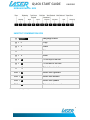
Multimedia and Internet hot keys (via key combination)
INDICATOR LIGHTS
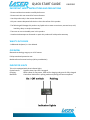
This unit is equipped with three indicator lights;
Capital Letters:
Signifies when Caps Lock is engaged
Charging:
Blinks yellow for low power, solid red for charging and green for fully charged.
Bluetooth:
Continuous blink while in pairing mode until pairing has been completed.
2