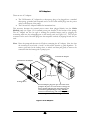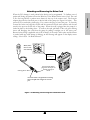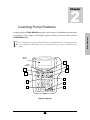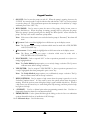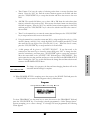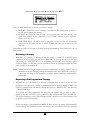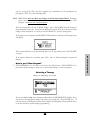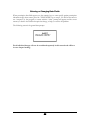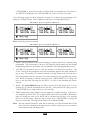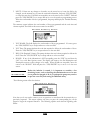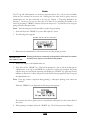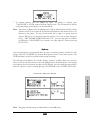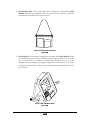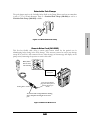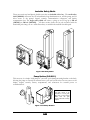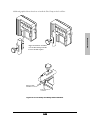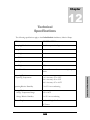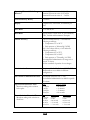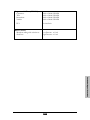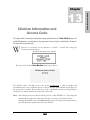
1
CURLIN MEDICAL User’s Manual for use with the 2000 Plus and 2000 CMS Ambulatory Infusion Systems 0050 CURLIN MEDICAL, LLC 15751 Graham Street Huntington Beach, CA 92649 Phone 714 893-2200 • Fax 714 894-2602 www.curlinmedical.com For 24-hour Clinical or Technical Support call toll free: 1-888-287-5999 (888-CURL-999) Covered by U.S. Patents 5,575,631 5,683,233 5,791,881 5,924,852 6,164,921 6,371,732 B1 Des. 408,911 Des. 437,547 S. Other U.S. and Foreign Patents Pending Copyright © 2000/2002 CURLIN MEDICAL, LLC All Rights Reserved Revision E Use with Software Rev. 40 for Curlin Medical 2000 Series Pumps Reorder Number 340-9009 TABLE OF CONTENTS INTRODUCTION .................... 1 Delivery Modes ................................ 1 Indications for Use ..........................2 Special Features of the 2000 Series Pump ...................................2 Regulatory Agency Approvals .........3 Warnings, Cautions, Notices...........4 Pump Illustrations and Features .....8 Disposable Administration Set Illustrations and Features .............. 10 Preparing Medication for Infusion/Changing IV Bags...........11 Opening and Closing the Pump Door ............................................... 13 Choosing and installing the Curlin Medical Administration Set................................................... 14 Gravity Priming Set and Filter....... 14 Steps in Installing Administration Set into Curlin Medical Pumps...... 15 Up Stream Occlusion Alarm Feature ........................................... 16 Installing the Batteries and Using External Power............................... 17 External Power Sources ................. 19 Battery Pack................................... 19 AC Adapters ................................... 20 Attaching and Removing the Bolus Cord ..................................... 21 LEARNING PUMP FEATURES.............................. 23 Keypad Function............................ 24 LED Light Indicators .................... 25 Audio Indicator.............................. 25 I Display Screen ............................... 25 BASICS OF PROGRAMMING ................... 27 Types of Display Screens .............. 27 Sample of an Action Field Screen...27 Sample of a Selection List Field ......27 Sample of a Data Entry Screen .......28 Sample of a Run Screen....................28 Sample of User Notification Screen ..................................................28 Using “Help” ................................ 29 Starting the Pump.......................... 29 Welcome Screen ................................29 Power Status Screen..........................30 Preventive Maintenance Screen.......30 Select Program or Bio-Med Setup Screen ..................................................30 Access Code....................................31 Clinician Access Code Screen..........31 BioMed Setup .................................31 Bio Med Setup Menu ........................31 Enable Therapy Menu ......................33 Patient History Log....................... 33 History Event Log.............................34 Clearing the History Log............... 35 Clearing Patient Information ........ 35 Changing Date and Time.............. 36 Change Date and Time Screen ........36 Program ......................................... 37 Program/BioMed Setup Menu........37 Resume/Repeat Rx/New Program Menu ...................................38 Resuming a therapy....................... 38 Repeating a Pre-Programmed Therapy.......................................... 38 How to go to “New Program” ...... 39 Selecting a Therapy ....................... 39 Select Therapy Screen .......................39 TABLE OF CONTENTS Entering or Changing Data Fields.............................................. 40 CONTINUOUS THERAPY ... 41 Prescription Menus........................ 41 Continuous Pre-Prescription Menu Screen...................................... 41 Continuous Delay Start Setting ...... 42 Run Options Screen ......................... 42 Continuous Titration Limit Screen ................................................. 43 Continuous Prescription Menu ...... 44 Run Options Screen ......................... 45 Prime.............................................. 45 Prime Direction Screen.................... 45 Options .......................................... 46 Continuous Options Menu ............. 47 Continuous Titration Menu ............ 47 Air-In-Line Sensor Off Message Screen ................................................. 48 Air-In-Line Sensor Set at 2.0ml Alert Screen ....................................... 49 Reviewing or Changing the Program ......................................... 49 Starting the Infusion ...................... 49 Continuous Run Screen ................... 50 Continuous Information Screens ... 50 PCA Pre-Prescription Menu Screen ..................................................55 Administration Routes......................56 PCA Titrate Limits Screen ...............56 PCA Prescription Menu ...................58 Run Options Screen..........................59 Prime ............................................. 59 Prime Direction Screen ....................59 Options .......................................... 60 PCA Options Menu ..........................61 Clinician Dose Menu ........................61 Clinician Dose Run Screen ..............62 PCA Titrate Screen............................62 Air-In-Line Sensor Off Message Screen ..................................................63 Air-In-Line Sensor at 2.0ml Alert Screen ..................................................64 Reviewing or Changing the Program ......................................... 64 Starting the Infusion...................... 65 PCA Run Screen................................65 PCA Information Screens ................66 Interrupting an Infusion................ 66 Pause Menu Screen ...........................66 Resuming the Current Container .. 66 Run Options Screen..........................66 Interrupting an Infusion ................ 51 Pause Menu Screen........................... 51 Hanging a New Container ............ 67 Resuming the Current Container .. 51 Run Options Screen ......................... 51 Infusion Complete......................... 68 PCA Infusion Complete...................68 Hanging a New Container ............ 51 Entering a New Program............... 52 Stopping the Infusion.................... 68 Pause Menu Screen ...........................69 Infusion Complete ......................... 53 Continuous Infusion Complete...... 53 TPN THERAPY WITH AUTOMATIC RAMPING....... 71 Stopping the Infusion .................... 53 Pause Menu Screen........................... 53 Prescription Menus ........................71 TPN Pre-Prescription Menu Screen ..................................................71 TPN Delay Start Setting ...................71 Run Options Screen..........................72 TPN Prescription Screen..................73 PCA THERAPY....................... 55 Prescription Menus........................ 55 II Entering a New Program .............. 67 TABLE OF CONTENTS Run Options Screen ......................... 74 Prime.............................................. 74 Prime Direction Screen.................... 75 Options .......................................... 76 TPN Options Menu ......................... 76 Air-In-Line Sensor Off Message Screen ................................................. 77 Air-In-Line Sensor Set at 2.0ml Alert Screen ....................................... 78 Air-In-Line Sensor Set at 2.0ml Alert Screen ........................................92 Reviewing or Changing the Program ......................................... 93 Starting the Infusion...................... 93 Intermittent Run Screen ...................93 Intermittent Information Screens ...94 Interrupting an Infusion................ 94 Pause Menu Screen ...........................95 Reviewing or Changing the Program ......................................... 78 Resuming the Current Container .. 95 Run Options Screen..........................95 Starting the Infusion ...................... 79 TPN Run Screen............................... 79 TPN Information Screens............... 80 Hanging a New Container ............ 95 Intermittent Dosing Schedule..........96 Interrupting an Infusion ................ 80 Pause Menu Screen........................... 80 Resuming the Current Container .. 80 Run Options Screen ......................... 80 Hanging a New Container ............ 81 Entering a New Program .............. 96 Timing Rules when Interrupting Intermittent Therapies .................. 97 Infusion Complete......................... 98 Intermittent Infusion Complete ......98 Entering a New Program............... 81 Stopping the Infusion.................... 98 Pause Menu Screen ...........................98 Infusion Complete ......................... 82 TPN Infusion Complete.................. 82 VARIABLE THERAPY.......... 101 Stopping the Infusion .................... 83 Pause Menu Screen........................... 83 INTERMITTENT THERAPY ............................... 85 Prescription Menus........................ 85 Intermittent Pre-Prescription Menu Screen...................................... 85 Intermittent Delay Start Setting ..... 86 Run Options Screen ......................... 86 Intermittent Prescription Menu...... 87 Run Options Screen ......................... 89 Prime.............................................. 89 Prime Direction Screen.................... 89 Options .......................................... 90 Intermittent Options Menu............. 91 Air-In-Line Sensor Off Message Screen ................................................. 92 III Prescription Menus ...................... 101 Variable Pre-Prescription Menu Screen ................................................101 Variable Delay Start Setting ...........102 Run Options Screen........................102 Variable Prescription Menu1 .........103 Variable Prescription Menu 2 ........104 Variable Prescription Menu 3 ........104 Variable Summary Screen...............105 Run Options Screen........................105 Prime ............................................106 Prime Direction Screen ..................106 Options .........................................107 Variable Options Menu ..................107 Air-In-Line Sensor Off Message Screen ................................................108 Air-In-Line Sensor Set at 2.0ml Alert Screen ......................................109 TABLE OF CONTENTS Reviewing or Changing the Program ........................................109 Starting the Infusion .....................109 Variable Run Screen 1.................... 110 Variable Run Screen 2.................... 110 Variable Information Screens ....... 111 Operating Environment ...............146 Maintenance .................................146 Limited Warranty .........................147 Procedure for Checking Pumps Between Patients ..........................149 Interrupting an Infusion ............... 111 Pause Menu Screen......................... 111 TECHNICAL SPECIFICATIONS.................153 Resuming the Current Container . 111 Run Options Screen ....................... 112 Hanging a New Container ...........112 CLINICIAN INFORMATION AND ACCESS CODE ......................157 Entering a New Program..............112 Clinician Access Code.....................157 Infusion Complete ........................113 Variable Infusion Complete ......... 113 Lock Setting Table .......................158 Stopping the Infusion ...................114 Pause Menu Screen......................... 114 TROUBLESHOOTING ........ 115 Alerts, Alarms, and Error Codes ...115 ACCESSORIES.......................137 AC Adapters/Chargers .................137 Battery Pack (340-2006) ................138 Soft Carry Packs............................139 Detachable Pole Clamps...............141 Remote Bolus Cord (340-2005) .....141 Lockable Safety Shells ..................142 Pump Holster (340-0111)...............142 Data Interface Cable (340-2011)....144 Palm Adapter Cable (350-2006) ....144 CLEANING, ENVIRONMENTAL CONDITIONS, AND MAINTENANCE...................145 Cleaning ........................................145 Transport and Storage ..................146 IV TABLE OF FIGURES FIGURE 1.1 CURLIN MEDICAL AMBULATORY PUMP—FRONT, TOP AND LEFT VIEW .... 8 FIGURE 10.2 BATTERY PACK ............................. 138 FIGURE 10.3 SMALL FANNY PACK.................... 139 FIGURE 1.2 CURLIN MEDICAL AMBULATORY PUMP—BACK, BOTTOM, AND RIGHT VIEW.................................................................. 9 FIGURE 10.4 LARGE FANNY PACK ................... 139 FIGURE 10.5 SOFT SHOULDER PACK .............. 140 FIGURE 1.3 SAMPLES OF CURLIN MEDICAL ADMINISTRATION SETS.............................10 FIGURE 10.6 SOFT BACK PACK ......................... 140 FIGURE 1.4 SPIKING THE FLUID CONTAINER, GRAVITY PRIMING THE SET AND USING THE SLIDE CLAMP TO CLOSE THE TUBING. .......................................................... 11 FIGURE 10.7 DETACHABLE POLE CLAMP ......141 FIGURE 10.8 REMOTE BOLUS CORD................141 FIGURE 10.9 SAFETY SHELLS............................ 142 FIGURE 1.5 CURLIN MEDICAL ADMINISTRATION SET “INTEGRAL FLOW-STOP” WITH BREAKAWAY TAB ....12 FIGURE 10.10 PUMP “HOLSTER” ...................... 142 FIGURE 10.11 POLE CLAMP AND SAFETY SHELL INSTALLATION............................. 143 FIGURE 1.6 INTENTIONALLY OPENING THE “INTEGRAL FLOW-STOP”...........................12 FIGURE 10.12 DATA INTERFACE CABLE ........ 144 FIGURE 1.7 OPENING THE PUMP DOOR .........13 FIGURE 1.8 CLOSING THE PUMP DOOR ..........13 FIGURE 1.9 PROPER INSTALLATION OF THE CURLIN MEDICAL ADMINISTRATION SET INTO THE PUMP ..................................15 FIGURE 1.10 TOP CUTAWAY VIEW OF THE CURLIN MEDICAL PUMP WITH CURLIN MEDICAL ADMINISTRATION SET IN PROPER INSTALLATION POSITION........16 FIGURE 1.11 INSTALLING BATTERIES INTO THE CURLIN MEDICAL AMBULATORY PUMP................................................................18 FIGURE 1.12 BATTERY PACK................................19 FIGURE 1.13 AC ADAPTERS...................................20 FIGURE 1.14 ATTACHING AND REMOVING THE REMOTE BOLUS CORD......................21 FIGURE 2.1 KEY PAD ..............................................23 FIGURE 2.2 SAMPLE OF DISPLAY SCREEN ......26 FIGURE 5.1 PCA ADMINISTRATION ROUTE DEFAULT SETTINGS....................................56 FIGURE 10.1 AC ADAPTERS/CHARGERS ......... 137 V 1 Chapter The Curlin Medical Infusion Pumps have been designed with the user in mind and have the latest in friendly, simple-to-learn technology to allow fast and easy access to the features of these pumps. With a little introduction and training, an operator will quickly be able to program and use these pumps to deliver the therapies prescribed. Note: Throughout this Manual the text will refer to the Curlin Medical pump. All the features described here apply equally to the 2000 Plus and the 2000 CMS pumps, unless specifically otherwise stated. L et’s begin by introducing you to the Curlin Medical pump, an easy-to-use, ambulatory or pole mounted infusion device designed to meet the needs of the hospital or alternate site patient. It operates accurately in any position, has a low rate resolution of 2 microliters, and its small, compact, lightweight design allows mobility for ambulatory patients. The Curlin Medical pump can be carried in any of the four convenient carryall soft-packs, pole mounted, placed into the locked “safety shells,” or set on a suitable surface for use. Delivery Modes The pump features five therapy delivery modes: 1 Continuous Infusion—Designed to allow a constant, programmed rate of infusion. 2 PCA or Patient Controlled Analgesia—Designed for therapies that require a continuous rate of infusion, patient-controlled demand boluses, or both. 3 TPN with Automatic Ramping—Designed to allow a level rate of infusion of parenteral nutritional products with the option of tapering at the beginning, end, or both beginning and end of the infusion. This mode also has an early ramp-down feature. 4 Intermittent Delivery—Designed to deliver programmed intervals and rates of specified amounts of infusates and to optionally deliver small amounts of the infusate between doses to keep the patient’s access site patent. 5 Variable Program—Designed to allow varying amounts, rates, and times of delivery of infusions up to twenty-four specified programs. 1 Introduction Introduction Indications for Use The Curlin Medical pump can be used for intravenous, epidural, or subcutaneous therapies. It can be used to deliver medications from the specially designed Curlin Medical medication reservoir, syringes1 or from IV bags. A physician or a certified, licensed, healthcare practitioner must oversee any therapy. Patients and caregivers using the Curlin Medical pump should be instructed in its use by a qualified clinician and demonstrate an adequate level of proficiency in the use of the pump. • Special Features of the 2000 Series Pump Automatic “quick-repeat” function • Large font display • Small, accurate, ambulatory, volumetric infusion pump that provides reliable and safe delivery of infusion therapies. • Cost effective, safe and easy-to-load disposable Curlin Medical administration sets featuring a unique, spring-activated, self-clamping, set-based “Integral Flow-Stop” device that automatically clamps the tubing when the door of the pump is opened and prevents inadvertent fluid flow. • User-friendly, easy-to-teach programming that shortens staff inservice time and patient teaching time. • “Helpful” help screens and display messages. • Three tamper-resistant lock settings to assist in maintaining patient compliance and safety. • Patient and therapy specific programming features via the Curlin Medical BIOMED SETUP and Options Menus. • Selection by user from three units of delivery, milliliters (ml), milligrams (mg), and micrograms (mcg). • Titration features in both PCA and Continuous therapies. • Retention of programmed infusion settings until cleared by the clinician, thus eliminating the need to reprogram before each use. • Mandatory requirement of two independent key press actions before a running pump can be turned off, thus minimizing the accidental interruption of a therapy in progress. • Powered by two readily available, cost-effective “C” size alkaline batteries. • Attractive yet robust design that is impact resistant and water resistant. • Audio alarms that can be adjusted from 1 (very quiet) to 9 (loudest) to meet specific patient and clinical setting needs but that cannot be totally disabled. • Four sizes of convenient carry packs to assist the ambulatory patient in maintaining independence of lifestyle. Backpack will accommodate pump, AC Adapter, and up to fourliter IV bag. • Retained memory features that allow the pump to easily resume a therapy exactly from where 1 Some syringes are not qualified for use. Please call Curlin Medical for details 2 it left off when it is interrupted before completion or to repeat a therapy using the same programmed prescription. • Compact, lockable safety shells that provide additional security when needed and that are designed to be free standing, pole mounted, or placed in the convenient, soft, carry case. Backlit illumination for display screen. Backlight remains on continuously if AC Adapter is in use. • Pump will not permit the user to enter any programming value that is outside of its predetermined range. • Integral Up as well as Down Occlusion alarms to notify user if an occlusion is present on either side of the pumping chamber. • Integral High Upstream pressure alarm to notify user of excessive upstream pressure. • Integral Air-In-Line alarm to notify user of presence of air in the tubing. • Adjustable Down Occlusion settings of “High” and “Low” to customize the pump’s down pressure requirements. • Patient side (downstream) “Line Pressure” displayed on CMS-enabled pumps. Regulatory Agency Approvals INFUSION PUMP WITH RESPECT TO ELECTRIC SHOCK, FIRE AND MECHANICAL HAZARDS ONLY IN ACCORDANCE WITH UL2601-1/CAN/CSA C22.2 NO. 601.1 70TK • Underwriters Laboratories has evaluated the Curlin Medical Pump with International AC Adapter (340-2022) to UL 2601-1 and CSA C22.2 No. 601-1 for General Standards of Safety for Medical Equipment and found the Curlin Medical Pump to be compliant. • Underwriters Laboratories has evaluated the Curlin Medical Pump with accessory equipment, which is the Battery Pack (340-2006) and the AC Adapter (340-2004), to UL 544 and CSA C22.2 No. 125 Standards for Safety for Medical Equipment and they were found to be compliant. • TÜV PRODUCT SERVICE has evaluated the Curlin Medical Pump and the AC Adapter (340-2004) for Electromagnetic Compatibility, to regulations EN 60601-1-1-2/1993 and EN 60601-2-24/1994 and both were found to be compliant. I M P O R T A N T I N F O R M A T I O N The indicator shown at the left appears throughout this manual to emphasize important information in the operation of the Curlin Medical Pump. Please read these sections carefully. 3 Introduction • Warnings, Cautions, Notices EXPLANATION FOR SYMBOLS on the Curlin Medical Pump with the Classified UL 2601-1 and CSA C22.2 No. 601-1 Label. The meanings for the symbols on the pump are as follows: Attention, consult ACCOMPANYING DOCUMENTS. ♥ Type CF Equipment IPX1 Protected against dripping water. INFUSION PUMP WITH RESPECT TO ELECTRIC SHOCK, FIRE AND MECHANICAL HAZARDS ONLY IN ACCORDANCE WITH UL2601-1/CAN/CSA C22.2 NO. 601.1 70TK INTERNALLY POWERED OR FOR USE WITH AC ADAPTER 340-2022 TYPE CF APPLIED PARTS EQUIPMENT PROTECTED AGAINST DRIPPING WATER, IPX1 EQUIPMENT NOT SUITABLE FOR USE IN THE PRESENCE OF A FLAMMABLE ANESTHETIC MIXTURE WITH AIR OR WITH OXYGEN OR NITROUS OXIDE MODE OF OPERATION CONTINUOUS EXPLANATION FOR SYMBOLS on the Curlin Medical Pump and Battery Pack label for listing to UL 544 and CSA C22.2 No. 125. The meaning for the symbols on the pump and battery pack label are as follows: Attention, consult ACCOMPANYING DOCUMENTS CAUTION: Refer servicing to qualified personnel Risk Class 2 (Type BF Equipment) DANGER – Risk of EXPLOSION if used in the presence of FLAMMABLE ANESTHETIC Use with Battery Pack Model No. 340-2006 or AC Adapter Model No. 340-2004 6.9 v DC 500mA 4 WARNINGS Use only Curlin Medical administration sets in your Curlin Medical pump. Use of nonproprietary administration sets may alter accuracy in delivery of fluids and could result in over or under infusions, leading to possible patient injury or death. • Do not use this pump with a pressure cuff applied to the IV bag or medication reservoir bag, and do not unduly squeeze or compress the bag during a running infusion. • Remove all air from the administration set and IV bag or reservoir before connecting it to a patient’s access site. • Do NOT prime the administration set while it is connected to the patient’s access device. Doing so could result in overdosing the patient and could cause injury or death. • Do not attempt to open the pump’s housing. All service problems should be referred to an appropriate service technician. • Danger: Risk of explosion if used in the presence of flammable anesthetic or explosive gasses. CAUTIONS • U.S. federal law restricts this device to sale by or on the order of a physician or other licensed practitioner. • Visually inspect the pump, pumping chamber and administration set before use. Do not use any pump or administration set that appears to be damaged or tampered with or if there is any indication of improper function. • Keep the pumping surfaces clean, dry, and free of fluid spillage at all times. • This pump is fluid resistant and can withstand fluid spillage. It is not, however, designed for total submersion as moisture buildup within the case could cause damage to the operating components. Do not use the pump in the shower, sauna, or steam bath, and do not position the pump where it could accidentally be dropped into a container of fluid (e.g., basin, tub, or toilet). Avoid fluid contact with the power port and data port of the pump. • Do not try to insert foreign objects into any of the pump connectors, as such objects may damage the pump. • Use only Curlin Medical external power sources to power the Curlin Medical pump. Using other power sources may result in circuitry or microprocessor damage. • When using the AC Adapter, connect the plug only into a grounded AC outlet. • Use only non-rigid, non-vented IV fluid containers unless an air vent adapter is in place and the container is suspended from an IV pole. • Do not unduly stretch the tubing of the administration set or leave the tubing in the pump for more than twenty-four hours when the pump is not running. • Use Curlin Medical administration sets with appropriate air-in-line filters any time the Air-In-Line Sensor of the pump is disabled. 5 Introduction • • If any signs or symptoms of infiltration or inflammation are noted at the infusion site, stop the infusion and report it to the appropriate healthcare provider. • Always use the slide clamp on the administration set as an additional precaution to occlude the tubing before opening the door of the pump. • Do not subject the pump to dropping or hitting against a hard surface. If at any time the pump is dropped or hit, inspect it for signs of damage. If any damage is discovered, report the damage to the healthcare provider for replacement of the pump. NOTICES • The Curlin Medical pump is not intended for the administration of blood or cellular blood products. • Dispose of all used administration sets in accordance with all applicable regulatory and institutional policies. • Teach users to check all tubing sites for proper aseptic connections and to check the administration sets for air leaks before and during the infusion. • To minimize the potential hazard of air bubble formation or “out-gassing,” administer all medications at the proper temperatures, and remove medications from refrigerators as specified by the healthcare provider or pharmaceutical manufacturer. • Follow local governing ordinances and recycling plans regarding disposal or recycling of device components. When the “C” size batteries are to be discarded, do not incinerate them. Dispose of all used administration sets in accordance with all applicable regulatory and institutional policies and directions. • Adhere to any warnings, precautions, or recommendations stated by drug manufacturers regarding the use of infusion pumps and disposable administration sets in the administration of their specific products. • Administer all drugs selected for epidural administration in accordance with the indications included in the manufacturer’s package insert accompanying the drugs. • Note that the administration of medications into the epidural space is limited to delivery via specially designed indwelling catheters inserted by a qualified physician. Any patients receiving epidural infusions should be managed and monitored by medical professionals familiar with epidural administrations and their clinical management. Curlin Medical offers administration sets specifically designed for epidural infusions with 0.22 micron filters, no injection ports, and yellow striping to clearly identify the set for epidural use. Any administration set being used for epidural infusions should be clearly labeled as such. • Clean the pump, remote bolus cord, AC adapter, and battery pack with a soft, clean cloth dampened in any of the following: 1 Warm soapy water (do not submerse) 2 Isopropyl alcohol 3 Household bleach, diluted 9:1 with water 4 Commercial disinfectant When clean, dry pump and other items with a soft, clean, dry cloth. 6 The soft carry packs are intended for single patient use. They may be cleaned in the gentle cycle of a washing machine using cold water, no chlorine bleach, and line dried. (They cannot be dried in a clothes dryer.) • The Bolus/Data connector is to be used by the patient only for the connection of the bolus cord with remote switch. Other accessory equipment connected to this digital interface must be certified to the respective IEC/EN standards (i.e. IEC 950 for data processing equipment and EN 60601-1 for medical equipment.) Furthermore, all configurations shall comply with the system standard EN 60601-1. Anyone who connects additional equipment to the signal input part or signal output part configures a medical system, and is therefore, responsible that the system complies with the requirements of the system standard EN 60601-1. If in doubt, consult the technical services department or your local Curlin Medical representative. • The Curlin Medical has been tested and found to comply with the European Standard EN 60601-1-2:1993 and EN 60601-2-24:1994. These limits are designed to provide reasonable protection against harmful interference in a typical medical installation. • This equipment generates, uses, and can radiate radio frequency energy and, if not installed and used in accordance with the instructions, may cause harmful interference to other devices in the vicinity. However, there is no guarantee that interference will not occur in a particular installation. If this equipment does cause harmful interference to other devices, which can be determined by turning the equipment off and on, the user is encouraged to try to correct the interference by one of more of the following measures: 1 Reorient or relocate the receiving device. 2 Increase the separation between the equipment. 3 Connect the equipment into an outlet on a circuit different from that to which the other device(s) are connected. 4 Consult the manufacturer or field service technician for help. Note: For information regarding the clinician access code, read the chapter entitled, “Clinician Information and Access Code.” When entered correctly, the access code allows a user to change the lock settings of the pump and thereby change the settings of the pump. I M P O R T A N T I N F O R M A T I O N Because the chapter entitled, “Clinician Information and Access Code” contains access code information, the entire chapter should be removed before initial patient teaching and should not be left in the manual while in the patient setting. Doing so could jeopardize the security levels intended only for clinician use and access. 7 Introduction • Pump Illustrations and Features Data Interface/ Bolus Cord Port Figure 1.1 Curlin Medical Ambulatory Pump—Front, top and left view 8 Introduction Figure 1.2 Curlin Medical Ambulatory Pump—Back, bottom, and right view 9 Disposable Administration Set Illustrations and Features Integral These drawings are NOT to scale. Note: An important feature of the Curlin Medical administration set is the unique design of the set-based “Integral Flow-Stop.” When the set is new, the “Integral Flow-Stop” has a breakaway tab that keeps the “Integral Flow-Stop” open and allows the tubing to be gravity primed. When you are ready to load the administration set into the pump, remove this tab, and the “Integral Flow-Stop” will automatically clamp the tubing. The Curlin Medical “Integral Flow-Stop” prevents inadvertent flow of medication to the patient whenever the door of the pump is opened because the “Integral Flow-Stop” automatically reacts to clamp the tubing. The “Integral FlowStop” can, however, be opened after the tab is broken away by intentionally squeezing down on the movable spring action section of the “Integral Flow-Stop.” See Figure 1.6 for an illustration of how to intentionally open the “Integral Flow-Stop.” For a complete listing of all available administration sets, see the Curlin Medical Product Catalog. CAUTION: USE ONLY CURLIN MEDICAL ADMINISTRATION SETS WITH THIS PUMP CURLIN MEDICAL Integral Figure 1.3 Samples of Curlin Medical Administration Sets 10 Preparing Medication for Infusion/Changing IV Bags Holding the bag with fill ports down allows fluid to fill tubing and displace the air in the line. Be sure all air has been removed from the IV bag as well. Air in the line moves down through the tubing as the fluid fills. OPEN Notice the breakaway tab on the “Integral Flow-Stop” has been removed. The set can be gravity primed by intentionally squeezing the “Integral Flow-Stop” and thus releasing the clamping action. ( See Figures 1.5 & 1.6 ) CLOSED In these illustrations, the slide clamps are shown in their open and closed states. Figure 1.4 Spiking the fluid container, gravity priming the set and using the slide clamp to close the tubing. 11 Introduction When using an IV bag, grasp the bag spike firmly in one hand and the IV bag spike-port in the other, and insert the spike completely into the port using aseptic technique. Twist and remove breakaway tab from “Integral Flow-Stop” Figure 1.5 Curlin Medical Administration set “Integral Flow-Stop” with breakaway tab Squeeze “Integral Flow-Stop” between thumb and forefinger as shown to allow fluid to flow through tubing after the breakaway tab has been removed. Figure 1.6 Intentionally Opening the “Integral Flow-Stop” 12 Door Latch (Lift to open) 1 Latch Hook 2 Latch Pins To open the pump door: 1 Pull the door latch up, releasing the latch hooks from the latch pins. 2 Grasp the door latch and pull upwards and to the right to open the entire door mechanism. Full range access is now available for installing the Curlin Medical Administration set. (See figures 1.9 and 1.10). Figure 1.7 Opening the pump door Push down To close the pump door properly, move the entire door assembly to the left and push downward until it is in its closed position. Then push the door latch down until it locks. The “over-center” latching mechanism assures that the door closes easily and securely. Figure 1.8 Closing the pump door 13 Introduction Opening and Closing the Pump Door The pump door, located on the top of the Curlin Medical pump, has a sturdy “over center” latching mechanism, which assists in securely closing the door. Review the following illustrations: Choosing and installing the Curlin Medical Administration Set A number of distinctively designed Curlin Medical administration sets are available to deliver each prescription accurately. (See Curlin Medical “Product Catalog”.) Each set is designed to meet the requirements of specific therapies, therefore, if a basic bag-spike set or a set with a medication reservoir is needed, with or without air eliminating filters, etc., there are several configurations from which to choose. Follow the healthcare provider’s protocols for preparing the medication and the administration set before loading the set into the pump, remembering the following basic rules: 1 Examine the packaging and the administration set before use to assure the package integrity. Do not use the set if the protective caps are dislodged or if the package integrity is breached, as fluid path sterility cannot be guaranteed under those circumstances. 2 Notice that there is an instructional insert included in the administration set package. This insert includes written and graphic instructions for proper installation of the administration set into the pump. It also lists the “fill volume” of the administration set. Allow for the amount of the fill volume when determining the final IV bag volume. Important Notification A lack of compliance with proper positioning of the tubing could result in infusion inaccuracies. Please center the tubing in the pumping area when installing the administration set. 1 Gravity Priming Set and Filter To gravity prime the administration set, twist and remove the breakaway tab from the “Integral Flow-Stop”, then spike the IV bag. Squeeze the “Integral Flow-Stop” between your thumb and forefinger to allow fluid to flow through the tubing until all air is removed from the IV bag and administration set. (See figures 1.5 and 1.6.) Release the “Integral FlowStop” to automatically clamp the tubing. To correctly prime a filtered set, hold the filter in a vertical position with the flow downwards allowing the filter to completely fill with fluid. 2 Close the slide clamp on the administration set before the door of the pump is opened. This step along with the automatic clamping properties of the “Integral Flow-Stop” prevents inadvertent fluid flow. 3 Use an administration set with an air-eliminating filter whenever the Air-In-Line Sensor is disabled or set to “OFF.” 4 Follow CDC guidelines or Intravenous Nursing Standards of Practice Guidelines regarding the frequency of changing the administration sets. 5 Use aseptic technique and universal precautions as directed by the policies of your healthcare facility or institution. 6 Use only Curlin Medical administration sets with the Curlin Medical pump. 7 Dispose of administration sets in accordance with all applicable regulatory and institutional policies and directions. 14 (Yellow) Note: Open the slide clamp before closing the pump door Figure 1.9 Proper installation of the Curlin Medical Administration set into the pump Steps in Installing Administration Set into Curlin Medical Pumps 1 Fully open the door of the pump. 2 Close the slide-clamp on the administration set. 3 Activate the Integral Flow-Stop by twisting and removing the breakaway tab. 4 Insert the blue tubing guide into the receptacle on right side of pump in the direction of the blue arrow, positioning the tubing in front of the door hinge. 5 Center the tubing in the middle of the pumping fingers, covering the yellow dot. 6 Holding the yellow Integral Flow-Stop by the handle (see Figure 1.9), insert it on an angle into the receptacle on the left side of the pump in the direction of the yellow arrow. CAUTION: Do not press down on the top of the Integral Flow-Stop when inserting it into the receptacle. This action could inadvertently open the Integral Flow-Stop and allow fluid to flow through the tubing. 7 Open the slide-clamp on the administration set 8 Push the tubing slightly into the black Air Detector slot. 9 Fully close the door of the pump and latch it securely. 10 If the set is not primed, prime the set according to prime section in the relevant therapy chapter. 11 Attach the primed set to the patient’s venous access device per agency protocols. 12 Dispose of used administration sets in accordance with all applicable regulatory and institutional policies and directions. 15 Introduction (Blue) Air Detector Figure 1.9 shows the Curlin Medical pump with a cut-away of the display screen allowing you to visualize the receptacles for the small blue “Tubing Guide” on the right side of the pump and yellow the larger “Integral Flow-Stop” on the left side of the pump. The arrows, in corresponding colors, are visible on the background surface of the pump head and indicate the proper direction for placing these locators into their receptacles. Also, note that the breakaway tab has been removed from the “Integral FlowStop”, allowing the administration set to be placed into the pump correctly. “Flow-Stop” handle 1 Insert blue “Tubing Guide” on right side of pump with tubing in front of the door. The Blue arrow on the background surface of the pump head indicates direction and location for the blue Tubing Guide. 2 Important: Center the tubing horizontally over the pumping fingers covering the yellow dot. 3 Insert yellow “Integral Flow-Stop” on the left side of the pump. The yellow arrow on the background surface of the pump head indicates the direction and location for the “Integral Flow-Stop.” CAUTION: Hold the “Flow-Stop by the small handle. DO NOT press down on the top of the “Integral Flow-Stop” when inserting it into the receptacle. This action could inadvertently open the “Integral Flow-Stop” and allow fluid to flow through the tubing. 4 Press the tubing into the air detector slot gently with index finger. Air Detector Slot Figure 1.10 Top cutaway view of the Curlin Medical pump with Curlin Medical Administration set in proper installation position Up Stream Occlusion Alarm Feature The Curlin Medical pump has an Up Stream Occlusion alarm feature, e.g., it detects low upstream pressure. This feature notifies you if an occlusion is present between the IV container and the pump. If this alarm occurs, the display will read, “ALARM –UP OCCLUSION,” the alarm will sound, the red LED light will blink, and the infusion will stop. This situation requires that you press the “Pause” key, examine the administration set from the IV container to the pump for potential causes of the occlusion. If a clamp is in place, open, or remove it; if the administration set is kinked, straighten it. If indicated, close the slide clamp on the administration set and open the door of the pump to verify that the set is correctly placed. Close the pump’s door and reopen the slide clamp. When ready to begin infusing, select “RESUME” and then press the “RUN” key. The pump also detects excessive up stream pressure (pressure on the IV bag). The display will read “ALARM – HIGH UP PRESSURE,” the alarm will sound, the red LED light will blink, and the infusion will stop. If this situation occurs, relieve the source of excessive pressure on the IV bag and when ready to begin infusing, select “RESUME” and then press the “RUN” key. Note: The up stream occlusion detection is disabled during priming. 16 Installing the Batteries and Using External Power The “C” size batteries will last approximately 30 hours at a rate of 125 ml/hour and over 85 hours at rates of 2 ml/hr or less. Factors that influence battery life are the number of times the screen is illuminated with a key press, the viscosity of the fluid being delivered, the age and temperature at which the batteries have been stored. To extend the life of the batteries, patients can use the AC adapter whenever they are stationary, e.g., at night. The pump has a “low battery” alert that beeps periodically with a message appearing to tell you when the power is low in the “C” size batteries and/or the battery pack. This alert gives you a window of time to be sure you have back-up power (e.g. extra batteries, AC adapter, or a recharged battery pack.) If you are infusing at high rates, you will have approximately one hour of warning; if you are infusing at low rates (below 10 ml/hr), you will have a significantly longer time interval before the batteries are completely empty. The user should be taught that whenever the “low battery” alert appears, to pause the therapy, turn the pump off, and to replace both “C” size batteries. Then, turn the pump back on, select resume to continue the therapy. When the “empty battery” alarm occurs the pump will go into an alarm state and the infusion will stop. If this occurs, turn the pump off, replace both of the “C” size batteries, turn the pump on, and go to the “Resume” function to continue the therapy. All programming information is retained. If the “C” size batteries are empty and you want to connect the AC adapter to power the pump, turn the pump off first, plug in the AC adapter and then turn the pump back on. Note: If you are operating the pump solely on the battery pack or the AC Adapter (no “C” size batteries installed) and the power source is disconnected from the pump, the alarm will sound, the infusion will stop, and the display screen will be blank. Turn the pump off, reconnect the power source, turn the pump on, and resume the therapy. All programmed information is retained. When replacing batteries, pause any infusion in progress by pressing the “PAUSE” key, and then turn the pump off. Replace the batteries, and, when the pump is turned back on, select “RESUME” to continue the therapy from the point at which it was interrupted. 17 Introduction The Curlin Medical pump can be powered solely with the use of two “C” size alkaline batteries installed into the pump as shown in Figure 1.11. “C” size batteries are readily available at most retail facilities that carry alkaline batteries. A second alternative for power is the portable, rechargeable Battery Pack, shown in Figure 1.12. The third alternative for power is to use the AC Adapter shown in Figure 1.13, allowing the pump to be connected to any approved, three-prong electrical wall outlet. The battery compartment door is located on the back of the Curlin Medical pump. To open the door, depress the recessed release pin (it may be helpful to use a small coin to depress the pin), slide the battery door down, and remove it. Replace the old batteries with two new “C” size alkaline batteries. Install them by depressing the coil spring with the bottom of the battery and sliding the top in place. Note: both positive poles are at the top as shown in Figure 1.11. Always replace both batteries. Slide the battery compartment door back to its closed position until the recessed pin locks into place. Two “C size” alkaline batteries Coil Springs Battery Compartment Door PLEASE NOTE: Follow local governing ordinances and recycling plans regarding disposal or recycling of device components. When the “C” size batteries are discarded do not incinerate them. Recessed Release Pin Figure 1.11 Installing batteries into the Curlin Medical Ambulatory pump I M P O R T A N T I N F O R M A T I O N Whenever an external source is powering the pump, it is still important to always install the two “C” size batteries. In the event of a power failure or accidental power cord disconnection, the batteries will power the pump without interrupting the therapy in progress. If the batteries are in place when the power cord is disconnected, the display will say “External Power Disconnected,” the alert beep will sound, the batteries will take over powering the pump, and the therapy will continue infusing. 18 External Power Sources Note: Pause the pump and then turn it off before connecting the Battery Pack. Note also that the connector is keyed with a “notch” at this red-dot location to guide alignment. To remove, pull back on the locking sleeve to unlock and then pull gently to remove the connector from the pump’s port. Illustration of the bottom of the Curlin Medical ambulatory pump Recharging port of battery pack Align the red dots and the notches. Then plug the twopin connector into the two-hole receptacle located on the bottom of the Curlin Medical Ambulatory pump. To charge the Battery Pack: Plug the AC Adapter into a grounded wall outlet and then plug the AC Adapter into the recharging port of the Battery Pack (see above). On initial use, the Battery Pack should be charged for a full 24 hours, to recharge takes approximately 12 hours (overnight). Figure 1.12 Battery Pack 19 Introduction Battery Pack The battery pack is an external, rechargeable, lead acid battery pack than can be used as an additional, long-life, portable, external source of power. It is rechargeable by plugging the AC Adapter into the recharging port. The battery pack is connected to the pump via the two-hole port located on the bottom of the pump (as shown below). The two-pin connector plugs into the receptacle correctly by aligning the red dots on each. AC Adapters There are two AC Adapters: • • The US Domestic AC Adapter has a three-prong plug to be plugged into a standard three-prong, grounded wall receptacle and a six-foot cable which plugs into the power outlet on the bottom of the pump. The Universal AC Adapter available for international use. This accessory becomes the external power source when plugged directly into the Curlin Medical pump (see Figure 1.2 for external power port location on the bottom of the pump). The AC Adapter can also be used to recharge the portable battery pack by plugging the connecting cable into the recharging port on the battery pack (see Figure 1.12). The two-pin connector on the end of the cable plugs into the receptacles correctly by aligning the red dots on each. Note: Pause the pump and then turn it off before connecting the AC Adapter. Note, also that the connector is keyed with a “notch” at this red-dot location to guide alignment. To remove, pull back on the locking sleeve to unlock and then pull gently to remove the connector from the battery pack or pump’s port. Universal AC Adapter US Domestic AC Adapter Locking Sleeve Locking Sleeve Two-Pin Adapter plugs into port on bottom of the pump for AC power or can be used to recharge the battery pack by plugging into the recharging port on the battery pack (see Figure 1.12). Note the connector notched keying and red dot alignment. To remove, pull back on the locking sleeve. Figure 1.13 AC Adapters 20 Bolus/Data Port on Left side of Pump Remote bolus access port Locking Sleeve Four-pronged adapter plugs into access port on left side of pump as shown. To remove bolus cord, pull back on locking sleeve and pull cord straight out of access port. Figure 1.14 Attaching and removing the remote Bolus Cord 21 Introduction Attaching and Removing the Bolus Cord When the PCA therapy is used, patient bolus dosing can be programmed. To facilitate ease of patient self-dosing, the patient can use the Bolus key or the Remote Bolus Access Cord. The cord is five feet long and has a patient access button at the top of the remote cord. The four-pin adapter plugs into the four-hole port on the left side of the pump (see Figure 1.14 below). This port may be covered with a plastic plug. If so, remove the plug to access the port. To correctly connect the bolus cord, align the red dot and the connector’s keyed notch with the red dot and notch in the port on the left side of the pump. When the cord is plugged into the pump it is locked in place by the locking sleeve. To remove the cord, pull back on the soft, green locking sleeve and disengage the cord from the pump by pulling it straight out of the access port. Because bolus dosing is applicable only in PCA therapy, if the cord is left in place and the button is pushed while any other therapy is infusing, an alert message will appear on the display screen stating: “Not in PCA No Bolus Allowed.” 22 2 Chapter Learning Pump Features F irst, examine the key pad and the functions of the individual keys. Knowing how the keys, especially the dual function keys, work will allow you to give commands to the pump. 7 Display Screen 7 LED Indicators 2 1 4 3 6 5 8 10 9 Figure 2.1 Key Pad 23 Learning Pump Learning to operate the Curlin Medical pump requires a few basic points of understanding that remain constant in every therapy. It may be helpful to read through these steps first, and then go back and use them to operate the Curlin Medical pump. Keypad Function 1 2 ON/OFF: Used to turn the pump on and off. When the pump is running, however, the “PAUSE” key must be used to stop the infusion first and then the “OFF” key can be pressed to turn the pump off. This requirement prevents the interruption of an infusion by a single accidental press of the “OFF” key. RUN/PAUSE: Used to start or pause the motor of the pump, which, in turn, starts or pauses fluid delivery. When the pump is running, pressing this key will pause the pump. When the pump is paused, pressing this key during the “Run Options” menu will start the pump. This key is also used to terminate a pump alarm. Note: If the cause of the alarm is not resolved when the pump is “Resumed,” the alarm will recur. 3 ⇑ Up arrow: Used to scroll the highlight bar or field cursor up on the display screen. Note: The Up arrow will not accept a selection which must be made with a YES/ENTER or NO/CHANGE key. 4 ⇓ Down arrow: Used to scroll the highlight bar or field cursor down on the display screen. Note: The Down arrow will not accept a selection which must be made with a YES/ENTER or NO/CHANGE key. 5 NO/CHANGE: Used to respond “NO” to data or questions presented or to reject or to change highlighted data. Note: The Curlin Medical pump requires you to actively change a selection. The Up arrow or Down arrow will not change a selection. 6 YES/ENTER: Used to respond “YES/ENTER” to data or questions presented or to “accept” highlighted data when prompted to press “enter” key. Note: The Curlin Medical pump requires you to affirmatively accept a selection. The Up arrow or Down arrow will not accept a selection. 7 HELP/OPTIONS: Used to request a help screen when the pump is paused or is at the “Infusion Complete Screen.” It is also used to access the options screen when the pump is running. When the options screen is displayed, help is again available with this key. When in a help screen, use the arrow keys to scroll through the help message, and then press the help key again to exit help. 8 ./SILENCE: Used as a decimal point when programming numeric data. Used also to temporarily silence the alarm (for one-minute intervals). 9 PRIME/BOLUS: Used to prime fluid through the tubing to clear it of air or to administer a patient demand bolus dose of medication in PCA therapy. 10 0 - 9 Numeric keys: - Used for data entry. 24 Audio Indicator An audible alarm or “beep” is used to alert you to a change in the status of the pump or a situation requiring user action or notification. A message will appear on the display screen describing the situation. The rate, number of beeps, and volume further specify status. This pump offers nine different volume levels from which to select for the audio feature; however, the “beep” cannot be totally disabled. The audio “beep” can be silenced for one-minute intervals by pressing the “SILENCE” key except during an “Error Code,” at which time the alarm continues and the pump must be turned off. The chapter of this manual entitled, Troubleshooting includes tables with the alerts, alarms, and error codes, the conditions causing them, the message displayed on the screen, and the actions required for resolution. If an alert or alarm occurs, please refer to these tables. Display Screen The display screen provides a maximum of four lines of text, or fields, at any one time for feedback regarding the pump status and data entry. It notifies the user with prompts or messages when necessary. The screen has backlighting that remains: • • • on if connected to an AC outlet; lit for 15 seconds if using batteries or during any key press sequences, on with alert/alarm messages. When no keys are pressed for fifteen seconds, the light goes off to conserve battery power. Backlighting is resumed with any key press. In most displays, a “Therapy Identifier” Bar appears at the far left of the screen, indicating which therapy is running or which programming screen is being considered. This identifier also has another function, and that is to alert you when more text exists either above the top line or below the bottom line on the display screen. The identifier bar will have an arrow configuration either pointing up or down or both whenever there is more text, or it will appear as a squared-off block if no further text exists. 25 Learning Pump LED Light Indicators This “three-light” feature gives the user feed back on the current status of the pump. 1 Green indicates a RUNNING status of the pump and blinks approximately once every three seconds when a therapy is in progress. 2 Yellow indicates a STANDBY status of the pump and blinks while the pump is paused. 3 Red indicates a STOPPED or ALARM status of the pump and blinks whenever an alarm status exists. 4 Green and Red indicates an “Infusion Complete Alarm” status with KVO or a Down Occlusion Alarm with automatic restart. 5 Yellow and Green indicates a “Standby” status with automatic start. This occurs during any delay start with a “0” KVO programmed or in PCA during a “0” basal rate and bolus only programmed. The screen also has a cursor or highlight bar to tell you which field is being considered. Use the up and down arrow keys to move the cursor. When the pump is running, a specially designed “running screen” appears to provide information regarding the status of that particular infusion. In the following chapters, each display screen will be explained. Identifier bar with down arrow indicator Text field with highlight bar or cursor appearing on first field. Figure 2.2 Sample of display screen 26 3 Chapter Basics of Programming The Curlin Medical pump allows the operator to customize this device to meet the specific infusion needs of each individual patient. This chapter will explain the customizing features along with the programming steps. P Several different types of screens and fields may appear on the displays. Each of the different types of screens is explained below. Whenever you are required to interact with the pump, a highlight bar or cursor will be present on the screen. Types of Display Screens An “action field screen” allows you to select a pump action from the menu. Sampl e of an Ac ti on Fi el d Scr een In this sample, the highlight bar is resting on the “RESUME” field. To select a field other than the one highlighted, use the arrow keys to move the cursor up or down to the desired field. When the cursor is highlighting the correct field and you press the “YES/ENTER” key, the pump accepts the selection and executes that action. In the example above, the pump would proceed with steps to resume the therapy. 2 A “Selection List” field allows you to select from a predetermined list of values: Sampl e of a Sel ecti o n L i st Fi el d The above example allows you to select which unit to use in programming—e.g., Units: ml, mg or mcg. Only one selection is displayed at a time. When the cursor blinks it is indicating that no selection has yet been accepted. The selection displayed on the screen changes each time you press the “NO/CHANGE” key. Pressing the “YES/ENTER” key accepts the selection displayed and moves the cursor to the next field. 27 Basics Programming 1 rogramming the Curlin Medical pump requires initial orientation and training, but the programming steps have been designed to be user friendly and self-prompting to minimize training time. 3 “Data entry screens” are used to specify prescription parameters. Sampl e of a Dat a Ent ry Scre en In the above example, the cursor rests on a field requiring numeric data entry for specific prescription information, e.g., the volume in the IV bag. The operator enters the correct information using the numeric keys and decimal point key. When the correct data is displayed and the “YES/ENTER” key is pressed, the pump accepts the selection if it is a valid entry value and moves the cursor down to the next field. If the down arrow key is used to move to the next field, the value reverts back to default or the last programmed value. 4 “Run screens” display information to the operator about the progress of the specific infusion while the pump is running: Sampl e of a Run Scre en The standard “run screen” displays the Mode Identifier, the rate of pumping, a graphical bar that indicates the progress of the infusion, the volume already infused, and the time remaining for the infusion. No action is required on a run screen, therefore, no highlight bar appears. In some therapies a field may toggle to give the operator more information, i.e. the “REMAIN” field may change from HH:MM (time remaining) to ml to tell you how much volume is remaining as well. The information on the run screen will alternate between a four-line display and a large font display of each line of information on the screen. 5 “User Notification Screens” are messages displayed to the user for information. Sampl e of User Noti f i ca ti on Sc r een Words representing “keys” are displayed in reverse video (shown in this manual as bold text). The action requested by a notification screen is either to press a specified key or to resolve an alert, alarm, or error code. For all events such as alerts, alarms, or error codes, specific notification screens will also be displayed. (See chapter entitled, “Troubleshooting” for specific alert, alarm, and error code 28 messages and how to resolve them). The audio alarm also beeps and the LEDs blink whenever an alarm or error code occurs. In the event of an error code, user directions will be displayed on the screen, most often, this will require turning the pump off and back on again. Using “Help” Help screens are available for data entry/selection screens, during “action field” screens, and at the “infusion complete” screen. To access help, press the “HELP” key. Use the arrow keys to scroll through the help message, and then press the “HELP” key again to exit help. When a help screen is displayed and there is more text to read which is not currently on the screen, a small up (▲) or down (▼) arrow indicator will appear to let you know you can scroll up or down to read the complete help message. Starting the Pump Start the pump by pushing the blue “ON” key. The following screen displays: Wel come Scre en During this test, you will hear three beeps as each of the LED indicators blink. If any one of the green, yellow, or red LED lights fails to light or to blink, return the pump for service. If the selftest fails, the alarm will sound, and a new screen will appear stating: “ERROR CODE:#” or “SYSTEM ERR:#” (See “Troubleshooting” chapter for a list of error notices and how to resolve them). The error notice will include a numeric code. At any error notice, the only user option is to turn the pump OFF. I M P O R T A N T I N F O R M A T I O N If, at any time, there is indication of pump damage, error code, or messages requiring the pump to be turned off, call the healthcare agency or facility as directed to report the condition. Note: If an error notice appears, turn the pump off and back on again. If the pump passes its start-up diagnostics tests, you can safely resume the therapy. If the error notice recurs, however, turn the pump off and notify the healthcare agency responsible for monitoring the pump. Some error notices may reset the pump back to it’s default settings and therefore will require reprogramming. 29 Basics Programming The above “Welcome” screen gives the date, time, and a message that the pump is performing a self-diagnostic test. If the numbers on the date field are displayed as zeros, the system clock will need to be set using the BIOMED Set Up. (See “BIOMED SETUP” section.) The display also lists the software revision number for this pump. When the Curlin Medical pump successfully passes it’s self-test, a brief message of “System OK” appears, and the display moves to the next screen: Power S t atu s Scr een This screen displays the active power source of the pump, whether internal (batteries) or external power. If the active source is the C-size batteries, a bar graph will indicate the amount of power remaining in the batteries. This graph is only an approximation of the charge left and is not intended to give a specific representation of battery life. The display will again automatically move to the next screen: Prev en ti ve Mai nt enan ce Scre en The above alert screen will appear after the Welcome Screen only when the Maintenance Due date has arrived and will continue to appear until the date has been reset during the actual maintenance performance. The pump may continue to be used after the maintenance due date but should be returned for its routine maintenance at the earliest opportunity. Sel ect P rog ram o r Bi o- Med Set up Scre en This screen is the first requiring you to act. It gives two selections from which to choose, “PROGRAM” or “BIOMED SETUP.” Using the up or down arrows, move the cursor to the desired field and then press the ENTER key. Selecting “PROGRAM” allows you to proceed with choosing features and entering data required for the pump to deliver a prescribed therapy. Selecting “BIOMED SETUP” allows the pump to be programmed and customized by the clinician to perform a number of special functions including setting the system clock. (See “BIOMED SETUP”) Accessing “BIOMED SETUP” requires you to enter a clinician access code. (Refer to the chapter entitled, Clinician Information and Access Code, of this manual.) 30 Access Code Cl i ni ci an Acce s s Code S cre en The clinician enters the five-digit access code; and, if the code is valid, the display will automatically move to the requested screen or field. The access code numbers do not appear on the screen; instead five asterisks appear. If an invalid code is accidentally entered, a message displays: “Invalid Code,” and the clinician can reenter the correct code. Note: After entering the access code, DO NOT press the “YES/ENTER” key. The pump will automatically recognize the correct code and give you access to the secured section. I M P O R T A N T I N F O R M A T I O N If an access code screen displays and the access code is not known, use the down arrow to move the cursor to the “EXIT?” field. Press the “YES/ENTER” key at this field to return to the previous screen and make another selection. Also, remember that the “HELP” key is available when the pump is paused. BioMed Setup Bi o Med Setu p M enu The BIOMED SETUP menu lists special optional customization and performance functions of the pump: 31 Basics Programming Look first at the BIOMED SETUP menu and its special customization features: I M P O R T A N T I N F O R M A T I O N 1 You may skip any of these functions by using the down arrow to move the cursor to only the desired selection. When the desired selection is highlighted, press the “YES/ENTER” key. A secondary screen will be displayed. When all BIOMED SETUP functions are completed, move the cursor to the last field, “DONE? YES,” and press the “YES/ENTER” key to exit this menu. PREVENTIVE MAINTENANCE DATE: The first field displays the date the pump requires its annual routine preventive maintenance check. Note: You cannot change this date, it is changed only when a factory technician performs the routine pump maintenance. The clinician that initially programs the pump for a patient should note the maintenance date. Once this date arrives, a “Perform Routine Maintenance” message will briefly appear after the welcome screen. If the “Maintenance Due” date will occur during the time the patient will be on service, the clinician may wish to select another Curlin Medical pump for this patient. This action will avoid any undue concern on the patient’s part at the notice of “maintenance due” and eliminate the need to recall a pump in service for maintenance. The pump, however, can continue to be used without disrupting service when this message appears, but should be returned for service as quickly as possible. 2 PROGRAMMER ID: This feature gives the programmer the option to use the numeric keypad to enter his or her assigned ID number (up to ten digits). If this option is not to be used, it can be left blank and skipped, using the down arrow to scroll to the next field. When the PROGRAMMER ID number is satisfactory, press the “YES/ENTER” key at the “ACCEPT? YES/NO” field and the number will be stored in the pump history log. 3 PATIENT ID: This feature gives the programmer the option to use the numeric keypad to enter a patient ID number (up to ten digits). If this option is not to be used, it can be left blank and skipped, using the down arrow to scroll to the next field. When the PATIENT ID number is satisfactory, press the “YES/ENTER” key at the “ACCEPT? YES/NO” field and the number will be stored in the pump history log. 4 Rx NUMBER: This feature gives the programmer the option to use the numeric keypad to enter a prescription number (up to ten digits). If this option is not to be used, it can be left blank and skipped, using the down arrow to scroll to the next field. When the Rx NUMBER is satisfactory, press the “YES/ENTER” key at the “ACCEPT? YES/NO” field and the number will be stored in the pump history log. 5 INVOICE NUMBER: This feature gives the programmer the option to use the numeric keypad to enter an invoice number (up to ten digits). If this option is not to be used, it can be left blank and skipped, using the down arrow to scroll to the next field. When the INVOICE NUMBER is satisfactory, press the “YES/ENTER” key at the “ACCEPT? YES/NO” field and the number will be stored in the pump history log. 6 CHANGE LOCK: This selection allows the clinician to change the lock setting of the pump. This feature is also available under the OPTIONS menu of each therapy. There are four choices in this field: OFF, 1, 2, or 3. When the lock is set to “OFF, ” the clinician has access 32 to all pump functions. Each level higher limits the options available to the patient or caregiver (see each lock option screen in the individual therapy sections and/or the lock level table in the chapter entitled Clinician Information and Access Code.) If the desired lock does not appear on the display, press the “NO/CHANGE” key until the correct lock does appear. Then, press the “YES/ENTER” key to accept and move the cursor to the next field. 7 ENABLE THERAPY: This field is used to customize the Curlin Medical pump to the specific therapy ordered for the patient. When you select this function by pressing the “YES/ENTER” key, the menu below appears, listing all five of the possible therapies. The pump’s default setting is to enable all therapies. You can choose, however, to enable or disable any of the therapies listed. Once a therapy is disabled, no further prompts will appear in programming for that therapy. Enabl e T her apy Menu b. To disable a therapy, move the cursor to that therapy selection and press the “NO/CHANGE” key. The “ON” status will change to “OFF.” Press the “YES” key to accept the “OFF” or disable status. c. When the “ON/OFF” status of each therapy is satisfactory, move the cursor to the last field, “ACCEPT?” and press the “YES/ENTER” key to accept. To abort the enable therapy process, press the “NO” key to exit this menu and return to the BIOMED SETUP Menu. d. At least one therapy must remain enabled before you exit this screen. Note: If a therapy that has previously been programmed is disabled, the program is cleared, and the default settings are reestablished. Patient History Log The patient history log is a cumulative record of the approximately last 6,000 events that have occurred in the pump. Example: When prescription information is saved using the “YES/ENTER” key at the “DONE” or “ACCEPT” fields, a copy of the information also gets ‘date and time stamped’ and is recorded in the patient history log. Alarms, error codes, certain alerts, and certain key press events also get logged when they occur. The patient history log can be printed using the Curlin Medical print package and by selecting the “Print 33 Basics Programming a. To enable a therapy, move the cursor to that therapy selection and press the “YES/ENTER” key when the selection states “ON.” Pt. Hx” option. Selecting the “Clear Hx Log” option will erase the patient history log. When the history log is full, it will overwrite on a “first-in, first-out” basis. Note: The patient history log should be printed before clearing occurs if a hard copy record is required. The history log, when printed, lists the most recent event first. Clearing the history log does not affect the saved patient information. When printed, the patient history log includes a heading at its beginning and a footer at its end. The heading includes the pump serial number, the patient history log title and revision number information of the software and hardware of the pump. The footer contains information about how much of the history log has been used. The information is printed with the most recent event first, and organized for easy transfer to a spreadsheet for sorting and reporting. A partial sample of a history log is given below: Hi stor y Even t 34 Lo g 8 PRINT PATIENT HISTORY: To print the patient history log, connect the Data Interface Cable to the communication port on left side of the pump before selecting this command. (FOLLOW DIRECTIONS THAT ACCOMPANY THE DATA INTERFACE CABLE.) The pump will display: When you select “YES,” the display will read “Printing Patient History Record.” When the printing is completed, the pump display returns to the BIOMED SETUP Menu. To abort the printing process, press the “NO/CHANGE” key on the pump’s keypad, and the display will return to the BIOMED SETUP Menu. If the Patient History Log stops before all data is transferred, exit and restart the “Print Pt. Hx” command. Note: To utilize the print feature of the Curlin Medical pump, you must have a PC running the Hyperterminal program within MS Windows™, and use the Curlin Medical Data Interface Cable which is purchased separately. Detailed user instructions are provided with the cable. When you select “YES,” the history log is cleared and the display returns to the BIOMED SETUP Menu. Selecting “NO” aborts the feature and also returns to the menu. Clearing Patient Information 10 CLEAR Rx: When this command is selected, prescription information for all currently programmed therapies is cleared; however, the patient data is retained. When you select “YES/ENTER” the pump displays: When you select “YES,” all prescription programs are cleared, and the display returns to the BIOMED SETUP Menu. Selecting “NO” aborts the feature and also returns to the menu. 35 Basics Programming Clearing the History Log 9 CLEAR Hx LOG: This feature is used to clear the patient history log from the pump. When you select “YES/ENTER,” the pump displays: 11 CLEAR Pt. DATA: Selecting this feature clears all data programmed and resets the pump to its default settings. The history log is NOT cleared. All disabled therapies are reenabled. When you select “YES/ENTER” at this field, the following screen displays: When you select “YES,” all patient data clears and the display returns to the BIOMED SETUP Menu. Selecting “NO” aborts the feature and also returns to the menu. 12 CHANGE CONTRAST: The contrast on the display screen can be adjusted. press the “YES/ENTER” key at this field, and the following screen appears: To do so, The level can be adjusted from 0 (lightest screen) to 100 (darkest screen). The pump is set to an optimized setting when shipped from the factory. To change the setting, enter any number between 0 and 100, and press the “YES/ENTER” key to see the change in the screen. If this level of contrast is not satisfactory, move the cursor back to the “LEVEL” field and enter another number and press the “YES/ENTER” key. When the contrast is satisfactory, move the cursor to the ACCEPT field, and press the “YES/ENTER” key. To abort the entire selection and return to the previous contrast setting, press the “NO/CHANGE” key at this field and return to the BIOMED SETUP Menu. Changing Date and Time 13 CHANGE DATE AND TIME: When this field is selected, the screen on the left appears: Chan ge Date a nd Ti me Scree n This screen is used to set the system Real Time Clock in the pump and will change the date and time displayed on the Welcome screen. Note: The time must be reset to accommodate Daylight Savings Time changes and also at any time the pump is moved into a different time zone. 36 a. Time Format: You have the option of selecting twelve-hour or twenty-four-hour time format. Press the “NO” key until the correct selection appears on the field and then press the “YES/ENTER” key to accept the selection and move the cursor to the next field. b. AM/PM: The second field allows you to select AM or PM when the twelve-hour time format is selected in the previous field. If the twenty-four-hour format was selected, this field will not appear. Press the “NO” key until the correct selection appears on the field, and then press the “YES/ENTER” key to choose the selection and move the cursor to the next field. c. Time: Use the numeric keys to enter the correct time and then press the “YES/ENTER” key to accept and move the cursor to the next field. d. Using the numeric keys, enter the correct mm/dd/yy, using two digits for each (e.g., if the month is January, enter 01; if it is a single digit date, use the number preceded by a 0 and then enter the last two digits of the year code, 00, 01, etc.). When the date is correct, press the “YES/ENTER” key to accept and move to the next field. I M P O R T A N T I N F O R M A T I O N If a therapy is in progress, the date and time changing functions will not be accessible until the therapy is complete. 14 When BIOMED SETUP is complete, move the cursor to the DONE? Field and press the “YES/ENTER” key to return to the Program or Set-Up Menu Screen. Program Prog ram/ Bi oMed Setu p M enu To select “PROGRAM,” use the arrow keys to move the cursor to the “PROGRAM” field and press the “YES/ENTER” key. If no therapy is already programmed, a “Select Therapy Screen” appears prompting you to select a therapy. If a therapy has been programmed, the following screen appears: 37 Basics Programming e. A final prompt will be given to “ACCEPT? YES/NO.” If any data needs to be corrected, use the arrow keys to locate the correct field, press “NO” to change the data, enter the correction(s), and then press “YES/ENTER” again to accept the correction. Move the cursor back to the “ACCEPT? YES” field and press “YES/ENTER”. This action enters the new time and date and moves to the next field in the BIOMED SETUP Menu. Pressing the “NO” key on this field aborts the change date and time selection and returns to the BIOMED SETUP Menu. Resum e/ Repe at Rx/ New Prog ram Menu There are three different ways that you can start a therapy: • RESUME: Should be used if a therapy is interrupted. The pump picks up where it left off, and continues the therapy. • REPEAT Rx: Should be used to hang a new bag and repeat the same therapy over again. The infusion history displayed is reset (volume infused, boluses requested, boluses received, etc). • NEW PROGRAM: Should be used to program a totally new Rx. All the therapy parameters in the pump are set to factory default and must be re-entered by the clinician. The judicious choice of the option can help speed up programming. This screen gives you all three options: Resuming a therapy 1 RESUME—If a therapy is interrupted and the pump is turned off or paused before completion of the infusion, you may select “RESUME” by moving the cursor to this field and pressing the “YES/ENTER” key. A notification screen displays, and a prompt is given to run the pump. At this time, you can continue to infuse the prescription from the exact point at which it was interrupted. Note: Patients should be taught proper time frames or limitations for leaving their IV bags or medication reservoirs “hanging” during an interrupted state and, if indicated, to change to a new bag according to the healthcare provider’s policies and drug manufacturer’s instructions. Repeating a Pre-Programmed Therapy 2 REPEAT Rx—Use this feature if an infusion is complete and you wish to repeat the same prescription over again or if a therapy is programmed and the pump is turned off before the infusion is started. Select this field by moving the cursor to “REPEAT Rx,” and press the “YES/ENTER” key. If the pump has been programmed for more than one therapy and you wish to select a therapy at this time, move the cursor to “REPEAT Rx,” and press the “YES/ENTER” key. This action will take you to the “Select Therapy Screen” and allow you to choose which of the programs you now wish to repeat. If only one therapy is programmed and REPEAT Rx is selected, the cursor will automatically advance through the prescription menus. You can stop the auto-advance function by pressing 38 any key (except ON/OFF) and then complete the confirmation of the prescription by pressing the “YES” key at the remaining fields. Note: REPEAT Rx does not allow any changes to the Pre-Prescription Menu. If changes need to be made in Pre-Prescription selections (units, concentration, etc.) select “New Program” and reenter the entire prescription. The lock settings affect the use of “REPEAT Rx”. Lock 1 allows REPEAT with changes to the prescription screen only. Lock 2 allows REPEAT but does NOT allow the user to make changes in the prescription. Lock 3 does not allow REPEAT. (See lock setting table). If a therapy has not completed and the REPEAT Rx function is selected, the following screen will display: If the current infusion is to be discontinued and a new IV bag started, press “YES/ENTER” to repeat. How to go to “New Program” 3. NEW PROGRAM—If the cursor is moved to this field and the ‘“YES/ENTER” key is pressed, the display changes to allow you to select which therapy you wish to program: Selecting a Therapy Sel ect T her apy S cre en This screen displays only those therapies enabled from the BIOMED SETUP Menu. Move the cursor to the appropriate therapy and select it by pressing the “YES/ENTER” key. If only one therapy is enabled, this screen will not display, and the pump will automatically move to the first screen for specific therapy programming. 39 Basics Programming If the current infusion is to continue, press “NO,” and you will be prompted to resume the therapy. Entering or Changing Data Fields When prescription data fields appear, use the numeric keys to enter specific patient prescription information and, when correct, press the “YES/ENTER” key to accept. If a field on the menu is not “accepted” by the program, a context sensitive “Alert” prompt will appear and the cursor returns you back to the fields that require the change, to help you resolve the problem. The following screen is the general alert prompt: Each individual therapy will now be considered separately in this manual and will have its own chapter heading. 40 4 Chapter Continuous Therapy Continuous Therapy is designed to allow a constant programmed rate of infusion. B egin programming a Continuous Therapy by selecting “Continuous” from the “Select Therapy Screen”. The following display screen appears and requires you to enter information needed to program this therapy: Prescription Menus Conti n uo us Pr e- Pres cri p t i on Menu Scre en These menu items allow you to customize the program to match each individual prescription. The pump’s default settings are displayed in the left screen. Each field is individually explained below. Note: Some of the lines are abbreviated to fit on the display screen; the full descriptions appear below. UNITS: Allows you to select from units of ml, mg, or mcg to match the patient’s prescription. The pump will allow a volume range of 0.1 to 400 ml/hr; therefore, if mg or mcg is selected, the concentration requested in the next field will determine the upper and lower programming limits for mg and mcg. Use the “NO/CHANGE” key until the desired “units” appears on the display, and then press the “YES/ENTER” key to accept and move to the next field. 2 CONCEN (Concentration): This field is active whenever mg or mcg is selected in the “units” field and requires data entry of the concentration of mg or mcg per ml. When the correct data is entered using the numeric keys, press “YES/ENTER” to accept and move the cursor to the next field. (If ml is chosen in the “units” field, this line will not display.) The range for this field is 0.1 to 999. 3 DELAY Start: This field allows you to delay the start of the infusion from one minute up to twenty-four hours. If the infusion is NOT to be delayed, accept the “OFF” setting by pressing the “YES/ENTER” key. The cursor will move to the next field. If the infusion IS to 41 Continuous Therapy 1 be delayed until a later time, press the “NO/CHANGE” key. The delay start will change from “OFF” to “ON”. Press the “YES/ENTER” to accept and the following screen will appear: C onti n uo us D el ay S tar t S etti n g The time format (12 hr AM/PM or 24 hr Military) selected in the BIOMED SETUP Menu will apply in this table; and, if Military was selected, the AM/PM field will not appear here. If the entire delay start screen is to be aborted, press the “NO” key at the ACCEPT field. When the start time and date are entered and the data is accepted after the “YES/ENTER” key is pressed, the infusion is set to start at the programmed time. The display then returns to the next field in the Pre-Prescription Menu. After the entire prescription program is accepted, if the pump is turned OFF and back ON, press “YES” at PROGRAM and “YES” to REPEAT Rx. The cursor will automatically scroll through the program. No changes will be allowed in the Pre-Prescription Menu during this time, thus maintaining the originally programmed Delay Start time. To change the Delay Start time, press the “NO/CHANGE” key when the Run Options Screen is displayed: Run Op ti ons Sc re en This will allow the clinician to go back to review the program and at this point a change can be made to the delay start time. Note: If the pump is not connected to the patient’s access site at this time, the patient or caregiver should be taught proper techniques to access the infusion site before the scheduled start time. When the “”RUN” key is pressed, the Green and Yellow LED lights will flash to indicate that the pump will automatically start when the delay start countdown period is up. During the delay start time, the following screen appears: 42 If the KVO rate is set to 0, the pump will beep ten minutes prior to the beginning of the Continuous Therapy start time. To stop the audible beep, press the “Silence” key. I M P O R T A N T I N F O R M A T I O N 4 During the delay start period, if the KVO rate is set to 0, no fluid is infusing. Be sure the patient’s access device is patent and has been flushed per facility policy to maintain patency during this time period. If a KVO rate is programmed, then that KVO rate will be used in the Delay Start period. TITRATE: Allows the programmer to set titration limits into the prescription settings of the pump. If there is no titration prescription, select “OFF” and press “YES/ENTER” to accept. The cursor will move to the next field. If a titration prescription has been written, press the “NO” key to select “ON” and press the “YES/ENTER” key to accept. The following screen will appear to program the titration parameters: Conti n uo us Ti tr a ti on Li m i t Scre e n a. MaxRATE (Maximum Rate) limits: Use the numeric keys to enter the upper limits of the infusion rate. When the maximum titration rate is entered correctly, press “YES/ENTER” and the cursor moves to the next field. The range for this field is from 0.1 to 400 ml/hr. 5 NEXT?: If there are any changes to be made, use the up or down arrow keys to locate the field to be changed, use the numeric keys to enter the corrected information, and press “YES/ENTER” to accept the new data. If all the fields are acceptable, move the cursor to the “NEXT?” field and press the “YES/ENTER” key to move on to the next screen. At the following screen, the prescription information is entered to complete the programming of the pump for a Continuous Therapy. Note that the Screen Identifier, at the left side of the display, gives the abbreviation “CON” for Continuous Therapy and has a down arrow configuration, which indicates that there are more than four fields of text or lines of information to be considered. 43 Continuous Therapy b. ACCEPT?: If there are any changes to be made, use the up or down arrows to move to the desired field, use the numeric keys to enter the corrected data, and press “YES/ENTER” to accept the new values. Move the cursor back to the “ACCEPT?” field and enter “YES/ENTER”. The Titration Limit is now entered, and the display returns to the Pre-Prescription Screen. If the entire Titration Limit Screen is to be aborted, press “NO” to return to the Pre-Prescription Screen. Conti n uo us 1 Pr esc ri pti on Menu BAG Vol (IV Bag Volume): Use the numeric keys to enter the amount of fluid in the IV Bag or Medication Reservoir (include the overfill volume). Note: The volume used for priming via the pump or for KVO is deducted from the Bag Volume. Therefore, Bag Volume should be equal to or greater than the Amount To Be Infused to start the infusion. When the correct amount has been entered, press the “YES/ENTER” key to accept this field and move on to the next. The range for this field is 1 to 9999. 2 Amt TBI (Amount To Be Infused): Use the numeric keys to enter the actual amount of infusion to be delivered excluding any KVO amounts. The “Units” selected in the prescription menu will automatically appear in this field, whether ml, mg, or mcg. When the amount is correctly entered, use the “YES/ENTER” key to accept this field and to move to the next. (If the Amt TBI entered is greater than Bag Volume, the pump will beep once. A message of “AMT TBI GREATER THAN BAG VOL” will appear to remind you to recheck and change the number before the “YES/ENTER” key will accept the value and move to the next field.) The range for this field is 0.1 to 9999. 3 RATE: The Curlin Medical pump can deliver from 0.1 ml to 400 ml per hour. Use the numeric keys to enter the prescribed rate. If the time of the infusion is entered first, the pump will automatically calculate the rate. When this field is correct, use the “YES/ENTER” key to accept the rate, and move to the next field. 4 TIME: Displays the time required to complete the infusion. When the pump is given the Amount To Be Infused and the RATE at which to infuse, it will automatically calculate the Time and display it here. If the time is not acceptable, press the “NO” key to edit this field, and enter the new TIME with the numeric keys. (Remember, by changing the time of the infusion, a new RATE will be calculated and will have to be accepted before exiting this menu. The “Amount To Be Infused” will remain constant.) When the TIME field is satisfactory, press the “YES/ENTER” key and move to the final field. The range for this field is 0:01 to 288:00 HH:MM. Note: The time calculated by the pump may be less than a minute; however, one minute is the minimum entry and display value. 5 KVO Rate (Keep Vein Open Rate): This field requires data entry using the numeric keys to set the rate at which fluid will be delivered in a “Keep Open” state. The pump defaults to a rate of 0.1 ml/hour, can be set from 0 to 10 ml/hour, but cannot be set at a rate to exceed the therapy-operating rate. When the desired KVO rate has been entered, press the “YES/ENTER” key to accept and move the cursor to the next field. 44 6 DONE?: If any changes are to be made, use the up or down arrow keys to locate the field to be changed, use the numeric keys to enter the corrected information, and press “YES/ENTER” to accept the new data. If all the fields are acceptable, move the cursor to the “DONE?” field and press the “YES/ENTER” key to move on to the next screen. I M P O R T A N T I N F O R M A T I O N Before the infusion is started, it is important to consider a few remaining issues, such as checking the administration set to be sure it was primed or purged of all air, or perhaps the pump may need to be put into a security lock setting for additional safety. The next screen that appears when the programming is complete offers four choices: Run Op ti ons Sc re en Note that you do not need to answer yes or no questions or enter data with the numeric keys as previously requested. This screen requires only that you press the corresponding key on the keypad to begin the requested function. The following explains each selection beginning with Prime: Prime The IV bag and administration set should be inspected and be free of all air and air bubbles before they are connected to the patient’s access site. Priming may have been done by gravity when the administration set was first connected to the bag (see Chapter 1, “Preparing Medication for Infusion”). However, if it was not done then or if there are any remaining air bubbles to be removed, the pump’s “PRIME” function will assist in this process. To prime the set by using the pump, follow the directions below. Note: The lock setting may restrict the ability to prime using the pump. Press and release the “PRIME” key at the “Run Options” screen. 2 The following screen appears: Pri m e 3 Di rec ti on Scre en Disconnect the administration set from the patient’s access site using aseptic protocols. I M P O R T A N T I N F O R M A T I O N Priming with the set connected to the patient could result in overdose and may cause injury or even death to the patient. 45 Continuous Therapy 1 4 Release any clamps on the administration set. 5 Press and hold the “PRIME” key. Fluid will be pumped at a rate of 300 ml/hr through the administration set as long as the PRIME key is pressed or until 6 ml is pumped. The pump will then beep once and require repressing and holding the “PRIME” key again until 6 more milliliters is delivered. Continue this process until all air has been purged from the IV bag and the administration set. Note: If the bag volume is depleted during priming, a subsequent priming event cannot be initiated. While the “PRIME” key is depressed, the following screen appears: The amount used for the prime session is accumulated and displayed on the bottom field of this screen. 6 When priming is complete, release the “PRIME” key. The following screen will display: 7 To continue priming, press the PRIME key again. If priming is complete, press “YES/ENTER” to exit and return to the Run Options screen. The total amount of solution used in this priming session displays on the bottom field. Note: The amount of fluid used in the priming process will be deducted from the Bag Volume Total but will NOT be counted in the amount infused because this amount is not to be delivered to the patient. The bag volume should still be equal to or greater than the Amount TBI before you can proceed with the infusion. If it is not, an alert will appear stating, “AMT TBI GREATER THAN BAG VOL”. You have the option to continue by pressing the “YES/ENTER” key or return to the “Run Options” screen by pressing the “NO” key. Options Once the prescription is programmed, there are more customizing features available for each therapy. Press the “OPTIONS” key from the Run Options screen to access these options. The OPTIONS menu can also be accessed while the pump is running. 46 The following screen displays the Continuous Therapy “Options” available. When you open this menu, use the up and down arrows to move the highlight bar to the desired option. Lock settings may require an access code before the option can be changed. Any new setting becomes effective when the “Options” screen is exited by pressing “YES/ENTER” at the “ACCEPT OPT?” field. Conti n uo us Opti o ns Menu Note: The pump’s default settings are indicated above in the left screen. LOCK: When the lock is set to “OFF ” the clinician has access to all of the pump functions. After the pump is completely programmed, change the lock to meet the security needs of this therapy. There are four choices: OFF, 1, 2, or 3. Each level higher limits the available options. To change the lock setting, press the “NO/CHANGE” key until the correct lock setting appears. Then, press “YES/ENTER” key to accept the new lock selection. Once the pump has been set into a locked condition, any subsequent request to change the lock will require a clinician access code. (See “Clinical Information and Access Code” chapter for access code information, lock setting table and available features for each lock setting). 2 TitrRx (Titrate Prescription): If this feature was not selected in the Pre-Prescription Menu, it will not appear on the Options Menu. If a Titrate prescription was programmed and if the therapy is to be titrated now, select “ON” and then press the “YES/ENTER” key to accept and to go to the Continuous titration menu: Conti n uo us Ti tr a ti on Men u This screen allows the user to change the rate within the predefined prescription limits. a. RATE: Using the numeric keys, enter the new desired rate. When the new rate has been entered, press the “YES/ENTER” key to move to the next field. If the titration option is used to change the rate, the new rate will then appear on the run screen and on the prescription menu whenever it is reviewed. 47 Continuous Therapy 1 b. ACCEPT? YES/NO: Use the up/down arrows to move to a field and change the data entered at this time. To abort this screen entirely, press “NO” at this prompt, and the display will return to the options menu. If the rate is correct, press the “YES/ENTER” key, and the new rate will automatically be accepted. The display returns to the Options menu when this screen is exited. c. New values will be in effect when the Options Menu is exited. 3 DN Occlu (Down Occlusion): This feature allows the pump to sense an occlusion pressure in the line between the pump and the access site— e.g., a kink in the tubing between the pump and the patient, a blockage in the access site, a clamp left on the distal tubing. There are two options for this field: the “Low” setting (default setting) triggers the alarm when it detects in-line pressures at 400 mmHg ±150 (8 ±3 psi “pounds per square inch”), or the “High” setting alarms when it detects in-line pressures at 900 mmHg ±150 (18 ±3 psi). Press “NO/CHANGE” to change the selection. When the correct pressure setting appears, press the “YES/ENTER” key to accept it and move the cursor to the next field. 4 AIR SENS (Air In Line Sensor): This feature allows you to select the amount of air the pump will detect in the administration set tubing before it goes into an alarm state. The choices are 0.1 ml, 0.5 ml (the default setting), 2.0 ml, and OFF. Press the “NO/CHANGE” key to change the options until the desired setting appears on the display, and then press “YES/ENTER” to select and move the cursor to the next line. I M P O R T A N T I N F O R M A T I O N Whenever the Air-In-Line Sensor is set to OFF, Curlin Medical recommends the use of an air-eliminating filter. When the Air-In-Line Sensor is set to “OFF” and the “RUN” key is pressed at the Run Options screen, the alert message below will appear on the screen. It will also appear if the Air-In-Line is changed from the OPTIONS menu when an infusion is in progress and the AIR SENS field is accepted. Ai r- I n- Li ne Sen s or Of f Messa ge S cre en This message alerts you to the Air-In-Line Sensor being set to “OFF.” The message will require answering “yes” or “no” to whether the administration set being used has an aireliminating filter. If you press the “YES” key to indicate that there is an air-eliminating filter in use, the Air-In-Line sensor will be completely disabled and the pump will start the infusion. If you press the “NO” key to indicate a filter is not in use, the Air-In-Line sensor will be set to detect the presence of any contiguous 2-milliliter air in the line. The alert message below will then briefly appear on the screen. If the alert occurred at the Run Options screen, the pump will start the infusion. 48 Ai r- I n- Li ne 5 Sen s or Se t a t 2. 0ml Al ert Sc ree n Also, when the Air-In-Line sensor is completely disabled and the infusion goes to an “Infusion Complete” or “Empty Bag” status, the Air Sensor setting will automatically change to 2.0 ml. AUDIO (Audio Volume): This feature allows you to adjust the audio volume of the pump’s alarm setting. You can enter a number from 9 (the loudest setting) to 1 (the quietest setting). When you select a number, the pump will beep at that audio level. Press the “NO” key and enter a new setting (1 – 9). Repeat until the desired setting is reached, and then press “YES/ENTER” to select it and move the cursor to the next field. 6 PWR CK? (Power Check): This feature allows you to periodically recheck the battery charge. It will display the active power source of the pump, whether internal batteries or external power. If the active source is the batteries, a graph will indicate approximately how much charge remains in the batteries. To access this information, select “ON” and press “YES/ENTER”. The Power Source Screen will display for five seconds and return to the Options Menu. 7 ACCEPT OPT?: If the changes made in the Options Menu are acceptable, press the “YES/ENTER” key. If the changes are not acceptable, use arrow keys to cursor up to any field for corrections, or abort all changes made in this menu by pressing the “NO” key and return to the previous screen. There are two remaining selections to consider from the “Run Options Screen,” NO to REVIEW, and RUN to START. Reviewing or Changing the Program Starting the Infusion RUN: When all parameters are correct and the pump has been primed properly and connected to the access site, press “RUN” at the Run Options screen to start the therapy. If a delayed start is programmed, the “Delay Start Count Down Screen” will appear. If no delay start is programmed or the delay has elapsed, the pump will begin infusing and the following screen will display the status of the therapy: 49 Continuous Therapy To review or make any changes in the prescription programming, press the “NO/CHANGE” key at the Run Options screen, and the prescription screens will reappear (Changes may be inhibited by lock setting.) Changes to the prescription can be made before the start of the therapy; however, once a therapy has started, no changes can be made to the Pre-Prescription Screen. It will appear only for review purposes. Attempts to change the Pre-Prescription Menu during a new program review will cause an alert screen to be displayed, notifying the programmer that changes will require reprogramming of the prescription. Conti n uo us Run S cre en This screen displays as long as the infusion is running. Notice the information on each field: 1 The first line displays the rate of the infusion in whichever units/hour has been selected. This information toggles with the programmed “Amount To Be Infused.” 2 The second line displays a graphic bar representing the percentage of the completed infusion. In CMS-enabled pumps, the graphic bar will toggle with Line Pressure (“L Press”) which displays the current patient side (downstream) pressure in the administration set in millimeter of mercury (mmHg) units. 3 The third line displays the total volume infused and, if mg or mcg is the selected unit, this field will toggle to display the total (mg or mcg) infused as well. 4 The last line displays the remaining time to the completion of the infusion toggled with the remaining amount to be infused. 5 In addition to the display screen giving information regarding the status of the infusion, the green LED light blinks whenever the pump is infusing. The information on the run screen will alternate between a four-line display and a large-font display of each line of information on the screen. Conti n uo us I nf or mati on 50 S cre ens Interrupting an Infusion The infusion can be paused at any time by pressing the “PAUSE” key. The yellow “Standby” LED light blinks, and the following screen displays: Paus e Menu Sc re en The screen offers you three options: Resuming the Current Container 1 RESUME: To resume the therapy in progress from where it left off, press the “YES/ENTER” key at this field. The pump will return to the Run Options Screen, and you can resume the therapy. Note: If you wish to hang a new container, move the cursor to REPEAT Rx (see following section). Run Op ti ons Sc re en a. Press the “RUN” key to resume the therapy. b. Press the “NO” key to go back to the programming screen to make changes in the therapy program (this feature may be blocked by a security lock, thus not allowing changes to the program unless an access code is given). Also, remember that no changes are allowed in the first prescription menu if an infusion is in progress. Hanging a New Container 2 REPEAT Rx: To repeat the present therapy and add another IV container with the same prescription, press the “YES/ENTER” key at this field. If more than one therapy is programmed, a “Select Therapy Screen” will list all preprogrammed therapies. Select which therapy to repeat by moving the cursor to the therapy of choice and pressing the “YES/ENTER” key. The pump will then display the program screen with the last programmed values of the therapy and the cursor will automatically advance through the prescription menus. You can stop the auto-advance function by pressing any key (except ON/OFF) and then complete the confirmation of the prescription manually by pressing the “YES” key at the remaining fields. 51 Continuous Therapy c. Press the “OPTIONS” or “PRIME” keys if either of these functions is desired at this time. When the program is accepted, the display returns to the above “Run Options Screen.” If the current therapy is still in progress when the “REPEAT Rx” function is selected, the following screen will appear: a. This screen is a reminder that the infusion is not complete. If the therapy is to be terminated and a new IV container added, press “YES/ENTER” to go to the programming screen, confirm the program and proceed with the repeat infusion. b. If the incomplete therapy is to be continued, press “NO” and the Pause Menu screen will be displayed, then press “YES” and the Run Options screen will be displayed. To resume the unfinished therapy, press “RUN”. Entering a New Program 3 NEW PROGRAM: To program an entirely new prescription or a different therapy, press the “YES/ENTER” key at this field (the ability to change these parameters may be controlled by the lock setting). The display will return to the “Select Therapy Screen” if more than one therapy mode is enabled, or to the “Pre-Prescription Screen” of the single therapy mode. If the current container has not completely infused, the following screen will appear: a. This screen is a reminder that the infusion is not complete. If you want to return to the current container and finish infusing it, press the “NO/CHANGE” key to return to the Pause Menu screen. b. To abort the current container and enter a new program, press the “YES/ENTER” key. If a prescription has previously been entered for the therapy mode you wish to program, the following screen will appear: c. If you want to save the current prescription, press the “NO/CHANGE” key to return to the Pause Menu screen. If you wish to erase the current prescription and enter a new program, press the “YES/ENTER” key to proceed. All previous prescription values will be erased. 52 Note: Selecting “NEW PROGRAM” will also reset the OPTIONS selected to their default settings except for the LOCK and AUDIO settings which must be changed manually. Infusion Complete When the infusion is complete, the audio alarm will beep, and the following screen will display: Note: To temporarily silence the alarm, press the “Silence” key. Conti n uo us I nf us i on Com pl ete This screen displays: 1 “INFUSION COMPLETE.” 2 A graphic representation (completely filled in bar graph) indicating infusion complete, or the smaller “dot” configuration (shown here) if a KVO RATE is programmed. 3 TOT Vol (Total Volume): If units are mg or mcg, this field will also toggle to give the Total Infused. 4 KVO Rate: The preset KVO rate displays. 5 Infusion Complete is considered an alarm status, and the audio alarm will beep periodically (every 3 seconds if there is no KVO, every 20 minutes if there is a KVO) to alert the user to this condition. Additionally, the LED lights blink to alert you to the status of the pump. The green light blinks when the KVO rate is infusing (if one is programmed) and the red light blinks to indicate that the “Infusion Complete” alarm exists. 1 Turn off the pump by pressing the “OFF” key, or 2 Select one of the options from the “Pause” screen: Paus e Menu Sc re en a. REPEAT Rx: To repeat the present therapy and add another container with the same prescription, press the “YES/ENTER” key at this field. If more than one therapy is 53 Continuous Therapy Stopping the Infusion To halt the infusion, at “Infusion Complete”, press the “PAUSE” key and then choose to either: programmed, a “Select Therapy Screen” will list all preprogrammed therapies. Select which therapy to repeat by moving the cursor to the therapy of choice and pressing the “YES/ENTER” key. The pump will then display the program screen with the last programmed values of the therapy and the cursor will automatically advance through the prescription menus. You can stop the auto-advance function by pressing any key (except ON/OFF) and then complete the confirmation of the prescription manually by pressing the “YES” key at the remaining fields. b. NEW PROGRAM: To program an entirely new prescription or different therapy, press the “YES/ENTER” key when this field is highlighted and the display will return to the “Select Therapy Screen.” (The lock setting can control access to this function.) Note: The therapy is complete; therefore, RESUME is not an option at this time and is not displayed. 54 5 Chapter PCA or Patient Controlled Analgesia is designed for therapies requiring a continuous rate of infusion, patient controlled demand boluses, or both. B egin programming a PCA Therapy by selecting “PCA” from the “Select Therapy Screen”. The following display screen will appear, requiring you to enter information needed to program this therapy. Prescription Menus PCA Pr e- Pres cri p ti on Men u Scr een These menu items allow you to customize the program to match each individual prescription. The pump’s default settings are listed in the left screen. Each field is individually explained below. Note: Some of the lines are abbreviated to fit on the display screen; the full descriptions appear below. 1 UNITS: Allows you to select from units of mg, mcg, or ml depending on how the prescription is written. In the PCA therapy, the pump will allow rates as defined in figure 5.1; therefore, if mg or mcg is selected, the concentration requested in the next field will determine the upper and lower programming limits for mg and mcg. Use the “NO/CHANGE” key until the desired “units” appears on the display, and then press the “YES/ENTER” key to accept and move to the next field. 2 CONCEN (Concentration): This field is active whenever mg or mcg is selected in the “units” field and requires data entry of the concentration of mg or mcg per ml. When the correct data is entered, press “YES/ENTER” to accept, and move the cursor to the next field. If ml is chosen in the “units” field, this line will not display. The range for this field is 0.1 to 999. 55 PCA Therapy PCA Therapy 3 ADMIN Rt (Administration Route): Allows a selection from three routes of administration: the default setting of IV (intravenous), EPI (epidural), and SQ (subcutaneous). If Epidural is selected, the Therapy Identifier bar in the Prescription Menu will display EPI instead of PCA. Each of the routes has defined settings as illustrated in the following table: Admi ni st rati o n R out es Administration Route Occlusion Setting mmHg (psi) Maximum Rate During Maximum Maximum Basal Rate Bolus Bolus Dose Load Dose (ml/hr) (ml/hr) (ml) (ml) 50 125 50 50 Intravenous 900 or 400 (18 or 8) Epidural 900 or 400 (18 or 8) 25 90 25 25 Subcutaneous 900 or 400 (18 or 8) 5 60 5 5 Figure 5.1 PCA Administration Route Default Settings 4 Load Dose (Loading Dose): Allows the clinician to program in a pre-infusion loading dose if it is prescribed. If a loading dose is not ordered, select the default setting of “0” by pressing “YES/ENTER”. If it is ordered, enter the dose in this field, and press the “YES/ENTER” key to accept and move to the next field. The maximum load dose is determined by the administration route (refer to Figure 5.1 above). Note: The “units” will correspond to the choice previously selected. The loading dose will be delivered at the fixed bolus delivery rate when the “RUN” key is pressed to start the PCA infusion. The amount of the loading dose is included in the displayed “amount infused” and is logged into the history file. The bolus lockout time is set from the end of the loading dose. Because the loading dose is only used on initial start up of an infusion, it will revert to a value of “0” whenever the “REPEAT Rx” function is selected. I M P O R T A N T I N F O R M A T I O N 5 To terminate a loading dose in progress but save the rest of the prescription, pause the pump and select “REPEAT Rx.” When the “RUN” key is pressed, the prescription will restart without the loading dose. Titrate: Allows the clinician to program titration limits into the prescription settings of the pump. If there is no titration prescription, select “OFF,” and press “YES/ENTER” to accept, and move the cursor to the next field. If a titration prescription has been written, select “ON”, press the “YES/ENTER” key to accept, and the following screen will appear to program the titration parameters: PCA Ti tr ate Li mi ts 56 Sc ree n b. ∆Rate (Delta Rate): Some prescriptions include incremental levels or delta limitations (e.g., “Do not raise the rate more than 1 ml in 12 hours”). If the prescription has these components, use the ∆Rate field and the ∆ Time field to enter those limits. Example: Enter the incremental titration amount level of 1 ml on this field, and press “YES/ENTER” to move to the next field. c. ∆Time (Delta Time): Enter the incremental or delta time limit. (Example: Enter 12:00 hours.) If there are no incremental or delta level components to the prescription, leave these fields (∆Rate and ∆Time) set at their default settings of “0” and press “YES/ENTER” to move to the next field. d. Max BOLS (Maximum Bolus Dose): Use this field to set the upper limit of the Bolus or Patient Demand dose. If there is no bolus dose, enter “0”. If a value is given for the Bolus Dose, use the numeric keys to enter it on this field, press the “YES/ENTER” key to accept, and move to the next field. The value entered for this field must be equal to or less than maximum Bolus Dose listed in Figure 5.1 Administration Routes table. e. MinINT (Minimum Bolus Interval): Use this field to set the minimum amount of time allowed between bolus doses. When the correct time is entered, press the “YES/ENTER” key to accept, and move to the next field. f. #BOLS/hr (Number of Boluses allowed per hour): Use this field to enter the maximum bolus/hr. When correct, press the “YES/ENTER” key to accept, and move to the next field. g. ACCEPT? If there are any changes to be made, use the up or down arrows to move to that field, use the numeric keys to enter the corrected data, and press “YES/ENTER” to accept the new values. Move the cursor back to the “ACCEPT?” field and press “YES/ENTER”. The Titration Limits are now entered and the display returns to the Pre-Prescription screen. If the entire Titration Limit Screen is to be aborted, press “NO” to return to the Pre-Prescription screen. 6 NEXT? If any field is not satisfactory, use the arrow keys to locate the field to be changed, enter the changes, press the “YES/ENTER” key to accept the new values and then go back to the “NEXT?” field. When all fields are satisfied with correct settings, press the “YES/ENTER” key to exit this screen, and move on to the next PCA Programming Menu. At the following screen, the patient’s prescription information is entered to complete the programming of the pump for a PCA Therapy. Remember that there may be additional limits to rates and doses based on limits for the route of administration selected. (See Figure 5.1). Note that the screen Identifier gives the abbreviation “PCA” for Patient Controlled Analgesic Therapy (or EPI if Epidural route is selected) and has a down arrow configuration, which indicates that there are more than four fields of text or information to be considered. 57 PCA Therapy a. MxRATE (Maximum Rate) limits: Use the numeric keys to enter the upper limits of the infusion rate. When the correct maximum titration rate is entered, press “YES/ENTER” and the cursor will move to the next field. The minimum rate is 0, and the maximum rate must be equal to or less than maximum Basal Rate listed in Figure 5.1 Administration Routes table. PCA Pr e scri p ti o n Menu Note: The PCA therapy can be programmed for Basal Rate (continuous infusion) only, for Bolus (patient demand dose) only, or for both. At least one of these settings must be entered, though, before this menu can be accepted at the “DONE?” prompt. 1 BAG Vol (IV Bag Volume): Using the numeric keys, enter the amount of fluid in the IV Bag or Medication Reservoir (include the overfill volume). Note: The volume used for priming via the pump is deducted from the Bag Volume. Therefore, Bag Volume should be equal to or greater than the Amount To Be Infused to start the infusion. When the correct amount has been entered, press the “YES/ENTER” key to accept this field and move on to the next. The range for this field is 1 to 9999. 2 BASL RATE (Basal Rate): The Curlin Medical pump in PCA Therapy can be set for a continuous basal infusion of 0 to 50 ml per hour, or the highest limit allowed for the administration route selected (see Figure 5.1). Use the numeric keys to enter the prescribed rate (the “units” chosen in the Pre-Prescription Menu will appear here). Note: If the rate falls out of the range of the pump (depending on the administration route selected), a beep will sound, and one of the following alert messages will appear: This field will not be accepted with the “YES/ENTER” key until the rate is adjusted to fall within pump’s range. When the rate is correct, use the “YES/ENTER” key to accept, and move to the next field. 3 BOLUS (Bolus Dose): Use the numeric keys to enter the prescribed bolus (patient demand dose) and when correct, press the “YES/ENTER” key to accept and move on to the next field. The Bolus Dose can be set for 0 to 50 ml, or the highest limit allowed for the administration route selected (see Figure 5.1). Note: If a bolus dose entered falls out of the range of the pump, the above “Greater than Max Field Limit” or “Less than Min Field Limit” alert will also appear and display the limit. 4 BOLS INT (Bolus Interval): This field allows the clinician to enter the minimum amount of time (from 0 to 60 min) prescribed between patient-activated bolus dosing. Enter the time 58 using the numeric keys and, when correct, press the “YES/ENTER” key to accept and move the cursor to the next field. # BOLS/hr (Number of Bolus Doses per hour): Using the numeric keys, enter the number (0 to 15) of boluses allowed per hour and, when correct, press the “YES/ENTER” key to accept and move to the last field. 6 DONE?: If the programming is not done, use the up or down arrow keys to locate the field to be changed, use the numeric keys to enter the corrected information and press “YES/ENTER” to accept the new data. If all the fields are acceptable, at the “DONE?” prompt, press the “YES/ENTER” key to move on to the next screen. I M P O R T A N T I N F O R M A T I O N Before the infusion is started, it is important to consider a few remaining issues, such as checking the administration set to be sure it was primed or purged of all air, or perhaps the pump may need to be put into a security lock setting for additional safety. The following screen offers you four choices: Run Op ti ons Sc re en Note that you do not need to answer yes or no questions or enter data as previously requested. This screen requires only that you press the corresponding key on the keypad to begin the requested function. The following section explains each selection beginning with Prime: Prime The IV bag or syringe and administration set should be inspected and be free of all air and air bubbles before they are connected to the access site. Priming may have been done by gravity when the administration set was first connected to the bag (see Chapter 1, “Preparing Medication for Infusion”). However, if it was not done then or if there are any remaining air bubbles to be removed, the pump’s “PRIME” function will assist in this process. To prime the set by using the pump, follow the directions below. Note: The lock setting may restrict the ability to prime using the pump. 1 Press and release the “PRIME” key at the “Run Options” screen. 2 The following screen appears: Pri m e 3 Di rec ti on Scre en Disconnect the administration set from the patient’s access site using aseptic protocols. 59 PCA Therapy 5 I M P O R T A N T I N F O R M A T I O N Priming with the set connected to the patient could result in overdose and may cause injury or even death to the patient. 4 Release any clamps on the administration set. 5 Press and hold the “PRIME” key. Fluid will be pumped at a rate of 300 ml/hr through the administration set as long as the PRIME key is pressed or until 6 ml is pumped. The pump will then beep once and require repressing and holding the “PRIME” key again until 6 more milliliters is delivered. Continue this process until all air has been purged from the IV bag and the administration set. Note: If the bag volume is depleted during priming, a subsequent priming event cannot be initiated. While the “PRIME” key is depressed, the following screen appears: The amount used for the prime session is accumulated and displayed on the bottom field of this screen. 6 When priming is complete, release the “PRIME” key. The following screen will display: 7 To continue priming, press the PRIME key again. If priming is complete, press “YES/ENTER” to exit and return to the Run Option screen. The total amount of solution used in this priming session displays on the bottom field. Note: The amount of fluid used in the priming process will be deducted from the Bag Volume Total but will NOT be counted in the amount infused because this amount is not to be delivered to the patient. The bag volume should still be equal to or greater than the Amount TBI before you can proceed with the infusion. If it is not, an alert will appear stating, “AMT TBI GREATER THAN BAG VOL”. You have the option to continue by pressing the “YES/ENTER” key or return to the “Run Options” screen by pressing the “NO” key. Options Once the prescription is programmed, there are more customizing features available for each therapy. Press the “OPTIONS” key from the Run Options screen to access these options. The OPTIONS menu can also be accessed while the pump is running. 60 PCA Opti ons Men u Note: The pump’s default settings are indicated above in the left screen. 1 2 LOCK: When the lock is set to “OFF,” the clinician has access to all of the pump functions. After the pump is completely programmed, change the lock to meet the security needs of this therapy. There are four choices: OFF, 1, 2, or 3. Each level higher limits the available options. To change the lock setting, press the “NO/CHANGE” key until the correct lock setting appears. Then, press “YES/ENTER” key to accept the new lock selection. Once the pump has been set into a locked condition, any subsequent request to change the lock will require a clinician access code. (See “Clinical Information and Access Code” chapter for access code information, lock setting table and available features for each lock setting). ClinDOSE? (Clinician Dose): Allows an additional prescribed dose to be administered by a clinician at any time except during a Load Dose or Bolus Dose. The Maximum Clinician Dose is determined by the administration route (see Figure 5.1). Cl i ni ci an Dose Menu Note: If a lock setting of 1, 2 or 3 is selected, an access code will be requested. If you wish to give a clinician dose at this time, change OFF to ON and press YES key. Enter the amount of clinician dose to be delivered. Press YES to accept the clinician dose menu. The Clinician Dose will begin when the options screen is accepted and the pump is running. The following Run Screen will appear until it is completed: 61 PCA Therapy The following screen displays the PCA Therapy “Options” available. When you open this menu, use the up and down arrows to move the highlight bar to the desired option. Lock settings may require an access code before the option can be changed. Any new setting becomes effective when the “Options” screen is exited by pressing “YES/ENTER” at the “ACCEPT OPT?” field. C l i ni ci an D ose R un Sc ree n The graphic bar now depicts the clinician dose in progress and when this dose is complete, reverts back to reflecting the container in progress. In CMS-enabled pumps, the graphic bar will toggle with Line Pressure (“L Press”) which displays the current patient side (downstream) pressure in the administration set in millimeter of mercury (mmHg) units. The Volume Infused will toggle with Dose Infused if mg or mcg are the selected unit. Remaining dose time will toggle with remaining dose volume to infuse. I M P O R T A N T I N F O R M A T I O N When the clinician dose is complete, the pump will beep, return to the previous running rate, and resume the PCA therapy. The lockout time for bolus dosing will restart at the end of the clinician dose to prevent a bolus from being delivered too quickly after a clinician dose. Once the clinician dose is given, the clinician-dose field returns to its default of “0,” and any subsequent clinician doses will need to be reentered. 3 TitrRx (Titrate Prescription): If this feature was not selected in the Pre-Prescription Menu, it will not appear on the Options menu. If Titration parameters were programmed previously, this field will appear; and if you want to titrate now, select “ON” and press the “YES/ENTER” key to go to the PCA titration menu: PCA Ti tr ate S cre en This screen allows you to change the basal rate and/or the bolus parameters within the predefined prescription limits. Whenever any value is changed using the titrate option, the new value will appear on the prescription menu when it is reviewed. If a delta time/rate limitation was previously programmed, the rate can be increased within those parameters up to 12 times during the delta time period. If a 13th attempt is made an alert will display: “MAX CHANGES FOR PERIOD REACHED”. a. BASL RATE: Use the numeric keys to enter the new desired rate. When the correct rate has been entered, press the “YES/ENTER” key to accept the rate, and move to the next field. The range for this field is 0 to 50, or the highest limit allowed for the administration route selected (see Figure 5.1). 62 4 DN Occlu (Down Occlusion): This feature allows the pump to sense an occlusion pressure in the line between the pump and the access site, e.g., a kink in the tubing between the pump and the patient, a blockage in the access site, or a clamp left on the distal tubing. There are two options for this field: the “Low” setting triggers the alarm when it detects in-line pressures at 400 mmHg ±150 (8 ±3 psi “pounds per square inch”), or the “High” setting (default setting) alarms when it detects in-line pressures at 900 mmHg ±150 (18 ±3 psi). Press “NO” to change the selection. When the correct pressure setting appears, press the “YES/ENTER” key to accept it and move the cursor to the next field. 5 AIR SENS (Air In Line Sensor): This feature allows you to select the amount of air the pump will detect in the administration set tubing before it goes into an alarm state. The choices are 0.1 ml, 0.5 ml (the default setting), 2.0 ml, and OFF. Press the “NO/CHANGE” key to change the options until the desired setting appears on the display, and then press “YES/ENTER” to select and move the cursor to the next line. I M P O R T A N T I N F O R M A T I O N Whenever the Air-In-Line Sensor is set to OFF, Curlin Medical recommends the use of an air-eliminating filter. When the Air-In-Line Sensor is set to “OFF” and the “RUN” key is pressed at the Run Option screen, the alert message below will appear on the screen. It will also appear if the Air-In-Line is changed from the OPTIONS menu when an infusion is in progress and the AIR SENS field is accepted. Ai r- I n- Li ne Sen s or Of f 63 Messa ge S cre en PCA Therapy b. BOLUS: Use the numeric keys to enter the new bolus dose and, when correct, press “YES/ENTER” to accept and move to the next field. The range for this field is 0 to 50, or the highest limit allowed for the administration route selected (see Figure 5.1) c. BOLS INT (Bolus Interval): Use the numeric keys to enter the new bolus time interval and, when correct, press “YES/ENTER” to accept and move to next field. The range for this field is 0 to 60. d. #BOLS /hr (number of boluses per hour): Use the numeric keys to enter the new number of boluses per hour and, when correct, press “YES/ENTER” to move to the final step in the titration menu. The range for this field is 0 to 15. e. ACCEPT? YES/NO: If necessary, use the arrow keys to move to any field and change the data entered. To abort this screen entirely, press “NO” at this prompt. Any data entered on this display will be aborted and the display will return to the options menu . If the parameters entered are correct, press the “YES/ENTER” key, and the new rate or rates will be accepted. The display returns to the Options menu when this screen is exited. f. New values will be in effect when the Options menu is accepted. This message alerts you to the Air-In-Line Sensor being set to “OFF.” The message will require answering “yes” or “no” to whether the administration set being used has an aireliminating filter. If you press the “YES” key to indicate that there is an air-eliminating filter in use, the Air-In-Line sensor will be completely disabled and the pump will start the infusion. If you press the “NO” key to indicate a filter is not in use, the Air-In-Line sensor will be set to detect the presence of any contiguous 2-milliliter air in the line. The alert message below will then briefly appear on the screen. If the alert occurred at the Run Options screen, the pump will start the infusion. Ai r- I n- Li ne Sen s or at 2. 0 m l Al ert Scre en Also, when the Air-In-Line sensor is completely disabled and the infusion goes to an “Infusion Complete” or “Empty Bag” status, the Air Sensor setting will automatically change to 2.0 ml. 6 AUDIO (Audio Volume): This feature allows you to adjust the audio volume of the pump’s alarm setting. You can enter a number from 9 (the loudest setting) to 1 (the quietest setting). When you select a number, the pump will beep at that audio level. Press the “NO” key and enter a new setting (1 – 9). Repeat until the desired setting is reached, and then press “YES/ENTER” to select and move the cursor to the next field. 7 PWR CK? (Power Check): This feature allows you to periodically recheck the battery charge. It will display the active power source of the pump, whether internal batteries or external power. If the active source is the batteries, a graph will indicate approximately how much charge remains in the batteries. To access this information, select “ON” and press “YES/ENTER”. The Power Source Screen will display for five seconds and return to the Options Menu. 8 ACCEPT OPT? If the changes made in the Options Menu are acceptable, press the “YES/ENTER” key. If the changes are not acceptable, cursor up to any field for corrections or abort all changes made in this menu by pressing the “NO” key, and return to the previous screen. There are two remaining selections to consider from the “Run Options Screen”, NO to REVIEW and RUN to START. Reviewing or Changing the Program To review or make any changes in the prescription programming, press the “NO/CHANGE” key at the Run Options screen, and the prescription screens will reappear (Changes may be inhibited by lock setting.) Changes to the prescription can be made before the start of the therapy; however, once a therapy has started, no changes can be made to the Pre-Prescription Screen. It will appear only for review purposes. Attempts to change the Pre-Prescription Menu 64 during a new program review will cause an alert screen to be displayed, notifying the programmer that changes will require reprogramming of the prescription. RUN: When the programming is complete and the pump has been primed properly and connected to the access site, press the “RUN” key at the Run Option screen to start the therapy. The pump will begin infusing, and except when a LOAD DOSE or CLIN DOSE is programmed, the following screen will display data on the status of the therapy: PCA Run Scre en This screen will continue to display as long as the infusion is running. Notice the information on each field: 1 The first field displays the “RATE” of the infusion toggled with the programmed Bolus Dose Amount. This field also displays “BOLUS xx (mg/ml/mcg)” whenever a bolus dose is being delivered. The programmed bolus amount displays and the BOLUS text flashes when the pump is delivering a bolus dose. 2 The second field is a graphic bar representing the percentage of the completed infusion. In CMS-enabled pumps, the graphic bar will toggle with Line Pressure (“L Press”) which displays the current patient side (downstream) pressure in the administration set in millimeter of mercury (mmHg) units. 3 The third line displays the total volume “TOT Vol” infused and, if mg or mcg is the selected unit, this field will toggle to display the total mg or mcg infused “TOT INF” as well. 4 The fourth line displays the number of boluses delivered and number of boluses attempted per bag volume. If the patient attempts a bolus before the allowed amount of time set between boluses, an alert message will display “Bolus Requested,” and only the second number will increase. Also, toggling with number of boluses delivered/requested is the remaining volume left in the bag. 5 In addition to the display screen, information on the status of the infusion is provided by the three LED lights. The green LED light blinks whenever the pump is infusing. If the Basal rate is set at “0”, the yellow LED light will blink along with the green light until the bolus is actually being delivered. While the bolus is infusing, only the green light will blink. The information on the run screen will alternate between a four-line display and a large font display of each individual line of information on the screen. 65 PCA Therapy Starting the Infusion PCA I nf ormati o n Scre en s Interrupting an Infusion The infusion can be paused at any time by pressing the “PAUSE” key. The yellow “Standby” LED light blinks, and the following screen displays: Paus e Menu Sc re en The screen offers the user three options: Resuming the Current Container 1 RESUME: To resume the therapy in progress from where it left off, press the “YES/ENTER” key at this field. The pump will return to the Run Options Screen, and you can resume the therapy. Note: If you wish to hang a new container, move the cursor to REPEAT Rx (see following section). Run Op ti ons a. Press the “RUN” key to resume the therapy. 66 Sc re en c. Press the “OPTIONS” or “PRIME” keys if either of these functions is desired at this time. Hanging a New Container 2 REPEAT Rx: To repeat the present therapy and add another IV container with the same prescription, press the “YES/ENTER” key at this field. If more than one therapy is programmed, a “Select Therapy Screen” will list all preprogrammed therapies. Select which therapy to repeat by moving the cursor to the therapy of choice and pressing the “YES/ENTER” key. The pump will then display the program screen with the last programmed values of the therapy and the cursor will automatically advance through the prescription menus. You can stop the auto-advance function by pressing any key (except ON/OFF) and then complete the confirmation of the prescription manually by pressing the “YES” key at the remaining fields. When the program is accepted, the display returns to the above “Run Options Screen.” If the current therapy is still in progress when the “REPEAT Rx” function is selected, the following screen will appear: a. This screen is a reminder that the infusion is not complete. If the therapy is to be terminated and a new IV container added, press “YES/ENTER” to go to the programming screen, confirm the program and proceed with the repeat infusion. b. If the incomplete therapy is to be continued, press “NO” and the Pause Menu screen will be displayed, then press “YES” and the Run Options screen will be displayed. To resume the unfinished therapy, press “RUN”. Entering a New Program 3 NEW PROGRAM: To program an entirely new prescription or different therapy, press the “YES/ENTER” key at this field (the ability to change these parameters may be controlled by the lock setting). The display will return to the “Select Therapy Screen” if more than one therapy mode is enabled, or to the “Pre-Prescription Screen” of the single therapy mode. If the current container has not completely infused, the following screen will appear: 67 PCA Therapy b. Press the “NO” key to go back to the programming screen to make changes in the therapy program (this feature may be blocked by a security lock, thus not allowing changes to the program unless an access code is given). Also, remember that no changes are allowed in the first prescription menu if an infusion is in progress. a. This screen is a reminder that the infusion is not complete. If you want to return to the current container and finish infusing it, press the “NO/CHANGE” key to return to the Pause Menu screen. b. To abort the current container and enter a new program, press the “YES/ENTER” key. If a prescription has previously been entered for the therapy mode you wish to program, the following screen will appear: c. If you want to save the current prescription, press the “NO/CHANGE” key to return to the Pause Menu screen. If you wish to erase the current prescription and enter a new program, press the “YES/ENTER” key to proceed. All previous prescription values will be erased. Note: Selecting “NEW PROGRAM” will also reset the OPTIONS selected to their default settings except for the LOCK and AUDIO settings which must be changed manually. Infusion Complete When the infusion is complete, the audio alarm will beep, and the following screen will display: Note: To temporarily silence the alarm, press the “Silence” key. PCA Infusion Co mplete This screen displays: 1 “INFUSION COMPLETE.” 2 A completely filled in bar graph indicating infusion complete. 3 TOT Vol (Total Volume): If units are mg or mcg, this field will also toggle to give the Total Infused. 4 Infusion Complete is considered an alarm status, and the audio alarm will beep periodically every 3 seconds to alert the user to this condition. Additionally, the red LED light blinks to indicate that the “Infusion Complete” alarm exists. Stopping the Infusion At “Infusion Complete”, press the “PAUSE” key and then choose to either: 1 Turn off the pump by pressing the “OFF” key, or 68 2 Select one of the options from the “Pause” screen: Paus e Menu Sc re en The pump will then display the program screens with the last programmed values of the therapy and the cursor will automatically advance through the prescription menus. You can stop the auto-advance function by pressing any key (except ON/OFF) and then complete the confirmation of the prescription manually by pressing the “YES” key at the remaining fields. b. NEW PROGRAM: To program an entirely new prescription or different therapy, press the “YES/ENTER” key when this field is highlighted and the display will return to the “Select Therapy Screen.” (The lock setting can control access to this function.) Note: The therapy is complete; therefore, RESUME is not an option at this time and is not displayed. 69 PCA Therapy a. REPEAT Rx: To repeat the present therapy and add another IV container with the same prescription, press the “YES/ENTER” key at this field. If more than one therapy is programmed, a “Select Therapy Screen” will list all preprogrammed therapies. Select which therapy to repeat by moving the cursor to the therapy of choice and pressing the “YES/ENTER” key. 70 6 Chapter TPN Therapy with Automatic Ramping B egin programming a TPN Therapy by selecting “TPN” from the “Select Therapy Screen”. The following display screen will appear, requiring you to enter information needed to program this therapy. Prescription Menus TPN Pre- Pres cri p ti on Men u Scr een This menu item allows you to customize the program to match each individual prescription. The pump’s default setting is displayed in the left screen. Each field is individually explained below: 1 DELAY (Delay Start): This field allows you to delay the start of the infusion from one minute up to twenty-four hours. If the infusion is NOT to be delayed, select “OFF” and press the “YES/ENTER” to enter. The cursor will move to the next field. If the infusion IS to be delayed until a later time, select “ON” and press “YES/ENTER” to accept. The following screen will appear: TPN Del ay St art Setti n g The time format (12 hr AM/PM or 24 hr Military) selected in the BIOMED SETUP Menu 71 TPN Therapy This therapy is designed to allow a level rate of infusion of parenteral nutritional products with the option of tapering at the beginning, end, or both of the infusion. It also has an early ramp-down feature. will apply in this table; and, if Military was selected, the AM/PM field will not appear here. If the entire delay start screen is to be aborted, press the “NO” key at the ACCEPT field. When the start time and date are entered and the data is accepted after the “YES/ENTER” key is pressed, the infusion is set to start at the programmed time. The display then returns to the next field in the Pre-Prescription Menu. After the entire prescription program is accepted, if the pump is turned OFF and back ON, press “YES” at PROGRAM and “YES” to REPEAT Rx. The cursor will automatically scroll through the program. No changes will be allowed in the Pre-Prescription Menu during this time, thus maintaining the originally programmed Delay Start time. To change the Delay Start time, press the “NO/CHANGE” key when the Run Options Screen is displayed: Run Op ti ons Sc re en This will allow the clinician to go back to review the program and at this point a change can be made to the delay start time. Note: If the pump is not connected to the patient’s access site at this time, the patient or caregiver should be taught proper techniques to access the infusion site before the scheduled start time. When the “”RUN” key is pressed, the Green and Yellow LED lights will flash to indicate that the pump will automatically start when the delay start countdown period is up. During the delay start time, the following screen appears: If the KVO rate is set to 0, the pump will beep ten minutes prior to the beginning of the therapy start time. To stop the audible beep, press the “Silence” key. I M P O R T A N T I N F O R M A T I O N 2 During the delay start period, if the KVO rate is set to 0, no fluid is infusing. Be sure the access device is patent and has been flushed per facility policy to maintain patency during this time period. If a KVO rate is programmed, then that KVO rate will be used in the Delay Start period. NEXT?: If there are any changes to be made, use the up or down arrow keys to locate the field to be changed, use the numeric keys to enter the corrected information, and press “YES/ENTER” to accept the new data. If all the fields are acceptable, move the cursor to the “NEXT?” field and press the “YES/ENTER” key to move on to the next screen. 72 At the following screen, the prescription information is entered to complete the programming of the pump: TPN Pre scri p ti o n Scr een 1 BAG Vol (IV Bag Volume): Use the numeric keys to enter the amount of fluid in the IV Bag or Medication Reservoir (include the overfill volume). Note: The volume used for priming via the pump or for KVO is deducted from the Bag Volume. Therefore, Bag Volume should be equal to or greater than the Amount To Be Infused to start the infusion. When the correct amount has been entered, press the “YES/ENTER” key to accept this field and move on to the next. The range for this field is 1 to 9999. 2 VOL TBI (Volume To Be Infused): Use the numeric keys to enter the actual volume of infusion to be delivered, excluding any KVO amounts. When the amount is correctly entered, use the “YES/ENTER” key to accept this field and to move to the next. (If VOL TBI entered is greater than Bag Volume, the pump will beep once. An alert message of “AMT TBI GREATER THAN BAG VOL” will appear to remind you to recheck and change the number before the “YES/ENTER” key will accept the value and move to the next field.) The range for this field is 0.1 to 9999. 3 Inf RATE (Infusion Rate or rate of the level infusion): The Curlin Medical pump can deliver from 0.1 ml to 400 ml per hour. Use the numeric keys to enter the prescribed rate. When this field is correct, use the “YES/ENTER” key to accept the rate and move to the next field. You may choose to let the pump calculate the rate by skipping this field and entering the up ramp time, down ramp, and total time. 4 UP Ramp: This optional feature allows the beginning of the infusion to be gradually tapered up to the level infusion rate over a specified period of time. Enter the up ramp time period using the numeric keys, and when correct, press the “YES/ENTER” key to accept this field and move to the next. Since this field is optional, “0” may be entered and accepted. The range for this field is 0:00 to 9:00 HH:MM. 5 DN Ramp (Down Ramp): This optional feature allows the infusion to be gradually tapered down over a specified period of time at the end of the level infusion. Enter the down ramp 73 TPN Therapy Note that the screen identifier gives the abbreviation “TPN” for Total Parenteral Nutrition and has a down arrow configuration, which indicates that there are more than four fields of text or information to be considered. time period using the numeric keys, and when correct, press the “YES/ENTER” key to accept and move the cursor to the next field. Since this field is optional, “0” may be entered and accepted. The range for this field is 0:00 to 9:00 HH:MM. 6 TotTime (Total Time): This field displays the entire time period over which the infusion will be delivered, including up and down ramp times. When the pump is given the Volume To Be Infused, the RATE at which to infuse, and the up and down ramp times, it will automatically calculate the Total Time and display it here. Or you may choose to program the Total Volume To Be Infused, Total Time and ramp times and let the pump calculate the level rate of infusion. If so, the cursor will go back to the “Inf RATE” field, display the rate, and require the operator to accept it by pressing the “YES/ENTER” key. If the time is not acceptable, enter the new TIME with the numeric keys. When the TIME field is satisfactory, press the “YES/ENTER” key and move to the final field. The range for this field is 0:01 to 288:00 HH:MM. Note: The time calculated by the pump may be less than a minute; however, one minute is the minimum entry and display value. 7 KVO Rate (Keep Vein Open Rate): This field requires data entry using the numeric keys to set the rate at which fluid will be delivered in a “Keep Open” state. The pump defaults to a rate of 0.1 ml/hour can be set from 0 to 10 ml/hour, but cannot be set at a rate to exceed the therapy operating rate. When the desired KVO rate has been entered, press the “YES/ENTER” key to accept and move the cursor to the next field. 8 DONE?: If there are any changes to be made, use the up or down arrow keys to locate the field to be changed, enter the corrected information, and press “YES/ENTER” to accept the new data. If all the fields are acceptable, at the “DONE?” prompt, press “YES/ENTER” to move to the next screen. I M P O R T A N T I N F O R M A T I O N Before the infusion is started, it is important to consider a few remaining issues, such as checking the administration set to be sure it was primed or purged of all air, or perhaps the pump may need to be put into a security lock setting for additional safety. The next screen that appears when the programming is complete offers four choices: Run Op ti ons Sc re en Note that you do not need to answer “yes” or “no” questions or enter data with the numeric keys as previously requested. This screen requires you to press the corresponding key on the keypad to begin the requested function. The following section explains each selection beginning with Prime: Prime The IV bag and administration set should be inspected and be free of all air and air bubbles 74 before they are connected to the access site. Priming may have been done by gravity when the administration set was first connected to the bag (see Chapter 1, “Preparing Medication for Infusion”). However, if it was not done then or if there are any remaining air bubbles to be removed, the pump’s “PRIME” function will assist in this process. To prime the set by using the pump, follow the directions below. Note: The lock setting may restrict the ability to prime using the pump. 1 Press and release the “PRIME” key at the “Run Options” screen. 2 The following screen appears: Pri m e Scre en Disconnect the administration set from the access site using aseptic protocols I M P O R T A N T I N F O R M A T I O N Priming with the set connected to the patient could result in overdose and may cause injury or even death to the patient. 4 Release any clamps on the administration set. 5 Press and hold the “PRIME” key. Fluid will be pumped at a rate of 300 ml/hr through the administration set as long as the PRIME key is pressed or until 6 ml is pumped. The pump will then beep once and require repressing and holding the “PRIME” key again until 6 more milliliters is delivered. Continue this process until all air has been purged from the IV bag and the administration set. Note: If the bag volume is depleted during priming, a subsequent priming event cannot be initiated. While the “PRIME” key is depressed, the following screen appears: The amount used for the prime session is accumulated and displayed on the bottom field of this screen. 6 When priming is complete, release the “PRIME” key. The following screen will display: 75 TPN Therapy 3 Di rec ti on 7 To continue priming, press the PRIME key again. If priming is complete, press “YES/ENTER” to exit and return to the Run Option screen. The total amount of solution used in this priming session displays on the bottom field. Note: The amount of fluid used in the priming process will be deducted from the Bag Volume Total but will NOT be counted in the amount infused because this amount is not to be delivered to the patient. The bag volume should still be equal to or greater than the Amount TBI before you can proceed with the infusion. If it is not, an alert will appear stating, “AMT TBI GREATER THAN BAG VOL”. You have the option to continue by pressing the “YES/ENTER” key or return to the “Run Options” screen by pressing the “NO” key. Options Once the prescription is programmed, there are more customizing features available for each therapy. Press the “OPTIONS” key from the Run Options screen to access these options. The OPTIONS menu can also be accessed while the pump is running. The following screen displays the TPN Therapy “Options” available. When you open this menu, use the up and down arrows to move the highlight bar to the desired option. Lock settings may require an access code before the option can be changed. Any new setting becomes effective when the “Options” screen is exited by pressing “YES/ENTER” at the “ACCEPT OPT?” field. TPN Opti ons Men u Note: The pump’s default settings are indicated above in the left screen. 1 LOCK: When the lock is set to “OFF ” the clinician has access to all of the pump functions. After the pump is completely programmed, change the lock to meet the security needs of this therapy. There are four choices: OFF, 1, 2, or 3. Each level higher limits the available options. To change the lock setting, press the “NO/CHANGE” key until the correct lock setting appears. Then, press “YES/ENTER” key to accept the new lock selection. Once the pump has been set into a locked condition, any subsequent request to change the lock will require a clinician access code. (See “Clinical Information and Access Code” chapter for access code information, lock setting table and available features for each lock setting). 76 2 DN Ramp (Early Down Ramp): During a TPN infusion, it may be necessary or desirable to stop the level rate of infusion and begin an early down ramp process. The range for this field is 0:00 to 9:00 HH:MM. Selecting early ramp down by selecting “ON” and pressing the “YES/ENTER” key when the highlight bar is on this field brings a second screen as seen below: 3 DN Occlu (Down Occlusion): This feature allows the pump to sense an occlusion pressure in the line between the pump and the access site— e.g., a kink in the tubing between the pump and the patient, a blockage in the access site, or a clamp left on the distal tubing. There are two options for this field: the “Low” setting (default setting) triggers the alarm when it detects in-line pressures at 400 mmHg ±150 (8 ±3 psi “pounds per square inch”), or the “High” setting alarms when it detects in-line pressures at 900 mmHg ±150 (18 ±3 psi). Press “NO/CHANGE” to change the selection. When the correct pressure setting appears, press the “YES/ENTER” key to accept it and move the cursor to the next field. 4 AIR SENS (Air In Line Sensor): This feature allows you to select the amount of air the pump will detect in the administration set tubing before it goes into an alarm state. The choices are 0.1 ml, 0.5 ml (the default setting), 2.0 ml, and OFF. Press the “NO/CHANGE” key to change the options until the desired setting appears on the display, and then press “YES/ENTER” to select and move the cursor to the next line. I M P O R T A N T I N F O R M A T I O N Whenever the Air-In-Line Sensor is set to OFF, Curlin Medical recommends the use of an air-eliminating filter. When the Air-In-Line Sensor is set to “OFF” and the “RUN” key is pressed at the Run Option screen, the alert message below will appear on the screen. It will also appear if the Air-In-Line is changed from the OPTIONS menu when an infusion is in progress and the AIR SENS field is accepted. Ai r- I n- Li ne Sen s or Of f 77 Messa ge S cre en TPN Therapy Note: Whatever Down Ramp time was accepted in the prescription menu will appear as the DN Ramp time on this screen. This time can be changed using the numeric keys or accepted as already displayed. When correct, press the “YES/ENTER” key. When the new time is accepted, the screen returns to the Options menu. The Early Down Ramp phase begins when the Options menu is exited and the pump is running. This message alerts you to the Air-In-Line Sensor being set to “OFF.” The message will require answering “yes” or “no” to whether the administration set being used has an aireliminating filter. If you press the “YES” key to indicate that there is an air-eliminating filter in use, the Air-In-Line sensor will be completely disabled and the pump will start the infusion. If you press the “NO” key to indicate a filter is not in use, the Air-In-Line sensor will be set to detect the presence of any contiguous 2-milliliter air in the line. The alert message below will then briefly appear on the screen. If the alert occurred at the Run Options screen, the pump will start the infusion. Ai r- I n- Li ne Sen s or Se t a t 2. 0ml Al ert Sc ree n Also, when the Air-In-Line sensor is completely disabled and the infusion goes to an “Infusion Complete” or “Empty Bag” status, the Air Sensor setting will automatically change to 2.0 ml. 5 AUDIO (Audio Volume): This feature allows you to adjust the audio volume of the pump’s alarm setting. You can enter a number from 9 (the loudest setting) to 1 (the quietest setting). When you select a number, the pump will beep at that audio level. Press the “NO” key and enter a new setting (1 – 9). Repeat until the desired setting is reached, and then press “YES/ENTER” to select it and move the cursor to the next field. 6 PWR CK? (Power Check): This feature allows you to periodically recheck the battery charge. It will display the active power source of the pump, whether internal batteries or external power. If the active source is the batteries, a graph will indicate approximately how much charge remains in the batteries. To access this information, select “ON,” and press “YES/ENTER”. The Power Source Screen will display for five seconds and return to the Options Menu. 7 ACCEPT OPT?: If the changes made in the Options Menu are acceptable, press the “YES/ENTER” key. If the changes are not acceptable, use arrow keys to cursor up to any field for corrections, or abort all changes made in this menu by pressing the “NO” key and return to the previous screen. There are two remaining selections to consider from the “Run Options Screen”: NO to REVIEW and RUN to START. Reviewing or Changing the Program To review or make any changes in the prescription programming, press the “NO/CHANGE” key at the Run Options screen, and the prescription screens will reappear (Changes may be inhibited by lock setting.) Changes to the prescription can be made before the start of the therapy; however, once a therapy has started, no changes can be made to the Pre-Prescription 78 Screen. It will appear only for review purposes. Attempts to change the Pre-Prescription Menu during a new program review will cause an alert screen to be displayed, notifying the programmer that changes will require reprogramming of the prescription. Starting the Infusion RUN: When all parameters are correct and the pump has been primed properly and connected to the access site, press “RUN” at the Run Options screen to start the therapy. If a delayed start is programmed, the “Delay Start Count Down Screen” will appear. If no delay start is programmed or the delay has elapsed, the pump will begin infusing, and the following screen displays the status of the therapy: TPN Run Scre en TPN Therapy This screen will continue to display as long as the infusion is running. Notice the information on each field: 1 The first field displays the “RATE” of the infusion. If the therapy is in a ramp up or down phase, the rate will change accordingly to reflect the gradual increase or decrease in rate. The Rate toggles with the Volume to Be Infused. 2 The second field is a graphic bar representing the percentage of the completed infusion. It also depicts the up or down ramping phase with gradually taller or shorter lines on the bar graph. In CMS-enabled pumps, the graphic bar will toggle with Line Pressure (“L Press”) which displays the current patient side (downstream) pressure in the administration set in millimeter of mercury (mmHg) units. 3 The third field displays total volume infused. 4 The fourth field displays the remaining time to the completion of the infusion. This toggles with the remaining volume. 5 In addition to the display screen accumulating information regarding the status of the infusion, the green LED light blinks whenever the pump is infusing. The information on the run screen will alternate between a four-line display and a large-font display of each individual line of information on the screen. 79 TPN I nf ormati o n Scre en s Interrupting an Infusion The infusion can be paused at any time by pressing the “PAUSE” key. The yellow “Standby” LED light blinks, and the following screen displays: Paus e Menu Sc re en The screen offers the user three options: 1 Resuming the Current Container RESUME: To resume the therapy in progress from where it left off, press the “YES/ENTER” key at this field. The pump will return to the Run Options Screen, and you can resume the therapy. Note: If you wish to hang a new container, move the cursor to REPEAT Rx (see following section). Run Op ti ons a. Press the “RUN” key to resume the therapy. 80 Sc re en b. Press the “NO” key to go back to the programming screen to make changes in the therapy program (this feature may be blocked by a security lock, thus not allowing changes to the program unless an access code is given). Also, remember that no changes are allowed in the first prescription menu if an infusion is in progress. c. Press the “OPTIONS” or “PRIME” keys if either of these functions is desired at this time. Hanging a New Container 2 The pump will then display the program screen with the last programmed values of the therapy and the cursor will automatically advance through the prescription menus. You can stop the auto-advance function by pressing any key (except ON/OFF) and then complete the confirmation of the prescription manually by pressing the “YES” key at the remaining fields. When the program is accepted, the display returns to the above “Run Options Screen.” If the current therapy is still in progress when the “REPEAT Rx” function is selected, the following screen will appear: a. This screen is a reminder that the infusion is not complete. If the therapy is to be terminated and a new IV container added, press “YES/ENTER” to go to the programming screen, confirm the program and proceed with the repeat infusion. b. If the incomplete therapy is to be continued, press “NO” and the Pause Menu screen will be displayed, then press “YES” and the Run Options screen will be displayed. To resume the unfinished therapy, press “RUN”. Entering a New Program 3 NEW PROGRAM: To program an entirely new prescription or different therapy, press the “YES/ENTER” key at this field (the ability to change these parameters may be controlled by the lock setting). The display will return to the “Select Therapy Screen” if more than one therapy mode is enabled, or to the “Pre-Prescription Screen” of the single therapy mode. If the current container has not completely infused, the following screen will appear: 81 TPN Therapy REPEAT Rx: To repeat the present therapy and add another IV container with the same prescription, press the “YES/ENTER” key at this field. If more than one therapy is programmed, a “Select Therapy Screen” will list all preprogrammed therapies. Select which therapy to repeat by moving the cursor to the therapy of choice and pressing the “YES/ENTER” key. a. This screen is a reminder that the infusion is not complete. If you want to return to the current container and finish infusing it, press the “NO/CHANGE” key to return to the Pause Menu screen. b. To abort the current container and enter a new program, press the “YES/ENTER” key. If a prescription has previously been entered for the therapy mode you wish to program, the following screen will appear: c. If you want to save the current prescription, press the “NO/CHANGE” key to return to the Pause Menu screen. If you wish to erase the current prescription and enter a new program, press the “YES/ENTER” key to proceed. All previous prescription values will be erased. Note: Selecting “NEW PROGRAM” will also reset the OPTIONS selected to their default settings except for the LOCK and AUDIO settings which must be changed manually. Infusion Complete When the infusion is complete, the audio alarm will beep, and the following screen will display: Note: To temporarily silence the alarm, press the “Silence” key. T P N I nf usi on C o m pl ete This screen displays: 1 “INFUSION COMPLETE.” 2 A graphic representation (completely filled in bar graph) indicating infusion complete, or the smaller “dot” configuration (shown here) if a KVO RATE is programmed. 3 TOT Vol (Total Volume): Displays the total volume infused. 4 KVO Rate: The preset KVO rate displays. 5 Infusion Complete is considered an alarm status, and the audio alarm will beep periodically (every 3 seconds if there is no KVO, every 20 minutes if there is a KVO) to alert the user to this condition. Additionally, the LED lights blink to alert you to the status of the pump. The green light blinks when the KVO rate is infusing (if one is programmed) and the red light blinks to indicate that the “Infusion Complete” alarm exists. 82 Stopping the Infusion To halt the infusion at “Infusion Complete”, press the “PAUSE” key and then choose to either: 1 Turn off the pump by pressing the “OFF” key, or 2 Select one of the options from the “Pause” screen: Paus e Menu Sc re en The pump will then display the program screens with the last programmed values of the therapy and the cursor will automatically advance through the prescription menus. You can stop the auto-advance function by pressing any key (except ON/OFF) and then complete the confirmation of the prescription manually by pressing the “YES” key at the remaining fields. b. NEW PROGRAM: To program an entirely new prescription or different therapy, press the “YES/ENTER” key at this field and the display will return to the “Select Therapy Screen.” (The lock setting can control access to this function.) Note: The therapy is complete; therefore, RESUME is not an option at this time and is not displayed. 83 TPN Therapy a. REPEAT Rx: To repeat the present therapy and add another IV container with the same prescription, press the “YES/ENTER” key at this field. If more than one therapy is programmed, a “Select Therapy Screen” will list all preprogrammed therapies. Select which therapy to repeat by moving the cursor to the therapy of choice and pressing the “YES/ENTER” key. 84 7 Chapter Intermittent Therapy Intermittent Therapy is designed to deliver programmed intervals and rates of specified amounts of infusates and to optionally deliver small amounts of the infusate between doses to keep the access site patent. B egin programming an Intermittent Therapy by selecting “Intermittent” from the “Select Therapy Screen”. The following display screen will appear, requiring you to enter information needed to program this therapy. Prescription Menus I ntermi t ten t Pre - Presc ri pti on Me nu Sc ree n Note: Some of the lines are abbreviated to fit on the display screen; the full descriptions appear below. 1 UNITS: Allows you to select from units of ml, mg, or mcg, to match the prescription. The pump will allow a volume range of 0.1 to 400 ml/hr; therefore, if mg or mcg is selected, the concentration requested in the next field will determine the upper and lower programming limits for mg and mcg. Use the “NO/CHANGE” key until the desired “units” appears on the display, and then press the “YES/ENTER” key to accept and move to the next field. 2 CONCEN (Concentration): This field is active whenever mg or mcg is selected in the “units” field and requires data entry of the concentration of mg or mcg per ml. When the correct data is entered, press “YES/ENTER” to accept, and move the cursor to the next field. If ml is chosen in the “units” field, this line will not display. The range for this field is 0.1 to 999. 3 DELAY: This field allows you to delay the start of the infusion from one minute up to twenty-four hours. If the infusion is NOT to be delayed, accept the default setting of “OFF” by pressing the “YES/ENTER” key, and the cursor will move to the next field. If the infusion IS to be delayed until a later time, press the “NO/CHANGE” key. The delay start will change to “ON.” Now, when you press the “YES/ENTER” to accept, the following 85 Intermittent Therapy These menu items allow you to customize the program to match each individual prescription. The pump’s default settings are displayed in the left screen. Each field is individually explained below. screen will appear: I nterm i t ten t D el ay S t art S etti n g The time format (12 hr AM/PM or 24 hr Military) selected in the BIOMED SETUP Menu will apply in this table; and, if Military was selected, the AM/PM field will not appear here. If the entire delay start screen is to be aborted, press the “NO” key at the ACCEPT field. When the start time and date are entered and the data is accepted after the “YES/ENTER” key is pressed, the infusion is set to start at the programmed time. The display then returns to the next field in the Pre-Prescription Menu. After the entire prescription program is accepted, if the pump is turned OFF and back ON, press “YES” at PROGRAM and “YES” to REPEAT Rx. The cursor will automatically scroll through the program. No changes will be allowed in the Pre-Prescription Menu during this time, thus maintaining the originally programmed Delay Start time. To change the Delay Start time, press the “NO/CHANGE” key when the Run Options Screen is displayed: Run Op ti ons Sc re en This will allow the clinician to go back to review the program and at this point a change can be made to the delay start time. Note: If the pump is not connected to the patient’s access site at this time, the patient or caregiver should be taught proper techniques to access the infusion site before the scheduled start time. When the “”RUN” key is pressed, the Green and Yellow LED lights will flash to indicate that the pump will automatically start when the delay start countdown period is up. During the delay start time, the following screen appears: If the KVO rate is set to 0, the pump will beep ten minutes prior to the beginning of the therapy start time. To stop the audible beep, press the “Silence” key. 86 I M P O R T A N T I N F O R M A T I O N 4 During the delay start period, if the KVO rate is set to 0, no fluid is infusing. Be sure the access device is patent and has been flushed per facility policy to maintain patency during this time period. If a KVO rate is programmed, then that KVO rate will be used in the Delay Start period. NEXT?: If there are any changes to be made, use the up or down arrow keys to locate the field to be changed, use the numeric keys to enter the corrected information and press “YES/ENTER” to accept the new data. If all the fields are acceptable, move the cursor to the “NEXT?” field and press the “YES/ENTER” key to move on to the next screen. At the following screen, the prescription information is entered to complete the programming of the pump. Note that the screen Identifier gives you the abbreviation “INT” for Intermittent Therapy and has a down arrow configuration, which indicates that there are more than four fields of text or information to be considered. I ntermi t ten t Menu BAG Vol (IV Bag Volume): Using the numeric keys to enter the amount of fluid in the IV Bag or Medication Reservoir (include the overfill volume). Note: The volume used for priming via the pump or for KVO is deducted from the Bag Volume. Therefore, Bag Volume should be equal to or greater than the Amount To Be Infused to start the infusion. When the correct amount has been entered, press the “YES/ENTER” key to accept this field and move on to the next. The range for this field is 1 to 9999. 2 AMT/DOSE (Amount per Dose): Using the numeric keys, enter the actual amount per dose to be delivered. The “Units” selected in the prescription menu will automatically appear in this field whether ml, mg, or mcg. When the amount is correctly entered, use the “YES/ENTER” key to accept this field and to move to the next. The range for this field is 0.1 to 999. 3 DOSE RATE (Rate at which each dose is to be delivered): The Curlin Medical pump can deliver from 0.1 ml to 400 ml per hour. Use the numeric keys to enter the prescribed rate (again, the units chosen in the pre-infusion menu will appear here). When the correct rate displays, use the “YES/ENTER” key to accept the rate, and move to the next field. 87 Intermittent Therapy 1 Pre scri p ti o n Note: You may elect to skip the dose rate and enter the dose time first to let the pump automatically calculate the dose rate. 4 DOSE Time: Using the numeric keys, enter the amount of time over which each dose is to be infused. The range for this field is 0:01 to 99:59 HH:MM. When correct, use the “YES/ENTER” key to accept this field, and to move on to the next. Note: If you have entered the dose amount and rate, the pump will automatically calculate the dose time. 5 DOSE Freq (Dose Frequency): Represents the time from the start of one dose to the start of the next (e.g., every six hours). Use the numeric keys to enter the dose frequency, and when correct, press the “YES/ENTER” key to accept the cycle time and to move on to the next field. The range for this field is 0:01 to 99:59 HH:MM. 6 KVO Rate (Keep Vein Open Rate): This field requires data entry using the numeric keys to set the rate at which fluid will be delivered in a “Keep Open” state. The KVO Rate will be used between doses. The pump can be set from 0 to 10 ml/hour, but cannot be set at a rate to exceed the therapy-operating rate. When the desired KVO rate has been entered, press the “YES/ENTER” key to accept and move the cursor to the next field. I M P O R T A N T I N F O R M A T I O N When a KVO rate is programmed for the Intermittent Therapy, the patient is not disconnected between dosing. The pump automatically cycles through dosing and KVO. A single beep alerts the user to the change between dosing and KVO. If the KVO rate is set at “0”, the pump can be off between doses. The internal time clock of the pump continues to monitor the dosing cycle. Note: The next three fields are automatically calculated based on the information already programmed and are helpful in providing additional information for managing an intermittent therapy. At each of these fields, when the information is correct, press the “YES/ENTER” key to accept and move to the next field. 7 DOSE/BAG: Displays the number of doses that can be delivered from the BAG Volume given. You can change this number to a lower number of doses per bag but cannot change to a greater number. When correct, press the “YES/ENTER” key to accept, and move to the next field. The range for this field is 1 to 200. 8 REQ Vol (Required Volume): The volume needed for the programmed number of doses, including the amount needed for KVO rates (if a KVO rate is programmed). The pump calculates this volume for you based on previously programmed information, and you cannot change the data in this field. Use the down arrow or the “YES/ENTER” key to move to the next field. The range for this field is 1 to 9999. 9 TOT Time (Total time): Time required to deliver the number of doses programmed. The pump calculates this time based on previously programmed information and you cannot change data in this field. Use the down arrow or the “YES/ENTER” key to move to the next field. The range for this field is 0:01 to 288:00 HH:MM. Note: A DOSE is always followed by a KVO period. Therefore, after the last dose, the KVO will run until the dose frequency time has expired. 88 10 DONE?: If there are any changes to be made, use the up or down arrow keys to locate the field to be changed, use the numeric keys to enter the corrected information, and press “YES/ENTER” to accept the new data. (Remember that if a field is changed, subsequent fields will need reconfirmation to verify accuracy.) If all the fields are acceptable, move the cursor to the “DONE” field, and press the “YES/ENTER” key to move on to the next screen. Before the infusion is started, it is important to consider a few remaining issues, such as checking the administration set to be sure I M P O R T A N T it was primed or purged of all air, or perhaps the pump may need to I N F O R M A T I O N be put into a security lock setting for additional safety. The following screen offers four choices: Run Op ti ons Sc re en Prime The IV bag and administration set should be inspected and be free of all air and air bubbles before they are connected to the access site. Priming may have been done by gravity when the administration set was first connected to the bag (see Chapter 1, “Preparing Medication for Infusion”). However, if it was not done then or if there are any remaining air bubbles to be removed, the pump’s “PRIME” function will assist in this process. To prime the set by using the pump, follow the directions below. Note: The lock setting may restrict the ability to prime using the pump. 1 Press and release the “PRIME” key at the “Run Options” screen. 2 The following screen appears: Pri m e 3 Di rec ti on Scre en Disconnect the administration set from the access site using aseptic protocols. I M P O R T A N T I N F O R M A T I O N Priming with the set connected to the patient could result in overdose and may cause injury or even death to the patient. 89 Intermittent Therapy Note that you do not need to answer yes or no questions or enter data with the numeric keys as previously requested. This screen requires only that you press the corresponding key on the keypad to begin the requested function. The following explains each selection beginning with Prime: 4 Release any clamps on the administration set. 5 Press and hold the “PRIME” key. Fluid will be pumped at a rate of 300 ml/hr through the administration set as long as the PRIME key is pressed or until 6 ml is pumped. The pump will then beep once and require repressing and holding the “PRIME” key again until 6 more milliliters is delivered. Continue this process until all air has been purged from the IV bag and the administration set. Note: If the bag volume is depleted during priming, a subsequent priming event cannot be initiated. While the “PRIME” key is depressed, the following screen appears: The amount used for the prime session is accumulated and displayed on the bottom field of this screen. 6 When priming is complete, release the “PRIME” key. The following screen will display: 7 To continue priming, press the PRIME key again. To continue priming, press the PRIME key again. If priming is complete, press “YES/ENTER” to exit and return to the Run Options screen. The total amount of solution used in this priming session displays on the bottom field. Note: The amount of fluid used in the priming process will be deducted from the Bag Volume Total but will NOT be counted in the amount infused because this amount is not to be delivered to the patient. The bag volume should still be equal to or greater than the Amount TBI before you can proceed with the infusion. If it is not, an alert will appear stating, “AMT TBI GREATER THAN BAG VOL”. You have the option to continue by pressing the “YES/ENTER” key or return to the “Run Options” screen by pressing the “NO” key. Options Once the prescription is programmed, there are more customizing features available for each therapy. Press the “OPTIONS” key from the Run Options screen to access these options. The OPTIONS menu can also be accessed while the pump is running. 90 The following screen displays the Intermittent Therapy “Options” available. When you open this menu, use the up and down arrows to move the highlight bar to the desired option. Lock settings may require an access code before the option can be changed. Any new setting becomes effective when the “Options” screen is exited by pressing “YES/ENTER” at the “ACCEPT OPT?” field. I ntermi t ten t Opt i ons Men u Note: The pump’s default settings are indicated above in the left screen. LOCK: When the lock is set to “OFF” the clinician has access to all of the pump functions. After the pump is completely programmed, change the lock to meet the security needs of this therapy. There are four choices: OFF, 1, 2, or 3. Each level higher limits the available options. To change the lock setting, press the “NO/CHANGE” key until the correct lock setting appears. Then, press “YES/ENTER” key to accept the new lock selection. Once the pump has been set into a locked condition, any subsequent request to change the lock will require a clinician access code. (See “Clinical Information and Access Code” chapter for access code information, lock setting table and available features for each lock setting). 2 DN Occlu (Down Occlusion): This feature allows the pump to sense an occlusion pressure in the line between the pump and the access site (e.g., a kink in the tubing between the pump and the patient, a blockage in the access site, or a clamp left on the distal tubing). There are two options for this field: the “Low” setting (default setting) triggers the alarm when it detects in-line pressures at 400 mmHg ±150 (8 ±3 psi “pounds per square inch”), or the “High” setting alarms when it detects in-line pressures at 900 mmHg ±150 (18 ±3 psi). Press “NO/CHANGE” to change the selection. When the correct pressure setting appears, press the “YES/ENTER” key to accept it and move the cursor to the next field. 3 AIR SENS (Air In Line Sensor): This feature allows you to select the amount of air the pump will detect in the administration set tubing before it goes into an alarm state. The choices are 0.1 ml, 0.5 ml (the default setting), 2.0 ml, and OFF. Press the “NO/CHANGE” key to change the options until the desired setting appears on the display, and then press “YES/ENTER” to select and move the cursor to the next line. I M P O R T A N T I N F O R M A T I O N Whenever the Air-In-Line Sensor is set to OFF, Curlin Medical recommends the use of an air-eliminating filter. 91 Intermittent Therapy 1 When the Air-In-Line Sensor is set to “OFF” and the “RUN” key is pressed at the Run Option screen, the alert message below will appear on the screen. It will also appear if the Air-In-Line is changed from the OPTIONS menu when an infusion is in progress and the AIR SENS field is accepted. Ai r- I n- Li ne Sen s or Of f Messa ge S cre en This message alerts you to the Air-In-Line Sensor being set to “OFF.” The message will require answering “yes” or “no” to whether the administration set being used has an aireliminating filter. If you press the “YES” key to indicate that there is an air-eliminating filter in use, the Air-In-Line sensor will be completely disabled and the pump will start the infusion. If you press the “NO” key to indicate a filter is not in use, the Air-In-Line sensor will be set to detect the presence of any contiguous 2-milliliter air in the line. The alert message below will then briefly appear on the screen. If the alert occurred at the Run Options screen, the pump will start the infusion. Ai r- I n- Li ne Sen s or Se t a t 2. 0ml Al ert Sc ree n Also, when the Air-In-Line sensor is completely disabled and the infusion goes to an “Infusion Complete” or “Empty Bag” status, the Air Sensor setting will automatically change to 2.0 ml. 4 NXT DOSE (Next Dose): Allows the time of the next dose to be changed. The current time-remaining-until-the-next-dose is displayed. Use the numeric keys to change the time for the start of the next dose. If correct, press the “YES/ENTER” key to accept, and move to the next field. The range for this field is 0:00 to 24:00 HH:MM. Note: If there is a dose currently in progress and the NXT DOSE feature is used, the current dose will be terminated and the cycle will continue at the KVO rate until the time for the new next dose. 5 AUDIO (Audio Volume): This feature allows you to adjust the audio volume of the pump’s alarm setting. You can enter a number from 9 (the loudest setting) to 1 (the quietest setting). When you select a number, the pump will beep at that audio level. Press the “NO/CHANGE” key and enter a new setting (1 - 9). Repeat until the desired setting is reached, and then press “YES/ENTER” to select it and move the cursor to the next field. 6 PWR CK? (Power Check): This feature allows the user to recheck the battery charge. The 92 display gives the active power source of the pump, whether internal batteries or external power. If the active source is the batteries, a bar graph will indicate approximately how much charge remains in the batteries. To access this information, use the “NO/CHANGE” key to change from the default setting of “OFF” to “ON,” and press “YES/ENTER”. The Power Source Screen will display for five seconds and return to the Options Menu. 7 ACCEPT?: If the changes made in the Options Menu are acceptable, press the “YES/ENTER” key. If the changes are not acceptable, use the arrow keys to cursor up to any field for corrections, or abort all changes made in this menu by pressing the “NO” key and return to the previous screen. There are two remaining selections to consider from the “Run Options Screen”: NO to REVIEW and RUN to START. Reviewing or Changing the Program To review or make any changes in the prescription programming, press the “NO/CHANGE” key at the Run Options screen, and the prescription screens will reappear (Changes may be inhibited by lock setting.) Changes to the prescription can be made before the start of the therapy; however, once a therapy has started, no changes can be made to the Pre-Prescription Screen. It will appear only for review purposes. Attempts to change the Pre-Prescription Menu during a new program review will cause an alert screen to be displayed, notifying the programmer that changes will require reprogramming of the prescription. I ntermi t ten t Run Scre en This screen continues to display as long as the infusion is in progress. Notice the information given in each field. 1 The first field displays the “RATE” of the infusion in whichever units/hour has been selected. The dose number in progress of the total number of doses programmed toggles with the infusion rate. 2 The second field is a graphic representation of the delivered amount of the dose in progress or that of the KVO cycle in progress. In CMS-enabled pumps, the graphic bar will toggle with Line Pressure (“L Press”) which displays the current patient side 93 Intermittent Therapy Starting the Infusion RUN: When all parameters are correct and the pump has been primed properly and connected to the access site, press “RUN” on the Run Options screen to start the therapy. If a delayed start is programmed, the “Delay Start Count Down Screen” will appear. If no delay start is programmed or the delay has elapsed, the pump will begin infusing and the following screen displays the status of the therapy: (downstream) pressure in the administration set in millimeter of mercury (mmHg) units. 3 The third field toggles to give Total Volume Infused, Dose Infused, and, if units are mg or mcg, the Total Amount Infused also. 4 The fourth field gives the remaining time for the entire infusion (all doses in this IV bag), the remaining amount (in mg or mcg), the remaining volume, and the time the next dose is due. 5 In addition to the display screen accumulating information regarding the status of the infusion, the green LED light blinks whenever the pump is infusing. The information on the run screen will alternate between a four-line display and a large-font display of each individual line of information on the screen. I ntermi t ten t I nf orma ti on Scre ens Interrupting an Infusion The infusion can be paused at any time by pressing the “PAUSE” key. The yellow “Standby” LED light blinks, and the following screen displays: 94 Paus e Menu Sc re en The screen offers the user three options: Resuming the Current Container 1 RESUME: To resume the therapy in progress from where it left off, press the “YES/ENTER” key at this field. The pump will return to the Run Options Screen, and you can resume the therapy. Note: If you wish to hang a new container, move the cursor to REPEAT Rx (see following section). Run Op ti ons Sc re en b. Press the “NO” key to go back to the programming screen to make changes in the therapy program (this feature may be blocked by a security lock, thus not allowing changes to the program unless an access code is given). Also, remember that no changes are allowed in the first prescription menu if an infusion is in progress. c. Press the “OPTIONS” or “PRIME” keys if either of these functions is desired at this time. Hanging a New Container 2 REPEAT Rx: To repeat the present therapy and add another IV bag or reservoir with the same prescription, press the “YES/ENTER” key at this field. If more than one therapy is programmed, a “Select Therapy Screen” will list all preprogrammed therapies. Select which therapy to repeat by moving the cursor to the therapy of choice and pressing the “YES/ENTER” key. The pump will then display the program screen with the last programmed values of the therapy and the cursor will automatically advance through the prescription menus. You can stop the auto-advance function by pressing any key (except ON/OFF) and then complete the confirmation of the prescription manually by pressing the “YES” key at the remaining fields. When the program is accepted, the display returns to the above “Run Options Screen.” If the current therapy is still in progress when the “REPEAT Rx” function is selected, the following 95 Intermittent Therapy a. Press the “RUN” key to resume the therapy. screen will appear: a. This screen is a reminder that the infusion is not complete. If the therapy is to be terminated and a new IV container added, press “YES/ENTER” to go to the programming screen, confirm the program and proceed with the repeat infusion. b. If the incomplete therapy is to be continued, press “NO” and the Pause Menu screen will be displayed, then press “YES” and the Run Options screen will be displayed. To resume the unfinished therapy, press “RUN”. Following the confirmation and acceptance of the prescription screens, a screen will appear to confirm the dosing schedule. This screen is displayed only if the previous INT infusion was terminated prior to the completion of the infusion. I ntermi t ten t Dos i ng Sche dul e The dosing schedule of the previous container is retained and displayed on this screen. In Lock setting 0 and 1, you can change the time. In lock 2 or 3, the next dose time is displayed but requires an access code before allowing a change. When the next dose time is correct, press the “YES/ENTER” key. The cursor will move to the “DONE?” field, press the “YES/ENTER” key again and the “Run Options” screen will display. Entering a New Program 3 NEW PROGRAM: To program an entirely new prescription or a different therapy, press the “YES/ENTER” key at this field (the ability to change these parameters may be controlled by the lock setting). The display will return to the “Select Therapy Screen” if more than one therapy mode is enabled, or to the “Pre-Prescription Screen” of the single therapy mode. If the current container has not completely infused, the following screen will appear: a. This screen is a reminder that the infusion is not complete. If you want to return to the current container and finish infusing it, press the “NO/CHANGE” key to return to the Pause Menu screen. 96 b. To abort the current container and enter a new program, press the “YES/ENTER” key. If a prescription has previously been entered for the therapy mode you wish to program, the following screen will appear: c. If you want to save the current prescription, press the “NO/CHANGE” key to return to the Pause Menu screen. If you wish to erase the current prescription and enter a new program, press the “YES/ENTER” key to proceed. All previous prescription values will be erased. Note: Selecting “NEW PROGRAM” will also reset the OPTIONS selected to their default settings except for the LOCK and AUDIO settings which must be changed manually. Timing Rules when Interrupting Intermittent Therapies I M P O R T A N T Remember, this therapy is time dependent, and the following rules apply for interruptions in the therapy. For the Intermittent Therapy the pump automatically cycles through dosing and KVO. A single beep alerts the user to the change in the cycle. If the KVO rate is set at “0” the pump can be off between those doses. When the pump is idle or OFF, the internal time clock of the pump continues to monitor the dosing cycle and the following time considerations apply: 1 When the infusion is resumed thirty minutes or less past the scheduled “Next Dose Time,” the dose is ready for immediate delivery and no changes will be made in the original scheduling except to shorten the next “KVO” time between doses to comply with the dosing cycle. 2 When the infusion is resumed more than thirty minutes past the scheduled “Next Dose Time,” the next dose will be ready for delivery when the pump is turned on. All subsequent dosing will be shifted to keep the dosing cycle consistent unless the “NXT DOSE” Option is used to change subsequent dose times. 3 If a dose in progress is interrupted for thirty minutes or less and the infusion is resumed, the dose in progress will resume, and the only adjustment made will be to shorten the next KVO time between doses. If a dose in progress is interrupted for more than thirty minutes and the infusion is resumed, the dose in progress will be terminated. If necessary, use the “NXT DOSE” Option to reset the next dose delivery time. 4 If the KVO cycle is interrupted before reaching the time for next dose, no changes occur in dosing time cycles. 97 Intermittent Therapy I N F O R M A T I O N I M P O R T A N T I N F O R M A T I O N If it is necessary to change the batteries during the delivery of an intermittent dose, be sure to press the “PAUSE” key and then turn the pump off before removing the batteries. If the pump is delivering a dose and the batteries are removed without first pausing the pump, the dose in progress will be aborted. Infusion Complete When the infusion is complete (all doses of this IV bag are administered and the last KVO cycle is complete), the following screen displays: I ntermi t ten t I nf usi on C o m pl ete This screen displays: 1 “INFUSION COMPLETE.” 2 A graphic representation (completely filled in bar graph) indicating infusion complete, or the smaller “dot” configuration (shown here) if a KVO RATE is programmed. 3 TOT Vol (Total Volume): If units are mg or mcg, this field will also toggle to give the Total Infused. 4 KVO Rate: The preset KVO rate displays. 5 Infusion Complete is considered an alarm status, and the audio alarm will beep periodically (every 3 seconds if there is no KVO, every 20 minutes if there is a KVO) to alert the user to this condition. Additionally, the LED lights blink to alert you to the status of the pump. The green light blinks when the KVO rate is infusing (if one is programmed) and the red light blinks to indicate that the “Infusion Complete” alarm exists. Stopping the Infusion To halt the infusion at “Infusion Complete”, press the “PAUSE” key and then choose to either: 1 Turn off the pump by pressing the “OFF” key, or 2 Select one of the options from the “Pause” screen: Paus e Menu 98 Sc re en a. REPEAT Rx: To repeat the present therapy and add another IV bag or reservoir with the same prescription, press the “YES/ENTER” key at this field. If more than one therapy is programmed, a “Select Therapy Screen” will list all preprogrammed therapies. Select which therapy to repeat by moving the cursor to the therapy of choice and pressing the “YES/ENTER” key. The pump will then display the program screens with the last programmed values of the therapy and the cursor will automatically advance through the prescription menus. You can stop the auto-advance function by pressing any key (except ON/OFF) and then complete the confirmation of the prescription manually by pressing the “YES” key at the remaining fields. b. NEW PROGRAM: To program an entirely new prescription or a different therapy, press the “YES/ENTER” key at this field and the display will return to the “Select Therapy Screen.” (The lock setting can control access to this function.) Note: The therapy is complete; therefore, RESUME is not an option at this time and is not displayed. Intermittent Therapy 99 100 8 CHAPTER Variable Therapy This therapy is designed to allow twenty-four specified programs of varying amounts, rates, and times of delivery. B egin programming a Variable Therapy by selecting “Variable” from the “Select Therapy Screen”. The following display screen will appear, requiring you to enter information needed to program this therapy. Prescription Menus Vari abl e Pre- Pr e scri p ti o n Menu Scre en These menu items allow you to customize the program to match each individual prescription. The pump’s default settings are displayed in the left screen. Each field is individually explained on following pages. Note: Some of the lines are abbreviated to fit on the display screen; the full descriptions appear below. UNITS: Allows you to select from units of ml, mg, or mcg, to match the prescription. The pump will allow a volume range of 0.1 to 400 ml/hr; therefore, if mg or mcg is selected, the concentration requested in the next field will determine the upper and lower programming limits for mg and mcg. Use the “NO/CHANGE” key until the desired “units” appears on the display, and then press the “YES/ ENTER” key to accept and move to the next field. 2 CONCEN (Concentration): This field is active whenever mg or mcg is selected in the “units” field and requires data entry of the concentration of mg or mcg per ml. When the correct data is entered using the numeric keys, press “YES/ENTER” to accept, and move the cursor to the next field. If ml is chosen in the “units” field, this line will not display. The range for this field is 0.1 to 999. 3 DELAY Start: This field allows you to delay the start of the infusion from one minute up to twenty-four hours. If the infusion is NOT to be delayed, select “OFF” and press “YES/ENTER” to enter. The cursor will move to the next field. If the infusion IS to be delayed until a later time, press the “NO/CHANGE” key. The delay start will change to 101 Variable Therapy 1 “ON.” Now, when you press the “YES/ENTER” to accept, the following screen will appear: Vari abl e Del ay S tar t Se t ti ng The time format (12 hr AM/PM or 24 hr Military) selected in the BIOMED SETUP Menu will apply in this table; and, if Military was selected, the AM/PM field will not appear here. If the entire delay start screen is to be aborted, press the “NO” key at the ACCEPT field. When the start time and date are entered and the data is accepted after the “YES/ENTER” key is pressed, the infusion is set to start at the programmed time. The display then returns to the next field in the Pre-Prescription Menu. After the entire prescription program is accepted, if the pump is turned OFF and back ON, press “YES” at PROGRAM and “YES” to REPEAT Rx. The cursor will automatically scroll through the program. No changes will be allowed in the Pre-Prescription Menu during this time, thus maintaining the originally programmed Delay Start time. To change the Delay Start time, press the “NO/CHANGE” key when the Run Options Screen is displayed: Run Op ti ons Sc re en This will allow the clinician to go back to review the program and at this point a change can be made to the delay start time. Note: If the pump is not connected to the patient’s access site at this time, the patient or caregiver should be taught proper techniques to access the infusion site before the scheduled start time. When the “”RUN” key is pressed, the Green and Yellow LED lights will flash to indicate that the pump will automatically start when the delay start count down period is up. During the delay start time, the following screen appears: If the KVO rate is set to 0, the pump will beep ten minutes prior to the beginning of the Continuous Therapy start time. To stop the audible beep, press the “Silence” key. 102 I M P O R T A N T I N F O R M A T I O N 4 During the delay start period, if the KVO rate is set to 0, no fluid is infusing. Be sure the access device is patent and has been flushed per facility policy to maintain patency during this time period. If a KVO rate is programmed, then that KVO rate will be used in the Delay Start period. NEXT?: If there are any changes to be made, use the up or down arrow keys to locate the field to be changed, use the numeric keys to enter the corrected information, and press “YES/ENTER” to accept the new data. If all the fields are acceptable, move the cursor to the “NEXT?” field and press the “YES/ENTER” key to move on to the next screen. At the following screens, the prescription information is entered to complete the programming of the therapy. Variable Therapies are programmed in individual dose screens, from one up to twenty-four. Before information about each individual dose is entered, the bag volume and number of total doses per bag are entered on the initial programming screen. Once the total number of doses is entered and accepted, the pump will subsequently display a screen for each dose to program the specific dose amount, rate, and time: Vari abl e 1 Pres cri pti on Me nu1 BAG Vol (IV Bag Volume): Use the numeric keys to enter the amount of fluid in the IV Bag or Medication Reservoir (include the overfill volume). Note: The volume used for priming via the pump or for KVO is deducted from the Bag Volume. Therefore, Bag Volume should be equal to or greater than the Amount To Be Infused to start the infusion. When the correct amount has been entered, press the “YES/ENTER” key to accept this field and move on to the next. The range for this field is 1 to 9999. # Doses: The Variable Therapy can be programmed to deliver from one to twenty-four individual programs or “doses”. Enter the total number of doses to be delivered from the previously entered bag volume. This number dictates the number of dose programming screens that will subsequently display. When the correct number of doses has been entered, press the “YES/ENTER” key to accept this field and move on to the next. 3 KVO RATE: This field requires data entry using the numeric keys to set the rate at which fluid will be delivered in a “Keep Open” state. The pump defaults to a rate of 0.1 ml/hour, can be set from 0 to 10 ml/hour. All dose rates (ml/hr) must be greater than the KVO rate. When the desired KVO rate has been entered, press the “YES/ENTER” key to accept and move the cursor to the next field. 4 NEXT?: If there are any changes to be made, use the up or down arrow keys to locate the field to be changed, use the numeric keys to enter the corrected information, and press 103 Variable Therapy 2 “YES/ENTER’ to accept the new data. If all the fields are acceptable, move the cursor to the “NEXT?” field and press the “YES/ENTER” key to move on to the next screen. At the following screens, the dose information is entered to complete the programming of the pump for a Variable Therapy. Each variable dose will have its own prescription screen: Vari abl e Pres cri pti on Me nu 2 Pres cri pti on Me nu 3 Note: One dose per screen is entered. Vari abl e 1 DOSE: The dose number on the first field changes to indicate which dose is currently being programmed. The total number of doses is also displayed, and the pump will only prompt programming screens for the number of doses indicated on the initial programming screen. 2 Amt TBI: Use the numeric keys to enter the amount to be delivered in this dose. The “Units” selected in the prescription menu will automatically appear in this field, whether ml, mg, or mcg. The amount to be infused is limited to the bag volume total, and each time a dose is programmed, the new amount to be infused is limited to the remaining bag volume total. When the amount is correctly entered, press the “YES/ENTER” key to accept, and move to the next field. The range for this field is 1 to 9999, or the remaining bag volume amount. 3 RATE: The Curlin Medical pump can deliver from 0.1 ml to 400 ml per hour. Use the numeric keys to enter the prescribed rate for this dose. When this field is correct, press the “YES/ENTER” key to accept, and move to the next field. 4 TIME (calculated by pump): Displays the time required to complete this dose. If the time is not acceptable, press the “NO” key to edit this field, and enter the new TIME. (Remember, when you change the time, a new RATE will be calculated and will have to be accepted before you exit this menu.) When the time is correct, press “YES/ENTER” to accept, and move to the next field. The range for this field is 0:01 to 288:00 HH:MM. Note: The time entered is limited by what time is remaining out of the maximum time of 288 hours. The time calculated by the pump may be less than a minute, however, one minute is the minimum entry and display value. 104 5 NEXT?: If there are any changes to be made, use the arrow keys to locate the field to be changed, use the numeric keys to enter the corrected information, and press “YES/ENTER” to accept the new data. If all fields are acceptable, move the cursor to the “NEXT?” field and press the “YES/ENTER” key to accept and move on to the next dose programming screen. When the total number of doses is programmed, the pump will display the Variable Summary screen. The summary screen indicates the total number of doses programmed and the total time and volume required. The fields on this screen cannot be modified. Vari abl e Summar y Scr een 1 TOT DOSES: The field displays the total number of doses programmed. If correct, press the “YES/ENTER” key to accept and move to the next field. 2 TOT Time: The pump calculates the total time required to deliver the total number of doses. Press the “YES/ENTER” key to accept and move to the next field. 3 REQ VOL (Required Volume): The pump calculates the total volume required to deliver the doses. Press the “YES/ENTER” key to accept and move to the next field. 4 DONE?: If any of the information is NOT acceptable, press the “YES” key and then the “NO” key at the Run Options screen. The display will return to the Pre-Prescription and Prescription screens to allow changes to be made. When all fields are acceptable, move the cursor to the “DONE?” field and press the “YES/ENTER” key to move on to the next screen. I M P O R T A N T I N F O R M A T I O N Before the infusion is started, it is important to consider a few remaining issues, such as checking the administration set to be sure it was primed or purged of all air, or perhaps the pump may need to be put into a security lock setting for additional safety. Run Op ti ons Sc re en Note that you do not need to answer yes or no questions or enter data with the numeric keys as previously requested. This screen requires only that you press the corresponding key on the keypad to begin the requested function. The following explains each selection beginning with Prime: 105 Variable Therapy The following screen offers four choices: Prime The IV bag and administration set should be inspected and be free of all air and air bubbles before they are connected to the access site. Priming may have been done by gravity when the administration set was first connected to the bag (see Chapter 1, “Preparing Medication for Infusion”). However, if it was not done then or if there are any remaining air bubbles to be removed, the pump’s “PRIME” function will assist in this process. To prime the set by using the pump, follow the directions below. Note: The lock setting may restrict the ability to prime using the pump. 1 Press and release the “PRIME” key at the “Run Options” screen. 2 The following screen appears: Pri m e 3 Di rec ti on Scre en Disconnect the administration set from the access site using aseptic protocols. I M P O R T A N T I N F O R M A T I O N Priming with the set connected to the patient could result in overdose and may cause injury or even death to the patient. 4 Release any clamps on the administration set. 5 Press and hold the “PRIME” key. Fluid will be pumped at a rate of 300 ml/hr through the administration set as long as the PRIME key is pressed or until 6 ml is pumped. The pump will then beep once and require repressing and holding the “PRIME” key again until 6 more milliliters is delivered. Continue this process until all air has been purged from the IV bag and the administration set. Note: If the bag volume is depleted during priming, a subsequent priming event cannot be initiated. While the “PRIME” key is depressed, the following screen appears: The amount used for the prime session is accumulated and displayed on the bottom field of this screen. 6 When priming is complete, release the “PRIME” key. The following screen will display: 106 7 To continue priming, press the PRIME key again. If priming is complete, press “YES/ENTER” to exit and return to the Run Options screen. The total amount of solution used in this priming session displays on the bottom field. Note: The amount of fluid used in the priming process will be deducted from the Bag Volume Total but will NOT be counted in the amount infused because this amount is not to be delivered to the patient. The bag volume should still be equal to or greater than the Amount TBI before you can proceed with the infusion. If it is not, an alert will appear stating, “AMT TBI GREATER THAN BAG VOL”. You have the option to continue by pressing the “YES/ENTER” key or return to the “Run Options” screen by pressing the “NO” key. Options Once the prescription is programmed, there are more customizing features available for each therapy. Press the “OPTIONS” key from the Run Options screen to access these options. The OPTIONS menu can also be accessed while the pump is running. The following screen displays the Variable Therapy “Options” available. When you open this menu, use the up and down arrows to move the highlight bar to the desired option. Lock settings may require an access code before the option can be changed. Any new setting becomes effective when the “Options” screen is exited by pressing “YES/ENTER” at the “ACCEPT OPT?” field. Vari abl e Opti ons Menu Variable Therapy Note: The pump’s default settings are indicated above in the left screen. 107 1 LOCK: When the lock is set to “OFF, ” the clinician has access to all of the pump functions. After the pump is completely programmed, change the lock to meet the security needs of this therapy. There are four choices: OFF, 1, 2, or 3. Each level higher limits the available options. To change the lock setting, press the “NO/CHANGE” key until the correct lock setting appears. Then, press “YES/ENTER” key to accept the new lock selection. Once the pump has been set into a locked condition, any subsequent request to change the lock will require a clinician access code. (See “Clinical Information and Access Code” chapter for access code information, lock setting table and available features for each lock setting). 2 DN Occlu (Down Occlusion): This feature allows the pump to sense an occlusion pressure in the line between the pump and the access site— e.g., a kink in the tubing between the pump and the patient, a blockage in the access site, a clamp left on the distal tubing. There are two options for this field: the “Low” setting (default setting) triggers the alarm when it detects in-line pressures at 400 mmHg ±150 (8 ±3 psi “pounds per square inch”), or the “High” setting alarms when it detects in-line pressures at 900 mmHg ±150 (18 ±3 psi). Press “NO/CHANGE” to change the selection. When the correct pressure setting appears, press the “YES/ENTER” key to accept it and move the cursor to the next field. 3 AIR SENS (Air In Line Sensor): This feature allows you to select the amount of air the pump will detect in the administration set tubing before it goes into an alarm state. The choices are 0.1 ml, 0.5 ml (the default setting), and OFF. Press the “NO/CHANGE” key to change the options until the desired setting appears on the display, and then press “YES/ENTER” to select and move the cursor to the next line. I M P O R T A N T I N F O R M A T I O N Whenever the Air-In-Line Sensor is set to OFF, Curlin Medical recommends the use of an air-eliminating filter. When the Air-In-Line Sensor is set to “OFF” and the “RUN” key is pressed at the Run Options screen, the alert message below will appear on the screen. It will also appear if the Air-In-Line is changed from the OPTIONS menu when an infusion is in progress and the AIR SENS field is accepted. Sen s or Of f Messa ge S cre en This message alerts you to the Air-In-Line Sensor being set to “OFF.” The message will require answering “yes” or “no” to whether the administration set being used has an aireliminating filter. If you press the “YES” key to indicate that there is an air-eliminating filter in use, the Air-In-Line sensor will be completely disabled and the pump will start the infusion. If you press the “NO” key to indicate a filter is not in use, the Air-In-Line sensor will be set to detect the presence of any contiguous 2-milliliter air in the line. The alert message below will then briefly appear on the screen. If the alert occurred at the Run Options 108 Variable Therapy Ai r- I n- Li ne screen, the pump will start the infusion. Ai r- I n- Li ne Sen s or Se t a t 2. 0ml Al ert Sc ree n Also, when the Air-In-Line sensor is completely disabled and the infusion goes to an “Infusion Complete” or “Empty Bag” status, the Air Sensor setting will automatically change to 2.0 ml. 4 AUDIO (Audio Volume): This feature allows you to adjust the audio volume of the pump’s alarm setting. You can enter a number from 9 (the loudest setting) to 1 (the quietest setting). When you select a number, the pump will beep at that audio level. Press the “NO” key and enter a new setting (1 - 9). Repeat until the desired setting appears on the display, and then press “YES/ENTER” to select it and move the cursor to the next field. 5 PWR CK? (Power Check): This feature allows you to periodically recheck the battery charge. It will display the active power source of the pump, whether batteries or external power. If the active source is the batteries, a graph will indicate approximately how much charge remains in the batteries. To access this information, select “ON” and press “YES/ENTER”. The Power Source Screen will display for five seconds and return to the Options Menu. 6 ACCEPT OPT?: If the changes made in the Options Menu are acceptable, press the “YES/ENTER” key. If the changes are not acceptable, use arrow keys to cursor up to any field for corrections, or abort all changes made in this menu by pressing the “NO” key and return to the previous screen. There are two remaining selections to consider from the “Run Options Screen”: NO to REVIEW and RUN to START. Reviewing or Changing the Program Starting the Infusion RUN: When all parameters are correct and the pump has been primed properly and connected to the access site, press “RUN” at the Run Options screen to start the therapy. If a delayed start is programmed, the “Delay Start Count Down Screen” will appear. If no delay start is programmed or the delay has elapsed, the pump will begin infusing and the following screen displays the status of the therapy: 109 Variable Therapy To review or make any changes in the prescription programming, press the “NO/CHANGE” key at the Run Options screen, and the prescription screens will reappear (Changes may be inhibited by lock setting.) Changes to the prescription can be made before the start of the therapy; however, once a therapy has started, no changes can be made to the Pre-Prescription Screen. It will appear only for review purposes. Attempts to change the Pre-Prescription Menu during a new program review will cause an alert screen to be displayed, notifying the programmer that changes will require reprogramming of the prescription. Vari abl e Run Scr een 1 Run Scr een 2 This information toggles with the following: Vari abl e This screen displays as long as the infusion is running. Notice the information on each field: 1 The first field displays the “RATE” of the infusion in whichever units/hour has been selected. This field toggles to also display the current dose # of total doses programmed. 2 The second field is a graphic bar representing the percentage completed of the current dose. In CMS-enabled pumps, the graphic bar will toggle with Line Pressure (“L Press”) which displays the current patient side (downstream) pressure in the administration set in millimeter of mercury (mmHg) units. 3 The third field displays Total Volume infused (for entire therapy) and toggles with the amount infused of the dose in progress, and Total Infused if units are in mg or mcg. 4 The fourth field displays the remaining time to the completion of the total infusion and toggles with total remaining volume to be infused, and total remaining amounts if units are in mg or mcg. 5 In addition to the display screen giving information regarding the status of the infusion, the green LED light blinks whenever the pump is infusing. The information on the run screen will alternate between a four-line display and a large-font display of each individual line of information on the screen. 110 Vari abl e I nf orma ti on Sc r eens Interrupting an Infusion The infusion can be paused at any time by pressing the “PAUSE” key. The yellow “Standby” LED light blinks, and the following screen displays: Paus e Menu Sc re en Resuming the Current Container 1 RESUME: To resume the therapy in progress from where it left off, press the “YES/ENTER” key at this field. The pump will return to the Run Options Screen, and you can resume the therapy. Note: If you wish to hang a new container, move the cursor to REPEAT Rx (see following section). 111 Variable Therapy The screen offers the user three options: Run Op ti ons Sc re en a. Press the “RUN” key to resume the therapy. b. Press the “NO” key to go back to the programming screen to make changes in the therapy program (this feature may be blocked by a security lock, thus not allowing changes to the program unless an access code is given). Also, remember that no changes are allowed in the first prescription menu if an infusion is in progress. c. Press the “OPTIONS” or “PRIME” keys if either of these functions is desired at this time. Hanging a New Container 2 REPEAT Rx: To repeat the present therapy and add another IV bag or reservoir with the same prescription, press the “YES/ENTER” key at this field. If more than one therapy is programmed, a “Select Therapy Screen” will list all preprogrammed therapies. Select which therapy to repeat by moving the cursor to the therapy of choice and pressing the “YES/ENTER” key. The pump will then display the program screen with the last programmed values of the therapy and the cursor will automatically advance through the prescription menus. You can stop the auto-advance function by pressing any key (except ON/OFF) and then complete the confirmation of the prescription manually by pressing the “YES” key at the remaining fields. When the program is accepted, the display returns to the above “Run Options Screen.” If the current therapy is still in progress when the “REPEAT Rx” function is selected, the following screen will appear: a. This screen is a reminder that the infusion is not complete. If the therapy is to be terminated and a new IV container added, press “YES/ENTER” to go to the programming screen, confirm the program and proceed with the repeat infusion. b. If the incomplete therapy is to be continued, press “NO” and the Pause Menu screen will be displayed, then press “YES” and the Run Options screen will be displayed. To resume the unfinished therapy, press “RUN”. Entering a New Program 3 NEW PROGRAM: To program an entirely new prescription or different therapy, press the “YES/ENTER” key at this field (The ability to change these parameters may be controlled 112 by the lock setting). The display will return to the “Select Therapy Screen” if more than one therapy mode is enabled, or to the “Pre-Prescription Screen” of the single therapy mode. If the current container has not completely infused, the following screen will appear: a. This screen is a reminder that the infusion is not complete. If you want to return to the current container and finish infusing it, press the “NO/CHANGE” key to return to the Pause Menu screen. b. To abort the current container and enter a new program, press the “YES/ENTER” key. If a prescription has previously been entered for the therapy mode you wish to program, the following screen will appear: c. If you want to save the current prescription, press the “NO/CHANGE” key to return to the Pause Menu screen. If you wish to erase the current prescription and enter a new program, press the “YES/ENTER” key to proceed. All previous prescription values will be erased. Note: Selecting “NEW PROGRAM” will also reset the OPTIONS selected to their default settings except for the LOCK and AUDIO settings which must be changed manually. Infusion Complete When the infusion is complete, the following screen will display: I nf usi on Compl ete This screen displays: 1 “INFUSION COMPLETE.” 2 A graphic representation (completely filled in bar graph) indicating infusion complete, or the smaller “dot” configuration (shown here) if a KVO RATE is programmed. 3 TOT Vol (Total Volume): If units are mg or mcg, this field will also toggle to give the Total Infused. 113 Variable Therapy Vari abl e 4 KVO Rate: The preset KVO rate displays. 5 Infusion Complete is considered an alarm status, and the audio alarm will beep periodically (every 3 seconds if there is no KVO, every 20 minutes if there is a KVO) to alert the user to this condition. Additionally, the LED lights blink to alert you to the status of the pump. The green light blinks when the KVO rate is infusing (if one is programmed) and the red light blinks to indicate that the “Infusion Complete” alarm exists. Stopping the Infusion To halt the infusion at “Infusion Complete”, press the “PAUSE” key and then choose to either: 1 Turn off the pump by pressing the “OFF” key, or 2 Select one of the options from the “Pause” screen: Paus e 3 Menu Sc re en REPEAT Rx: To repeat the present therapy and add another IV bag with the same prescription, press the “YES/ENTER” key at this field. If more than one therapy is programmed, a “Select Therapy Screen” will list all preprogrammed therapies. Select which therapy to repeat by moving the cursor to the therapy of choice and pressing the “YES/ENTER” key. The pump will then display the program screens with the last programmed values of the therapy and the cursor will automatically advance through the prescription menus. You can stop the auto-advance function by pressing any key (except ON/OFF) and then complete the confirmation of the prescription manually by pressing the “YES” key at the remaining fields. 4 NEW PROGRAM: To program an entirely new prescription or a different therapy, press the “YES/ENTER” key at this field and the display will return to the “Select Therapy Screen.” (The ability to change these parameters may be controlled by the lock setting.) Note: The therapy is complete; therefore, RESUME is not an option at this time and is not displayed. 114 9 Chapter This section assists in identifying and resolving alert and alarm conditions that may occur during the use of the Curlin Medical pump. Alerts, Alarms, and Error Codes I M P O R T A N T I N F O R M A T I O N Alerts, Alarms, and Error Codes are classes of events that are relayed to the user and logged into the history file. The screen will display messages, the LED status lights will blink, and the audio alarm will sound. The backlight feature will illuminate the screen during an alert or alarm. If the batteries have been dislodged or are so low in power that they cannot operate the pump, a solid tone may occur accompanied by a blank display screen and a constant red alarm light. In this event, replace the batteries. ALERTS Alerts report conditions that require attention from the user but may not be safety issues. When an alert occurs, a message is displayed on the LCD screen, and the audio alarm is sounded. The message displays on the screen for three seconds if it is a user-initiated alert, such as a wrong key press. If it is an automatic alert occurring while a therapy is infusing, such as “low battery,” the message displays for twenty seconds. If it is an alert that requires a user response, the alert remains displayed until the user presses one of the keys specified on the screen. The following is a list of the alerts in alphabetical order. LCD Display: Alert: Cause: Resolution: ALERT AIR SENS OFF. Using In Line Filter? Air-In-Line Sensor Disabled The Air-In-Line Sensor has been disabled and either the “RUN” key has been pressed to run an infusion or the AIR SENS setting has been set to OFF on the Options menu while the pump is running. If an air-eliminating filter is being used, press YES. The infusion will start/resume and the Air In Line sensitivity will be disabled until the empty bag alert occurs or infusion complete is reached. No “AIR IN LINE” alarms will occur while the air sensitivity is disabled. 115 Troubleshooting Troubleshooting If no air-eliminating filter is being used, press NO. The infusion will start/resume and the Air In Line sensitivity will be set to 2 ml for the remainder of the infusion. Note: If the screen is not acknowledged with a YES or NO key press, the Air In Line sensitivity will be set to 2 ml when the screen is cleared (i.e. alarm occurs while screen is displayed). LCD Display: Alert: Cause: Resolution: LCD Display: Alert: Cause: Resolution: LCD Display: Alert: Cause: Resolution: LCD Display: Alert: Cause: Resolution: ALERT AIR SENSOR HAS BEEN SET TO 2.0 ML Air in line sensitivity will be set to 2.0ml NO was pressed at the “AIR SENS OFF. Using In Line Filter?” alert screen. The air in line sensitivity will be set to trigger an AIR IN LINE alarm if 2.0ml of air is detected. If an air eliminating filter is being used, press YES when the “AIR SENS OFF. Using In Line Filter?” screen is displayed. This will disable air detection as indicated under “AIR SENS OFF. Using In Line Filter?” alert explanation. ALERT AMT NOT 0 OR CURRENT DOSE AMT Unable to change clinician dose while clinician dose in progress A clinician dose is in progress, and a new clinician dose value is entered that is not “0” or the current dose amount. If the current clinician dose is to be continued, change the ‘Clin DOSE’ value back to the original value and accept the field and menu. If the current clinician dose is to be terminated, which will allow a new clinician dose to be programmed, enter a value of 0 in the ‘Clin DOSE’ field and accept the field and menu. The next time that the Options menu is accessed a new ‘Clin DOSE’ value can be entered. ALERT AMT TBI GREATER THAN BAG VOLUME Value entered is greater than value in Bag Vol field. Occurs when the amount the entered for the “Amt TBI” or “Vol TBI” field is greater than the value in the bag volume field. Recheck the data entry. ALERT AMT TBI GREATER THAN BAG VOLUME. YES to Continue NO to Return Insufficient volume Occurs when bag volume is less than amount to be infused. Can occur when pump’s priming feature is used as bag volume is depleted by the amount used in priming. To modify the Bag Volume or Amt/Vol TBI, press “NO” to return to the Run Options screen. The programming screens will then be accessible by pressing “NO” to Review on the Run Options screen. 116 Note: Access to the programming screens is lock level restrictive. Note: If the infusion is continued without sufficient volume, air-in-line or up occlusion alarms may occur later in the infusion. LCD Display: Alert: Cause: Resolution: LCD Display: Alert: Cause: Resolution: ALERT AMT TBI LESS THAN AMT INFUSED Unable to change amount to be infused to an amount less than what has already infused. Occurs when user tries to change the Vol TBI / Amt TBI field in the prescription menu to an amount lower that the amount which has already infused. Recheck the data entry. If alert recurs, resume the infusion and observe the Vol Inf / Amt Inf field on the run menu. The value for data entry must be greater than the value displayed on the run menu. ALERT BOLUS DOSE IS NON-ZERO Unable to enter a bolus interval or # of boluses/hour of “0” Bolus interval or # of boluses/hour value entered is zero, and bolus dose value is non-zero. When a bolus value is entered, there must also be a value greater than 0 entered for bolus interval and # of boluses/hour. Recheck data entered for the prescription. LCD Display: Alert: Cause: Resolution: ALERT BOLUS DOSE NOT ALLOWED A bolus dose is not allowed Bolus key or button pressed when no bolus dose is programmed. If bolus doses are part of the prescription, modify the Rx/titration program to allow bolus doses. LCD Display: Alert: Cause: ALERT BOLUS REQUESTED Not time for bolus Bolus button or key is pressed before the programmed time interval between bolus doses have elapsed. Advise patient of time limits between bolus doses per agency protocols. Resolution: LCD Display: Alert: Cause: Resolution: ALERT CALCULATED AMT OUT OF RANGE Invalid calculated amount for infusion The calculated amount for the infusion, based on the values entered for Rate and Time, exceeds either the pump limit or the value entered for bag volume. Recheck data entry for Rx. 117 Troubleshooting If the actual amount in the source bag/container is sufficient to complete the programmed infusion, press “YES” to start the infusion. LCD Display: Alert: Cause: Resolution: ALERT CALCULATED RATE OUT OF RANGE Invalid calculated rate of infusion The calculated rate for the infusion, based on the values entered for Volume/Amount and Time, exceeds either the minimum or maximum rate limit of the pump or the maximum rate programmed in titration limits. Recheck data entry for Rx. LCD Display: ALERT CALCULATED TIME OUT OF RANGE Alert: Invalid calculated time Cause: The calculated time for the therapy, based on the values entered for Volume/Amount and Rate, exceeds the therapy time limit of 288:00 HHMM (167:59 HHMM Software Versions below R37C). Resolution: Recheck data entry. The time calculated by the pump cannot exceed the pump range. LCD Display: Alert: Cause: Resolution: LCD Display: Alert: Cause: Resolution: LCD Display: Alert: Cause: Resolution: ALERT CHANGES REQUIRE REPROGRAMMING. YES to Continue NO to Return Changes to the data will require re-entry of prescription. Attempted to change the Pre-Prescription Screen prior to start of infusion. If a change to the programmed prescription is required, press “YES”. Note: Selecting “YES” will clear the entire prescription and require reentry the prescription. If no change is required, press “NO” to preserve the current prescription and return back to the Pre-Prescription screen. ALERT CMS LEARN MODE ACTIVE – KEY NOT ACCEPTED The pump is performing a CMS Create Prescription function and the key pressed is not valid for this mode. While using the pump with CMS/PC in order to create a prescription only certain keys are allowed to be recorded as part of the prescription. Whenever a prohibited key is pressed (i.e., RUN key) this alert will occur and the key will not be recorded. Do not press the key causing the alert during a CMS Create Prescription function. ALERT DATE/TIME CHANGE NOT ALLOWED Not allowed to change date or time Attempt made to modify system clock while a therapy/delay is in progress. If the therapy in progress is to be continued, wait until the infusion is complete and then change the Date and Time. 118 LCD Display: Alert: Cause: Resolution: ALERT DATE/TIME INVALID Unable to enter invalid date or time Date or time entry is not in a valid format. Recheck data entry. An invalid date or time will not be accepted. LCD Display: Alert: Cause: ALERT DELAY START TIME NOT VALID Delay Start time not valid Delay start time entered is less than one minute or greater than 24 hours from the current system time. Reset Delay Start Time to fall within pump limits. (To obtain the current date and time of the pump, turn the pump off and then on and observe the time on the Welcome screen). Resolution: LCD Display: Alert: Cause: Resolution: ALERT DOOR OPEN or SET NOT PROPERLY INSTALLED Door Open or Administration Set is not properly installed Door Latch is not completely closed or the Administration Set is not installed according to installation instructions. Recheck the door latch assembly and securely close the door. If the door was closed properly, re-install the set according to the installation instructions. LCD Display: ALERT DOSE AMT IS LESS THAN DOSE INFUSED Alert: Dose amount entered is less than the amount already infused for the dose. Cause: New dose value entered is less than the amount already infused for the dose. Resolution: Recheck data entry. After the dose in progress finishes, the dose amount may be changed to the lower value. If the above is not suitable, re-program the prescription. LCD Display: ALERT DOSE CANCELLED, RESUME INFUSION, THEN NEW DOSE 119 Troubleshooting If it is not necessary to preserve the therapy in progress or any other programmed therapy, use the “CLEAR Rx” feature of the Clinician Biomed menu. This feature will erase all programmed therapies in the pump. The Date and Time can then be changed. If the therapy is to be terminated but the prescription preserved (excluding Delayed Start), go to the “Pause” menu, select “REPEAT Rx” and press “YES” at the “Rx in progress” alert screen. The pump can then be turned off and then on to access the Date/Time change option in the Clinician Biomed menu. Selecting “NEW PROGRAM” and the name for the therapy in progress, instead of “REPEAT Rx”, may also be used but this selection will erase the prescription for the therapy. Alert: Cause: Resolution: LCD Display: Alert: Cause: Resolution: LCD Display: Alert: Cause: Resolution: LCD Display: Alert: Cause: Resolution: Cancellation of a Clinician Dose is pending and can only be processed with the pump running. Clinician Dose in progress is cancelled while the infusion is paused; and the user attempts to enter a new Clinician Dose, prior to resuming the infusion Resume the infusion and then program the desired Clinician Dose. ALERT DOSE FREQ LESS THAN DOSE TIME Dose frequency time is less than the time required to infuse the programmed dose The dose frequency value entered is less than the time required to infuse the programmed dose amount. Recheck data entry. Dose frequency cannot be less than required time for dose to infuse. ALERT EMPTY BAG Empty Bag Occurs when the volume infused for the prescription is equal to the “Bag Vol”. Bag Vol may have been reduced due to priming. Verify that the volume remaining in the source container is sufficient to complete the current therapy. If the volume is insufficient, add another source container or stop the infusion. ALERT EXCEEDS POSSIBLE DOSES PER HR Unable to enter # of boluses/hr that would be possible given the programmed bolus amount # Boluses/hr value exceeds the possible # given the bolus amount. Recheck data entered. The # of boluses per hour cannot exceed the time required to deliver the bolus amount programmed. LCD Display: Alert: Cause: Resolution: ALERT EXTERNAL POWER DISCONNECTED External power source disconnected External power source is disconnected during pump operation. Reestablish external power source, or let pump continue to operate on batteries. Note: The battery level should be checked after the external source is disconnected to gage if additional batteries will be required before an external power source is available again. LCD Display: Alert: Cause: ALERT FIELD NOT ACCEPTED Field Not Accepted The field indicated by the flashing cursor has not been accepted. 120 Recheck the field and accept it by pressing the “YES/ENTER” key. LCD Display: Alert: Cause: Resolution: ALERT GREATER THAN MAX FIELD LIMIT, MAX = _____ Unable to program a field with a value that exceeds the maximum limit Value entered is greater than the allowable limit. Recheck data entry. A value entered cannot exceed the field limit. LCD Display: Alert: ALERT GREATER THAN WHAT BOLS INT ALLOWS Unable to enter a # of boluses/hr that exceeds the possible number allowed given the bolus interval # Boluses/hr value exceeds the possible number given the bolus interval (“BOLS INT”) programmed. Recheck data entry. The # of boluses/hr cannot be set for higher than the number allowed using the given bolus interval. Cause: Resolution: LCD Display: Alert: Cause: Resolution: LCD Display: Alert: Cause: Resolution: LCD Display: Alert: Cause: Resolution: ALERT INFUSION NOT IN PROGRESS Infusion not in progress Modification attempted to Next Dose or Early Down Ramp field without an infusion in progress. Wait until infusion is in progress before modifying or modify original Rx programmed. ALERT INSUFFICIENT VOLUME MAX DOSES=_____ Bag Volume value is insufficient to deliver the remaining Occurs whenever the prescription is changed so that Bag Volume is now less than Amount Required for the entire therapy (based on volume already infused plus volume required to deliver the remaining doses). Recheck data entry. If the source container contains sufficient volume to complete the remaining dose cycles (dose volume + KVO volume), increase the “Bag Vol”. If the volume is insufficient, decrease the “DOSE/BAG” such that the therapy can continue with the new modified prescription. Note: If either “Bag Vol” or “DOSE/BAG” is modified and the therapy is repeated, these fields will have to be verified against the source container volume and prescribed prescription and changed accordingly. ALERT INVALID ENTRY Invalid Entry Data entered does not fall within the defined limits of the program. Enter data that falls within the limits of the program. Refer to the specific therapy section in the User’s Manual. 121 Troubleshooting Resolution: LCD Display: Alert: Cause: Resolution: ALERT KVO RATE IS GREATER THAN INF RATE Unable to enter KVO rate that is greater than infusion rate Occurs when user enters a KVO rate that is greater than infusion rate. Recheck data entry. KVO rate must be less than programmed or calculated infusion rate. LCD Display: ALERT LESS THAN MIN FIELD LIMIT, MIN = ________ Alert: Unable to program a field with a value that is less than the minimum limit Cause: Value entered is less than the minimum limit for the pump or titration limit programmed. Resolution: Recheck data entry. A value entered cannot be less than the field’s minimum limit. LCD Display: Alert: Cause: Resolution: LCD Display: Alert: Cause: Resolution: LCD Display: Alert: Cause: Resolution: ALERT “LOW C BATTERIES” or “LOW EXTERNAL BATTERY” Battery source power is low The batteries that are powering the pump have reached levels that may prevent the continued operation of the pump beyond 1 hour (actual time is rate dependent). Alert applies to both “C size” and rechargeable battery pack. “PAUSE” the therapy in progress, turn the pump “OFF”; and then replace the batteries. (See chapter 1 of the User’s Manual for instructions on battery change.) Replace or recharge the battery pack if applicable. ALERT MAX CHANGES FOR PERIOD REACHED The maximum number of changes for the current delta time window has been reached The maximum number of pump rate changes for the current delta time window has been reached. This occurs when the rate has been changed more than 12 times during any delta time window. Allow more time to elapse before attempting to change the rate or reprogram the therapy with titration limits and prescription basal and bolus ranges that will reduce the number of times that the rate will have to be adjusted. ALERT MODIFICATION NOT ALLOWED Modification Not Allowed The selection cannot be modified at this time or the programmed lock setting does not permit modifications to this selection. Review the User’s Manual for program restrictions or if lock level restricted, change lock setting to access area you wish to modify. 122 Cause: Resolution: ALERT NEW DOSE IS LESS THAN CURRENT DOSE Unable to program a lower number of doses than number of doses already infused While the Variable or Intermittent therapy is in progress, a lower number of doses to be delivered is entered than the number already infused. Wait until current therapy in progress is complete, or “PAUSE” pump and, using the REPEAT Rx function, modify the number of doses. Note: Selecting to repeat the therapy in progress will terminate the current therapy. LCD Display: Alert: Cause: Resolution: LCD Display: Alert: Cause: Resolution: LCD Display: Alert: Cause: Resolution: LCD Display: Alert: Cause: ALERT NO BOLUS DOSE DEFINED Unable to enter bolus interval or # of bolus/hr because no bolus value has been programmed Entry of a value other than zero for the Bolus Interval or #Bolus per hour field when no bolus value has been programmed. Enter bolus value before entering bolus interval or # of boluses/hr. ALERT NO KEYPAD ACTIVITY No Keypad Activity The pump has been displaying a non-running screen for two minutes without any keys being pressed. The alert will recur every 2 minutes as long as there are no key presses. Complete the activity for the displayed menu. The pump may also be turned off, however, all programming that was not complete will be discarded. If the pump was running and the Options menu displayed when the alert occurred, the run screen for the therapy will be displayed when the alert is cleared. Any changes to the Options menu are discarded and will have to be re-entered. ALERT NO THERAPY ENABLED No Therapy Enabled Attempting to accept the Enable Therapy menu with all therapies set to “OFF”. At least one therapy must be enabled or “ON” for menu to be accepted. Enable the therapy or therapies that are to be active for the pump. ALERT NOT ALLOWED, DOSE IN PROGRESS Change is not allowed while a dose is in progress Modification to the current field is not allowed while the dose is in progress. 123 Troubleshooting LCD Display: Alert: Resolution: Wait until the dose in progress completes before modifying field. LCD Display: Alert: Cause: Resolution: ALERT NOT in PCA. NO BOLUS ALLOWED Bolus requested when therapy is not PCA Remote Bolus button or BOLUS key is pressed when not in PCA therapy. Remove the remote bolus cord from the pump if connected. Refrain from pressing the BOLUS key. LCD Display: Alert: Cause: ALERT NUMBER OF DOSES INVALID Number of doses entered exceeds maximum for therapy The number of doses per bag in Intermittent therapy exceeds the allowable maximum. Recheck data entry. The number of doses requested must be less than or equal to the maximum for the therapy. Resolution: LCD Display: Alert: Cause: Resolution: LCD Display: Alert: Cause: Resolution: LCD Display: Alert: Cause: Resolution: LCD Display: Alert: Cause: ALERT PERFORM ROUTINE MAINTENANCE Maintenance Date (displayed only if date has arrived when pump is turned on) Current Date is beyond the Maintenance Date. Return pump for routine maintenance. ALERT RAMP INVALID FOR AMT/RATE Ramp time entered is invalid for amt/rate already programmed Ramp value entered for TPN is unacceptable given the desired rate and amount programmed. Recheck all data entered for prescription. If programming a new TPN therapy (”NEW PROGRAM” selected) and the ramp time is a requirement, enter the ramp time(s) and total time first followed by the next governing parameter (rate or volume to be infused). ALERT RATE EXCEEDS DELTA RATE/DELTA TIME Rate entered exceeds the delta time limits The rate entered falls outside of the allowable range for the delta rate / delta time limits programmed. Recheck data entry or wait more time elapses then attempt to change the rate. Rate selected cannot exceed the range placed on titration. ALERT RUNNING, PAUSE PUMP BEFORE OFF Pause Infusion before turning off The OFF key was pressed while the pump was infusing or a running screen displayed. 124 Press “PAUSE” key before pressing “OFF” key to stop an infusion. LCD Display: Alert: Cause: Resolution: ALERT Rx IN PROGRESS, YES to Repeat – NO to Return REPEAT Rx selected while a therapy is already in progress REPEAT Rx was selected and there is a therapy currently in progress. To terminate the current therapy in progress, press YES. Resume will no longer be available. The Select Therapy menu will be displayed (if only one therapy is in programmed, the pre Rx menu for the therapy will be displayed). When the therapy to repeat is chosen, the last prescription data programmed will appear in the menu, excluding Delayed Start and Load Dose (if therapy was previously started). When the infusion is started the entire therapy will be repeated. To continue the current therapy in progress, press NO. The Pause menu will be displayed. LCD Display: Alert: Cause: ALERT Rx IN PROGRESS, YES New Program – NO to Return NEW PROGRAM was selected while a therapy is already in progress NEW PROGRAM was selected and there is a therapy currently in progress. To terminate the current therapy in progress, press YES. Resume will no longer be available. The Select Therapy menu will be displayed (if only one therapy is in programmed, an alert screen informing that the Rx will be erased will be displayed). When the therapy for the new program is chosen, entry of a new prescription will be required. To continue the current therapy in progress, press NO. The Pause menu will be displayed. Resolution: LCD Display: Alert: Cause: Resolution: LCD Display: Alert: Cause: Resolution: ALERT Rx Programmed, YES to Erase – NO to Return NEW PROGRAM was selected for a therapy that has an existing prescription NEW PROGRAM was selected for a therapy that has an existing prescription. To erase the prescription for the selected therapy, press YES. The pre Rx menu will be displayed and entry of a new prescription will be required. To preserve the prescription for the selected therapy, press NO. The Pause menu will be displayed. ALERT SET NOT INSTALLED Set Not Installed Administration set is not properly installed. Install the appropriate Curlin Medical administration set for the desired therapy. Use ONLY Curlin Medical administration sets. See Chapter 1, 125 Troubleshooting Resolution: figures 1.9 and 1.10 of the User’s Manual for proper installation of the administration set. LCD Display: Alert: Cause: Resolution: ALERT SYSTEM CLOCK NOT SET System Clock Not Set The clock for the pump is not set Use the BIOMED SETUP menu Date and Time option to set the date and time. LCD Display: ALERT THERAPY TIME INVALID Alert: Invalid therapy time calculated Cause: While programming or modifying an Intermittent therapy, the combination of dose duration and dose frequency result in a prescription with a duration greater than 288:00 HH:MM. Resolution: Recheck data entry. The changes to the field must comply with the total time limit. LCD Display: Alert: Cause: Resolution: ALERT TIME LESS THAN RAMP TIME Unable to enter a TPN therapy time that is less than the ramp times Time value entered for TPN infusion is less than ramp times. Recheck data entry. TPN infusion time cannot be less than specified ramp times. LCD Display: Alert: Cause: ALERT USING 2.0 ML DEFAULT, PRESS YES TO OFF FOR OFF The air sensitivity currently being used by the pump is 2.0ml YES was pressed at the “ACCEPT?” field on the Options menu and the displayed setting in Options for the AIR SENS field is OFF, however, the pump is using a setting of 2.0ml. This occurs when YES was not pressed when the “AIR SENS OFF. Using In Line Filter?” alert screen was last displayed and the down scroll arrow was used instead of the YES key to pass the AIR SENS field on the Options menu. Alert is only displayed when Options is displayed and pump is running. The cursor will be on the AIR SENS field when the alert is cleared. Press YES to display the “AIR SENS OFF. Using In Line Filter?” screen. Press YES if an air eliminating filter is being used. Press NO if no air eliminating filter is being used. Resolution: LCD Display: Alert: Cause: Resolution: ALERT VALUE PREVENTS A SUBSEQUENT DOSE Value entered will prevent the ability to program any more doses The value entered for the Variable Dose Amt or Time field will cause no remaining amount or time for a subsequent. Recheck data entry. If this is a new program, reprogramming of the therapy will be required if 126 127 Troubleshooting the error is in a previously programmed dose. If the therapy is in progress or this is a repeat program that has not started and the error is in a previously programmed dose, turn the pump off and then on. Choosing to resume or repeat the therapy will display the last prescription that was completely programmed. ALARMS Alarms are conditions that require correction by the user and may be a safety issue but are not system errors of the pump. All alarm conditions stop the infusion. The only exception to this rule is at the “Infusion Complete” alarm, which allows the KVO rate, when programmed, to continue infusing. When an alarm occurs, a message is displayed on the screen, the audio alarm is sounded, and the red LED light flashes. The message stays on the screen until the pause key is pressed. The “Silence” key can be pressed to disable the audio alarm for one-minute intervals. The cause of the alarm must be resolved, or the alarm will recur when the infusion is restarted. To exit an alarm screen, press the “PAUSE” key, resolve the alarm condition, and then resume the therapy by selecting “RESUME” from the Pause Menu. The following is a selected and alphabetical list of the alarms, conditions that cause the alarms, messages displayed on the screen, and actions necessary to resolve them: LCD Display: Alarm: Cause: Resolution: ALARM AIR IN LINE Air In Line Pump has detected air in the administration set during an infusion. Check air settings and remove air from administration set and IV bag or reservoir per protocol. (Disconnect from patient’s access site before using prime function.) LCD Display: Alarm: ALARM DOOR OPEN or SET NOT PROPERLY INSTALLED Door is opened or administration set is not properly installed while the pump is running Door is opened or administration set is not properly installed while the pump is running Check the door latch assembly and securely close the door. If the door was closed properly, re-install the set according to the installation instructions. See Figure 1.8 for instructions on closing door. Cause: Resolution: LCD Display: Alarm: Cause: Resolution: ALARM DOWN OCCLUSION Occlusion between pump and patient access site Pump has detected excessive pressure in the administration set between the pump and the patient’s access site. Check administration set from pump to patient access site for potential causes of occlusion. If tubing is kinked, straighten it. If filter is blocked , replace administration set. If patient access is obstructed, check it according to protocol. Consider changing the down occlusion pressure setting from Low to High. If the occlusion is cleared without the need to open the pump door, the pump automatically resumes its operation. Note: If the door of the pump is opened to clear the occlusion, (e.g. replacing the set), you must press the pause key, select “Resume,” and then press the “RUN” key to restart the infusion. 128 LCD Display: Alarm: Cause: Resolution: LCD Display: Alarm: Cause: Resolution: LCD Display: Alarm: Cause: Resolution: LCD Display: Alarm: Cause: Resolution: ALARM HIGH UP PRESSURE High positive pressure between the pump and IV reservoir The pump has detected excessive positive pressure between the pump and the IV Source. Press Pause to clear alarm screen. Check for excessive pressure on the IV bag and relieve it. When ready to begin infusion, select RESUME. ALARM REPLACE SET# Replace Set The pump has detected that the disposable administration set must be replaced. Replace the disposable administration set, prime the set if necessary, and when ready to begin infusing, select RESUME to continue the infusion. ALARM SET NOT INSTALLED Administration Set Not Installed The administration set has not been installed or has been installed improperly. Install appropriate Curlin Medical Administration set for desired therapy. Use ONLY Curlin Medical Administration sets. If the blue tubing guide on the administration set has been damaged in any way, replace the entire administration set. See Chapter entitled Introduction, Figures 1.9 and 1.10 for proper installation of administration set. ALARM UNATTENDED PUMP No key presses have occurred while the pump was paused When a therapy is in progress and a pump is placed in a paused state and left unattended for more than two minutes, this alarm will sound. If the prime menus are left unattended for one minute, this alarm will sound Press the “PAUSE” key to clear the alarm screen. If required, return to the screen displayed at the time of the alarm and complete the activity that was in progress, or resume the infusion, or turn the pump off. 129 Troubleshooting LCD Display: ALARM EMPTY BATTERY Alarm: Empty Battery Cause: The battery no longer has sufficient power to run the pump. (If the battery pack is being used, both it and the “C size” batteries are depleted). Resolution: Turn the pump off. Replace both of the “C size” batteries. Recharge or replace the battery pack if applicable. LCD Display: Alarm: Cause: Resolution: LCD Display: Alarm: Cause: Resolution: LCD Display: Alarm: Cause: Resolution: ALARM UP OCCLUSION Negative pressure detected between the pump and IV reservoir Pump has detected excessive negative pressure in the administration set between the medication reservoir or IV bag (“up stream”) and the pump. Pause the pump. Check administration set from IV bag to pump for potential causes of occlusion. Open the door of the pump and remove the administration set from the pumping chamber. If an area of the tubing is flattened, massage that area to a more rounded shape. If a clamp is in place, open it; if tubing is kinked, straighten it. Replace administration set back in the pump. When ready to begin infusing, select RESUME. If the alarm continues, use a new administration set or if the IV bag is almost empty, replace it. CMS NOT ENABLED Pump is not CMS capable A CMS system had attempted to communicate with this pump which was not CMS capable This pump is not capable of CMS communication and should not be used for any CMS function. COMM TIMEOUT Communication Timeout occurred during Pump/CMS communication The communication link between the pump and the P.C. running CMS was broken (i.e., the cable between them was unplugged) during a CMS upload to the pump Check the cable connection between the pump and the PDA or P.C . LCD Display: Alarm: Cause: Resolution: INFUSION COMPLETE Infusion Complete Programmed “Amount to be Infused” is depleted to 0. If the therapy is to be repeated, press “PAUSE”, add another IV bag or reservoir and select the “REPEAT Rx” function. If the therapy will not be repeated, press “PAUSE” key and turn the pump off by pressing the “OFF” key. LCD Display: Alarm: Cause: Resolution: UPLOAD CHAR ERR While uploading a prescription to the pump a character was misinterpreted Faulty communications link between the pump and the P.C. running CMS Replace the communication cable between the pump and the PDA or PC. If other programs are running on the PC that might with the operation of CMS/PC, close those programs. 130 Resolution: UPLOAD CkSum ERR CMS Upload experienced a Check Sum Error At the completion of an upload of a CMS script the Check Sum signature from the CMS system did not match the signature calculated by the pump A second attempt to upload the script should be made. If the second attempt fails, then a new script should be created for the desired prescription. (See CMS User’s Manual). 131 Troubleshooting LCD Display: Alarm: Cause: ERROR CODES If a pump goes into an error code, a numeric code will appear on the display screen. If this has occurred, turn the pump off and back on. If the error code message does not reappear, continue using the pump. If the pump passes its start-up diagnostic tests, resume the therapy. If an error code recurs, turn the pump off, replace it, and report the error code to the healthcare provider. Error Code LCD Displayed Message Probable Cause Corrective Action 10 Turn pump OFF/ON or Replace Battery or Call Provider Motor Control Loss 11 12 Turn pump Off/On Air Sensor Turn pump Off/ON or Call provider Pressure Sens DN Check Admin Set turn pump Off/On Pressure Sens UP Check Admin Set Turn pump Off/On Turn pump Off/On or Call Provider Turn pump Off/On or call Provider Turn pump OFF Call Provider Call Provider Keyboard Buffer Full Air In Line test circuit failure Replace batteries. Connect AC Adaptor. Turn power off/on and resume. Report error code to factory. Report error code to factory. Bad Down Strain Beam Replace set and Resume. Bad Up Strain Beam Replace set and Resume. Bad Encoder Report error code to factory. Bad Analog to Digital Conversion Bad Clock Bad Air In Line comparator register reading from FPGA. Bad Door Sensor Empty Lithium Battery Report error code to factory. 13 14 15 16 17 18 19 20 21 22 23 24 25 26 27 28 29 30 31 32 33 Turn Pump OFF Call Provider Empty Lithium Battery Call Provider Turn pump Off Call Provider Turn Pump OFF Call Provider Turn Pump OFF Call Provider Turn Pump OFF Call Provider Stalled Pump Turn pump OFF/ON Call Provider Turn Pump OFF Call Provider Turn Pump OFF Call Provider Turn Pump OFF Call Provider Low Alarm Batt Connect AC Adapt Turn pump OFF/ON Turn Pump OFF Call Provider Turn Pump OFF Call Provider Turn Pump OFF Call Provider Low Alarm Audio Connect AC Adapt Turn pump OFF/ON Report error code to factory. Report error code to factory. Report error code to factory. Report error code to factory. Bad Tristate Pin Report error code to factory. Bad Test Pin Report error code to factory. Bad Reverence Voltage Report error code to factory. Bad Motor Supply Report error code to factory. Broken Motor Shaft Turn power off/on and resume. Bad Motor Inhibit Report error code to factory. Bad Motor Supply Enable Report error code to factory. Bad Motor Logic Enable Report error code to factory. Low Auxiliary Battery Bad Auxiliary Battery Connect pump to AC Battery Eliminator and turn power off/on to pump. May require turning pump off/on a few times. Report error code to factory. Audio Main Speaker Low Report error code to factory. Audio Main Speaker High Check/replace D31. Replace PCB. Audio Auxiliary Speaker Low Connect pump to AC Battery Eliminator and turn power off/on to pump. May require turning pump off/on a few times. 132 LCD Displayed Message Probable Cause Corrective Action 34 Turn Pump OFF Call Provider History File Turn pump OFF/ON Bad Cal Data Turn pump OFF Call Provider Turn Pump OFF Call Provider Turn Pump OFF Call Provider Turn Pump OFF Call Provider Turn Pump OFF Call Provider Bad Cal Range Turn Pump OFF Call Provider Turn pumpOFF/ON Call Provider Turn pumpOFF/ON Call Provider Turn pumpOFF/ON Call Provider Turn pumpOFF/ON Call Provider Turn pumpOFF/ON Call Provider Turn pumpOFF/ON Call Provider Turn pumpOFF/ON Call Provider Turn pumpOFF/ON Call Provider Turn pumpOFF/ON Call Provider Turn pumpOFF/ON Call Provider Turn pumpOFF/ON Call Provider Turn pumpOFF/ON Call Provider Turn pumpOFF/ON Call Provider Turn pumpOFF/ON Call Provider Turn pumpOFF/ON Call Provider Turn pumpOFF/ON Call Provider Turn pumpOFF/ON Call Provider Turn pumpOFF/ON Call Provider Turn pumpOFF/ON Call Provider Turn pumpOFF/ON Call Provider Stuck PERIOD Key Turn pump OFF/ON or Call Provider Stuck ON OFF Key Turn pump OFF/ON or Call Provider Audio Auxiliary Speaker High Report error code to factory. History Log Erased Report error code to factory. Bad EEPROM Data CRC value Report error code to factory. Analog to Digital Converter did not Run Air In Line Circuit not Tested Report error code to factory. Report error code to factory. Bad EEPROM Data CRC 2 Report error code to factory. Bad EEPROM Data Header Report error code to factory. Bad EEPROM Limit Report error code to factory. Menu not found Report error code to factory. Mode not found Report error code to factory. Item not found Report error code to factory. Field not found Report error code to factory. Data mismatch Report error code to factory. No menu pointer Report error code to factory. Count out of range Report error code to factory. Display task queue overflow Report error code to factory. Divide by zero Report error code to factory. Concentration zero value Report error code to factory. Invalid occurrence Report error code to factory. Multiple param struct access Report error code to factory. Multiple status struct access Report error code to factory. Infusion volume out of range Report error code to factory. Infusion rate out of range Report error code to factory. Infusion time out of range Report error code to factory. Volume conversion error Report error code to factory. Rate conversion error Report error code to factory. Time conversion error Report error code to factory. Bad PCA dose ratio Report error code to factory. Stuck Period / Silence Key If key was pressed, release it. Otherwise report error code to factory. If key was pressed, release it. Otherwise report error code to factory. 35 36 37 38 39 40 41 100 101 102 103 104 105 106 107 108 109 110 111 112 140 141 142 143 144 145 146 160 161 Stuck On / Off Key 133 Troubleshooting Error Code Error Code LCD Displayed Message Probable Cause Corrective Action 162 Stuck 0 Key Turn pump OFF/ON or Call Provider Stuck 1 Key Turn pump OFF/ON or Call Provider Stuck 2 Key Turn pump OFF/ON or Call Provider Stuck 3 Key Turn pump OFF/ON or Call Provider Stuck 4 Key Turn pump OFF/ON or Call Provider Stuck 5 Key Turn pump OFF/ON or Call Provider Stuck 6 Key Turn pump OFF/ON or Call Provider Stuck 7 Key Turn pump OFF/ON or Call Provider Stuck 8 Key Turn pump OFF/ON or Call Provider Stuck 9 Key Turn pump OFF/ON or Call Provider Stuck UP Key Turn pump OFF/ON or Call Provider Stuck NO Key Turn pump OFF/ON or Call Provider Stuck YES Key Turn pump OFF/ON or Call Provider Stuck DOWN Key Turn pump OFF/ON or Call Provider Stuck RUN Key Turn pump OFF/ON or Call Provider Stuck HELP Key Turn pump OFF/ON or Call Provider Stuck PRIME Key Turn pump OFF/ON or Call Provider Bolus Cord Unplug Cord Turn pump OFF/ON Stuck 0 Key Turn pump OFF/ON Call Provider Turn pump OFF/ON Call Provider Turn pump OFF/ON Call Provider Turn pump OFF/ON Call Provider Turn pump OFF/ON Call Provider Invalid Key If key was pressed, release it. Otherwise report error code to factory. If key was pressed, release it. Otherwise report error code to factory. If key was pressed, release it. Otherwise report error code to factory. If key was pressed, release it. Otherwise report error code to factory. If key was pressed, release it. Otherwise report error code to factory. If key was pressed, release it. Otherwise report error code to factory. If key was pressed, release it. Otherwise report error code to factory. If key was pressed, release it. Otherwise report error code to factory. If key was pressed, release it. Otherwise report error code to factory. If key was pressed, release it. Otherwise report error code to factory. If key was pressed, release it. Otherwise report error code to factory. If key was pressed, release it. Otherwise report error code to factory. If key was pressed, release it. Otherwise report error code to factory. If key was pressed, release it. Otherwise report error code to factory. If key was pressed, release it. Otherwise report error code to factory. If key was pressed, release it. Otherwise report error code to factory. If key was pressed, release it. Otherwise report error code to factory. If Bolus Switch was pressed, release it. Replace Bolus assembly. Otherwise report error code to factory. Report error code to factory. Invalid system state Report error code to factory. Bad power up test number Report error code to factory. Bad power up state Report error code to factory. Bad A to D Max address Report error code to factory. 163 164 165 166 167 168 169 170 171 172 173 174 175 176 177 178 179 180 200 201 202 203 Stuck 1 Key Stuck 2 Key Stuck 3 Key Stuck 4 Key Stuck 5 Key Stuck 6 Key Stuck 7 Key Stuck 8 Key Stuck 9 Key Stuck Up Arrow Key Stuck No / Change Key Stuck Yes / Enter Key Stuck Down Arrow Key Stuck Run / Pause Key Stuck Help / Options Key Stuck Prime / Bolus Key Stuck Remote Bolus Switch 134 LCD Displayed Message Probable Cause Corrective Action 204 Turn pump OFF/ON Call Provider Turn pump OFF/ON Call Provider Turn pump OFF/ON Call Provider Turn pump OFF/ON Call Provider Turn pump OFF/ON Call Provider Turn pump OFF/ON Call Provider Turn pump OFF/ON Call Provider Turn pump OFF/ON Call Provider Turn pump OFF Call Provider Turn pump OFF Call Provider Turn pump OFF Call Provider Turn pump OFF Call Provider Turn pump OFF Call Provider Turn pump OFF Call Provider Turn pump OFF Call Provider Turn pump OFF Call Provider Turn pump OFF Call Provider Turn pump OFF Call Provider Turn pump OFF Call Provider Watch Dog Call Provider Turn pump OFF Call Provider Turn pump OFF Call Provider Turn pump OFF Call Provider Turn pump OFF Call Provider Turn pump OFF Call Provider Turn pump OFF Call Provider Turn pump OFF Call Provider Bad run state Report error code to factory. Bad pump status Report error code to factory. Bad volume type Report error code to factory. Bad rate type Report error code to factory. Bad motor test number Report error code to factory. Bad hist type Report error code to factory. Bad EEPROM Data ID Report error code to factory. Bad run time CRC state Report error code to factory. Bad EEPROM Write Report error code to factory. Bad total volume Report error code to factory. Bad total time Report error code to factory. Stack Overflow Report error code to factory. Bad Flash Report error code to factory. Bad Run Time Flash Report error code to factory. Bad Ram Report error code to factory. Bad output data Report error code to factory. Bad active data Report error code to factory. Bad overflow count Report error code to factory. Therapy data CRC failure Report error code to factory. Bad Watch Dog Test Report error code to factory. Stopped Motor Motion Count Report error code to factory. Stopped Motor Motion Volt Report error code to factory. Bad Active Flags Report error code to factory. Bad Active Flags 2 Report error code to factory. Negative Motor Motion Report error code to factory. Therapy params write violate Report error code to factory. Therapy status write violate Report error code to factory. 205 206 207 208 209 210 211 212 213 214 300 301 302 303 304 305 306 307 308 309 310 311 312 313 314 315 135 Troubleshooting Error Code 136 Chapter 10 Accessories AC Adapters/Chargers This accessory (US Domestic 340-2004 or Universal 340-2022) can be used with the pump as the primary source of power or for charging the lead-acid battery pack. This accessory becomes the external power source when plugged into wall receptacle and the Curlin Medical pump (see Figure 1.2 for external power port location on the bottom of the pump). It can also be used to recharge the portable battery pack when you plug it into the recharging port (see Figure 1.12). The two-pin connector on the end of the cable plugs into the receptacles correctly when you align the red dots on each. Note, also, that the connector is keyed with a “notch” at this red-dot location to guide alignment. To remove, pull back on the locking sleeve to unlock and remove it from the pump’s port. When the AC Adapter is powered, the green LED light on the US domestic AC Adapter will be “on.” Universal AC Adapter US Domestic AC Adapter Locking Sleeve Locking Sleeve Two-Pin Adapter plugs into port on bottom of the pump for AC power or can be used to recharge the battery pack by plugging into the recharging port on the battery pack (see Figure 1.12). Note the connector notched keying and red dot alignment. To remove, pull back on the locking sleeve. Figure 10.1 AC Adapters/Chargers 137 Accessories There are a number of helpful accessories for use with the Curlin Medical pumps, and their descriptions and diagrams for use are included in this chapter. Note: The pump should always have two “C size” batteries installed, even if this device is in use, thereby providing power to the pump in the event of a power failure or disconnection of the AC Adapter. When using this power source, the power status screen will indicate “External Power Source”. Battery Pack (340-2006) This accessory is an external, rechargeable, lead-acid battery pack than can be used as an additional, long-life, portable, external source of power. It is recharged with the AC Adapter. (Plug the AC Adapter into a wall receptacle and then into the recharging port of the battery pack). The battery pack is connected to the pump via the two-hole port located on the bottom of the pump (as shown below). The two-pin connector plugs into the receptacle correctly when the red dots are aligned on each. Note, also, that the connector is keyed with a “notch” at this red-dot location to guide alignment. To remove, pull back on the locking sleeve to unlock, and then remove the cord from the pump’s port. When using this power source, the power status screen will indicate “External Power Source”. Illustration of the bottom of the Curlin Medical Pump Recharging Port Align the red dots and the notches. Then plug the twopin connector into the twohole receptacle located on the bottom of the Curlin Medical pump. Locking Sleeve To charge the Battery Pack: Plug the AC Adapter into a grounded wall outlet and then plug the AC Adapter into the recharging port of the Battery Pack (see above). On initial use, the Battery Pack should be charged for a full 24 hours, subsequent recharge takes approximately 12 hours (overnight). Figure 10.2 Battery Pack 138 Soft Carry Packs These carry packs come in four sizes and are designed to provide user comfort and convenience. The fabric is durable, attractive, and easily cleaned. The packs can be washed in cold water, without bleach, in the gentle cycle of the washing machine. They must be air dried and NOT placed into a clothes dryer. They are intended for use as a single patient item. • Small Fanny Pack - The small fanny pack is designed to accommodate the Curlin Medical Pump and the Curlin Medical 150 ml- reservoir administration set. This pack can be used with the shoulder strap, or can be worn using the belt strap. Accessories CURLIN Figure 10.3 Small Fanny Pack (340-0107) • Large Fanny Pack - The large fanny pack is designed to accommodate the Curlin Medical Pump and up to a 500 ml IV bag. CURLIN Figure 10.4 Large Fanny Pack (340-0112) 139 • Soft Shoulder Pack - The soft shoulder pack is designed to accommodate Curlin Medical Pump and any collapsible solution container of up to 1000 ml. It will also accommodate the lockable safety shell accessory. CURLIN Figure 10.5 Soft Shoulder Pack (340-0108) • Soft Backpack - The backpack is designed to accommodate Curlin Medical Pump, the external battery pack, and any collapsible solution container from one to four-liter size. It can be worn as a backpack or carried by the handle at the top. It is also designed to be freestanding in an upright configuration as shown below. The section securing the pump and IV container is removable and can be suspended from an IV pole or hook. Figure 10.6 Soft Back Pack (340-0109) 140 Detachable Pole Clamps The pole clamps attach to the Lockable Safety Shells or the Pump Holster and can accommodate a pole of .75 to 1.25-inch diameter. There is a Standard Pole Clamp (340-0104) as well as a Lockable Pole Clamp (340-0125) available. Remote Bolus Cord (340-2005) This five-foot flexible cable offers a remote push button switch for the patient’s use in administering bolus dosing in the PCA therapy. This accessory cannot be used in any therapy except PCA; and if it is left connected for any other therapy, an alert message will display on the pump screen, instructing the operator to remove this cable. Bolus/Data Port on Left side of Pump Remote bolus access port Locking Sleeve Four-pronged adapter plugs into access port on left side of pump as shown. To remove bolus cord, pull back on locking sleeve and pull cord straight out of access port. Figure 10.8 Remote Bolus Cord 141 Accessories Figure 10.7 Detachable Pole Clamp Lockable Safety Shells These accessories are hard-plastic, durable cases that are lockable with a key. The small safety shell (340-0106) will secure the 150 ml medication bag administration set, and the pump, and yet allow access to the pump’s keypad, controls, communication connectors, and battery compartment door. The larger safety shells will secure a syringe or an IV bag up to 250 ml (340-0126) or 500 ml (340-0136). All three security shells can be pole mounted with the detachable pole clamp, set on a stable flat surface, or carried in the medium shoulder pack. Figure 10.9 Safety Shells Pump Holster (340-0111) This accessory is a simple “slide pump in” case with a pole clamp-mounting bracket on the back, allowing the pump to securely be mounted onto a pole and yet allow the user easy access to the display, keypad, controls, battery compartment, and connectors for external power or communications. Curlin Medical Holster with pole mount to be attached to an IV pole. The back of the holster slides onto the pole mount and locks securely in place Figure 10.10 Pump “Holster” 142 Additional graphics below show how to install the Pole Clamp on the Lock Box. Push and slide Lock Box to remove Press Latch lever to release Figure 10.11 Pole Clamp and Safety Shell Installation 143 Accessories Align and slide the Lock Box over the Pole Clamp until the Latch is looked in place. Data Interface Cable (340-2011) The data interface cable is used to download the history file of the pump into a PC with “Windows” 95 or greater using the Hyperterminal communications program of MS Windows® 1. An instruction booklet is shipped with the Interface Cable. It is also used for communications between the Curlin Medical CMS pump and the PC running the CMS program. Figure 10.12 Data Interface Cable Palm Adapter Cable (350-2006) The PalmTM Adapter cable is used to interface the Curlin Medical CMS Pump to a PalmTM2 PDA. The Palm Adapter cable plugs into the pump data port and to the 9 pin 'D' connector of the Serial HotSync cable for the specific type of Palm to be used. The travel Palm Serial HotSync cable, without a cradle, is a good choice for interface with Curlin Medical CMS Pump although a Serial HotSync cable with a cradle will also work. 1 2 MS Windows is a registered trademark of Microsoft Corporation Palm is a trademark of Palm, Inc. 144 Chapter Cleaning, Environmental Conditions, and Maintenance 11 Following the guidelines for care listed below will assure the best appearance and longest life of the Curlin Medical pump. Clean the pump, remote bolus cord, AC adapter, safety shells, holster and battery pack with a soft cloth dampened in any of the following: • Warm soapy water (do not submerse) • Isopropyl alcohol • Household bleach, diluted 9:1 with water • Commercial disinfectant (Do NOT spray the cleaning solution directly on the pump.) I M P O R T A N T I N F O R M A T I O N The following cleaning/disinfecting methods are specifically prohibited: • Do not use full strength bleach • Do not autoclave or use steam sterilization • Do not clean in a dishwasher • Do not use acetone, lacquer thinner, or any other solvents or abrasive cleansers to clean the pump With proper care, the pump will retain its finish for many years of service. 145 Cleaning, Maintenance Cleaning The Curlin Medical pumps are designed to be resistant to fluid spillage from any direction but are not to be immersed in solutions. Keep the pump and the pumping surfaces clean, dry, and free of fluid spillage at all times. Do not use the pump in the shower, sauna, or steam bath and do not position the pump where it could accidentally be dropped into a container of fluid, (e.g. basin, tub, or toilet.) The pumping surfaces can be cleaned with a cloth dampened with any of the following solutions, and dried with a soft cloth without harming the pump. Transport and Storage During transport or storage, the batteries should be removed, the pump should be cleaned and kept in its hard-shell packing case. The environmental conditions should be within the range of: • • • An ambient temperature -20° F to 140°F A relative humidity range of 10% to 95% An atmospheric pressure range of 500 Hpa to 1060 Hpa All accessories should be stored in their original packing containers to ensure the longest service. Operating Environment The following conditions of ambient temperature range and relative humidity are recommended for the fluid delivered accuracy of: • Temperature: ±6% Accuracy: 55 to 90°F ±10% Accuracy: 45 to 55°F ±10% Accuracy: 90 to 104°F • Relative Humidity: 15 to 95% Non-condensing. Maintenance Yearly preventive maintenance checks are recommended and will be prompted in the “Set-Up” menu and on the display when the date occurs. This date accrues from the date of factory release and is reset when each annual maintenance check is completed. Any time an error code message occurs repeatedly or any time a pump appears to be tampered with or shows any indication of not performing to standards, the pump should be returned to the healthcare provider dispensing the pump. At no time should unauthorized personnel open the hard case of the pump. 146 Limited Warranty Curlin Medical, LLC (the “Manufacturer”) warrants to the Original Purchaser that the infusion pump (the “Pump”), not including accessories, shall be free from defects in material and workmanship under normal use, if used in accordance with this User’s Manual, for a period of one year from the actual date of sale to the Original Purchaser. THERE ARE NO OTHER WARRANTIES. The warranty does not cover normal wear and tear and maintenance items, and specifically excludes batteries, administration sets, extension sets or any other accessory items or equipment used with the Pump. Subject to the conditions of and upon compliance with this Limited Warranty, the Manufacturer will repair or replace at its option without charge (except for a minimal charge for postage and handling) any Pump (not including accessories) which is defective if a claim is made during such one year period. The following conditions, procedures, and limitations apply to the Manufacturer’s obligation under this warranty: Parties Covered by this Warranty: This warranty extends only to the Original Purchaser of the Pump. This warranty does not extend to subsequent purchasers. The Original Purchaser may be a patient, medical personnel, or a medical facility that purchases the Pump for treatment of patients. The Original Purchaser should retain the invoice or sales receipt as proof as to the actual date of purchase. 2 Warranty Performance Procedure: Notice of the claimed defect must be made in writing or by telephone to the Manufacturer as follows: Customer Service Department, Curlin Medical, LLC, 15751 Graham Street, Huntington Beach, CA 92649, (714) 893-2200. Notice to the Manufacturer must include date of purchase, model and serial number, and a description of the claimed defect in sufficient detail to allow the Manufacturer to determine and facilitate any repairs that may be necessary. AUTHORIZATION MUST BE OBTAINED PRIOR TO RETURNING THE PUMP, and confirmed with issuance of an RMA (Return Materials Authorization) number. When authorized, the Pump must be properly and carefully packaged and returned to the Manufacturer, postage prepaid. Any loss or damage during shipment is at the risk of the sender. 3 Conditions of Warranty: The warranty is void if the pump has been 1) repaired by someone other than the Manufacturer or its authorized agent; 2) altered so that its stability or reliability is affected; 3) misused; or, 4) damaged by negligence or accident. Misuse includes, but not limited to, use not in compliance with the User’s Manual or use with non approved accessories. The pump is a sealed unit, and the fact that the seal has been broken will be considered conclusive evidence that the Pump has been altered or misused. Removal or damage to the Pump’s serial number will invalidate this warranty. 4 Limitations and Exclusions: Repair or replacement of the pump or any component part thereof is the EXCLUSIVE remedy offered by the Manufacturer. The following and limitations shall apply: 147 Cleaning, Maintenance 1 a. No agent, representative, or employee of the Manufacturer has authority to bind the Manufacturer to any representation or warranty, expressed or implied. b. THERE IS NO WARRANTY OF MERCHANTABILITY OR FITNESS OR USE OF THE PUMP FOR ANY PARTICULAR PURPOSE. c. The pump can only be used under the supervision of medical personnel whose skill and judgment determine the suitability of the Pump for any particular medical treatment. d. All recommendations, information, and descriptive literature supplied by the Manufacturer or its agents are believed to be accurate and reliable, but do not constitute warranties. The Manufacturer disclaims responsibility for the suitability of the pump for any particular medical treatment or for any medical complications resulting from the use of the Pump. The Manufacturer shall not be responsible for any incidental damages or consequential damages to property, loss of profits, or loss of use caused by any defect or malfunction of the pump. This warranty gives the Original Purchaser specific legal rights, and the Original Purchaser may have other legal rights, which may vary from state to state. 148 Procedure for Checking Pumps Between Patients Purpose This Pump Test Procedure is for use by Technicians to inspect, test and prepare a pump for use by a new patient. It checks volumetric delivery accuracy and all pump safety systems. Also initialization is performed for various parameters. This procedure is intended to be used by Technicians familiar with operation of the Curlin Medical Infusion Pump. Note: This procedure does not replace the recommended Annual Preventive Maintenance. The pump should receive preventive maintenance by a qualified technician annually. Required Equipment The following equipment is required for this procedure: • • • A NEW Administration Set (old or used sets are not suitable for the volumetric delivery and pressure measurements tests.) Volumetric measurement device (i.e. calibrated weight scale, burette or syringe.) Beaker with clean, fresh water or I.V. container. Maintenance Between Patients This procedure does not replace the recommended preventive maintenance. The pump should receive preventive maintenance by a qualified technician annually. 1 Clean and inspect pump for Damage: a Clean the pump with a soft cloth dampened with a designated antiseptic, disinfectant solution or a solution of household bleach diluted 9:1 with water. Be sure to clean all surfaces, including the pumping chamber. b Inspect pump for damage. Check all case surfaces for cracks. Open the pumping chamber door. Examine the finger seal to confirm that no cuts or tears exist. Confirm that the door is well aligned by closing it with no unreasonable interference. Verify that the Power and Bolus/Data connectors are securely mounted on the case (no loose nuts). Verify that all labels are legible and in good condition. Check that Keypad is securely attached to case and that no corners are pealing up. Verify that the Battery Door is in place and that the Battery Contacts in the Battery Compartment are not deformed. 2 Volumetric Delivery test: a Install a new primed Administration Set in the pump and latch the door. b Connect the up-stream side of administration set to a un-pressurized water source. c Connect the down stream side of administration set to a volumetric measurement device (i.e. a calibrated scale or burette). 149 Cleaning, Maintenance Note: If the administration set contains a filter, sterile saline or sterile water should be used. d Program the following CONTINUOUS Infusion: Pre Rx: UNITS: DELAY: Titrate: NEXT? Prescription: BAG VOL: VOL TBI: RATE: TIME: KVO Rate: DONE? 3 ml OFF OFF YES 100 10.0 125 0:04 0.0 YES ml ml ml/hr HH:MM ml/hr e Start the continuous therapy running by pressing RUN button. f When the 10 ml infusion is over, observe the amount volume infused as measured on the measurement device. Passing measurement is: 9.5 g to 10.50 g (9.5ml to 10.5ml). g When Infusion complete occurs verify that the Audio Alarm is beeping and that the Green and Red LEDs are flashing. Check all Safety Systems: a LOW DOWN STREAM OCCLUSION - Repeat the same Continuous Infusion as above. Go to the Option screen and confirm that the Down Occlusion level is set to LOW. Start the infusion and while the pump is running pinch off or close the down stream side of the administration set. Confirm the pump goes into Down Occlusion alarm. Open or clear the down stream occlusion and confirm the pump resumes infusion. b HIGH DOWN STREAM OCCLUSION – Go to the Option screen and change the Down Occlusion level to HIGH. Again pinch off or close the clamp on the downstream side of the administration set. Confirm the pump goes into Down Occlusion. Open or clear the down stream occlusion and confirm the pump resumes infusion. c UP STREAM OCCLUSION - Resume the infusion pumping then pinch off or close the up-stream side of the administration set. Confirm that the pump goes into an Up Occlusion alarm. Open or clear the up stream occlusion, press Pause then Resume the infusion. d DOOR SENSOR - With infusion in progress open the door latch and observe ALARM DOOR OPEN OR SET NOT INSTALLED. e AIR IN LINE SENSOR: Reinstall the administration set properly and resume the infusion. From the Options menu set the AIL SENS (AIR IN LINE sensitivity) to 0.1ml. With the pump running introduce an Air Bolus of approximately 0.5ml into the fluid path at the input side of the pump. Once approximately 0.1ml of air has past the AIL detector, an ALARM AIR IN LINE will occur. Pause and Prime the air bolus past the AIL sensor, then resume the infusion. 150 f 4 AUXILIARY ALARM - With the pump running observe the Vol INF (volume infused on the run screen) and disconnect the pump from all power sources (unplug the AC Adapter eliminator and remove one C-Cell battery.) Observe that the Auxiliary Alarm System is activated, with the Red LED and Beeper on constant (not intermittently beeping). With the battery still out of the pump, press the ON/OFF button to turn off the auxiliary alarm. Replace the battery in the battery compartment and turn on the pump. Resume the therapy and confirm that the infusion continues where it stopped due to Auxiliary Alarm occurrence. Set BIOMED Clinician Menu items: a Turn the pump Off and back On. While pump is performing Self Tests confirm that the pump is set to the correct Date and Time. If date and time are not correct, program the correct date and time from the Biomed/Clinician menu. b Enter the Biomed/Clinician Menu using the Clinician Code. Set the Lock Level to OFF in the CHANGE LOCK menu. d Clear the Pt DATA from the pump. e Observe the Pump Maintenance Date, top of the Biomed/Clinician Menu, to insure adequate time for the next use by patient. f Sign, date and return the Check List to your record file. Pumps that pass can be used for new patients. Pumps that fail are to be returned for service. 151 Cleaning, Maintenance c 152 Chapter Technical Specifications 12 The following specifications apply to the Curlin Medical Ambulatory Infusion Pump: ITEM SPECIFICATION Pumping Mechanism: Curvilinear peristaltic finger action Pump Size: Height: 5 inches Width: 4 inches Depth: 2.5 inches Weight: 17.5 ounces Case Material: Operating Relative Humidity: Storage Environment: Storage Temperature Range: Storage Relative Humidity: Power Requirements: ± 6% Accuracy: 55° to 90oF ±10% Accuracy: 45o to 55oF ±10% Accuracy: 90o to 104oF 15 to 95% non condensing -20o to 140oF 5 to 95% non-condensing 2 “C size” Single-Use Batteries AC Power 153 Technical Specifications Operating Environment: Operating Temperature: UL rated flame-retardant, non-toxic high impact plastic Operating Time with Full Charge Batteries: Nominal 10 hours at a rate of 400 ml/hr Nominal 30 hours at a rate of 125 ml/hr Nominal 85 hours at a rate of 2 ml/hr Internal Memory Battery 5 years life Display Graphic LCD, 4 text fields, 16 characters per field Flow Rates 0.1 to 400 ml/hr KVO Rates 0 to 10 ml/hr. Can be set at “0” in Continuous, TPN, Variable and Intermittent Therapies Volume Accuracy ± 6% for volume delivery >1 ml under the following conditions: • Temperature 55° to 90° F • Back pressure to 300 mmHg (5.8 PSI) ±10% for volume delivery >1 ml under the following conditions: • Temperature 45° to 55°F • Temperature 90° to 104°F • Back pressure to 750 mmHg (14.5 PSI) Recommended administration set usage not to exceed 72* hours. *follow standards of practice for set changes Administration Sets Proprietary Curlin Medical non-DEHP, PVC administration sets available in different configurations. Fill Volume for Administration Sets Nonfiltered microbore sets ± 4 ml. See individual administration set label for specific fill volume Up Occlusion Detection Time Macrobore tubing with occlusion below spike Rate 0.1 ml/hr 1 ml/hr 10 ml/hr 50 ml/hr Down Occlusion Detection Time Microbore tubing with occlusion at distal Luer Rate 0.1 ml/hr 1 ml/hr 10 ml/hr 50 ml/hr 125 ml/hr 154 Time to Alarm <20 minutes < 4 minutes < 2 minutes <10 seconds Low Pressure <45 min <5 min <20 seconds < 5 seconds < 3 seconds High Pressure <1 hr, 30 min <7 min <45 seconds <15 seconds < 5 seconds Programmable Time (HH:MM) Continuous TPN Intermittent Variable PCA Bolus Volumes Microbore tubing with occlusion at distal Luer 00:01 to 288:00 HH:MM 00:01 to 288:00 HH:MM 00:01 to 288:00 HH:MM 00:01 to 288:00 HH:MM No time limit Low Pressure: <0.1 ml High Pressure: <0.1 ml Technical Specifications 155 156 Chapter Clinician Information and Access Code This chapter should be removed before initial patient training and instruction on the Curlin Medical pump so the intended locked functions or secured functions of the pump cannot be accessed except by a trained clinician. Removal of this chapter will assist in patient safety. W henever it is necessary for the clinician to “unlock” a secured lock setting the following screen will appear: Cl i ni ci an Acce s s Code The access code for the Curlin Medical pump is given below: Clinician Access Code ***** The clinician enters a five-digit access code. If the five-digit code is valid, the display will automatically move to the requested screen or field. The access code numbers are displayed on the screen as five asterisks. If an invalid access code is accidentally entered, a message displays: “Invalid Code” and the clinician can reenter the correct code. Note: After entering the access code, DO NOT press the “YES/ENTER” key. The pump will automatically recognize the correct code and give you access to the secured section. Entering the clinician access code does not change the lock setting of the pump but does allow the clinician to perform the locked-out function. 157 Clinician Information 13 Lock Setting Table The following table illustrates which features are controlled under which lock settings: Pump Operation Active Therapy All Change Lock Settings Turn Pump Off/On Pause/Run Therapy Access Help/Options Check Power Source Resume Therapy View Rx Screens at “No to Review” Repeat Therapy Prime Pump Change Audio Level Change Rx screen information Change Rx screen at “No to Review” Access New Program Change Air in Line Setting Change Down Pressure Change KVO Rate Delay Start Change Units (New Program) Change Concentration (New Program) Utilize Titration Option Program Titration Limits Change Administration Route (New Program) Program Loading Dose Program Clinician Dose Access Early Down Ramp Change Next Dose Time All All All All All All All All All All All All All All CON, TPN, INT, VAR CON, TPN, INT, VAR CON, PCA, INT, VAR CON, PCA, INT, VAR CON, PCA CON, PCA PCA PCA PCA TPN INT Lock Lock Lock Lock OFF 1 2 3 All settings with correct access code Yes Yes Yes Yes Yes Yes Yes Yes Yes Yes Yes Yes Yes Yes Yes Yes Yes Yes Yes Yes Yes Yes Yes Yes Yes Yes Yes No Yes Yes Yes No Yes Yes Yes No Yes Yes No No Yes Yes No No Yes No No No Yes No No No Yes No No No Yes Yes No No Yes No No No Yes No No No Yes No No No Yes Yes Yes Yes Yes Yes Yes Yes No No No No Yes Yes No No No No No Yes No No No No No No Yes No Whenever a lock setting is placed in the pump it is retained unless changed by using either the BIOMED SETUP function or the OPTIONS function to change the setting. If a locked-out function is requested, such as PRIME in lock setting 3, a screen will appear requesting the entry of the access code. When the correct code is entered, the locked out function can be performed by the clinician. Note: The lock setting remains the same, but the pump recognizes the access code, and authorizes the function to be performed without the need to change the lock setting. 158