1
Channel Selection
Channel Selection
It is important to choose channels that are free from interference to achieve proper
operation of your Listen equipment. This process is trial and error. Before turning
on the transmitter, listen to the wide band channels (lettered channels at 72MHz
and channels that start with a “2” for 216MHz when using a Listen receiver).
Listen to the audio through the headphone or via the speaker. Choose a channel
with the least amount of interface. Unless you are interfacing with an existing narrowband transmission system, always use a wide band channel. If you are using
multiple channels follow this process:
a. Same Space If you are using multiple transmitters in the same space, the
most number of channels that will work simultaneously is six at 72MHz and
three at 216MHz. With all of the transmitters off, listen for interference on all
the wide band channels via the headphone jack on a Listen receiver. Using the
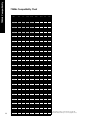
frequency compatibility tables on pages 12-13, eliminate any channels that have
noticeable interference. Now choose the channels with the widest channel
spacing. It is recommended that adjacent channels be spaced at least 300KHz.
If there is no interference the following channels are recommended: A, C, E, I, J,
and H for 72MHz and channels 2A, 2K and 2V at 216MHz.
b. Distributed Spacing If you are using transmitters that are spread out over
space, you can achieve more simultaneous broadcast channels. However, it is
critical that your receiver(s) be located as close to its transmitter as possible.
You can use adjacent channels (see frequency compatibility tables on pages 1213) in this case as long as the adjacent channel transmitter is at least 50% further away from the receiver as its transmitter. Example: The transmitter for the
receiver on channel E is 100 feet from the receiver. The adjacent channel transmitter on channel D should be at least 150 feet away.
Wide Band Recommendation
Listen recommends that you always use
a wide band channel unless you need to
be compatible with existing narrow
band receivers from other manufacturers. Wide band channels have lower
noise than their narrow band counterparts.
At 72MHz
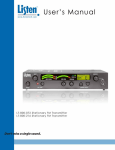
The LT-800 at 72MHz operates on 17
wide band channels and 40 narrow band
channels.
· Letters= Wide Band Channels
(Example: E)
· Numbers= Narrow Band Channels
(Example: 32)
At 216MHz
The LT-800 at 216MHz operates on 19
wide band channels and 38 narrow band
channels.
· “2” as left digit= Wide Band
·
Channel
(Example: 2C)
“1” and “3” as left digits= Narrow
Band Channels (Examples: 1A; 3R)
It is highly recommended that after channel selection has been achieved, you lock
the channel so that it cannot be changed by the user. To accomplish LOCK on the
LT-800, press both the UP and DOWN buttons simultaneously for 5 seconds.
Repeat the process to unlock.
Notes in regard to using 72MHz and 216MHz systems:
i. 72MHz in a secondary frequency band. This means that other transmitters are
licensed to use these frequencies. Thus, you may experience interference from
paging transmitters and other types of transmissions. You will need to find a
clear channel by listening to all the wide band channels.
ii. 216MHz is a primary frequency band and no other types of transmissions are
authorized to use it. Thus, you will find the highest probability of clear channels
in this band. However, you may experience intermodulation of the TV Channel
13 aural carrier if there is a channel 13 transmitter in your area and you are close
to the transmitter. If you cannot find a clear channel in 216MHz band due to
channel 13, it is recommended that you switch to a 72MHz system.
19