1
wePresent
Wireless interactive Presentation Gateway
WiPG-1000 User’s Manual
(Model Name: WiPG-1000)
Version: 1.0
Date: Mar. 22, 2012
Table of Contents
Table of Contents
1.Overview................................................................................................................ 4
2.
Package Contents............................................................................................... 5
3.
USB Token Contents........................................................................................... 5
4.
Physical Details.................................................................................................... 5
5.
What You Might Need....................................................................................... 7
6.
Quick Installation................................................................................................ 7
7.
WiPG-1000 Receiver Device............................................................................ 8
8.
DoWiFi for Windows.........................................................................................10
8.1
Install the application......................................................................................10
8.2
Start the application........................................................................................11
8.3
Quick Connect...................................................................................................11
8.4
Connect to WiFi Network...............................................................................12
8.5
Connect to Receiver Device..........................................................................12
8.6Login......................................................................................................................12
8.7
Main User Interface..........................................................................................13
8.8
Screen Projection..............................................................................................13
8.9
Audio Projection...............................................................................................14
8.10Menu.....................................................................................................................14
2
8.10.1
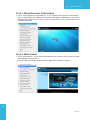
Show Receiver Information...........................................................................15
8.10.2
Web Admin.........................................................................................................15
8.10.3
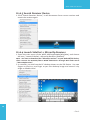
Search Receiver Device...................................................................................16
8.10.4
Launch SidePad -> MirrorOp Receiver......................................................16
8.10.5
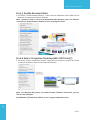
Enable BrowserSlides......................................................................................17
8.10.6
Select Projection Desktop (Win XP/Vista/7)............................................17
8.10.7
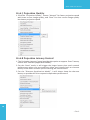
Projection Quality.............................................................................................18
8.10.8
Projection Latency Control............................................................................18
8.10.9
Enable USB IWB Bridge...................................................................................19
8.10.10
Advanced Screen Capture.............................................................................19
8.10.11
Send Audio to Display.....................................................................................20
8.10.12
Auto Power Manager.......................................................................................21
8.10.13
Auto WiFi Connect............................................................................................21
8.10.14
Make wePresent WiPG-1000 Token............................................................22
8.10.15
Copy Application to desktop........................................................................22
8.10.16About....................................................................................................................23
8.10.17Exit..........................................................................................................................23
Table of Contents
9.
DoWiFi for Mac...................................................................................................24
9.1
Install the application......................................................................................24
9.2
Start the application........................................................................................24
9.3
Quick Connect...................................................................................................24
9.4
Connect to WiFi Network...............................................................................25
9.5
Connect to Receiver Device..........................................................................25
9.6Login......................................................................................................................26
9.7
Main User Interface..........................................................................................26
9.8
Screen Projection..............................................................................................26
9.9
Audio Projection...............................................................................................27
9.10Menu.....................................................................................................................27
9.10.1
Show Receiver Information...........................................................................28
9.10.2
Web Admin.........................................................................................................28
9.10.3
Search Receiver Device...................................................................................29
9.10.4
Launch SidePad -> MirrorOp Receiver......................................................29
9.10.5
Enable BrowserSlides......................................................................................29
9.10.6
Projection Quality.............................................................................................30
9.10.7
Projection Latency Control............................................................................30
9.10.8
Send Audio to Display.....................................................................................30
9.10.9
Auto WiFi Connect............................................................................................30
9.10.10About....................................................................................................................31
9.10.11Exit..........................................................................................................................31
10.
Web Management............................................................................................31
10.1
Home Page..........................................................................................................31
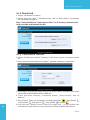
10.2Download............................................................................................................32
10.3
Conference Control..........................................................................................32
10.4BrowserSlides.....................................................................................................33
10.5Admin....................................................................................................................34
3
10.5.1
System Status.....................................................................................................34
10.5.2
Device Setup.......................................................................................................35
10.5.3
Network Setup...................................................................................................35
10.5.4
OSD Setup...........................................................................................................37
10.5.5
Change Passwords............................................................................................38
10.5.6
Reset to Default.................................................................................................39
10.5.7
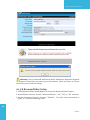
Firmware Upgrade............................................................................................39
10.5.8
BrowserSlides Setup .......................................................................................40
10.5.9
Reboot System...................................................................................................41
10.5.10Logout...................................................................................................................41
11.Appendix.............................................................................................................42
11.1
Wall-mount Instructions.................................................................................42
WiPG-1000 User Manual
1. Overview
wePresent WiPG-1000 is professional wireless presentation gateway. By enabling the
Revolutionary “interactive” and “wireless” functions, you can throw your presentations
wirelessly from a PC, Mac, iPad, iPhone, or Android devices to a projector! And use your pad,
tab or phone to control your PC/Mac, or view the presenting slides!
• WiPG-1000 Features Highlight:
Icon
Feature
Description
DoWiFi
No more wires … Display-over-WiFi for Windows & Mac
Plug&Show
No software installation required. Just plug in the USB
drive to your PC.
MobiShow
Interactive PPT presentation via iPhone/iPad or Android
devices
WiFi-Doc
High quality presentation via iPhone/iPad or Android
devices
SidePad
Control the presentation on PC or Mac via iPhone/iPad
or Android devices
BrowserSlides
Broadcast slides to your devices with WiFi and web
browser
4-to-1 projection
Project four PC/Mac screens to one projector at once.
Conference Control
Open WiPG's web page to control screen projection
centrally. Or use mouse/keyboard to select a PC to show
from WiPG's UI.
SNMP Manager
Use the SNMP manager to manage WiPG devices across
the network.
•Basic Features
▪▪
▪▪
▪▪
▪▪
▪▪
▪▪
▪▪
▪▪
▪▪
▪▪
4
▪▪
▪▪
Wireless screen and audio projection
Remote desktop control feature
Support Windows Win7, Vista, XP
Support Mac version 10.5 and above
Plug and Show! No installation required … just plug in the accompanied token to
a USB port, and hassle free presentation can be started in seconds. (Windows)
M obiShow Supportive for iOS/Android/Blackberry/Windows Mobile 5/6
handheld devices
WiFi-Doc Supportive for iOS/Android mobile devices
Up to 30FPS high speed 4-to-1 Split Screen Projection. Turn one projector into
four, increase meeting productivity right away.
Conference control! Allows moderators to streamline grand meetings.
Provide session security login, wireless WEP/WPA key and Gatekeeper function
to protect presentation contents and keep good security to office networks.
Web management including software download and device settings
Support WiFi AP-Client Mode
→Back
WiPG-1000 User Manual
2. Package Contents
•
•
•
•
•
•
wePresent WiPG-1000 Box
wePresent WiPG-1000 USB Token
Power Adapter (DC +5V, 2.5A)
2 WiFi Antenna
Quick Installation Guide
Warranty Card
3. USB Token Contents
•
•
•
•
•
•
Windows Installer (WiPG-1000 Windows Installer)
MAC Installer (WiPG-1000 Mac Installer)
VAC Driver (For Windows XP Audio Projection)
VDD Driver (For Windows Virtual Extended Screen)
USBoIP Driver (For USB IWB Bridge)
Utility
▪▪ PtG Converter (For MobiShow PtG function)
▪▪ SNMP Manager (For SNMP Management)
4. Physical Details
• Front Panel
Power Button and LED
USB Port
Description
5
Power Button and LED
Power on/off button.
LED Indicator: System Loading(Red), Ready(Yellow)
USB Port (Front)
USB port for USB mouse and keyboard
→Back
WiPG-1000 User Manual
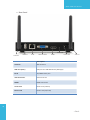
• Rear Panel
Audio Jack
Antenna
USB Port
RJ-45
VGA Connector
HDMI
Power Jack
Antenna
Description
Antenna
WiFi Antenna
USB Port (Rear)
USB port for USB IWB device (HID type)
RJ-45
10/100M RJ-45 port
VGA Connector
VGA connector
HDMI
HDMI Connector
Audio Jack
Audio Jack (3.5mm)
Power Jack
Power Jack (5V/2.5A)
6
→Back
WiPG-1000 User Manual
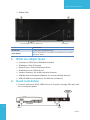
• Bottom Side
Screw hole(Optional kit for Wall Mount)
Reset Button
Description
Screw Hole
Screw Hole for Wall Mount Kit
Reset Button
Press reset button and power on the device to execute
Hardware Reset.
5. What You Might Need
•
•
•
•
•
•
•
Projector or HDTV with VGA/HDMI interface
Windows or Mac PC/Laptop
Apple iPhone, iPad or iPod-touch device
Android Phone or Tablet device
Speaker (Optional, for audio projection feature)
USB Mouse and Keyboard (Optional, for remote desktop feature)
USB HID IWB Device (Optional, for IWB over IP feature)
6. Quick Installation
1. Connect wePresent WiPG-1000 device to Projector through VGA port and
turn on projector power.
7
→Back
WiPG-1000 User Manual
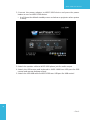
2. Connect the power adaptor to WiPG-1000 device and press the power
button to turn on WiPG-1000 device.
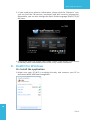
▪▪ It will show the default standby screen as below on projector when system
is ready.
3. Attach the speaker cable to WiPG-1000 phone jack for audio output
4. Attach the USB mouse and keyboard to WiPG-1000 front USB port for OSD
control and remote desktop control
5. Attach the USB IWB cable to WiPG-1000 rear USB port for IWB control
8
→Back
WiPG-1000 User Manual
7. WiPG-1000 Receiver Device
1. Connect wePresent WiPG-1000 device to Projector through VGA port and
turn on projector power.
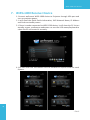
2. It will show the Quick Guide Information, WiFi Network Name, IP Address
and Code on standby screen.
3. If there is sender connected to WiPG-1000 device, it will show the PC-List on
standby screen, conference moderator can use the USB mouse/keyboard to
select the PC and control it remotely.
4. You can also click the feature Icon to browse the Quick Guide for each
feature.
9
→Back
WiPG-1000 User Manual
5. If you need more advance information, please click the “Advance” icon,
you can find the FW version, resolution and WiFi security information.
Meanwhile, you can also change the Quick Guide Language (EN/SC/TC/JP/
KO) here.
6. System will enter the Screen Saver mode if none is connected, it will restore
to standby status immediately when there is any sender connected.
8. DoWiFi for Windows
8.1 Install the application
1.M ake sure your PC WiFi is enabled already, and connect your PC to
wePresent WiPG-1000 box through WiFi.
10
→Back
WiPG-1000 User Manual
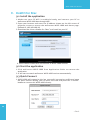
2. Open your browser and enter the IP address shown on the left corner of
projector screen to access the wePresent WiPG-1000 web home page.
(Default IP: 192.168.100.10)
3. Download the client software for “Windows 7/ Vista / XP” and install on
your PC. (Ps. You can also launch the application from PnS token directly.)
4. Launch WiPG-1000 client and connect to WiPG-1000 receiver.
(Make
sure your personal firewall allows wePresent WiPG-1000 software to
pass through.)
8.2 Start the application
1. C
lick wePresent WiPG-1000 icon on desktop to execute the application, or
launch the application from PnS token directly.
2. It will start to search wePresent WiPG-1000 receiver automatically.
8.3 Quick Connect
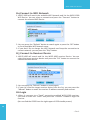
1. WiPG-1000 will memorize the last successful connection profile and open
the quick connect dialog, you can enter the code and press the “Connect”
button to connect this WiPG-1000 directly.
11
2. If you want to connect to another WiPG-1000 receiver, please press the
“Rescan” button.
→Back
WiPG-1000 User Manual
8.4 Connect to WiFi Network
1. WiPG-1000 will search the available WiFi Network and list the WiPG-1000
WiFi Device. You can select a network and press the “Connect” button to
connect the selected WiFi Device.
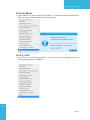
2. You can press the “Refresh” button to search again or press the “All” button
to list all available WiFi Network name.
3. If you don’t like to change the WiFi Network and keep the connection to
current network, you can press the “Skip” button.
8.5 Connect to Receiver Device
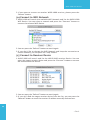
1. WiPG-1000 will search and list the WiPG-1000 receiver Device. You can
select the target receiver device and press the “OK” button to connect the
selected receiver device.
2. You can press the “Refresh” button to search again.
3. If you can’t find the target receiver device from the list, you can press the
“Manual” button to enter the receiver IP address manually and connect.
8.6 Login
1. When it connects to a “Code” protection enabled WiPG-1000 receiver,
you have to enter the “Code” and press the “Connect” button to login the
receiver.
(You can find the CODE from the right-upper of OSD standby screen)
12
→Back
WiPG-1000 User Manual
2. If you want to connect to another receiver or cancel the login, please press
the “Cancel” button.
8.7 Main User Interface
Menu Area
Control Area for Screen
Projection Feature
Status Indicator
8.8 Screen Projection
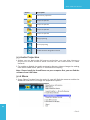
1. Click the “Play” button for full or split screen, you can project the main
screen on to the display immediately, click the “Pause” button, you can
freeze you projection screen, and click the “Stop” button to stop projecting
your screen.
Button
Description
Full Screen projection
Project to Split #1
Project to Split #2
Project to Split #3
Project to Split #4
Stop projecting
Pause projecting
13
Enable the Windows
Magnifier function
→Back
WiPG-1000 User Manual
8.9 Audio Projection
1. When you are doing the full screen projection, you can also choose to
project the audio to WiPG-1000 receiver for the multimedia or video
scenario.
2. To enable or disable the audio projection feature, please change the setting
from WiPG-1000 menu. (Menu -> Send audio to display)
Note: For Windows XP system, please install the Audio driver (“VAC.exe”, Virtual
Audio Control Driver) on your computer first, you can find the software from USB
Token. (Windows Vista and Win7 is not necessary to install VAC)
8.10 Menu
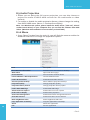
1. Press “Menu” button from the main UI, you will find the menu to enable the
additional feature or to change the application options.
14
Item
Show Receiver Information
Web Admin
Search Receiver
Launch SidePad -> MirrorOp Receiver
Enable BrowserSlides
Select Projection Desktop
Projection Quality
Projection Latency Control
Enable IWB USB Bridge
Advanced Screen Capture
Send Audio to Display
Auto Power Management
Auto WiFi Connect
Make Plug&Show Token
Copy Application to Desktop
About
Exit
Description
Show Receiver Information on desktop
Open web admin page
Search another receiver device
Launch SidePad sender
Enable BrowserSlides feature
Select different projection desktop
Change projection quality
Change projection latency option
Enable IWB USB bridge
Enable advance screen capture
Enable audio projection
Enable Auto Power management feature
Enable Auto WiFi connect feature
Make Plug&Show USB token
Copy the application to desktop
About this application
Exit the application
→Back
WiPG-1000 User Manual
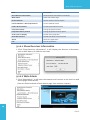
8.10.1 Show Receiver Information
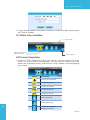
1. Click “Show Receiver Information”, it will display the Receiver Information,
such as WiFi Name, IP Address and code on the upper of desktop, it will close
automatically after 30 seconds or you can also click on the area to close this
window manually.
8.10.2 Web Admin
1. Click “Web Admin”, it will open the browser and connect to the receiver web
admin page automatically.
(You can find the details of web admin page from another chapter.)
15
→Back
WiPG-1000 User Manual
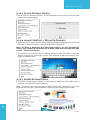
8.10.3 Search Receiver Device
1. Click “Search Receiver Device”, it will disconnect from current receiver and
search the receiver again.
8.10.4 Launch SidePad -> MirrorOp Receiver
1. Open the main menu of the WiPG-1000 application(Win/Mac), and choose
the item, “Launch SidePad -> MirrorOp Receiver (SidePad)”
Note:You have to download the “MirrorOp receiver” on your Android/iOS device,
then connect the Android/iOS to WiPG-1000 device through WiFi and Launch
“‘MirrorOp Receiver”.
2. In seconds, you shall see the PC desktop shown on the iOS Device. Use two
fingers to pinch or one finger to pan the desktop image and control it by
single or double clicks!
16
→Back
WiPG-1000 User Manual
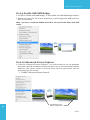
8.10.5 Enable BrowserSlides
1. Click the “Enable BrowserSlides”, it will start to broadcast your slides to the
browser on connected mobile devices.
Note: Audience need to connect to WiPG-1000 WiFi Network, open the browser
and click the “BrowserSlides” button to start receiving the slides.
8.10.6 Select Projection Desktop (Win XP/Vista/7)
1. Click the “Select Projection Source” then you can select to project the main
screen of desktop or the virtual extended screen.
Note: For Windows XP system, you need to install “VDD.exe” driver first, you can
find it from USB token.
For Windows 7/Vista Starter edition, it can’t support extended screen.
17
→Back
WiPG-1000 User Manual
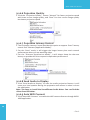
8.10.7 Projection Quality
1. Click the “Projection Quality”, choose “Normal” for faster projection speed
with lower screen image quality, and “Best” for clear screen image quality
but slower projection speed.
8.10.8 Projection Latency Control
1. The Projection Latency Control provides the option to support “Auto” latency
control and “Shortest (Application Mode)”.
2. For the “Auto” mode, it will trigger the longer latency but much smooth
performance when you are watching video, and change back to shortest
latency mode when it detect you are moving the mouse cursor.
3. For the “Shortest (Application Mode)”, it will always keep the shortest
latency to provide the most responsive operation performance.
18
→Back
WiPG-1000 User Manual
8.10.9 Enable USB IWB Bridge
1. Click the “Enable USB IWB Bridge”, it will enable the USB IWB Bridge feature.
2. When you start the full screen projection, it will bridge the IWB device to
your PC wirelessly.
Note: You have to install the USBoIP driver first. You can find the driver from USB
token.
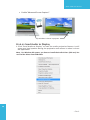
8.10.10 Advanced Screen Capture
1. Click the “Advanced Screen Capture”, you will be able to see tip windows
and other layered windows (include the main UI) on the connected display.
However, the mouse cursor may blink from time to time when you are
projecting your PC screen!
• Disable “Advanced Screen Capture”.
19
Tip windows is not
shown in projector
→Back
WiPG-1000 User Manual
• Enable “Advanced Screen Capture”.
Tip windows is shown in projector
8.10.11 Send Audio to Display
1. Click “Send Audio to Display” to start the audio projection feature. It will
mute your local speaker during the projection and restore it when it closes
the application.
Note: For Windows XP system, you have to install the Audio driver. (VAC.exe) You
can find the driver from USB token.
20
→Back
WiPG-1000 User Manual
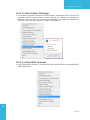
8.10.12 Auto Power Manager
1. To make the highest projection performance, application will turn the PC’s
windows power scheme from current settings to “highest performance”,
however, you can click the “Auto Power Manage” to enable or disable this
function and restore you power scheme immediately.
8.10.13 Auto WiFi Connect
1. Click “Auto WiFi Connect” to enable the WiFi connect feature through WiPG1000 application.
21
→Back
WiPG-1000 User Manual
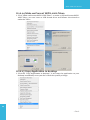
8.10.14 Make wePresent WiPG-1000 Token
1. Click “Make wePresent WiPG-1000 Token” to make a USB wePresent WiPG1000 Token, you can insert a USB thumb drive and follows the wizard to
make the Token.
8.10.15 Copy Application to desktop
1. Click the “Copy Application to desktop”, it will copy the application to your
desktop immediately even you don’t have the system privilege
22
→Back
WiPG-1000 User Manual
8.10.16 About
1. Click “About” to show system information. It includes product model name,
Client version, IP address and other information.
8.10.17 Exit
1. Click “Exit” to exit this application. It will stop current playing status and
close the application immediate.
23
→Back
WiPG-1000 User Manual
9. DoWiFi for Mac
9.1 Install the application
1. M ake sure your PC WiFi is enabled already, and connect your PC to
wePresent WiPG-1000 box through WiFi.
2. Open your browser and enter the IP address shown on the left corner of
projector screen to access the wePresent WiPG-1000 web home page.
(Default IP: 192.168.100.10)
3. Download the client software for “Mac” and install on your PC.
4. Launch WiPG-1000 client and connect to WiPG-1000 receiver.
9.2 Start the application
1. C lick wePresent WiPG-1000 from Application folder to execute the
application.
2. It will start to search wePresent WiPG-1000 receiver automatically.
9.3 Quick Connect
1. WiPG-1000 will memorize the last successful connection profile and open
the quick connect dialog, you can enter the code and press the “Connect”
button to connect this WiPG-1000 directly.
24
→Back
WiPG-1000 User Manual
2. If you want to connect to another WiPG-1000 receiver, please press the
“Rescan” button.
9.4 Connect to WiFi Network
1. WiPG-1000 will search the available WiFi Network and list the WiPG-1000
WiFi Device. You can select a network and press the “Connect” button to
connect the selected WiFi Device.
2. You can press the “Refresh” button to search again.
3. If you don’t like to change the WiFi Network and keep the connection to
current network, you can press the “Skip” button.
9.5 Connect to Receiver Device
1. WiPG-1000 will search and list the WiPG-1000 receiver Device. You can
select the target receiver device and press the “Connect” button to connect
the selected receiver device.
2. You can press the “Refresh” button to search again.
3. If you can’t find the target receiver device from the list, you can press the
“Manual” button to enter the receiver IP address manually and connect.
25
→Back
WiPG-1000 User Manual
9.6 Login
1. When it connects to a “Code” protection enabled WiPG-1000 receiver,
you have to enter the “Code” and press the “Connect” button to login the
receiver.
(You can find the CODE from the right-upper of OSD standby screen)
2. If you want to connect to another receiver or cancel the login, please press
the “Cancel” button.
9.7 Main User Interface
Control Area for Screen
Projection Feature
Menu Area
Status Indicator
9.8 Screen Projection
1. C
lick the “Play” button for full or split screen, you can project the main
screen on to the display immediately, click the “Pause” button, you can
freeze you projection screen, and click the “Stop” button to stop projecting
your screen.
26
→Back
WiPG-1000 User Manual
Button
Description
Full Screen projection
Project to Split #1
Project to Split #2
Project to Split #3
Project to Split #4
Stop projecting
Pause projecting
Enable the Mac Magnifier function
9.9 Audio Projection
1. When you are doing the full screen projection, you can also choose to
project the audio to WiPG-1000 receiver for the multimedia or video
scenario.
2. To enable or disable the audio projection feature, please change the setting
from WiPG-1000 menu. (Menu -> Send audio to display)
Note: Please install the SoundFlower on your computer first, you can find the
software from USB Token.
9.10 Menu
1. Press “Menu” button from the main UI, you will find the menu to enable the
additional feature or to change the application options.
27
→Back
WiPG-1000 User Manual
Item
Description
Show Receiver Information
Show Receiver Information on desktop
Web Admin
Open web admin page
Search Receiver
Search another receiver device
Launch SidePad -> MirrorOp Receiver
Launch SidePad sender
Enable BrowserSlides
Enable BrowserSlides feature
Projection Quality
Change projection quality
Projection Latency Control
Change projection latency option
Send Audio to Display
Enable audio projection
Auto WiFi Connect
Enable Auto WiFi connect feature
About
About this application
Exit
Exit the application
9.10.1 Show Receiver Information
1. Click “Show Receiver Information”, it will display the Receiver Information,
such as WiFi Name, IP Address and code.
9.10.2 Web Admin
1. Click “Web Admin”, it will open the browser and connect to the receiver web
admin page automatically.
(You can find the details of web admin page from another chapter.)
28
→Back
WiPG-1000 User Manual
9.10.3 Search Receiver Device
1. Click “Search Receiver Device”, it will disconnect from current receiver and
search the receiver again.
9.10.4 Launch SidePad -> MirrorOp Receiver
1. Open the main menu of the WiPG-1000 application(Win/Mac), and choose
the item, “Launch SidePad -> MirrorOp Receiver (SidePad)”
Note: You have to download the “MirrorOp receiver” on your Android/iOS
device, then connect the Android/iOS to WiPG-1000 device through WiFi and
Launch “‘MirrorOp Receiver”.
2. In seconds, you shall see the PC desktop shown on the iOS Device. Use two
fingers to pinch or one finger to pan the desktop image and control it by
single or double clicks!
9.10.5 Enable BrowserSlides
1. Click the “Enable BrowserSlides”, it will start to broadcast your slides to the
browser on connected mobile devices.
Note: Audience need to connect to WiPG-1000 WiFi Network, open the
browser and click the “BrowserSlides” button to start receiving the slides.
29
→Back
WiPG-1000 User Manual
9.10.6 Projection Quality
1. Click the “Projection Quality”, choose “Normal” for faster projection speed
with lower screen image quality, and “Best” for clear screen image quality
but slower projection speed.
9.10.7 Projection Latency Control
1. The Projection Latency Control provides the option to support “Auto” latency
control and “Shortest (Application Mode)”.
2. For the “Auto” mode, it will trigger the longer latency but much smooth
performance when you are watching video.
3. For the “Shortest (Application Mode)”, it will always keep the shortest
latency to provide the most responsive operation performance.
9.10.8 Send Audio to Display
1. Click “Send Audio to Display” to start the audio projection feature. It will
mute your local speaker during the projection and restore it when it closes
the application.
Note: You have to install the SoundFlower Audio driver. You can find the
driver from USB token.
9.10.9 Auto WiFi Connect
1. Click “Auto WiFi Connect” to enable the WiFi connect feature through WiPG1000 application.
30
→Back
WiPG-1000 User Manual
9.10.10 About
1. Click “About” to show system information. It includes product model name,
Client version and other information.
9.10.11 Exit
1. Click “Exit” to exit this application. It will stop current playing status and
close the application immediate.
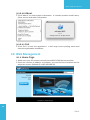
10.Web Management
10.1 Home Page
1. Make sure your PC connect to wePresent WiPG-1000 box successfully.
2. Enter the receiver IP address on browser; you can find the IP address on the
projector screen. (Default IP is 192.168.100.10)
31
→Back
WiPG-1000 User Manual
10.2 Download
1. Select “Download” function.
2. Please select the “Win 7 / Windows Vista / XP” or “Mac Utility” and execute
the installation program.
Note: Please disable the “Smart Screen Filter” on IE browser; otherwise you
might not able to download the file.
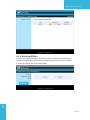
10.3 Conference Control
1. Select “Conference Control” function, it will show current connected sender
list.
2. Enter password and then press [Login]. (default password: moderator)
32
3. After login, you can see a User List on the screen which indicates all of users
connected to WEPRESENT WIPG-1000 box.
4. T here are three columns, “Computer Name”, “Play Control” and “IP
Address”.
5. Play Control, There are six buttons, including Play(Full)
, Play Split #1
, Play Split #2
,Play Split #3
, Play Split #4
and Stop
.
6. U ncheck the “Allow Control from this page only”, it will disable the
centralized control and user can project the screen to WiPG-1000 freely.
→Back
WiPG-1000 User Manual
10.4 BrowserSlides
1. Press the “BrowserSlides” button to enter the BrowserSlides page.
2. Enter the password if necessary. (Default password: Same as Code)
3. Start to receive the projecting slides.
33
→Back
WiPG-1000 User Manual
10.5 Admin
1. Click [Admin] and then enter the password to login web admin page.
(Default Password: admin)
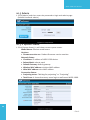
10.5.1 System Status
1. Click [System Status], it will show current system status.
Model Name: Product model name
Versions:
• Firmware version no.: Product firmware version number.
Network Status:
• IP address: IP address of WiPG-1000 device.
• Subnet Mask: subnet mask
• Default Gateway: default gateway
• Wireless MAC address: wireless MAC address
• Wire MAC address: wire MAC address
Connection Status:
• Projecting status: “Waiting for projecting” or “Projecting”
• Total Users: It shows how many users login to wePresent WiPG-1000.
34
→Back
WiPG-1000 User Manual
10.5.2 Device Setup
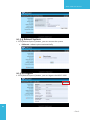
1. Click [Device Setup] button, it will show the device setting items,
• Choose <VGA> or <HDMI> output option
• <Resolution>:
HDMI: 720p, 1080i, 1080p
• VGA: U XGA(1600*1200), WXGA+(1440*900), WXGA(1360*768,
1280x768, 1280x800) ,XGA(1024*768), and SVGA(800*600). The
default value is XGA(1024*768).
<Code>: You can select “Disable”, “Random”, or “Use the following code”
to set a specified 4-characters Number.
• <IWB USB Port>: You can configure the IWB USB port to support “IWB
(HID)” device or “Mouse/Keyboard” device
• <Apply>: Confirmation and Save modifications
• <Cancel>: Cancel all the modifications
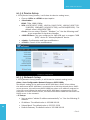
10.5.3 Network Setup
1. Click [Network Setup] button, it will show the network setting items,
35
<Note: Auto-Configuration Network Setup on WiPG-1000>
The default setting of the wePresent WiPG-1000 box is DHCP client. When
the wePresent WiPG-1000 box is connected to a LAN that already has a DHCP
server present, the wePresent WiPG-1000 box takes an IP address assigned to
it by the server. When the wePresent WiPG-1000 box is connected to a LAN
that does not have a DHCP server, the wePresent WiPG-1000 box becomes the
DHCP server in the network.
< IP Setup>
• You can select “obtain IP address automatically” or “Use the following IP
address”
• IP Address: The default value is 192.168.100.10.
• Subnet Mask: The default value is 255.255.255.0
• Default Gateway: The default value is 192.168.100.10
→Back
WiPG-1000 User Manual
36
• DNS Server: The default value is 192.168.100.10
<DHCP Server Setup>
• You can select “auto(Enable/Disable DHCP Server” or “Disable”)
• Start IP: The start IP address of DHCP Server.
• End IP: The end IP address of DHCP Server
• Subnet Mask: The default value is 255.255.255.0
• Default Gateway: The default value is 192.168.100.10
• DNS Server: The default value is 192.168.100.10
< Wireless Setup>
• Wireless LAN: The default value is “Enable”
• Region: default value is “Worldwide”.
• SSID: SSID string, max. Length is 32 bytes.
• SSID Broadcast: The default value is “Enable”
• Channel: to set fixed channel or Auto. The “Auto” means after power
on wePresent WiPG-1000, it will scan all of wireless channel and select
clear one channel automatically.
• Encryption: you can select “Disable” or one of WEP/WPA/WPA2 64bit or
128bit in ASCII or HEX string.
• Key:If Encryption is enabled, you have to set key value according to the
encryption mode you selected.
< AP Client>
• Connect to Existing AP: Input the SSID of Home WiFi AP you want to
connect.
• Encryption: you can select “Disable” or one of WEP/WPA/WPA2 64bit or
128bit in ASCII or HEX string.
• Key: If Encryption is enabled, you have to set key value according to the
encryption mode you selected.
• Press Apply button, and follow the reboot instruction to make it work.
< Gatekeeper>
Gatekeeper is designed for ensuring the enterprise network security
within wePresent WiPG-1000 box
• All Block can block Guest Users(through wireless) to access all office
network(LAN),
• All Allow can pass Guest Users(through wireless) to access all office
network
• Internet Only can block Guest Users (through wireless) from office
network (LAN) but still reserve internet connection capability.
< Apply >: press button to select this mode.
< Cancel>: press button to abort action.
< Back>: Back to Operating mode main menu.
→Back
WiPG-1000 User Manual
10.5.4 OSD Setup
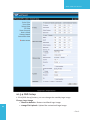
1. Click [OSD Setup] button, you can change the standby Logo image
37
Change Logo Image
▪▪ <Reset to default>: Restore to default Logo image.
▪▪ <Image File Upload>: Upload the customized Logo Image.
→Back
WiPG-1000 User Manual
10.5.5 Change Passwords
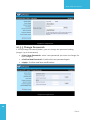
1. Click [Change Password] button, you can change the password setting.
(Length: up to 8 characters)
• < Enter New Password>: enter new password you want to change for
each category.
• <Confirm New Password>: Confirm the new password again.
• <Apply>: Confirm and Save modifications.
38
→Back
WiPG-1000 User Manual
10.5.6 Reset to Default
1. Click [Reset to Default] button to restore factory default settings.
<Apply>: Confirm and take action.
*** To execute the Hardware Factory Reset to Default, Please follow below
procedures.
1.Press [Reset] button and Hold.
2.Turn on wePresent WiPG-1000 box.
3.Wait for over 10 seconds and relief [Reset] button.
4.It will take effect to restore factory default settings.
10.5.7 Firmware Upgrade
1. Click [Firmware Upgrade] button to import/export system configuration and
upgrade firmware.
2. System Configuration Import and Export
Export:Export the system configuration to a configuration file
Import:Import the system configuration file to WiPG-1000
3. Firmware Upgrade
A. Firstly, you have to get latest firmware image file from your vendor.
B. Click <Browse> to specify file name you want to upgrade.
C. Click <Upgrade> to start.
D. A warning message shown and count down counter on the screen.
E. After a few minutes, a complete message shown on the screen.
F. Restart wePresent WiPG-1000 box to take effect.
39
→Back
WiPG-1000 User Manual
Warning: Don’t power off wePresent WiPG-1000 while firmware upgrade
in progress, otherwise will cause your Box doesn’t work and have to return
device to your vendor for fixing.
10.5.8 BrowserSlides Setup
1. Click [BrowserSlides Setup] button to setup the BrowserSlides Feature.
2. Auto Refresh Interval: choose “Manual Refresh”, “10”, “20”, or “30” seconds
3. Access Password Control: choose “Disable”, “Use the same password as
Code” or “Use the following Code”
40
→Back
WiPG-1000 User Manual
10.5.9 Reboot System
1. Click [Reboot System] button, you can restart the system
• <Reboot>: reboot system automatically.
10.5.10 Logout
1. Click [Reboot System] button, you can logout the WiPG-1000
41
→Back
WiPG-1000 User Manual
11.Appendix
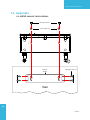
11.1Wall-mount Instructions
Mounting Screw X 2
Screw Washer X 2
Mounting
Bracket
Bracket Fix Screw X 4
Wall
42
→Back