1
GETTING STARTED
1)
Unpack your machine: The package comes with the FT201 pedal, a 9VDC, 500mA, centernegative power supply and this manual. Save the box and packaging material in case you ever need
to ship your pedal! Make sure that the power supply is rated for the line voltage of your country:
120 VAC for the USA, 220 VAC for Europe or most other countries.
2)
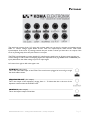
Connections: Connect your instrument to the FT201 by using the AUDIO INPUT on the patch
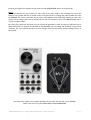
bay. Connect the LO PASS of the FT201 to your amp. To connect the Motion Controller (the builtin expression function) plug in a ¼ inch jack cable from SENSOR to CUTOFF CV on the patch bay.
3)
Set up the FT201/ Amp: Set all the rotary controls on the FT201 to 0. Turn down the volume
of your amplifier.
4)
Power up / Bypass: Connect the FT201 power supply to the FT201 DC input on the backside
of the pedal. When you press the bypass switch the EFFECT ON/OFF led will light up, this means
the effect is ON.
5)
Set levels: Turn on your amplifier. Make sure the EFFECT ON/OFF indicator is OFF. Play your
instrument and adjust the volume of the amplifier so it is at a comfortable level. Press the Bypass
switch and the EFFECT ON/OFF indicator will turn on green which means the effect is active.
6)
Play: Now go nuts. If necessary, adjust the INPUT GAIN slider control to match the levels of the
processed signal and the bypassed signal. Be aware of volume changes in your signal when using the
FT201. This is especially true when the RESONANCE slider control is set to HIGH, don't turn it up
too much, you'll get crazy and very high pitched sounds!
You can use the Motion Controller to adjust the EXTERNAL CLOCK, CUTOFF, RESONANCE and
SEQUENCER RESET. Be sure to read through the Control Voltage Theory section to understand all
CV features and the way to use them properly.
KOMA Elektronik FT201 – Analog State Variable Filter / 10 Step Sequencer
Page 4