1
Session 11a4
mode analog inputs (or 16 analog inputs in differential
mode), 2 analog outputs, 4 user counter/timers, and 16
input/output lines.
A patch panel, also manufactured by the DAC card
supplier, allows easy access to each one of the input and
output channels, plus timers and clocks. Twisted pair wires
connect the patch panel ports with either banana plug or
BNC connectors in a metal box. The oscilloscope has two
dedicated BNC connectors, one per channel. A third BNC
connector serves as the input port to the spectrum analyzer.
All the other instruments have dedicated banana plug type
output ports. Users just have to plug in the test leads into
either banana plug or BNC type of connectors. All current
sources are protected with fuses, either 100 mA, or 5 mA
micro fuses.
Test equipment is expensive. A single fully equipped
station for a basic electrical measurements laboratory with
frequency domain analysis capabilities can easily exceed
$10 K. In addition to the capital investment, additional
expenses include maintenance, equipment calibration,
workbenches, and floor space. Even if several test sets are
stacked on top of each other, a table or workbench large
enough to accommodate all the equipment and allow
reasonable user working space is required. The total cost of
the developed system, including a high performance PC and
all the additional components, is less than $ 6 K per station.
However, if several stations are assembled and only one, the
development station, runs the full software while the
remaining ones are loaded with run time versions, then
software costs can be spread over a larger base thus reducing
even more the per unit cost.
Educational institutions may find the proposed
configuration easier to economically justify since the PC’s
can also be used by a larger pool of students, and may serve
multiple purposes, including word processing and spread
sheet analysis, even for non electrical engineering or
electronics majors.
Software Architecture
The following instruments have been developed:
oscilloscope, digital multi meter with voltmeter, current
meter, and ohmmeter options, frequency counter, power
supply, function generator, and spectrum analyzer. To
simplify programming, each instrument is contained within a
User Object in the HP VEE graphical programming
language. Future developments and options can be easily
added to any particular instrument without affecting the
overall architecture or any of the previously developed
instruments. New instruments can easily be incorporated
into the existing architecture.
Oscilloscope
As in [5], the virtual oscilloscope was designed with the
intention of allowing students to make basic electrical
measurements without having to deal with the intricacies of
multiple knobs. Colors have been used to make the use of
the oscilloscope virtual instrument even more intuitive. For
example, it has two input channels and can display two
waveforms. The channel 1 waveform is plotted in red while
the channel 2 waveform is plotted in blue. All the knobs and
settings controlling channel 1 are in red while all the knobs
and settings controlling channel 2 are in blue. All the timing
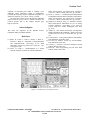
and trigger options are in yellow. Figure 1 shows the
oscilloscope user interface screen.
The built-in mathematical functions of the graphical
programming language simplified the development of the
application. For example, key controls in an oscilloscope are
the DC/AC coupling for every channel. In a real
oscilloscope, AC coupled signals pass through a capacitor to
block the DC component. In a software implementation, the
mean or DC value of the signal is mathematically calculated
and then subtracted from the original array of data points.
The same effect achieved by the blocking capacitor is
achieved using software instructions, but with the advantage
that the original signal is not distorted. In a real
implementation students will observe the rise and fall time
of the waveform due to the charging and discharging
capacitor. The software implementation achieves a true DC
removal without distorting the original waveform.
Scales and conversion factors typically confuse students
learning basic test and measurement techniques. To simplify
their task, for each channel all the main signal statistics,
maximum, minimum, root mean square, mean or DC value,
and peak to peak are displayed. Markers facilitate relative
time and relative amplitude measurements. Students can
concentrate on the basic observations and waveforms. The
computer will do the calculations for them.
Like in a storage scope, waveforms can be stored in a
data file for later retrieval, analysis by any other software
application, or for plotting.
All input analog channels, including the two
oscilloscope channels, have been programmed to measure
bipolar signals with a range of +/- 10 V, and a resolution of
12 bits.
Multi Meter
The multi meter may operate in any of the following three
options: voltmeter, current meter, and ohmmeter. Each one
of these three functions has a pair of input leads or wires and
a separate channel assigned to it. Figure 2 shows the multi
meter user interface screen.
Figure 3 shows the voltmeter user interface screen. The
user just selects the desired statistics (root mean square,
average or DC, maximum, minimum, and peak to peak) and
the measurement scale. The user interface screen clearly
0-7803-5643-8/99/$10.00 © 1999 IEEE
November 10 - 13, 1999 San Juan, Puerto Rico
29th ASEE/IEEE Frontiers in Education Conference
11a4-19