1
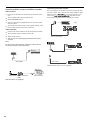
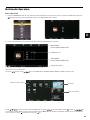
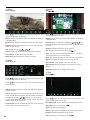
AV Connection
TV Back
Audio and video cable (RCA)
Mini audio and video
transfer cable
DVD or VCR back
DVD or VCR
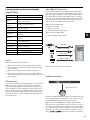
Connect the VIDEO and AUDIO output jack of the DVD or VCR to the VIDEO jacks on the TV set using the supplied YPbPr
converter cable and an RCA cable (not supplied). Match the jack colors: Video is yellow, Audio left is white, and Audio
right is red. Press the SOURCE button on the remote control and select the AV input source.
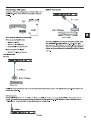
YPbPr Connection
TV Back
Audio cable (RCA)
Audio cable
Mini video transfer cable
DVD or VCR back
DVD or VCR back
DVD or VCR
DVD or VCR
Connect the YPbPr output of the DVD or VCR to the YPbPr input on the TV set. Connect the Audio output of the DVD or
VCR to the Audio input jacks on the TV set using two RCA cables together with the supplied converter cables.
Match the jacks colors : Y is green, Pb is blue, Pr is red, Audio left is white, and Audio right is red. Press the SOURCE
button on the remote control and select the YPbPr input source.
14