1
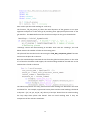
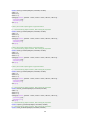
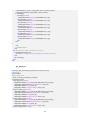
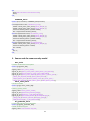
set(handles.listbox4, 'Value', []);
newItems = currentItems22;
newItems(index_selected) = [];
set(handles.listbox4, 'String', newItems);
if ~isempty(newItems)
if length(newItems) >= 1
set(handles.listbox4, 'Value', 1);
end
end
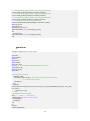
GUI.m
function varargout = GUI(varargin)
% GUI is a MATLAB code for calling and running GUI.fig
% The GUI is designed and created by Nigussie Girma as realtime display
% and monitor for GPenSIM.
% The GUi is embedded inside a GPenSIM
% A GPenSIM is a general petrinet simulator
% -------------------------§§§----------------------------%
% GUI, by itself, creates a new GUI or raises the existing
% singleton*.
% In order to run GUI
% H = GUI returns the handle to a new GUI or the handle to
% the existing singleton*.
%
% GUI ('CALLBACK', hObject, eventdata, handles...) calls the local
% function named CALLBACK in GUI.M with the given input arguments.
%
% GUI ('Property’, ‘Value’,) creates a new GUI or raises the
% existing singleton*. Starting from the left, property value pairs are
% applied to the GUI before GUI_OpeningFcn gets called. An
% unrecognized property name or invalid value makes property application
% stop. All inputs are passed to GUI_OpeningFcn via varargin.
%
% *See GUI Options on GUIDE's Tools menu. Choose "GUI allows only one
% instance to run (singleton)".
% To use this tool, one should have a knowledge of Petri net and
% GPenSIM in addition to Matlab GUIDE
% See also: GUIDE, GUIDATA, GUIHANDLES, gpensim, Petrinet
% Last Modified by GUIDE v2.5 13-Apr-2014 17:55:59
% Begin initialization code % CAUTION: !!! DO NOT EDIT The code before reading the readme file!!!
%
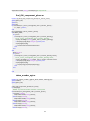
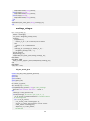
-----------§§§---------------gui_Singleton = 1;
gui_State = struct('gui_Name',
mfilename, ...
'gui_Singleton', gui_Singleton, ...
'gui_OpeningFcn', @GUI_OpeningFcn, ...
'gui_OutputFcn', @GUI_OutputFcn, ...
'gui_LayoutFcn', [] , ...
'gui_Callback', []);
if nargin && ischar(varargin{1})
gui_State.gui_Callback = str2func(varargin{1});
end
126