1
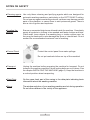
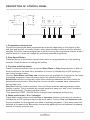
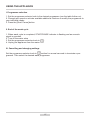
DESCRIPTION OF CONTROL PANEL
1
2
3
4
5
6
1. Programme selector knob
Choose the appropriate wash programme as required, depending on the degree of dirt,
and type and amount of laundry loaded, which ensures better results and more effective
washing. Once the cleaning programme is started, turning the programme selector knob to
another position it does not change the previously selected programme.
2. Spin Speed Button
Press this button to set the spin speed when water is being pumped out of the washing
machine. Press the button to change the setting.
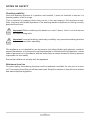
3. Function selection button
Press Function selection button to activate Extra Rinse or Easy Iron functions or both of
these functions at the same time. Activation of function is indicated by a LED lighting up
next to the function name.
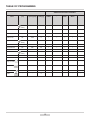
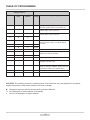
Caution:Extra Rinse and Easy Iron functions are not available for all programs (see table
of washing programs). Some functions cannot be selected at the same time.
Extra Rinse function is especially useful when washing underwear and also clothes for
people with sensitive skin. Selecting this function causes increased water consumption
during rinse cycle.
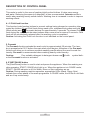
Easy Iron function reduces wrinkles. Once the Rinse ends the washing machine holds
laundry in water. This is indicated by a single beep and „easy iron” and „rinse” indicators
blink simultaneously. The door remains locked.
Then press the START / PAUSE button to begin water discharge and spinning.
4. Wash mode button - Eco / Intensive
Press Wash mode button to activate Eco or Intensive functions. Activation of a mode is
indicated by a LED lighting up next to the mode name. Caution: Eco and Intensive mode
are not available for all programs (see table of washing programs). The modes cannot be
selected at the same time. Eco mode shortens the washing time and reduces the general
number of rinsing cycles by one.
9