1
DWIGHT CAVENDISH
VS-628-01
MONITORING CONTROL PANEL
USER HANDBOOK
INCLUDING ADDITIONAL MODULE
VS-628-24
10 WAY INTERFACE
INDEX
Number
Page
1. INTRODUCTION ............................................................................ 3
1.1
1.2
Inter-connections ....................................................................................... 4
QC Monitoring - System Components...................................................... 5
2. OPERATION .................................................................................... 6
2.1
System Reset Mode ................................................................................... 6
2.2.1 Level Selection .............................................................................. 6
2.2.2 Cabinet Selection........................................................................... 7
2.2.3 Upper Limit ................................................................................... 7
2.2.4 Lower Limit................................................................................... 7
2.2.5 Go to Upper and Go to Lower Limit ............................................. 7
2.2.6 QC Eject ........................................................................................ 7
2.2.7 Auto Cycle Mode .......................................................................... 8
3. SET DWELL TIME MODE ............................................................. 9
4. CONFIGURATION MODE........................................................... 10
4.1
4.2
4.3
4.4
4.5
4.6
Maximum Cabinet Setting....................................................................... 10
Maximum Level Setting for All Cabinets ............................................... 10
VCR Type for All Cabinets..................................................................... 11
Maximum Level Setting for Individual Cabinets.................................... 11
VCR Type for Individual Cabinets ......................................................... 12
Assigning Cabinets to a Group Number.................................................. 13
5. VS-628-24 TYPES.......................................................................... 14
6. VS-628-24 SELF ADDRESSING .................................................. 15
7. VCR REMOTE CONTROL TYPES.............................................. 16
7.1
Relay Eject .............................................................................................. 16
8. RECORD STATUS MEMORY ..................................................... 17
9. REAR CONNECTORS ON VS-628-01......................................... 19
10. SPECIFICATIONS......................................................................... 21
10.1 VS-628-01 ............................................................................................... 21
10.2 VS-628-24 ............................................................................................... 21
2
1.
INTRODUCTION
The Copymaster VS-628 series of modules has been designed as an economical approach to
the Remote Control and Monitoring in a Video/Audio Duplication System. In its simplest
form it provides Video and Audio monitoring of several Video Cassette Recorders and with
the addition of further modules it can provide full Remote Control configured to control one
to twenty groups of slave VCRs.
When the Copymaster 628 Series is arranged as a simple monitoring system, the main
components are the Monitoring Control Panel VS-628-01, and a number of Monitoring
Interface units VS-628-24, each of which can be connected to 10 VCRS. Additional
Monitoring Interfaces can easily be added for system expansion. In fact any system from 10
to 2500 VCRs can be accommodated.
The Monitoring Control Panel is user friendly, with simple to use push buttons, and six
segment LEDs to display the selected VCR position. Step-up, Step-down, Set Upper and
Lower Limits, Auto Cycle On-Off and individual Eject of current selected VCR are some of
the powerful features offered. A non-volatile memory within the Monitoring Control Panel
allows system variables to be entered, such as maximum number of interfaces, number of
VCRs per interface (for situations where VCRs are not stacked 10 high) and Remote Control
type for each interface (Infra-red Remote Control or Serial Remote Control).
The above Monitoring System can be transformed into a full Video Duplication System by
the addition of the Remote Control Panel VS-628-02, Group Control Panel VS-628-04/05
and necessary Video and Audio Routing Switchers and Distribution Amplifiers (see the
10x10 Video/Audio Matrix Switcher VP-738 and lx10 Video and Audio Distribution
Amplifier VP-702). This collection of modules is called the COPYMASTER 2500 System.
The VS-628-02 provides Remote Control function Play, Stop, Rewind, Fast Forward, Pause,
Eject and Record. A button labelled 'QC VCR' controls whether the Remote Control
commands are sent to the selected VCR or all VCRS. A lock button is also provided.
The VS-628-03 has 10 buttons with integral LEDs for group selection of slave VCRS. The
VS-628-05 provides selection of slave VCRS. The VS-628-05 provides selection of a further
10 groups. These panels are used in two ways. One is to control which groups of slave VCRs
that are to respond to Remote Control commands from the VS-628-02 panel.
3
Further powerful features are:
• Flexible addressing sequence. Each Interface Module can be connected to any number of
VCRs 1-10 and the VS-628-01 Panel can be programmed to only address the VCRs which
are connected, unconnected VCRs are skipped.
• Different Remote Control types can be accommodated. Each Interface Module can be preset to be Infra-red or Serial Remote Control. Manufacturers include JVC, Sony, Panasonic,
Sharp etc. Parallel Remote Control is available by the addition of VS-60803 10-way
Remote Interface module to any of the existing VS-628-24 Interface Modules.
• Up to 20 Remote Control Groups. Each Interface Module is assigned to a group.
• Interface Modules can be configured to act as a follower to existing Interface Modules so
that 2 Video Channels (ie Y/C or Video and RF off-tape) and 4 audio (2 Linear and 2 HiFi) can be switched.
• Variable dwell time for automatic stepping of VCR address. 0.3 to 20 seconds in 20 steps.
Push button selection on VS-628-01 Panel.
• In most cases the system can be overlaid onto existing Video Duplicators which require
monitoring (this also gives individual eject).
• Ten 'Relay Eject Outputs' provided on each Interface module. This is to drive a relay
inserted in VCR. This relay connects to the eject button for individual or Master Eject.
Alternatively, this output can be patched into an existing parallel Remote Control System.
Separate User Handbooks are available for Remote Control Module VS-628-02 and Group
Control Modules VS-628-03/05.
1.1
Inter-connections
The system monitor panel VS-628-01 is the control panel for monitoring Video and
Stereo Audio playback from a number of VCRS. It also provides individual remote
control eject signal to the VCRS.
The VS-628-01 is connected to a number of 10 way monitor interface units VS-62824. The minimum number of VS-628-24 is 1 and the maximum number is 250. This
allows monitoring of up to 2500 VCRS. Connection is made between the VS-628-01
and VS-628-24 units via a 9 way cable which carries serial data (RS232 format) and
dc power supply.
The VS-628-24 contains a 10xl video and stereo audio switcher. There is also 10
outputs for remote control (infra-red or JVC serial). There are also another 10 outputs
which are open-collector pull to ground logic for connection to eject line on parallel
4
(multi-wire) type remote control. The VS-628-24 has loop through output on Video
and Audio for easy daisy-chain connection.
The VS-628-01 can provide power for the first 10 VS-628-24 units. The VS-628-01
has a non-volatile memory and during the installation of the system it is configured to
store system constants, such as maximum number of VS-628-24 units, number of
VCRs per VS-628-24 unit and remote control type (JVC or Panasonic infra-red etc).
1.2
QC Monitoring - System Components
Module Number
Description
VS-628-01
Monitoring System Control Panel - Single Group Control
1 Rack unit high
Monitoring Interface - 10 way - Serial or Infra-red eject
Group Combiner - 10 way (same as VS-628-24)
Line Drive Power Supply c/with Control System cables
Audio Monitor c/with Power Supply Colour Video
Monitor c/with Rack Mount Kit 14 inch
VS-628-24
VS-628-06
VS-628-07
VS-628-09
MC-608-01
MC-608-02
MC-608-24
MC-608-26
SC-500-01
SC-500-02
SC-500-14
SC-500-15
SC-500-06
SC-500-07
MACHINE LEADS
Video Lead, set (10) BNC/BNC (with Idents 1 - 10)
Audio Lead, Stereo set (10) Twin Phono (RCA)
Remote Control Lead set (10) Serial Phono/Phono
Remote Control Lead set (10) Infra-red Phono/LED
SYSTEM CABLES
Video Feed Cable (1.5mtr) BNC/BNC
Video Loop Cable (1.5mtr) BNC/BNC
Audio Feed Cable (1.5mtr) Twin Phono/Twin Phono
Audio Loop Cable (1.5mtr) 9 way 'D' Twin-Phono/Twin
Phono
Control Feed Cable (1.5mtr) 9 way 'D'
Control Loop Cable (1.5mtr) 9 way 'D'
5
2.
OPERATION
2.1
System Reset Mode
When the VS-628-01 is first powered-up it automatically goes into System Reset
Mode. It stays in this mode for about 6 seconds and then goes into normal mode (if no
buttons are pressed, see Configuration Mode, below).
During System Reset Mode the VS-628-01 will display the word 'ADDR'. During this
time the VS-628-01 will send set-up signals to the VS-628-24 units. These signals
will allow the VS-628-24 units to determine their address number (cabinet number 1
to 250 (max)), number of VCRs per VS-628-24 (1 to 10) and remote control type.
It is important that the VS-628-01 is powered-up at the same time or at a time which
is later than when the VS-628-24 units are powered-up. If this does not occur the VS628-24 unit will not operate properly.
The System Reset Mode can also be selected (during normal mode) by holding down
cabinet -, level - and Auto button together for about half a second. The display will
blank and then the word 'ADDR' will be seen for about 6 seconds, in the same manner
as above. After this the display will show Cabinet 1, level 1, (Normal mode).
2.2
Normal Mode
In normal mode the VS-628-01 will send signals to the VS-628-2224 units to select
one video and audio signal from the many video and audio signals which are
connected to the VS-628-24 units. If the VCRs are of suitable remote control type the
VS-628-01 can send an eject signal to the VCR which is currently displayed (Cabinet
number and level number).
2.2.1
Level Selection
The Level - and + buttons will allow selection of the VCR level (inputs 1 to 10
of the VS-628-24 unit).
Automatic increment and decrement of cabinet number takes place as the level
rolls over the maximum level or rolls under level one.
6
2.2.2
Cabinet Selection
The cabinet - and + buttons will allow selection of the cabinet number (VS628-24 unit). The buttons can be stepped or held down. If held down the
increment or decrement rate will speed-up to a maximum of 3 cabinet
addresses per second. When the maximum cabinet is reached it will roll over
to cabinet number 1. It is also possible to roll under from cabinet 1 to
maximum cabinet number (as set during configuration mode or by upper limit
button).
2.2.3
Upper Limit
A temporary upper limit for cabinet address on the VS-628-01 can be set by
holding down the upper limit button for about half a second. Upper limit
selection is indicated by a single horizontal bar (Upper position) on the centre
seven segment display. To cancel press Upper and Lower limit buttons
together for about one second.
2.2.4
Lower Limit
A temporary upper limit for cabinet address on the VS-628-01 can be set in the
same manner as above. A lower horizontal bar will now be seen on the
display.
It is possible to have a temporary upper and lower at the same time. Again
cancel by pressing both the Upper and Lower buttons together.
2.2.5
Go to Upper and Go to Lower Limit
It is possible to go directly to the Cabinet Upper Limit address by holding
down Upper Limit button and Cabinet + button together. It is also possible to
go directly to the Cabinet Lower limit address by holding down Lower Limit
button and Cabinet - button together. In both of these cases level one is
selected.
2.2.6
QC Eject
When this button is pressed the current addressed VCR (cabinet and level) is
given an Eject signal by the remote control output on the VS628-24 unit. The
word EJECT will be seen on the VS-628-01 display.
Note: It may not be possible to eject certain makes of VCRs by infrared
remote control.
7
2.2.7
Auto Cycle Mode
Press the Auto button for about half a second to select Auto Cycle Mode. The
LED on the Auto button will light-up (at the moment when the finger is
released from the button).
The level position will now automatically increment and when the maximum
level is reached (usually 10) the cabinet number will increment. Upper and
Lower limits can be used to determine roll-over points.
If the QC Eject button is pressed the Auto Cycle mode will temporarily stop
while the Eject signal is sent to the VCR.
8
3.
SET DWELL TIME MODE
This mode is selected by holding down the Auto button for about 3 seconds while in the
normal mode.
The display will indicate Dwell Time mode by showing the word 'AUTO' followed by a
number in the level position. This number is the current Dwell Time in seconds. The Dwell
Time is the time spent in each cabinet/level selected position while in Auto Cycle Mode. The
level + and - button can be used to select one of twenty different Dwell Times ranging from
0.3 seconds to 20 seconds. On power-up the Dwell Time defaults to 1.2 seconds. To return
from set Dwell Time Mode to Normal Mode press Auto button for about 1 second.
9
4.
CONFIGURATION MODE
To enter Configuration Mode, pole 1 of the 8 pole switch inside the VS-628-01 must be
switched to ON position. Next, the VS-628-01 is put into System Reset Mode (see 2.1) and
while the word ADDR appears on the display, hold down Cabinet + button and level + button
together. The display will then show the letter C on the right hand side and a number (1 to
250) on the left hand side.
The display is now showing the highest cabinet number that the VS-628-01 will monitor.
4.1
Maximum Cabinet Setting
Procedure 4 shown how to access Configuration Mode for changing the Maximum
Cabinet setting, to change the setting press Cabinet + or Cabinet button.
The number in the display will change to any value between 1 and 250. To store this
new setting in the VS-628-01 non-volatile memory, press the Auto button for about 1
second. The buzzer inside the VS-628-01 will sound and the unit will now go into
Normal Mode and automatically select Cabinet 1, level 1.
The new Maximum Cabinet setting can be confirmed by pressing Upper Limit and
Cabinet + buttons together (see 2.2.5) while in Normal Mode.
While in Configuration Mode pressing Lower Limit selects Maximum Level Setting,
Upper Limit selects Maximum Cabinet Setting, Upper and Lower limit together
selects VCR type.
See Warning below regarding storing new settings.
4.2
Maximum Level Setting for All Cabinets
Enter Configuration Mode as shown in Procedure 4 and now press Lower Limit
button. The letter L will now be seen on the left hand side of the display and a number
between 1 and 10 will be seen under Level. This number is the current maximum
level setting for all Cabinets.
To change, press Level + or - buttons. To store, press Auto button for about 1 second,
the display will now return to Normal Mode.
WARNING:
When the Auto button is pressed in the configuration Mode, the values for Maximum
Cabinet setting, Maximum level setting and VCR type are stored in the non-volatile
memory. It is important that all three settings are correct before pressing the Auto
button.
10
4.3
VCR Type for All Cabinets
Enter Configuration Mode and then press both Upper Limit and Lower Limit buttons
together. The display will now show the letter t on the left hand side and a number, 0
to 29, on the right hand side. The number 0 to 29 describes the VCR type for remote
control, not all of these numbers are designated, some are for future use. See the table
VCR type at the end of this User Manual for current assigned types.
In general, the values 0 to 9 and 12 to 28 are different infra-red types (JVC = 0,
Panasonic = 1, etc). The value 10 is JVC Serial and 11 is Sony Serial as used on the
Industrial VHS VCRs (BR7000, AG6850, SVO960).
WARNING:
Do not select positions 10, 11 or 20 (by pressing Auto button) if the VS-628-24
monitor interface units have Infra-red LEDs connected to the remote control output.
The serial logic level has opposite polarity to the infra-red logic level and this could
result in excessive current taken from the power supply.
Note: Not all the infra-red types are capable of eject signals.
4.4
Maximum Level Setting for Individual Cabinets
There may be situations where the VS-628 monitoring system is added on to an
existing or new Video Duplicator which has some VCRs stacked 8 high or 10 high or
even 15 high.
It is possible to programme the non-volatile memory inside the VS-628-01 so that the
up/down counter for cabinet skips unconnected inputs (level) on the VS-628-24
interfaces. For example: if some VCRs are stacked 8 high, then the VS-628-24
interfaces which connect to these VCRs would have only inputs 1 to 8 wired, and in
the case where the VCRs are stacked 15 high, two VS-628-24 interfaces could be
used. One would have inputs 1 to 10 wired and the other would have inputs 1 to 5
wired, or any other combination which adds up to 15. Of course two successive
cabinet numbers displayed on the VS-628-01 would refer to one stack of 15 VCRS.
To set maximum level setting for individual cabinets make sure that Pole 2 (and Pole
1) of the 8 pole switch inside the VS-628-01 is switched to ON position. Next, power
up the VS-628-01 unit and while the word 'ADDR' appears, hold down Cabinet +
button and Level + button together. The display will then show C on the right hand
side and a number on the left hand side. Now press Lower Limit button. The letter L
will now be seen in the centre of the display with a 1 under Cabinet (for Cabinet 1)
and a number under Level, which represents the current Maximum Level for cabinet
presently indicated (in this case Cabinet 1).
11
The Maximum Level for any cabinet between 1 and the current Maximum Cabinet
(see 4.1 for setting of Maximum Cabinet) can be examined by pressing the Cabinet +
and - buttons.
If a change is required to Maximum Level for any individual Cabinet, then select that
Cabinet using the Cabinet + and - button as above and then select the New Maximum
Level by pressing the Level + or - buttons.
To enter this new value into the non-volatile memory press the QC EJECT button.
The display will be seen to flash off for a fraction of a second. The buzzer will also
give a sound.
Note: ln the Maximum Level setting for each cabinet, the Maximum Level settings
are 1 to 10. 0 indicates that the whole cabinet (all ten levels) will be skipped while
stepping up and down in Normal Mode.
For situations where there are several consecutively numbered Cabinets which have
the same Maximum Level setting, there is a quick method of programming the nonvolatile memory. First select the lowest numbered Cabinet of the group to be
programmed with the same levels. Then select the New Maximum Level setting for
that group. Now hold down the QC EJECT button and a moment later also hold down
the CABINET + button. The VS-628-01 will now automatically enter the New
Maximum Level setting and at the same time increment the Cabinet setting. When the
highest Cabinet number is reached, release the EJECT and CABINET + buttons.
To enter Normal Mode, hold down the AUTO ON/OFF button.
4.5
VCR Type for Individual Cabinets
During power-up the VS-628-01 sends a special control word to each of the VS-62824 interfaces. This control word sets up the VCR remote control type for the EJECT
function. The non-volatile memory can be programmed to store Remote Control VCR
Type for each of the VS-628-24 interfaces in the system. For information on different
VCR types see Sections 4.2 and 7.
To set VCR type for Individual cabinets, make sure that Pole 3 (and Pole 1) of the 8
Pole switch inside the VS-628-01 is switched to ON position (Note: Pole 2 can be in
ON or OFF position).
Now power-up and enter the configuration mode and then press both Upper Limit and
Lower Limit buttons together. The display will now show the letter t in the centre of
the display. On the left hand side of the letter t is the number 1, for Cabinet 1
(interface 1). On the right hand side of the letter t is a number 0 to 28 indicating the
current VCR type for the Cabinet being shown.
12
By using the Cabinet + and - buttons and the Level (for VCR type) + and buttons and
the QC EJECT button for entering new values into the non-volatile memory, the VS628-01 can be programmed in a similar manner as described in 4.4 for Maximum
Level setting for individual cabinets.
Press AUTO ON/OFF to return to Normal Mode.
4.6
Assigning Cabinets to a Group Number
This can be done if the Group Control Panel VS-628-03 is connected to Port 1 or Port
2 of the VS-628-01. While in Configuration Mode press Upper Limit and Cabinet +
button together and the letter F will appear in the centre of the display.
In a similar manner to above, the Cabinet + and - buttons and the Level (for Group
Number) + and - buttons and the QC EJECT button (for entering New Values) can be
used to carry out the assigmnents.
See 4.0 in the Control Group User Manual for further details.
13
5.
VS-628-24 TYPES
Inside the VS-628-24 is a 2 pole, 2 position switch. The settings of this switch determines 1
of 4 possible types as shown in the table below:
VS-628-24
2 POLE SWITCH
Type
Pole 1
Pole 2
Comments
0
1
2
3
OFF
OFF
ON
ON
OFF
ON
OFF
ON
Standard
Combiner (Remote Control not used)
Follower (Remote Control not normally used)
Combiner-Follower (Remote Control not used)
The standard type of VS-628-24 can be converted into any of the other three types by
changing the 2 pole switch position.
The standard (Type 0) provides switching of Video and Stereo Audio from 10 VCRS. It also
provides the remote control Eject function to these VCRS.
The Follower (Type 2) provides switching of a second video (eg. Y and C of an S-Video
signal) and a second Stereo Audio (eg. Hi-Fi Audio, with the standard unit switching Linear
Audio). The Follower unit will have the same cabinet address as one of the standard types.
The Combiner (Type 1) provides Video and Stereo Audio switching from groups of standard
units. Each input of the Combiner unit connects to daisy-chained video and audio signals
from 5 standard units. Hence a Combiner unit will select one Video and Stereo Audio signal
from 500 VCRS. When used in this manner it is given the number VS-628-06.
The Combiner Follower (Type 3) switches the Video and Stereo Audio from Follower (Type
2) units.
14
6.
VS-628-24 SELF ADDRESSING
When the system is powered-up and the VS-628-01 goes into System Reset
Mode (see 2.1) all of the VS-628-24 units will determine their own Cabinet
address number. This is done by each VS-628-24 unit sending an address signal
(its own address + 1) to the next unit which is connected via the 9 way looping
cable.
The first standard unit (the one which is connected to VS-628-01) will become
Cabinet address 1, the next one (of the same type - see type 0, 1, 2, 3 in 5 above),
will become Cabinet address 2.
The first Combiner unit (the one nearest to the VS-628-01) will become
Combiner unit 1, and the next, Combiner unit, 2. The Combiner unit can be
connected anywhere along the chain of Standard units and will not affect the
addressing order of the standard units. The whole of the self address sequence
will only take 2 to 3 seconds.
The address of any standard unit can be checked against the cabinet number
displayed on the front of the VS-628-01 by checking that the LED indication on
the standard VS-628-01 is lit-up (only one standard type in the whole system will
be lit-up).
15
7.
VCR REMOTE CONTROL TYPES
See 4.2 and 4.3 for details of how to enter the VCR Remote Control type into the VS-628-01
non-volatile memory.
Setting
0
1
2
3
4
5
6
7
8
9
10
11
12
13
14
15
16
17
18
19
20
21
22
23
24
25
26
27
28
29
VCR Type
Comments
JVC
Panasonic - Old
Panasonic - New
Sony Betamax USA
Sony Betamax Europe
Sony VHS
Mitsubishi
Sharp
Philips / Grundig
Thompson
Panasonic - Serial
Sony - Serial
NEC
Sanyo
Hitachi
Toshiba
Eject usually works (IR)
Eject only works on new Models (IR)
Eject only works on new Models (IR)
Eject usually works (IR)
Eject usually works (IR)
Eject usually works (IR)
Eject usually works (IR)
Eject usually works (IR)
Eject usually works (IR)
Some have EJECT (IR)
AG6840/50, AG-5250
SVO960 (Control P)
Eject usually works (IR)
Eject may not work on older models (IR)
Eject usually works (IR)
Some have Eject (IR)
Akai
Sony Video 8
Goldstar
JVC Serial
Ferguson
Awia
Samsung
Thomson/Saba
Sony - Control S
Sony - Control S
Sony - Control S
Some have Eject (IR)
Eject usually works (IR)
Eject usually works (IR)
BR7000, BR7020/30/40
No Eject (IR)
Eject usually works (IR)
Double stop causes Eject (IR), Some have Eject
Eject usually works (IR)
Type 1
Type 2
Type 3 SVO140/170/9620/1410/1610/1500
(IR) = Infra-red type remote control
7.1
Relay Eject
For VCRs which do not have Infra-red eject it is possible to add a 'Relay Eject
Assembly' inside the VCR with 2 wires soldered across the VCRs eject button. This
assembly is connected to the VS-628-24 relay eject outputs.
16
8.
RECORD STATUS MEMORY
When the Group Control Panel VS-628-03 is connected to the System Control Panel VS-62801 it is possible for the VS-628-01 panel to store Record Status of the VCRs in each group.
This Record Status can be displayed for a few seconds on the LEDs 1 to 10 of the Group
Control Panel VS-628-03 (also LEDs 11 to 20 on the VS-628-05).
To access the Record Status Memory press both Level + and - buttons together.
The display on the VS-628-01 will show the word REC followed by a number 0 to 15. If the
number displayed is 0 then there are no groups which have VCRs in record mode.
The Group Control Panel will at the same time show none of its LEDs lit-up. The word REC
0 will be seen for 2 seconds and the display will then return to Normal Mode and indicate
Cabinet and Level selection. Also, the Group Control Panel VS628-03 (and VS-628-05) will
return to its normal mode of displaying the present group selections.
If the number displayed is above 0 (ie. 1 to 15) then the Group Control Panel will indicate
which groups are in Record Mode. The number displayed against the word REC is the record
session number. There may be more than one record session on the go at any point in time.
To access the other record sessions press Cabinet + button repeatedly. The buzzer will beep
when all the record sessions have been displayed. The groups which are in Record Mode will
be indicated on the VS-628-03 panel for each record session.
It is possible to return to Normal Mode by pressing the Level + and Level - buttons together
or by not pressing any buttons for 10 seconds.
The VS-628-01 can store up to 10 record sessions, these record sessions are labelled 1 to 15.
A record session is cancelled from the VS-628-01 memory when all the groups which are
presently in Record Mode are given a stop signal.
When all the record sessions are cancelled the VS-628-01 display will display REC 0. Each
new record session which is created is given the next available record session number, the
next number after 15 is 1. It is assumed that the original record session 1 would have been
cancelled by this time (otherwise there will be two record session 1 in memory).
When displaying record sessions the LED pattern of the groups in Record Mode can be
transferred to Normal Mode by pressing the Auto button. When in Normal Mode this same
pattern of LEDs will indicate groups selected.
This feature is useful in that it saves the Operator writing down on paper the pattern of LEDs
for a particular record session and then having to re-select this pattern when in normal mode.
17
It should be noted that the record sessions only provide a memory of which groups are
presently in record mode. This is pseudo status and not actual status. It is possible for the
VCRs to be in a different mode to that indicated, for example the VCRs may be stopped due
to the tape ending.
18
9.
REAR CONNECTORS ON VS-628-01
On the rear of the unit are the following connectors:
a) Phono labelled 'hold input'. Connecting the centre pin to ground will cause the auto
cycling to stop stepping. Opening this connection will allow the cycling to continue. This
feature allows the possibility of a loss of video detection to stop the cycling for further
inspection of the video signal.
b) Phono labelled 'inhibit output'. Whenever a remote control button is pressed (QC Eject
on VS-628-01 or Functions on the Remote Control Panel VS-628-02) a logic high (+5v)
occurs on this connector. This signal is fed to Panel VS618-01 to inhibit its generation of
secondary remote control signals.
c) 9 way 'D' type socket labelled 'Output to VS-628-24'. A cable from this output connects
to and loops through all the interface modules VS-628-04 which are in the system. It
carries communication signals and power supply lines.
d) 9 way 'D' type socket labelled Port 1 and Port 2. These connect to a range of other panels
which compliment the Monitoring Control Panel. Typical examples are:
Remote Control Panel
Group Control Panel (1-10)
QC Control Panel
Group Control Panel (11-20)
Secondary Functions Panel
VS-628-02
VS-628-03
VS-628-04
VS-628-05
VS-628-08
19
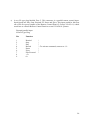
e) 9 way 'D' type plug labelled 'Port 3'. This connector is a parallel remote control input.
Input signals are Play, Stop, Rewind, FF, Pause and Eject. This input would be fed from
one of the five group outputs of the Remote Control Panel (5 Group) VS-615-01, which
would act as a master Remote Control Panel to several VS-628-01 systems.
External parallel input
9 Pin D-Type Plug
Pin
Function
1
2
3
4
5
6
7
8
9
Rewind
Stop
Play
Record
Pause
Eject
Fast Forward
+5v
0v
\
|
|
> To activate command, connect to +5v
|
|
/
20
10.
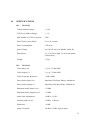
SPECIFICATIONS
10.1
VS-628-01
Cabinet Address Range:
1 - 250
VCR Level Address Range:
1 - 10
Max Number of VCRs in System:
2500
Dwell Time in Auto Mode:
0.3 to 20 seconds
Power Consumption:
25 W max
Input Voltage:
90-130/180-260 v switchable, 50/60 Hz
Dimensions:
1u (1.75 inches) high, 19 inch rack mount,
6 inches deep
Weight:
3.1 Kg
10.2
VS-628-24
Video Input (10):
1 v p-p, 75 ohm, BNC
Video Output (1):
1 v p-p, 75 ohm, BNC
Video Frequency Response:
-5 dB, 6 MHz
Stereo Audio Input (10):
Impedence 20 Kohm, Phono, unbalanced
Stereo Audio Output (1):
Impedence 560 ohm, Phono, unbalanced
Maximum Audio Input Level:
+22 dBu
Maximum Audio Output Level:
+12 dBu
Audio Gain Adjustment:
+8 dB to -12 dB
Nominal Audio Level:
-6 dB in, -6 dB out
Headroom:
+18 dB
Audio Crosstalk:
-90 dB at 1 KHz, input to input
21
Audio S/N:
76 dB (ref -6 dBu)
Audio Frequency Response:
-1 dB, 20 KHz
DC Power:
+8 v:
-8 v:
130 mA (selected),
44 mA (unselected),
RS232 loop in
86 mA (selected),
10 mA (unselected),
RS232 loop in
Remote Control Outputs (10):
Infra-red diode or Serial, Phono
Relay Eject - open collector, Phono
Aux Output:
9 way 'D' socket, parallel control
for connection to VS-608-03
RS232 Loop In:
9 way 'D' socket, Pseudo RS232, 4800 Baud
RS232 Loop Out:
9 way 'D' socket, Pseudo RS232, 4800 Baud
Dimensions:
1u (1.75 inches) high, 19 inch rack mount,
6 inches deep
Weight:
2.6 Kg
DWIGHT CAVENDISH DEVELOPMENTS LIMITED
Vincent House, Alington Road, Eynesbury, Cambridgeshire, PE19 4YH England
Telephone: (01480) 215753 Fax: (01480) 474525 Telex: 32744 DWICAV G
22