1
AQUANODE XL
USER GUIDE
Aquadyne
Version 1.0
First Edition
APRIL 2000
Copyright
© AQUADYNE Computer Corp., 19942000. All rights reserved worldwide. No
part of this publication may be reproduced, transmitted, transcribed, stored
in a retrieval system or translated into
any language in any form by any means
without the written permission of
AQUADYNE Computer Corp.
Licenses and T
rademarks
Trademarks
Octopus, AquaNode, AquaGuard,
AquaWeb, H2O/S are trademarks of
Aquadyne Computer Corp.
Part Number: 75-052893
AQUADYNE Computer Corporation
7343 "P" Ronson Road
San Diego, California 92111
USA
Sales:
(858) 569-2082
Tech. Support:
(858) 569-2082 x250
Fax:
(858) 495-3119
E-Mail: [email protected]
[email protected]
Web:
http://www.aquadyne.com
Printed in USA
Table of Contents
1. INTRODUCTION
How the AquaNode Works ........................................................... 1-3
User Guide Features .................................................................. 1-4
Quick Reference Menu Map ........................................................ 1-4
Monitoring Capability ................................................................. 1-4
Flash Memory Architecture ........................................................ 1-5
Status Lights .............................................................................. 1-5
Infrared Printer Port ................................................................... 1-6
Powering the AquaNode .............................................................. 1-7
Control Capability ....................................................................... 1-7
2. INSTALLING THE COMPONENTS
Step 1. Mount the AquaNode Controller ...................................... 2-4
Step 2. Install the Probes ............................................................ 2-5
Step 3. Install the Aux. I/O Module ............................................ 2-11
Step 4. Install Optional X-10 Control Module ............................. 2-18
Step 5. Install and Address Optional Satellite Module(s) ............ 2-18
Step 6. Install Communications Equipment .............................. 2-20
Step 7. Powering Up the AquaNode Controller .......................... 2-23
Step 8. Install the 12-Volt Backup Battery option ...................... 2-24
3. PROGRAMMING THE SOFTWARE
Overview of the AquaNode Menus ............................................... 3-2
Using the Menu Map—An Example ............................................. 3-4
i
Table of Contents
Initial Software Setup ................................................................. 3-4
Step 9. Set the System Clock ...................................................... 3-5
Step 10. Enter the Protective Password ....................................... 3-6
Step 11. Set the Noise Filter Control ........................................... 3-6
Step 12. Select the Conductivity Temp Compensation Settings .. 3-7
Step 13. Select Temperature Scale ............................................. 3-7
Step 14. Select DO Operating Mode (YSI Only). ............................ 3-8
Step 15. Enter Setpoint and Range Values .................................. 3-8
Step 16. Entering Alarm Range Values ..................................... 3-13
Step 17. Set up Digital Input ..................................................... 3-16
Step 18. Set up the Lighting System ......................................... 3-16
Step 19. Set Up the WaveMaker System ................................... 3-17
Step 20. Assign System Control Addresses ................................ 3-18
Step 21. Set Up the Communication Software ........................... 3-18
Step 22. Enable the AquaNode System Control .......................... 3-25
Step 23. Test the System Configuration .................................... 3-26
4. OPERATION AND MAINTENANCE
Daily check list ........................................................................... 4-2
Cleaning the Probes .................................................................... 4-3
Calibrating the Probes ................................................................. 4-8
Replacing a Probe ...................................................................... 4-14
Conducting a System Test ......................................................... 4-14
Changing a Satellite Address .................................................... 4-14
AquaNet Reporting and Graphing .............................................. 4-14
Operating the Infrared Printer ................................................... 4-15
ii
Table of Contents
5. TROUBLESHOOTING
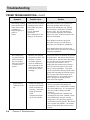
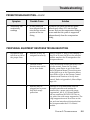
Probe Troubleshooting ................................................................. 5-2
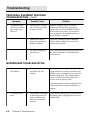
Peripheral Equipment Response Troubleshooting ......................... 5-5
Modem/pager Troubleshooting .................................................... 5-6
APPENDICES
Appendix A: Menu Maps
Appendix B: Understanding Water Quality
Appendix C: Conversion Tables
Appendix D: Upgrading H2O/S Flash System in the AquaNode
Appendix E: Product Warranty
Congratulations on your Aquadyne purchase.
This manual is available in an Adobe “pdf” format from our web page at
http://www.aquadyne.com. For the latest information, electronic
updates to this documentation and other technical information, we
recommend that you check with us regularly.
Aquadyne Computer Corp.
7343 “P” Ronson Road
San Diego, California 92111
USA
iii
Chapter
1
Introduction
Introduction
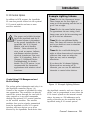
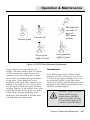
Figure 1.1 The AquaNode XL Controller
1-2
CHAPTER 1: INTRODUCTION
Introduction
HOW THE AQUANODE WORKS
Congratulations on your purchase of the
most sophisticated, yet easy-to-use aquatic
environment controller on the market today.
Designed with a powerful INTEL™ microprocessor, your AquaNode™ XL controller
includes the following features:
•
Continuous monitoring of Dissolved
Oxygen, conductivity, water temperature, pH and oxidation reduction
potential (ORP).
•
Environmentally sealed unit for operation in outdoor or wet environments.
•
H2O/S™ software with menu-driven
programming environment.
•
Optional Internal modem for remote
operation via phone line.
•
Aux. I/O system supporting 2 Analog/
Digital Inputs and 2 Relay outputs.
•
FLASH memory that makes upgrading
your AquaNode with new H2O/S
software a simple task.
•
Local audible alarm or optional remote
dialup pager alarm capability.
•
Parameter control capability for
controlling peripheral equipment such
as pumps, and lighting.
•
Powerful datalogging capability that
holds up to 30-days of probe data.
•
Dual communications ports supporting
both direct connect to a PC or remote
modem communications and a network
communications port allowing multiple
AquaNodes to be connected via a RS485 network.
•
Wide operating power range (7V - 16V)
along with 12VDC battery backup
capability.
•
Built-in RS485 Optically isolated
Network for networking multiple
AquaNodes and support for the RCS
(Relay Control System) for the addition
of hardwired relays for control and
alarming functions.
•
Supports both YSI, and OxyGuard DO
Probes. (Must state which probe is
required at time of order.)
•
An infrared Data Port that supports an
optional hand-held HP printer for data
reporting and graphical analysis.
•
AquaWeb™ Remote Access—Our latest
software product that allows you to
communicate with your AquaNode,
perform advanced graphical analysis of
current and historical data—from any
Windows 9X/NT/2000 PC.
Until now, performing even the simplest
functions with a controller required technical or electronic expertise. The AquaNode
controller makes maintaining the optimum
aquatic environment easy.
Note
☞
!
CAUTION
The helpful Notes logo
highlights items which will
save you time and effort, and
increase your understanding
of the AquaNode operation.
The CAUTION logo highlights
items which are critical to
safety or which may cause the
AquaNode to malfunction or
become damaged.
CHAPTER 1: INTRODUCTION
1-3
Introduction
The AquaNode XL is constructed with only
the highest quality components. The heart
of the AquaNode is an INTEL microprocessor
which manages all of the activities of the
controller. All information gathered by the
controller is processed digitally. The
AquaNode Architecture includes Digital
Signal Processing (DSP) hardware and
software that guarantees accurate and
repeatable readings over the life of the
AquaNode. In addition, the microprocessor
design provides unsurpassed flexibility, as
reflected by the variety of software options
that are available for the AquaNode.
AQUADYNE™ is committed to building
products in the USA that meet world class
standards of quality and workmanship. If
you have any questions regarding the use of
this product, AQUADYNE provides hotline
service through the Technical Support
Group. They can be reached between 8:30
AM and 5:00 PM Pacific Standard Time at
(858) 569-2082 x 250 or via the Internet.
The primary source for technical and other
useful information about the AquaNode,
including the latest release of this User
Guide in Adobe™ “PDF” format, can be found
on our Web Page:
http://www.aquadyne.com.
Our Web Page always reflects the latest
information about our products, so we
suggest that you visit it frequently.
USER GUIDE FEATURES
The AquaNode User Guide is presented in
five chapters: Introduction, Installation,
Programming, Operation and Maintenance,
and Troubleshooting.
1-4
CHAPTER 1: INTRODUCTION
In Chapter 1, we provide a basic overview of
the AquaNode and its capabilities. We
recommend that all users review this
information before proceeding with Chapter
2, Installation and Software Programming.
This User Guide includes several quick
reference features, including Notes, Cautions and a Quick Reference Menu Map.
QUICK REFERENCE MENU MAP
The laminated Menu Map included with your
AquaNode summarizes the H2O/S software
menu structure. Post it in a convenient spot
for quick reference. For more detailed menu
maps, refer to Appendix A.
MONITORING CAPABILITY
The Standard AquaNode software provides
for monitoring, control, and alarm capabilities. The five water quality parameters
monitored and controlled are:
•
Dissolved Oxygen (YSI or OxyGuard
probe) depending on AquaNode Model
ordered.
•
Conductivity
•
Temperature
•
pH
•
ORP
In addition to the five parameters the
AquaNode also provides two aux. inputs
which can be configured to provide 2 digital
inputs or 1 digital input and 1 analog input
for sampling a recorder output from another
instrument.
Introduction
Probes connected to the bottom of the
AquaNode (Figure 1.1) gather information
and relay it to the AquaNode for processing
and display on the screen.
The AquaNode is programmed using a
membrane keypad on the face of the unit.
Directional arrows on the keypad are used
to move horizontally across a given menu
level. The “Enter” key is used to move down
the menu map or to make a selection.
Once in the submenus, if there is no
activity for ten minutes, the AquaNode LCD
display window will return to the Current
Status Display. Settings entered up to that
time will be saved. When not in programming mode, current status information
gathered by the probes is shown on the
AquaNode LCD Display Window.
Parameter Status Lights
No Light. (Parameter is within setpoints and no
dosing required, OR control system is not activated.)
Conductivity
Solid Green. (System is dosing to lower
conductivity value.)
Flashing Green. Dwell State. (Will read
conductivity again after dwell time is complete.)
Solid Red. (System is Dosing to raise conductivity
value.)
Flashing Red. Dwell State. (Will read conductivity
again after dwell time is complete.)
Temperature
Solid Green. Chiller On. (Current temperature is
too high.)
Flashing Green. Chiller Dwell State. (Dwell time to
prevent compressor burn out.)
Solid Red. Heater On. (Current temperature too
low.)
pH
Solid Green. (CO2 is Dosing to lower pH.)
Flashing Green. Dwell State. (Will read pH again
after dwell time is complete.)
Solid Red. (pH buffer is dosing to raise pH.)
FLASH MEMORY ARCHITECTURE
A key feature of the AquaNode is that it is
designed using FLASH memory and a special
application embedded in the AquaNode
called a bootstrap loader. When the loader is
used in conjunction with other PC software
offered by Aquadyne, routine updates to the
AquaNode H2O/S software can be easily
accomplished. Refer to Appendix D for
instructions on upgrading the H2O/S
software in the AquaNode. Additional
Information about the current revision level
of the H2O/S software, the availability of
AquaWeb for Windows 9X/NT/2000, and
other technical details about the AquaNode
can be found on the Aquadyne WEB page:
http://www.aquadyne.com.
Flashing Red. Dwell State. (Will read pH again
after dwell time is complete.)
ORP
Solid Red. (Ozone is dosing to raise ORP.)
DISSOLVED OXYGEN
Solid Green. (System is dosing to lower Dissolved
Oxygen level.)
Solid Red. (System is dosing to higher Dissolved
Oxygen level.)
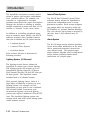
Figure 1.2 Parameter Status Lights
STATUS LIGHTS
Parameter Status Lights
The Parameter Status Lights located on the
face of the Octopus indicate whether a
system is operating within it’s preset limits
or a control system has been activated. A
status light lit red indicates that the system
CHAPTER 1: INTRODUCTION
1-5
Introduction
detected a low condition, a green light
indicates a high condition.. A summary of
Parameter Status Lights is given in Figure
1.2. In addition there are 2 Relay Status
lights on the front of the AquaNode. They
represent the state of the 2 Aux. Output
relays inside the AquaNode. If the Relay #1
System Status Lights
Solid Green. Operating properly and available
for data entry.
Dissolved Oxygen Probe Selection
(YSI or OxyGuard)
There are a number of issues related to the
use of Dissolved Oxygen probes in the
AquaNode. The AquaNode is designed to
support either YSI or OxyGuard DO
probes. Probe selection must be done at
the time you order the AquaNode. The controller can’t be converted in the field to
support the other probe.
Flashing Green. Busy processing data.
Flashing Green/Orange. Sending commands
through the power line to the Satellite Modules.
Solid Orange. One or more setpoints are out of
the normal habitat range of most fish.
Flashing Red. Controller hardware failure. Unplug
the Octopus controller and call Aquadyne
customer service.
Figure 1.3 System Status Lights
light is green then that indicates that Relay
#1 is energized. The same will hold true
from Relay #2 as well. The contacts for
these relays are available through the Aux.
I/O connector on the bottom of the
AquaNode.
OxyGuard probes also require that the
probe be placed within 6 inches of the
Temperature probe. This is required because the AquaNode uses a balanced input
for the DO system and requires a ground
reference to function. This ground reference is taken by the temperature probe.
The YSI probe can be located anywhere in
the system as long as the water temperature is the same at the temperature probe
System Status Light
The System Status Light located on the face
of the AquaNode indicates the general
condition of the AquaNode controller
operating system. Figure 1.3 summarizes
the System Status Lights and their meaning.
1-6
CHAPTER 1: INTRODUCTION
!
CAUTION
Your AquaNode is a precision
laboratory instrument that
could be damaged by unexpected power surges or
fluctuations.
The use of a quality surge
protection device is highly
recommended, and is required
to preserve your warranty.
Introduction
and the DO probe. Temperature compensation for the YSI probe is performed by the
AquaNode based on the temperature readings taken by the temperature probe.
Infrared Printer Port
The infrared printer port is located at the
upper left hand corner of the AquaNode
and is standard. This port provides access
for the optional infrared data-log reporting
feature. Using the Infrared Printer (optional) or AquaWeb, data collected by the
AquaNode can be printed out in a variety of
formats, including the current data, the
high and low points of data collected within
the last 24 hours, 48 hours, or 1 week.
Temperature, pH, and ORP can be graphed.
Conductivity, and DO will be added in a future release of H2O/S software
Powering the AQUANODE
Primary power for the AquaNode is either a
wall mount power transformer providing 7 to
16 VDC at 700 mA. or any battery providing
voltage and current in the range stated.
The AquaNode comes standard with a
12VDC 500 mA wall mount power supply.
In addition a optional 12VDC battery
backup input is available for powering the
AquaNode should the primary power fail.
Backup power is provided by one of two
methods:
•
An optional 12V Battery Backup Power
System
•
An optional UPS Backup Power System
(Uninterrupted Power Supply). (The A/C
wall-mount transformer is plugged into
this system.)
The backup battery-pack will provide up to
24 hours of operation during a power failure
if a 12V 7AH Gel cell is used. While operating from the battery pack, the AquaNode will
continue to operate normally until the
battery is exhausted and display the battery
voltage on the status line in the display.
A optional UPS backup is also a good idea if
you require more than 24 hours of backup
power, or if you wish to backup other critical
peripheral or communications equipment
such as a pump, a bio-filter or a modem for
example. Note however, that the duration of
backup of the UPS is reduced by the addition
of such equipment.
The AquaNode design incorporates FLASH
Memory, RAM, and a battery backed-up
real-time clock. Should power be lost, none
of the parameter setpoints, or configuration
data will be lost. However, during a power
failure, data in the data-log will be erased if
no backup power is provided to the unit.
CHAPTER 1: INTRODUCTION
1-7
Introduction
RCS/Network Control Capability
The AquaNode XL offers several control
options. Each AquaNode XL has 2 built in
relays which can be directly programmed to
perform management functions. In addition
Aquadyne Relay Control System (RCS) can
be integrated with the AquaNode to provide
additonal relay control function. Since the
RCS communicates through the built-in
AquaNode XL
Master
AquaNode XL
Slave #1
RS485 optically isolated netowrk. Multiple
RCS platforms can be integrated with
multiple AquaNode’s to provide extremely
flexible control cabability. Each relay on
the RCS will switch up to 15 AMPS of power
providing direct control for larger motors
and pumps. Up to 16 devices including
AquaNodes, RCS board, and AMS modules
can be connected on a single 485 network.
The nework can stretch up to 1500 meters.
This allows the RCS modules to be located
away from the AquaNode XL systems which
are managing them. Refer to the RCS
installation manual for setup and configuration of a RCS system with the AquaNode XL
controller.
AquaNode XL
Slave #2
AquaNode XL
Slave #3
RS485 Network
RCS Slave #1
RCS Slave #2
Figure 1.4 AquaNode Control System
Network & Components
1-8
CHAPTER 1: INTRODUCTION
Introduction
X-10 Control Option
In additon to RCS support the AquaNode
XL can also provide control via the optional
X-10 control module and one or more
satellite modules.
!
CAUTION
The proper and reliable functioning of the AquaNode and the X10 control system is dependent
on the proper installation of the
AquaNode, the X-10 Control
Module, and each Satellite
Module. Other electrical devices, such as motors, ballasts,
and dimmer switches produce
electrical interference that may
affect X-10 signaling. Refer to
Chapter 5, Peripheral Device
Troubleshooting, for further
details. The X-10 system is not
recommended for commerical
applications with mission critcal
functions.
Example Lighting Scheme
Timer 1 is for the fluorescent lamps.
These lamps are the first lights to
come on in the morning and the last to
go off late at night.
Timer 2 is for the metal halide lamps.
To approximate the sun rising, these
lamps come on in the late morning and
go off in the late afternoon.
Timer 3 is for an additional halide
lamp. This lamp will come on for about
one to two hours at noon to simulate
the midday sun.
Timer 4 is for a red bulb during the
night to allow observation of nocturnal
creatures that come out when the
lights are out, and or moonlight
simulation.
If you have the 16-channel Lighting
System and are not using all 16
channels, you can use the additional
channels to control other devices.
Control Using X-10 Management and
Built -In Relays
Figure 1.5 Example Lighting Scheme
The probes gather information and relay it to
the AquaNode controller (Figure 1.4).
Control of the systems is provided for using
two approaches. The controller can directly
control the system through the two built-in
relay outputs or it can send commands
through the optional X-10 control interface
to the satellite modules. The satellite
modules then receive signals transmitted
from the AquaNode via the X-10 control
interface and turn devices on or off as
directed by the AquaNode. Each device that
the AquaNode controls, such as a heater or
chiller, can be programmed to use either the
X-10 control system or the internal control
relays. As many as 256 addresses and a
variety of devices can be controlled by the
AquaNode using X-10 control system.
CHAPTER 1: INTRODUCTION
1-9
Introduction
The AquaNode incorporates several mechanisms to protect your aquatic environment
from controller failure. For example, the
controller is engineered to overcome
problems associated with power fluctuations
through the periodic re-sending of satellite
module commands to make sure that a X-10
satellite is “latched” in the correct state.
In addition to controlling peripheral equipment to maintain water quality, the H2O/S
software supports other optional features
that can be enabled on the control menus:
•
A Lighting System
•
A Interval Timer System
•
An Alarm System
Each of these features is described in
following sections.
Lighting System (16-Channel)
The lighting control feature allows the
AquaNode to control your system lighting.
The lighting system will support up to 16
independent lighting times per 24 hours.
Each channel has one ON and OFF time per
24-hour period. The AquaNode comes
standard with a 16 channel system.
With separate lighting timers, there is a
high degree of flexibility in setting up your
lighting system. For example, in your
application you may wish to use a combination of metal halide, fluorescent, and
incandescent lighting. And each lighting
system may require a dedicated ON and OFF
time. The AquaNode lighting system can
manage these and other varied timing needs
under software control.
1-10
CHAPTER 1: INTRODUCTION
Interval Timer System
The H2O/S Dual Channel Interval Timer
software feature allows the AquaNode to
control two independent wave or surge
generation systems. Each system supports
two pumps which are driven by either the
RCS module or, optional Satellite Modules.
The cycle time for each pump is selected by
the user, from 1-999 minutes (over 16
hours).
Alarm System
The H20/S alarm system software provides
visual and audible notification in the event
that a monitored parameter exceeds the
user defined range. The optional pager
alarm software upgrade used in conjunction
with a modem provides remote alarm
notification via a digital pager.
Chapter
2
Installing
the
Components
Installing the Components
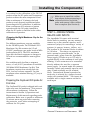
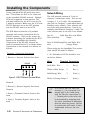
This Chapter will provide you with simple
step-by-step instructions to lead you through
the installation process. But before
continuing...
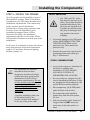
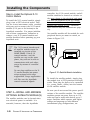
STOP–READ THIS FIRST
KEEP pH AND ORP PROBE TIPS
WET AT ALL TIMES
!
CAUTION
DO NOT ALLOW CONTROLLER
TO GET WET!
Your AquaNode controller can be located
in any dry location. The controller is not
waterproof and cannot be submerged,
permitted to get wet or exposed to high
humidity. To avoid splashing the unit,
install it properly as described in this
chapter.
AVOID DANGEROUS
OPERATING CONDITIONS
Do not operate the AquaNode controller
under any of the following conditions:
2-2
•
With wet hands.
•
If you are standing in water.
•
If the AquaNode Controller is wet.
•
If there is salt creep on the box.
CHAPTER 2: INSTALLING
THE
COMPONENTS
To prevent loss of accuracy in the pH and
ORP probes, be sure to keep the tips wet
at all times. NOTE: Do not completely
submerge probes. Refer to probe installation procedures (Step 2) in this chapter
for more information.
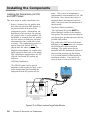
INSTALL ALL ELECTRICAL
CORDS CORRECTLY
Always take care when using electricity
around water. To prevent water from
running down the cord of an aquarium
device, always use a drip loop as shown
in Figure 2.0. To create a drip loop, make
sure that the cord extends below the
outlet so that any runoff will not enter
the outlet or the device. Also, the AquaNode controller and ALL other aquatic
environment devices should be plugged
into a GFCI outlet.
If you are not familiar with installation
of electrical equipment, it is strongly
recommended that you hire a licensed
electrician.
Installing the Components
Figure 2.0 • Protective Drip Loop and GFCI Outlet
!
CAUTION
In addition to a surge suppressor, a Ground Fault Circuit Interrupter (GFCI) should be part of you installation. A GFCI is a sensitive device which immediately cuts off the electricity flow when an
electric current leak is detected. All devices that are part of the
AquaNode system should be connected to a GFCI protected
circuit. If you do not have one installed already, you should purchase one. They are inexpensive and are available at any electronics
or hardware store. Don’t wait, a GFCI can save your life!
CHAPTER 2: INSTALLING
THE
COMPONENTS
2-3
Installing the Components
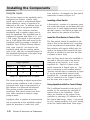
INSTALLING THE COMPONENTS
There are two basic parts to installing the
AquaNode controller:
The ORDER OF INSTALLATION is important to successful startup and operation of
the system. The X-10 Control
Interface, Satellite Modules,
and Modem must be installed
before the AquaNode controller is plugged in to ensure
proper initialization of these
components.
!
CAUTION
•
Installing the AquaNode hardware and
additional components
(Chapter 2, Steps 1 through 8).
•
Programming the AquaNode (H2O/S)
software
(Chapter 3, Steps 9 through 23).
Not all systems require the same installation
steps. The steps required for each individual
system will depend on:
•
Whether the system is monitoring only
or monitoring and control.
•
Which optional components are included in the system.
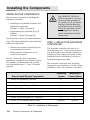
Table 2.1 indicates which components
installation procedures your system requires.
For example, for Monitoring Only systems,
only installation steps 1, 2, and 7 would be
required.
Steps to Install Physical Components
STEP 1—MOUNT THE AQUANODE
CONTROLLER
The AquaNode controller will need to be
installed within 5 to 10 feet of the probes. If
you wish to place the controller beyond the
standard 10-foot length of the probe cables,
additional cable is available in a variety of
lengths through special order.
The controller comes with four mounting
hangers for easy installation. Use the screws
provided to attach the controller to the wall.
Monitoring
System
Monitoring &
Control System
1. Mount the AquaNode Controller
✔
✔
2. Install the Probes
✔
✔
3. Wiring Internal Relays or RCS and Inputs
N/A
✔
4. Install X-10 Control Module
N/A
✔
N/A
✔
Optional
Optional
✔
✔
Optional
Optional
5. Addressing of Relays or Satellite Module(s)
6. Installaion of Optional Modem
7. Power Up the AquaNode XL Controller
8. Install 12-Volt Backup Battery Pack
Table 2.1 • Installation of Components
2-4
CHAPTER 2: INSTALLING
THE
COMPONENTS
Installing the Components
STEP 2—INSTALL THE PROBES
Up to five probes can be installed as part of
the AquaNode system. Three of the probes
(temperature, pH, ORP) have the same basic
installation requirements. The conductivity
probe, requires special installation
procedures to ensure proper operation and
accuracy. Since the AquaNode can be
purchased to support either a YSI or
OxyGuard DO probe, the installation
requirements specific to each probe (YSI or
OxyGuard) are broken out in each step of the
installation.
In all cases, it is desirable to locate the probes
away from sources of electrical interference
such as UV sterilizers, florescent lighting,
ballasts, pumps, etc.
PROBE UNPACKING
!
CAUTION
• pH, ORP, and DO probe
tips must be kept wet at all
times. The probes should be
installed immediately after
their tips are exposed to air.
If probes are allowed to dry,
they may be damaged and
may produce inaccurate
readings.
•
To prevent damage to the ORP probe
sensor, FIRST REMOVE THE TAPE
OVER THE VENT SEAL on the
protective cap. Then remove the
protective cap.
•
Remove the protective caps from the
remaining probes and install per
Step 2 instructions.
OTHER CONSIDERATIONS
☞
Note
The AquaNode is a precision
instrument that has been
designed to interface with highquality laboratory grade probes
manufactured in the USA to
Aquadyne specifications. The use
of other probes (especially
inexpensive imported probes) not
approved by Aquadyne is not
recommended and will not be
supported.
A genuine Aquadyne probe can
be identified easily by the
presence of date code stamped
on the top of the probe shaft.
•
A new probe requires a minimum of
48 hours to stabilize after
installation. DO NOT ENABLE
AQUANODE CONTROL OF
PARAMETERS FOR 48 HOURS.
•
Be sure probes are plugged into the
correct AquaNode probe ports. If they
are plugged into the wrong ports, the
system will not monitor properly.
•
Place temperature, pH, & ORP probes
within 6 inches of each other.
•
The conductivity probe should be
located away from the other probes,
36” min.
•
With the exception of the Dissolved
Oxygen Probe do NOT totally immerse any of the other probes in
water.
CHAPTER 2: INSTALLING
THE
COMPONENTS
2-5
Installing the Components
Installing the Temperature, pH, DO,
and ORP Probes
The four steps in probe installation are:
1. Select a location for the probes that
will allow the pH and ORP probes to
be placed within 6-inches of the
temperature probe. (Alternatives are
described in this section). By placing
the probes close to each another, the
AquaNode is assured that the probes
are not subject to different electrical
environments that could affect their
accuracy. The conductivity probe is a
special case and should NOT be
placed with the other probes. The
diagram below shows the conductivity
probe placed in-line back to the pump.
The installation requirements for the
YSI and OxyGuard DO probes are
different.
same. This is due to temperature
compensation requirements of the YSI
DO probe. Also, insure that there is
adequate water movement of not less
than 3 cm/sec across the membrane of
the electrode.
OxyGuard Probe Installation:
The OxyGuard DO probe MUST be
placed within 6 inches of the temperature probe. The probe uses the temperature probe as a ground reference like the
pH and ORP probes.
The probe must NOT be located above
diffusers or near aspirators etc. because
the bubbles will cause erroneous
readings. The probe must also be
mounted with the membrane surface of
the electrode pointing up (See Figure
2.3) to avoid bubbles collecting on the
membrane surface. Use either a tiewrap or tape to secure electrode. Also,
YSI Probe Installation:
The YSI DO probe can be placed
anywhere in the system as long as the
water temperature surrounding the
temperature and DO probes are the
pH
Conductivity
Probe
ORP
Temp.
YSI DO
Probe
OxyGuard
DO Probe
OR
Conductivity
Cell
To
Pump
Note: Conductivity Probe shown
Mounted inline.
Note: OxyGuard DO Probe
Must be placed within 6 inches
of Temperature Probe.
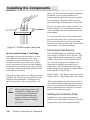
Figure 2.2 • In-Filter Location Using Probe Mounts
2-6
CHAPTER 2: INSTALLING
THE
COMPONENTS
;y
y;
Installing the Components
Tie Wrap
Figure 2.3 • OxyGuard DO Probe Mounted
with Membrane Pointed Up.
insure that there is adequate water
movement of not less than 3 cm/sec.
2. Remove the vent seal on the ORP
probe protective cap, then remove all
protective caps.
3. Plug the probe connector cables into the
designated port at the bottom of the
AquaNode controller.
4. Place the probes in the location selected
in Step 1. None of the probes can be
submersed except for the DO probe.
Mount the probes so that the top of the
probe is above the water line. The probes
should be positioned so that ONLY
ABOUT HALF of the probe shaft is
immersed in water. Both the YSI and
OxyGuard DO probes are designed to be
fully submersed and needs to be placed
in a location with good flow to insure
accurate readings.
Alternative Probe Locations
Select a probe installation that will allow
the pH, ORP, and (OxyGuard if used) probes
to be located within 6 inches of the temperature probe.
Three possible probe installations are:
•
In-Filter Location Using Probe Mounts
(Figure 2.2).
•
In-Filter Location Using a Float
(Figure 2.4).
•
In-Line Location Using Tee-Fittings
(Figure 2.6).
In-Filter Location Using Probe Mounts—
The most common place for probe location is
in the filter. Installing probes in a filter or
sump requires that the probes be secured
using probe mounts that attach to the back of
the filter so the probes are only half-immersed in the water, (See Figure 2.2.) When
placing your probes, be sure that there is
adequate water flow over the probe tips at all
times. The pH and ORP probes must be
placed within 6 inches of the Temperature
Probe.
In-Filter Location Using a Float—The float
installation shown in Figure 2.4 keeps probes
from being submerged (or drying out), and is
economical to construct.
To construct a probe float, punch a hole
(slightly smaller than the probe diameter)
through a small piece of styrofoam. Be sure
the probes are no further than 6 inches
apart. Insert the probes into the float, as
shown in Figure 2.4.
CHAPTER 2: INSTALLING
THE
COMPONENTS
2-7
OR
p
em
pH
T
Installing the Components
inch (3/4” for conductivity probe) regardless
of whether you are using laboratory or
standard grade probes as they are supplied
from Aquadyne. Aquadyne offers two compression fittings for installation of the probes.
P
Be sure to install water shut-off valves, as
shown in Figure 2.6, to permit probe replacement. All fittings must be secured so there is no
water leakage.
It is important that the in-line probe extend
no more than about 50% into the flow stream.
If the probe protrudes too far into the flow
stream it will interrupt flow and interfere with
the accuracy of the probe readings.
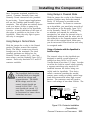
Figure 2.4 • In-Filter Location Using Float
Conductivity Probe Selection
In-Line Location Using a Tee-Fitting—
Although in-line probe placement is a little
more difficult and requires some extra
plumbing, it has been found to be a very
accurate and safe way to place your probes.
In-line placement will give accurate readings
because water is moving across the probe tips
at all times, and because algae growth on the
probe tips is minimized.
The AquaNode supports 2 different conductivity ranges, 0-2000uS and 0-200mS. The
range is determined automatically by which
conductivity probe is used with the AquaNode. The low range probe configures the
AquaNode to monitor and control over a
range of 0 to 2000 uS while the high range
probe configures the system to operate from 0
to 200 mS (0 to 200,000 uS).
The probe is placed into a tee-fitting, as shown
in Figure 2.6. You will need to provide the teefitting for this installation. The diameter of
the in-line portion of the tee should be 1/2
PN 68-010565
PN 68-012872
☞
Note
2-8
If the conductivity probe is not
installed in a conductivity cell
or if the probe is exposed to
electrical interference from
pumps, motors, or electrical
ballasts, unreliable readings
will result.
CHAPTER 2: INSTALLING
THE
COMPONENTS
Low Range Lab Cond. Probe
High Range Lab Cond. Probe
The correct probe must be connected up to
the AquaNode before powering up the instrument. The AquaNode will determine which
probe is connected and configure the instrument for that operating range.
Installing the Conductivity Probe
Installation of the conductivity probe is
similar to the installation of the pH, ORP and
temperature probes discussed previously.
Installing the Components
1. Select the proper probe location away
from the other probes.
2. Remove the probe protective cap.
3. Plug the probe connector cable into the
conductivity port at the bottom of the
AquaNode controller.
4. Place the probe in the location selected
in Step 1.
Alternative Probe Locations
The conductivity probe must be located away
from the other three probes, and the conductivity probe must be installed in a controlled
volume environment called a “conductivity
cell.” (See Figure 2.5)
The conductivity cell provides the conductivity probe with a controlled volume environment. The conductivity cell is required to
achieve accurate conductivity readings. It
reduces the chances that the conductivity
probe will be affected by alternate ground
(conductive) paths.
The conductivity probe can be installed in
either of two ways:
•
In-line, using a tee-fitting.
•
Off-line, using a “Drip Cup.”
In-Line Location
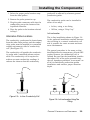
The in-line installation shown in Figure 2.6
is the preferred installation method because
the tee-fitting is a natural conductivity cell
and it provides the most accurate measurement environment.
The general procedure is the same as that
described above for temperature, pH and ORP
probes. However, the conductivity cell, is
utilized. Be sure that the installation provides
that about 10% of the probe protrudes into
the cell. Aquadyne provides a “score-mark” on
all of it’s conductivity probes that guides
installation and assures proper insertion
depth.
Probe
Probe
Joints
Valve
Valve
Conductivity
Cell
Figure 2.5 • In-Line Conductivity Cell
Figure 2.6 • In-Line Location Using Tee
Fitting
CHAPTER 2: INSTALLING
THE
COMPONENTS
2-9
Installing the Components
Off-Line Location
The “Drip Cup” installation is a second
option for the conductivity probe installation. As illustrated in Figure 2.7, a portion of
water from the pump discharge line is
diverted to a small cup-type arrangement.
The water flows in and out of the cup at a
rate of about 1 cup per minute.
;;;
;;;
;
;;;
;;;
;
;;;
;;;
;;;
;;;
☞
Note
The AquaNode has been
calibrated at the factory to preset standards. Since each
probe has its own unique
measuring characteristics, it is
always recommended that you
perform a manual calibration
allowing sufficient time for the
probes to stabilize in the
calibration solution.
Drip Cup Installation
Ball Valve
To
AquaNode
Ball Valve
Small
Pump
Conductivity
Probe
Drip
Cup
Drip
Cup
Filter/Sump/Tank
Filter/Sump/Tank
Figure 2.7 • “Drip Cup” Installation
In a drip cup installation, there is no
compression fitting to control insertion
depth—you must carefully position the
probe so that the end of the probe is approximately 1 inch from the bottom of the
cup.
Stabilization Period for Probes
After the probes are installed, there is a
period of time required for each probe to
stabilize in its new environment. The
conductivity probe will be the first to stabi-
2-10
CHAPTER 2: INSTALLING
THE
COMPONENTS
lize in only 5 minutes, followed by the
temperature probe which requires about 10
to 15 minutes before accurate readings are
possible. The pH and ORP probes will take
considerably longer to stabilize. Their
readings are much more sensitive. The pH
probe will stabilize in about 24 hours while
the ORP probe may require 48 hours. The
start up requirements for the YSI and
OxyGuard DO probes are different. Refer to
the correct section for the start up procedure for the probe that you are using.
Preparing the YSI DO probe for First
Use.
The YSI DO probe is shipped wet with a
shipping membrane installed. This protective
membrane cap on the probe tip must be
removed and replaced with a new membrane
cap filled with MEA probe solution before
using the probe. Follow the instructions in
Section 4 (Operations and Maintenance) of
this manual regarding membrane cap replacement and probe calibration. Make sure
to provide a minimum 20 minute warm up
period before attempting to calibrate the DO
probe.
Installing the Components
It is critical in the calibration of the YSI DO
probe to allow the DO probe and Temperature
probe to achieve the same temperature level.
Allow a minimum of 10 minutes for both
probes to reach thermal equilibrium before
proceeding with DO calibration. In addition
allow a minimum of 20 minutes of system
operation with the DO probe installed to
allow the DO probe to stabilize before either
calibration or operation.
Choosing the Right Membrane Cap for the
YSI Probe
Two different membrane caps are available
for the YSI MEA probe. The YSI Model 9501
Membrane Cap Kit contains six 0.5 mil
(0.0005”) membrane caps and a bottle of MEA
probe solution (KCl). The 9501 membrane
caps offer the fastest response to changes in
DO and are recommended for most applications.
For conditions with low flow or stagnant
water, a 1 mil (0.001”) membrane is available
(YSI Model 9502 Membrane Cap Kit). This
membrane requires less stirring than the
9501, but has a slower response. Use this
membrane when minimal stirring (<2”/sec) is
available.
Preparing the OxyGuard DO probe for
First Use.
☞
Note
Make sure to install the calibration adapter before attempting to
calibrate with the OxyGuard
probe and remove it after calibration is complete (See Section 4).
STEP 3—WIRING INTERAL
RELAYS AND INPUTS
The AquaNode XL comes with terminal
blocks built-in providing an easy means to
connect up to two external sensors, and 2
contactors (relays) for controlling a variety of
systems (ie pumps, heaters, chillers, etc.).
The location of the terminal blocks in shown
in 2.8 below. The relays can operate in
both a normal or powered mode. In the
powered mode, power from the AquaNode’s
Power supply (12Volts at up to 125 mA) is
applied directly to the common of each relay
allowing 12 volt contactors to be controlled
directly without the need for a separate
power supply. In normal mode the common,
normally closed, and normally open for each
relay if made available on the terminal
block. Powered and Normal operation for
each relay is selected by a jumper located
under each terminal block. Two inputs are
available with a single common return for
each input.
The OxyGuard DO probe is shipped with a air
tight cover over the membrane. This protects
the membrane in shipment. Follow the
instructions in Section 4 (Operations and
Maintenance) of this manual regarding probe
calibration. Make sure to provide a minimum
20 minute warm up period after removing
the protective cover before attempting to
calibrate the DO probe.
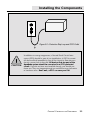
Figure 2.8 • Aux I/O
CHAPTER 2: INSTALLING
THE
COMPONENTS
2-11
Installing the Components
Using the Inputs
The two Aux. Inputs in the AquaNode can be
configured in a number of ways. Both
inputs can be used as conventional digital
inputs allowing a variety of sensors to be
connected to the unit. In addition Input #2
can also be used as an optional external
analog input. This allows an external
instrument with a recorder output port to
drive the AquaNode. The AquaNode can be
configured to operate with either a 0-1 or 05 Volt range. The signal is then converted
into a 10 bit digital value and stored in the
AquaNode’s data-log making it available to
AquaWeb Up to 30 days of hourly observations from input #2 are stored in the
AquaNode along with the existing parameters (ie DO, and pH). An internal jumper in
the AquaNode determines if the input range
is 0 to 1 Volt or 0 to 5 volts.
Input Options
Input #
1
2
Digital
X
X
Analog
X
Table 2.2 • AquaNode Aux. I/O Inputs
The inputs operating as digital inputs allow
various system conditions, such as high or
low water levels, high or low pressures, or
flow failures to be detected and alarmed.
This section provides instructions for
installing a float switch (water level detection), and a contactor to control a large
pump or motor.
Aquadyne offers a number of sensors which
can be connected to the AquaNode’s digital
inputs for detection of water level, pres-
2-12
CHAPTER 2: INSTALLING
THE
COMPONENTS
sure, and flow. An example of a float switch
connection is shown in Figure 2.9.
Installing a Float Switch
A float switch consists of a stationary stem
and a float that moves up and down with the
water level. A small magnet mounted inside
the float causes a reed switch to open and
close based on the position of the float.
Install the Float Switch in Tank or Filter
The float switch should be installed in the
tank or filter at the desired level, according
to the manufacturer’s instructions. (Many
float switches will require drilling into the
tank at the desired float location.) Be sure
the float is installed in such that the float
is allowed to move freely.
Once the float switch has been installed in
the tank or filter the switch can then be
connected to the Input #1 or #2 in the
AquaNode XL. Figure 2.9 shows a float
switch connected to Digital Input #1. One
wire is connected to the terminal labeled
‘Ground’ and the other is connected to Input
#1 on the terminal block located in the
AquaNode XL. A second sensor would be
also be connected to the ‘Ground’ terminal
and the other wire to Input #2.
Using AquaNode’s Built in Control Relays
The 6 additional terminals in the Aux I/O
module are for accessing the two built-in
control relays in the AquaNode. These
relays are available to any system in the
controller by selecting a ‘R’ address in the
Set Control Addr menu. Relay 1 is accessed
by a R-1 setting and Relay 2 by a R-2 setting
in the Set Control Addr menu. Both relays
Installing the Components
have 3 separate terminals available for
control. Common, Normally Open, and
Normally Closed connections are provided
for each relay. Typical control applications
will use the Common and Normally Open
terminals. This will allow an external device
such as a heater, chiller, or pump to be
turned on when the relay in the AquaNode
is active. A visual indication of the state of
the relays is available on the front of the
AquaNode. When the relay light is green
the relay is energized.
Using Relays in Normal Mode
With the jumper for a relay in the Normal
position (Jumper nearest the terminal
block). The Relay’s contacts are directly
brought out to the terminals. The three
terminal positions are defined as the
Normally Closed contact (N.C.), the Common contact, and the Normally Open (N.O.)
contact. Each relay has both N.O. and N.C.
contacts available.
!
CAUTION
The AquaNode built in relays
in Normal Mode are designed
to switch low voltage and
current devices. The MAXIMUM voltage used in the
control circuit should not
exceed 24 VAC/VDC. Current should not exceed 1/2
amp. Max. Caution should
be exericesed to insure these
limitations are met.
Using Relays in Powered Mode
With the jumper for a relay in the Powered
position (Jumper away from the terminal
block). 12 Volt power is provided on the
common terminal. To connect a contactor
up to AquaNode, you would wire one side of
the contactor to the Normally Open “N.O.”,
or the Normally Closed “N.C.” (Depending
on whether you wanted the contactor
energized or not when the internal relay is
deenergized) terminal and the other wire of
the contactor to the Ground terminal on the
left side of the terminal block. Make sure
you do not exceed 125mA load on each relay
in energized mode.
Using a Contactor with the AquaNode’s
built-in relays.
The internal relays in the AquaNode are
designed to switch a small amount of
voltage less than 24VAC or DC and a
Current draw of less then 1/2 Amp. In order
to utilize the built-in control relays typically
a separate switching relay needs to be
installed between the device being controlled and the AquaNode. This device
called a contactor provides the needed
contact power rating to reliably switch large
loads from motors and other high current
devices. The contactor used will need to
have a coil voltage of less than 24Volts. The
Lower Board in bottom of AquaNode Enclosure
485 Network
Relay 1 Relay 2 Inputs
NC C NO NC C NO 1
2
G
Large Pump or Motor
to be Controlled
Note: Shown with Relays
in NORMAL Position using an
external power source for
contactor.
Contactor
Switched Power
External
12 or 24 VAC
Power Source
for
Contactor
X
COIL
Contacts
Power
for
Pump
Figure 2.10 • Contactor Installation
(Normal Mode)
CHAPTER 2: INSTALLING
THE
COMPONENTS
2-13
Installing the Components
contactor needs to be sized to meet the
switching loads required. Figure 2.10 shows
the typically method of connecting a
contactor to the AquaNode Aux. I/O module.
Relay Bank # 3
Relay Bank # 1
Relay Bank # 2
Using the AquaNode XL with the Relay
Control System
Bank # 1
RS485
X-10 Bank #2 and #3
Network Powerline Dry Contact
12VDC
Inputs
Figure 2.11 The Aquadyne Relay Control System (RCS)
2-14
CHAPTER 2: INSTALLING
THE
COMPONENTS
Installing the Components
RCS General Description
Each relay on the board is socketed for easy
maintenance.
The Relay Control System (RCS) shown in
figure 2.11 is designed to provide users with
the ability to control up to sixteen high
current plug-in type industrial relays. Each
relay will switch up to 15 Amps (7 Amps
Inductive) at 110VAC/220VAC. The RCS is
available in either an 8 or 16 relay configuration. The RCS can be managed using one of
3 three different control interfaces. The
RCS will accept commands from one of 3
different control interfaces: X-10, RS-232,
and RS-485. Through the use of the RS-485
interface, the RCS can reside on a
AquaNode network provides unlimited
control expansion for the AquaNode line of
controllers. Through the use of Aquadyne’s
subnetwork addressing scheme multiple
RCS units can be placed on a AquaNode
network, providing extremely flexible control
capabilities. For example a single RCS can
receive commands from multiple
AquaNode’s, thus allowing the RCS unit to
be shared among multiple AquaNode controllers. Figure 1.2 shows a typical
AquaNode network with RCS and AMS
peripheral units attached.
Configuration of the RCS is accomplish via 3
banks of switches providing easy configuration in the field. Each switch has a indicator light making switch status easy to
determine at a glance. The RCS is switch
selectable for either 110VAC or 220VAC
operation. The onboard power supply has a
separate field replaceable fuse for ease of
maintenance. For complete installation and
configuration information on the RCS refer
to the RCS installation and Configuration
Manual that comes with the RCS module.
AquaNode XL Isolated RS-485 Interface
The AquaNode’s RS485 Optically Isolated
Interface is located next to the Aux. I/O
terminals and is shown in the figure 2.13
below. Up to 16 AquaNode’s and RCS
modules can be connected via the network.
This provides significant flexibility in regard
to alarming, monitoring and control.
RCS Isolated RS-485 Interface
The RCS relays are rated to handle up to a
15 AMP resistive load, with a maximum
inductive load of not to exceed 7 amps.
Telephone
Line
Master
Slave #1
Slave #2
RCS
Slave #N
RS-485
Network
Figure 2.12 Typical AquaNode Network
Figure 2.13 AquaNode XL 485 Interface
CHAPTER 2: INSTALLING
THE
COMPONENTS
2-15
Installing the Components
Using a standard RS-485 multi-drop interface. This allows the RCS to be connected
to the AquaNode RS-485 network. Multiple
RCSs are supported in this manner. The
sub-node address for the RCS is set by the
4 address switches. Make sure the X-10 and
RS-232 Switches are in the OFF position
and the RS-485 switch is set to ON.
The RCS Board at location J12 provides
transmit and receive connections for the
RS-485 interface. Refer to the section on
subnode networking for interfacing the RCS
board to the AquaNode Sub Network.
Connections to the RS-485 network are
made at terminal block J12 as shown below.
Connections to the network are defined as
follows:
Network Wiring
The LAN network consists of 2 pair of
category 5 twisted pair cable. You can use
Catagory 3, 4, or 5 cable. We recommand
that you use Catagory 5 cable which has the
following color scheme. Color schemes will
vary from cable manufacturer. Here is an
example with Ethernet Catagory 5 cable. The
color scheme used in the wire is as follows:
Pair #1:
Solid Blue Wire and White
Wire with Blue
Stripe
Pair#2: SolidOrangeWire and White Wire
with
Orange Stripe
When wiring up the AquaNode XL’s connections should be made as follows:
Terminal Connection Description
1 Receive (+ )Receive Positive Data from
1. All Subnodes or RCS’s should be connected as follows:
Wire
RS-485
Terminal Connection
J12
Figure 2.14 RCS Network Terminal Block
Solid Blue Wire
1
Rec(+)
White w/Blue Stripe
2
Rec (-)
SolidOrange Wire
3
Xmit (+)
White w/Orange Stripe 4
Xmit (-)
Network
2 Receive (-) Receive Negative Data from
Network
3 Xmit (+) Tramsmit Positive Data to Network
4 Xmit (-) Transmit Negative Data to Network
2-16
CHAPTER 2: INSTALLING
THE
COMPONENTS
☞
Note
It is critical that the Xmit connections (+,-) be connected to a
twisted pair in the cable along
with the Receive connections (+,). Twisted pairs in the cable can
be determined by stripping back
the outer insulation to determine
how the wires are paired. Failure
to match pairs will result in data
tranmission errors on the network.
Installing the Components
2. The Master Node should be wired as
follows:
Wire
Terminal Connection
SolidOrange Wire
1
White w/Orange Stripe
2
Solid Blue Wire
3
White w/Blue Stripe
4
☞
Note
Address of 2 the settings would be “S1-1” if
Relay #1 was used on the RCS module.
In a network configuration it is
important that each device on
the network be given a unique
address. No two devices are
allowed to share the same
subnode address.
Sub-Network Programming
The programming of the AquaNodes to
support subnetworking consists of setting
the Sub-Node address in each controller in
the network. The node address is located in
the Datalogger Sub Menu under the setup
menu. To set up the network, first set the
master node to an address of zero. Then
assign a unique number from 1 to 31 for
each of the sub-nodes on the network. You
must make sure that each node is assigned
a unique sub node address. If two node
share a common sub-node address, neither
node will operate correctly on the network.
Under the Set Control ID, RCS boards are
addressed with a subaddress of ‘S’ followed
by the RCS address that the board is set to
followed by the Relay Address 1 - 16. For
example if you were controling a Heater from
a AquaNode on a RCS module with a Sub-
☞
Note
Note: In Netowrk Test Flash
Mode only the AquaNode Slave
units LED’s flash. The master
AquaNode LED’s do not flash.
A network test feature is designed into the
system to allow you to test to insure that
the network is wired correctly. The master
node has an additional menu labels Test
Flash On and Test Flash Off. Setting the
menu on the master node to Test Flash On
will cause all the slaves Aquanodes status
lamps to flash on and off. This will allow you
to check to insure that the slave nodes are
wired up correctly. After proper network
connections are established. Execute the
Test Flash Off menu item to stop the
subnodes from flashing.
CHAPTER 2: INSTALLING
THE
COMPONENTS
2-17
Installing the Components
Step 4—Install the Optional X-10
Control Module
To install the X-10 control module, simply
plug it into a GFCI electrical outlet. Then
use the 4-wire interconnect cable provided
with your unit to connect the X-10 control
module (X-10 port at the bottom) to the
AquaNode controller. For proper initialization of these components, remember to
connect your X-10 control module and
satellite modules before powering up your
AquaNode unit.
☞
Note
The X-10 control interface and
all satellite modules must be
installed on circuits of the
SAME PHASE. If the X-10
control interface and the
satellite are not on the same
phase, they will not be able to
communicate with each other,
except by means of a satellite
bridge.
Do not plug satellites or the X10 control module into power
strips equipped with surge
suppression. Surge suppression
will filter out the AquaNode
control command signals.
STEP 5—INSTALL AND ADDRESS
OPTIONAL SATELLITE MODULE(S)
The satellite modules can be located wherever electrical power is available. It is
essential, however, that the AquaNode
2-18
CHAPTER 2: INSTALLING
THE
COMPONENTS
controller, the X-10 control module, and all
satellite modules be located on circuits on
the same phase in the electrical sub-panel
and have the distance of the A/C wiring
between the X-10 control module and any
satellite not exceed 50 feet. Otherwise,
these devices may not communicate properly.
One satellite module will be needed for each
peripheral device you want to control, as
shown in Figure 2.15.
15
AQUADYNE
TM
1
3
5
13
11
O
9
UNIT
A
7
C
M
E
K
I
ID
SATELLITE
G
Chiller
Chauffage
TM
Control Module
Figure 2.15 • Satellite Module Installation
To install the satellite module, simply plug
the module into a GFCI-protected electrical
outlet. Then plug the device to be controlled
(i.e., pump, heater, chiller) into the bottom
of the satellite module.
Be sure you do not exceed the power specifications of the satellite module. The satellite
modules operate on power lines up to 110
volts and can be used with devices up to 5
amps. Satellites which operate with higher
voltage and amperage or with different
international plug configurations, are
Installing the Components
available from your dealer.
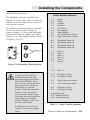
Default Satellite Addresses
The AquaNode controller identifies each
satellite by its own code, which is called an
address. A control address must be set for
each satellite module.
The address is selected using the two dials
on the face of the satellite module, as
shown in Figure 2.16. The alpha dial allows
selections A-P and the numeric dial allows
selection 1-16. The satellite address shown
in Figure 2.16 is A-3.
15
1
3
13
5
11
AQUADYNE
15
TM
1
3
5
13
11
O
9
UNIT
A
O
C
A
Address: A-3
C
E
K
TM
Control Module
I
ID
G
M
E
K
I
ID
G
Figure 2.16 • Addressing a Satellite Module
!
CAUTION
Heater
Chiller
Ozonizer
pH Doser
CO2 Doser
Not Assigned
Alarm Module
Low Conductivity Control
High Conductivity Control
B-1
B-2
B-3
B-4
WaveMaker Pump 1A
WaveMaker Pump 1B
WaveMaker Pump 2A
WaveMaker Pump 2B
C-1
C-2
C-3
C-4
F-1
F-2
•
•
•
F-12
Timer
Timer
Timer
Timer
Timer
Timer
Timer 16
F-15
F-16
DO Range #1 Low
DO Range #1 High
G-1
G-2
High Conductivity Alarm
Low Conductivity Alarm
G-3
G-4
DO Range #2 Low
DO Range #2 High
7
7
M
SATELLITE
9
UNIT
A-1
A-2
A-3
A-4
A-5
A-6
A-7
A-8
A-9
A sticker on each satellite
module indicates the maximum load-rating of the device.
DO NOT OVERLOAD. Equipment such as compressors and
pump motors can exceed the
load rating of a satellite
module. Verify with the manufacturer of your peripheral
device that the surge current
at startup does not exceed the
load rating of the satellite
module. Damage to the satellite unit could result!
In addition, be sure you are
using the correct plug configuration.
1
2
3
4
5
6
Available for use:
R-1 = Internal Relay #1
R-2 = Internal Relay #2
Table 2.2 • Default Satellite Addresses
CHAPTER 2: INSTALLING
THE
COMPONENTS
2-19
Installing the Components
Before assigning any addresses, you should
make a list of all devices to be controlled
and their proposed satellite addresses. You
may wish to choose addresses to coincide
with default addresses provided by Aquadyne
shown in Table 2.2. Satellite addresses will
also have to be entered in the AquaNode
software. (Refer to installation procedure
Step 21.)
STEP 6—INSTALL THE
COMMUNICATIONS EQUIPMENT
There are two communication features
available for the AquaNode system:
•
Alarm Paging
•
AquaWeb for Windows 9X/NT
The alarm paging feature allows your pager
to receive an alarm page when a water
quality parameter goes outside the acceptable range or when a digital input switch
signals an alarm condition. The pager
Communication Feature
message indicates which AquaNode unit (via
the last 3 digits of the unit serial number) is
affected (in the event of multiple units),
which parameter is involved, and whether
the alarm represents a high or low condition. (Refer to Chapter 3, Step 23 for a
discussion of pager message information.)
As shown in Table 2.3, in order to have the
alarm paging feature, you must install a
modem to your system.
AquaWeb provides remote access to the
AquaNode internal data-log and permits
network communication between a PC and
the AquaNode. Depending on the software
version of AquaWeb, some of the features
include remote communications, trend
analysis and networking with extensive
graphing, statistical and data export capabilities.
As indicated in Table 2.3, there are two ways
to access AquaWeb:
•
Via modem
•
Via direct cable connection
Connection Options Available
Direct Cable
Modem
Connection
Alarm Paging Only
✔
N/A
AquaWeb Only
✔
✔
✔
Both Alarm Paging & AquaWeb
Table 2.3 • Communication Options
2-20
CHAPTER 2: INSTALLING
THE
COMPONENTS
N/A
Installing the Components
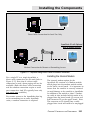
Direct Cable Connection for Local Use Only
AquaNode XL with Optional
Built-in Modem Module
Modem Connection for Remote or Networking Access
Figure 2.17 • AquaNet using Direct Cable or Modem Connection
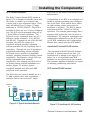
For a single PC to a single AquaNode, a
direct cable connection can be used (refer to
Figure 2.17). Note that if a direct cable
connection is used, alarm paging will not be
available. (Both the direct cable connection
and the modem connection require a serial
port connection. And PCs typically have only
one serial port available.)
For remote access to the AquaNode data-log
or for networking two or more AquaNode
units, a modem connection is required.
Installing the Internal Modem
The internal modem option for the
AquaNode XL consists of a Modem module
which plugs into the modem module socket
on the lower circuit board. It is important to
insure that the module is correctly oriented
to avoid damage to the module or AquaNode.
In addition to the module a short 5 conductor cable is also included which needs to be
plugged into the lower board (j5) on one end
and connector P2 on the upper board. Note:
The connector at P2 already has a cable
plugged into it and will need to be unplugged
CHAPTER 2: INSTALLING
THE
COMPONENTS
2-21
Installing the Components
indicator that a connection to the unit
has been established by turning from
green to orange.
Phone Line
Pin 1
Modem Module
Connector J5
Connector P2 on
Other Board (Not
Shown)
Figure 2.18 • Installing the Modem
so that the modem cable can be plugged in.
The connectors are keyed so they will only
plug in one way.
2.
Power Up the AquaNode XL—With the
modem module and cable installed you
can now power up the AquaNode. To
the right of the modem module is a
status indicator. When the AquaNode
XL first powers up the indicator will be
orange. Once the modem is initialized
by the AquaNode the indicator will turn
to green. The indicator will also
!
CAUTION
2-22
There could be problems in
modem operation and pager
functionality if the telephone
line is shared. For proper
operation, the modem will
required a dedicated telephone line.
CHAPTER 2: INSTALLING
THE
COMPONENTS
3.
Connect the Modem and Phone—The
modem is supplied with a 6-foot
telephone cable to connect the modem
to the telephone company (telco) phone
line. Plug the phone cable into the
phone line connector located on the
board above the modem module..
Connect the other end of the phone
line to the closest telco live telephone
jack.
If your installation does not use this
type of phone connection, adapters are
available through your local hardware
store. With the cable connected to the
phone line, you are now ready to
program the H2O/S software for modem
use. (Refer to Chapter 3, Step 23.)
Installing the Direct Cable Connection
Your AquaNode Controller with its H2O/S
system software can be configured to
connect directly to a PC by using Aquadyne’s
direct cable connection. Once connected,
the AquaNode can communicate with
AquaWeb for Windows 9x/NT/2000,
Aquadyne’s remote access application.
To hook up directly to the PC, one end of
the direct cable connects to the serial port
on the AquaNode unit and the other end
connects to your PC com port. Aquadyne
provides a optional 25-foot cable and, for a
longer run, a 25-foot extension cable.
Along with the cabling issue the AquaNode
allows you to control a number of different
serial data options such as baud rate,
parity, and software flow control.
Installing the Components
STEP 7—POWER UP THE
AQUANODE CONTROLLER
!
If your system includes a modem, X-10
control interface or satellite modules, be
sure that these components are plugged in
BEFORE powering up the AquaNode.
CAUTION
Plug the end of the cable from the power
transformer into the power jack located on
the bottom left of the AquaNode (See Figure
2.19). Be sure to use the protective power
cord drip loop to prevent water from running
down the cord into the AquaNode controller.
The cord should extend below the outlet so
that any runoff will not enter the electrical
outlet.
When the controller is first plugged in, it
goes through a diagnostic self check. The
Local PC
Network/
Modem
ORP Probe
Primary Power
(7-16VDC)
Use of any cable other than
that supplied by Aquadyne
may result in an incomplete
connection or, in extreme
cases, damage to the AquaNode or computer.
The cable utilized for Direct
Cable connection is a nonstandard cable. It can be
ordered from your dealer or
from Aquadyne.
LCD screen will show a series of messages
indicating that a self diagnosis is in
progress, as shown in Figure 2.20.
pH Probe
12VDC
Battery
Backup
Temp.
Probe
Conductivity
Probe
X-10
Control
Module
Dissolved
Oxygen
Probe
Figure 2.19 • Bottom View of the AquaNode XL Controller
CHAPTER 2: INSTALLING
THE
COMPONENTS
2-23
Installing the Components
When powering the AquaNode for the first
time, make note of your system serial
number and H2O/S software version. This
information is required should you find it
necessary to obtain technical support. When
the current status screen begins to display
you will notice that the top line of the
display will show the current probe readings.
The second line will show system activity
such as systems being activated, and alarms
occurring. When the Current Status Screen
is shown, Figure 2.21, you are ready for
programming the AquaNode controller.
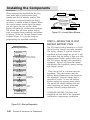
08/15/97 11:45AM
DO = 8.2
Current Readings Rotate thru
Top Line of the Display
OR= 350mV
C45.4mS
pH= 8.20 T= 78.2F
All Systems Normal <---
Changes In System status
Rotate thru Bottom Line
Heater System is Active
of the Display
DO System is Active
pH Low Alarm
Figure 2.21 • Current Status Window
STEP 8—INSTALL THE 12-VOLT
BACKUP BATTERY PACK
Startup Diagnostics
(Monitoring and Control)
AQUANODE ES
Aquadyne Inc.
Ver. 1.0
Ser #93-1234567
Software Version and
Product Serial Number
Copyright (C)
1992-1997
Self Test LEDS
Self Test ok
Initializing
Outputs
Control Module
Installed/Detected
Initialization
Complete
Initializing
Modem: +++
Initialize
Modem
Initializing
Modem: String
CHAPTER 2: INSTALLING
Place the gel cell in a location near the
AquaNode. Plug the harness into the
Battery Backup connector on the bottom of
the AquaNode. Plug the charger into a
powered AC outlet. To test the backup
system unplug the primary power source.
The status line should indicate that the
unit is operating on battery power and
provide a battery voltage indication.
CONGRATULATIONS—You have now
completed the first half of the AquaNode
installation—components installation
Figure 2.20 • Startup Diagnostics
2-24
The 12V battery backup consists of a 12VDC
Gell cell with a charger and cable assembly.
The battery charger is required since the
AquaNode will not charge the gel cel. It will
also insure that the battery is kept in a fully
charged state should a power failure occur.
The 12 V battery backup is not provided by
Aquadyne. Figure 2-22 shows the connection between the AquaNode, battery backup
and charger system.
THE
COMPONENTS
Installing the Components
In Steps 1-8, you mounted the AquaNode
and installed the following components:
•
Probes (Temperature, ORP, pH, Conductivity, and Dissolved Oxygen),
•
Aux. I/O Module and Device (optional),
•
X-10 Control Module (Optional),
•
Satellite Module(s) (Optional), and
•
Communications Equipment (Optional).
You then powered up the AquaNode and
installed the Backup Battery Pack.
You are now ready for the second half of the
installation process: programming the
AquaNode H2O/S software (Steps 9-25),
presented in Chapter 3.
Don’t worry, you don’t have to be a computer
programmer to successfully program the
AquaNode. We not only give you the
roadmap (the Menu Map), we guide you down
the road as well.
AquaNode
Battery
Charger
Power
Supply
Surge
Suppressor
Probe Cables
Battery
Backup
Cable
Harness
Main Power
Transformer
for AquaNode
Plugged Into
Surge Suppressor
12V Gel Cell
Figure 2.22 • Battery Backup Installation
CHAPTER 2: INSTALLING
THE
COMPONENTS
2-25
Chapter
3
Programming
the
Software
Programming the Software
PROGRAMMING THE SOFTWARE
Your AquaNode includes the latest version of
the H2O/S software which was pre-loaded into
FLASH memory at the factory prior to shipment. The FLASH memory design of the
AquaNode allows future software upgrades to
be installed by the user as they are made
available by Aquadyne.
For additional information pertaining to the
latest software release, visit our WEB page:
http://www.aquadyne.com
For this part of the installation process, we
recommend that you have your laminated
Quick Reference Menu Map card at hand to
follow along with the description. This will
familiarize you with the Quick Reference card
as well as introduce you to the use of the
AquaNode software menus. Detailed Menu
Maps are given in Appendix A.
Before you begin entering setpoint data, we
thought it would be beneficial to review the
general structure of the AquaNode menus.
Overview of the AQUANODE Menus
All software menus and data entries are
viewed through the LCD Screen Window on
the face of the AquaNode (Figure 3.1). The
screen typically shown in the window is the
Current Status Screen. This screen gives
current probe readings for each of the five
parameters: conductivity, temperature, pH,
ORP, and Dissolved Oxygen (DO).
Figure 3.1 • Face of AquaNode XL
Menu Map shows all available Top Level
Displays.
To scroll through the Top Level Display,
simply push the right or left arrow on the
keypad. The screens will be shown in the
order indicated on the Menu Map. You can
cycle through the screens as many times as
you desire in either direction.
The Top Level Display provides both current
parameter information (i.e. pH, ORP, DO,
Conductivity, and Temperature) on the top
line and system status on the lower one. As
systems are activated or alarms are triggered
the status line provides up to date status on
the system being managed. As events occur
they are entered into the lower display. Up to
16 events are saved and displayed in sequence. Figure 3.2 shows the current status
window.
08/15/97 11:45AM
DO = 8.2
Current Readings Rotate thru
Top Line of the Display
OR= 350mV
C45.4mS
pH= 8.20
Top Level Display
The Current Status Screen is only one of
several screens that comprise the Top Level
Display. Side One of the Quick Reference
T= 78.2F
All Systems Normal <--Changes In System status
Rotate thru Bottom Line
Heater System is Active
of the Display
DO System is Active
pH Low Alarm
Figure 3.2 • Current Status Display
3-2
CHAPTER 3: PROGRAMMING THE SOFTWARE
Programming the Software
TOP LEVEL DISPLAY
Exit
Main
Menu
Setpoint
Menu
Operation
Menu
Setup
Menu
Figure 3.3 • The Main Menu
Main Menu
The Main Menu is comprised of three
primary sub-menus, as shown in Figure 3.3
•
pH Setpoint
•
DO Setpoint
•
Conductivity Setpoint
For Monitoring and Control Systems, in
addition to setpoint values, you can input
parameter setpoint ranges, and parameter
control information for use with the internal
relays or X-10 control system.
Operation Menu Overview
The Operation Menu includes options that
might be required in day-to-day operation of
the AquaNode:
•
Setpoints Menu
•
Operation Menu
•
System Control
•
Setup Menu
•
Probe Calibration
•
Lock/Unlock Password
•
Clean Probes
•
Printer Menu
These menus are the first level down from the
Top Level Display and comprise the Main
Menu for the AquaNode. This menu is the
doorway to all other sub-menus. To enter the
Main Menu, simply push the Enter key from
any position on the Top Level Display.
Note that from the Top Level Display you will
always enter the Main Menu at the same
place: the Setpoints Menu.
From there, you can scroll left or right in the
Main Menu as desired, using the right or left
arrows on the keypad.
Setpoint Menu Overview
As the name implies, the Setpoints Menu
allows you to enter the setpoint values for the
five water quality parameters:
•
Temperature Setpoint
•
ORP Setpoint
Setup Menu Overview
The Setup Menu is used primarily during
initial setup of the AquaNode controller,
including:
•
System Test
•
Set Control Addr
•
New Password
•
Temp Scale
•
Timers
•
Alarm
•
Data Logger
CHAPTER 3: PROGRAMMING THE SOFTWARE
3-3
Programming the Software
•
Wave-Maker
•
Filter
•
Pager (optional)
•
Dissolved Oxygen
•
Conductivity
•
Digital Inputs
Using the Menu Map—An Example
Suppose, for example, you wish to enter the
pH setpoint for the AquaNode controller. To do
this, you would follow these steps (See Figure
3.4):
•
From anywhere on the Top Level
Display, press Enter. This will take
you to the Setpoints Menu.
•
Press Enter at the Setpoints Menu.
This will take you to the Setpoint
prompt. Press Enter again and you
will be at Temperature Setpoint.
•
Scroll to the right using the right
arrow key until you reach pH
Setpoint. Then press Enter.
•
You will then be at pH Setpoint.
Move the arrows left or right to find
the desired pH value. Then press
Enter to record the Setpoint value
into memory.
Remember that the Main Menu selections are
the doorway through which all other submenus are accessed. From the Top Level
Display, press the Enter key to get to the Main
Menu level. Then simply scroll to the left or
right, as desired.
Initial Software Setup
You can now begin programming the AquaNode H2O/S software—developed by Aquadyne
specifically for advanced water quality monitoring applications. The H2O/S software setup
consists of Steps 9-23 in the installation
process. A summary of these steps is given in
Table 3.1. Step 15 (Entering Setpoint Values)
is perhaps one of the most important of these
steps.
Top Level Display
Cond.
Setpoint
Exit Main
Menu
Setpoints
Operation
Configuration
DO
Setpoint
Temp
Setpoint
ORP
Setpoint
pH
Setpoint
pH Setpoint
Setpoint =x.xx
Figure 3.4 • Entering pH Setpoint
3-4
CHAPTER 3: PROGRAMMING THE SOFTWARE
Programming the Software
On Menu
Monitoring
System
Monitoring &
Control
System
Setup
X
X
10. Enter Password
Setup
Optional
Optional
11. Set Noise Filter Control
Setup
X
X
12. Select the Conductivity Temp. Compensation Settings
Setup
X
X
13. Select a Temperature Scale
Setup
X
X
14. Select DO Operating Mode (YSI Probe Only)
Setup
X
X
Setpoint
X
X
16. Enter the Alarm Range Values & Hold-Off Timer
Setup
X
X
17. Set Up Digital Inputs
Setup
N/A
X
18. Set Up Lighting System
Setup
N/A
X
19. Set Up WaveMaker System
Setup
N/A
X
20. Assign Satellite ID's on Software
Setup
N/A
X
21. Set Up the Communications Software
Setup
X
X
Operations
N/A
X
Setup
N/A
X
I nitial Software Setup
9. Set System Clock
15. Enter Setpoint & Range Values
(Cond., Temp., pH, ORP, DO)
22. Enable AquaNode System Control
23. Test the System Configuration
Table 3.1 • Initial Software Setup
STEP 9—SET THE SYSTEM CLOCK
(SETUP MENU)
The AquaNode is equipped with an internal
clock that includes its own battery source. So,
you won’t need to set the clock as a result of
power failure. However, because each clock is
set from the factory with Pacific Standard
Time, you may need to adjust the clock to
your time zone. Control of the clock is accessed under the Setup Menu under Timer.
Your first option in setup is to load the
current date. Data is loaded in the following
order: First, the month (01=January, 02=February. . ., 12=December), then the day of the
month, and finally the last two digits of the
year. To enter the year 1997, you would only
enter "97." For example, if the current date
were May 16, 1997, then you would enter
"05/16/97." The controller will then prompt
you to verify the date before continuing to
enter the time. If you answer NO to the
question "Correct?," then you have an opportunity to re-enter the date.
CHAPTER 3: PROGRAMMING THE SOFTWARE
3-5
Programming the Software
Next, enter the time in a 12-hour format. After
the time is entered you are again given the
opportunity to verify that what you entered is
correct. If you answer NO, then you will be
given another opportunity to enter the time.
STEP 10—ENTER THE
PROTECTIVE PASSWORD
The use of a password will protect your
controller from unauthorized use. Anyone
attempting to use the controller will not be
able to enter the Main Menu without entering
the correct password. Your password may
consist of up to five characters, letters and/or
numbers. You may choose not to utilize the
password protection; if so, do not enter any
password and move to the next setup procedure.
Many people find password numbers easier to
remember; you may want to choose a number
you already use somewhere else, such as an
address. To enter your password, go to the
“New Password” selection in the Setup Menu.
When you press Enter, you will be prompted
to enter your password of up to five characters. To do so, push the arrow until the first
character you desire appears, then push
enter. Follow this process for the remaining
☞
Note
3-6
Entering “AQDYN” at the new
password prompt will
display the system serial
number and the version of
H2O/S software installed in
the AquaNode. This information may be required should
you need to contact technical support for any reason.
CHAPTER 3: PROGRAMMING THE SOFTWARE
characters of your password. If your password has less than five characters, push enter
a second time to signal that your password is
complete. You will be prompted to enter the
same password a second time to ensure that
the password has been entered correctly.
When your password has been entered and
verified the LCD Screen returns to the "Exit
Password" Screen.
In order to activate your password selection go
to the Operations Menu, press Enter, then
scroll using the arrows to the "Lock-Unlock"
menu. Push Enter and the display will show
"Lock Now." Push Enter and you have activated the password.
STEP 11—SET THE NOISE FILTER
CONTROL
The AquaNode comes with a software noise
filter which minimizes the effects of electrical
noise on probe measurements. The filter may
be set to one of four states: Off, Low, Medium,
or High. Unless your AquaNode is having
problems recording data into the data-log, we
recommend an initial setting of Off. If your
aquatic environment is stable, but your HP
hand-held printer output is showing unusual
“high-low” readings, then some adjustment to
the filter setting is warranted. It is always
advisable to first identify and eliminate the
source of the interference —before attempting
to use the filter to achieve the same goal. The
filter menu is accessed under the Setup Menu.
Note that the noise filter does not alleviate the
satellite control problems associated with
electrical noise. Contact your nearest X-10
control module dealer who can help troubleshoot installation problems.
Programming the Software
STEP 12—SELECT THE
CONDUCTIVITY TEMPERATURE
COMPENSATION SETTINGS
Temperature variations affect conductivity
readings. Therefore temperature compensation is one of the sub-menus for the conductivity setup. This setpoint allows you to
artificially adjust the conductance reading in
percent per degree Celsius (s.s%/°C). As a
general rule, an adjustment of 2-3% is
common for the water environment.
To reach the temperature compensation menu
(“Temp Comp Menu”), press Enter on the
Setup Menu, then press the arrow keys until
you scroll to the Conductivity menu (Cond.
Menu). When you press Enter again, you will
be at the Temp Comp Adjust Menu.
NOTE: You can test the required percent
adjustment setting by using water temperatures of known conductivity value and observing the conductivity readings. The readings
should stay constant.
STEP 13—SELECT A
TEMPERATURE SCALE
☞
Note
The conductivity range is selected
automatically when you plug the
conductivity probe into the AquaNode.
Two probes are available from
Aquadyne for the AquaNode. A low
range probe (0-2000uS) and a high
range probe supporting (0-200ms).
This is important since the conductivity range of water varies greatly
depending on the application. Saltwater, for example, ranges from about
45,000 to 55,000 µS, whereas freshwater conductivity is typically between
800 and 1,500 µS, depending on the
water source. Hydroponic and other
applications can vary across a broad
range as well, depending on the crop
and the stage of growth.
The temperature scale menu allows you to
select the scale you wish to use for temperature measurement—Celsius or Fahrenheit.
The AquaNode controller is set to Fahrenheit
at the factory.
Changing the temperature scale automatically
recomputes your setpoints. For example, if
your setpoints were entered in Fahrenheit and
you change the temperature scale to Celsius,
all of your setpoints will be automatically
converted to their Celsius equivalents.
The Temperature Scale Menu is accessed by
pressing Enter at the Setup Menu. Use the
directional keys to scroll through the menu
options until the temp scale menu is reached.
Press Enter to access the item, and use the
directional keys to choose a temp scale.
The first scale is a much more sensitive scale since it reflects changes in
conductivity of only two microSiemen
(1 µS). The second scale is less
sensitive and reflects conductivity
changes in increments of 100 µS.
CHAPTER 3: PROGRAMMING THE SOFTWARE
3-7
Programming the Software
There are three values that must be entered:
STEP 14—SELECT DO PROBE
MODE
(YSI PROBE ONLY)
The DO system can be operated in either a
continuous or sampled mode. In continuous
mode the DO probe is taking measurements
10 times per second all the time. In the
Sampled Mode the DO system is powered
down for 2 minutes. The probe is then powered back up for 75 seconds. Data is sampled
during the last 15 seconds of the powered
cycle. The entire cycle is then repeated. To
extend the time between probe servicing and
calibration the DO system should be run in a
sampled mode. Caution should be exercised
when running a controlled application since
systems will only by managed during the 15
seconds that the AquaNode is sampling the
DO levels in the system The Sampled ON time
and OFF times can be can be changed in the
menu as well if desired.
The DO probe mode is located in the Setup
Menu in the DO sub-menu. (See Appendix A)
STEP 15—ENTER SETPOINT AND
RANGE VALUES
Various setpoints and ranges must be established for each of the five monitoring parameters: conductivity, temperature, pH, ORP and
DO.
Lower
Parameter
Value
Low
Alarm
ON
Low
Control
ON
The optimal setpoint value (in Step 15).
•
The control range (in Step 15).
•
The alarm range (in Step 16).
When these three values are entered, the
system will operate as illustrated in Figure
3.5. As long as the water quality parameters
remain within the acceptable operating range,
no control or alarm will be activated. If,
however, the parameter rises above or falls
below the acceptable operating range, the
AquaNode will activate the appropriate control
device. The control device remains in operation until the parameter returns to the
Setpoint value. (For ORP, the control device
remains in operation until the ORP value
returns to the HIGH control point.)
Entering Data on the Setpoints Menu
Generally speaking, you enter or change any
setpoint by first pressing Enter from any
position on the Top Level Display. This will
bring you to the Setpoints Menu. Press Enter
and you will be at the “Temp Setpoint” menu.
Scroll left or right using the arrows until you
arrive at the desired parameter. Press Enter.
When the current setpoint is displayed, push
High
Control
ON
High
Alarm
ON
Higher
Parameter
Values
Low
Alarm
Setpoint
3-8
Acceptable
Operating
Range
•
Low
Control
Setpoint
Optimal
Setpoint
Value
High
Control
Setpoint
High
Alarm
Setpoint
Figure 3.5 • Monitoring and Control Systems Setpoint and Ranges
CHAPTER 3: PROGRAMMING THE SOFTWARE
Programming the Software
Conductivity Setpoints
ON SETPOINT MENU
Value Required
Monitoring Monitoring &
Control
System
System
Conductivity
Conductivity Setpoint
X
X
Conductivity Range
X
X
Low Conductivity Dose Time
X
Low Conductivity Dwell Time
X
High Conductivity Dose Time
X
High Conductivity Dwell Time
X
Temperature
Temperature Setpoint
X
X
Temperatrue Range
X
X
pH Setpoint
X
X
pH Range
X
X
pH
X
Dose Time
Dwell Time
X
CO2 Doser Time
X
CO2 Dwell Time
X
OR P
ORP Setpoint
X
X
DO Setpoint
X
X
DO Range #2
X
X
DO Range #2
X
X
DO
To enter the conductivity optimal setpoint
value, press Enter from any place on the Top
Level Display.
Using the left arrow key, scroll to the conductivity menu and press Enter. At the flashing
screen, scroll to the left or right until the
desired conductivity value appears and press
Enter. This registers the optimal conductivity
setpoint value.
In a control application, in addition to optimal
setpoint value you will need to enter a range
value as well, in addition you will need to
enter other values in the Setpoints Menu
including dosing times for low and high
conductivity, and dwell times.
A dwell time is the length of time that the
AquaNode will wait until dosing can occur
again. This feature prevents overdosing a
system with a dosing solution and protects
against “short cycling” of equipment.
Table 3.2 • Parameter Setpoints
the right arrow to increase the value or the left
arrow to decrease the value. Once the setpoint
value you want is displayed, push Enter once
to register your selection. Table 3.2 shows
which parameters need to be set for monitoring and alarming functions and the additional
settings needed for adding control.
As you choose a setpoint value, check the
System Status light. The light should be solid
green. If the light turns yellow as you are
selecting your value, the setpoint is out of the
normal value range for that parameter. Adjust
the setpoint accordingly.
☞
Note
Configuration data such as
setpoint values, are stored in
permanent (nonvolatile)
memory. Should primary or
backup power to the AquaNode
be lost, the setpoint values will
be restored to their previous
values when power is restored
to the Octopus.
CHAPTER 3: PROGRAMMING THE SOFTWARE
3-9
Programming the Software
Conductivity Example
Suppose that you desire an optimal setpoint
value of 45 mS, an operating range of ±5 mS
and an alarm range of ±3mS. Figure 3.5
illustrates the relationship between the
optimal setpoint value, and the control range.
For these systems, if the conductivity value
remains within the target operating range,
the parameter status light will not be illuminated. If the conductivity value enters the
control range, the parameter status light will
turn either red if the low conductivity dosing
system is enabled, or green if the high
conductivity dosing system is active. If the
parameter status light is flashing red, the low
conductivity dosing system is in a dwell state.
A high conductivity dosing system dwell state
is indicated by a flashing green parameter
status light (See Figure 1.2).
Temperature Setpoints
If the system is configured for monitoring and
control, you will need to enter values for the
temperature range in addition to the temperature setpoint. This determines the control
range for heating and chilling devices.
Since most heaters and chillers have their
own thermostat, these thermostats can be
used as a backup temperature control system.
The heater thermostat should be set several
degrees above your desired temperature and
the chiller several degrees below. If your
desired temperature is 78°F then set your
heater thermostat at 81°F and your chiller
thermostat at 75°F.
Temperature Example
Suppose you have a Monitoring and Control
System and that your setpoint value is 78.2
°F, your target operating range is ±0.1 °F, and
the alarm range is 0.1 °F. (Figure 3.5 illustrates the relationship between the setpoint
value, and the control and alarm ranges.)
The temperature setpoint defines the optimum water temperature. In a control application you will also need to enter the control
range on the Setpoint Menu.
If the temperature stays within the target
operating range (78.1–78.3 °F), the parameter
status light will remain off.
To enter the temperature setpoint, first press
Enter from any position on the Top Level
Display. You will be at the Setpoints Menu.
Press Enter and you will be at the Temperature Setpoint Menu.
If, however, the temperature enters the control
range (between 78.1°F on the low side and
78.3°F on the high side), the parameter status
light will either turn green if the chilling
system is active, or red if the heating system is
active.
When you press Enter again the current
temperature setpoint will begin flashing on
the LCD display window. Pushing the right
arrow will increase the setpoint value and
pushing the left arrow will decrease the
setpoint value. When the desired value is
displayed, push the Enter key to select it.
3-10 CHAPTER 3: PROGRAMMING THE SOFTWARE
At the beginning of the control range, the
AquaNode will turn on the chiller or heater, as
required. These peripheral devices will remain
activated to drive the temperature value back
to the optimal setpoint value, and once
achieved, the peripheral device will be turned
off.
Programming the Software
pH Setpoints
The pH setpoint defines the optimum pH level
that you wish the AquaNode controller to
maintain in the aquatic environment. To enter
a pH optimal setpoint value, press Enter from
any place on the Top Level Display. Press
Enter and use the right arrow to reach the pH
Setpoints Menu. When you press Enter, the
current pH setpoint will flash on the LCD
display. Push the right arrow to increase the
setpoint value or the left arrow to decrease the
setpoint value. When the desired value is
displayed, push Enter to register your selection. Other setpoint values are entered
similarly. For controlling pH additional values
must be entered on the Setpoints Menu, including
the dose and dwell values.
The AquaNode can control the pH system by
dosing a buffer solution or injecting CO2 gas or do
both.
The pH control range is selectable from ±0.05
pH units to ±1.00 pH units, and determines
the ON points for the pH and CO2 dosing
systems.
The Current Dose in minutes (time per dose of
buffer solution) will flash on the screen. This
is the number of minutes that the AquaNode
controller will dose buffer to bring the pH level
back up into the target operating range. The
acceptable values for buffer solution dosing
are from 1 to 99 minutes.
Dose times will range from 0-99 minutes. You
are also required to enter a dwell time— The
Dwell Time is the length of time that the
AquaNode will wait until dosing can occur
again. This feature prevents overdosing a
system with buffer.
☞
Note
Note that if the dose time is set
to 0, the dwell time entered will
be ignored by the AquaNode
and the unit will continue to
dose buffer until the pH returns
to the Optimal Setpoint Value.
The next option is the setting of the CO2
Dosing, in seconds. This controls how long the
CO2 gas valve will remain open. The possible
values range from 0 to 99 seconds. For
example, if you enter 10 seconds, when the
upper end of the target operating range for pH
is reached, the AquaNode will turn on the CO2
gas for 10 seconds to reduce the pH to a lower
value. A CO2 Dwell Time will force the AquaNode to wait to allow the gas to be absorbed
into the water. This will prevent the pH value
from dropping to fast.
If you enter a value of 0 seconds, then the
AquaNode will turn the gas valve on when the
pH level reaches the high end of the target
operating range and will keep the valve open
until the pH drops below the optimal pH level.
The 0 seconds option is for systems with
pressurized CO2 injection.
Dose Time
0 Sec.
1-99 Sec.
CO2 System
Pressurized Systems
Non Pressurized Systems
Table 3.3 • Buffer Dose Time
The last pH control selection is the CO2 dwell
time. This is the time that the AquaNode waits
before allowing another CO2 gas injection to
occur. This time is selectable from 1-255
minutes.
CHAPTER 3: PROGRAMMING THE SOFTWARE
3-11
Programming the Software
If the AquaNode senses that the pH is outside
of the target operating range, it will turn on
the pH doser or CO2 injector until the pH
returns to the optimal setpoint range (See
Figure 3.5).
An green parameter status light indicates
the CO2 dosing system is active, while an
redstatus light indicates the pH dosing
system is active
A CO2 dwell time is indicated by a flashing
green status light while a flashing redlight
indicates a pH dosing system dwell time.
ORP Setpoints
The ORP setpoint defines the acceptable
level of oxidation reduction potential in the
aquatic environment. The ORP level is an
indicator of ozone. Acceptable levels are
between 0 and 450 mV. The ORP setpoint
can be maintained through the use of an
ozonizer in Monitoring and Control System.
However, unlike the proceeding parameters,
the ORP setpoint has a FIXED range of ±5
mV.
DO Setpoints
The DO setpoint defines the optimum DO
level that you wish the AquaNode controller
to maintain in the aquatic environment. To
enter a DO optimal setpoint value, press
Enter from any place on the Top Level
Display. Press Enter and use the right arrow
to reach the DO Setpoints Menu. When you
press Enter, the current DO setpoint will
flash on the LCD display. Push the right
arrow to increase the setpoint value or the
left arrow to decrease the setpoint value.
When the desired value is displayed, push
Enter to register your selection.
The DO system uses a more advanced
control system employing two control ranges
instead of just one as in the other systems
(See Figure 3.6). The dual range design
allows you to change the way oxygen levels
are managed in the system if the DO level
move out of the first range and into the
second. This provides the ability, for
example to use a air injection system
(controlled by range 1) to maintain DO levels
for the first range and pure oxygen injection
system (controlled by range 2) as a backup
should the DO levels continue to fall. The
DO control range is selectable from ±0.1
ppm/mL units to ±19.9 ppm/mL. Range 1
and Range 2 are both selectable from ±0
ppm/mL units to ±1.0 ppm/mL. Figure 3.6
depicts the DO control system in the
AquaNode.
Range #2
Range #1
Lower
Parameter
Values
High
Alarm
ON
Low
Alarm
ON
Low
Alarm
Setpoint
Low
Rng #2
ON
Low
Optimal
Rng #1 Setpoint
Value
ON
High
High
Rng #1 Rng #2
ON
ON
High
Alarm
Setpoint
Figure 3.6 • Dissolved Oxygen Dual Range Control
3-12 CHAPTER 3: PROGRAMMING THE SOFTWARE
Higher
Parameter
Values
Programming the Software
If the AquaNode senses that the DO level is
outside of the operating range #1 it will turn
on the Range #1 control system. If the DO
level continues to move outside of operating
range #2 then Range #2 control system will
activate.
The DO readings can be displayed in either
ppm or % Saturation. This is selected in the
Setup menu under Dissolved Oxygen Menu.
The AquaNode is capable of readings from 0 to
199% Saturation.
ON THE SETUP MENU
Monitoring Monitoring &
System Control System
Value Required
Conductivity
Temperature Compensation
X
X
Conductivity Alarm Range
X
X
Temperature Scale
X
X
Temperature Alarm Range
X
X
X
X
X
X
DO Alarm Range
X
X
DO Sampling Mode (YSI)
X
X
Temperature
pH
Verify All Setpoint Settings
ph Alarm Range
ORP
You can easily view the parameter setpoints.
From the Top Level Display, simply push
either the right or left arrow keys to scroll
through the screens. Each successive push of
an arrow will display another setpoint until it
returns to the current status screen. Push
Enter to at any time to enter the other menu’s.
STEP 16—ENTERING ALARM
RANGE
General Alarm System
The alarm is located in the Setup Menu under
Alarms. All alarm ranges are entered in this
menu. The alarm range can only be entered if
the alarm system itself is also enabled first. In
addition to an alarm range for each system
there is a common alarm hold-off time which
can be entered. This will prevent any system
for generating an alarm until the hold off time
has expired. Table 3.4 lists all system parameters that are located in the Setup menu
relating to alarming or system configuration.
When a alarm occurs the status line on the
LCD screen will show which system(s) had the
alarm and whether the alarm was a high or
ORP Alarm Range
DO
Table 3.4
Parameter Settings Included
in the Setup Menu
low alarm condition. When the hold-off time
has expired the controller will generate an
audible alarm and initiate a alarm page if the
pager system is enabled on the controller.
The alarm condition is reset by pressing the
Enter button on the front of the controller.
Pressing the Enter key during an alarm will
stop the audible alarm and cancel any
pending pages but the alarm status messages will NOT be cleared until the alarm
condition is no longer sensed by the controller.1
G1 and G2 Alarm Logic
The G1 and G2 alarm outputs are two
additional alarm outputs available with the
AquaNode XL controller. Any parameter (pH,
CHAPTER 3: PROGRAMMING THE SOFTWARE
3-13
Programming the Software
ORP, Temperature, Conductivity, or Dissolved Oxygen) can be added to either one or
both of the G1 and G2 outputs by selecting
ENABLE under each parameter in the Alarm
Menu (refer to the Alarm Menu menu map,
Appendix A-11).
All parameters enabled in G1 will be OR’ed
together to create a custom alarm output.
For example let’s say conductivity and
dissolved oxygen have been enabled in G1.
If either conductivity or dissolved oxygen is
in an alarm state, G1 will have an output.
The G2 alarm output behaves similiarly.
Remember to enable the general alarm
output (the first enable/disable choice) for
any parameter you wish to add to G1 or G2
Both the G1 and G2 alarm outputs are
addressed (refer to the Set Cntl (Control) ID
Menu, Appendix A-8 in the same fashion as
the General Alarm output.
Conductivity Alarm
The conductivity alarm range is entered in
the Setup Menu under the Alarms submenu. From the Setup Menu, press the
Enter key. Then press the right or left arrow
until you reach the alarm menu. Press the
Enter key and you will go to the pH menu.
Scroll left using the arrows until you get to
“Cond Alarm.” Press enter and then select
Enabled and press Enter again. You will
automatically be directed to the conductivity
alarm range menu.
As long as the conductivity value of the
water stays outside the alarm range, (i.e.
within the acceptable operating range or
control range), the alarm will not be triggered.
3-14 CHAPTER 3: PROGRAMMING THE SOFTWARE
If the conductivity value goes outside the
control range, an alarm will be triggered. The
alarm condition will be confirmed by an
alarm status message appearing in the LCD
screen, the sounding of an audible alarm,
and the issuance of a pager alarm (if installed), once the hold-off period has expired. (See Figure 3.5)
In addition to the general conductivity alarm
there is also two separate conductivity alarm
outputs which can be configured in the Set
Cntl Address menu. One for a low conductivity alarm and the other for a high conductivity alarm. Theses outputs will go active in a
low or high conductivity alarm condition.
Temperature Alarm
The temperature alarm range can be set from
±0.10 degrees to ±2.00 degrees. The temperature alarm range can only be set if the temperature alarm is enabled.
An alarm will be triggered when the value
measured falls outside of the control range.
For example, suppose you have a Monitoring
Only system with an optimal temperature
setpoint value of 78.0 °F and an acceptable
operating range of ±0.1. Figure 3.5 illustrates
the relationship between the setpoint value
and the acceptable operating range. When the
parameter value stays within the acceptable
operating range (77.9–78.1 °F), the system
monitoring function will not detect an alarm
and the parameter status light will be off.
If, however, the temperature drifts past the
acceptable operating range (below 77.9 °F or
above 78.1 °F), an audible alarm will be
triggered, the monitored parameter will begin
flashing on the current status screen, and a
Programming the Software
pager alarm will be issued (if installed), upon
the expiration of the hold-off period.
As a second example , suppose you have a
system with the same values as above but
with a temperature range of ±0.2°F. If the
temperature value drifts away from the target
operating range and comes to the control
range (lower than 77.8°F or higher than
78.2°F), then the peripheral device (heater or
chiller for example), will be activated. If the
temperature continues to drift away from the
target operating range and comes to the end
of the control range (i.e. <77.7°F or >78.3°F),
then the heater or chiller will remain active
but an audible alarm will be triggered, the
monitored parameter will begin flashing on
the LCD display window, and a pager alarm
will be issued (if installed), upon expiration
of the hold-off period.
to 8.4 pH units. If you set the pH alarm
range to ±0.20 pH units, an alarm will be
triggered if the pH falls below 8.0 or rises
above 8.6 pH units. If the hold-off timer
value is greater than zero, the audible alarm
will not sound until the alarm hold-off timer
has expired.
ORP Alarm
The ORP alarm range can be set from ±5 mV
to ±100 mV. The ORP alarm range can only
be set if the ORP alarm is enabled. If the
Hold-off Timer value is greater than zero, the
audible alarm will not sound until the alarm
Hold-off Timer has expired.
pH Alarm
To reset the alarm you must push the Enter
key once on the face of the controller. This
action will silence the alarm and the alarm
will not re-trigger until the measured value
again falls outside the alarm range.
The pH alarm range is entered in the Setup
Menu. Note that the pH alarm range can only
be set if the pH alarm is enabled and it is
expressed as a value around the pH setpoint.
The pH alarm range value can be set from ±
0.05 to ±1.0 around the setpoint and is
adjustable in increments of 0.05 pH units.
For example, to maintain a ORP of 200 mV.
This means that the ORP has an acceptable
value range from 195 mv to 205 mV (remember, ORP has a default range of ±5 mV,) If you
set the ORP alarm range to ±10 mV an alarm
will be triggered if the ORP falls below 185 mV
or rises above 215 mV.
To reset the alarm you must push the Enter
key on the front of the AquaNode once. This
action will silence the alarm. When the
parameter returns to the acceptable operating
range, the alarm will not re-trigger until the
parameter again goes outside the acceptable
operating range.
DO Alarm
There is a target control range in addition to
the alarm range. For example, suppose your
system has an optimum setpoint pH of 8.3
and a target operating range of ±0.10, then
the pH has a target operating range from 8.2
The DO alarm range can be set from 0 to ±1.0
p.p.m . The DO alarm range can only be set if
the DO alarm is enabled. If the Hold-off Timer
value is greater than zero, the audible alarm
will not sound until the alarm Hold-off Timer
has expired.
A status message ‘DO High Alarm’ or ‘DO
Low Alarm’ will be displayed in the status
line on the LCD screen during a DO alarm
condition.
CHAPTER 3: PROGRAMMING THE SOFTWARE
3-15
Programming the Software
Set the Alarm Hold-off Timer
The Hold-off Timer provides a delay before an
audible alarm is sounded and before the
remote Alarm Satellite (if the system includes it), and an alarm page is sent (if
installed). This is useful to avoid “bounce” by
allowing sufficient time for the trend to fully
establish itself. The timer can be set from 0
minutes to 99 minutes. If you select 0
minutes then no delay will occur before a
audible alarm is triggered, Alarm Satellite is
turned on, and a page is generated (if installed).
If the Hold-off Timer value is greater than
zero, the audible alarm will NOT SOUND
until the alarm Hold-off Timer has expired.
the Temperature Screen will flash whenever
the measured value is outside of the alarm
range. This is useful to determine which
system has triggered the alarm. To reset the
alarm you must push the Enter key once on
the face of the AquaNode. This action will
silence the alarm and the alarm will not retrigger unless the temperature value returns
to the target operating range and then
reaches the alarm point again.
☞
Note
The reliability of the digital
input circuit is dependent on
the use of low impedance
switches and wiring. For
customers wiring multiple
switches in series, the total
resistance of the switches
should not exceed 200 ohms.
the menu you are presented with Digital
Input 1 or 2. Pushing the button again gets
you to the following.
No Alarm
Alarm is disabled.
Alarm when Closed
The alarm will sound and a message ‘Input
Alarm 1 or 2 will be displayed in the top
display status line. A page (if enabled) will also
occur after the hold-off when the two contacts
are CLOSED.
Alarm when Open
STEP 17—SET UP DIGITAL INPUT
The software in the AquaNode unit (H2O/S)
will support 2 digital input alarm’s on either
a switch open condition or a switch close
condition. A selectable wait period (3 minutes
is the default setting) is also provided to
prevent false alarm conditions.
Note: If you are using Input #2 as a Aux.
Analog input then the input control for
digital input #2 must be set to NO ALARM.
The menu is called "Digital Inputs" and is
located in the Setup menu. When you enter
3-16 CHAPTER 3: PROGRAMMING THE SOFTWARE
The alarm will sound and a message ‘Input
Alarm 1 or 2 will be displayed in the top
display status line. A page (if enabled) will also
occur after the hold-off when the two contacts
are OPEN.
Hold-off
Hold-off is the number of seconds that the
system will wait before generating an alarm.
The Digital Input port allows the AquaNode
to issue an alarm based on whether a switch
has opened or closed. The purpose of the
hold-off time is to allow the measured
Programming the Software
parameter to “settle” into an alarm zone—
thereby avoiding the premature processing of
a false alarm. The hold-off time is selectable
from 0 to 999 seconds. If the hold-off time is
set to “0”, the AquaNode will generate an
alarm condition as soon as the switch opens
or closes. The most common application this
is used for is to detect high or low water
levels using a float switch.
Pump
1A
CURRENT
FLOW
To enter start and stop times, go to the
Setup Menu, press Enter, then use the
arrow keys to scroll to “Timers Menu.” Once
at the timers menu, press Enter. Use the
directional keys to scroll through the menu
options until you reach the general timers
menu. Push Enter to select.
Use the direction key to select the desired
timer and push Enter.
STEP 19—SET UP THE
WAVEMAKER SYSTEM
Changing flow patterns in an aquatic environment might be desirable to stimulate the
growth of aquatic life, or to improve circulation.
Pump
2B
Pump
2A
STEP 18—SET UP THE LIGHTING
SYSTEM
The setup of the light timers involves setting
a start time and a stop time. The start time
is the time the lighting system will come on
and the stop time is the time it will go off.
Only one start and one stop time can be set
for each channel.
Pump
1B
Pumps 1A & 2A Operating
Pump
1A
Pump
1B
CURRENT
FLOW
Pump
2A
Pump
2B
Pumps 1B & 2B Operating
Figure 3.7 • WaveMaker System
Setting up the WaveMaker Timers
Each WaveMaker timer has a duration
period. The duration specifies the length of
time the specified timer (i.e. pump 1A) will
operate before turning off and going to its
counterpart timer (i.e. pump 1B). The programming of the wave timers is accessed
under the Setup Menu.
The WaveMaker system is comprised of two
completely independent systems. System 1
CHAPTER 3: PROGRAMMING THE SOFTWARE
3-17
Programming the Software
has two pumps (Pump 1A, Pump 1B), and
System 2 has two pumps (Pump 2A, Pump
2B), as shown in Figure 3.7. Pumps 1A and
1B work as a pair (when one is on the other
is off, and vice versa). And Pumps 2A and 2B
also work as a pair. Figure 3.7 shows just one
WaveMaker example:
Cycle 1: (Top Diagram)
Pumps 1A and 2A are set to operate for 3
minutes (variable), with Pumps 1B and 2B off.
This produces a flow pattern from left to right.
123
Serial Number
99999 99
Alarm Code
Table 3.8 • Alarm Code on Pager
the Set Control Address (Set Cntl Addr)
menu select the X-10 system while selecting
an address starting with ‘R’ selects the
internal relays. If the internal relays are
used then a valid address for relay #1 is ‘R1’ and relay #2 is R-2.
Cycle 2: (Bottom Diagram)
Other Control IDs
Pumps 1B and 2B are set to operate for 5
minutes (variable) with Pumps 1A and 2A off.
This produces the flow pattern from right to
left.
Since the pumps can have multiple ON/OFF
times, and can operate independently, there
is a great deal of flexibility in wave and surge
generation.
STEP 20—ASSIGN SATELLITE IDS
Step 5 in the installation process (given in
Chapter 2) was to install and address the
satellite modules or to connect up contactors
to the built in relays. As described in that
section, each satellite has a unique address
(Satellite ID). In the case of the X-10 system.
In addition to setting the IDs on the face of
the satellites, the same Control ID’s must
also be assigned in the AquaNode controller
software. For each satellite module, enter its
address in the software. (Set Cntl Address is
accessed under the Setup Menu.) The
address selected controls whether the X-10
control system is used or the two internal
relays are selected. Addresses A thru P in
3-18 CHAPTER 3: PROGRAMMING THE SOFTWARE
In addition to Satellite ID’s for peripheral
devices such as heaters and chillers, Satellite
ID’s may be required for other devices such as
X-10-activated remote alarms configured in
the system. Don’t forget to assign Satellite ID’s
to the following, if applicable:
•
Remote Alarm
•
Lighting Timers
•
WaveMaker
STEP 21—SET UP THE
COMMUNICATIONS SOFTWARE
Setting up the communication software
involves two steps:
•
Setting Up Alarm Pager software
( in AquaNode Software)
•
Setting Up AquaWeb Application
(in PC Software)
Programming the Software
pH
Low Alarm*
1
ORP Temp Cond
1
1
1
DO
IN1
IN2
1
1
1
High Alarm*
2
2
2
2
2
1
1
Both High and Low
3
3
3
3
3
NA
NA
Power Up
0
0
0
0
0
0
0
Test
9
9
9
9
9
9
9
* For digital input devices, a 1 indicates an alarm condition.
Table 3.9 • Interpreting Alarm Code Numbers
Setting up the Alarm Pager
Alarm Pager Reference
Each parameter has an acceptable operating
range. When the parameter enters the alarm
range, the parameter that is in alarm state
will begin flashing on the unit. There is often a
hold-off period (set by the user) that waits for
the page feature to be activated. This hold-off
period is to allow for a temporary out-ofbounds condition which can be caused by a
power surge, etc. After the hold-off period is
expired, it will activate the audible alarm (a
standard feature) on the AquaNode unit. If
your AquaNode has been configured and
enabled for alarm pager support, an alarm
page will be sent indicating the parameter is
in alarm state (pH, ORP, Temperature, etc.)
and the type of alarm it is (high alarm, low
alarm, etc.). This digital information is then
transmitted via a modem to your pager. This
page consists of the last three digits of the
serial number of the AquaNode unit, followed
by a seven digit alarm code, as indicated in
Table 3.7.
alarm condition is (low alarm, high alarm,
both high and low, power up or test). After the
serial number of the unit, the first digit
always refers to pH status, the second digit
indicates ORP status, the third digit indicates temperature status, the fourth digit is
conductivity status, the fifth is DO status
and the last two digits are Input #1 and
Input #2.
Table 3.8 shows the possible alarm conditions and the codes that would be displayed.
Note that a “0” in any digit location indicates
that no alarm condition occurred for that
channel.
As an example, an alarm for an AquaNode
unit with serial number 003598 was activated, indicating a high pH and low ORP
condition, the page would appear as follows:
“598 2100000”
If your system has the UPS backup, this will
allow you to still receive pages through the
power fail detect feature of the digital input.
The UPS battery provides 7-9 hours of
backup. (If it used to backup a modem as well,
the backup time will be shorter.) If power fails
on the unit that has no backup battery, once
power comes back on, the unit will dial the
phone pager and send a power out message.
(All zeros means the unit is powered back up
after a power outage.)
After any power outage or intentional power
disconnect, the page will display a “good
page/bad page” message:
The seven digit alarm code sent by the pager
indicates both which parameter (pH, ORP,
temp, etc.) is in alarm condition and what that
CHAPTER 3: PROGRAMMING THE SOFTWARE
3-19
Programming the Software
•
•
Good page = X
(This is how many times the page was
completed.)
Bad page = 0
(This is how many times the number
was busy or the page didn’t get through.)
Pager Phone Number
The first step in programming the AquaNode
for pager support is the entry of the phone
number you want the controller to dial in the
event of an alarm condition. The pager phone
number menu is accessed by pressing Enter
at the pager menu prompt, under the Setup
Menu. Use the directional keys to scroll
through the options until you reach the pager
phone number menu, and press Enter (see
Appendix A-13).
Pager Phone Number Example
The following is an example of one scenario
where the pager number requires a bit more
than the nine-digit phone number:
To reach the pager, it is necessary to:
•
Dial 9 for an outside line.
•
Wait for the dial tone.
•
Dial the paging company.
•
Wait a couple of seconds for the paging
company to answer the phone and accept
a pager input.
The pager number to be used in this example
would be:
9W6195551212
Use the directional keys to select the desired
numbers you wish to dial (16 characters can
be entered). The number will be flashing until
you press Enter to register your selection.
(Note: If you enter a wrong digit, you must
start the process over.) Depending on your
specific situation you may need to use the dial
modifiers (listed below). These are special
parameters that are used to tell the modem
what, when and how to dial the telephone
number.
Dial Modifier
0-9
,
W
Description
Digits/characters for dialing.
Delay for approx. 1 sec.
Wait for dial tone.
The ‘W’ dial modifier is particularly important
to make sure that there is a “dial tone” before
initiating a page.
3-20 CHAPTER 3: PROGRAMMING THE SOFTWARE
(Then set 5 seconds on the Pager Delay
menu for the pager to delay before
sending.)
!
CAUTION
After an alarm page has
been acknowledged by
pressing Enter on the face of
the AquaNode, if the alarm
condition still exists (e.g.,
temperature or some other
parameter is still outside the
acceptable operating range.)
the alarm page will be
triggered again and the
Retransmit Alarm function
will be activated.
Table 3.9 • Alarm Code on Pager
Programming the Software
Pager Delay (Setup)
Every pager service company processes pager
calls differently. It is therefore important
that the AquaNode does not start sending
information before the pager company
computer is ready to receive it. For this
reason, the pager delay function is a critical
setting for the pager software to work properly.
The pager delay time is the amount of time
that the AquaNode controller waits after it has
dialed the phone number before sending the
serial number and alarm values to the pager
service company. The time is set in seconds.
You will have to experiment with the time
value to select the correct time. For example, if
your pager service has a message that precedes the transmission of a page you will
need to count the number of seconds or use
a watch to time the message period and
program this time period into the Pager
Delay. If the interval is set for too short a
period, the serial number and alarm code will
not be properly processed by the paging
system. If the time period is set for too long
a period, then the pager service company
may terminate the call before the alarm code
information is sent. A good starting value is
5-10 seconds.
The default value for this command register
is 5 minutes. Valid times are from 0 to 120
minutes. (Note: If you have your retry option
set to “0”, and the modem gets a busy signal,
the alarm page would not be transmitted.)
Pager Retransmit (Until Reset)
When an alarm condition is detected, (and
after the hold-off period has expired), the
paging system will send a pager alarm. The
AquaNode is programmed to continue the
paging process until someone physically
pushes the Enter key on the front of the
AquaNode controller to acknowledge the
page.
The pager retransmit value controls the
length of time that the controller waits after
the first page before it initiates another page
(every 30 minutes is the default setting) —
assuming that the alarm has not been
acknowledged.
Pager Tone/Pulse
The pager tone/pulse command register
controls whether the modem uses DTMF
tones or pulses to dial the telephone. If you
have a rotary phone, you will want to set the
register to pulse; otherwise, leave the
register at the default setting which is tone.
Pager Retry (Redial)
The pager retry timer is activated if the
AquaNode controller is unable to send a page
due to a busy phone line. The controller will
wait the number of minutes specified by this
command and attempt to send another page.
!
CAUTION
There could be problems in
modem operation or pager
functionality if the modem
telephone line is shared. Be
sure to use a dedicated line
for the modem.
CHAPTER 3: PROGRAMMING THE SOFTWARE
3-21
Programming the Software
Baud Rate
The pager baud rate is the actual speed in
which the AquaNode can transmit data to
the modem. The AquaNode baud rate can
vary at rates from 300 baud to 19,200 baud.
The default value is 19,200 baud, which is
ideal and recommended. This value will work
with 90% of the modems in use today
including the Aquadyne modem that comes
with the pager option. If you also have the
AquaWeb option you must set the baud rate
of the pager to 19,200 to match the fixed
baud rate of AquaWeb.
Data Format
The pager data format register controls how
information is sent to the modem. The controller defaults 8 data bits, 1 stop bit, and no
parity (81N). Additional information on serial
data formats is outside the scope of this
manual.
If using both a pager and AquaWeb, you
must use the same data format for both.
Page Now (Test Pager)
The AquaNode allows you to test the paging
system at any time to insure proper operation.
At the Page Now prompt in the Pager menu
press Enter. When you initialize the test page,
the controller will show on the LCD display
that it is in the process of communicating with
the modem. The page now command generates
a code which consists of a “999” following
the unit’s serial number. Allow at least five
minutes after the controller has initiated a
page, to be received by your pager.
3-22 CHAPTER 3: PROGRAMMING THE SOFTWARE
AquaWeb works on any
properly-configured Windows
9x/NT/2000 system where
CAUTION
dial-up networking (such as
Microsoft Network) is working
for other applications. Before you set up
AquaWeb, verify that the dial-up networking is operational. If it is operational you would be able to dial up
America Online (AOL), CompuServe, or
other internet service provider.
!
Even after the system has been operational for some while, if you experience
problems with AquaWeb, go back to the
Windows environment and confirm that
the dial-up networking is operational
before trying to resolve an apparent
problem with AquaWeb.
Contact the vendor of your networking
software to troubleshoot your unsuccessful Internet connection. For example, if
you use the Windows Networking software, first visit www.microsoft.com/
support for late-breaking updates and
technical information.
Or, on the Windows taskbar, click the
Start button, click Help, click Troubleshooting, and then double-click a topic
such as "If you have trouble using DialUp Networking."
Another resource is the Readme file on
your Windows CD-ROM and/or your
printed Windows documentation. Lastly,
US and Canadian customers can contact
Microsoft Technical Support, and all
other customers can contact Microsoft
Product Support Services at the Microsoft
subsidiary office that serves their area.
Programming the Software
Pager Enable/Disable
The pager enable/disable command allows
you to enable or disable the paging system.
If the system is disabled, no pages will be
sent by the controller should an alarm
condition occur.
Setting up AquaWeb
It is quick and easy to set up AquaWeb on
your PC. We take advantage of Microsoft's
newest setup utility for Windows 95-compliant products, such as AquaWeb. This means
our setup software conforms to your PC's
Windows software!
Downloading the AquaWeb Software
from the Internet
1. Start Microsoft Internet Explorer,
Netscape Navigator, or another Internet
browser.
2.
In the browser's URL text box, type ftp://
www.aquadyne.com
3. On Aquadyne's FTP page, click
AquaWeb.EXE.
4. When asked whether you want to open
AquaWeb.EXE or save it to disk, choose
Save it to disk.
5. In the Windows Save As dialog box,
select C:\Program Files, leave the file
name as AquaWeb in the Name text
box, and then click Save.
Setting up AquaWeb on your PC
During setup, you must choose whether
AquaWeb will poll your Aquadyne node(s) via
a Direct Wire connection, or remotely via
modem connection.
If you choose a PnP Modem connection,
AquaWeb utilizes Microsoft's advanced DialUp Networking system.
Whichever connection you choose, AquaWeb
takes advantage of Microsoft's newest setup
utility for Windows compliant products. This
means all your Aquadyne software conforms
to Windows 9x/NT/2000 standards, in all
respects!
1. Quit all other programs that may be
open.
2.
Verify that your PC is successfully
connected to the Internet or an ISP.
If you cannot verify a successful
connection, do not set up AquaWeb!
3. Quit all other programs that may be
open.
4.
In the My Computer window, click the
Start button, point to Settings, and then
click Control Panel.
5.
In the Control Panel window, click Add/
Remove Programs.
6.
On the Install/Uninstall tab of the Add/
Remove Programs Properties dialog box,
click Install.
7. To install AquaWeb from a Floppy disk
or CD-ROM
a. In the Install Program from Floppy
Disk or CD-ROM dialog box. click Next.
b. In the Run Installation Program dialog
box, click Browse.
c. After a message says, "Please wait
while Windows looks for the installation
program," the Browse dialog box will
display.
d. In the Browse dialog box, select
CHAPTER 3: PROGRAMMING THE SOFTWARE
3-23
Programming the Software
C:\Program Files\AquaWeb, and then
click Open.
8.
In the WinZip Self-Extractor
[AquaWeb.EXE] dialog box, click Setup.
9.
The WinZip program will "unzip" a
series of component files. Then a Setup
message box will report further status.
10.
In the 1st AquaWeb Setup dialog box,
click OK.
11.
In the 2nd AquaWeb Setup dialog box,
do one of the following:
Click the large button to set up
AquaWeb in a new AquaWeb folder.
Click Change Directory to select
another folder in which to set up
AquaWeb. When done in the Change
Directory dialog box, click OK. Again in
the 2nd AquaWeb Setup dialog box,
click OK.
12.
Figure 3.10 • Communications Properties
e. Again in the Run Installation Program dialog box, click Finish.
When an AquaWeb Setup dialog box
says, "AquaWeb Setup was completed
successfully," click OK.
Configuring the Communications
System under Windows to support
AquaWeb
In order to insure the proper operation of
AquaWeb the communications system in
Windows needs to be adjusted to insure
proper operation.
1.
Figure 3.11 • Advanced Ports Settings
3-24 CHAPTER 3: PROGRAMMING THE SOFTWARE
Go to the Start Menu and select Settings
and then select the Control Panel. Select
the Modem Control Icon if you are using
a modem in a remote data application or
if you are connecting up directly to a
comm port on your PC go to the Systems
Icon. Select the Properties tab for either
the modem or comm port that you are
using. (See Figure 3.11)
Programming the Software
2. Select the port settings button show in
Figure 3.10. Figure 3.11 will appear on
the screen. Make sure that the Use
FIFO buffers is checked in the upper
left hand corner and move both sliders
to the far left position as shown in
Figure 3.11.
3. Click Ok to change the communications
settings and exit out of the communications control and proceed with the
starting of AquaWeb.
2. With the General Preferences dialog
box open. Select the communications
port that the AquaNode is connected to.
Make sure that no other program has
captured the port that the AquaNode is
connected to or AquaWeb will not be
able to gain access to the port.
How to Configure AquaWeb for Dialup Networking
How to Start the AquaWeb Software
1.
1. On the Windows taskbar, click the Start
button, point to Programs, and then
click AquaWeb.
2.
2. In the Welcome dialog box, do one of
the following:
•
Click OK.
•
Click Purchase to register for new use
of AquaWeb. When done in the Purchase dialog box, click OK. Again in the
Welcome dialog box, click OK.
3. In the AquaWebLogin dialog box, type
your name and password, and then click
OK or press enter.AquaWeb is ready
when you see a sample Network Map
displayed as a "tree" list. Note: The
default name and password the first
time AquaWeb is run is:
Name:
Password:
Administrator
Octopi
How to Configure AquaWeb for a
Direct Wire Connection
2.
Verify that your modem is a Microsoftlisted PnP modem. Non-PnP modems are
not supported by Aquadyne.
With AquaWeb running select the
generatl default preferences option.
This is located in the Properties section
of the file menu.
With the General Preferences dialog box
open. Select the communications port
that the modem is installed on. Make
sure that no other program is currently
using the port such as a fax software
package.
Software Upgrades
To upgrade your H2O/S software you will need
to download the Aquadyne Downloader and
keep this resident on the hard drive of your
computer. The Aquadyne Downloader is
available on Aquadyne’s web site:
http://www.aquadyne.com
1. With AquaWeb running select the
generatl default preferences option.
This is located in the Properties section
of the file menu.
CHAPTER 3: PROGRAMMING THE SOFTWARE
3-25
Programming the Software
There are three versions of AquaWeb available:
•
Standard Edition, AquaWebSE
*
Database Edition, AquaWebDB
•
Network Edition, AquaWebNE
The standard edition, AquaWebSE, is
available from our web site at no charge. It is
available to all our customers and to anyone
who wants to test the product. AquaWebSE
allows you to view and graph data that
resides in the database of any Aquadyne
product with H2O/S software.
The database edition, AquaWebDE, additionally supports a local database on your
PC> The database retains probe data for
months—or years if you wish. The software
includes powerful data and graph manipulation features such as simple line and bar
graphs, or more sophisticated best curve line
and points and spline graphs.
The network edition, AquaWebNE, adds
the ability to create a wide-area network
(WAN) of a few or a few thousand monitoring
and control nodes. Using a modem, an
integrated scheduler “polls” each unit and
downloads the internal datalog automatically. This means that graph data is always
current—even for AquaNode units that are in
a foreign country.
STEP 22—ENABLE THE
AQUANODE SYSTEM CONTROL
With the installation of the hardware components complete (Steps 1-8) and the configuration of the software complete (Steps 9-23),
3-26 CHAPTER 3: PROGRAMMING THE SOFTWARE
each system that the AquaNode controller
will manage now needs to be Enabled to
activate AquaNode control systems. The
"System Control" menu (under the Operations Menu) allows you to set each system
to either the "OFF" or "AUTO" position. In
the "Off" position, the system will remain off
all the time. If the system is set to the
"AUTO" mode, then that system will be
controlled by the AquaNode. The System
Control Menu is accessed under the Operation Menu.
STEP 23—TEST THE SYSTEM
CONFIGURATION.
The System Test Menu is located in the
Setup Menu. It’s purpose is to allow you to
exercise the individual systems independent
of parameter setpoints to insure that the
equipment is operating properly. Upon
entering the System Test Menu all systems
that the AquaNode is configurated to control
will be shut down. By selecting the desired
parameter control device (i.e. heater, chiller,
or chemical dosing system, etc.), to be tested
each system can be turned on or off. Upon
exiting the System Test Menu all systems
will be returned to their proper state.
Chapter
4
Operation
&
Maintenance
Operation & Maintenance
The AquaNode is designed to run 24 hours a
day, 365 days a year. The only time it is not
running is during maintenance.
☞
Note
Under normal operation the system requires
virtually no interaction with the user. However, here are some hints for keeping your
AquaNode in perfect operating condition:
Probes are delicate instruments that can be damaged by
improper handling, installation
or poor maintenance. Damaged probes will cause inaccurate parameter measurements
and operational problems for
systems configured for control.
•
Check the AquaNode daily, and respond
to any alarms.
•
Keep it clean and a safe distance away
from, heat, water, and humidity.
•
Clean the probes every 90 days, or as
needed.
•
Recalibrate probes every 90 days, or as
needed.
1. DAILY CHECK LIST
•
Replace probes every 12-18 months, or
as needed.
By checking your AquaNode controller daily,
you can identify a potential problem early.
In the rest of this chapter, we will discusses
topics that relate to the operation and maintenance of the AquaNode. The topics covered
include:
Please review Chapter 5 “Probe
Problems” for troubleshooting
tips.
1.
Check your conductivity, temperature,
pH, DO, and ORP values and compare
them to the optimal levels for your
environment.
2.
Check all of your peripheral devices to
ensure proper operation (i.e. heater,
chiller, ozonizer, pH doser).
3.
Check the System Status light for solid
green. If the light is not solid green, refer
to the Quick Reference Card.
4.
Look for signs of stress on all aquatic
inhabitants, if any.
5.
Respond to any AquaNode alarms.
1. Daily Check List
2. Cleaning the Probes
3. Calibrating the Probes
4. Replacing a Probe
5. Conducting a System Test
6. Changing a Satellite Address
7. AquaWeb Reporting and
Graphing
8. Operating the Infrared Printer
4-2
CHAPTER 4: OPERATION & MAINTENANCE
Should an alarm condition occur,
pressing Enter key will reset the alarm terminating further audible and pager
alarms for that event. However, as long
as the parameter value stays within the
alarm range, an alarm message will be
Operation & Maintenance
displayed in the status line. Once the
parameter value returns to acceptable
Operating Range, the alarm will be
turned off and the status message will
be removed.
2. CLEANING THE PROBES
For maximum accuracy, it is important to
keep the probes clean. Probes require
cleaning because a residue will collect on
the probe after a period of time. This residue
comes from the chemicals and algae that
flow through your system. It is recommended
that you clean your probes at least every 90
days. However, more frequent calibrations
provide greater accuracy —especially in
harsh aquatic environments. This simple
process will help prolong the life of your
probes. A screen prompt on the AquaNode
LCD will display every 90 days to remind you
to do so.
!
CAUTION
required for this cleaning depends on the
water quality. For relatively clean fresh
water, this cleaning might be required only
once per year. For highly saline water, it
might be advisable to clean once per week.
Cleaning the Temperature Probe
Begin by removing the probe from the mount.
The temperature probe only requires a good
wiping from a soft dry towel to clean it.
Cleaning pH and ORP Probes
The pH and ORP probes require a little more
work. Remove the probe from its mount and
wipe with a clean towel. Begin by soaking the
probes for 5 minutes in lemon juice. Then
take a Q-tip and dip it into some lemon juice
and clean the probe tip, as shown in Figure
4.1. The citric acid from the lemon juice
helps to remove any chemically hardened
residue that would impede the probe from
making an accurate reading. Aquadyne does
To Reset the clean probes
message go to Operation/
Clean Probes/Reset “Clean
Probes” Timer.
Cleaning the Conductivity Probe
The conductivity probe can develop deposits
over the graphite sensors which will interfere with accurate conductivity readings.
Since such deposits are often colorless, they
may go unnoticed. To keep the probes clean,
use Lime-Away or other household
descaler... Rinse the probe completely before
returning it to your system. The frequency
H2 0
Lemon
Q-tip
Figure 4.1 Cleaning the pH & ORP Probes
CHAPTER 4: OPERATION & MAINTENANCE
4-3
Operation & Maintenance
not recommend the use of any hazardous
chemicals when cleaning probes, unless
the process is supervised by qualified
personnel. Do not use abrasive cleansers
or sponges to clean probes since this can
scratch and damage the probe.
Cleaning YSI DO Probe, Membrane
Maintenance, and Probe Service.
Membrane Cap Installation
WARNING: Use only YSI MEA probe solution
in the membrane cap. Any other solution will
damage the MEA sensor.
Anode (silver)
MEA Cathode (gold)
To install a new membrane cap on your YSI
DO probe:
Figure 4.2 YSI DO Probe
1. Unscrew and remove the probe sensor
guard.
2. Unscrew and remove the old membrane
cap.
6. Shake off any excess probe solution and
rinse the stainless steel thoroughly with
distilled water to prevent corrosion.
3. Thoroughly rinse the sensor tip with
distilled water.
Anode Service
4. Hold the membrane cap and add 8 to 9
drops of MEA probe solution (about half full).
5. Tap the bottom of the cap with your finger
a few times to remove any trapped air
bubbles. DON’T TOUCH THE MEMBRANE
SURFACE!
6. Screw the membrane cap onto the probe
tightly by hand (to prevent leakage of electrolyte.) A small amount of probe solution
should overflow.
4-4
CHAPTER 4: OPERATION & MAINTENANCE
The MEA oxygen sensor is, in principle, the
same as the conventional Clark oxygen sensor
in that the sensor is made of a silver anode
and gold cathode, but the cathode is a microelectrode array. Since the current of the MEA
!
CAUTION
WARNING: Under no circumstances should ammonium
hydroxide be used to clean the
silver anode. Ammonium
hydroxide will permanently
damage the condition of the
MEA surface.
Operation & Maintenance
Unscrew guard
Fill membrane
cap with 8-9
drops of
MEA probe
solution
Unscrew cap
Screw guard on
tightly by hand
Screw cap on
tightly by hand
Figure 4.3 YSI DO Probe Membrane Replacement
oxygen sensor is so much smaller (on
average 100 times smaller) than the current
of YSI conventional oxygen sensors, consumption of the silver anode due to formation of AGCl, is minimal during the lifetime
of the probe. There should not be any
significant build-up of silver chloride at the
surface of the anode for 3 to 4 years, therefore the anode should not require chemical
cleaning. However, if the surface of the silver
anode has become fouled, gently wet sand it
using 400 grit wet/dry sandpaper, rinse
thoroughly with deionized or distilled water
and wipe with a wet paper towel.
Cathode Service
If the MEA oxygen sensor exhibits erratic
behavior, such as a current rise of a rate of
1%/hour or very jumpy readings, then it can
be serviced by buffing (a few light twists
against the surface) with the wet micro-cloth
mounted on the buffing tool provided in the
YSI 9503 reconditioning kit.
!
CAUTION
WARNING: Under no circumstances should the gold
cathode surface (the MES
surface) be sanded. Sanding
will permanently damage the
condition of the MEA surface.
CHAPTER 4: OPERATION & MAINTENANCE
4-5
Operation & Maintenance
YSI DO Probe Precautions.
The YSI DO probe service depends on the
environment that the probe is located in. If
the probe is properly maintained, one
membrane cap should last two to four weeks.
It is recommended that membrane caps not
be re-used.
To keep the electrolyte from drying out,
when the probe is not in use, store the
probe in a moist environment, such as the
plastic bottle the probe came in. Make sure
the sponge is kept wet in the bottle.
Erratic reading are a result of loose,
wrinkled, damaged, or fouled membranes, or
from large (more than 1/4 of the circumference of the probe) bubbles in the electrolyte
reservoir. If erratic readings or evidence of
membrane damage occurs, you should
replace the membrane cap and the KCl
solution. The average replacement interval
is two to four weeks.
If the membrane is coated with oxygen
consuming (e.g. bacteria) or oxygen evolving
organisms (e.g. algae), erroneous readings
may occur.
Chlorine, sulfur dioxide, nitric oxide, and
nitrous oxide can affect readings by behaving
like oxygen at the probe. If you suspect
erroneous readings, it may be necessary to
determine if these gases are the cause.
Avoid any environment which contains
substances that may attack the probe materials. Some of these substances are concentrated acids, caustics, and strong solvents.
The probe materials that come in contact with
the sample include FEP Teflon, stainless
steel, epoxy, polyetherimide and the polyurethane cable covering.
4-6
CHAPTER 4: OPERATION & MAINTENANCE
Do no allow the probe to strike hard objects.
The membrane or sensor inside may be
damaged.
Cleaning OxyGuard DO Probe,
Membrane Replacement, and Probe
Renovation.
Cleaning OxyGuard DO Probe
The probe’s membrane must be kept free from
deposits. All surfaces in a biologically active
system will be covered by a film which acts as
a barrier to the oxygen that must diffuse
through the membrane. The membrane must,
therefore, be cleaned at regular intervals, the
frequency depending on the actual conditions.
Cleaning can be performed with a cloth or soft
paper towel. The membrane is strong and not
easily damaged, but care must be taken when
cleaning.
Membrane Replacement
A new membrane can easily be fitted to the
membrane cap as follows:
1. Unscrew the retaining ring using a coin or
membrane tool (if purchased).
2. Remove the old membrane and O-ring.
Rinse with water and wipe dry.
3. Install new O-ring and membrane.
The O-ring must be installed first with
the membrane placed on top it.
4. Screw in the retaining ring and tighten
firmly. After installation the membrane must
be flat - if it wrinkles remove it and try again
until the membrane is taught and flat.
Operation & Maintenance
Turning the membrane over often helps. If
not replace with a new one.
Spare membranes are supplied in a plastic
bag layered between paper discs. Do not
install the paper discs.
A membrane can only be used once.
A membrane cap should not be re-used
without replacing the membrane and O-ring.
When a membrane cap is screwed onto the
probe, the membrane is stretched by the
cathode. If the same cap and membrane is
used a second time it will not fit perfectly
☞
Note
The OxyGuard probe should
NOT be taken apart unless it
needs renovation!
There is no need to exchange
the electrolyte on a regular
basis. Renovation becomes
necessary when the probe
behaves erratically and/or it is
no longer possible to obtain a
correct calibration value. Refer
to Troubleshooting (Section 5)
onto the cathode and will result in erratic
readings, and will not fit perfectly a second
time.
Probe Renovation
To renovate the OxyGuard DO probe:
1. Rinse the probe in water and wipe
clean.
Figure 4.4 OxyGuard DO Probe
Exploded View
2. Unscrew the cap and rinse the probe
internals with water.
3. Inspect the anode. Clean off any loose
white deposits with a non-metallic
brush, e.g. a hard toothbrush. Do not
scrape the anode with any metallic
object. If the anode is very corroded
replace it. Anodes usually last
approximately 4 years. Check that
the nut under the anode is tight
before fitting a new anode.
4. Inspect the cathode and remove any
deposits using wet or dry emery
paper, 400 grit.
The cathode must not be polished
5. Check that the small vent hole in
the top of the probe is open. If
CHAPTER 4: OPERATION & MAINTENANCE
4-7
Operation & Maintenance
necessary, it can be cleaned with a
needle.
8. Tighten the cap firmly by hand.
6. Replace the large O-ring with a new
one if it is damaged.
7. Fill a new (or renovated) membrane
cap to the brim with electrolyte, and
fit it to the upper part by holding the
upper part with the vent hole away
from you. Engage the cap with the
upper part and slowly screw the cap
into place without turning backwards
at any time. Ensure that the large Oring seats properly. Excess electrolyte
should dribble out of the vent hole.
After renovation the probe can be regarded
as new. It should be hung up in air to
stabilize for at least an hour before calibration. If possible re-calibrate after a day or
two.
3. CALIBRATING THE PROBES
Probes require periodic calibration to maintain accuracy. Each probe is calibrated
through a simple process of placing it into a
standard solution of known water quality. The
pH and ORP probe reading are corrected in
software for temperature compensation. It is
Cond. Calibration
Enter to Select
(Alternating Message)
Dry off the
Cond. Probe
Press Enter to
Begin Calibrate
Cond Probe is
Settling
(A YES to calibrate to either of the
2 uS choices will result in a similar sequence:)
Cal to 718 uS?
Are you sure? YES
Cal to 718 uS?
Are you sure? YES
(Alternating Message)
Cal to 58640 uS?
Are you sure? NO
Place probe in
718 uS Solution
Cond Probe is
Settling
Complete
Clean or Replace
the Cond. Probe
Complete
Figure 4.5 Conductivity Probe Calibration
4-8
CHAPTER 4: OPERATION & MAINTENANCE
Press Enter to
Begin Calibrate
Operation & Maintenance
for this reason that the temperature probe
must always be included in the calibration
solutions when either the pH or ORP probes
are calibrated. However, the conductivity
probe does not require the use of the Temperature probe to complete the calibration
process.
Calibrating the Conductivity Probe
The Conductivity probe calibration is a twopart process:
•
Step 1—Calibrate to zero.
This is done by calibrating a dry probe
out of water.
•
Step 2—Calibrate to one of two standard solutions.
This is done by placing the probe in a
solution of known conductivity ( 718 uS,
or 58,640 uS).
From the Operations Menu, use the arrows
to scroll to the Probe Calibrate Menu. After
you respond to the “Are You Sure?” prompt,
use the arrow keys to scroll to the Conductivity Calibration menu, and press Enter.
During the calibration process you will see
the following menu prompts shown in Figure
4.5.
You are directed to dry off the probe then
push Enter and begin the dry calibration.
When the probe is calibrating the Display
Window will read “Cond Probe is Settling.”
At this point you will be prompted to enter the
calibration solution. Then place the probe in
the solution for calibration. Repeat the
calibration procedures for the four standard
solutions.
If the probe calibrates properly, the screen
will return to the Operation Menu. If the
AquaNode cannot calibrate a probe to within
15% of its design specification, a message
will be displayed, “Clean or Replace Probe.”
Calibrating the Temperature Probe
Aquadyne offers a temperature probe that is
calibrated and accurate up to ±0.4 degrees. It
is guaranteed to be accurate to within ±1
degree at 77° F. Should you wish to
recalibrate the temperature probe, do so as
follows:
1.
From the Top Level Display, press Enter
and then press the right arrow and go to
the Operation Menu. Press Enter.
2.
Next, press the right arrow once to get to
the Probe Calibrate menu. Press Enter.
3.
Then press the right arrow three times to
see the display Temp Calibration. Press
Enter to Select.
Temperature Calibration
Enter to Select
(Alternating Message)
Place Probes
in the Water
Press Enter to
Begin Calibrate
Adj. Temperature
>>>> °F
Figure 4.6 Temperature Probe Calibration
CHAPTER 4: OPERATION & MAINTENANCE
4-9
Operation & Maintenance
☞
Note
To insure accurate reading it is
critical that the unit be
calibrated with a conductivity
buffer consistent with the
range that the conductivity
system will be operated in.
Aquadyne recommends calibrating the low range with a
718 uS buffer and the high
range with a 58,640 uS buffer.
Failure to do this will yield
inconsistent readings.
pH Calibration
Enter to Select
Enter the pH of
Solution 1: x.xx
(Alternating Message)
Place Probes in
Buffer Sol. x/xx
Press Enter to
Begin Calibrate
pH Probe
is Settling
(Alternating Message)
4.
Measure the temperature of a water
sample with an accurate thermometer.
5.
Read the temperature.
6.
Place the probe in the sample and
adjust the temperature using left and
right arrows until the screen value
matches the thermometer reading.
7.
Press Enter twice to return to the Top
Level Display.
The menus that appear on the AquaNode
display during calibration are shown in
Figure 4.6.
Calibrating the pH Probe
The pH probe requires a few more steps to
calibrate. The pH calibration is done using
two different buffer solutions. Standard
buffer solution choices are pH 4, 5, 6, 7, 8, 9,
and 10. Calibrate the probe using two buffer
solutions. It is best to choose buffers which
surround the application range (i.e. saltwater
use pH 7 & 10, fresh water use pH 4 and 7)
Set up three cups: Buffer Solution #1 in the
4-10
CHAPTER 4: OPERATION & MAINTENANCE
Enter the pH of
Solution 2: x.xx
Press Enter to
Begin Calibrate
pH Probe
is Settling
Clean or Replace
the pH Probe
Figure 4.7 pH Calibration Menu
first cup, Buffer Solution #2 in the second
cup, and distilled water in the third cup, as
shown in Figure 4.8.
☞
Note
It is important that the buffer
solution in cup #1 is the
HIGHER of the two buffers being
used. For example, if you are
using buffers 7 & 10, cup #1
should contain pH 10 buffer.
Operation & Maintenance
During calibration the AquaNode controller
will prompt you, asking you which solution
you wish to use for Buffer Solution #1, and
Buffer Solution #2. Simply follow the
prompts on the display screen. The menu
prompts should be as shown in Figure 4.7.
When preparing a new probe for first use,
carefully remove the probe from the soaker
bottle. Be sure to save the bottle in case the
Buffer Solution
#1
tank water cup and drying excess water off
the probes, they are ready to be put back
into the system. If the probes are not
within the tolerance limits, the message
will read, “Clean or Replace Probe.” Should
this occur, clean the probe, and try to
recalibrate it.
If you have cleaned the probe twice and
you are still having problems, you will need
to purchase an Aquadyne replacement
probe from the dealer where you purchased
the AquaNode.
ORP Calibration
Enter to Select
Buffer Solution
#2
Tank
Water
(Alternating Message)
Place Probes in
Qu-7 Buffer Sol.
Press Enter to
Begin Calibrate
Figure 4.8 pH Calibration Solution
OPR Probe
is Settling
probe needs to be stored at some later date.
Rinse the probe in the distilled water and
shake it off.
Next, place the pH probe and the temperature probe into the Buffer Solution #1. The
AquaNode controller will let you know when
the readings are stable, so you can remove
the probes, rinse them thoroughly in the
tank water cup, and proceed to the next
step.
Finally, place the pH probe and the temperature probe into Buffer Solution #2. Wait at
least 2 minute (or up to 5 minutes if the
probes are not new), before pressing the Enter
key to begin calibration of the probes. The
controller should indicate the probe is now
calibrated. After cleaning the probes in the
(Alternating Message)
Place Probes in
Qu-4 Buffer Sol.
Press Enter to
Begin Calibrate
ORP Probe
is Settling
Clean or Replace
the ORP Probe
Figure 4.9 ORP Calibration Menu
Calibrating the ORP Probe
Calibration of the ORP probe follows the
same general steps as for the pH probe
CHAPTER 4: OPERATION & MAINTENANCE 4-11
Operation & Maintenance
except for two differences:
•
•
When setting up your cups for ORP
calibration, you will need to add
Quinhydrone to each of the Buffer
Solutions.
You must use only pH-4 and pH-7
Buffer Solutions with Quinhydrone.
Proceed with the calibration procedure, as
follows:
1.
Dip the stir stick provided into the
Quinhydrone powder and remove a
heaping portion on the bottom 1/4-inch
of the stick.
2.
Mix this powder into one of the buffer
solutions (pH-4 or pH-7). Some of the
Quinhydrone should remain
undissolved. If the Quinhydrone
dissolves completely, add more.
3.
Use a different stir stick and repeat this
procedure for the second buffer solution.
4.
At the AquaNode controller, press the
Enter key from any place on the Top
Level Display, you will be at the Setpoint
Menu. Use the arrow keys to scroll to the
Operation Menu and press the Enter key.
Use the arrow keys to scroll to the Probe
Calibrate sub-menu. When you press the
Enter key, you will be prompted whether
you wish to continue with probe
calibration. After selecting yes, the
menus will prompt you through the
calibration process, as shown in Figure
4.9. Be sure to let the probes settle in the
calibration solution at least one minute
before pressing Enter to begin
calibration.
Calibrating the YSI and OxyGuard DO
Probes
Frequency of calibration depends upon
accuracy desired. A newly service probe
needs more frequent calibration than an
“old” one. If an accuracy of +/- 0.5 ppm is
sufficient, calibration once a month is more
than enough. It is, however, much better to
perform one thorough calibration than two
quick ones.
Accuracy of calibration depends primarily on the probe having reached
equilibrium with the temperature at
which you are calibrating.
Dissolved oxygen calibration must be done
in an environment with a known oxygen
content. Since the amount of oxygen in the
atmosphere is known, it makes an excellent
environment for calibration (at 100% relative
humidity.) The calibration/storage container
the DO probe ships in contains a moist
sponge to create a 100 % water saturated air
environment.
To accurately calibrate the DO probe you will
need to know the following information:
•
The approximate altitude of the
region in which you are located
•
The approximate salinity of the
samples that you will be measuring.
Fresh water has a salinity of approxi
mately zero. Sea water has a salinity
of approximately 35 ppt (parts per
thousand).
The AquaNode can be calibrated using either
100% Saturated Air as a standard or a known
DO level in solution. Calibration Mode 1 uses
4-12
CHAPTER 4: OPERATION & MAINTENANCE
Operation & Maintenance
DO Calibration
Enter to Select
Cal. Method 1
Enter to Select
Cal. Method 2
Enter to Select
Place Probe
in Air
Place Probe
in Water
Temp. Probe
Settling
Enter Cal. Value
X.X ppm
DO Probe
Settling
DO Probe
Settling
Exit DO Calibration
Enter to Select
☞
Note
ppt of the water which will be sampled.
Enter Known DO
Value Here
Temp Probe
Settling
DO Calibration
Complete
4.
1.
Unplug the OxyGuard DO probe from
the AquaNode and plug the calibration
adapter into the DO socket on the
AquaNode. Plug the OxyGuard probe
into the calibration adapter. Take the
probe out of the water, wipe the
membrane dry, and hang it in the air
away from direct sunlight. Allow 10
minutes for the DO probe to reach
temperature equilibrium.
2.
In the Setup Menu under Dissolved
Oxygen menu go to the Elevation menu
and enter the current elevation that you
are at in increments of 500 ft.
3.
In the same menu enter the Salinity in
ppt of the water which will be sampled.
4.
Go to the operations menu and select
the Dissolved Oxygen calibration and
select ‘Calibration Method 1’. Press
enter and the AquaNode will calibrate
the DO probe automatically.
Calibration Method 1 (YSI Probe)
1.
Place the DO probe in it’s shipping
container and locate the temperature
next to it. Allow 10 minutes for the
temperature probe and DO probe to
equalize to the same temperature.
2.
In the Setup Menu under Dissolved
Oxygen menu go to the Elevation menu
and enter the current elevation that
you are at in increments of 500 ft.
3.
In the same menu enter the Salinity in
Go to the operations menu and select
the Dissolved Oxygen calibration and
select ‘Calibration Method 1’. Press
enter and the AquaNode will calibrate
the DO probe automatically.
Calibration Method 1 (OxyGuard Probe)
Figure 4.10 DO Calibration Menu
100 % saturated air for the YSI probe, and
room air for the OxyGuard probe, and
Calibration Mode 2 uses a known DO
standard for both YSI and OxyGuard probes.
Each calibration procedure is described
below.
You MUST use the calibration
adapter to calibrate the
OxyGuard probe using method
The probe will fail calibration
without it.
CHAPTER 4: OPERATION & MAINTENANCE 4-13
Operation & Maintenance
Calibration Method 2 (YSI or OxyGuard
Probe)
1.
Place the DO probe and temperature
probe in a solution of a known DO
level. Allow 10 minutes for the
temperature probe and DO probe to
equalize to the same temperature.
2.
In the Setup Menu under Dissolved
Oxygen menu go to the Elevation menu
and enter the current elevation that
you are at in increments of 500 ft.
3.
In the same menu enter the Salinity in
ppt of the water which will be
sampled.
4.
Go to the Calibration menu in the
Operations Menu and select DO
calibration. Select Method 2 and Enter
the known DO level taken from
another reference source.
5.
The AquaNode’s DO system will now
be adjusted to match the reference
system.
4. REPLACING A PROBE
Replace your pH and ORP probes every 18
months for Aquadyne laboratory grade
probes, 12 months for standard grade
☞
Note
4-14
If you leave the controller in the
System Test Mode unattended
for 10 minutes or more, the
controller will automatically
revert back its state prior to
entering System Test.
CHAPTER 4: OPERATION & MAINTENANCE
probes, or as needed for accuracy and
reliability. Replacement probes can be
purchased from the store where you purchased your AquaNode controller. For a list
of dealers nearest you, check Aquadyne’s
Web site at http://www.aquadyne.com or
call Aquadyne Customer Service.
5. CONDUCTING A SYSTEM TEST
When you conduct a System Test, all configured Satellite Modules and built-in relays
automatically go to an "off" condition. Once
in the System Test mode, you can select any
Satellite Module and manually turn it on or
off. The purpose of this test is to make sure
each Satellite Module is working and that its
address is correct. Remember, the Satellite
address on the Satellite Module for the
device MUST MATCH the Satellite address
that was set in the AquaNode H2O/S software. (Refer to the Menu Map: Look for the
Set Satellite ID Menu under the Setup
Menu).
When you exit System Test, each Satellite
Module will revert to the ON or OFF state that
it was in prior to System Test.
To conduct a System Test, first press Enter
from any position on the Top Level Display,
you will be at the Setpoints Menu. Use the
arrow keys to scroll to the Setup Menu then
press Enter.
You should now be at the System Test submenu. When you press Enter again, you will
be at the Heater Test screen. Use the arrow
keys to scroll to the system you desire to test.
When you are at the desired screen, press
Enter. This will default to the System Control
OFF screen. Use the arrow key to scroll to the
System Control ON screen and press Enter.
This will test the desired system.
Operation & Maintenance
6. CHANGING A SATELLITE
ADDRESS
To change the address of a Satellite Module,
turn the top dial pointer to the number you
desire and the bottom dial pointer to the ID
(letter) you desire. Once you have changed
the address on the Satellite module, be sure
to change the corresponding address in the
AquaNode controller.
7. AQUAWEB REPORTING AND
GRAPHING
AquaWeb is a 32-bit Windows 9x/NT/2000
application that provides remote access and
network management services between a PC
and the H2O/S software that resides in every
AquaNode, Octopus and AquaGuard monitoring and control system.
The sole function of the software is to assist
nontechnical users with the complex task of
monitoring local- or remotely-connected
AquaGuards or AquaNode units.
AquaWeb works very much like an e-mail
system. Periodically, AquaWeb initiates a
direct or modem-to-modem dial-up connection with a "node" (Octopus , AquaNode, or
AquaGuard). Once connected, many actions
can then be accomplished, including downloading of the datalog, viewing current conditions, reviewing configuration setpoints,
uptime, and graphing data.
Your AquaNode monitoring system is ready
to communicate with any AquaWeb-enabled
Windows PC. Aquadyne’s security system
allows only authorized users access to your
systems and your data.
For further information about AquaWeb,
consult the AquaNet On-Line User Manual, or
visit our WEB page at:
http://www.aquadyne.com.
8. OPERATING THE INFRARED
PRINTER
You will notice that in the bottom left hand
corner of the AquaNode controller face there
is an Infrared Port. This infrared transmitter
Figure 4.11 Holding the Infrared Printer
CHAPTER 4: OPERATION & MAINTENANCE 4-15
Operation & Maintenance
is similar to the remote control used to send
commands to a television.
The AquaNode communicates with the HP
82240B Infrared Printer via a beam of invisible infrared light. The receiver on the printer
is located in the lower left front corner of the
printer.
You must hold the HP printer within 18
inches of the infrared port for the printer to be
able to pick up the data and operate properly.
Figure 4.11 shows how to position the HP
printer to the AquaNode for the best operation. The top illustration shows a side view of
the AquaNode and printer. The printer should
be held with no more than 20° above horizontal or 10° below horizontal. The bottom
illustration is a top view of the AquaNode and
printer. You want the printer to point basically
straight ahead at the AquaNode. As shown
in the illustration, there is a little flexibility
from “straight ahead.”
Make sure that the printer is held steady
and within 18 inches of the AquaNode while
data is being sent. The printer will pause
during graphing. The printer must be held in
place until the "Printing" message is no
longer on the display.
While the AquaNode controller is sending
data to the printer, it will not respond to
user input. The System Status Light will
flash green and yellow and the display will
indicate that it is printing.
To begin using the printer, you must first
install the batteries and a roll of thermal
paper which comes with the printer. Refer to
the User’s Manual that comes with the
printer for instructions on installing the
4-16
CHAPTER 4: OPERATION & MAINTENANCE
batteries and paper. If desired, you may
order an optional battery eliminator to use
the printer without batteries. Paper is also
available in packages of six rolls.
Printer Menus
The printer commands are accessed through
the Operations Menu. This menu allows you
to select the information you want to print.
The printer menu provides you with the
choice of three data formats, current, high/
low, and graph.
Current Data
When you select current data, you will
receive a printout showing the current
readings for each of the systems that you are
monitoring or controlling with the AquaNode.
Your printout will look like this:
High and Low Data
If you want to know what the peak high and
peak low values were, use the High/Low
menu. The AquaNode monitors high and low
points separately from the hourly data. The
High/Low value is a peak detector that is
recorded during, each hour. You may find
that your peak level will be different from the
hourly data. Your options are a 24 hour, 48
Operation & Maintenance
hour, or one week period. Based on your
selections the printout will appear as shown
in the chart below.
1 WEEK HIGH/LOW DATA
High
pH =
8.32
Graph Data
In the graph mode, the AquaNode plots the
data that it has been collected over the week
of operation. The printer will automatically
scale the Y-axis to make sure that the plot
will always display all of the data points.
The X-axis tick marks are labeled in hours if
you are plotting in 24-hour or 48-hour mode.
Figure 4.12 • Temperature 7-day Graph
Low
High
Low
High
Low
pH = 7.95
ORP = 165 mv
ORP = 280 mv
Temp = 78.0°F
Temp = 77.5°F
Figure 4.13 • pH 48-Hour Graph
Figure 4.14 • ORP 7-day Graph
If you plot the last week's data, the tick
marks represent one day of data collection.
The most recent data sample is always
shown on the far right hand side of the
graph.
On all the plots, each mark represents the
hourly collection point. The graphs shown in
Figures 4.12, 4.13, and 4.14 are rough
approximations of the type of charting that the
AquaNode controller will perform. Graphs are
labeled with its type (Temp, pH, or ORP). The
date and time that the graph is printed is also
on every chart. (The AquaNode does not
currently support datalogging of conductivity measurements.)
CHAPTER 4: OPERATION & MAINTENANCE 4-17
Chapter
5
Troubleshooting
Troubleshooting
The most common troubleshooting questions are
in the following three areas:
• Probe readings,
• Peripheral equipment response, and
• Modem/pager feature.
PROBE TROUBLESHOOTING
Symptom
1.
Probe reading
fluctuates or only
<<< or >>> are
displayed
Possible Cause
Solution
a.
Probe cap has not
been removed
Verify that all protective caps have been
removed from the probes.
b.
Improper placement of
probe
The pH and ORP probes must be located
within 6 inches of the temperature/Accuread probe.
Probes location must have sufficient water
movement.
Verify that probes are plugged into the
proper Octopus port.
c.
Induced voltage
interference
Place pH, ORP, and temp probes in a cup
of aquarium water. If readings stabilize,
the problem may be due to induced
voltage interference. (If probe readings do
NOT stabilize, refer to Possible Cause #4)
Powerheads, pumps, and other aquarium
equipment can leak voltage into the body
of water. This can affect probe accuracy
and longevity. The Octopus compensates
for induced voltage of 4 volts peak to peak.
Voltage exceeding this level must be
removed via the addition of a solution
ground placed directly next to equipment
causing the leak.
5-2
CHAPTER 5: TROUBLESHOOTING
Troubleshooting
PROBE TROUBLESHOOTING—Cont’d
Symptom
1. Probe reading
fluctuates or only
<<< or >>> are
displayed
Possible Cause
Solution
d. RF (Radio frequency)
interference
Turn off all equipment other than the
Controller unit. If the probe readings
stabilize, the problem may be a result of
RF interference. (If probes DO NOT
stabilize, all Aquadyne Technical Support
at 858 569-2082
High output equipment such as ozonizers,
chillers, and electronic ballasts emit RF
under normal operation. (RF can also be
generated by household equipment such
as TVs, refrigerators, dryers, etc.) The RF
noise can be received by the probes or
probe cables and will cause inaccurate
readings to be displayed. If this is the
problem attempt to relocate the probes as
far away from the known source as
possible. If this does not resolve the
problem, the probes must be shielded
using metal conduit which has been
grounded. If this does not resolve the
problem, contact Aquadyne for assistance.
e. Probe is dirty
damaged or defective
Calibrate the probe using the procedure
described in Chapter 4.
Clean probe if Octopus message reads,
"Clean or Replace Probe." If this does not
resolve the problem, the probe may
require replacement.
2. No changes in
parameter probe
readings (flat line
reading)
a. Probe is bad
Replace probe. (Be sure to eliminate
possible causes before
CHAPTER 5: TROUBLESHOOTING
5-3
Troubleshooting
PROBE TROUBLESHOOTING—Cont’d
Symptom
Fluctuating reading
with OxyGuard DO
Probe when probe
is shaken or
bumped lightly i.e.
probe is
erratic.
Possible Cause
Probe has lost electrolyte
a sloshing noise will be
heard when the probe
is shaken.
Torn or damaged
membrane
Wet connections in the
wiring or in the probe.
Solution
Determine whether it is a physical or
electronic problem with the probe.
Unscrew the membrane cap, discard
the electrolyte, membrane, and membrane O-ring. Dry the internals of
the electrode, especially the cathode
with a soft cloth. With the system 'ON'
observe the display:
If the display reads zero the probe
and cable circuitry are OK. Service
the probe and change the membrane.
If the display does not read zero, but
some other value, then there is probably
moisture somewhere.
5-4
With membrane
cap removed and
probe internals
dry, the display
does not read zero
or reads erratic
values
Moisture has entered
the probe or cable. The
moisture creates a
secondary galvanic
action in addition to
that produced by the
probe and results in
a non-zero or erratic
readings.
Locate the source of moisture by process
of elimination. If moisture has entered
a cable joint or junction box, thoroughly
dry out the area and take measures
to prevent reoccurrence. If it is
suspected that moisture has entered
the top half of the probe at the cable
entry, contact Aquadyne. The probe
can be repaired by backing off the cable
gland thus exposing the internal wiring.
Dry out the probe with a small jet of
compressed air or over gentle heat or
both. Drying out the the probe is
best left to the supplier.
Probe will not
calibrate in the
air.
Probe has dried outNo electrolyte inside.
Probe is overdue for
servicing - excessive
build up of anode
oxide.
A deposit has built
up on the cathode.
Service the probe and change the
membrane. Use a stiff brush to remove
the loose oxide layer. If it is suspected
that the anode is badly corroded,
change it.
If it is suspected that a deposit has
developed on the silver cathode. Clean
the cathode with 400 grit wet/dry
sand paper, wet/dry emery paper or
with some scouring powder. Be careful
not to polish the cathode - the surface
must remain dull. (Do not use a wire
brush.
CHAPTER 5: TROUBLESHOOTING
Troubleshooting
PROBE TROUBLESHOOTING—Cont’d
Symptom
3. Abnormally low
conductivity
readings
Possible Cause
a. In-line probe has
been inserted too far
into the flow stream
portion of the teefitting
Solution
Reposition the probe so that the probe
extends only about 10% into the flow
stream. Be sure the compression fitting is
secure and that the probe is supported
independesntly from the compression
fitting.
PERIPHERAL EQUIPMENT RESPONSE TROUBLESHOOTING
1.
Equipment does
not turn on/off at
the proper time
a.
Satellite ID may be
assigned incorrectly
Review Chapter 2, Step 5 and Chapter 3,
Step 22 to be sure the ID on the satellite
madule matches the ID assigned on the
Octopus software.
b.
Desired control
function may not be
set to Auto mode.
Verify the desired control functsion is set
to Auto control. From the Top Level
Display, press Enter to get to the Main
Menu (Setpoints Menu). Press the arrow
to the right to go to the Operation Menu.
Press Enter to get to the System Control
submenu and continue to verify Auto
control. Refer to Appendix A, Menu Maps.
page A-6.
c.
Satellite may be
plugged into a power
strip with surge
protection
Although it is recommended that the
Octopus controller and modem be
protected by a power strip with surge
suppression, the X-10 Control Module
and any satellites SHOULD NOT be on
any power line with surge supression. The
surge suppression acts as a filter on the
line and can interefere with signals that
the Octopus sends the X-10 control
module.
CHAPTER 5: TROUBLESHOOTING
5-5
Troubleshooting
PERIPHERAL EQUIPMENT RESPONSE
TROUBLESHOOTING—Cont’d
Symptom
1.
Equipment does
not turn on/off at
the proper time
ÑCont'd
Possible Cause
Solution
d.
Satellite and Octopus
are on different phase
of power source.
Plug the Octopus, the X-10 control
module and all satellites into power
outlets that are on the SAME PHASE of
the electrical sub-panel. If you wish to
place equipment on multiple phases, a
signal bridge is required.
e.
Malfunction with a
particular satellite or
satellite address
If possible, attempt to use a different
satellite and/or address to see if this
resolves the problem.
f.
RF (radio frequency)
interference
Refer to the RF interference discussion in
the "Probe Problems" troubleshooting
section above.
MODEM/PAGER TROUBLESHOOTING
1.
No response from
the modem
a.
Modem and Octopus
controller are not
talking
Check to insure that the cables are fully
plugged into the Octopus controller and
the data rates and formats are set for the
modem being used. The standard data
rate is 19,200 baud with 8 data bits, 1
stop bit, and no parity (81N).
Verify that power is being supplied to the
modem when the Octopus controller is
sending.
2.
5-6
No modem dial
tone
a.
The modem attempted
to dial the phone but
when it checked for
dial tone, none was
present
CHAPTER 5: TROUBLESHOOTING
Verify that the phone line is live and that
the phone cable is plugged into the jack
labeled LINE.
Troubleshooting
MODEM/PAGER TROUBLESHOOTING—Cont’d
Symptom
Possible Cause
Solution
3.
Bad Response
message
a.
The Octopus
controller was unable
to understand the
message sent back
from the modem
Verify that the cables are plugged securely
into the Octopus and that the data rates
and formats are set for the modem being
used. The standard data rate is 19,200
baud with 8 data bits, 1 stop bit, and no
parity (81N).
4.
Page not going
throough properly
a.
Modem is connected
to a multi-telephone
system
The modem should not be connected to a
multi-line telephone system (such as PBX)
as this may interfere with proper
communication of the modem. Connect
the modem to a single telephone direct
line.
b.
An extra feature (such
as voice mailbox, etc.)
on the paging service
may be interfering
with pager function
When the alarm pager is activated, it dials
the number that was entered in the
Octopus software.Then when it begins to
transmit the page message, it first sends
the serial number of the Octopus that is
alarming. Depending on any extra
features (such as voice mail) provided by
your paging service,the first digit in the
seriial number may activate that extra
service (such as voice mail), the alarm
page is forwarded to the voice mail, and
the page is never sent.
Verify with your pager service that there
are no extra service features that could
interfere with the alarm page.
c.
Paging feature not
enabled on the
Octopus software
Enable the paging function on the Setup
Menu.
CHAPTER 5: TROUBLESHOOTING
5-7
Troubleshooting
NOTES:
5-8
CHAPTER 5: TROUBLESHOOTING
Troubleshooting
NOTES:
CHAPTER 5: TROUBLESHOOTING
5-9
Appendix
A
Menu Maps
Menu Maps
MAIN MENU
TOP LEVEL DISPLAY
08/15/97 11:45AM
DO = 8.2
Current Readings Rotate thru
Top Line of the Display
OR= 350mV
Low Conductivity
Dwell Mins = X
Hi Conductivity
Dose Secs = X
Hi Conductivity
Dwell Mins = X
C45.4mS
ORP Setpoint
Setpoint XXX mV
pH= 8.20 T= 78.2F
All Systems Normal <---
pH Setpoint
Setpoint = X.XX
pH Setpoint
Range +/-X.XX
Changes In System status
Rotate thru Bottom Line
Heater System is Active
of the Display
DO System is Active
pH Low Alarm
Low Conductivity
Dose Secs = X
Exit Main Menu
Enter to Select
Cond Setpoint
Range = +/-XX.X
Cond Setpoint
Setpoint = XX.X
pH Setpoint
Dose Mins = X
Push
Enter
DO Setpoint
Range 2 = +/-XX.X
APPENDIX A - 2
DO Setpoint
Range 1 = +/-XX.X
Setpoint Menu
Enter to Select
DO Setpoint
Setpoint = XX.X
Operation Menu
Enter to Select
Temp Setpoint
Range = +/-XX.X
Temp Setpoint
Temp = XX.X
Setup Menu
Enter to Select
CO2 Doser
Dwell Min = X
pH Setpoint
Dwell Mins = X
CO2 Doser
Dose in Sec = X
Menu Maps
SETPOINTS MENU
Exit Main Menu
Enter to Select
Setpoints
Enter to Select
Operation Menu
Enter to Select
Setup Menu
Enter to Select
Exit Setpoints
Enter to Select
Temp. Setpoints
Enter to Select
ORP Setpoint
Enter to Select
pH Setpoint
Enter to Select
DO Setpoint
Enter to Select
Cond Setpoint
Setpoint = X.XmS
Temp Setpoint
Temp=XX.XF
ORP Setpoint
Setpoint = XXXmV
pH Setpoint
Setpoint = X.XX
DO Setpoint
Setpoint = X.XX
Cond Setpoint
Range +/- X.XmS
Temp Setpoint
Range +/- X.XF
pH Setpoint
Range +/- X.XX
DO Setpoint
Range 1 +/- X.XX
Low Conductivity
Dose in Sec = X
pH Setpoint
Dose in Min = X
DO Setpoint
Range 2 +/- X.XX
Low Conductivity
Dwell Mins = X
pH Setpoint
Dwell hrs = X
Hi Conductivity
Dose in Sec = X
CO2 Setpoint
Dose in Sec = X
Hi Conductivity
Dwell Minx = X
CO2 Setpoint
Dwell in Min = X
Cond Setpoint
Enter to Select
APPENDIX A - 3
Menu Maps
OPERATION MENU
Operations Menu
Enter to Select
Clean Probes
Enter to Select
Printer Menu
Enter to Select
Current Data
Enter to Select
Reset "Clean
Probes" Timer? No
Exit Op Menu
Enter to Select
Probe Calibrate
Enter to Select
See
System Control
Menu Map
Probe Calibrate
Are You Sure?
Probe Calibrate
Are You Sure?
pH Calibration
Enter to Select
Cond Calibration
Enter to Select
Reset to Factory
Enter to Select
Exit Calibration
Enter to Select
ORP Calibration
Enter to Select
Temp Calibration
Enter to Select
Temp Calibration
Enter to Select
High/Low Data
Enter to Select
Graph Data
Enter to Select
Clear Data
Enter to Select
Unlock Now
Enter to Select
Reset "Clean
Probes" Timer? Yes
Graph 24 Hour
Enter to Select
APPENDIX A - 4
System Control
Enter to Select
Graph 48 Hour
Enter to Select
Graph 1 Week
Enter to Select
Lock-Unlock
Enter to Select
Exit Printer
Enter to Select
Exit Lock-Unlock
Enter to Select
Exit Graph
Enter to Select
Lock Now
Enter to Select
Menu Maps
SETUP MENU
Setup Menu
Enter to Select
Cond Menu
Enter to Select
Digital Inputs
Enter to Select
Exit Setup Menu
Enter to Select
See
Digital Inputs
Menu Map
System Test
Enter to Select
Set Cntl Addr
Enter to Select
New Password
Enter to Select
See
System Test
Menu Map
See
Set Cntl ID
Menu Map
New Password
Enter to Select
Temp Scale
Enter to Select
Enter Password
Enter to Select
Temp Comp Menu
Enter to Select
Exit Cond Menu
Enter to Select
Fahrenheit
Enter to Select
Enter Password
Enter to Select
Temp Comp. Adjust
Adj = X.X/C
DO Menu
Enter to Select
Pager Menu
Enter to Select
See
DO
Menu Map
See
Pager
Menu Map
Filter Menu
Enter to Select
Filter Menu
Filter Mode OFF
Wave Maker Menu
Enter to Select
Data Logger Menu
Enter to Select
Alarm Menu
Enter to Select
Timer Menu
Enter to Select
See
Wave Maker
Menu Map
See
Data Logger
Menu Map
See
Alarm
Menu Map
See
Timer
Menu Map
Filter Menu
Filter Mode Low
Filter Menu
Filter Mode Med
Filter Menu
Filter Mode High
APPENDIX A - 5
Menu Maps
SYSTEMS CONTROL MENU
System Cntl
Enter to Select
Timer Systems
Enter to Select
Wave Maker Sys
Enter to Select
DO System
Enter to Select
DO #1 Low
Enter to Select
A
Wave Maker 1-A
Enter to Select
A
Timer 1 Sysetm
Enter to Select
A
Timer 2 System
Enter to Select
A
APPENDIX A - 6
Cond System
Enter to Select
Timer 3 System
Enter to Select
A
Chiller System
Enter to Select
Ozonizer System
Enter to Select
pH Doser System
Enter to Select
A
A
A
A
Hi Cond System
Enter to Select
Exit Cond System
Enter to Select
A
A
A
DO #1 Hi
Enter to Select
DO #2 Low
Enter to Select
A
Wave Maker 2-A
Enter to Select
A
A
Heater System
Enter to Select
Low Cond. System
Enter to Select
A
Wave Maker 1-B
Enter to Select
Exit System Cntl
Enter to Select
DO #2 Hi
Enter to Select
A
A
Exit DO
Enter to Select
A
Wave Maker 2-B
Enter to Select
Exit WaveMakers
Enter to Select
A
A
Timer 4 System
Enter to Select
pH Doser System
Enter to Select
Exit Timers
Enter to Select
XXX Control
System -OFF
XXX Control
System -Auto
XXX Control
Push to Exit
Menu Maps
SYSTEMS TEST MENU
System Test
Enter to Select
Heater Test
Enter to Select
Timer #4 Test
Enter to Select
Alarm Test
Enter to Select
Chiller Test
Enter to Select
Timer #3 Test
Enter to Select
Wave Mkr -1A Test
Enter to Select
Ozonizer Test
Enter to Select
Low Cond Test
Enter to Select
pH Doser Test
Enter to Select
XXX Control
System -OFF
XXX Control
System -ON
XXX Control
Push to Exit
Timer #2 Test
Enter to Select
Timer #1 Test
Enter to Select
DO #2 High Test
Enter to Select
XXX Control
System -OFF
XXX Control
System -ON
XXX Control
Push to Exit
Wave Mkr -1BTest
Enter to Select
Wave Mkr -2A Test
Enter to Select
Wave Mkr -2B Test
Enter to Select
XXX Control
System -OFF
XXX Control
System -ON
XXX Control
Push to Exit
CO2 Doser Test
Enter to Select
DO #1 Low Test
Enter to Select
DO #2 Low Test
Enter to Select
DO #1 High Test
Enter to Select
Exit System Test
Enter to Select
APPENDIX A - 7
Menu Maps
SET (CONTROL) CNTL ID MENU
Set Cntl ID
Enter to Select
Low Cond Alarm ID
Enter to Select
Hi Cond Alarm ID
Enter to Select
A
A
Alarm ID
Enter to Select
Timer IDs
Enter to Select
A
B
A
Gen Alarm 1 ID
Enter to Select
Gen Alarm 2 ID
Enter to Select
A
A
High Cond ID
Enter to Select
Exit Set Cntl
Enter to Select
ORP Control ID
Enter to Select
A
A
DO 1 Hi Cntl ID
Enter to Select
DO 1 Low Cntl ID
Enter to Select
A
A
A
A
Wave Maker 1A ID
Enter to Select
Wave Maker 1B ID
Enter to Select
Wave Maker 2A ID
Enter to Select
Wave Maker 2B ID
Enter to Select
ROC ID
Enter to Select
A
A
A
A
A
Low Temp Alarm ID
Enter to Select
High Temp Alarm ID
Enter to Select
Low ORP Alarm ID
Enter to Select
High ORP Alarm ID
Enter to Select
A
A
A
A
A
DO 2 Low Cntl ID
Enter to Select
DO 2 Hi Cntl ID
Enter to Select
A
B
A
CO2 Control ID
Enter to Select
pH Alarm ID
Enter to Select
A
A
Timer 1 ID
Enter to Select
Timer 2 ID
Enter to Select
A
A
APPENDIX A - 8
pH Control ID
Enter to Select
Chill Control ID
Enter to Select
A
Low Cond ID
Enter to Select
A
Heat Control ID
Enter to Select
...
Enter to Select
A
Timer 16 ID
Enter to Select
A
Exit Timers
Enter to Select
XX ID
ID = X Unit = Y
Menu Maps
WAVE MAKER MENU
W a v e
M a k e r
M e n u
Wave Maker Menu
Enter to Select
Wave Maker 2-B
Exit Wave Makers
Wave Maker 1-A
Wave Maker 1-B
Wave Maker 2-A
Enter to Select
Enter to Select
Enter to Select
Enter to Select
Enter to Select
Wave Maker 2-B
Wave Maker 1-A
Wave Maker 1-B
Wave Maker 2-A
Duration=X Min
Duration=X Min
Duration=X Min
Duration=X Min
DO MENU
DO Menu
Enter to Select
YSI Probe Only
Exit DO Menu
Enter to Select
Set Elevation
Enter to Select
Set Salinity
Enter to Select
Set Display Mode
Enter to Select
Set Probe Mode
Enter to Select
Set Elevation
Elevation XXX ft
Set Salinity
Salinity XX ppt
Set Display Mode
Display in ppm/%Sat
Set Probe Mode
ON Time XX Sec
Note:
'Set Probe Mode' only present
if AquaNode is configured for
YSI DO Probe
Set Probe Mode
OFF Time XX Sec
APPENDIX A - 9
Menu Maps
TIMER MENU
Timer Menu
Enter to Select
Date/Time
Enter to Select
Show Date/Time
Enter to Select
Set Date/Time
Enter to Select
XX/XX/XX
XX:XX:XX AM
XX/XX/XX
Enter Date
Exit Timers
Enter to Select
General Timers
Enter to Select
Exit Timer Menu
Enter to Select
Timers 1
Enter to Select
XX:XX AM
Start Time
XX:XX AM
Correct? Yes/No
XX/XX/XX
Correct? Yes/No
No
No
Yes
Yes
XX/XX/XX
Enter Date
XX:XX AM
Stop Time
Yes
XX/XX/XX
Correct? Yes/No
No
Yes
Exit Date/Time
Enter to Select
APPENDIX A - 10
XX:XX AM
Correct? Yes/No
No
Yes
Exit Timer Menu
Enter to Select
Timer 2
Enter of Select
Timer 3
Enter to Select
Timer 4
Enter to Select
See
Timer
1
See
Timer
1
See
Timer
1
Menu Maps
ALARM MENU
Alarm Menu
Enter to Select
Set Holdoff
Enter to Select
Set Holdoff
X Minutes
Exit Alarm Maker
Enter to Select
pH Alarm
Enter to Select
ORP Alarm
Enter to Select
Temp Alarm
Enter to Select
DO Alarm
Enter to Select
Cond Alarm
Enter to Select
A
A
A
A
A
A
XX Alarm
is Disabled
XX Alarm
Disable/Enable in G1
XX Alarm
Disable/Enable in G2
XX Alarm
Range +/- YY
APPENDIX A - 11
Menu Maps
DATA LOGGER MENU
Data Logger Menu
Enter to Select
Field Delimiter
Enter to Select
Field Delimiter
Delimiter: Space
Flow Control
Enter to Select
Exit DataLogger
Enter to Select
Flow Control
F/C: Disabled
Exit DataLogger
F/C: Enabled
Field Delimiter
Delimiter: Comma
Field Delimiter
Delimiter: Tab
Baud Rate
2400
APPENDIX A - 12
Print Data Now
Enter to Select
Baud Rate
Enter to Select
Data Format
Enter to Select
Data Interval
Enter to Select
Data Interval
Interval = X Min
Baud Rate
9600
Baud Rate
19200
Data Format
DataFormat 8N1
Data Format
DataFormat 7E1
Baud Rate
300
Baud Rate
1200
Menu Maps
PAGER MENU
Pager Menu
Enter to Select
Pager Tone/Pulse
Enter to Select
Baud Rate
Enter to Select
Baud Rate
2400
Pager Tone/PUlse
Select: Tone
Data Format
Enter to Select
Page Now
Enter to Select
Data Format
DataFormat 8N1
Data Format
DataFormat 7E1
Baud Rate
9600
Baud Rate
19200
Exit Pager
Enter to Select
Baud Rate
300
Pager Enable
Enter to Select
Pager Ph Number
Enter to Select
Pager Delay
Enter to Select
Pager Retry
Enter to Select
Pager Retransmit
Enter to Select
Pager Enable
Yes/No
Pager Ph Number
XXXXXXXXXX
Pager Delay
Delay X Sec
Pager Retry
Delay XX Min
Pager Retransmit
Delay XX Min
Baud Rate
1200
Pager Tone/PUlse
Select: Pulse
APPENDIX A - 13
Menu Maps
DIGITAL INPUTS MENU
Digital Inputs
Enter to Select
Exit Digital Inputs
Enter to Select
Digital Inputs 1
Enter to Select
Digital Inputs 2
Enter to Select
A
A
A
APPENDIX A - 14
Alarm if Closed
Enter to Select
Alarm if Open
Enter to Select
Holdoff: X Sec
Enter to Select
Holdoff: X Sec
Enter to Select
No Alarm
Enter to Select
Appendix
B
Understanding
The
Water Quality
Parameters
Water Quality
UNDERSTANDING THE WATER
QUALITY PARAMETERS
Increasing your understanding of basic water
chemistry will enhance your ability to interpret the data generated by your AquaNode
controller. With the controller's assistance
you can cultivate the ultimate aquatic
environment. The following chapter covers
five components vital to creating the optimal
aquatic habitat: pH, ORP, temperature,
conductivity, and dissolved oxygen.
TEMPERATURE
It is frequently desirable that the temperature
of an aquatic environment remain stable over
the course of a day. Varying a degree or two
(Fahrenheit) is sometimes acceptable, but
larger fluctuations can cause problems.
A heater or chiller is very helpful maintaining
correct temperatures. It may be sufficient,
however, simply to heat or air condition the
room the aquatic environment is in. The body
temperature of your aquatic pets and all
other cold blooded animals is determined by
their environment. As the temperature cools,
their metabolic processes slow down. The
ideal temperature is one at which your fish
are active, eating and growing.
The ideal temperature range for salt water
environments is 75° to 78° F. The ideal range
for fresh water environments is 76° to 80° F.
If you have questions about the requirements
of a particular species, refer to the specialist
at your local fish store.
APPENDIX B - 2
Temperature should be altered gradually,
with changes of no more than 2 °F or 1 °C in
a 24-hour period. Your AQUANODE controller is ideal for maintaining water temperature
since it makes constant incremental alterations.
pH
The pH of water refers to the degree to which
an aquatic environment is acidic or alkaline.
The pH scale ranges from 0 to 14.0, with a pH
of 7.0 being neutral. Below 7.0 is acidic, and
above 7.0 is basic. Natural sea water, for
example, has a pH of about 8.3 which is
slightly alkaline. The typical pH range for
tropical marine fish is between 7.6 and 8.5
The pH probe must be calibrated with calibration solutions to assure the accuracy of
the reading.
Because the pH changes on a logarithmic
scale, not a linear one, the calibration solutions used should be on both sides of the
average pH for the environment. For saltwater
environments with an ideal pH of 8.3, the
calibration solutions used should be 7 and 9
or 7 and 10. The pH of an aquatic environment fluctuates naturally from day to night.
The pH tends to fall at night and rise, due to
photosynthesis by plants, during the day.
Therefore, a range of readings over the course
of the day is normal, and a single test may
not mean very much.
Wide fluctuations in pH can be fatal to fish
and marine organisms. Therefore, small
changes of no more than 0.1 unit of pH a day
can be made by adding a buffer solution.
With help from your AQUANODE controller,
maintaining proper pH levels becomes easy.
The controller monitors your pH levels and
Water Quality
instructs the doser control system to make
necessary adjustments to replenish your pH
depleted aqua system.
ORP
Oxidation Reduction Potential (ORP) is a
measurement of the potential for chemical
reactions which occur in the water. This
potential is determined by measuring the
millivolts (mV) present in the water.
ORP provides a useful indication of water
purity. High ORP values indicate oxidation
reactions greatly exceed reducing reactions.
Low ORP values indicate reducing reactions
greatly exceed oxidation reactions. ORP
values in natural sea water (NSW) typically
range from 350 to 400 mV. This corresponds
to the ideal range for aquariums as well.
Artificial manipulation of ORP is accomplished with ozonization of the water.
CONDUCTIVITY
As its name implies conductivity measures
the ability of a sample to conduct an electrical
current. For liquids, conductivity is dependent on the amount of ionic compounds
dissolved in the sample. Conductivity is
useful for measuring total dissolved solids
(TDS) and salinity. As a general rule, as ion
concentration increases, conductivity rises.
Although the conductivity measurement can
not differentiate between the contributions
from specific ions, it does give a general
indication of the total ion concentration.
In saltwater, conductivity is generally used to
determine the approximate salinity equivalent. Because all aquatic systems will experi-
ence a loss of water through evaporation, salinity will gradually rise over
time. A decreasing salinity is often
reflected by changes in the growth of
algae (Esp. blue-green or other “slimy”
algae, and a decline in the health of
invertebrates.) In Appendix C on Page 5
shows the relationship between conductivity and salinity is shown.
For freshwater applications, conductivity
is generally used to determine the
general water quality.
In hydroponic applications conductivity
is useful in measuring the concentration
of nutrient solutions. Proper conductivity levels for various types of plants, in
varying stages of growth are listed in the
table below.
Stage
Plants
Seedling
1600µS
Average
Fruiting
Fruiting Plants
Leafy
1600-1800µS
1400-
2500µS
2400-2600µS
1800µS
N/A
DISSOLVED OXYGEN
Dissolved oxygen (D.O.) refers to the
volume of oxygen that is contained in
water. Oxygen enters the water by
photosynthesis of aquatic biota and by
the transfer of oxygen across the airwater interface (ecosystem productivity).
The amount of D.O. is a balance between two factors, ecosystem productivity and biological oxygen demand
(B.O.D., i.e. fishes, microorganisms). The
productivity, which is measured in
grams of carbon produced, is deter-
APPENDIX B - 3
Water Quality
mined by the amount of photosynthetic
plants and must be great enough to support
the number of organisms undergoing respiration, or B.O.D. In short, the amount of oxygen
being produced, as a by-product of photosynthesis must exceed the amount needed to
support the organisms undergoing respiration. The amount of dissolved oxygen in an
ecosystem is measured in mg/l and ranges
from 0 to 18 (a reading higher than 18 is
impossible).
The amount of oxygen that can be held by the
water also depends on the water temperature,
salinity, and pressure. Gas solubility increases with decreasing temperature (colder
water holds more oxygen). Gas solubility
increases with decreasing salinity (freshwater
holds more oxygen than does saltwater). Both
the partial pressure and the degree of saturation of oxygen will change with altitude.
Finally, gas solubility decreases as pressure
decreases. Thus, the amount of oxygen
absorbed in water decreases as altitude
increases because of the decrease in relative
pressure.
Oxygen losses quickly occur when water
temperatures rise, when plants and animals
respire, and when microbes aerobically
decompose organic matter. Although substantial fluctuations in D.O. levels appear (such
as at night when O2 is no longer being
APPENDIX B - 4
produced), drastic changes, often lead to
massive deaths of aquatic organisms and
need to be carefully monitored.
(Microbes play a key role in the loss of oxygen
from surface waters. Microbes use oxygen as
energy to break down long-chained organic
molecules into simpler, more stable endproducts such as carbon dioxide, water,
phosphate and nitrate. As microbes break
down the organic molecules, oxygen is
removed from the system and must be
replaced by exchange at the air-water interface.)
Appendix
C
Conversion
Tables
Conversion Tables
Oxygen Solubility Table
Solubility of Oxygen in mg/l in Water Exposed to Water-Saturated Air at 760 mm Hg Pressure
Salinity = Measure of quantity of dissolved salts in water
Chlorinity = Measure of chloride content, by mass, of water.
S(0/00) = 1.80655 x Chlorinity (0/00)
2
Te mp
”C
Chlorinity:0
Salinity:0
5.0 ppt
9.0 ppt
10.1 ppt
18.1 ppt
15.0 ppt
27.1 ppt
20.0 ppt
36.1 ppt
25.0 ppt
45.2 ppt
0.0
14.62
13.73
12.89
12.10
11.36
10.66
1.0
14.22
13.36
12.55
11.78
11.07
10 . 3 9
2.0
13.83
13.00
12.22
11.48
10.79
10.14
3.0
13.46
12 . 6 6
11.91
11.20
10.53
9.90
4.0
13.11
12.34
11.61
10.92
10.27
9.66
5.0
12.77
12.02
11.32
10.66
10.03
9.44
6.0
12.45
11.73
11.05
10.40
9.80
9.23
7.0
12.14
11.44
10 . 7 8
10.16
9.58
9.02
8.0
11.84
11.17
10.53
9.93
9.36
8.83
9.0
11.56
10.91
10.29
9.71
9.16
8.64
10 . 0
11.29
10.66
10.06
9.49
8.96
8.45
11.0
11.03
10 . 4 2
9.84
9.29
8.77
8.28
12 . 0
10.78
10.18
9.62
9.09
8.59
8.11
13.0
10 . 5 4
9.96
9.42
8.90
8.41
7.95
14 . 0
10.31
9.75
9.22
8.72
8.24
7.79
15 . 0
10.08
9.54
9.03
8.54
8.08
7.64
16 . 0
9.87
9.34
8.84
8.37
7.92
7.50
17 . 0
9.67
9.15
8.67
8.21
7.77
7.36
18 . 0
9.47
8.97
8.50
8.05
7.62
7.22
19 . 0
9.28
8.79
8.33
7.90
7.48
7.09
20.0
9.09
8.62
8.17
7.75
7.35
6.96
2 1. 0
8.92
8.46
8.02
7.61
7.21
6.84
APPENDIX C
Conversion Tables
Note:
Te mp
”C
Chlorinity:0
Salinity:0
5.0 ppt
9.0 ppt
10.1 ppt
18.1 ppt
15.0 ppt
27.1 ppt
20.0 ppt
36.1 ppt
25.0 ppt
45.2 ppt
22.0
8.74
8.30
7.87
7.47
7.09
6.72
23.0
8.58
8.14
7.73
7.34
6.96
6.61
24.0
8.42
7.99
7.59
7.21
6.84
6.50
25.0
8.26
7.85
7.46
7.08
6.72
6.39
26.0
8.11
7.71
7.33
6.96
6.62
6.28
27.0
7.97
7.58
7.20
6.85
6.51
6.18
28.0
7.83
7.44
7.08
6.73
6.40
6.09
29.0
7.69
7.32
6.96
6.62
6.30
5.99
30.0
7.56
7.19
6.85
6.51
6.20
5.90
3 1. 0
7.43
7.07
6.73
6.41
6.10
5.81
32.0
7.31
6.96
6.62
6.31
6.01
5.72
33.0
7.18
6.84
6.52
6.21
5.91
5.63
34.0
7.07
6.73
6.42
6.11
5.82
5.55
35.0
6.95
6.62
6.31
6.02
5.73
5.46
36.0
6.84
6.52
6.22
5.93
5.65
5.38
37.0
6.73
6.42
6.12
5.84
5.56
5.31
38.0
6.62
6.32
6.03
5.75
5.48
5.23
39.0
6.52
6.22
5.98
5.66
5.40
5.15
40.0
6.41
6.12
5.84
5.58
5.32
5.08
4 1. 0
6.31
6.03
5.75
5.49
5.24
5.01
42.0
6.21
5.93
5.67
5.41
5.17
4.93
43.0
6.12
5.84
5.58
5.33
5.09
4.86
44.0
6.02
5.75
5.50
5.25
5.02
4.79
45.0
5.93
5.67
5.41
5.17
4.94
4.72
This table is provided for your information only. It is NOT required when
calibrating the AquaNode in accordance with the instructions outlined in the
chapter entitled Operation and maintenance.
APPENDIX C
3
Conversion Tables
DO Calibration Values Table
Calibration values for various atmospheric pressures and altitudes.
Note: This table is for information only. It is not required for calibration.
4
Pre s s ure
Inche s of Hg
Pre s s ure
mm of Hg
Pre s s ure
kPA
Altitude
in Fe e t
Altitude
in me te rs
30.23
768
102.3
- 276
- 84
101
29.92
760
101.3
0
0
100
29.61
752
100.3
278
85
99
29.33
745
99.3
558
170
98
APPENDIX C
Calibration
Value in %
29.02
737
98.3
841
256
97
28.74
730
97.3
1126
343
96
28.43
722
96.3
1413
431
95
28.11
714
95.3
1703
519
94
27.83
707
94.3
1995
608
93
27.52
699
93.3
2290
698
92
27.24
692
92.2
2587
789
91
26.93
684
91.2
2887
880
90
26.61
676
90.2
3190
972
89
26.34
669
89.2
3496
1066
88
26.02
661
88.2
3804
1160
87
25.75
654
87.1
4115
1254
86
25.43
646
86.1
4430
1350
85
25.12
638
85.1
4747
1447
84
24.84
631
84.1
5067
1544
83
24.53
623
83.1
5391
1643
82
24.25
6 16
82.1
5717
1743
81
23.94
608
81.1
6047
1843
80
23.62
600
80.0
6381
1945
79
23.35
593
79.0
6717
2047
78
23.03
585
78.0
7058
2151
77
22.76
578
77.0
7401
2256
76
22.44
570
76.0
7749
2362
75
22.13
562
75.0
8100
2469
74
21.85
555
74.0
8455
2577
73
2 1. 5 4
547
73.0
8815
2687
72
21.26
540
71.9
9178
2797
71
20.94
532
70.9
9545
2909
70
20.63
524
69.9
9917
3023
69
20.35
517
68.9
10293
3137
68
Conversion Tables
Conductivity vs. Salt Concentration
Conductivity will vary with temperature. Conductivity values shown at 25 and 30 degrees C
Note: This table is for information only. It is not required for calibration.
Conductivity (mS)
65
60
55
50
Conductivity at 30 °C
Conductivity at o25
C
45
Conductivity at o30
C
40
Conductivity at 25 °C
35
30
25
20
15
10
15
20
25
30
35
40
Salt Concentration in 0/0
APPENDIX C
5
Conversion Tables
Conductivity, Salinity, and
Density Comparison
6
APPENDIX C
Conductivity
at 25 C
(mS/cm)
Salinity at
at 25 C
(0/00)
D e ns ity at
25 C (0/00)
(g/cm3)
40.0
25.2
1.0187
41.0
26.2
1.0193
42.0
26.9
1.0198
43.0
27.7
1.0204
44.0
28.4
1.0209
45.0
29.1
1.0214
46.0
29.8
1.0220
47.0
30.5
1.0225
48.0
31.3
1.0232
49.0
32.0
1.0238
50.0
32.7
1.0244
51.0
33.4
1.0250
52.0
34.1
1.0256
53.0
34.8
1.0262
54.0
35.5
1.0268
55.0
36.1
1.0274
Appendix
D
Upgrading
H2O/S
Flash
System
in
AquaNode
Upgrading H2O/S Flash
H2O/S FLASH DOWNLOADER
The AquaNode is designed to be able to have
it’s built-in software (H2O/S System) upgraded without the need to have the product
returned to Aquadyne.
The system is built using the latest Flash
memory technology. The Flash memory can
be reprogrammed using a special program
available from Aquadyne called the
‘ADLoader’. This software is available through
the internet at the following addresses:
ftp://www.aquadyne.com
Once ADLoader is installed on your local
computer upgrading is a simple matter of
connecting the AquaNode to the computer
and running the ADLoader application. The
entire process is automatic and requires no
user intervention. ADLoader will also go out
to the internet and check to see if there is a
newer release of the H2O/S software available
for the AquaNode and automatically download it from our ftp site for you.
APPENDIX D - 2
Downloading the H2O/S Software
from the Internet
1.
Start Microsoft Internet Explorer,
Netscape Navigator, or another
Internet browser.
2.
In the browser's URL text box, type ftp:/
/www.aquadyne.com
3.
On Aquadyne's FTP page, click
Downloader.EXE.
4.
When asked whether you want to open
Downloader.EXE or save it to disk,
choose Save it to disk.
5.
In the Windows 95 Save As dialog box,
select C:\Windows\Temp, leave the file
name as Downloader in the Name text
box, and then click Save.
6.
When the download is complete simply
run the application ‘Downloader.exe’. It
will self extract all the necessary files
and automatically run the installation
program. Follow the instructions
provided within the installation
application to complete the installation
process.
Installing the H2O/S Software from
CD-ROM or Floppy
1. In the Install Program from Floppy Disk
or CD-ROM dialog box and click Next.
2. From the Start menu locate the run
option and select it.
3. When the run dialog box comes up
select the Browse button.
Upgrading H2O/S Flash
4. In the Browse dialog box, select the drive
where the where the installation software is located. Typically drive A: if it is
a floppy or the CD rom drive designation.
5. Once you selected the drive locate the
file called ‘Setup.exe on the disk or if it
is a CD rom drive in the folder named
‘Downloader’
!
CAUTION
If you plan to download the unit
via phone. Aquadyne strongly
recommends that the download
process be monitored by having a
support person at the AquaNode
unit should problems arise in the
download process.
During the download sequence the
AquaNode is no longer running the H2O/S
software. It will run a special loader which
is built into the AquaNode. Once the
download process is begun it MUST be
allowed to complete successfully. If the
process is terminated for any reason the
Aqua-Node will automatically run the builtin downloader on startup in an attempt to
complete the download process.
If the download process is only partially
complete the AquaNode will NOT be able to
perform any Monitoring or Control
operations!
!
CAUTION
6. Run the program named ‘Setup.exe’.
Follow the instructions provided within
the installation application to complete
the installation process.
During the Download process all
system functions such as monitoring, control and alarming are
terminated. Make sure that the
systems that the AquaNode is
managing are disabled during the
download process.
Running the H2O/S Software
The H2O/S downloader is capable of upgrading the AquaNode by either connecting the
AquaNode directly to one of the computers
serial communications ports or by connecting
to the AquaNode via modem. Refer to the
Section 1 in this manual regarding both
modem connections to the AquaNode and
Direct connection via a serial port on the
computer.
The H2O/S downloader software is very easy
to use and will prompt you through the
upgrade process for the AquaNode. A new
menu item in your start menu is called
ADLoader. Select that to start the
downloader software.
APPENDIX D - 3
Upgrading H2O/S Flash
Once the download completes successfully.
The AquaNode will perform a check of the
system memory built into the AquaNode and
automatically reset the controller. During the
Initialization process you should see the
version number of the new software just
installed in the controller displayed in the
LCD screen on startup.
!
CAUTION
In the very rare event that the
AquaNode is unable to startup
either in the downloader or the
H2O/S system. You can force the
software into the downloader by
holding down the Enter and Right
Buttons keys at the same time
while power is first applied to the
system. No indication of any kind
will be present in the LCD screen
but the controller will respond to
the downloader software in the
PC.
APPENDIX D - 4
Appendix
E
Product
Warranty
Product Warranty
Aquadyne Computer Corporation warrants
articles of equipment manufactured by it to
be free from defects in material and
workmanship under normal use and service.
Aquadyne’s obligation under this warranty is
limited to making good at its factory any
defective controller or satellite which is
returned intact to Aquadyne or to one of
Aquadyne’s authorized service centers within
one year of delivery of the product to the
original purchaser. The shipping must be
prepaid until the product has been
determined to be defective.
Probes supplied by Aquadyne carry a 90-day
warranty from date of purchase with the
same conditions as the controller and satellite
warranty.
Aquadyne warrants any repair or replacement
of its products for thirty (30) days or for the
remainder of the original warranty, whichever
period is longer.
This warranty shall not apply to any article of
equipment which has been repaired or altered
outside the Aquadyne Computer Corporation
factory or authorized service centers, nor
which has been subject to misuse, negligence
or accident, incorrect wiring by others, or
installation or use not in accord with
instructions furnished by the manufacturer.
Aquadyne’s warranty obligation has limited
transportation expenses. Products believed
by buyer to be defective shall be returned to
Aquadyne, transportation and insurance
prepaid by buyer. If Aquadyne determines
the product is defective in operation, workmanship or material, the product will be
repaired or replaced and returned to the
APPENDIX E - 2
buyer with transportation and insurance
prepaid. If Aquadyne determines that the
product is operating normally and the buyer
was misusing the product, Aquadyne may
charge the buyer for labor and shipping
charges.
Aquadyne will give the buyer every possible
consideration and will notify the buyer of
products not subject to warranty allowance;
and promptly upon receiving such notice, the
buyer will notify Aquadyne as to whether the
product should be repaired, returned to the
buyer without repair or otherwise disposed of.
Products left in Aquadyne’s possession longer
than thirty (30) days without the buyer’s
notice of disposition will be subject to a
stocking and handling charge. For replaced
items, the buyer will pay the established
Aquadyne price. For repair labor, the buyer
will pay Aquadyne’s established maintenance
service rate. Under all circumstances, a
product not subject to warranty coverage will
free Aquadyne of all transportation charges.
Product Warranty
EXCEPT FOR THE EXPRESS WARRANTY
SET FORTH HEREIN, AQUADYNE
COMPUTER CORPORATION GRANTS NO
WARRANTIES, EITHER EXPRESS OR
IMPLIED, OF MERCHANTABILITY AND
FITNESS. THE STATED EXPRESS
WARRANTY IS IN LIEU OF ALL
LIABILITIES OR OBLIGATIONS OF
AQUADYNE COMPUTER CORPORATION
FOR DAMAGES INCLUDING, BUT NOT
LIMITED TO, CONSEQUENTIAL DAMAGES
OCCURRING OUT OF OR IN CONNECTION
WITH THE DELIVERY, USE OR
PERFORMANCE OF AQUADYNE
COMPUTER CORPORATION PRODUCTS.
Buyer’s remedies for breach of warranty shall
be limited to repair, or replacement subject to
adjustment as stated herein, and full or
partial adjustment to purchase price.
APPENDIX E - 3