1
*Preferred
Multi-Format
Processor
EXT-MFP
User Manual
Release A4
Important Safety Instructions
1.
Read these instructions.
2.
Keep these instructions.
3.
Heed all warnings.
4.
Follow all instructions.
5.
Do not use this product near water.
6.
Clean only with a dry cloth.
7.
Do not block any ventilation openings. Install in accordance with the manufacturer’s
instructions.
8.
Do not install or place this product near any heat sources such as radiators, heat
registers, stoves, or other apparatus (including amplifiers) that produce heat.
9.
Do not defeat the safety purpose of the polarized or grounding-type plug. A polarized
plug has two blades with one wider than the other. A grounding type plug has two
blades and a third grounding prong. The wide blade or the third prong are provided for
your safety. If the provided plug does not fit into your outlet, consult an electrician for
replacement of the obsolete outlet.
10. Protect the power cord from being walked on or pinched particularly at plugs,
convenience receptacles, and the point where they exit from the apparatus.
11. Only use attachments/accessories specified by the manufacturer.
12. To reduce the risk of electric shock and/or damage to this product, never handle or
touch this unit or power cord if your hands are wet or damp. Do not expose this
product to rain or moisture.
13. Unplug this apparatus during lightning storms or when unused for long periods of time.
14. Refer all servicing to qualified service personnel. Servicing is required when the
apparatus has been damaged in any way, such as power-supply cord or plug is
damaged, liquid has been spilled or objects have fallen into the apparatus,
the apparatus has been exposed to rain or moisture, does not operate normally,
or has been dropped.
15. Batteries that may be included with this product and/or accessories should never be
exposed to open flame or excessive heat. Always dispose of used batteries
according to the instructions.
ii
Warranty Information
Gefen warrants the equipment it manufactures to be free from defects in material and
workmanship.
If equipment fails because of such defects and Gefen is notified within two (2) years from
the date of shipment, Gefen will, at its option, repair or replace the equipment, provided
that the equipment has not been subjected to mechanical, electrical, or other abuse or
modifications. Equipment that fails under conditions other than those covered will be
repaired at the current price of parts and labor in effect at the time of repair. Such repairs
are warranted for ninety (90) days from the day of reshipment to the Buyer.
This warranty is in lieu of all other warranties expressed or implied, including without
limitation, any implied warranty or merchantability or fitness for any particular purpose, all of
which are expressly disclaimed.
1.
Proof of sale may be required in order to claim warranty.
2.
Customers outside the US are responsible for shipping charges to and from Gefen.
3.
Copper cables are limited to a 30 day warranty and cables must be in their original
condition.
The information in this manual has been carefully checked and is believed to be accurate.
However, Gefen assumes no responsibility for any inaccuracies that may be contained
in this manual. In no event will Gefen be liable for direct, indirect, special, incidental, or
consequential damages resulting from any defect or omission in this manual, even if
advised of the possibility of such damages. The technical information contained herein
regarding the features and specifications is subject to change without notice.
For the latest warranty coverage information, refer to the Warranty and Return Policy under
the Support section of the Gefen Web site at www.gefen.com.
iii
Contacting Gefen Technical Support
Technical Support
(818) 772-9100
(800) 545-6900
8:00 AM to 5:00 PM Monday - Friday, Pacific Time
Fax
(818) 772-9120
Email
[email protected]
Web
http://www.gefen.com
Mailing Address
Gefen, LLC
c/o Customer Service
20600 Nordhoff St.
Chatsworth, CA 91311
Product Registration
Register your product here: http://www.gefen.com/kvm/Registry/Registration.jsp
iv
Operating Notes
•
Audio from the selected 2-channel analog inputs will be automatically embedded into
the HDMI output signal.
•
By default, the current input and output resolution will be displayed whenever the
Mulit-Format Processor is disconnected from the source or display or if a change in
the video output settings are made. This feature can be disabled through the Display
Notify option See Menu System (page 17) and the #set_display_notify
command for more information.
•
The Gefen Syner-G Software Suite is a free downloadable application from Gefen
that provides automatic download and installation of firmware upgrades for this
product.
Download the application here: http://www.gefen.com/support/download.jsp
Multi-Format Processor is a trademark of Gefen, LLC.
© 2015 Gefen, LLC. All Rights Reserved. All trademarks are the property of their respective owners.
Gefen, LLC reserves the right to make changes in the hardware, packaging, and any accompanying documentation
without prior written notice.
Pb
This product uses UL or CE listed power supplies.
v
Licensing
This product uses software that is subject to open source licenses, including one or more
of the General Public License Version 2 and Version 2.1, Lesser General Public License
Version 2.1 and Version 3, BSD, and BSD-style licenses. Distribution and use of this
product is subject to the license terms and limitations of liability provided in those licenses.
Specific license terms and Copyright Notifications are provided in the source code.
For three years from date of activation of this product, any party may request, and we
will supply, for software covered by an applicable license (e.g. GPL or LGPL), a complete
machine-readable copy of the corresponding open source code on a medium customarily
used for software interchange. The following software and libraries are included with this
product and subject to their respective open source licenses:
•
•
lwIP
jQuery
lwIP is licenced under the BSD licence:
Copyright (c) 2001-2004 Swedish Institute of Computer Science.
All rights reserved.
Redistribution and use in source and binary forms, with or without modification,
are permitted provided that the following conditions are met:
1.
Redistributions of source code must retain the above copyright notice, this list of
conditions and the following disclaimer.
2.
Redistributions in binary form must reproduce the above copyright notice, this list of
conditions and the following disclaimer in the documentation and/or other materials
provided with the distribution.
3.
The name of the author may not be used to endorse or promote products derived from
this software without specific prior written permission.
THIS SOFTWARE IS PROVIDED BY THE AUTHOR ``AS IS’’ AND ANY EXPRESS
OR IMPLIED WARRANTIES, INCLUDING, BUT NOT LIMITED TO, THE IMPLIED
WARRANTIES OF MERCHANTABILITY AND FITNESS FOR A PARTICULAR PURPOSE
ARE DISCLAIMED. IN NO EVENT SHALL THE AUTHOR BE LIABLE FOR ANY DIRECT,
INDIRECT, INCIDENTAL, SPECIAL, EXEMPLARY, OR CONSEQUENTIAL DAMAGES
(INCLUDING, BUT NOT LIMITED TO, PROCUREMENT OF SUBSTITUTE GOODS OR
SERVICES; LOSS OF USE, DATA, OR PROFITS; OR BUSINESS INTERRUPTION)
HOWEVER CAUSED AND ON ANY THEORY OF LIABILITY, WHETHER IN
CONTRACT, STRICT LIABILITY, OR TORT (INCLUDING NEGLIGENCE OR
OTHERWISE) ARISING IN ANY WAY OUT OF THE USE OF THIS SOFTWARE, EVEN IF
ADVISED OF THE POSSIBILITY OF SUCH DAMAGE.
vi
Features and Packing List
Features
•
Independent and configurable audio and video routing
•
Supports input and output resolutions up to 1080p Full HD & 1920 x 1200 (WUXGA)
•
HDCP compliant
•
HDMI, DisplayPort, DVI, VGA, and Composite Video inputs
•
DisplayPort input is compatible with Mac and PC computers
•
TOSLINK® optical digital, S/PDIF coaxial digital, and two analog L/R audio inputs
•
Each audio source can be independently assigned to any video source
•
Audio sources can be temporarily switched away from their assigned video sources
•
On-screen display (OSD) menu and web server interface allow easy set-up & control
•
IP control via Telnet, UDP, and web server interface
•
RS-232 Serial interface for use with an automation control system
•
Independent IR control of up to four units in proximity, using distinct command sets
•
Password-protected user and administrative access
•
Advanced EDID Management for rapid integration of sources and dispays
•
Assignable input naming
•
System Configuration Upload/Download function
•
Plug-and-Play installation with little to no set-up
•
Locking power supply connector
•
Rack-mountable using EXT-RACK-1U-GRY (available separately)
•
Surface-mountable using the included L-brackets
®
1080P
Packing List
The Mulit-Format Processor ships with the items listed below. If any of these items are not
present in the box when you first open it, immediately contact your dealer or Gefen.
•
•
•
•
•
1 x Multi-Format Processor
1 x 6-pin Phoenix Plug
2 x L-shaped Brackets for surface mounting
4 x Mounting Screws for L-shaped brackets
2 x Mounting Screws
vii
•
•
•
•
4 x Self-Adhesive Rubber Feet
1 x IR Remote Control
1 x 12V DC Power Supply
1 x Quick-Start Guide
Table of Contents
1
Getting Started
Introduction............................................................................................................ 2
IR Remote Control......................................................................................... 5
Installing the Batteries.................................................................................... 7
Setting the IR Channel................................................................................... 8
Installation.............................................................................................................. 9
Connection Instructions.................................................................................. 9
Sample Wiring Diagram............................................................................... 10
2
Basic Operation
Front-Panel Controls............................................................................................ 14
Powering the Multi-Format Processor.......................................................... 14
Selecting a Video Input................................................................................ 15
Selecting an Audio Input.............................................................................. 15
Using the IR Remote Control............................................................................... 16
Menu System....................................................................................................... 17
Accessing the Menu System........................................................................ 17
Setting the Output Resolution...................................................................... 18
Displaying the Input / Output Resolution...................................................... 20
Adjusting the Contrast.................................................................................. 21
Adjusting the Brightness.............................................................................. 23
Adjusting the Saturation............................................................................... 25
Adjusting the Hue......................................................................................... 27
Adjusting the Color Range........................................................................... 29
Adjusting the Color Temperature................................................................. 31
Adjusting the Color Balance......................................................................... 34
Adjusting the Sharpness.............................................................................. 37
Using Auto Size............................................................................................ 39
Adjusting the Phase..................................................................................... 41
Adjusting the Vertical Position...................................................................... 44
Adjusting the Horizontal Position................................................................. 47
Adjusting Underscan / Overscan.................................................................. 50
Adjusting the Aspect Ratio........................................................................... 53
HDCP........................................................................................................... 56
Sending an HPD Pulse................................................................................ 59
Enabling / Disabling Analog Audio Output................................................... 61
Setting the Analog Audio Mode.................................................................... 63
Audio Linking................................................................................................ 65
Changing the IP Settings............................................................................. 68
Changing the System Settings..................................................................... 71
OSD Timeout............................................................................................... 72
Display Notify............................................................................................... 72
Lower Power................................................................................................ 73
Set Feedback............................................................................................... 73
Input Res. Info.............................................................................................. 73
viii
Table of Contents
Firmware Version......................................................................................... 73
Multi-Format Processor IR Channel ............................................................ 74
Factory Reset............................................................................................... 74
Control Methods................................................................................................... 75
Contact Control............................................................................................ 75
RS-232 Control............................................................................................ 76
IP Control..................................................................................................... 76
Syner-G Discovery Tool........................................................................................ 77
Using the Gefen Syner-G Discovery Tool.................................................... 78
Web Interface....................................................................................................... 80
Using the Built-in Web Interface................................................................... 80
Main............................................................................................................. 81
Status........................................................................................................... 83
Setup ► Output........................................................................................... 84
Setup ► Picture........................................................................................... 86
Setup ► Input.............................................................................................. 88
Setup ► Audio............................................................................................. 90
Setup ► Names........................................................................................... 94
Setup ► HPD Pulse..................................................................................... 95
Setup ► HDCP............................................................................................ 96
Manage EDID ► EDID Mode...................................................................... 97
Manage EDID ► EDID Copy....................................................................... 98
Manage EDID ► EDID Info......................................................................... 99
Manage EDID ► Edit Bank Names........................................................... 100
Manage EDID ► Upload/Download........................................................... 101
Network ► IP Settings............................................................................... 102
Network ► TCP/Telnet Settings................................................................ 103
Network ► UDP Settings........................................................................... 104
Network ► Web Login Settings................................................................. 105
Network ► Discovery Protocol Settings.................................................... 106
System....................................................................................................... 108
3
Advanced Operation
RS-232 Interface.................................................................................................114
RS-232 Interface........................................................................................ 114
RS-232 Settings......................................................................................... 114
IP Configuration...................................................................................................115
Commands..........................................................................................................116
4Appendix
Default Settings.................................................................................................. 238
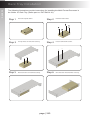
Rack Tray Installation......................................................................................... 240
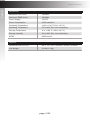
Specifications..................................................................................................... 241
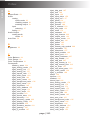
Index.................................................................................................................. 243
ix
Multi-Format
Processor
1
Getting Started
Getting Started
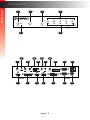
Introduction
Page Title
1
3
4
5
®
Int
Opt
Coax
L/R 1
L/R 2
HDMI
DisplayPort
DVI
VGA
Composite
Audio
Video
Multi-Format Processor
Input Select
IR
Power
2
EXT-MFP
USB
6
L
R
Optical
Coax
L/R 1
L/R 2
C 1 2 3 4 5
IR Ext
Audio In
Audio Out
Composite
In (5)
®
HDMI Out
Int
DVI Out
HDMI In (1)
Opt
Audio
DisplayPort In (2)
RS-232
Input Control
Coax
DVI In (3)
HDMI
L/R 1
VGA In (4)
DisplayPort
DVI
VGA
IP Control
L/R 2
12V DC
Composite
Video
9
12
7
EXT-MFP
10
USB
L
15
14
R
Multi-Format Processor
Input Select
IR
Power
Optical
Coax
18
17
L/R 1
20
21
23
RS-232
IP Control
L/R 2
C 1 2 3 4 5
IR Ext
Audio In
Audio Out
Composite
In (5)
Input Control
HDMI Out
DVI Out
HDMI In (1)
DisplayPort In (2)
DVI In (3)
VGA In (4)
12V DC
8
11
13
16
19
22
24
page | 2
Getting Started
Introduction
Page Title
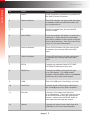
ID
Name
Description
1
Power
Press this button to power-on or power-off
the Multi-Format Processor.
2
Power Indicator
This LED indicator will glow solid red when
in standby mode and solid blue when the
unit is powered on.
3
IR
Receives signals from the included IR
remote control.
4
Input Select
Press and release this button to select the
video input. Audio inputs are selectable
and can be linked to video inputs using the
built-in Web interface. See Setup ► Audio
(page 90) for more information.
5
Audio Indicators
These LED indicator will glow solid green
to indicate the currently selected audio
input.
6
Video Indicators
These LED indicator will glow solid green
to indicate the currently selected video
input.
7
IR Ext
Connect an (optional Gefen EXT-RMTEXTIRN) IR extender to this port.
8
HDMI Out
Connect an HDMI cable from this port
to an HD display. The HDMI output
includes internal HDMI audio or embedded
audio from any of the audio inputs.
9
USB
This mini-USB port is for factory use only.
10
Audio Out
Connect a pair of RCA-type cables from
the L and R ports to an audio amplifier.
11
DVI Out
Connect a DVI cable from this port
to an HD display. This output can be used
as an HDMI output using an appropriate
adapter. When used as HDMI, audio is
also supported through this output.
12
Optical
Connect an optical audio cable from this
TOSLINK™ port to an audio amplifier.
page | 3
Getting Started
Introduction
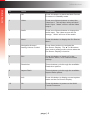
ID
Name
Description
13
HDMI In (1)
Connect an HDMI cable from an HD
source to this port. A DVI source can be
connected using an adapter.
14
Coax
Connect an RCA-type cable from the digital
output of the source to this port.
15
L/R 1
Connect a 3.5mm mini-stereo cable from
the audio output of the source to this port.
Use an adapter cable if the source has
RCA-type jacks.
16
DisplayPort In (2)
Connect a DisplayPort cable from the
source to this port.
17
L/R 2
Connect a 3.5mm mini-stereo cable from
the audio output of the source to this port.
Use an adapter cable if the source has
RCA-type jacks.
18
Composite (5)
Connect an RCA-type cable from the
Composite Video output of the source to
this port.
19
DVI In (3)
Connect a DVI cable from the source to
this port. An HDMI source (with audio) can
be connected using an adapter.
20
Input Control
Video inputs (with associated audio) can
be selected by connecting switches here.
See page Contact Control (page 75) for
details.
21
RS-232
Connect an RS-232 cable from this port to
an RS-232 control device.
22
VGA In (4)
Connect the included VGA cable from a
VGA source (e.g. computer) to this port.
Component video can also be connected
using an adaptor cable.
23
IP Control
Connect a CAT-5e cable (or better) from
this port to the network.
24
12V DC
Connect the included 12V DC power supply
to this power receptacle.
page | 4
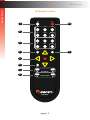
IR Remote Control
Off
On
2
3
10
Video
1
Audio
Getting Started
Introduction
HDMI
DP
DVI
VGA
Comp
Mask
Int
Optical
Coaxial
L/R 1
L/R 2
Mute
Menu
Vol +
Info
4
9
5
OK
6
Exit
7
8
Vol -
Resolution
Aspect Ratio
*Preferred
®
RMT-MFP
page | 5
Getting Started
Introduction
ID
Name
Description
1
Off
Press this button to place the Multi-Format
Processor in Standby mode.
2
Video
Press one of these buttons to select the
video input. This will also select a linked
Audio input. “Mask” will turn off the Video
output.
3
Audio
Press one of these buttons to change the
audio input. The video source will not
change. “Mute” will turn off the audio.
4
Menu
Press this button to display the On-Screen
Menu.
5
Navigation Arrows /
Analog Volume Control
Press these buttons to navigate the
On-Screen Display. The ▲ or ▼ buttons
also control analog audio volume when the
On-Screen Display is inactive.
6
Exit
Press this button to “back up” in the
On-Screen Menu, or to close the Menu
entirely.
7
Resolution
These buttons cycle through the available
Resolution options.
8
Aspect Ratio
These buttons cycle through the available
Aspect Ratio options.
9
Info
Press this button to display current system
status on the On-Screen Display.
10
On
Press this button to power-on the MultiFormat Processor.
page | 6
Introduction
Getting Started
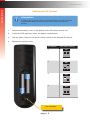
Installing the Batteries
Warning!
Risk of explosion if battery is replaced by an incorrect type. Dispose of used
batteries according to the instructions.
1.
Remove the battery cover on the bottom of the IR remote control unit.
2.
Make sure that the batteries are installed with the correct polarity, as shown in the
illustration, below. Always use two 1.5V AAA-type batteries.
3.
Replace the battery cover.
_
+
+
_
page | 7
Introduction
Getting Started
Setting the IR Channel
Information
In order for the IR remote control to function properly, both the IR remote
control and the Multi-Format Processor must be set to the same IR
channel.
1.
Remove the battery cover on the bottom of the IR remote control unit.
2.
Locate the DIP switches, below the battery compartment.
3.
Use the table, below, to set the IR remote control to the desired IR channel.
4.
Replace the battery cover.
IR channel
DIP switch setting
1
ON
1
2
ON
1
_
+
3
2
ON
1
4
+
2
2
ON
_
1
DIP switches
page | 8
2
Getting Started
Installation
Connection Instructions
►► Video Connections
1.
Use an appropriate cable to connect each video source to the corresponding video
input on the MFP. The HDMI, DisplayPort, and DVI inputs can include embedded
audio. The DVI input only supports audio from an HDMI source with the proper cable
and/or adapter). The VGA and Composite inputs require an external audio input.
2.
Connect an HDMI cable from the HDMI Out and/or DVI Out port(s) to HD display(s).
Both displays will show identical content, but may be used for a direct display and a
projector, for example.
►► Audio Connections
3.
Use appropriate cables to connect each audio source to the proper audio input on
the MFP. Audio inputs can be associated with a specific video input through system
configuration, but they can also be switched independently.
Information
Only the embedded audio from the currently selected digital video source, or
any independent audio source can be selected (e.g. You cannot display DP
video with HDMI audio, etc.).
4.
Connect the analog audio outputs to an audio amplifier and speakers, or you can use
the speakers in the display, if available, over the existing HDMI connection.
►► Control Options
5.
Connect the IP Control port to the LAN with a network cable. The connected LAN
should be available to the participants that will be controlling the presentations.
6.
If desired, connect the RS-232 input to an external RS-232 controller or automation
system.
7.
If desired, connect dry-contact pushbuttons to the Input Control terminals
8.
If desired, connect an IR Extender (Gefen part no. EXT-RMT-EXTIRN) to the IR Ext
port to allow use of the included IR remote if the IR “eye” on the front of the MFP
is not within range of the remote.
►► Power
9.
Connect the included power supply to the 12V DC power receptacle and connect
the power cord to an available electrical outlet.
page | 9
HDMI Source
Automation
Control Device
with trigger relays
Composite Video
Source
DisplayPort
Source
Automation
Control Device
with
RS-232 Serial Port
DVI
Source
VGA
Source
Local Area
Network
Stereo
Integrated
Amplifier
with RCA
inputs
EXT-MFP
Multi-Format Processor
HDMI CABLE
DISPLAYPORT CABLE
DVI CABLE
VGA CABLE
COMPOSITE VIDEO CABLE
HD Display
or Projector
with
DVI input
EXT-MFP
TOSLINK® OPTICAL CABLE
S/PDIF COAXIAL CABLE
3.5mm L/R ANALOG AUDIO CABLE
RCA L/R ANALOG AUDIO CABLE
TRIGGER CABLE
DB-9 CABLE
CAT-5 CABLE
IR
HD Display
or Projector
with
HDMI input
EXT-RMT-EXTIRN
IR Extender
Automation
Control Device
with IP port
Getting Started
Installation
Sample Wiring Diagram
page | 10
Multi-Format
Processor
2
Basic Operation
Basic Operation
Front-Panel Controls
Powering the Multi-Format Processor
1.
Make sure the included 12V DC power supply is connected from the Multi-Format
Processor to an available electrical outlet.
2.
Press and release the Power button on the front panel.
3.
The power indicator will glow solid blue.
Power button
®
Int
Opt
Coax
L/R 1
L/R 2
HDMI
DisplayPort
DVI
VGA
Composite
Audio
Video
Multi-Format Processor
Input Select
IR
Power
Power indicator
4.
ToEXT-MFP
power-off the Multi Format Processor, press and release the Power button.
5.
The power indicator will turn red.
USB
L
R
Optical
Coax
L/R 1
L/R 2
C 1 2 3 4 5
IR Ext
HDMI Out
Audio Out
DVI Out
HDMI In (1)
Audio In
Composite
In (5)
DisplayPort In (2)
Input Control
DVI In (3)
RS-232
VGA In (4)
IP Control
12V DC
Information
The Multi-Format Processor can also be turned on and off with the IR Remote
Control, the Web GUI, or by an external controller using either RS-232 or IP
Telnet control.
page | 14
Basic Operation
Front-Panel Controls
Selecting a Video Input
The Multi-Format Processor allows you to switch between five simultaneous connections.
By default, the HDMI port is active. The Multi-Format Processor will cycle through each of
the following inputs, in order: HDMI, DisplayPort, DVI, VGA, and Composite.
1.
Press and release the Input Select button to cycle through each of the available
inputs.
2.
The input indicator will glow solid green to denote the active input. For example, in the
illustration below, the DisplayPort input indicator is illuminated.
Input Select button
®
Int
Opt
Coax
L/R 1
L/R 2
HDMI
DisplayPort
DVI
VGA
Composite
Audio
Video
Multi-Format Processor
Input Select
IR
Power
Video Input indicators
Active input indicator
3.
EXT-MFP
Press
and release the Input Select button to advance to the next input (DVI).
The input indicators will always be selected from left to right.
4.
Continue with this process until the desired input is selected.
5.
Once the Composite input is selected, pressing the Input Select button again will
select the HDMI input.
USB
L
R
Optical
Coax
L/R 1
L/R 2
C 1 2 3 4 5
IR Ext
Audio In
Audio Out
HDMI Out
DVI Out
HDMI In (1)
Composite
In (5)
DisplayPort In (2)
Input Control
DVI In (3)
RS-232
VGA In (4)
IP Control
12V DC
Information
The Video Input Selection can also be changed with the IR Remote Control,
the Web GUI, or by an external controller using either RS-232 or IP Telnet
control, or via the Contact Closure Inputs on the back panel.
Selecting an Audio Input
Audio inputs must be selected and/or paired with video inputs using the built-in Web
interface. See Setup ► Audio (page 90) for more information.
page | 15
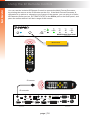
You can use the included IR Remote Control to operate the Multi-Format Processor,
by pointing the remote at the IR Window on the unit. If the Multi-Format Processor is
concealed in a cabinet or otherwise out of range of the remote, you can plug in a Gefen
IR Extender (Gefen part no. EXT-RMT-EXTIR) to the IR Ext port on the back panel, and
place the sensor where it will be in range of the remote.
®
Int
Opt
Coax
L/R 1
L/R 2
HDMI
DisplayPort
DVI
VGA
Composite
Audio
Video
Multi-Format Processor
Input Select
IR
Power
IR window
Off
EXT-MFP
IR Ext
On
HDMI
L
Video
USB
DP
DVI
R
Optical
VGA
Comp
Mask
Int
Optical
Coaxial
Coax
Audio
L/R 2
C 1 2 3 4 5
Audio In
Audio Out
HDMI Out
L/R 1
L/R 1
L/R 2
Mute
Menu
Vol +
Info
DVI Out
HDMI In (1)
Composite
In (5)
RS-232
Input Control
DVI In (3)
DisplayPort In (2)
IP Control
VGA In (4)
12V DC
OK
Exit
Vol -
Resolution
Aspect Ratio
*Preferred
®
RMT-MFP
®
Int
Opt
Coax
L/R 1
L/R 2
HDMI
DisplayPort
DVI
VGA
Composite
Audio
Video
®
RMT-MFP
Resolution
Aspect Ratio
OK
Vol -
Mute
Info
Vol +
L/R 2
L/R 1
Menu
Int
Mask
Coaxial
Comp
Optical
VGA
On
DVI
DP
Off
HDMI
*Preferred
Multi-Format Processor
Exit
IR sensor
Input Select
IR
Power
Audio
Video
Basic Operation
Using the IR Remote Control
IR extender
EXT-MFP
USB
L
R
Optical
Coax
L/R 1
L/R 2
C 1 2 3 4 5
IR Ext
HDMI Out
Audio In
Audio Out
DVI Out
HDMI In (1)
Composite
In (5)
DisplayPort In (2)
page | 16
Input Control
DVI In (3)
RS-232
VGA In (4)
IP Control
12V DC
Accessing the Menu System
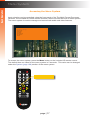
Input selection can be controlled using the front panel of the The Multi-Format Processor.
However, the included IR remote control must be used to access the built-in menu system.
The menu system is used to manage and control both audio and video features.
Output Setup
Picture
Adjust
Audio
Network
System
Exit
To access the menu system, press the Menu button on the included IR remote control.
The default time-out value for the menu system is 5 seconds. This value can be changed
under the System (page 108) section of the menu system.
Off
Video
HDMI
Audio
Basic Operation
Menu System
On
DP
DVI
VGA
Comp
Mask
Int
Optical
Coaxial
L/R 1
L/R 2
Mute
Menu
Vol +
Info
Menu button
OK
Exit
Vol -
Resolution
Aspect Ratio
*Preferred
®
RMT-MFP
page | 17
Menu System
Basic Operation
Setting the Output Resolution
Important
Before changing this setting, make sure that the connected display can
support the selected output resolution.
Off
HDMI
DP
DVI
VGA
Comp
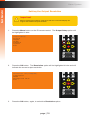
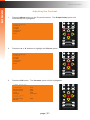
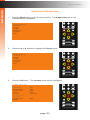
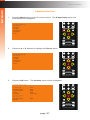
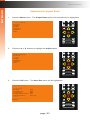
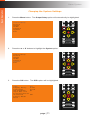
Press the Menu button on the IR remote control. The Output Setup
optionMaskwill
be highlighted in blue.
Video
1.
On
Audio
Output Setup
Picture
Adjust
Audio
Network
System
Exit
Int
Optical
Coaxial
L/R 1
L/R 2
Mute
Menu
Vol +
Info
OK
Exit
Vol -
Resolution
Aspect Ratio
Off
HDMI
DP
DVI
*Preferred
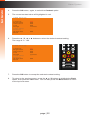
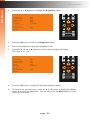
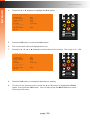
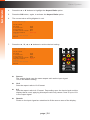
Press the OK button. The Resolution option will be highlighted in blue and ®will
VGA
Comp
Mask
indicate the current output resolution.
RMT-MFP
Video
2.
On
Audio
Resolution HD( 1080p60 )
Colorspace
Mode
Background Blue
Exit
Int
Optical
Coaxial
L/R 1
L/R 2
Mute
Menu
Vol +
Info
OK
Exit
Vol -
Resolution
Aspect Ratio
3.
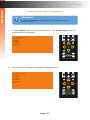
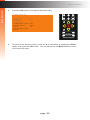
Press the OK button, again, to select the Resolution option.
*Preferred
®
RMT-MFP
page | 18
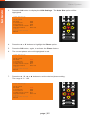
4.
The current output resolution will be highlighted in red.
Resolution HD( 1080p60 )
Colorspace
Mode
Background Blue
Exit
5.
Video
Off
On
HDMI
DP
DVI
VGA
Comp
Mask
Int
Optical
Coaxial
L/R 1
L/R 2
Mute
Menu
Vol +
Info
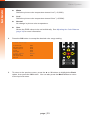
Press the ▲, ▼, ◄, or ► buttons to select the desired output resolution.
Audio
Resolution HD( 720p60 )
Colorspace
Mode
Background Blue
Exit
OK
Exit
Vol -
Resolution
For a complete listing of available output resolutions,
see the #set_output_res command.
6.
Aspect Ratio
*Preferred
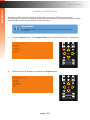
Press the OK button to accept the selected output resolution.
Off
On
®
RMT-MFP
7.
The display will flash when the output resolution is changed.
8.
VGA will
Comp
Mask
Once the resolution has changed, the following display notification
be displayed
momentarily (the resolution information will vary depending on your selection).
DP
DVI
Video
HDMI
IN
: HDMI
1280 x 720 / 60
O U T: 7 2 0 p 6 0
Audio
Basic Operation
Menu System
The timeout value for the display notification can
be changed under the Display Notify (page 72)
section of the menu system.
Int
Optical
Coaxial
L/R 1
L/R 2
Mute
Menu
Vol +
Info
OK
Exit
Vol -
Resolution
Note that the output resolution can also be changed
by pressing the ◄ or ► Resolution buttons.
Aspect Ratio
*Preferred
page | 19
®
RMT-MFP
Menu System
Off
On
Video
1.
Press the Info button on the IR remote control.
Audio
Basic Operation
HDMI
DP
DVI
VGA
Comp
Mask
Int
Optical
Coaxial
L/R 1
L/R 2
Mute
Menu
Vol +
Info
Displaying the Input / Output Resolution
OK
Exit
Vol -
Resolution
Aspect Ratio
2.
The Display Notify will be displayed .
*Preferred
®
RMT-MFP
IN
: HDMI
1280 x 720 / 60
O U T: 7 2 0 p 6 0
3.
The Display Info window will automatically disappear after the timeout period has
expired. You can also press the Info button again to dismiss the Display Info window
before the timeout period.
To set the timeout period, see Display Notify (page 72).
page | 20
Adjusting the Contrast
Off
HDMI
DP
DVI
Press the Menu button on the IR remote control. The Output Setup option will
VGA
Comp
Mask
automatically be highlighted.
Audio
Output Setup
Picture
Adjust
Audio
Network
System
Exit
Int
Optical
Coaxial
L/R 1
L/R 2
Mute
Menu
Vol +
Info
OK
Press the ▲ or ▼ buttons to highlight the Picture option.
Audio
Output Setup
Picture
Adjust
Audio
Network
System
Exit
Video
Exit
2.
On
Video
1.
Vol -
Off
Resolution
On
HDMI
Aspect
Ratio
DP
DVI
VGA
Comp
Mask
Int
Optical
L/R 1
Coaxial
*Preferred
®
L/R 2
Mute
RMT-MFP
Menu
Vol +
Info
OK
Exit
Vol -
Resolution
Off
On
3.
Video
Aspect Ratio
Press the OK button. The Contrast option will be highlighted.
HDMI
DP
VGA
Comp
DVI
Mask
*Preferred
Int
HDMI Settings
Optical
Coaxial
®
Audio
Basic Operation
Menu System
C o n t r a s t 050
Brightness050
Saturation050
H u e 050
R a n g e Limited
C o l o r Te m p --Balance
Sharpness000
Back
L/R 1
Menu
RMT-MFP
L/R 2
Mute
Vol +
Info
OK
Exit
Vol -
Resolution
Aspect Ratio
page | 21
*Preferred
®
RMT-MFP
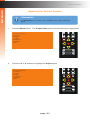
4.
Press the OK button, again, to select the Contrast option.
5.
The current contrast value will highlighted in red.
HDMI Settings
C o n t r a s t 050
Brightness050
Saturation050
H u e 050
R a n g e Limited
C o l o r Te m p --Balance
Sharpness000
Back
Off
HDMI
On
DP
DVI
Press the ▲, ▼, ◄, or ► buttons to select the desired contrast setting.
VGA
Comp
The range is: 0 - 100.
Video
6.
HDMI Settings
Audio
Basic Operation
Menu System
C o n t r a s t 067
Brightness050
Saturation050
H u e 050
R a n g e Limited
C o l o r Te m p --Balance
Sharpness000
Back
Mask
Int
Optical
Coaxial
L/R 1
L/R 2
Mute
Menu
Vol +
Info
OK
Exit
Vol -
Resolution
Aspect Ratio
7.
Press the OK button to accept the selected contrast setting.
8.
RMT-MFP
To return to the previous menu, press the ▲ or ▼ buttons to highlight
the Back
option, then press the OK button. You can also press the Menu button to return
to the top-level menu.
*Preferred
®
page | 22
Adjusting the Brightness
Off
HDMI
DP
DVI
Press the Menu button on the IR remote control. The Output Setup option will
VGA
Comp
Mask
automatically be highlighted.
Audio
Output Setup
Picture
Adjust
Audio
Network
System
Exit
Int
Optical
Coaxial
L/R 1
L/R 2
Mute
Menu
Vol +
Info
OK
Press the ▲ or ▼ buttons to highlight the Picture option.
Audio
Output Setup
Picture
Adjust
Audio
Network
System
Exit
Video
Exit
2.
On
Video
1.
Vol -
Off
Resolution
On
HDMI
Aspect
Ratio
DP
DVI
VGA
Comp
Mask
Int
Optical
L/R 1
Coaxial
*Preferred
®
L/R 2
Mute
RMT-MFP
Menu
Vol +
Info
OK
Exit
Vol -
Resolution
Off
On
3.
Video
Aspect Ratio
Press the OK button. The Contrast option will be highlighted.
HDMI
DP
VGA
Comp
DVI
Mask
*Preferred
Int
HDMI Settings
Optical
Coaxial
®
Audio
Basic Operation
Menu System
C o n t r a s t 067
Brightness050
Saturation050
H u e 050
R a n g e Limited
C o l o r Te m p --Balance
Sharpness000
Back
L/R 1
Menu
RMT-MFP
L/R 2
Mute
Vol +
Info
OK
Exit
Vol -
Resolution
Aspect Ratio
page | 23
*Preferred
®
RMT-MFP
Off
On
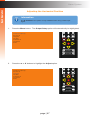
Press the ▲ or ▼ buttons to highlight the Brightness option.
Audio
HDMI Settings
Video
4.
C o n t r a s t 067
Brightness050
Saturation050
H u e 050
R a n g e Limited
C o l o r Te m p --Balance
Sharpness000
Back
HDMI
DP
DVI
VGA
Comp
Mask
Int
Optical
Coaxial
L/R 1
L/R 2
Mute
Menu
Vol +
Info
OK
Exit
Vol -
Resolution
Aspect Ratio
5.
Press the OK button to select the Brightness option.
*Preferred
Off
6.
The current brightness value will highlighted in red.
HDMI
®
DP
DVI
Press the ▲, ▼, ◄, or ► buttons to set the desired brightness setting.
VGA
Comp
The range is: 0 - 100.
Video
7.
On
RMT-MFP
HDMI Settings
Audio
Basic Operation
Menu System
C o n t r a s t 067
Brightness
055
Saturation050
H u e 050
R a n g e Limited
C o l o r Te m p --Balance
Sharpness000
Back
Mask
Int
Optical
Coaxial
L/R 1
L/R 2
Mute
Menu
Vol +
Info
OK
Exit
Vol -
Resolution
Aspect Ratio
8.
Press the OK button to accept the desired brightness setting.
9.
RMT-MFP
To return to the previous menu, press the ▲ or ▼ buttons to highlight
the Back
option, then press the OK button. You can also press the Menu button to return
to the top-level menu.
*Preferred
®
page | 24
Adjusting the Saturation
Off
HDMI
DP
DVI
Press the Menu button on the IR remote control. The Output Setup option will
VGA
Comp
Mask
automatically be highlighted.
Audio
Output Setup
Picture
Adjust
Audio
Network
System
Exit
Int
Optical
Coaxial
L/R 1
L/R 2
Mute
Menu
Vol +
Info
OK
Press the ▲ or ▼ buttons to highlight the Picture option.
Audio
Output Setup
Picture
Adjust
Audio
Network
System
Exit
Video
Exit
2.
On
Video
1.
Vol -
Off
Resolution
On
HDMI
Aspect
Ratio
DP
DVI
VGA
Comp
Mask
Int
Optical
L/R 1
Coaxial
*Preferred
®
L/R 2
Mute
RMT-MFP
Menu
Vol +
Info
OK
Exit
Vol -
Resolution
Off
On
3.
Video
Aspect Ratio
Press the OK button. The Contrast option will be highlighted.
HDMI
DP
VGA
Comp
DVI
Mask
*Preferred
Int
HDMI Settings
Optical
Coaxial
®
Audio
Basic Operation
Menu System
C o n t r a s t 067
Brightness055
Saturation050
H u e 050
R a n g e Limited
C o l o r Te m p --Balance
Sharpness000
Back
L/R 1
Menu
RMT-MFP
L/R 2
Mute
Vol +
Info
OK
Exit
Vol -
Resolution
Aspect Ratio
page | 25
*Preferred
®
RMT-MFP
Off
On
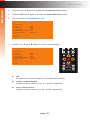
Press the ▲ or ▼ buttons to highlight the Saturation option.
Audio
HDMI Settings
Video
4.
C o n t r a s t 067
Brightness055
Saturation050
H u e 050
R a n g e Limited
C o l o r Te m p --Balance
Sharpness000
Back
HDMI
DP
DVI
VGA
Comp
Mask
Int
Optical
Coaxial
L/R 1
L/R 2
Mute
Menu
Vol +
Info
OK
Exit
Vol -
Resolution
Aspect Ratio
5.
Press the OK button to select the Saturation option.
*Preferred
On
Off
®
6.
The current saturation value will highlighted in red.
7.
Press the ▲, ▼, ◄, or ► buttons to set the desired saturation setting.
VGA
Comp
The range is: 0 - 100.
RMT-MFP
DP
DVI
Video
HDMI
HDMI Settings
Audio
Basic Operation
Menu System
C o n t r a s t 067
Brightness055
Saturation
048
H u e 050
R a n g e Limited
C o l o r Te m p --Balance
Sharpness000
Back
Mask
Int
Optical
Coaxial
L/R 1
L/R 2
Mute
Menu
Vol +
Info
OK
Exit
Vol -
Resolution
Aspect Ratio
8.
Press the OK button to accept the desired saturation setting.
9.
®
To return to the previous menu, press the ▲ or ▼ buttons to highlight the Back
RMT-MFP
option, then press the OK button. You can also press the Menu button
to return
to the top-level menu.
page | 26
*Preferred
Adjusting the Hue
Off
HDMI
DP
DVI
Press the Menu button on the IR remote control. The Output Setup option will
VGA
Comp
Mask
automatically be highlighted.
Audio
Output Setup
Picture
Adjust
Audio
Network
System
Exit
Int
Optical
Coaxial
L/R 1
L/R 2
Mute
Menu
Vol +
Info
OK
Press the ▲ or ▼ buttons to highlight the Picture option.
Audio
Output Setup
Picture
Adjust
Audio
Network
System
Exit
Video
Exit
2.
On
Video
1.
Vol -
Off
Resolution
On
HDMI
Aspect
Ratio
DP
DVI
VGA
Comp
Mask
Int
Optical
L/R 1
Coaxial
*Preferred
®
L/R 2
Mute
RMT-MFP
Menu
Vol +
Info
OK
Exit
Vol -
Resolution
Off
On
3.
Video
Aspect Ratio
Press the OK button. The Contrast option will be highlighted.
HDMI
DP
VGA
Comp
DVI
Mask
*Preferred
Int
HDMI Settings
Optical
Coaxial
®
Audio
Basic Operation
Menu System
C o n t r a s t 067
Brightness055
Saturation048
H u e 050
R a n g e Limited
C o l o r Te m p --Balance
Sharpness000
Back
L/R 1
Menu
RMT-MFP
L/R 2
Mute
Vol +
Info
OK
Exit
Vol -
Resolution
Aspect Ratio
page | 27
*Preferred
®
RMT-MFP
Off
On
Press the ▲ or ▼ buttons to highlight the Hue option.
Audio
HDMI Settings
Video
4.
C o n t r a s t 067
Brightness055
Saturation048
H u e 050
R a n g e Limited
C o l o r Te m p --Balance
Sharpness000
Back
HDMI
DP
DVI
VGA
Comp
Mask
Int
Optical
Coaxial
L/R 1
L/R 2
Mute
Menu
Vol +
Info
OK
Exit
Vol -
Resolution
Aspect Ratio
5.
Press the OK button to select the Hue option.
6.
The current hue value will highlighted in red.
7.
Press the ▲, ▼, ◄, or ► buttons to set the desired hue setting. The range is: 0 - 100.
Off
HDMI
Video
HDMI Settings
C o n t r a s t 067
Brightness055
Saturation048
H u e 052
R a n g e Limited
C o l o r Te m p --Balance
Sharpness000
Back
On
*Preferred
Audio
Basic Operation
Menu System
DVI
®
DP
RMT-MFP
VGA
Comp
Mask
Int
Optical
Coaxial
L/R 1
L/R 2
Mute
Menu
Vol +
Info
OK
Exit
Vol -
Resolution
Aspect Ratio
8.
Press the OK button to accept the desired hue setting.
9.
®
To return to the previous menu, press the ▲ or ▼ buttons to highlight the Back
RMT-MFP
option, then press the OK button. You can also press the Menu button to return
to the top-level menu.
page | 28
*Preferred
Adjusting the Color Range
Off
HDMI
DP
DVI
Press the Menu button on the IR remote control. The Output Setup option will
VGA
Comp
Mask
automatically be highlighted.
Audio
Output Setup
Picture
Adjust
Audio
Network
System
Exit
Int
Optical
Coaxial
L/R 1
L/R 2
Mute
Menu
Vol +
Info
OK
Press the ▲ or ▼ buttons to highlight the Picture option.
Audio
Output Setup
Picture
Adjust
Audio
Network
System
Exit
Video
Exit
2.
On
Video
1.
Vol -
Off
Resolution
On
HDMI
Aspect
Ratio
DP
DVI
VGA
Comp
Mask
Int
Optical
L/R 1
Coaxial
*Preferred
®
L/R 2
Mute
RMT-MFP
Menu
Vol +
Info
OK
Exit
Vol -
Resolution
Off
On
3.
Video
Aspect Ratio
Press the OK button. The Contrast option will be highlighted.
HDMI
DP
VGA
Comp
DVI
Mask
*Preferred
Int
HDMI Settings
Optical
Coaxial
®
Audio
Basic Operation
Menu System
C o n t r a s t 067
Brightness055
Saturation048
H u e 052
R a n g e Limited
C o l o r Te m p --Balance
Sharpness000
Back
L/R 1
Menu
RMT-MFP
L/R 2
Mute
Vol +
Info
OK
Exit
Vol -
Resolution
Aspect Ratio
page | 29
*Preferred
®
RMT-MFP
Off
On
Press the ▲ or ▼ buttons to highlight the Range option.
Audio
HDMI Settings
Video
4.
C o n t r a s t 067
Brightness055
Saturation048
H u e 052
R a n g e Limited
C o l o r Te m p --Balance
Sharpness000
Back
HDMI
DP
DVI
VGA
Comp
Mask
Int
Optical
Coaxial
L/R 1
L/R 2
Mute
Menu
Vol +
Info
OK
Exit
Vol -
Resolution
Aspect Ratio
5.
Press the OK button to select the Range option.
6.
The current color range setting will highlighted in red.
7.
Press the ▲, ▼, ◄, or ► buttons to switch between Limited or Full.
Off
HDMI
Video
HDMI Settings
On
*Preferred
Audio
Basic Operation
Menu System
C o n t r a s t 067
Brightness055
Saturation048
H u e 052
R a n g e Full
C o l o r Te m p --Balance
Sharpness000
Back
DVI
®
DP
RMT-MFP
VGA
Comp
Mask
Int
Optical
Coaxial
L/R 1
L/R 2
Mute
Menu
Vol +
Info
OK
Exit
Vol -
Resolution
Aspect Ratio
8.
Press the OK button to accept the desired color range setting.
9.
®
To return to the previous menu, press the ▲ or ▼ buttons to highlight the Back
RMT-MFP
option, then press the OK button. You can also press the Menu button to return
to the top-level menu.
page | 30
*Preferred
Menu System
Basic Operation
Adjusting the Color Temperature
Information
The Color Temperature menu option is only available when using
a VGA input signal.
Off
HDMI
DP
DVI
Press the Menu button on the IR remote control. The Output Setup
optionMaskwill
VGA
Comp
automatically be highlighted.
Video
1.
On
Audio
Output Setup
Picture
Adjust
Audio
Network
System
Exit
Int
Optical
Coaxial
L/R 1
L/R 2
Mute
Menu
Vol +
Info
OK
Exit
Vol -
Resolution
Aspect Ratio
Off
Press the ▲ or ▼ buttons to highlight the Picture option.
Output Setup
Picture
Adjust
Audio
Network
System
Exit
VGA
DP
DVI
*Preferred
®
Comp
Mask
RMT-MFP
Audio
2.
Video
HDMI
On
Int
Optical
Coaxial
L/R 1
L/R 2
Mute
Menu
Vol +
Info
OK
Exit
Vol -
Resolution
Aspect Ratio
*Preferred
®
RMT-MFP
page | 31
Off
On
Video
3.
Press the OK button. The Contrast option will be highlighted.
Audio
HDMI Settings
C o n t r a s t 067
Brightness055
Saturation048
H u e 052
R a n g e Full
C o l o r Te m p Neutral
Balance
Sharpness000
Back
HDMI
DP
DVI
VGA
Comp
Mask
Int
Optical
Coaxial
L/R 1
L/R 2
Mute
Menu
Vol +
Info
OK
Exit
Vol -
Resolution
4.
Press the ▲ or ▼ buttons to highlight the Color Temp option.
Video
Off
HDMI
DP
VGA
Comp
Int
Audio
HDMI Settings
Aspect Ratio
On
DVI
Mask
*Preferred
C o n t r a s t 067
Brightness055
Saturation048
H u e 052
R a n g e Full
C o l o r Te m p Neutral
Balance
Sharpness000
Back
Optical
Coaxial
®
RMT-MFP
L/R 1
L/R 2
Mute
Menu
Vol +
Info
OK
Exit
Vol -
Resolution
Aspect Ratio
5.
Press the OK button to select the Color Temp option.
6.
The current color temperature setting will highlighted in red.
7.
Press the ▲, ▼, ◄, or ► buttons to switch between Neutral, Warm, Cool, and User.
Off
HDMI
Video
HDMI Settings
C o n t r a s t 067
Brightness055
Saturation048
H u e 052
R a n g e Full
C o l o r Te m p Neutral
Balance
Sharpness000
Back
On
*Preferred
Audio
Basic Operation
Menu System
DP
DVI
®
RMT-MFP
VGA
Comp
Mask
Int
Optical
Coaxial
L/R 1
L/R 2
Mute
Menu
Vol +
Info
OK
Exit
Vol -
Resolution
Aspect Ratio
page | 32
*Preferred
®
RMT-MFP
Menu System
Basic Operation
►► Warm
Shifts the picture color temperature toward “red” (~3,000K).
►► Cool
Shifts the picture color temperature toward “blue” (~8,000K).
►► Neutral
No change in picture color temperature.
8.
Video
►► User
Allows the RGB values to be set individually. See Adjusting the Color Balance
Off
On
(page 34) for more information.
Press the OK button to accept the desired color range setting.
Audio
HDMI Settings
C o n t r a s t 067
Brightness055
Saturation048
H u e 052
R a n g e Full
C o l o r Te m p Warm
Balance
Sharpness000
Back
HDMI
DP
DVI
VGA
Comp
Mask
Int
Optical
Coaxial
L/R 1
L/R 2
Mute
Menu
Vol +
Info
OK
Exit
Vol -
Resolution
Aspect Ratio
9.
To return to the previous menu, press the ▲ or ▼ buttons to highlight the Back
®
option, then press the OK button. You can also press the Menu button to return
RMT-MFP
to the top-level menu.
*Preferred
page | 33
Menu System
Basic Operation
Adjusting the Color Balance
Information
This menu option is only available if the Color Temperature is set to User.
See Adjusting the Color Temperature (page 31) for more information.
Off
HDMI
DP
DVI
Press the Menu button on the IR remote control. The Output Setup
optionMaskwill
VGA
Comp
automatically be highlighted.
Video
1.
On
Audio
Output Setup
Picture
Adjust
Audio
Network
System
Exit
Int
Optical
Coaxial
L/R 1
L/R 2
Mute
Menu
Vol +
Info
OK
Exit
Vol -
Resolution
Aspect Ratio
Off
Press the ▲ or ▼ buttons to highlight the Picture option.
Output Setup
Picture
Adjust
Audio
Network
System
Exit
VGA
DP
DVI
*Preferred
®
Comp
Mask
RMT-MFP
Audio
2.
Video
HDMI
On
Int
Optical
Coaxial
L/R 1
L/R 2
Mute
Menu
Vol +
Info
OK
Exit
Vol -
Resolution
Aspect Ratio
*Preferred
®
RMT-MFP
page | 34
3.
Press the OK button. The Contrast option will be highlighted.
4.
Press the ▲ or ▼ buttons to highlight the Color Temp option.
5.
Off
On
Set the Color Temp option to User. See Adjusting the Color Temperature
(page
31) for more information.
6.
After setting the Color Temp option, return to this menu and press the ▲ or ▼ buttons
VGA
Comp
Mask
to highlight the Balance option.
DP
DVI
Video
HDMI
Audio
HDMI Settings
C o n t r a s t 067
Brightness055
Saturation048
H u e 052
R a n g e Full
C o l o r Te m p Warm
Balance
Sharpness000
Back
Int
Optical
Coaxial
L/R 1
L/R 2
Mute
Menu
Vol +
Info
OK
Exit
Vol -
Off
On
Resolution
7.
Press the OK button to select the Balance option.
HDMI Settings
Video
HDMI
Audio
Basic Operation
Menu System
C o n t r a s t 067
Brightness055
Saturation048
H u e 052
R a n g e Full
C o l o r Te m p Neutral
Balance
Sharpness000
Back
DP
DVI
VGA
Comp
Mask
Int
Optical
Aspect Ratio
Coaxial
*Preferred
L/R 1
L/R 2
Mute
®
RMT-MFP
Menu
Vol +
Info
OK
Exit
Vol -
Resolution
Aspect Ratio
8.
The current Balance screen will be displayed. Each color channel value is
displayed.
*Preferred
The Red option will be highlighted.
®
RMT-MFP
R e d G r e e n B l u e Back
050
050
050
page | 35
9.
Press the ▲ or ▼ buttons to highlight the color channel to be changed.
Off
On
10. Press the OK button to select the highlighted color channel. Once selected,
the current value will be highlighted in red. In this example, we have
selected
VGA
Comp
Mask
the Green channel.
HDMI
DP
DVI
Int
Optical
Coaxial
L/R 1
L/R 2
Mute
Menu
Vol +
Info
Video
Audio
R e d G r e e n B l u e Back
050
050
050
OK
Exit
Vol -
Resolution
Aspect Ratio
Off
HDMI
On
DP
DVI
*Preferred
Video
11. Press the ▲, ▼, ◄, or ► buttons to set the desired value for the color channel.
®
VGA
Comp
Mask
The range for each color channel is: 0 - 100.
RMT-MFP
R e d G r e e n B l u e Back
050
052
050
Audio
Basic Operation
Menu System
Int
Optical
Coaxial
L/R 1
L/R 2
Mute
Menu
Vol +
Info
OK
Exit
Vol -
Resolution
Aspect Ratio
12. Press the OK button to accept the desired color channel setting.
13. Repeat steps 9 - 11 for each color channel, as desired.
*Preferred
®
RMT-MFP
14. To return to the previous menu, press the ▲ or ▼ buttons to highlight the Back
option, then press the OK button. You can also press the Menu button to return
to the top-level menu.
page | 36
Adjusting the Sharpness
Off
HDMI
DP
DVI
Press the Menu button on the IR remote control. The Output Setup option will
VGA
Comp
Mask
automatically be highlighted.
Audio
Output Setup
Picture
Adjust
Audio
Network
System
Exit
Int
Optical
Coaxial
L/R 1
L/R 2
Mute
Menu
Vol +
Info
OK
Press the ▲ or ▼ buttons to highlight the Picture option.
Audio
Output Setup
Picture
Adjust
Audio
Network
System
Exit
Video
Exit
2.
On
Video
1.
Vol -
Off
Resolution
On
HDMI
Aspect
Ratio
DP
DVI
VGA
Comp
Mask
Int
Optical
L/R 1
Coaxial
*Preferred
®
L/R 2
Mute
RMT-MFP
Menu
Vol +
Info
OK
Exit
Vol -
Resolution
Off
On
3.
Video
Aspect Ratio
Press the OK button. The Contrast option will be highlighted.
HDMI
DP
VGA
Comp
DVI
Mask
*Preferred
Int
Optical
Coaxial
®
HDMI Settings
Audio
Basic Operation
Menu System
C o n t r a s t 067
Brightness055
Saturation048
H u e 052
R a n g e Full
C o l o r Te m p Neutral
Balance
Sharpness000
Back
L/R 1
Menu
RMT-MFP
L/R 2
Mute
Vol +
Info
OK
Exit
Vol -
Resolution
Aspect Ratio
page | 37
*Preferred
®
RMT-MFP
Off
On
Press the ▲ or ▼ buttons to highlight the Sharpness option.
Audio
HDMI Settings
Video
4.
C o n t r a s t 067
Brightness055
Saturation048
H u e 052
R a n g e Full
C o l o r Te m p User
Balance
Sharpness000
Back
HDMI
DP
DVI
VGA
Comp
Mask
Int
Optical
Coaxial
L/R 1
L/R 2
Mute
Menu
Vol +
Info
OK
Exit
Vol -
Resolution
Aspect Ratio
5.
Press the OK button to select the Sharpness option.
6.
The current sharpness setting will highlighted in red.
7.
Press the ▲, ▼, ◄, or ► buttons to set the sharpness setting. The range is: 0 - 100.
Off
HDMI
Video
HDMI Settings
C o n t r a s t 067
Brightness055
Saturation048
H u e 052
R a n g e Full
C o l o r Te m p User
Balance
Sharpness
025
Back
On
*Preferred
Audio
Basic Operation
Menu System
DVI
®
DP
RMT-MFP
VGA
Comp
Mask
Int
Optical
Coaxial
L/R 1
L/R 2
Mute
Menu
Vol +
Info
OK
Exit
Vol -
Resolution
Aspect Ratio
8.
Press the OK button to accept the desired sharpness setting.
9.
®
To return to the previous menu, press the ▲ or ▼ buttons to highlight the Back
RMT-MFP
option, then press the OK button. You can also press the Menu button to return
to the top-level menu.
page | 38
*Preferred
Using Auto Size
The Auto Size feature automatically adjusts the clock and phase of the incoming VGA
signal. If the alignment of the picture is incorrect then use this feature to correct it.
Information
The Autosize menu option is only available when using a VGA input
signal.
Off
HDMI
On
DP
DVI
Press the Menu button on the IR remote control. The Output Setup
optionMaskwill
VGA
Comp
automatically be highlighted.
Video
1.
Audio
Output Setup
Picture
Adjust
Audio
Network
System
Exit
Int
Optical
Coaxial
L/R 1
L/R 2
Mute
Menu
Vol +
Info
OK
Exit
Vol -
Resolution
2.
Press the ▲ or ▼ buttons to highlight the Adjust option.
Output Setup
Picture
Adjust
Audio
Network
System
Exit
Video
Off
Aspect Ratio
On
HDMI
DP
DVI
VGA
Comp
Mask
*Preferred
Int
RMT-MFP
Optical
Coaxial
L/R 1
L/R 2
Mute
Menu
Vol +
Info
®
Audio
Basic Operation
Menu System
OK
Exit
Vol -
Resolution
Aspect Ratio
*Preferred
®
RMT-MFP
page | 39
Menu System
Press the OK button to display the VGA Settings.
4.
The Auto Size option will be highlighted.
VGA Settings
Auto Size
P h a s e V Position
H Position
Under/Over Scan
Aspect Ratio
HDCP
Send HPD Pulse
Back
Video
3.
Audio
Basic Operation
Off
050
050
050
Off
Source
On
HDMI
DP
DVI
VGA
Comp
Mask
Int
Optical
Coaxial
L/R 1
L/R 2
Mute
Menu
Vol +
Info
OK
--Exit
Vol -
Resolution
Aspect Ratio
5.
Press the OK button, again, to activate the Auto Size feature.
6.
The word “Executing” will be displayed, in red, next to the Auto Size feature.®
*Preferred
RMT-MFP
VGA Settings
Auto Size
P h a s e V Position
H Position
Under/Over Scan
Aspect Ratio
HDCP
Send HPD Pulse
Back
Executing
050
050
050
Off
Source
---
This process is instantaneous and once completed, the “Executing” message will
disappear.
7.
To return to the previous menu, press the ▲ or ▼ buttons to highlight the Back
option, then press the OK button. You can also press the Menu button to return
to the top-level menu.
page | 40
Menu System
Basic Operation
Adjusting the Phase
Information
The Phase menu option is only available when using a VGA input
signal. On
Off
1.
DP
DVI
Video
HDMI
VGA
Comp
Mask
Press the Menu button. The Output Setup option will automatically
be
highlighted.
Audio
Output Setup
Picture
Adjust
Audio
Network
System
Exit
Int
Optical
Coaxial
L/R 1
L/R 2
Mute
Menu
Vol +
Info
OK
Exit
Vol -
Resolution
Aspect Ratio
Off
HDMI
On
DP
DVI
Press the ▲ or ▼ buttons to highlight the Adjust option.
VGA
Comp
Mask
®
RMT-MFP
Output Setup
Picture
Adjust
Audio
Network
System
Exit
Audio
2.
Video
*Preferred
Int
Optical
Coaxial
L/R 1
L/R 2
Mute
Menu
Vol +
Info
OK
Exit
Vol -
Resolution
Aspect Ratio
*Preferred
®
RMT-MFP
page | 41
Off
On
DP
DVI
Video
Press the OK button to display the VGA Settings. The Auto Size
option
will
be
VGA
Comp
Mask
highlighted.
Auto Size
P h a s e V Position
H Position
Under/Over Scan
Aspect Ratio
HDCP
Send HPD Pulse
Back
Audio
VGA Settings
050
000
050
Off
Source
Int
Optical
Coaxial
L/R 1
L/R 2
Mute
Menu
Vol +
Info
OK
--Exit
Vol -
Resolution
Aspect Ratio
4.
Press the ▲ or ▼ buttons to highlight the Phase option.
5.
Press the OK button, again, to activate the Phase feature.
6.
The current phase value will highlighted in red.
*Preferred
®
RMT-MFP
VGA Settings
Auto Size
P h a s e V Position
H Position
Under/Over Scan
Aspect Ratio
HDCP
Send HPD Pulse
Back
050
000
050
Off
Source
--Off
HDMI
VGA Settings
Auto Size
P h a s e V Position
H Position
Under/Over Scan
Aspect Ratio
HDCP
Send HPD Pulse
Back
040
000
050
Off
Source
On
DP
DVI
Comp
Mask
Int
Optical
Coaxial
L/R 1
L/R 2
Mute
Menu
Vol +
Info
Press the ▲, ▼, ◄, or ► buttons to set the desired phase setting.
VGA
The range is: 0 - 100.
Video
7.
Audio
Basic Operation
HDMI
3.
Menu System
OK
--Exit
Vol -
Resolution
Aspect Ratio
*Preferred
page | 42
®
RMT-MFP
Press the OK button to accept the desired phase setting.
VGA Settings
Auto Size
P h a s e V Position
H Position
Under/Over Scan
Aspect Ratio
HDCP
Send HPD Pulse
Back
Video
8.
Audio
Basic Operation
Off
040
000
050
Off
Source
On
Menu System
HDMI
DP
DVI
VGA
Comp
Mask
Int
Optical
Coaxial
L/R 1
L/R 2
Mute
Menu
Vol +
Info
OK
--Exit
Vol -
Resolution
Aspect Ratio
9.
To return to the previous menu, press the ▲ or ▼ buttons to highlight the Back
®
option, then press the OK button. You can also press the Menu button to return
RMT-MFP
to the top-level menu.
*Preferred
page | 43
Menu System
Basic Operation
Adjusting the Vertical Position
Information
1.
Video
The V Position menu option is only available when using a VGA
input
Off
signal.
On
HDMI
DP
DVI
VGA
Comp
Mask
Int
Optical
Coaxial
L/R 1
L/R 2
Mute
Menu
Vol +
Info
Press the Menu button. The Output Setup option will automatically be highlighted.
Audio
Output Setup
Picture
Adjust
Audio
Network
System
Exit
OK
Exit
Vol -
Resolution
Aspect Ratio
Off
Press the ▲ or ▼ buttons to highlight the Adjust option.
Output Setup
Picture
Adjust
Audio
Network
System
Exit
VGA
DP
DVI
*Preferred
®
Mask
Comp
RMT-MFP
Audio
2.
Video
HDMI
On
Int
Optical
Coaxial
L/R 1
L/R 2
Mute
Menu
Vol +
Info
OK
Exit
Vol -
Resolution
Aspect Ratio
*Preferred
®
RMT-MFP
page | 44
Off
On
DP
DVI
Video
Press the OK button to display the VGA Settings. The Auto Size
option
will
be
VGA
Comp
Mask
highlighted.
Auto Size
P h a s e V Position
H Position
Under/Over Scan
Aspect Ratio
HDCP
Send HPD Pulse
Back
Audio
VGA Settings
040
000
050
Off
Source
Int
Optical
Coaxial
L/R 1
L/R 2
Mute
Menu
Vol +
Info
OK
--Exit
Vol -
Resolution
Aspect Ratio
4.
Press the ▲ or ▼ buttons to highlight the V Position option.
5.
Press the OK button, again, to activate the V Position option.
6.
The current vertical position value will highlighted in red.
*Preferred
®
RMT-MFP
VGA Settings
Auto Size
P h a s e V Position
H Position
Under/Over Scan
Aspect Ratio
HDCP
Send HPD Pulse
Back
040
000
050
Off
Source
--Off
HDMI
On
DP
DVI
Press the ▲, ▼, ◄, or ► buttons to set the desired phase setting.
Comp
Mask
The range is: 0 - 100. Increasing the value will move the image,VGAup, vertically.
Video
7.
VGA Settings
Auto Size
P h a s e V Position
H Position
Under/Over Scan
Aspect Ratio
HDCP
Send HPD Pulse
Back
Audio
Basic Operation
HDMI
3.
Menu System
040
005
050
Off
Source
Int
Optical
Coaxial
L/R 1
L/R 2
Mute
Menu
Vol +
Info
OK
--Exit
Vol -
Resolution
Aspect Ratio
page | 45
*Preferred
®
RMT-MFP
Video
8.
VGA Settings
Auto Size
P h a s e V Position
H Position
Under/Over Scan
Aspect Ratio
HDCP
Send HPD Pulse
Back
040
005
050
Off
Source
On
Menu System
HDMI
DP
DVI
VGA
Comp
Mask
Int
Optical
Coaxial
L/R 1
L/R 2
Mute
Menu
Vol +
Info
Press the OK button to accept the desired vertical position setting.
Audio
Basic Operation
Off
OK
--Exit
Vol -
Resolution
Aspect Ratio
9.
To return to the previous menu, press the ▲ or ▼ buttons to highlight the Back
®
option, then press the OK button. You can also press the Menu button to return
RMT-MFP
to the top-level menu.
*Preferred
page | 46
Menu System
Basic Operation
Adjusting the Horizontal Position
Information
1.
Video
The H Position menu option is only available when using a VGA
input
Off
signal.
On
HDMI
DP
DVI
VGA
Comp
Mask
Int
Optical
Coaxial
L/R 1
L/R 2
Mute
Menu
Vol +
Info
Press the Menu button. The Output Setup option will automatically be highlighted.
Audio
Output Setup
Picture
Adjust
Audio
Network
System
Exit
OK
Exit
Vol -
Resolution
Aspect Ratio
Off
Press the ▲ or ▼ buttons to highlight the Adjust option.
Output Setup
Picture
Adjust
Audio
Network
System
Exit
VGA
DP
DVI
*Preferred
®
Mask
Comp
RMT-MFP
Audio
2.
Video
HDMI
On
Int
Optical
Coaxial
L/R 1
L/R 2
Mute
Menu
Vol +
Info
OK
Exit
Vol -
Resolution
Aspect Ratio
*Preferred
®
RMT-MFP
page | 47
Video
3.
Press the OK button. The Auto Size option will be highlighted.
Auto Size
P h a s e V Position
H Position
Under/Over Scan
Aspect Ratio
HDCP
Send HPD Pulse
Back
Audio
VGA Settings
040
005
050
Off
Source
On
Menu System
HDMI
DP
DVI
VGA
Comp
Mask
Int
Optical
Coaxial
L/R 1
L/R 2
Mute
Menu
Vol +
Info
OK
--Exit
Vol -
Resolution
Aspect Ratio
4.
Press the ▲ or ▼ buttons to highlight the H Position option.
5.
Press the OK button, again, to activate the H Position option.
6.
The current horizontal position value will highlighted in red.
*Preferred
®
RMT-MFP
VGA Settings
Auto Size
P h a s e V Position
H Position
Under/Over Scan
Aspect Ratio
HDCP
Send HPD Pulse
Back
040
005
050
Off
Source
--Off
On
HDMI
DP
Press the ▲, ▼, ◄, or ► buttons to set the desired phase setting.
The range is: 0 - 100. Values less than 50 will shift the picture to the left.
VGA
Comp
Values greater than 50 will shift the picture to the right.
DVI
Video
7.
VGA Settings
Auto Size
P h a s e V Position
H Position
Under/Over Scan
Aspect Ratio
HDCP
Send HPD Pulse
Back
Audio
Basic Operation
Off
040
005
054
Off
Source
Mask
Int
Optical
Coaxial
L/R 1
L/R 2
Mute
Menu
Vol +
Info
OK
--Exit
Vol -
Resolution
Aspect Ratio
*Preferred
page | 48
®
RMT-MFP
Video
8.
VGA Settings
Auto Size
P h a s e V Position
H Position
Under/Over Scan
Aspect Ratio
HDCP
Send HPD Pulse
Back
040
005
054
Off
Source
On
Menu System
HDMI
DP
DVI
VGA
Comp
Mask
Int
Optical
Coaxial
L/R 1
L/R 2
Mute
Menu
Vol +
Info
Press the OK button to accept the desired vertical position setting.
Audio
Basic Operation
Off
OK
--Exit
Vol -
Resolution
Aspect Ratio
9.
To return to the previous menu, press the ▲ or ▼ buttons to highlight the Back
®
option, then press the OK button. You can also press the Menu button to return
RMT-MFP
to the top-level menu.
*Preferred
page | 49
Menu System
1.
Video
HDMI
On
DP
DVI
Press the Menu button. The Output Setup option will automatically be highlighted.
Audio
Output Setup
Picture
Adjust
Audio
Network
System
Exit
VGA
Comp
Mask
Int
Optical
Coaxial
L/R 1
L/R 2
Mute
Menu
Vol +
Info
OK
Exit
Vol -
Resolution
Off
On
2.
Press the ▲ or ▼ buttons to highlight the Adjust option.
Video
Aspect Ratio
HDMI
DP
VGA
Comp
Int
Optical
DVI
Mask
*Preferred
Coaxial
®
Audio
Output Setup
Picture
Adjust
Audio
Network
System
Exit
L/R 1
Menu
RMT-MFP
L/R 2
Mute
Vol +
Info
OK
Exit
Vol -
Resolution
Off
On
3.
Video
Aspect Ratio
Press the OK button. The Auto Size option will be highlighted.
HDMI
DP
VGA
Comp
Auto Size
P h a s e V Position
H Position
Under/Over Scan
Aspect Ratio
HDCP
Send HPD Pulse
Back
DVI
Mask
*Preferred
Int
Optical
Coaxial
®
VGA Settings
Audio
Basic Operation
Off
Adjusting Underscan / Overscan
040
005
054
Off
Source
RMT-MFP
L/R 1
L/R 2
Mute
Menu
Vol +
Info
OK
--Exit
Vol -
Resolution
Aspect Ratio
page | 50
*Preferred
®
RMT-MFP
4.
Press the ▲ or ▼ buttons to highlight the Under/Over Scan option.
5.
Press the OK button, again, to activate the Under/Over Scan option.
6.
The current value will highlighted in red.
VGA Settings
7.
040
005
054
Off
Source
---
Off
Press the ▲, ▼, ◄, or ► buttons to set the desired setting.
VGA Settings
Auto Size
P h a s e V Position
H Position
Under/Over Scan
Aspect Ratio
HDCP
Send HPD Pulse
Back
Video
Auto Size
P h a s e V Position
H Position
Under/Over Scan
Aspect Ratio
HDCP
Send HPD Pulse
Back
Audio
Basic Operation
Menu System
040
005
054
Over2
Source
On
HDMI
DP
DVI
VGA
Comp
Mask
Int
Optical
Coaxial
L/R 1
L/R 2
Mute
Menu
Vol +
Info
OK
--Exit
Vol -
Resolution
Aspect Ratio
►► Off
No underscan / overscan applied. This is the default setting.
►► Under1, Under2, Under3
Applies underscan values of 3%, 6%, and 9% respectively.
►► Over1, Over2, Over3
Applies overscan values of 3%, 6%, and 9% respectively.
page | 51
*Preferred
®
RMT-MFP
Press the OK button to accept the desired setting.
VGA Settings
Auto Size
P h a s e V Position
H Position
Under/Over Scan
Aspect Ratio
HDCP
Send HPD Pulse
Back
Video
8.
Audio
Basic Operation
Off
040
005
054
Over2
Source
Menu System
On
HDMI
DP
DVI
VGA
Comp
Mask
Int
Optical
Coaxial
L/R 1
L/R 2
Mute
Menu
Vol +
Info
OK
--Exit
Vol -
Resolution
Aspect Ratio
9.
To return to the previous menu, press the ▲ or ▼ buttons to highlight the *Preferred
Back
option, then press the OK button. You can also press the Menu button to return
®
RMT-MFP
to the top-level menu.
page | 52
Menu System
1.
Video
HDMI
On
DP
DVI
Press the Menu button. The Output Setup option will automatically be highlighted.
Audio
Output Setup
Picture
Adjust
Audio
Network
System
Exit
VGA
Comp
Mask
Int
Optical
Coaxial
L/R 1
L/R 2
Mute
Menu
Vol +
Info
OK
Exit
Vol -
Resolution
Off
On
2.
Press the ▲ or ▼ buttons to highlight the Adjust option.
Video
Aspect Ratio
HDMI
DP
VGA
Comp
Int
Optical
DVI
Mask
*Preferred
Coaxial
®
Audio
Output Setup
Picture
Adjust
Audio
Network
System
Exit
L/R 1
Menu
RMT-MFP
L/R 2
Mute
Vol +
Info
OK
Exit
Vol -
Resolution
Off
On
3.
Video
Aspect Ratio
Press the OK button. The Auto Size option will be highlighted.
HDMI
DP
VGA
Comp
Auto Size
P h a s e V Position
H Position
Under/Over Scan
Aspect Ratio
HDCP
Send HPD Pulse
Back
DVI
Mask
*Preferred
Int
Optical
Coaxial
®
VGA Settings
Audio
Basic Operation
Off
Adjusting the Aspect Ratio
040
005
054
Off
Source
RMT-MFP
L/R 1
L/R 2
Mute
Menu
Vol +
Info
OK
--Exit
Vol -
Resolution
Aspect Ratio
page | 53
*Preferred
®
RMT-MFP
4.
Press the ▲ or ▼ buttons to highlight the Aspect Ratio option.
5.
Press the OK button, again, to activate the Aspect Ratio option.
6.
The current value will highlighted in red.
VGA Settings
7.
040
005
054
Off
Source
---
Off
Press the ▲, ▼, ◄, or ► buttons to set the desired setting.
VGA Settings
Auto Size
P h a s e V Position
H Position
Under/Over Scan
Aspect Ratio
HDCP
Send HPD Pulse
Back
Video
Auto Size
P h a s e V Position
H Position
Under/Over Scan
Aspect Ratio
HDCP
Send HPD Pulse
Back
Audio
Basic Operation
Menu System
040
005
054
Over2
16:9
On
HDMI
DP
DVI
VGA
Comp
Mask
Int
Optical
Coaxial
L/R 1
L/R 2
Mute
Menu
Vol +
Info
OK
--Exit
Vol -
Resolution
Aspect Ratio
►► Source
The output signal uses the same aspect ratio as the input signal.
This is the default setting.
*Preferred
®
RMT-MFP
►► 16:9
Sets the aspect ratio to 16:9 format.
►► 4:3
Sets the aspect ratio to 4:3 format. Depending upon the input signal and the
display that is used, applying this aspect ratio may cause a loss of up to 12%
in the output signal.
►► Stretch
Pixels on the input signal are stretched to fit the screen area of the display.
page | 54
Press the OK button to accept the desired setting.
Auto Size
P h a s e V Position
H Position
Under/Over Scan
Aspect Ratio
HDCP
Send HPD Pulse
Back
Audio
VGA Settings
Video
8.
040
005
054
Over2
16:9
Menu System
On
HDMI
DP
DVI
VGA
Comp
Mask
Int
Optical
Coaxial
L/R 1
L/R 2
Mute
Menu
Vol +
Info
OK
--Exit
Off
Vol -
Resolution
On
Video
Aspect Ratio
Note that the aspect ratio can also be changed
by pressing the ◄ or ► Aspect Ratio buttons.
Audio
Basic Operation
Off
HDMI
DP
DVI
VGA
Comp
Mask
Int
Optical
L/R 1
L/R 2
RMT-MFP
Mute
Menu
Vol +
Info
*Preferred
Coaxial
®
OK
Exit
Vol -
Resolution
Aspect Ratio
9.
*Preferred
To return to the previous menu, press the ▲ or ▼ buttons to highlight the Back
®
option, then press the OK button. You can also press the Menu button
to return
RMT-MFP
to the top-level menu.
page | 55
HDCP
Some sources (e.g. computers) will enable HDCP if an HDCP-compliant display is
detected. The HDMI input can be set to On or Off. If set to On, the HDCP is passed
through. If set to Off, then HDCP content will not be accepted.
Information
The HDCP menu option is only available when using an HDMI input signal.
Off
On
This feature does not allow HDCP to be defeated.
1.
DP
DVI
Video
HDMI
VGA
Comp
Mask
Press the Menu button. The Output Setup option will automatically
be
highlighted.
Audio
Output Setup
Picture
Adjust
Audio
Network
System
Exit
Int
Optical
Coaxial
L/R 1
L/R 2
Mute
Menu
Vol +
Info
OK
Exit
Vol -
Resolution
Off
On
2.
Press the ▲ or ▼ buttons to highlight the Adjust option.
Video
Aspect Ratio
HDMI
DP
VGA
Comp
Int
Optical
DVI
Mask
*Preferred
Coaxial
®
Output Setup
Picture
Adjust
Audio
Network
System
Exit
Audio
Basic Operation
Menu System
L/R 1
Menu
RMT-MFP
L/R 2
Mute
Vol +
Info
OK
Exit
Vol -
Resolution
Aspect Ratio
*Preferred
®
RMT-MFP
page | 56
Video
3.
On
Menu System
HDMI
DP
DVI
VGA
Comp
Mask
Int
Optical
Coaxial
L/R 1
L/R 2
Mute
Menu
Vol +
Info
Press the OK button. The Under/Over Scan option will be highlighted.
Auto Size
P h a s e V Position
H Position
Under/Over Scan
Aspect Ratio
H D C P Send HPD Pulse
Back
Audio
HDMI Settings
--------Off
16:9
On
OK
Exit
Vol -
Resolution
Aspect Ratio
4.
Press the ▲ or ▼ buttons to highlight the HDCP option.
5.
Press the OK button, again, to activate the HDCP option.
6.
The current value will highlighted in red.
*Preferred
®
RMT-MFP
HDMI Settings
7.
--------Off
16:9
On
Off
Video
Auto Size
P h a s e V Position
H Position
Under/Over Scan
Aspect Ratio
H D C P Send HPD Pulse
Back
Press the ▲, ▼, ◄, or ► buttons to switch between On or Off.
HDMI Settings
Auto Size
P h a s e V Position
H Position
Under/Over Scan
Aspect Ratio
H D C P Send HPD Pulse
Back
Audio
Basic Operation
Off
--------Off
16:9
On
On
HDMI
DP
DVI
VGA
Comp
Mask
Int
Optical
Coaxial
L/R 1
L/R 2
Mute
Menu
Vol +
Info
OK
Exit
Vol -
Resolution
Aspect Ratio
*Preferred
page | 57
®
RMT-MFP
Press the OK button to accept the desired setting.
HDMI Settings
Auto Size
P h a s e V Position
H Position
Under/Over Scan
Aspect Ratio
H D C P Send HPD Pulse
Back
Video
8.
Audio
Basic Operation
Off
--------Off
16:9
On
On
Menu System
HDMI
DP
DVI
VGA
Comp
Mask
Int
Optical
Coaxial
L/R 1
L/R 2
Mute
Menu
Vol +
Info
OK
Exit
Vol -
Resolution
Aspect Ratio
9.
To return to the previous menu, press the ▲ or ▼ buttons to highlight the Back
®
option, then press the OK button. You can also press the Menu button to return
RMT-MFP
to the top-level menu.
*Preferred
page | 58
Sending an HPD Pulse
Sending an HPD (Hot-Plug Detect) signal pulse cycles the HPD line on the input.
Performing this function is identical to physically disconnecting and reconnecting the cable
between the source and the Multi-Format Processor.
Information
The Send HPD Pulse menu option is only available when using an HDMI
Off
On
input signal.
1.
DP
DVI
Video
HDMI
VGA
Comp
Mask
Press the Menu button. The Output Setup option will automatically
be
highlighted.
Audio
Output Setup
Picture
Adjust
Audio
Network
System
Exit
Int
Optical
Coaxial
L/R 1
L/R 2
Mute
Menu
Vol +
Info
OK
Exit
Vol -
2.
Press the ▲ or ▼ buttons to highlight the Adjust option.
Video
Resolution
Off
Aspect Ratio
On
HDMI
DP
DVI
VGA
Comp
Mask
*Preferred
Optical
Coaxial
L/R 1
L/R 2
Mute
Menu
Vol +
Info
Int
Output Setup
Picture
Adjust
Audio
Network
System
Exit
Audio
Basic Operation
Menu System
®
RMT-MFP
OK
Exit
Vol -
Resolution
Aspect Ratio
*Preferred
®
RMT-MFP
page | 59
Video
3.
On
Menu System
HDMI
DP
DVI
VGA
Comp
Mask
Int
Optical
Coaxial
L/R 1
L/R 2
Mute
Menu
Vol +
Info
Press the OK button. The Under/Over Scan option will be highlighted.
HDMI Settings
Auto Size
P h a s e V Position
H Position
Under/Over Scan
Aspect Ratio
H D C P Send HPD Pulse
Back
Audio
Basic Operation
Off
--------Off
16:9
On
OK
Exit
Vol -
Resolution
Aspect Ratio
4.
Press the ▲ or ▼ buttons to highlight the Send HPD Pulse option.
5.
Press the OK button, again, to select the Send HPD Pulse option.
6.
The word “Send” will appear, in red, next to the Send HPD Pulse option.
*Preferred
®
RMT-MFP
HDMI Settings
Auto Size
P h a s e V Position
H Position
Under/Over Scan
Aspect Ratio
H D C P Send HPD Pulse
Back
--------Off
16:9
On
Send
7.
Press the OK button, again, to activate the Send HPD Pulse option.
8.
The screen will flash and after a few moments, the image will be displayed.
9.
To return to the previous menu, press the ▲ or ▼ buttons to highlight the Back
option, then press the OK button. You can also press the Menu button to return
to the top-level menu.
page | 60
Menu System
1.
Video
HDMI
On
DP
DVI
Press the Menu button. The Output Setup option will automatically be highlighted.
Audio
Output Setup
Picture
Adjust
Audio
Network
System
Exit
VGA
Comp
Mask
Int
Optical
Coaxial
L/R 1
L/R 2
Mute
Menu
Vol +
Info
OK
Exit
Vol -
Resolution
Off
On
2.
Press the ▲ or ▼ buttons to highlight the Audio option.
Video
Aspect Ratio
HDMI
DP
VGA
Comp
Int
Optical
DVI
Mask
*Preferred
Coaxial
®
Audio
Output Setup
Picture
Adjust
Audio
Network
System
Exit
L/R 1
Menu
RMT-MFP
L/R 2
Mute
Vol +
Info
OK
Exit
Vol -
Resolution
Off
On
3.
Video
Aspect Ratio
HDMI
DP
VGA
Comp
Press the OK button. The Analog Out option will be highlighted.
Int
DVI
Mask
*Preferred
Optical
Coaxial
®
Analog Out
Analog Mode
HDMI Link
D P L i n k D V I L i n k VGA Link
Comp Link
Back
On
Fixed
Internal
Internal
Optical
L/R 1
L/R 2
Audio
Basic Operation
Off
Enabling / Disabling Analog Audio Output
RMT-MFP
L/R 1
L/R 2
Mute
Menu
Vol +
Info
OK
Exit
Vol -
Resolution
Aspect Ratio
page | 61
*Preferred
®
RMT-MFP
3.
Press the OK button, again, to select the Analog Out option.
4.
Press the ▲, ▼, ◄, or ► buttons to switch between On or Off.
►► On
Enables audio on the Analog Out ports.
Off
Analog Out
Analog Mode
HDMI Link
D P L i n k D V I L i n k VGA Link
Comp Link
Back
Video
►► Off
Disables audio on the Analog Out ports.
On
Fixed
Internal
Internal
Optical
L/R 1
L/R 2
Audio
Basic Operation
Menu System
On
HDMI
DP
DVI
VGA
Comp
Mask
Int
Optical
Coaxial
L/R 1
L/R 2
Mute
Menu
Vol +
Info
OK
Exit
®
Int
Opt
Coax
HDMI
DisplayPort
DVI
Vol -
L/R Resolution
1
L/R 2
Audio
VGA
Composite
Aspect Ratio
Video
Multi-Format Processor
Input Select
IR
Power
Analog Out
*Preferred
®
RMT-MFP
EXT-MFP
USB
L
R
Optical
Coax
L/R 1
L/R 2
C 1 2 3 4 5
IR Ext
HDMI Out
Audio In
Audio Out
DVI Out
HDMI In (1)
Composite
In (5)
DisplayPort In (2)
Input Control
DVI In (3)
RS-232
VGA In (4)
IP Control
12V DC
5.
Press the OK button to accept the desired setting.
6.
To return to the previous menu, press the ▲ or ▼ buttons to highlight the Back
option, then press the OK button. You can also press the Menu button to return
to the top-level menu.
page | 62
Menu System
1.
Video
HDMI
On
DP
DVI
Press the Menu button. The Output Setup option will automatically be highlighted.
Audio
Output Setup
Picture
Adjust
Audio
Network
System
Exit
VGA
Comp
Mask
Int
Optical
Coaxial
L/R 1
L/R 2
Mute
Menu
Vol +
Info
OK
Exit
Vol -
Resolution
Off
On
2.
Press the ▲ or ▼ buttons to highlight the Audio option.
Video
Aspect Ratio
HDMI
DP
VGA
Comp
Int
Optical
DVI
Mask
*Preferred
Coaxial
®
Audio
Output Setup
Picture
Adjust
Audio
Network
System
Exit
L/R 1
Menu
RMT-MFP
L/R 2
Mute
Vol +
Info
OK
Exit
Vol -
Resolution
Off
On
3.
Video
Aspect Ratio
HDMI
DP
VGA
Comp
Press the OK button. The Analog Out option will be highlighted.
Int
DVI
Mask
*Preferred
Optical
Coaxial
®
Analog Out
Analog Mode
HDMI Link
D P L i n k D V I L i n k VGA Link
Comp Link
Back
On
Fixed
Internal
Internal
Optical
L/R 1
L/R 2
Audio
Basic Operation
Off
Setting the Analog Audio Mode
RMT-MFP
L/R 1
L/R 2
Mute
Menu
Vol +
Info
OK
Exit
Vol -
Resolution
Aspect Ratio
page | 63
*Preferred
®
RMT-MFP
Off
On
Video
HDMI
DP
DVI
VGA
Comp
Mask
Int
Optical
Coaxial
L/R 1
L/R 2
Mute
Menu
Vol +
Info
Press the ▲ or ▼ buttons to highlight the Analog Mode option.
Analog Out
Analog Mode
HDMI Link
D P L i n k D V I L i n k VGA Link
Comp Link
Back
On
Fixed
Internal
Internal
Optical
L/R 1
L/R 2
Audio
4.
OK
Exit
Vol -
Resolution
Aspect Ratio
5.
Press the OK button, again, to select the Analog Mode option.
6.
Press the ▲, ▼, ◄, or ► buttons to switch between Fixed or Variable.
RMT-MFP
*Preferred
®
►► Variable
The source device controls the audio output level.
Analog Out
Analog Mode
HDMI Link
D P L i n k D V I L i n k VGA Link
Comp Link
Back
On
Fixed
Internal
Internal
Optical
L/R 1
L/R 2
Video
►► Fixed
Off
The Multi-Format Processor will control the audio output level.
This is Onthe default
setting.
Audio
Basic Operation
Menu System
HDMI
DP
DVI
VGA
Comp
Mask
Int
Optical
Coaxial
L/R 1
L/R 2
Mute
Menu
Vol +
Info
OK
Exit
Vol -
Resolution
Aspect Ratio
7.
Press the OK button to accept the desired setting.
8.
To return to the previous menu, press the ▲ or ▼ buttons to highlight the Back
®
RMT-MFP
option, then press the OK button. You can also press the Menu button
to return
to the top-level menu.
*Preferred
page | 64
Audio Linking
1.
Video
The linking feature of the Multi-Format Process allows each video input to be assigned
a separate audio source. If the No Audio setting is used, then the audio will be muted on
the selected video input. If the No Change setting is used, then this will prevent the audio
source from changing when switching video inputs. See Setup ► Audio (page 90),
Off
On
within the built-in Web interface, for more information.
HDMI
DP
DVI
VGA
Comp
Mask
Int
Optical
Coaxial
L/R 1
L/R 2
Mute
Menu
Vol +
Info
Press the Menu button. The Output Setup option will automatically be highlighted.
Audio
Output Setup
Picture
Adjust
Audio
Network
System
Exit
OK
Exit
Vol -
Resolution
2.
Press the ▲ or ▼ buttons to highlight the Audio option.
Video
Off
Output Setup
Picture
Adjust
Audio
Network
System
Exit
Aspect Ratio
On
HDMI
DP
VGA
Comp
Mask
*Preferred
Optical
Coaxial
L/R 1
L/R 2
Mute
Menu
Vol +
Info
Int
Audio
Basic Operation
Menu System
DVI
®
RMT-MFP
OK
Exit
Vol -
Resolution
Aspect Ratio
*Preferred
®
RMT-MFP
page | 65
Off
On
Video
HDMI
DP
DVI
VGA
Comp
Mask
Int
Optical
Coaxial
L/R 1
L/R 2
Mute
Menu
Vol +
Info
Press the OK button. The Analog Out option will be highlighted.
Analog Out
Analog Mode
HDMI Link
D P L i n k D V I L i n k VGA Link
Comp Link
Back
On
Fixed
Internal
Internal
Optical
L/R 1
L/R 2
Audio
3.
OK
Exit
Vol -
Resolution
Aspect Ratio
4.
Press the ▲ or ▼ buttons to highlight the desired video port modify audio*Preferred
linking.
The table, below, lists the available audio inputs for each video input.
®
RMT-MFP
Audio
HDMI
DisplayPort
DVI
VGA
Composite
Internal
Yes
Yes
Yes*
No
No
Optical
Yes
Yes
Yes
Yes
Yes
Coaxial
Yes
Yes
Yes
Yes
Yes
L/R 1
Yes
Yes
Yes
Yes
Yes
L/R 2
Yes
Yes
Yes
Yes
Yes
No Audio
Yes
Yes
Yes
Yes
Yes
No Change
Yes
Yes
Yes
Yes
Yes
* Only if signal is HDMI.
Off
HDMI
On
DP
DVI
Press the OK button, again, to select the highlighted video port.VGAThe Comp
audioMask
setting for
the port will be highlighted in red, as shown in the example below.
Video
5.
Analog Out
Analog Mode
HDMI Link
D P L i n k D V I L i n k VGA Link
Comp Link
Back
On
Fixed
Internal
Internal
Optical
L/R 1
L/R 2
Audio
Basic Operation
Menu System
Int
Optical
Coaxial
L/R 1
L/R 2
Mute
Menu
Vol +
Info
OK
Exit
Vol -
Resolution
Aspect Ratio
*Preferred
page | 66
®
RMT-MFP
Off
On
DP
DVI
Press the ▲, ▼, ◄, or ► buttons to switch to the desired audio VGA
input.Comp
Video
6.
Analog Out
Analog Mode
HDMI Link
D P L i n k D V I L i n k VGA Link
Comp Link
Back
On
Fixed
Internal
Internal
Optical
Coaxial
L/R 2
Audio
Basic Operation
HDMI
Menu System
Mask
Int
Optical
Coaxial
L/R 1
L/R 2
Mute
Menu
Vol +
Info
OK
Exit
Vol -
Resolution
Aspect Ratio
7.
8.
*Preferred
Press the OK button to accept the desired setting.
®
RMT-MFP
To return to the previous menu, press the ▲ or ▼ buttons to highlight the Back
option, then press the OK button. You can also press the Menu button to return
to the top-level menu.
page | 67
Menu System
1.
Video
HDMI
On
DP
DVI
Press the Menu button. The Output Setup option will automatically be highlighted.
Audio
Output Setup
Picture
Adjust
Audio
Network
System
Exit
VGA
Comp
Mask
Int
Optical
Coaxial
L/R 1
L/R 2
Mute
Menu
Vol +
Info
OK
Exit
Vol -
Resolution
Off
On
2.
Press the ▲ or ▼ buttons to highlight the Network option.
Video
Aspect Ratio
HDMI
DP
VGA
Comp
Int
Optical
DVI
Mask
*Preferred
Coaxial
®
Audio
Output Setup
Picture
Adjust
Audio
Network
System
Exit
L/R 1
Menu
RMT-MFP
L/R 2
Mute
Vol +
Info
OK
Exit
Vol -
Resolution
Off
On
3.
Press the OK button. The IP Mode option will be highlighted.
Video
Aspect Ratio
HDMI
DP
VGA
Comp
DVI
Mask
*Preferred
Int
Optical
Coaxial
®
IP Mode
HTTP Port
00080
Te l n e t Enable
Te l n e t P o r t 00023
U D P Disable
UDP Port
50007
Remote UDP
DiscoveryOn
Back
Audio
Basic Operation
Off
Changing the IP Settings
RMT-MFP
L/R 1
L/R 2
Mute
Menu
Vol +
Info
OK
Exit
Vol -
Resolution
Aspect Ratio
page | 68
*Preferred
®
RMT-MFP
Off
On
Press the ▲ or ▼ buttons to highlight the desired option.
Audio
IP Mode
HTTP Port
00080
Te l n e t Enable
Te l n e t P o r t 00023
U D P Disable
UDP Port
50007
Remote UDP
DiscoveryOn
Back
Video
4.
HDMI
DP
DVI
VGA
Comp
Mask
Int
Optical
Coaxial
L/R 1
L/R 2
Mute
Menu
Vol +
Info
OK
Exit
Vol -
Resolution
5.
Press the OK button to select the highlighted option.
Video
Off
HDMI
DP
VGA
Comp
Int
IP Mode
HTTP Port
00080
Te l n e t Enable
Te l n e t P o r t 00023
U D P Disable
UDP Port
50007
Remote UDP
DiscoveryOn
Back
Aspect Ratio
On
DVI
Mask
*Preferred
Audio
Basic Operation
Menu System
Optical
Coaxial
®
RMT-MFP
L/R 1
L/R 2
Mute
Menu
Vol +
Info
OK
Exit
Vol -
Resolution
Aspect Ratio
►► To modify Telnet, UDP, and Discovery options:
*Preferred
a.
Press the OK button to select the option.
b.
Press the ▲, ▼, ◄, or ► buttons to switch between Enable / Disable
or On / Off, depending upon the options that are available.
c.
Press the OK button to save the change.
®
RMT-MFP
►► To modify HTTP Port, Telnet Port, or UDP Port options:
a.
Press the OK button to select the option.
b.
Press the ◄ or ► buttons to select the digit.
c.
Press the ▲ or ▼ buttons to select the numeric value (0 - 9).
d.
Press the OK button to save the change.
page | 69
Menu System
Basic Operation
►► To set the IP Mode option(s):
a.
Press the OK button to select IP Mode.
b.
The following screen will be displayed:
I P M o d e Static
Static IP
IP Address
Subnet Mask Def Gateway iP Address
Mac Address
Back
:
:
:
:
:
192.168.001.072
255.255.255.000
192.168.001.001
192.168.001.072
00:1C;91:04:50:D6
c.
Press the ▲ or ▼ buttons to highlight the desired option.
d.
Press the OK button to select the highlighted option.
e.
To change the IP Mode option:
f.
i.
Select the IP Mode option.
ii.
Press ▲, ▼, ◄, or ► buttons to switch between Static or DHCP.
iii.
Press the OK button to save the change.
To change the IP Address, Subnet Mask, or Def Gateway options:
vii. Press the OK button to select the desired option.
viii. Press the ◄ or ► buttons to select the digit.
ix. Press the ▲ or ▼ buttons to select the numeric value (0 - 9).
x.
6.
Press the OK button to save the change.
To return to the previous menu, press the ▲ or ▼ buttons to highlight the Back
option, then press the OK button. You can also press the Menu button to return
to the top-level menu.
page | 70
Menu System
1.
Video
HDMI
On
DP
DVI
Press the Menu button. The Output Setup option will automatically be highlighted.
Audio
Output Setup
Picture
Adjust
Audio
Network
System
Exit
VGA
Comp
Mask
Int
Optical
Coaxial
L/R 1
L/R 2
Mute
Menu
Vol +
Info
OK
Exit
Vol -
Resolution
Off
On
2.
Press the ▲ or ▼ buttons to highlight the System option.
Video
Aspect Ratio
HDMI
DP
VGA
Comp
Int
Optical
DVI
Mask
*Preferred
Coaxial
®
Audio
Output Setup
Picture
Adjust
Audio
Network
System
Exit
L/R 1
Menu
RMT-MFP
L/R 2
Mute
Vol +
Info
OK
Exit
Vol -
Resolution
Off
On
3.
Press the OK button. The OSD option will be highlighted.
Video
Aspect Ratio
HDMI
DP
VGA
Comp
DVI
Mask
*Preferred
Int
Optical
Coaxial
®
O S D Display Notify
Low Power
Set Feedback
Input Res. Info
F i r m w a re Ve r s i o n
IR Channel
Factory Reset
Back
Off
5 Sec
IP Off
On
Audio
Basic Operation
Off
Changing the System Settings
RMT-MFP
L/R 1
L/R 2
Mute
Menu
Vol +
Info
001
OK
Exit
Vol -
Resolution
Aspect Ratio
page | 71
*Preferred
®
RMT-MFP
Press the ▲ or ▼ buttons to highlight the desired option.
5.
Press the OK button to select it.
6.
Press the ▲, ▼, ◄, or ► buttons to set the desired value.
O S D Display Notify
Low Power
Set Feedback
Input Res. Info
F i r m w a re Ve r s i o n
IR Channel
Factory Reset
Back
Off
5 Sec
IP Off
On
Off
Video
4.
Audio
Basic Operation
Menu System
On
HDMI
DP
DVI
VGA
Comp
Mask
Int
Optical
Coaxial
L/R 1
L/R 2
Mute
Menu
Vol +
Info
001
OK
Exit
Vol -
Resolution
Aspect Ratio
*Preferred
OSD Timeout
®
RMT-MFP
Sets the timeout value of the OSD after the Menu button is pressed. Set the value to Off
to prevent the OSD from timing out. Set a value from 5 to 60 (in seconds) to set the
timeout period.
Display Notify
If set to Off, the Display Notify window is never displayed. Set to On to always display the
window. Set to 005 to set the timeout value to 5 seconds.
IN
OUT
: HDMI
1280x720/60
: 720p60
page | 72
Basic Operation
Menu System
Lower Power
Turns off IP Control. This meets EnergyStar requirements, but does not allow the unit to
be turned on using IP control. Set this option to IP Off only if you are NOT using IP control.
Set Feedback
Enables or disables feedback for RS-232, UDP, and Telnet. If set to Off, then feedback will
be turned off for compatibility with one-way control systems.
Input Res. Info
Displays the current input resolution / timing and color space information. To return to the
System menu, press the Menu button.
1280x720/60
RGB 4 : 4: 4
Firmware Version
Displays the current input resolution / timing and color space information. To return to the
System menu, press the Menu button.
FIRMWARE VERSION IS 1.37
page | 73
Basic Operation
Menu System
Multi-Format Processor IR Channel
Set the IR channel for the Multi-Format Processor. The IR channel for both the
Multi-Format Processor and the IR remote control must be the same. See Setting the IR
Channel (page 8) for more information.
Factory Reset
Set the Multi-Format Processor to factory-default settings. See Default Settings (page
238) for a list of factory-default settings.
page | 74
ax
1)
Basic Operation
Control Methods
Contact Control
You can select inputs using ordinary dry-contact push-button switches, keypads, or contact
closures. Any device that provides a simple normally-open (NO) momentary closure can be
wired to the Input Control connectors on the rear panel, using the included screw-terminal
connecting block. Video inputs (with associated audio) can be selected by connecting
SPST NO switches between the desired input and the “C” terminal. Refer to the illustration
below.
1.
Connect switches between the desired input selection (1 - 5) and the “C” terminal as
shown below. The numbers correspond to the video inputs as follow:
1.HDMI
2.DisplayPort
3.DVI
4.VGA
Int
5. Composite
Video Opt
Coax
L/R 1
L/R 2
Audio
2.
Closing the connection momentarily will cause the Multi-Format Processor to select
HDMI
DisplayPort
DVI
VGA
Composite
that video
input. If configured,
the audio input
will also change
to the pre-set
linked
Video
audio input. See Setup ► Audio (page 90) for more information on audio selection.
Multi-Format Processor
Input Select
HDMI
DisplayPort
DVI
VGA
Composite
L/R 1
L/R 2
C 1 2 3 4 5
Audio In
DisplayPort In (2)
Composite
In (5)
Input Control
DVI In (3)
RS-232
VGA In (4)
page | 75
IP Control
12V DC
Basic Operation
Control Methods
RS-232 Control
®
Int
Opt
Coax
L/R 1
L/R 2
You can control the Multi-Format Processor Audio
with any control device that can send simple
HDMI cable
DisplayPort
DVI
VGA
Compositeto the
ASCII commands over RS-232. Connect a Video
serial
with a DB-9M
connector
RS-232 port on the rear panel. See page RS-232 Interface (page 114) for more
Input Select
IR
Power
Multi-Format Processor
information.
RS-232 port
EXT-MFP
USB
L
R
Optical
Coax
L/R 1
L/R 2
C 1 2 3 4 5
IR Ext
Audio In
Audio Out
HDMI Out
DVI Out
HDMI In (1)
Composite
In (5)
Input Control
DVI In (3)
DisplayPort In (2)
RS-232
VGA In (4)
IP Control
12V DC
IP Control
You can also control the Multi-Format Processor with any control device or system that can
send Telnet commands to
the IP address of the Multi-Format Processor. Connect a LAN
®
Int
Opt
Coax
L/R 1
L/R 2
Patch Cord with an RJ-45 connector to the IP
AudioControl Port on the rear panel.
HDMI
DisplayPort
DVI
VGA
Composite
See IP Configuration (page 115) for more information.
Video
Multi-Format Processor
Input Select
IR
Power
IP Control port
EXT-MFP
USB
L
R
Optical
Coax
L/R 1
L/R 2
C 1 2 3 4 5
IR Ext
HDMI Out
Audio In
Audio Out
DVI Out
HDMI In (1)
Composite
In (5)
DisplayPort In (2)
page | 76
Input Control
DVI In (3)
RS-232
VGA In (4)
IP Control
12V DC
Basic Operation
Syner-G Discovery Tool
Gefen’s new Syner-G Discovery Tool makes it easy to set up IP Control for your
Multi-Format Processor!
With the Syner-G Discovery Tool, you don’t need to be an IT Expert to set up a new
network device. You can easily configure or operate your Multi-Function Processor from
any Windows PC, laptop, iOS or Android smart phone or tablet.
Gefen Syner-G Software Suite is a free download from www.gefen.com/synerg,
or you can download the free Syner-G Discovery Tool App from the Apple App Store
or the Google Play Store.
Download the App or the software and install it on your PC, laptop, or smart phone.
Make sure your PC or phone is on the same network that the Multi-Format Processor is
connected to and that the Multi-Format Processor is connected to power.
Syner-G Software Suite
Syner-G Discovery App
(continued on next page)
page | 77
Basic Operation
Syner-G Discovery Tool
Using the Gefen Syner-G Discovery Tool
1.
Make sure that the Enable Discovery feature is set to enabled. See Network ►
Discovery Protocol Settings (page 106) for more information on this feature.
Information
If the Multi-Format Processor is in standby mode and set to “Low Power”,
then the Multi-Format Processor will not be detected by Syner-G. See the
System (page 108) Web page section for more information.
2.
Open the software suite and click the Discover tab or open the App and press
Find Devices On Network.
3.
The Product Name of the Multi-Format Processor will be displayed as EXT-MFP.
4.
Click on the EXT-MFP.
5.
The Device IP Settings will appear at the bottom of the screen (shown on the next
page).
Product Name
page | 78
Basic Operation
Syner-G Discovery Tool
6.
The current IP Address and settings are displayed. You can change the settings
if necessary to allow other users to easily connect to the Multi-Format Processor.
Description field
Show Me button
Web GUI link
7.
The text in the Description field can be changed to help identify a specific unit if there
are several Multi-Format Processors connected on a network. By default, the Product
Name is used as the Description.
8.
Press the Show Me button. When the Show Me button is pressed, the Audio and
Video LED indicators on the front panel of the Multi-Format Processor will flash
green..This behavior indicates that you are connected to the correct device.
9.
Press the Web GUI link to go directly to the built-in Multi-Format Processor Web
interface.
Note that if the IP address of the Multi-Format Processor is not compatible with your
network settings, then you will be unable to access the Web interface. You can
change the IP settings of the Multi-Format Processor on this page and then try again
to connect.
10. Type the password (default Operator password is “operator”) to access the control
screen. See Using the Built-in Web Interface (page 80) for more information.
page | 79
Basic Operation
Web Interface
Using the Built-in Web Interface
The built-in Web interface provides advanced control of the Multi-Format Processor.
In order to access the Web interface use the Gefen Syner-G Software Suite to obtain
the IP settings of the Multi-Format Processor. Once connected to the Multi-Format
Processor, the login screen will be displayed.
1
2
3
ID
Name
Description
1
Username
Select the username from the drop-down
list. The Administrator login provides
unrestricted access to all features and
settings. Operator login limits access to
routing, display information, and routing
preset features.
2
Password
Enter the password for the associated
username. The password can also
be set using the #set_webui_ad_pass
and #set_webui_op_pass commands,
respectively. The password is masked
when it is entered.
3
Login
•
The default Operator password is
Operator.
•
The default Administrator password
is Admin.
Click this button to login in to the Web
interface.
page | 80
Basic Operation
Web Interface
The Web interface is divided into six main pages: Main, Status, Setup, Manage EDID,
Network, and System. Each main page is represented by a tab at the top-most portion of
the screen. The Setup and Manage EDID pages have their own set of sub-tabs. Click on
the desired tab / sub-tab to open the desired page.
Information
In order to view all six tabs, the user must be logged-in as “Administrator”.
If logged-in as “Operator”, then only the Main tab will be visible.
Main
1
2
ID
Name
Description
1
Video Select
Click these buttons to switch to the
desired video input. Options: HDMI,
DisplayPort, DVI, VGA, Composite,
No Video
2
Audio Select
Click these buttons to switch to the
desired audio input. Options: Internal,
Optical, Coaxial, L/R 1, L/R 2, No
Audio
page | 81
Basic Operation
Web Interface
5
3
4
6
ID
Name
Description
3
Input Resolution
Displays the input resolution of the source.
4
Output Resolution
Displays the output resolution from the
Multi-Format Processor.
5
Volume
(Analog audio output only)
Click and drag the slider control to adjust
the volume to the desired output level.
The volume level can also be set by
entering the desired level in the Volume
box. The current volume level is listed in
the box above the slider bar.
6
Mute
Click the On button to mute the audio
output. Click the Off button to restore the
audio level to the previous state. The
button that is highlighted in red will indicate
the current muting state.
page | 82
Web Interface
Basic Operation
Status
1
2
ID
Name
Description
1
Output
Displays the current output information for
HDMI and DVI modes.
2
Input
Displays the current input information for
both audio and video.
page | 83
Web Interface
Basic Operation
Setup ► Output
1
2
4
3
ID
Name
Description
1
Output Resolution
Click the drop-down list to select the output
resolution.
2
Background Color
Sets the background color
3
Output Mode Selection
(HDMI)
Click these buttons to set the desired HDMI
output mode. The default setting is “Auto”.
4
Output Color Space
(HDMI)
Click these buttons to set the desired HDMI
color space.
page | 84
Basic Operation
Web Interface
6
5
ID
Name
Description
5
Output Color Space
(DVI)
Click these buttons to set the desired DVI
color space.
6
Output Mode Selection
(DVI)
Click these buttons to set the desired
DVI output mode. The default setting is
“HDMI”.
page | 85
Web Interface
Basic Operation
Setup ► Picture
1
2
ID
Name
Description
1
Select Input
Click these buttons to select the desired
input to be adjusted.
2
Contrast
Brightness
Saturation
Hue
Sharpness
Click and drag these slider controls to
adjust the Contrast, Brightness, Saturation,
Hue, and Sharpness of the picture.
page | 86
Basic Operation
Web Interface
3
4
5
ID
Name
Description
3
Color Temperature
Click these buttons to set the desired
Color Temperature. The default setting is
“Neutral”.
4
Output Mode Selection
(DVI)
Click these buttons to set the desired Color
Range. The default setting is “Full”.
5
Color Balance
Click and drag these slider controls to
adjust the Red, Green, and Blue Color
Balance of the picture.
page | 87
Basic Operation
Web Interface
Setup ► Input
1
2
3
ID
Name
Description
1
Select Input
Click these buttons to select the desired
input to be adjusted.
2
Overscan
Underscan
Click these buttons to set the amount of
overscan / underscan. Click the OFF
button to disable overscan / underscan.
3
Aspect Ratio Control
Click these buttons to set the aspect ratio
of the picture.
page | 88
Web Interface
Basic Operation
4
5
ID
Name
4
Auto-Size
5
Phase
Horizontal Position
Vertical Position
Description
Click and drag these slider controls to
adjust the Phase, Horizontal Position, and
Vertical Position of the picture. These
sliders are only available when using the
VGA or Composite input.
page | 89
Basic Operation
Web Interface
Setup ► Audio
1
2
ID
Name
Description
1
Analog Out
Click these buttons to enable or disable
analog audio output.
2
Analog Mode
Click these buttons to toggle between fixed
or variable analog output. If set to “Fixed”,
then the Volume control (on the Main tab)
is disabled. If set to “Variable”, then the
Multi-Format Processor controls the audio
output level using the Volume control on
the Main tab. See Main (page 81) for
information on the Volume control.
page | 90
Basic Operation
Web Interface
3
ID
Name
Description
3
Default Audio Association
Click these buttons to set the audio
association for each video input.
For example, in the above screenshot, both
the HDMI and DisplayPort video inputs are
set to “Internal”. In addition, the DVI input
is set to Coaxial, the VGA input is set to
L/R 2, and the Composite input is set to
“No Change”.
Clicking No Audio will mute the audio
on the selected video input. Clicking No
Change will prevent the audio source from
changing when switching video inputs.
Refer to the next page for details on the
“No Change” feature.
page | 91
Basic Operation
Web Interface
As previously mentioned, the No Change button will prevent the audio source from
changing when switching video inputs.
Example: Let say we have an DVI source using the Coaxial audio input. We want to
switch to DisplayPort but use the audio from the Coaxial input. Here are the steps:
1.
Under the Setup > Audio tab, we will set the DisplayPort audio input to No Change.
This will prevent selecting of the DisplayPort input from changing the audio input.
No Change button
Coaxial selected
2.
From the Main tab, the DVI input is using the Coaxial audio input. We can also see
this association in the Setup > Audio tab, above.
DVI selected
page | 92
Basic Operation
Web Interface
3.
Now, we’ll switch to the DisplayPort video input.
4.
The DisplayPort video input is labeled as “(No Change)”. This indicates that the
audio source will not changed when switching to this video input.
Also note that the Audio Select row shows a diagram of the DisplayPort interface and
labels it as “Internal”. This means that the digital audio channels embedded in the
video signal is selected. Note that only the audio channels from the currently selected
digital video source are available as the “Internal” selection.
Information
If the audio selection is Internal and VGA or Composite Video are selected
with “No Change” set, then there will be no audio output.
page | 93
Basic Operation
Web Interface
Setup ► Names
1
2
3
ID
Name
Description
1
Video Inputs
Click each of these boxes to activate them,
then enter the desired name for each input.
The name of the input cannot exceed 12
characters in length.
2
Audio Inputs
Click each of these boxes to activate them,
then enter the desired name for each input.
The name of the input cannot exceed 12
characters in length.
3
Save
Click this button to save all changes to the
Video Inputs / Audio Inputs names.
page | 94
Basic Operation
Web Interface
Setup ► HPD Pulse
1
ID
Name
Description
1
HPD Control
Click the Pulse button to cycle the HPD
line on the desired input. This is the
equivalent of physically disconnecting and
reconnecting the HDMI / DisplayPort / DVI
cable between the source device and the
Multi-Format Processor.
page | 95
Basic Operation
Web Interface
Setup ► HDCP
1
ID
Name
Description
1
HDCP Handshake
Controls whether the source transmits
HDCP content to the Multi-Format
Processor. Click the Accepted button to
allow the source to transmit HDCP. Click
the Rejected button to prevent HDCP
content from being transmitted.
To allow all sources to transmit HDCP,
click the Accept button, in the row labeled
“All Inputs”. To prevent all sources from
transmitting HDCP content, click the Do
Not Accept button
page | 96
Basic Operation
Web Interface
Manage EDID ► EDID Mode
1
ID
Name
Description
1
EDID Mode
Select the EDID mode from the drop-down
list for each input:
Internal
Internal
Internal
Internal
External
External
Custom (continued on next page)
page | 97
- 720p 2 ch audio
- 720p Multi ch
- 1080p 2 ch audio
- 1080p Multi ch
- HDMI Output
- DVI Output
User-defined
Basic Operation
Web Interface
Manage EDID ► EDID Copy
1
2
3
ID
Name
Description
1
Select EDID to Copy
Click on the device you want to copy
the EDID from. This can be an Output
(Display), an EDID saved at an Input
location, or one of the Storage Locations.
2
Select Copy Destination
Select the Destination for the copied EDID.
This can be an Input (in “Custom EDID”
Mode only) or a Storage Location.
3
Copy
Click this button to actually copy the EDID
file to the selected location(s).
page | 98
Basic Operation
Web Interface
Manage EDID ► EDID Info
1
2
3
This page shows the EDID information that is contained in each of the EDID Banks, and
stored for each Video Input that supports EDID.
ID
Name
Description
1
Choose EDID
Choose the EDID file to display the EDID
information for that device
2
Feature
Shows the video specification supported by
that EDID
3
Audio Formats
Shows the audio specifications supported
by that EDID
page | 99
Basic Operation
Web Interface
Manage EDID ► Edit Bank Names
1
3
2
This page allows you to re-name the internal EDID bank names to make them easier to
remember.
ID
Name
Description
1
Edit EDID name
Edit the EDID Name
2
Save
Save the new EDID name.
page | 100
Basic Operation
Web Interface
Manage EDID ► Upload/Download
1
2
3
This page lets you either upload an existing EDID file on your computer to a Bank or
location in the Multi-Format Processor, or download an EDID file from the Multi-Format
Processor to a location on your computer (EDID files are in *.bin binary format).
ID
Name
Description
1
Select EDID File
Browse your computer for an appropriate
EDID file.
2
Select Destination
Select a Bank location for the downloaded
file.
3
Select EDID File
Select an EDID file location (Bank, Input or
Output) in the Multi-Format Processor to
download to your computer.
page | 101
Basic Operation
Web Interface
Network ► IP Settings
1
ID
Name
Description
1
IP Settings
Allows setting of DHCP or Manual IP
Address, Subnet, and Gateway (Router)
addresses and HTTP Port (Default IP
Address is 192.168.1.72).
The IP Address, Subnet, and Gateway
fields are enabled if the Mode is set to
Static.
page | 102
Basic Operation
Web Interface
Network ► TCP/Telnet Settings
2
ID
Name
Description
2
TCP/Telnet Settings
Allows settings for TCP Access and Telnet
Control (Remote Control over IP). This is
for connection to Crestron or other control
systems.
The Old Password, New Password, and
Confirm New Password fields are only
enabled if the Require Password on
Connect option is set to Enabled.
page | 103
Basic Operation
Web Interface
Network ► UDP Settings
3
ID
Name
Description
3
UDP Settings
Allows enabling and settings for UDP
control. UDP offers faster communications,
but lacks guaranteed delivery. It is
supported by some control systems.
The Remote UDP IP Address and
Remote UDP Port fields are only enabled
if the Remote UDP Access option is set to
Enabled.
page | 104
Basic Operation
Web Interface
Network ► Web Login Settings
4
ID
Name
Description
4
Web Login Settings
Allows setting and changing of Operator
and Administrator passwords. The default
password for Administrator is Admin.
The default password for Operator is
Operator. Passwords are case-sensitive.
page | 105
Basic Operation
Web Interface
Network ► Discovery Protocol Settings
5
6
ID
Name
Description
5
Enable Discovery
When set to Enabled, the Multi-Format
Processor can be detected using the Gefen
Syner-G Software Suite or Syner-G App.
6
Find Your Device
Click the Show Me button to locate the
Multi-Format Processor on the network.
When this button is clicked, the button
text will change to “Hide Me” and all LED
indicators on the front panel will flash.
Click the “Hide Me” button to stop the LED
indicators from flashing.
(continued on next page)
page | 106
Basic Operation
Web Interface
7
8
9
10
ID
Name
Description
7
Discover Read Only
When set to Read Only, the IP settings
for the Multi-Format Processor will be
displayed by Syner-G but they cannot be
changed. In order to display and change
IP settings, this option must be set to
Read/Write.
8
Product Description
EXT-MFP is the default product description
of the Multi-Format Processor. This name
will be used to identify the Multi-Format
Processor within the Syner-G software.
9
Set Network Defaults
Click this button to reset the Multi-Format
Processor to factory-default settings.
10
Save
Click this button to save all changes within
the Network tab.
page | 107
Basic Operation
Web Interface
System
1
2
3
4
ID
Name
Description
1
RS-232 Feedback
Turns off RS-232 feedback for compatibility
with one-way control systems.
2
OSD Timeout
Sets the timeout for the On-Screen Display.
3
Display Notification
Displays the current source in the upperleft corner of the display whenever it is
changed.
4
Standby Mode
Turns off IP Control. This meets
EnergyStar requirements, but does not
allow unit to be turned back on over IP.
Only choose the Low power / Network
OFF option if you are NOT using IP control.
page | 108
Basic Operation
Web Interface
5
6
ID
Name
Description
5
Download Current
Configuration to PC
Click the Download button to download the
entire Multi-Format Processor configuration
to an .XML file on your computer. The
default filename is settings.gfn.
If you wish to save multiple configuration
files, be sure to rename the last file that
was downloaded so that it does not get
overwritten.
The XML file can be restored to the unit, or
copied to other units to “clone” the MultiFormat Processor configuration.
6
Restore / Upload
Configuration File
Click the Browse... button to select the
configuration file (.xml format) to be
uploaded to the Multi-Format Processor.
Click the Restore button to begin the
upload process.
page | 109
Basic Operation
Web Interface
7
ID
Name
Description
7
Firmware Update
Firmware Updates gan be found at www.
gefen.com, or through the Gefen Syner-G
Tool. Download the update to your PC,
then click the Browse... button to select
the firmware file. Click the Update button
to begin the update process.
The current version of firmware that the
Multi-Format Processor is running is
displayed above the Browse... button.
page | 110
Basic Operation
Web Interface
8
9
10
ID
Name
Description
8
IR Channel
Click the desired button (1 - 4) to change
the IR channel used by the included IR
remote control unit. The IR channel should
only be changed if the current channel is
conflicting with another IR remote control
that is using the same channel. See
page Setting the IR Channel (page 8)
for instructions on how to change the IR
channel of the IR remote control unit.
9
Factory Reset
Reset the Multi-Format Processor to
factory-default settings. If the unit has
been configured, be sure to download the
configuration file before resetting it. If your
configuration gets corrupted, it can often be
fixed by downloading the configuration file,
resetting the unit to factory-default settings,
then re-uploading the configuration file.
10
Reboot
Click the Reboot button to reboot the
Multi-Format Processor. This is the same
as power-cycling the unit.
page | 111
Multi-Format
Processor
3
Advanced Operation
RS-232 Interface
Advanced Operation
RS-232 Interface
5 4
3
2 1
DE-9
6 7
8
9
RS-232 Controller
DA-15
Multi-Format Processor
DCD
1
1
DCD
RXD
2
2
RXD
TXD
3
3
TXD
DTR
4
4
DTR
GND
5
5
DSR
6
6
RTS
7
7
CTS
8
8
CTS
R1
9
9
R1
Only TXD, RXD, and GND pins are used.
DB-25
GND
DSR
RTS
DC-37
RS-232 Settings
Description
Setting
Baud rate
19200
Data bits
8
Parity
None
Stop bits
1
Hardware flow control
None
page | 114
DD-50
Advanced Operation
IP Configuration
The Multi-Format Processor supports IP-based control using Telnet, UDP, or the built-in
Web-based GUI. To set up IP control, the network settings may need to be configured.
The default network settings for the Multi-Format Processor are as follows:
Description
IP Address / Port
Description
IP Address / Port
IP Address
192.168.1.72
Telnet Port
23
Subnet
255.255.255.0
Local UDP Port
50007
Gateway
192.168.1.254
Remote UDP IP
192.168.1.129
HTTP Port
80
Remote UDP Port
50008
All IP settings can be easily changed using the Gefen Syner-G Software Suite or the
Syner-G Discovery Tool App for iOS and Android. See Syner-G Discovery Tool (page
77) for more information.
Alternatively, the configuration settings can be assigned using RS-232 commands,
using the process below.
1.
Launch a terminal emulation program (e.g. HyperTerminal) and use the RS-232
settings listed on the previous page.
2.
Set the IP address using the #set_ipadd command.
Information
Depending upon the network, all related IP, Telnet, and UDP settings will
need to be assigned. Consult your network administrator to obtain the proper
settings.
3.
Set the subnet mask using the #set_netmask command.
4.
Set the gateway (router) IP address using the #set_gateway command.
5.
Set the Telnet listening port using the #set_telnet_port command.
6.
Set the HTTP listening port using the #set_http_port command.
7.
Set the UDP remote IP address for the using the #set_udp_remote_ip command.
8.
Set the UDP listening port using the #set_udp_port command.
9.
Set the UDP remote port using the #set_udp_remote_port command.
10. Reboot the processor to apply all changes, then type the IP address that was
specified in step 3, in a Web browser to access the Web GUI. Use the same IP
address to Telnet to the Multi-Format Processor.
page | 115
Advanced Operation
Commands
Command
Description
Power
#power
Power The Unit On/Off
#get_power
Get Current Power State
#set_low_power
Set low power standby mode
Special
#get_mac_addr
Displays the MAC address
#help
Displays the list of available commands.
Routing
#set_input
Set Input Source with Associated Audio Source
#get_input
Get Input Source
#set_audio_input
Set Audio Source
#get_audio_input
Get Audio Source
Output
#set_output_res
Set output resolution
#get_output_res
Get the current output resolution
#set_output_color
Set output color space per display
#get_output_color
Get output color space per display
#set_output_mode
Set output mode per display
#get_output_mode
Get output mode per display
#set_background_color
Set background color
#get_background_color
Get background color
Input
#get_input_res
Get The Current Input Resolution
#set_video_name
Set The Video Input Name
#get_video_name
Get The Video Input Name
#set_audio_name
Set The Audio Input Name
#get_audio_name
Get The Audio Input Name
page | 116
Advanced Operation
Commands
Command
Description
Picture
#set_contrast
Set picture contrast
#get_contrast
Get picture contrast
#set_brightness
Set picture brightness
#get_brightness
Get picture brightness
#set_saturation
Set picture saturation
#get_saturation
Get picture saturation
#set_hue
Set picture hue
#get_hue
Get picture hue
#set_color_range
Sets output color range
#get_color_range
Gets output color range
#set_color_temp
Set picture color temperature
#get_color_temp
Get picture color temperature
#set_color_balance
Set picture color balance
#get_color_balance
Get picture color balance
#set_sharpness
Set picture sharpness
#get_sharpness
Get picture sharpness
Adjust
#set_input_hdcp
Set Input HDCP compatibility on or off
#get_input_hdcp
Get Input HDCP compatibility on or off
#set_uo_scan
Set under/over scan
#get_uo_scan
Get under/over scan
#send_hpd
Send HPD (Hot Plug Detect) Pulse
#set_auto_size
Set VGA input auto size adjust
#set_phase
Set VGA input phase
#get_phase
Get VGA input phase
#set_h_position
Set VGA horizontal input position
#get_h_position
Get VGA horizontal input position
#set_v_position
Set VGA vertical input position
#get_v_position
Get VGA vertical input position
#set_aspect_ratio
Set aspect ratio
#get_aspect_ratio
Get aspect ratio
page | 117
Advanced Operation
Commands
Command
Description
Audio
#set_mute
MUTE/UNMUTE both analog and HDMI outputs
#get_mute
Get MUTE/UNMUTE status
#set_analog_vol
Set analog analog output volume
#get_analog_vol
Get analog analog output volume
#set_analog_out
Set analog output on or off
#get_analog_out
Get status of analog output
#set_analog_mode
Set analog analog output mode
#get_analog_mode
Get analog analog output mode
#set_audio_link
Set associated audio source for selected input
#get_audio_link
Get associated audio source for selected input
EDID
#set_edid
Set Bank/Output EDID To Input / Bank
#set_bank_name
Set The EDID Bank Name
#get_bank_name
Set The EDID Bank Name
Network
#set_ipmode
Set Ip Mode To DHCP Or Manual
#get_ipmode
Get Current IP Mode
#get_ipconfig
Get Ip Configuration
#set_ipadd
Set Ip Address
#get_ipadd
Print The Ip Address To The Screen
#set_netmask
Set Subnet Address
#get_netmask
Print The Netmask Address To The Screen
#set_gateway
Set Gateway Address
#get_gateway
Print The Gateway Address To The Screen
#set_http_port
Set The HTTP Communication Port
#get_http_port
Print The HTTP Communication Port To The Screen
#set_telnet_enable
Enable Or Disable Telnet Access
#get_telnet_enable
Print The Telnet Access Status To The Screen
#set_telnet_port
Set The Telnet Communication Port
#get_telnet_port
Print The Telnet Communication Port To The Screen
#set_use_telnet_pass
Enable Or Disable The Telnet Password
#get_use_telnet_pass
Get Status Of Use Telnet Password
#set_telnet_welcome
Enable Or Disable The Telnet Welcome Screen
#get_telnet_welcome
Get Status Of The Telnet Welcome Screen
#set_udp_port
Set The UDP Communication Port
page | 118
Advanced Operation
Commands
Command
Description
#get_udp_port
Get The UDP Communication Port
#set_remote_udp_enable
Enable Or Disable The Remote UDP Access
#get_remote_udp_enable
Get Status Of Remote UDP Access
#set_udp_remote_ip
Set The Remote UDP Ip Address
#get_udp_remote_ip
Get The Remote UDP Ip Address
#set_udp_remote_port
Set The Remote UDP Communication Port
#get_udp_remote_port
Get The Remote UDP Communication Port
#set_udp_enable
Enable Or Disable The UDP Access
#get_udp_enable
Get Status Of The UDP Access
#set_webui_ad_pass
Set The Web UI Administrator Password
#set_webui_op_pass
Set The Web UI Operator Password
Discovery
#set_discovery
Enable/Disable Discovery Service
#get_discovery
Get Status Of Discovery Service
#set_showme
Turn The Discovery 'Show Me' Feature On / Off
#set_discovery_mode
Set The Discovery Read/Write Mode
#get_discovery_mode
Get The Discovery Read/Write Mode
#set_device_descr
Set The Device Description
#get_device_desc
Get The Device Description
System
#set_osd_timeout
Set OSD Timeout
#get_osd_timeout
Get OSD Timeout
#set_display_notify
Set Display Notifications
#get_display_notify
Get Display Notifications
#set_feedback
Turn (Unsolicited) RS-232 Feedback On Or Off
#get_feedback
Get Status Of RS-232 Feedback On Or Off
#get_firmware_version
Get Firmware Version
#set_ir_channel
Set IR Command Channel
#get_ir_channel
Get IR Command Channel
#factory_reset
Reset To Factory Defaults
#reboot
Reboot The Unit
page | 119
Advanced Operation
Commands
#power
Powers the Multi-Format Processor On and Off. All settings will be preserved when power
is lost or cycled. Unit should recover to same state before power loss/cycle event.
Syntax
#power param1
Parameters
param1
Integer[0 ... 1]
param1
Description
0
Standby
1
On
Example
#power 1
POWER IS ON
Related Commands
#get_power
#set_low_power
page | 120
Advanced Operation
Commands
#get_power
Displays the current power state.
Syntax
#get_power
Parameters
none
Example
#get_power
POWER IS ON
POWER IS OFF
Related Commands
#power
page | 121
Advanced Operation
Commands
#set_low_power
If the Multi-Format Processor will be controlled via the Web interface or via IP commands,
then param1 must be set to 1. This setting turns off the Ethernet port is turned off when
the Multi-Format Processor is placed in standby mode (Power LED indicator on front panel
is red) in order to reduce power consumption. Turning off the Ethernet port will reduce
power consumption to under 0.5W but will not allow the Multi-Format Processor to be
turned on using IP control or the Web interface.
0 - RS-232/IR / Front Panel Only (Power Consumption < 0.5W)
1 - IP Control / RS-232 / IR / Front Panel (Power Consumption > 0.5W)
Syntax
#set_low_power param1
Parameters
param1
Integer[0 ... 1]
param1
Description
0
Off
1
On
Examples
#set_low_power 1
LOW POWER STANDBY IP IS SET TO ON
#set_low_power 0
LOW POWER STANDBY IP IS SET TO OFF
Related Commands
#get_power
page | 122
Advanced Operation
Commands
#get_mac_addr
Displays the MAC address of the Multi-Format Processor.
Syntax
#get_mac_address
Parameters
none
Example
#get_mac_addr
MAC ADDRESS IS 00:1c:91:04:50:13
page | 123
Advanced Operation
Commands
#help
Displays the list of available commands. If a command is specified with param1, then the
description of the command is displayed.
Syntax
#help (param1)
Parameters
param1
Command (optional)
param1
Description
[none]
Print All Commands
#set_input
Print #set_input Command
Examples
#help
AVAILABLE COMMANDS
-----------------#POWER
#GET_POWER
#SET_LOW_POWER
#GET_MAC_ADDR
.
.
.
#FACTORY_RESET
#REBOOT
-----------------#help #set_input
SET INPUT SOURCE WITH ASSOCIATED AUDIO SOURCE
#SET_INPUT PARAM1
PARAM1 =
HDMI
DP
DVI
VGA
COMP
NOVIDEO
page | 124
Advanced Operation
Commands
#set_input
Sets the input video souce. The default setting is HDMI.
Syntax
#set_input param1
Parameters
param1
String
param1
Description
HDMI
HDMI Input (1)
DP
DisplayPort Input (2)
DVI
DVI Input (3)
VGA
VGA Input (4)
COMP
Composite Video Input (5)
NOVIDEO
Video Off
Example
#set_input hdmi
INPUT SET TO HDMI
Related Commands
#set_audio_input
Default
HDMI
page | 125
Advanced Operation
Commands
#get_input
Displays the currently selected video input.
Syntax
#get_input
Parameters
none
Example
#get_input
INPUT SET TO HDMI
Related Commands
#set_input
page | 126
Advanced Operation
Commands
#set_audio_input
Sets the input audio source. The default setting is int.
Syntax
#set_audio_input param1
Parameters
param1
Input
param1
Description
INT
Internal (Embedded) Digital
Audio Input
(HDMI, DVI, or DisplayPort)
OPT
Optical Input
COAX
Coaxial Input
LR1
Analog Stereo Input 1
LR2
Analog Stereo Input 2
NOAUDIO
Audio Off
Example
#set_audio_input lr1
AUDIO INPUT SET TO LR1
Related Commands
#get_audio_input
page | 127
Advanced Operation
Commands
#get_audio_input
Displays the currently selected audio input.
Syntax
#get_audio_input
Parameters
none
Example
#get_audio_input
AUDIO INPUT SET TO LR1
Related Commands
#set_audio_input
page | 128
Advanced Operation
Commands
#set_output_res
Sets the output video resolution. The default setting is HD (1080p) Auto Refresh.
Syntax
#set_output_res param1
Parameters
param1
Integer[0 ... 26]
param1
Description
param1
Description
0
Auto-Detect
14
SD (480i) 60Hz
1
640x480 60Hz
15
SD (576i) 50Hz
2
800x600 60Hz
16
SD (480p) 60Hz
3
1024x768 60Hz
17
SD (576p) 50Hz
4
1280x768 60Hz
18
HD (720p) 60Hz
5
1280x800 60Hz
19
HD (720p) 50Hz
6
1280x1024 60Hz
20
HD (1080i) 60Hz
7
1360x768 60Hz
21
HD (1080i) 50Hz
8
1366x768 60Hz
22
HD (1080p) 60Hz
9
1440x900 60Hz
23
HD (1080p) 50Hz
10
1400x1050 60Hz
24
HD (1080p) 25Hz
11
1600x900 60Hz
25
HD (1080p) 24Hz
12
1680x1050 60Hz
26
HD (1080p) Auto Refresh
13
1920x1200 60Hz
Example
#set_output_res 18
OUTPUT RESOLUTION SET TO HD (720p) 60Hz
page | 129
Advanced Operation
Commands
#get_output_res
Displays the current video output resolution.
Syntax
#get_output_res
Parameters
None
Example
#get_output_res
OUTPUT RESOLUTION IS HD (1080p) Auto Refresh
Related Commands
#set_output_res
page | 130
Advanced Operation
Commands
#set_output_color
Sets the output color space for the specified display. The default settings for both
Output 1 (HDMI) and Output 2 (DVI) are RGB 4:4:4.
Syntax
#set_output_color param1 param2
Parameters
param1
param2
Video Output
param1
Description
1
Output 1 (HDMI Connector)
2
Output 2 (DVI Connector)
Color Space
param2
Description
0
RGB 4:4:4
1
YCbCr 4:4:4
2
YCbCr 4:2:2
Example
#set_output_color 1 1
OUTPUT COLOR SPACE OF OUTPUT 1 SET TO YCBCR 444
Related Commands
#set_output_mode
#get_output_color
page | 131
Advanced Operation
Commands
#get_output_color
Displays the video output color space for the specified display.
Syntax
#get_output_color param1
Parameters
param1
Integer[1 ... 2]
param1
Description
1
Output 1 (HDMI Connector)
2
Output 2 (DVI Connector)
Example
#get_output_color 2
OUTPUT COLOR SPACE OF OUTPUT 2 SET TO RGB 444
Related Commands
#get_output_mode
page | 132
Advanced Operation
Commands
#set_output_mode
Sets the output mode for the specified display. The default settings for both
Output 1 (HDMI) and Output 2 (DVI) are Auto.
Syntax
#set_output_mode param1 param2
Parameters
param1
param2
Integer[1 ... 2]
param1
Description
1
Output 1 (HDMI Connector)
2
Output 2 (DVI Connector)
String
param2
Description
hdmi
HDMI
dvi
DVI
auto
Auto
Example
#set_output_mode 1 hdmi
OUTPUT MODE OF OUTPUT 1 SET TO HDMI
Related Commands
#set_output_color
page | 133
Advanced Operation
Commands
#get_output_mode
Displays the video output mode of the specified display.
Syntax
#get_output_mode param1
Parameters
param1
Integer[1 ... 2]
param1
Description
1
Output 1 (HDMI Connector)
2
Output 2 (DVI Connector)
Example
#get_output_mode 1
OUTPUT MODE OF OUTPUT 1 SET TO HDMI
Related Commands
#get_output_mode
page | 134
Advanced Operation
Commands
#set_background_color
Sets the background color. The background color is seen when there is no video source
present. The default color is blue.
Syntax
#set_background_color param1
Parameters
param1
Integer[0 ... 1]
param1
Description
0
Blue
1
Black
Example
#set_background_color 1
BACKGROUND COLOR SET TO BLACK
Related Commands
#get_background_color
page | 135
Advanced Operation
Commands
#get_background_color
Displays the current background color setting.
Syntax
#get_background_color
Parameters
None
Example
#get_background_color
BACKGROUND COLOR SET TO BLACK
Related Commands
#set_background_color
page | 136
Advanced Operation
Commands
#get_input_res
Displays the input resolution of the currently selected source.
Syntax
#get_input_res
Parameters
None
Example
#get_input_res
INPUT RESOLUTION SET TO 1280x720p60 YCBCR 422
Related Commands
#set_output_res
page | 137
Advanced Operation
Commands
#set_video_name
Sets the Web GUI name for the specified video input. The value of param2 cannot exceed
12 characters in length and cannot contain spaces.
Syntax
#set_video_name param1 param2
Parameters
param1
param2
String
param1
Description
HDMI
HDMI Input (1)
DP
DisplayPort Input (2)
DVI
DVI Input (3)
VGA
VGA Input (4)
Comp
Composite Video Input (5)
String
Example
#set_video_name hdmi Blu-ray
HDMI INPUT NAME IS SET TO Blu-ray
Related Commands
#get_video_name
page | 138
Advanced Operation
Commands
#get_video_name
Displays the Web GUI name for the specified video input.
Syntax
#get_video_name param1
Parameters
param1
Video Input
param1
Description
HDMI
HDMI Input (1)
DP
DisplayPort Input (2)
DVI
DVI Input (3)
VGA
VGA Input (4)
Comp
Composite Video Input (5)
Examples
#get_video_name hdmi
HDMI INPUT NAME IS SET TO Video1
#get_video_name dvi
DVI INPUT NAME IS SET TO 1!@#$%^&*()+
#get_video_name hdmi
HDMI INPUT NAME IS SET TO Blu-ray
Related Commands
#set_video_name
page | 139
Advanced Operation
Commands
#set_audio_name
Sets the Web GUI name for the specified audio input. The value of param2 cannot exceed
12 characters in length and cannot contain spaces.
Syntax
#set_audio_name param1 param2
Parameters
param1
param2
String
param1
Description
OPT
Optical Input
COAX
Coaxial Input
LR1
Analog Stereo Input 1
LR2
Analog Stereo Input 2
String
Example
#set_video_name hdmi Blu-ray Player
HDMI INPUT NAME IS SET TO Blu-ray
Related Commands
#get_audio_name
page | 140
Advanced Operation
Commands
#get_audio_name
Displays the Web GUI name for the specified audio input.
Syntax
#get_audio_name param1
Parameters
param1
String
param1
Description
OPT
Optical Input
COAX
Coaxial Input
LR1
Analog Stereo Input 1
LR2
Analog Stereo Input 2
Example
#get_video_name hdmi
HDMI INPUT NAME IS SET TO Video1
Related Commands
#set_audio_name
page | 141
Advanced Operation
Commands
#set_contrast
Sets the picture contrast. The default value is 50.
Syntax
#set_contrast param1
Parameters
param1
Integer[0 ... 100]
Example
#set_contrast 50
PICTURE CONTRAST SET TO 50
Related Commands
#get_contrast
page | 142
Advanced Operation
Commands
#get_contrast
Displays the picture contrast setting.
Syntax
#get_contrast
Parameters
None
Example
#get_contrast
PICTURE CONTRAST SET TO 0
Related Commands
#set_contrast
page | 143
Advanced Operation
Commands
#set_brightness
Sets the picture brightness. The default value is 50.
Syntax
#set_brightness param1
Parameters
param1
Integer[0 ... 100]
Example
#set_brightness 60
PICTURE BRIGHTNESS SET TO 60
Related Commands
#get_brightness
page | 144
Advanced Operation
Commands
#get_brightness
Displays the picture brightness setting.
Syntax
#get_brightness
Parameters
None
Example
#get_brightness
PICTURE BRIGHTNESS SET TO 60
Default
#set_brightness
page | 145
Advanced Operation
Commands
#set_saturation
Sets the picture saturation. The default setting is 50.
Syntax
#set_saturation param1
Parameters
param1
Integer[0 ... 100]
Example
#set_saturation 48
PICTURE SATURATION SET TO 48
Related Commands
#get_saturation
page | 146
Advanced Operation
Commands
#get_saturation
Displays the picture saturation setting.
Syntax
#get_saturation
Parameters
None
Example
#get_saturation
PICTURE SATURATION SET TO 48
Related Commands
#set_saturation
page | 147
Advanced Operation
Commands
#set_hue
Sets the picture hue. The default value is 50.
Syntax
#set_hue param1
Parameters
param1
Integer[0 ... 100]
Example
#set_hue 65
PICTURE HUE SET TO 65
Related Commands
#get_hue
page | 148
Advanced Operation
Commands
#get_hue
Displays the picture hue setting.
Syntax
#get_hue
Parameters
None
Example
#get_hue
PICTURE HUE SET TO 65
Related Commands
#set_hue
page | 149
Advanced Operation
Commands
#set_color_range
Sets the output color range. Set Color Range to Limited if your connected display can
only handle a limited RGB range (16 - 235). Otherwise shadows will be “too black” and
highlights will be “too white”. If your display can handle a full color range (0 - 255),
set Color Range to “Full”. The default value is Full.
Syntax
#set_color_range param1
Parameters
param1
Integer[0 ... 1]
param1
Description
0
Full
1
Limited
Example
#set_color_range 1
PICTURE COLOR RANGE SET TO LIMITED
Related Commands
#get_color_range
page | 150
Advanced Operation
Commands
#get_color_range
Displays the output color range setting.
Syntax
#get_color_range
Parameters
None
Example
#get_color_range
PICTURE COLOR RANGE SET TO LIMITED
Related Commands
#set_color_range
page | 151
Advanced Operation
Commands
#set_color_temp
Sets the picture color temperature. The default value is Neutral.
Syntax
#set_color_temp param1 param2
Parameters
param1
param2
Integer[0 ... 3]
param1
Description
0
Warm
1
Neutral
2
Cool
3
User
Integer[0 ... 100]
Example
#set_color_temp 0
PICTURE COLOR TEMP SET TO WARM
Related Commands
#get_color_temp
page | 152
Advanced Operation
Commands
#get_color_temp
Displays the picture color temperature setting.
Syntax
#get_color_temp
Parameters
None
Example
#get_color_temp
PICTURE COLOR TEMP SET TO WARM
Related Commands
#set_color_temp
page | 153
Advanced Operation
Commands
#set_color_balance
Sets the picture color balance. This commands can only be used when setting the
#set_color_temp command to USER. The default value for all color channels is 50.
Syntax
#set_color_balance param1 param2
Parameters
param1
param2
Integer[0 ... 2]
param1
Description
0
Red Channel
1
Green Channel
2
Blue Channel
Integer[0 ... 100]
Examples
#set_color_balance 0 45
PICTURE COLOR BALANCE RED CHANNEL SET TO 45
If Color Temperature is not set to USER, then the following feedback will be produced:
#set_color_balance 0 45
COLOR TEMP IS NOT USER!!!
Related Commands
#set_color_temp
#get_color_balance
page | 154
Advanced Operation
Commands
#get_color_balance
Displays the picture color balance setting of the specified color channel.
Syntax
#get_color_balance param1
Parameters
param1
Integer[0 ... 2]
param1
Description
0
Red Channel
1
Green Channel
2
Blue Channel
Example
#get_color_balance 2
PICTURE COLOR BALANCE BLUE CHANNEL SET TO 50
Related Commands
#set_color_balance
page | 155
Advanced Operation
Commands
#set_sharpness
Sets the picture sharpness. The default value is 0.
Syntax
#set_sharpness param1
Parameters
param1
Sharpness
Example
#set_sharpness 40
PICTURE SHARPNESS SET TO 40
Related Commands
#get_sharpness
page | 156
[0 ... 100]
Advanced Operation
Commands
#get_sharpness
Displays the picture sharpness setting.
Syntax
#get_sharpness
Parameters
None
Example
#get_sharpness
PICTURE SHARPNESS SET TO 40
Related Commands
#get_sharpness
page | 157
Advanced Operation
Commands
#set_input_hdcp
Enables or disables HDCP compatibility on the specified input. The default value for both
DVI and HDMI is On.
Syntax
#set_input_hdcp param1 param2
Parameters
param1
param2
String
param1
Description
hdmi
HDMI Input
dvi
DVI Input
Integer[0 ... 1]
param2
Description
0
Off
1
On
Example
#set_input_hdcp hdmi 1
HDMI INPUT HDCP IS SET TO ON
Related Commands
#get_input_hdcp
page | 158
Advanced Operation
Commands
#get_input_hdcp
Displays the HDCP compatibility of the specified input.
Syntax
#set_input_hdcp param1
Parameters
param1
String
param1
Description
hdmi
HDMI Input
dvi
DVI Input
Example
#get_input_hdcp hdmi
HDMI INPUT HDCP IS SET TO ON
Related Commands
#set_input_hdcp
page | 159
Advanced Operation
Commands
#set_uo_scan
Sets the amount of underscan or overscan on the output. The default value for both
underscan and overscan is Off.
Syntax
#set_uo_scan param1 param2
Parameters
param1
param2
Character
param1
Description
U
Underscan
O
Overscan
Integer[0 ... 3]
param2
Description
0
Off
1
3%
2
6%
3
9%
Example
#set_uo_scan O 2
OVERSCAN SET TO 6%
Related Commands
#get_uo_scan
page | 160
Advanced Operation
Commands
#get_uo_scan
Displays the current underscan / overscan setting.
Syntax
#get_uo_scan
Parameters
None
Example
#get_uo_scan
OVER/UNDERSCAN SET TO 6%
Related Commands
#get_uo_scan
page | 161
Advanced Operation
Commands
#send_hpd
Sends an HPD (Hot Plug Detect) event to the specified video input. See also Setup ► HPD
Pulse (page 95).
Syntax
#send_hpd param1
Parameters
param1
String
param1
Description
hdmi
HDMI Input
dvi
DVI Input
dp
DisplayPort Input
Example
#send_hpd hdmi
HPD PULSE SENT
Related Commands
#send_hpd hdmi
page | 162
Advanced Operation
Commands
#set_auto_size
Enables the VGA input auto size adjustment.
Syntax
#set_auto_size
Parameters
None
Example
#set_auto_size
VGA AUTO SIZE TRIGGERED
Example
#set_auto_size
page | 163
Advanced Operation
Commands
#set_phase
Sets the phase value for the VGA input. The default value is 0.
Syntax
#set_phase param1
Parameters
param1
Integer[0 ... 100]
Example
#set_phase 50
VGA PHASE SET TO 50
Related Commands
#get_phase
page | 164
Advanced Operation
Commands
#get_phase
Displays the phase value for the VGA input.
Syntax
#get_phase
Parameters
None
Example
#get_phase
VGA PHASE SET TO 0
Example
#get_phase
page | 165
Advanced Operation
Commands
#set_h_position
Sets the horizontal picture position for the VGA input. The default value is 0.
Syntax
#set_h_position param1
Parameters
param1
Input[0 ... 100]
Example
#set_h_position 0
VGA HORIZONTAL POSITION SET TO 0
Related Commands
#get_h_position
page | 166
Advanced Operation
Commands
#get_h_position
Displays the horizontal picture position of the VGA input.
Syntax
#get_h_position
Parameters
None
Example
#get_h_position
VGA HORIZONTAL POSITION SET TO 0
Example
#set_h_position
page | 167
Advanced Operation
Commands
#set_v_position
Sets the vertical picture position for the VGA input. The default value is 0.
Syntax
#set_v_position param1
Parameters
param1
Integer[0 ... 100]
Example
#set_v_position 5
VGA VERTICAL POSITION SET TO 5
Related Commands
#get_v_position
page | 168
Advanced Operation
Commands
#get_v_position
Displays the vertical picture position of the VGA input.
Syntax
#get_v_position
Parameters
None
Example
#get_v_position
VGA VERTICAL POSITION SET TO 5
Related Commands
#set_v_position
page | 169
Advanced Operation
Commands
#set_aspect_ratio
Sets the aspect ratio of the output. The default value is Source.
Syntax
#set_aspect_ratio param1
Parameters
Integer[0 ... 3]
param1
param1
Description
0
16:9
1
4:3
2
Stretch
3
Source (follows Source aspect)
Example
#set_aspect_ratio 2
ASPECT RATIO SET TO STRETCH
Related Commands
#get_aspect_ratio
page | 170
Advanced Operation
Commands
#get_aspect_ratio
Displays the aspect ratio setting.
Syntax
#get_aspect_ratio
Parameters
None
Example
#get_aspect_ratio
ASPECT RATIO SET TO STRETCH
Related Commands
#set_aspect_ratio
page | 171
Advanced Operation
Commands
#set_mute
Mutes or un-mutes both analog and HDMI outputs. The default value is Unmute.
Syntax
#set_mute param1
Parameters
Integer[0 ... 1]
param1
param1
Description
0
Unmute
1
Mute
Example
#set_mute 1
AUDIO IS SET TO MUTE
Related Commands
#get_mute
page | 172
Advanced Operation
Commands
#get_mute
Displays the mute / un-mute status.
Syntax
#get_mute
Parameters
None
Example
#get_mute
AUDIO IS SET TO MUTE
Related Commands
#set_mute
page | 173
Advanced Operation
Commands
#set_analog_vol
Sets the volume setting of the analog output. The default value is 100.
Syntax
#set_analog_vol param1
Parameters
param1
Integer[0 ... 100]
Example
#set_analog_vol 50
ANALOG AUDIO VOLUME SET TO 50
Related Commands
#get_analog_vol
page | 174
Advanced Operation
Commands
#get_analog_vol
Displays the analog output volume setting.
Syntax
#get_analog_vol
Parameters
None
Example
#get_analog_vol
ANALOG AUDIO VOLUME SET TO 100
Related Commands
#set_mute
page | 175
Advanced Operation
Commands
#set_analog_out
Enables or disables the analog output. The default value is On.
Syntax
#set_analog_out param1
Parameters
param1
Integer[0 ... 1]
param1
Description
0
Off
1
On
Example
#set_analog_out 1
ANALOG AUDIO OUTPUT IS SET TO ON
Related Commands
#get_analog_out
page | 176
Advanced Operation
Commands
#get_analog_out
Displays the analog output status.
Syntax
#get_analog_out
Parameters
None
Example
#get_analog_out
ANALOG AUDIO OUTPUT IS SET TO ON
Related Commands
#set_analog_out
page | 177
Advanced Operation
Commands
#set_analog_mode
Sets the analog output mode to fixed or variable volume. The default value is Fixed.
Syntax
#set_analog_mode param1
Parameters
param1
Analog Output Volume Mode
param1
Description
0
Fixed
1
Variable
Example
#set_analog_mode 1
ANALOG AUDIO OUTPUT IS SET TO VARIABLE
Related Commands
#get_analog_mode
page | 178
[0 ... 1]
Advanced Operation
Commands
#get_analog_mode
Displays the analog output volume mode
Syntax
#get_analog_mode
Parameters
None
Example
#get_analog_mode
ANALOG AUDIO OUTPUT IS SET TO VARIABLE
Related Commands
#set_analog_mode
page | 179
Advanced Operation
Commands
#set_audio_link
Sets the associated audio source for the selected video input. If VGA or Comp are
selected, then Source is not an available audio selection.
Default Audio Linking
HDMI
Source (HDMI)
DP
Source (DisplayPort)
DVI
Optical
VGA
LR 1
Comp
LR 2
Syntax
#set_audio_link param1 param2
Parameters
param1
String
param1
Description
HDMI
HDMI Input (1)
DP
DisplayPort Input (2)
DVI
DVI Input (3)
VGA
VGA Input (4)
COMP
Composite Video Input (5)
(continued on next page)
page | 180
Advanced Operation
Commands
param2
String
param1
Description
INT*
Embedded audio
OPT
Optical Audio Input
COAX
Coaxial Audio Input
LR1
Analog Stereo Audio Input 1
LR2
Analog Stereo Audio Input 2
NOAUDIO
No Audio
NC
No Change (keep current audio
input source)
* Must be HDMI, DVI, or DisplayPort input.
Examples
#set_audio_link hdmi opt
HDMI AUDIO LINKED TO OPT
#set_audio_link hdmi off
HDMI AUDIO LINKED TO OFF
Related Commands
#get_audio_link
page | 181
Advanced Operation
Commands
#get_audio_link
Displays the current audio link status.
Syntax
#get_audio_link param1
Parameters
param1Video Input
param1
Description
HDMI
HDMI Input (1)
DP
DisplayPort Input (2)
DVI
DVI Input (3)
VGA
VGA Input (4)
COMP
Composite Video Input (5)
Example
#get_audio_link hdmi
HDMI AUDIO LINKED TO SOURCE
#get_audio_link dvi
DVI AUDIO LINKED TO OPT
Related Commands
#set_audio_link
page | 182
Advanced Operation
Commands
#set_edid
Sets the type of EDID to be used by the Multi-Format Processor. The argument for param2
is dependent upon the value of param1. The argument for param4 is dependent upon the
value of param3.
Syntax
#set_edid param1 param2 param3 param4
Parameters
param1
param2
Source type
param1
Description
INT
Internal EDID
BANK
EDID Bank
INPUT
HDMI / DP / DVI / VGA Input
OUTPUT
HDMI / DVI Output
Source
param2
Description
0 ... 7
Internal EDID *
(param1 must be INT)
1 ... 8
EDID Bank
(param1 must be BANK)
HDMI
DP
DVI
VGA
EDID from Input
(param1 must be INPUT)
HDMI
DVI
EDID from Display
(param1 must be OUTPUT)
* See next page for Internal EDID descriptions.
(continued on next page)
page | 183
Advanced Operation
Commands
Destination Type
param3
param3
Description
INPUT
Internal EDID
BANK
EDID Bank
param4
Destination
param4
Description
HDMI
DP
DVI
VGA
EDID to Inputs
(param3 must be INPUT)
1 ... 8
EDID Banks 1 - 8
(param3 must be BANK)
Example
#set_edid int 3 input hdmi
INTERNAL EDID 3 IS SAVED TO INPUT HDMI
#set_edid bank 1 bank 3
BANK EDID 1 IS SAVED TO BANK 3
Notes
Internal EDID descriptions for param2
1
DVI 1080p
5
DisplayPort 2CH 1080p
2
HDMI 2CH 720p
5
DisplayPort Multichannel 1080p
3
HDMI 2CH 1080p
6
VGA 1080p
4
HDMI Multichannel 1080p
Default EDID Settings
HDMI
Internal
2-Channel
1080p
DisplayPort
Internal
2-channel
1080p
DVI
Internal
N/A
1080p
VGA
Internal
N/A
1080p
page | 184
Advanced Operation
Commands
#set_bank_name
Sets the name for the specified EDID bank.
Syntax
#set_bank_name param1 param2
Parameters
param1
param2
Integer[1 ... 8]
String
Example
#set_bank_name 1 Gefen_EDID
EDID BANK 1 NAME IS SET TO Gefen_EDID
#set_bank_name 2 Fitzy’s_EDID
EDID BANK 2 NAME IS SET TO Fitzy’s_EDID
#set_bank_name 3 Projector
EDID BANK 3 NAME IS SET TO Projector
Related Commands
#get_bank_name
page | 185
Advanced Operation
Commands
#get_bank_name
Displays the name for the specified EDID bank.
Syntax
#get_bank_name param1
Parameters
param1
Integer[1 ... 8]
Example
#get_bank_name 1
EDID BANK 1 NAME IS Bank_1
#get_bank_name 8
EDID BANK 8 NAME IS Bank_8
Related Commands
#set_bank_name
page | 186
Advanced Operation
Commands
#get_ipconfig
Displays the current IP settings.
Syntax
#get_ipconfig
Parameters
None
Example
#get_ipconfig
IP CONFIGURATION IS:
(DHCP)
IP : 10.5.64.223
NETMASK : 255.255.255.0
GATEWAY : 10.5.64.1
MAC ADDRESS = 00:1c:91:04:50:13
Related Commands
#get_ipconfig
page | 187
Advanced Operation
Commands
#set_ipmode
Sets the IP mode to DHCP or Static. The default value is DHCP.
Syntax
#set_ipmode param1
Parameters
param1
IP Setting Mode
param1
Description
0
DHCP
1
Static
Example
#set_ipmode 1
IP MODE SET TO STATIC
A REBOOT IS REQUIRED TO APPLY CHANGES
Related Commands
#get_ipmode
page | 188
[0 ... 1]
Advanced Operation
Commands
#get_ipmode
Displays the current IP mode.
Syntax
#get_ipmode
Parameters
None
Examples
#get_ipmode
IP MODE SET TO DHCP
#get_ipmode
IP MODE SET TO STATIC
Related Commands
#set_ipmode
page | 189
Advanced Operation
Commands
#set_ipadd
Sets the IP address of the Multi-Format Processor. The IP address must be entered using
dot-decimal notation. The Multi-Format Processor must be rebooted after executing this
command. The default IP address is 192.168.1.72.
Syntax
#set_ipadd param1
Parameters
param1
IP address
Example
#set_ipadd 10.5.64.26
Related Commands
#get_ipadd
page | 190
Advanced Operation
Commands
#get_ipadd
Displays the IP address of the Multi-Format Processor.
Syntax
#get_ipadd
Parameters
None
Example
#get_ip
IP ADDRESS IS : 10.5.64.26
Related Commands
#set_ipadd
page | 191
Advanced Operation
Commands
#set_netmask
Sets the subnet mask. The subnet mask must be entered using dot-decimal notation.
The Multi-Format Processor must be rebooted after executing this command. The default
net mask is 255.255.255.0.
Syntax
#set_netmask param1
Parameters
param1
Subnet mask
Example
#set_netmask 255.255.0.0
NETMASK ADDRESS IS : 255.255.0.0
PLEASE REBOOT THE UNIT TO APPLY CHANGES
Related Commands
#get_netmask
page | 192
Advanced Operation
Commands
#get_netmask
Displays the subnet mask of the Multi-Format Processor.
Syntax
#get_netmask
Parameters
None
Example
#get_netmask
NETMASK ADDRESS IS : 255.255.0.0
Related Commands
#set_netmask
page | 193
Advanced Operation
Commands
#set_gateway
Sets the gateway address. The gateway must be typed using dot-decimal notation.
The Multi-Format Processor must be rebooted after executing this command. The default
gateway is 192.168.1.254.
Syntax
#set_gateway param1
Parameters
param1
Gateway address
Example
#set_gateway 192.168.25.254
GATEWAY ADDRESS IS : 192.168.25.254
PLEASE REBOOT THE UNIT TO APPLY CHANGES
Related Commands
#get_gateway
page | 194
Advanced Operation
Commands
#get_gateway
Displays the gateway address of the Multi-Format Processor. The gateway address is
generally the IP Address of the system router.
Syntax
#get_gateway
Parameters
None
Example
#get_gateway
GATEWAY ADDRESS IS : 192.168.1.254
Related Commands
#set_gateway
page | 195
Advanced Operation
Commands
#set_http_port
Specifies the Web server listening port. The Multi-Format Processor must be rebooted
after executing this command. The default port setting is 80.
Syntax
#set_http_port param1
Parameters
param1
Integer[1 ... 1024]
Example
#set_http_port 81
HTTP COMMUNICATION PORT 81 IS SET
PLEASE REBOOT THE UNIT TO APPLY CHANGES
Related Commands
#get_http_port
page | 196
Advanced Operation
Commands
#get_http_port
Displays the current HTTP listening port.
Syntax
#get_ip
Parameters
None
Example
#get_http_port
HTTP COMMUNICATION PORT IS 80
Related Commands
#set_http_port
page | 197
Advanced Operation
Commands
#set_telnet_enable
Enables or disables Telnet access. The default setting is Enabled.
Syntax
#set_telnet_enable param1
Parameters
param1
Integer[0 ... 1]
param1
Description
0
Disabled
1
Enabled
Example
#set_telnet_enable 1
TELNET ACCESS IS ENABLED
Related Commands
#get_telnet_enable
page | 198
Advanced Operation
Commands
#get_telnet_enable
Displays the current Telnet access status.
Syntax
#get_telnet_enable
Parameters
None
Example
#get_telnet_enable
TELNET ACCESS IS ENABLED
Related Commands
#set_telnet_enable
page | 199
Advanced Operation
Commands
#set_telnet_port
Sets the Telnet listening port. The default port is 23.
Syntax
#set_telnet_port param1
Parameters
param1
Integer[0 ... 1024]
Example
#set_telnet_port 23
TELNET COMMUNCATION PORT 23 IS SET
PLEASE REBOOT THE UNIT.
Related Commands
#get_telnet_port
page | 200
Advanced Operation
Commands
#get_telnet_port
Displays the Telnet listening port.
Syntax
#get_telnet_port
Parameters
None
Example
#get_telnet_port
TELNET COMMUNCATION PORT IS 23
Related Commands
#set_telnet_port
page | 201
Advanced Operation
Commands
#set_use_telnet_pass
Enables or disables the Telnet password. The default value is Disabled.
Syntax
#set_use_telnet_pass param1
Parameters
param1
Integer[0 - 1]
param1
Description
0
Password Disabled
1
Password Enabled
Example
#set_use_telnet_pass 0
TELNET INTERFACE PASSWORD IS DISABLED
Related Commands
#get_use_telnet_pass
page | 202
Advanced Operation
Commands
#get_use_telnet_pass
Displays the status of the Telnet password.
Syntax
#get_use_telnet_pass
Parameters
None
Example
#get_use_telnet_pass
TELNET INTERFACE PASSWORD IS DISABLED
Related Commands
#set_use_telnet_pass
page | 203
Advanced Operation
Commands
#set_telnet_welcome
Enables or disables the Telnet Welcome Screen. When enabled, the following message
will be displayed at the beginning of each Telnet session: Welcome to EXT-MFP
TELNET. This message is enabled, by default. The message may be disabled for
communications with some control systems.
Syntax
#set_telnet_welcome param1
Parameters
param1
Telnet Welcome
param1
Description
0
Telnet Welcome Disabled
1
Telnet Welcome Enabled
Example
#set_telnet_welcome 0
TELNET WELCOME SCREEN IS DISABLED
Related Commands
#get_telnet_welcome
page | 204
[0 ... 1]
Advanced Operation
Commands
#get_telnet_welcome
Displays the status of Telnet Welcome Screen.
Syntax
#get_telnet_welcome
Parameters
None
Example
#get_telnet_welcome
TELNET WELCOME SCREEN IS DISABLED
Related Commands
#set_telnet_welcome
page | 205
Advanced Operation
Commands
#set_udp_port
Sets the UDP listening port. The default port is 50007.
Syntax
#set_udp_port param1
Parameters
param1
Integer[1 ... 65535]
Example
#set_udp_port 50007
UDP COMMUNICATION PORT 50007 IS SET
PLEASE REBOOT THE UNIT
Related Commands
#get_udp_port
page | 206
Advanced Operation
Commands
#get_udp_port
Displays the UDP listening port.
Syntax
#get_udp_port
Parameters
None
Example
#get_udp_port
UDP SERVER PORT IS 50007
Related Commands
#set_udp_port
page | 207
Advanced Operation
Commands
#set_remote_udp_enable
Enables or disables remote UDP access.
Syntax
#set_remote_udp_enable param1
Parameters
param1
Integer[0 ... 1]
param1
Description
0
Remote UDP Access Disabled
1
Remote UDP Access Enabled
Example
#set_remote_udp_enable 1
REMOTE UDP IS ENABLED
Related Commands
#get_remote_udp_enable
page | 208
Advanced Operation
Commands
#get_remote_udp_enable
Displays the remote UDP access status.
Syntax
#get_remote_udp_enable
Parameters
None
Example
#get_remote_udp_enable
REMOTE UDP ACCESS IS ENABLED
Related Commands
#set_remote_udp_enable
page | 209
Advanced Operation
Commands
#set_udp_remote_ip
Sets the remote UDP IP address. The IP address must be specified using dot-decimal
notation. The default UDP remote IP address is 192.168.1.255. The Multi-Format
Processor must be rebooted after executing this command.
Syntax
#set_udp_remote_ip param1
Parameters
param1
IP address
Example
#set_udp_remote_ip 192.168.1.129
UDP REMOTE IP ADDRESS : 192.168.1.129
Related Commands
#get_udp_remote_ip
page | 210
Advanced Operation
Commands
#get_udp_remote_ip
Displays the remote UDP IP address.
Syntax
#get_udp_remote_ip
Parameters
None
Example
#get_udp_remote_ip
UDP REMOTE IP ADDRESS : 192.168.1.129
Related Commands
#set_udp_remote_ip
page | 211
Advanced Operation
Commands
#set_udp_remote_port
Sets the remote UDP listening port. The default port is 50008.
Syntax
#set_udp_remote_port param1
Parameters
param1
Integer[1 ... 65535]
Example
#set_udp_remote_port 50008
UDP REMOTE PORT IS 50008
Related Commands
#get_udp_remote_port
page | 212
Advanced Operation
Commands
#get_udp_remote_port
Displays the remote UDP listening port.
Syntax
#get_udp_remote_port
Parameters
None
Example
#get_udp_remote_port
UDP REMOTE PORT IS 50008
Related Commands
#set_remote_udp_port
page | 213
Advanced Operation
Commands
#set_udp_enable
Enables or disables UDP access. The default setting is Enabled.
Syntax
#set_udp_enable param1
Parameters
param1
Integer[0 ... 1]
param1
Description
0
UDP Access Disabled
1
UDP Access Enabled
Example
#set_udp_enable 1
UDP ACCESS IS ENABLED
Related Commands
#get_udp_enable
page | 214
Advanced Operation
Commands
#get_udp_enable
Displays the UDP access status.
Syntax
#get_udp_enable
Parameters
None
Example
#get_udp_enable
UDP ACCESS IS ENABLED
Related Commands
#set_udp_enable
page | 215
Advanced Operation
Commands
#set_webui_ad_pass
Sets the Administrator password for the Web GUI. The password is case-sensitive and
cannot exceed 7 characters in length. The default password is Admin.
Syntax
#set_webui_ad_pass param1
Parameters
param1
String
Example
#set_webui_ad_pass b055man
WEB UI ADMINISTRATOR PASSWORD IS SET b055man
Related Commands
#set_webui_op_pass
page | 216
Advanced Operation
Commands
#set_webui_op_pass
Sets the Operator password for the Web GUI. The password is case-sensitive and cannot
exceed 7 characters in length. The default password is: Operator.
Syntax
#set_webui_op_pass param1
Parameters
param1
Password
Example
#set_webui_op_pass m1ni0n
WEB UI OPERATOR PASSWORD IS SET m1ni0n
Related Commands
#set_webui_ad_pass
page | 217
Advanced Operation
Commands
#set_discovery
Enables or disables the Discovery Service (Gefen Syner-G Discovery Tool). The default
value is Enabled.
Syntax
#set_discovery param1
Parameters
param1
State
param1
Description
0
Discovery Disabled
[0 ... 1]
1
Discovery Enabled
Example
#set_discovery 1
DISCOVERY SERVICE IS ENABLED
Related Commands
#get_discovery
page | 218
Advanced Operation
Commands
#get_discovery
Displays the Discovery Service status.
Syntax
#get_discovery
Parameters
None
Example
#get_discovery
DISCOVERY SERVICE IS ENABLED
Related Commands
#set_discovery
page | 219
Advanced Operation
Commands
#set_showme
Enables or disables the “Show Me” feature. When the “Show Me” feature is enabled, all
the audio and video Input lights on the front panel will flash. This quickly identifies a unit
and is useful when multiple units are being used. The default setting is Off.
Syntax
#set_showme param1
Parameters
param1
Integer[0 ... 1]
param1
Description
0
Turn “Show Me” Off
1
Turn “Show Me” On
Examples
#set_showme 1
SHOWME IS ON
#set_showme 0
SHOWME IS OFF
Flashing indicators
Int
Opt
Coax
L/R 1
L/R 2
HDMI
DisplayPort
DVI
VGA
Composite
Audio
Video
Multi-Format Processor
Input Select
Related Commands
#get_discovery
page | 220
Coax
L/R 1
L/R 2
Advanced Operation
Commands
#set_discovery_mode
Sets the read / write mode of the Discovery Service. The default value is Read / Write.
Syntax
#set_discovery_mode param1
Parameters
param1
State
param1
Description
0
Read / Write
1
[0 ... 1]
Read Only
Examples
#set_discovery_mode 1
DISCOVERY MODE READ ONLY
#set_discovery_mode 0
DISCOVERY MODE READ/WRITE
Related Commands
#set_discovery
#get_discovery
page | 221
Advanced Operation
Commands
#get_discovery_mode
Displays the read/write mode of the Discovery Service.
Syntax
#get_discovery_mode
Parameters
None
Example
#get_discovery_mode
DISCOVERY MODE 0
Related Commands
#set_discovery_mode
page | 222
Advanced Operation
Commands
#set_device_descr
Assigns a name to the Multi-Format Processor. This is useful when there are multiple
devices in a project and you want to give them different names (e.g. Conf Rm 1, Conf
Rm 2, etc.) The value of param1 cannot exceed 12 characters in length. The Device
Description will show on the Gefen Syner-G Discovery page. The default name is
EXT-MFP.
Syntax
#set_device_descr param1
Parameters
param1
String
Example
#set_device_desc Conf Rm 1
DEVICE DESCRIPTION NAME IS SET TO Conf Rm 1
Related Commands
#get_device_descr
page | 223
Advanced Operation
Commands
#get_device_desc
Displays the device description.
Syntax
#get_device_desc
Parameters
None
Example
#get_device_desc
DEVICE DESRIPTION NAME IS SET TO Conf Rm 1
Related Commands
#set_device_desc
page | 224
Advanced Operation
Commands
#set_osd_timeout
Sets the timeout value (in seconds) for the On-Screen Display. The default timeout value is
5 seconds.
Syntax
#set_osd_timeout param1
Parameters
param1
Integer
param1
Description
0
Off
5 ... 60
Seconds until Timeout
Example
#set_osd_timeout 0
OSD TIMEOUT IS SET TO OFF
#set_osd_timeout 60
OSD TIMEOUT IS SET TO 60
Related Commands
#get_osd_timeout
page | 225
[0, 5 ... 60]
Advanced Operation
Commands
#get_osd_timeout
Displays the timeout value for the On-Screen Display.
Syntax
#get_osd_timeout
Parameters
None
Example
#get_osd_timeout
OSD TIMEOUT IS SET TO 5
Related Commands
#set_osd_timeout
page | 226
Advanced Operation
Commands
#set_display_notify
Sets the on-dcreen timeout (in seconds) of the display characteristics. When the video
source changes, this window can pop up to show the new resolution. The default timeout
value is 5 seconds.
Syntax
#set_display_notify param1
Parameters
param1
Integer[0 ... 2]
param1
Description
0
5 Seconds
1
Off
2
Always On
Example
#set_display_notify 1
DISPLAY NOTIFICATIONS SET TO OFF
Related Commands
#get_display_notify
page | 227
Advanced Operation
Commands
#get_display_notify
Displays the current timeout value for the on-screen display characteristics.
Syntax
#get_display_notify
Parameters
None
Example
#get_display_notify
DISPLAY NOTIFICATIONS SET TO OFF
Related Commands
#set_display_notify
page | 228
Advanced Operation
Commands
#set_feedback
Enable or disable unsolicited command feedback for RS-232, TCP, and UDP protocols.
The default value is On.
Syntax
#set_feedback param1
Parameters
param1
Integer[0 ... 1]
param1
Description
0
Off
1
On
Example
#set_feedback 1
FEEDBACK IS ON
Notes
• Feedback shall be sent whenever a status is changed, whether it is changed by
RS-232, Web GUI, IR, Contact closure, or Front Panel buttons.
• Feedback shall be the same as #get_feedback Command.
• Feedback can be turned off via the #set_feedback Command.
page | 229
Advanced Operation
Commands
#get_feedback
Displays the status of the command feedback.
Syntax
#get_feedback
Parameters
None
Example
#get_feedback
FEEDBACK IS ON
Related Commands
#set_feedback
page | 230
Advanced Operation
Commands
#get_firmware_version
Displays the current version of firmware.
Syntax
#get_firmware_version
Parameters
None
Example
#get_firmware_version
FIRMWARE VERSION IS 1.2
Related Commands
page | 231
Advanced Operation
Commands
#set_ir_channel
Sets the IR channel for the Multi-Format Processor. The default IR channel setting is 1.
The IR channel for the Multi-Format Processor can also be set under the System (page
108) tab within the Web interface.
Syntax
#set_ir_channel param1
Parameters
param1
IR Channel
param1
Description
1
Channel 1
2
Channel 2
3
Channel 3
4
[1 ... 4]
Channel 4
Example
#set_ir_channel 3
IR CHANNEL IS SET TO 3
Related Commands
#get_ir_channel
page | 232
Advanced Operation
Commands
#get_ir_channel
Displays the current IR channel of the Multi-Format Processor.
Syntax
#get_ir_channel
Parameters
None
Example
#get_ir_channel
IR CHANNEL IS SET TO 1
Related Commands
#set_ir_channel
page | 233
Advanced Operation
Commands
#factory_reset
Reset the Multi-Format Processor to factory-default settings. The Multi-Format Processor
must be power-cycled after executing this command.
Important
This command also resets the IP address to “Static” 192.168.1.72. If the IP
address has changed, this will disconnect the Multi-Format Processor from the
network. Use the Gefen Syner-G Discovery Tool to locate the Multi-Format
Processor and assign the new network settings to work on your network.
Syntax
#factory_reset
Parameters
None
Example
#factory_reset
UNIT IS SET TO FACTORY DEFAULTS
INPUT SET TO HDMI
ASPECT RATIO SET TO SOURCE
PICTURE CONTRAST SET TO 50
PICTURE BRIGHTNESS SET TO 50
PICTURE HUE SET TO 50
PICTURE SHARPNESS SET TO 0
HDMI INPUT HDCP IS SET TO ON
OUTPUT COLOR SPACE OF OUTPUT 2 SET TO RGB 444
OUTPUT MODE OF OUTPUT 1 SET TO AUTO
OUTPUT MODE OF OUTPUT 2 SET TO AUTO
BACKGROUND COLOR SET TO BLUE
PICTURE COLOR RANGE SET TO LIMITED
OVER/UNDERSCAN SET TO OFF
AUDIO INPUT SET TO SOURCE
COMP AUDIO LINKED TO LR2
UNIT IS SET TO FACTORY DEFAULTS
IP MODE SET TO STATIC
A REBOOT IS REQUIRED TO APPLY CHANGES
page | 234
Advanced Operation
Commands
#reboot
Reboots the Multi-Format Processor.
Syntax
#reboot
Parameters
None
Example
#reboot
DEVICE HAS BEEN REBOOTED
page | 235
Multi-Format
Processor
4
Appendix
page | 237
Appendix
Default Settings
Menu
Option
Sub-option
Setting
Output Setup
Resolution
---
1080p60
Colorspace
Output 1
RGB 4:4:4
Output 2
RGB 4:4:4
Output 1
Auto Detect
Mode
Picture
Adjust
Audio
Output 2
Auto Detect
Background Color
---
Blue
Contrast
---
50
Brightness
---
50
Saturation
---
50
Hue
---
50
Range
---
Limited
Color Temp (VGA only)
---
Neutral
Balance (VGA only)
Red
50
Green
50
Blue
50
Sharpness
---
0
Auto Size (VGA only)
---
---
Phase (VGA only)
---
50
V Position (VGA only)
---
0
H Position (VGA only)
---
50
Under/Over Scan
---
Off
Aspect Ratio
---
Source
HDCP
---
On
Send HPD Pulse
---
---
Analog Out
---
On
Analog Mode
---
Fixed
HDMI Link
---
Internal
DisplayPort (DP) Link
---
Internal
DVI Link
---
Optical
VGA Link
---
L/R 1
Composite (Comp) Link
---
L/R 2
page | 238
Appendix
Default Settings
Menu
Option
Sub-option
Setting
Network
IP Mode
---
Static
IP Address
---
192.168.1.72
Subnet Mask
---
255.255.255.0
Default (Def) Gateway
---
192.168.1.1
HTTP Port
---
80
Telnet
---
Enable
Telnet Port
---
23
UDP
---
Disable
UDP Port
---
50007
Remote UDP
Access
Disable
IP Address
192.168.1..255
Port
50008
Discovery
---
On
OSD
---
5 Sec
Display Notify
---
5 Sec
Low Power
---
IP Off
Set Feedback
---
On
Input Res. Info
---
---
Firmware Version
---
---
IR Channel
---
1
Factory Reset
---
---
System
page | 239
Appendix
Rack Tray Installation
The following illustrations provide instructions for installing the Multi-Format Processor in
the Gefen 1U Rack Tray (Gefen part no. EXT-RACK-1U).
Step 1
Turn unit upside down.
Step 2
Remove rubber feet.
Step 3
Line up holes on unit and rack tray.
Step 4
Install countersink screws .
Step 5
Ensure the unit is installed securely.
Step 6
Unit has been installed into rack tray.
page | 240
Appendix
Specifications
Connectors, Controls, and Indicators
Video Input
•
•
•
•
•
1 x VGA 15-pin, female
1 x DisplayPort, 20-pin, female
1 x DVI-I, 29-pin, female (digital only)
1 x VGA HD-15, female
1 x Composite, RCA-type, female
Video Output
•
•
1 x HDMI Type-A 19-pin, female
1 x DVI-I, 29-pin, female (digital only)
Audio Input
•
•
•
2 x 3.5mm mini-stereo
1 x TOSLINK®, female
1 x S/PDIF, RCA-type, female
Audio Output
•
2 x RCA-type
USB
•
1 x Mini-B (factory use only)
IR Sensor
•
1 x located on front panel
IR Extender
•
1 x 3.5mm mini-stereo
Contact Closure
•
1 x 6-pin Phoenix
IP
•
1 x RJ-45
RS-232
•
1 x DB-9, female
Input Select Button
•
1 x tact-type
Power / Standby Button
•
1 x tact-type
Power / Standby Indicator
•
1 x LED, multicolor, blue / red
Video Input Indicators
•
5 x LED, green
Audio Input Indicators
•
5 x LED, green
Power Connector
•
1 x 3-pin Kycon KPJX-35 type, locking
(continued on next page)
page | 241
Appendix
Specifications
Operational
Maximum Pixel Clock
•
165 MHz
Maximum TMDS Clock
•
225 MHz
Power Supply
•
12V DC
Power Consumption
•
8.5W maximum
Operating Temperature
•
+32 to +122 °F (0 to +50 °C)
Operating Temperature
•
5% to 90% RH, non-condensing
Storage Temperature
•
-4 to +185 °F (-20 to +85 °C)
Storage Humidity
•
0% to 95% RH, non-condensing
MTBF
•
50000 hours
Dimensions (W x H x D)
•
8.4” x 1.6” x 8.5” (213mm x 41mm x 216mm)
Unit Weight
•
3.2 lbs (1.5 kg)
Physical
page | 242
Appendix
Index
#get_http_port 197
#get_hue 149
#get_input 126
#get_input_hdcp 159
#get_input_res 137
#get_ipadd 191
#get_ipconfig 187
#get_ipmode 189
#get_ir_channel 233
#get_mac_addr 123
#get_mute 173
#get_netmask 193
#get_osd_timeout 226
#get_output_color 132
#get_output_mode 134
#get_output_res 130
#get_phase 165
#get_power 121
#get_remote_udp_enable 209
#get_saturation 147
#get_sharpness 157
#get_telnet_enable 199
#get_telnet_port 201
#get_telnet_welcome 205
#get_udp_enable 215
#get_udp_port 207
#get_udp_remote_ip 211
#get_udp_remote_port 213
#get_uo_scan 161
#get_use_telnet_pass 203
#get_video_name 139
#get_v_position 169
#help 124
#power 120
#reboot 235
#send_hpd 162
#set_analog_mode 178
#set_analog_out 176
#set_analog_vol 174
#set_aspect_ratio 170
#set_audio_input 127
#set_audio_link 180
#set_audio_name 140
#set_auto_size 163
#set_background_color 135
#set_bank_name 185
#set_brightness 144
#set_color_balance 154
#set_color_range 150
#set_color_temp 152
A
Aspect Ratio 53
Audio
analog
audio mode 63
disabling output 61
enabling output 61
input
selecting 15
linking 65
Audio Output
analog audio
mode 63
Auto Size 39
B
Brightness 23
C
Color Balance 34
Color Range 29
Color Temperature 31
Commands
#factory_reset 234
#get_analog_mode 179
#get_analog_out 177
#get_analog_vol 175
#get_aspect_ratio 171
#get_audio_input 128
#get_audio_link 182
#get_audio_name 141
#get_background_color 136
#get_bank_name 186
#get_brightness 145
#get_color_balance 155
#get_color_range 151
#get_color_temp 153
#get_contrast 143
#get_device_desc 224
#get_discovery 219
#get_discovery_mode 222
#get_display_notify 228
#get_feedback 230
#get_firmware_version 231
#get_gateway 195
#get_h_position 167
page | 243
Appendix
Index
#set_contrast 142
#set_device_descr 223
#set_discovery 218
#set_discovery_mode 221
#set_display_notify 227
#set_edid 183
#set_feedback 229
#set_gateway 194
#set_h_position 166
#set_http_port 196
#set_hue 148
#set_input 125
#set_input_hdcp 158
#set_ipadd 190
#set_ipmode 188
#set_ir_channel 232
#set_low_power 122
#set_mute 172
#set_netmask 192
#set_osd_timeout 225
#set_output_color 131
#set_output_mode 133
#set_output_res 129
#set_phase 164
#set_remote_udp_enable 208
#set_saturation 146
#set_sharpness 156
#set_showme 220
#set_telnet_enable 198
#set_telnet_port 200
#set_telnet_welcome 204
#set_udp_enable 214
#set_udp_port 206
#set_udp_remote_ip 210
#set_udp_remote_port 212
#set_uo_scan 160
#set_use_telnet_pass 202
#set_video_name 138
#set_v_position 168
#set_webui_ad_pass 216
#set_webui_op_pass 217
Configuration
IP 115
Contrast 21
Control
contact closure 75
IP 76
RS-232 76
Control Methods 75
D
Default Settings 238
Disabling
analog audio output 61
Discovery
App 77
Syner-G Software Suite 77
Display Notify 72
E
EDID
Manage EDID tab
EDID Copy 98
EDID Info 99
EDID Mode 97
Edit Bank Names 100
Mange EDID
Upload / Download EDID 101
Enabling
analog audio output 61
F
Factory Reset 74
Features vi
Feedback
command 73
Firmware Version
displaying 73
G
Gateway. See IP Settings
H
HDCP 56
HDMI
HDCP 56
HPD 59
Horizontal Position 47
HPD 59
HTTP Port. See IP Settings
Hue 27
page | 244
Appendix
Index
I
P
Input Resolution
displaying 20
Installation 9
wiring diagram 10
IP Configuration 115
IP Settings 68
IR Channel
multi-format processor 74
IR Remote Control
installing the batteries 7
setting the IR channel 8
using 16
Packing List vii
Phase 41
Picture
aspect ratio 53
auto size 39
brightness 23
color balance 34
color range 29
color temperature 31
contrast 21
horizontal position 47
hue 27
overscan 50
phase 41
saturation 25
sharpness 37
underscan 50
vertical position 44
Position
horizontal 47
vertical 44
Powering off 14
Powering on 14
Power Setting
Low 73
L
Lower Power 73
M
Main tab 81
Menu System
accessing 17
horizontal position 47
OSD timeout 72
vertical position 44
R
N
Network tab
Discovery Protocol Settings 106
IP Settings 102
TCP/Telnet Settings 103
UDP Settings 104
Web Login Settings 105
Rack Tray Installation 240
Reset
factory-default settings 74
RS-232
interface 114
settings 114
S
O
Operating Notes v
OSD Timeout 72
Output Resolution
displaying 20
setting 18
Overscan 50
Safety instructions ii
Saturation 25
Selecting an Audio Input 15
Selecting a Video Input 15
Setup tab
audio 90
HDCP 96
HPD pulse 95
input 88
names 94
page | 245
Appendix
Index
output 84
picture 86
Sharpness 37
Specifications 241
Status tab 83
Subnet Mask. See IP Settings
Syner-G
Discovery App 77
Discovery Tool 77
using 78
System Settings 71
System tab 108
T
Table of Contents viii
Technical support iv
Telnet Port. See IP Settings
Telnet Settings. See IP Settings
Timeout
Display Notify 72
OSD 72
U
UDP Port. See IP Settings
UDP Settings. See IP Settings
Underscan 50
V
Vertical Position 44
VGA
Auto Size 39
color temperature 31
horizontal position 47
phase 41
vertical position 44
Video Input
selecting 15
W
Warranty information iii
Web Interface 80
Wiring Diagram 10
page | 246
*Preferred
Stretch it. Switch it. Split it. Gefen’s got it. ®
20600 Nordhoff St., Chatsworth CA 91311
1-800-545-6900 818-772-9100 fax: 818-772-9120
www.gefen.com [email protected]